ServiceNow as System of Record with Jira AI Agents for Incident Triage

A ServiceNow incident can remain open after responders have moved their investigation into Jira. Updates spread across the incident, alert, and work item. An artificial intelligence (AI) agent may then recommend a priority using an incomplete record.
IT directors need a clear contract between those systems. ServiceNow can remain the system of record for incidents while Jira Service Management supports response coordination. Rovo can assist with triage when the required records and tools are available.
Assign incident authority before connecting platforms
A system of record holds the authoritative version of a business record. In this architecture, the organization designates ServiceNow as the authority for incidents.
That designation should cover the incident number, accountable owner, approved priority, resolution, and closure. Jira Service Management can provide alerts and investigation workspaces for responders. The two platforms can support one response without sharing authority over every field.
For example, an on-call team may use a Jira alert to acknowledge an issue. The incident manager may then approve a priority change in ServiceNow. The operating model should explain how responders see that decision across both records.
Assign an owner to the integration and field mappings. That person needs a process for resolving conflicts between the service desk and engineering teams. A clear ownership policy heads off duplicated updates across tools. blog post on assigning CI and field ownership across ITSM platforms
What should teams record when one incident spans two platforms?
Teams should preserve the ServiceNow incident number alongside the related Jira alert identifier. If a Jira incident work item also exists, record its identifier and the relationship between the records. Keep the mapping available during closure and review so responders can reconstruct the handoff later.
Understand the ServiceNow-to-Jira alert flow
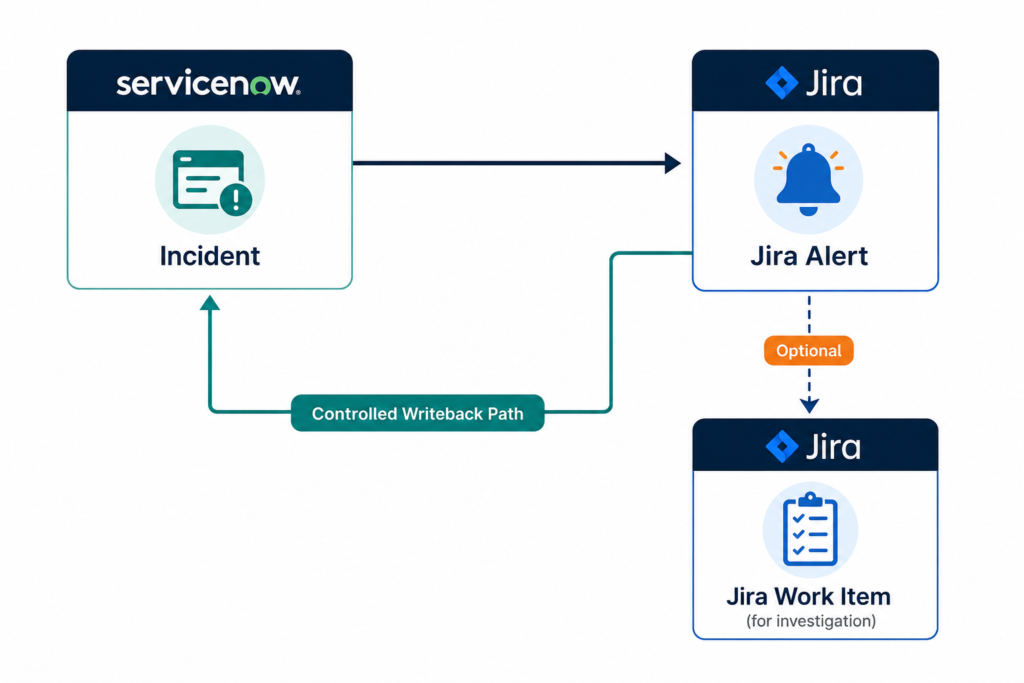
Atlassian’s ServiceNow integration documentation describes a bidirectional alert integration with Jira Service Management. An alert and a Jira incident work item are not the same record: the alert integration notifies responders and tracks response activity, while a separate work item, if configured, holds the investigation itself. Creating an incident in ServiceNow creates a Jira Service Management alert. Resolving or closing the ServiceNow incident closes the corresponding alert.
Teams can configure selected Jira alert actions to trigger actions in ServiceNow. One documented example adds a work note when a responder acknowledges an alert. The result depends on the chosen mapping and the integration account’s access.
The documented ServiceNow-to-alert flow does not establish that an incident work item appears automatically — but if your triage process needs one, define how it will be created and linked, and test the workflow in a non-production environment before relying on it during an outage.
Atlassian also documents plan requirements for bidirectional integrations — confirm your entitlement and current setup options before including writeback in the implementation plan.
Keep the ServiceNow Jira incident handoff traceable
Record the ServiceNow incident number in the related Jira records where your configuration supports it, and store the Jira identifiers with the ServiceNow incident or an approved mapping record.
Use those identifiers during reconciliation and closure checks. A responder should be able to follow the path from the authoritative incident to its alert and investigation workspace.
Give Rovo a defined role in triage
Rovo incident triage depends on what the agent can see and change. Atlassian’s Ops Expert documentation describes a Rovo agent for incident and alert assistance. It can find accessible alerts, summarize incidents, and suggest related people or teams. It can also identify similar incidents and suggest field values using available information.
For a Jira incident work item, a responder can request a summary and inspect the supporting records. The responder can compare a suggested priority with the incident policy and current evidence.
Ops Expert can help update supported Jira incident fields, including priority and severity. That capability does not by itself update the authoritative ServiceNow incident. Your architecture needs a separately defined and tested path for any approved writeback.
Start a pilot with summaries and recommendations. Capture the proposed action, supporting records, and reviewer decision. Review unsupported answers and access failures before expanding the agent’s permissions. Agentic AI in the Enterprise: What IT Leaders Must Get Right
Atlassian’s 2025 incident management survey included more than 500 US software developers, IT professionals, and IT decision-makers. It reported that 74% of respondents cited security risks as a barrier to expanding AI use. The same report says 79% of teams were exploring AI for incident trending.
Those findings support a permissions review before rollout. They do not establish the accuracy of Rovo recommendations or the results of a particular deployment.
Choose the route for ServiceNow data
The alert integration, indexed connector, and direct connector serve different purposes. Evaluate each path against the information and actions your responders need.
The Jira Service Management integration sends incident events as alerts. Its configured action mappings can return selected alert activity to ServiceNow.
Atlassian also documents an indexed ServiceNow connector for supported records, including incident tickets and knowledge articles. Check the documented indexed fields against the data required for your triage workflow.
The ServiceNow direct connector supports Rovo Chat and Rovo agents through ServiceNow application programming interface (API) requests. Atlassian states that this connector does not index ServiceNow content for Rovo Search.
Atlassian describes supported direct-connector reads for incidents, configuration items, and relationships, and lists approved incident updates and work notes among supported writes — but which of those actions a given user can actually take depends on administration settings and their own ServiceNow permissions.
The direct connector requires individual ServiceNow authorization, and Atlassian states that its write actions require user review and confirmation. Test the available actions using representative user permissions before production rollout.
How can teams test ServiceNow access before enabling writes?
A team can start with a non-production ServiceNow account that represents a typical responder. Test an accessible incident and a restricted incident separately. Compare the returned fields with direct ServiceNow access, then investigate permission differences before enabling any supported write action.
Add discovery evidence to the investigation
Incident records capture response activity. Configuration records help responders identify the infrastructure and services under investigation.
Virima collects asset and relationship information through scheduled discovery cycles using agentless, agent-based, and API-based methods, including API-based discovery for AWS and Azure cloud environments. Coverage depends on the configured sources, credentials, and discovery scope.
Virima’s Trusted Runtime Truth describes what exists, how it connects, what changed, and who owns it, and helps teams examine what may be affected by a component failure. Responders should verify the relevant records against the latest available observations.
Review Trusted Runtime Truth for a closer look at the evidence supporting incident and change decisions.
Check service impact with customer-provided definitions
Virima’s ViVID™ service maps model service dependencies after customers provide service definitions. Teams can enter those definitions manually, import spreadsheets, or use supported integrations.
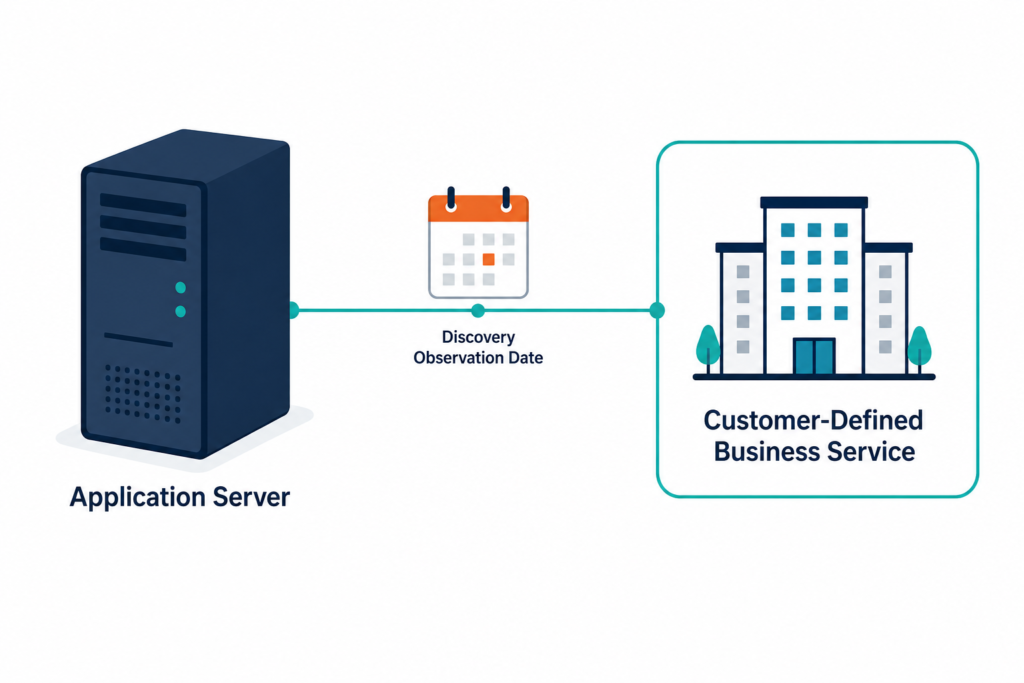
A responder investigating an application server can inspect its recorded relationships and associated service. Monitoring results and responder checks establish the current condition.
A service missing from the supplied definitions may be absent from the map. A discovery cycle also reflects what its configured sources could observe at that time. Record the latest relevant observation date before using a relationship to support an operational decision.
Write a field-level ownership contract
Field ownership prevents a Jira working value from silently replacing the official ServiceNow value. It also prevents the sync loops that happen when both systems can write the same field — one owner per field means there is no bidirectional overwrite to loop on. Document the owner, permitted writers, conflict procedure, and evidence for each shared field.
Incident identity. ServiceNow owns the official incident number. Preserve related Jira alert and work item identifiers.
Priority and severity. The incident process owner defines the authoritative ServiceNow fields. A Jira recommendation requires review before the approved value reaches ServiceNow.
Assignment. ServiceNow holds the accountable incident assignment under this model. Jira on-call routing can identify the team responding to the alert.
Work notes. The integration owner defines which Jira alert actions return notes to ServiceNow. Review the note content and target incident during testing.
Resolution and closure. ServiceNow records the official resolution. The related Jira alert follows the configured closure behavior.
Configuration information. The configuration owner defines source authority and reconciliation rules for assets and relationships. Include observation dates where they are available.
Use a suitable serial number or cloud instance ID when matching records, and include the source system’s scope when comparing identifiers — a hostname alone can change or be reused.
Resolve conflicts without silent overwrites
Record both values and their timestamps when priority or assignment differs. Route the discrepancy to the designated incident owner. The owner can approve a correction after checking the supporting record.
AI incident writeback should never fail silently. If an update fails, preserve the proposed value and show the failure to the responder. The team also needs a manual path for completing the change in ServiceNow.
What should an incident team do when writeback fails?
The incident team should retain the proposed update and identify the ServiceNow record it targeted. A responder can check required fields, record state, and access restrictions before retrying. The team should document any manual correction so the incident history reflects the final decision.
Set permissions for the intended action
Give responders access to the incident information they need for investigation. Separate that read access from permission to change records.
Virima connects with ServiceNow and Jira Service Management through its supported ITSM connections. Teams should verify which fields appear in their configuration. They should also test whether a particular AI feature can access those fields.
Review access to restricted work notes and service documentation. Test the workflow with a user who should see the record and another who should not. Keep connector credentials in the organization’s approved secret-management process. A non-human identity is a service account, API token, or integration credential that acts on a system without a person directly at the keyboard — the ServiceNow-Jira connector account is one example, and it needs the same ownership and review discipline as human users. blog post on non-human identity security for IT operations
Human review must be configured for the action path in use. Atlassian documents that agents in automation can be configured without confirmation for every action. That’s why a confirmation in one interface should not be assumed to cover a separate automation.
For an initial pilot, keep priority changes, reassignment, and closure under human control. If the team later permits selected writes, define eligible records and action limits. Review the ServiceNow audit trail and the corresponding Jira activity during the pilot.
Test the complete handoff
Choose one service and a small responder group for the first test. Use non-production records where possible.
- Create an incident in ServiceNow. Confirm that the expected Jira alert appears.
- Check identity and routing. Verify the incident reference, responder team, and acknowledgement behavior.
- Create the investigation workspace. If needed, test the separate Jira incident work item workflow.
- Request an agent summary. Compare the output with the records available to the responder.
- Review a suggested update. Confirm the proposed value, target record, and approving person.
- Test writeback failure. Deny a test permission and verify the escalation and manual correction path.
- Close the incident. Confirm ServiceNow retains the official resolution and the related alert closes as configured.
Measure the pilot against the team’s operating goals. Track acknowledgement time, time spent locating related records, and handoffs requiring correction. Review results alongside responder feedback and access failures.
Connect the platforms around one incident record
ServiceNow can retain incident authority while Jira Service Management supports response coordination. Rovo can assist when the required incident data and permissions are available. Virima can provide discovery-sourced asset and dependency information to supported workflows.
Frequently Asked Questions
Can ServiceNow remain the system of record when teams use Jira?
An organization can designate ServiceNow as the authoritative incident record. Jira Service Management can support alerts and response work. The team should define field ownership and test updates between the related records.
Does a ServiceNow incident automatically become a Jira incident?
Atlassian documents creation of a Jira Service Management alert from a ServiceNow incident. A Jira incident work item may require a separate configured workflow. Teams should test that path before relying on it.
Can Rovo suggest an incident priority?
Atlassian documents priority and severity suggestions through Ops Expert. Recommendations depend on the information and access available to the user. The incident process should identify who approves changes to the authoritative record.
How does Virima support incident investigation across these platforms?
Virima provides discovery-sourced configuration information and service dependency maps for investigation. Supported connections can enrich ServiceNow and Jira Service Management workflows. Teams should verify the fields available in their own configuration.
How are services defined for ViVID™ maps?
Customers provide service definitions manually, through spreadsheet import, or through supported integrations. Virima then builds dependency maps using those definitions and available discovery information. Teams remain responsible for maintaining their service definitions.