Linking Certificate CIs to Device CIs in a CMDB | Virima

A certificate replacement can leave a production device serving an expiring certificate. The certificate team may record a successful renewal without seeing every deployment point.
Linking certificate CIs to device CIs in a CMDB gives infrastructure teams a record of where certificates are deployed. Each relationship needs evidence, an observation date, and a responsible owner. Those details help teams identify which devices need review before a renewal or emergency replacement.
Why certificate CI relationships matter
A certificate configuration item, or CI, represents a certificate tracked by an organization. A device CI represents infrastructure such as a server, load balancer, or network appliance.
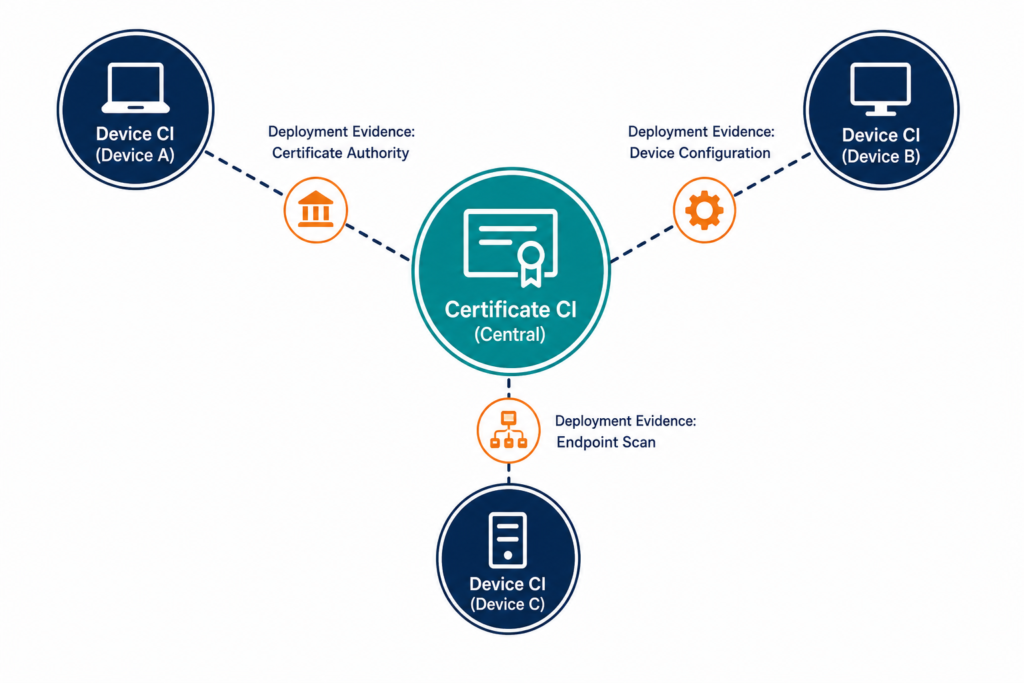
The relationship records a specific association between those items. Depending on the evidence, the device may hold, configure, or present the certificate.
Certificate outages are common: 45% of organizations reported service downtime from certificate-related incidents in the past year (DigiCert, 2025).
The distinction helps during a certificate change. A certificate inventory may show the issuer and expiration date. The infrastructure team also needs to identify deployment points and the people who can update them.
The NIST certificate management guide identifies an inventory of deployed TLS server certificates as a foundation for certificate management. CMDB relationships add device and service context to that inventory when supported by deployment evidence.
A useful impact path connects four records:
Certificate CI → deployment relationship → device CI → application or service dependency
The certificate identifies the credential under review. The deployment relationship identifies a device associated with it. The service dependency can help the team identify potential downstream effects.
Each connection needs its own evidence. A confirmed certificate-to-device link does not establish which business services use that certificate. The team must also verify the device-to-service path.
Model the certificate and device separately
Create distinct records for certificate identity and infrastructure identity. One certificate may be deployed to several devices. One device may also hold or present several certificates.
Required certificate CI fields
For each certificate CI, record the fields needed to identify and assess it:
- The certificate fingerprint and fingerprint algorithm.
- The issuer, serial number, and validity dates.
- The subject and subject alternative names, where available.
- The certificate status and lifecycle owner.
- The source system and last observation date.
A SHA-256 fingerprint can identify a specific encoded certificate. A renewed certificate normally has a different fingerprint, even when its domain names remain unchanged.
Keep private keys out of the CMDB. Store identification metadata and operational context only, not sensitive key material.
Required device CI fields
For each device CI, select a durable identifier appropriate to the environment. A hardware serial number can identify a physical server. An AWS or Azure instance ID can identify the relevant cloud instance.
Hostnames and IP addresses can help locate candidate records. They should not serve as durable join keys on their own.
Define the relationship direction
Document the meaning of each relationship before importing records. A device may have a certificate installed without presenting it to clients. A listener may be configured to use a certificate without a recent network observation.
Choose relationship labels that reflect the available evidence. The label “device uses certificate” should have a documented direction and definition. The inverse view can describe the certificate as “used by device.”
If your CMDB supports relationship attributes, retain the source and observation time. Also capture the listener, port, or configuration location when available. Those details help the device owner find the deployment.
Should a renewed certificate replace its existing CMDB record?
A renewed certificate generally needs a separate configuration item when its encoded certificate and fingerprint differ. Retain the previous record according to policy, then record which deployment relationships moved to the replacement. This history helps reviewers identify devices that still use the older certificate.
Gather evidence for each relationship
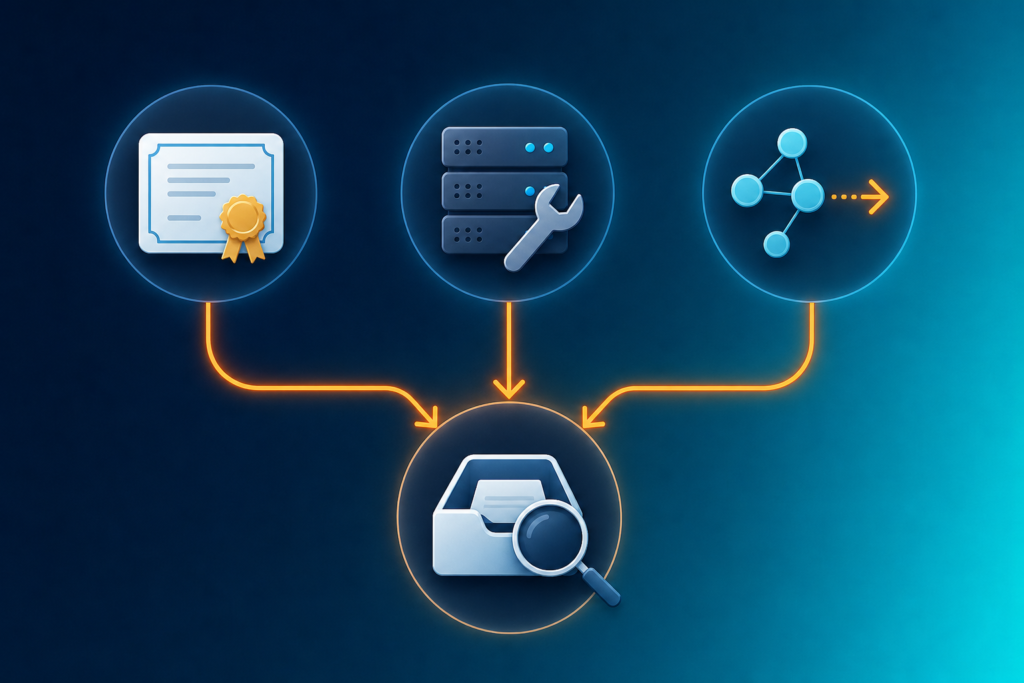
Certificate authorities, device configurations, endpoint scans, and change records provide different views. Choose a source that supports the specific relationship being recorded.
A certificate authority can show that it issued a certificate. Issuance alone does not show where the certificate is deployed. A network scan can show what an endpoint presented during a connection.
The endpoint may belong to a load balancer or proxy. Its certificate does not necessarily identify the backend server.
| Evidence source | What it can establish | Limitation to review |
|---|---|---|
| Certificate authority inventory | A certificate was issued or revoked, when status is available. | Issuance alone does not establish deployment. |
| Device or appliance configuration | A certificate is configured on the inspected component. | Coverage depends on access and the configurations collected. |
| TLS endpoint scan | An endpoint presented a certificate during the observed connection. | A proxy or load balancer may terminate the connection. |
| Deployment or change record | A team intended or reported a certificate deployment. | The deployment may still need independent verification. |
Retain the certificate identifier, device identifier, source, and observation time. Record the relationship type and deployment location whenever the source supplies them.
If an endpoint cannot be matched to a device, preserve the observation. Send the unresolved association for review instead of selecting a backend server by assumption.
Can a TLS scan identify the backend server?
A Transport Layer Security (TLS) scan identifies the certificate presented by the endpoint it reaches. A proxy or load balancer may terminate that connection before traffic reaches a backend server. Confirm the terminating component through configuration evidence before creating a device relationship.
Reconcile records without creating false matches
Reconciliation connects source observations to the correct CIs. Use separate checks for certificate identity and device identity.
Scheduled discovery cycles can reduce manual reconciliation when they reach the relevant network segments and device types and supply certificate and device observations on a repeating basis. Confirm which sources and schedules are active in your environment before relying on that cadence.
Match the certificate
Compare the source fingerprint with the certificate CI fingerprint. When the fingerprints match, confirm that both use the same fingerprint algorithm.
Treat a domain name or subject name as a candidate match. Different certificates can cover the same domain during a replacement. Wildcard certificates can also cover multiple hostnames.
Issuer and serial number can help identify a certificate when both are available. Record the match method so reviewers can distinguish a fingerprint match from a name-based candidate.
Match the device
Resolve the source device against an existing CI using a stable identifier. For a physical server, that may be its hardware serial number. For a cloud instance, use the appropriate provider instance ID.
A hostname can help locate possible records for investigation. Confirm the device identity before creating a verified relationship.
When the device cannot be resolved, retain the observation in an exception queue. Include its certificate identifier, source, observed endpoint, and timestamp. Assign the exception to an owner who can investigate the missing or conflicting record.
Record relationship confidence
A simple status model makes uncertainty visible to the teams using the CMDB:
- Confirmed: an approved source identifies the certificate and the device.
- Candidate: available evidence suggests a link that still needs verification.
- Stale: the last confirmation exceeds the agreed review window.
- Retired: the relationship is no longer active, with history retained under policy.
Document who can change each status and how reviewers resolve conflicts when sources disagree.
A confirmed relationship reflects evidence available at a recorded time and does not guarantee the deployment remains unchanged afterward.
Track shared certificates through replacement
A shared certificate needs a separate relationship for each confirmed deployment. Those devices may receive a replacement at different times.
Consider an illustrative renewal across three load balancers. Two devices receive the replacement certificate during the first change window. The third remains on the older certificate until its next approved window.
The replacement certificate should have its own CI. Add confirmed relationships to the first two devices after verification. Retain the older certificate’s relationship to the third device until evidence confirms its replacement or removal.
This approach gives the change team a deployment-level view and prevents a renewal record from implying every installation is complete.
Capture the listener or configuration location when the source provides it. A device can host several listeners, and only one may present the certificate under review.
Avoid assuming that every application on a device uses that certificate. Confirm application and service dependencies with a trusted source or owner.
The CA/Browser Forum requirements set a 47-day maximum validity period for applicable subscriber certificates issued from March 15, 2029. This requirement applies to publicly trusted TLS certificates within those rules. Shorter validity periods make repeatable deployment tracking more important for affected teams.
What happens to certificate relationships after device decommissioning?
Retire active certificate relationships after the device decommission is confirmed. Keep the relationship history according to the organization’s retention policy. If an endpoint still presents the certificate, investigate whether another active device now terminates that connection.
Use device relationships to assess service impact
A certificate-to-device link becomes more useful when the device has a supported service relationship. The combined path helps teams identify services that may require review.
Start with the certificate under change. List its confirmed device relationships and their latest observation dates. Then inspect the known applications and services connected to those devices.
Treat the result as a candidate impact list. A shared device can support several services, while a service may use multiple traffic paths. Ask the application or network owner to confirm which path uses the certificate.
Ownership may span several teams. The certificate owner can coordinate issuance and renewal. A network team may update a load balancer, while an application owner validates service behavior.
Record those responsibilities separately where the CMDB model permits. The certificate owner should not automatically become the owner of every connected device or service.
Virima supports CI relationship mapping and multi-source data reconciliation. Its discovery capabilities can populate infrastructure records used for impact analysis. Confirm certificate ingestion and relationship coverage for the sources configured in your environment before relying on a specific workflow.
Explore Trusted Runtime Truth for CMDB decisions to understand what exists, how it connects, what changed, what could be affected, and who owns it.
Keep deployment relationships current
A certificate relationship should carry its source and latest confirmation date. Reviewers can then decide whether the evidence is recent enough for a planned change.
Set review windows according to risk and change rate. Review internet-facing certificate relationships weekly and internal-only relationships monthly. Scheduled discovery cycles and certificate sources may refresh at different times, so compare timestamps before treating an entire impact path as current.
Build a recurring review around these exceptions:
- Unmatched certificates: investigate certificates expected to have an active deployment.
- Unresolved devices: review observations that cannot be joined to a device CI.
- Stale relationships: route links past their review window to the infrastructure owner.
- Conflicting evidence: compare source authority and observation dates before changing a record.
- Incomplete replacements: check each expected device against the approved change and replacement certificate.
A missing relationship may indicate a coverage gap. Check whether the relevant network segment, device configuration, or certificate source was included.
Measure coverage against a defined group of devices. For example, begin with production load balancers supporting one business service. Define which evidence qualifies a deployment as confirmed before calculating coverage.
Review the exceptions with the teams that maintain the source systems. A failed scan, missing credential, or retired device may require a different correction. The reason should remain visible until an owner resolves it.
Build a certificate impact view your team can verify
Start with one service or infrastructure group that regularly changes certificates. Agree on identity fields, relationship meanings, evidence sources, and review owners before expanding.
Test the model against a recent renewal. Compare both certificate fingerprints with device configurations and the approved change record. Keep unresolved observations in the exception queue until an owner confirms them.
Schedule a CMDB mapping demo to discuss your certificate sources and relationship requirements.
Frequently Asked Questions
Should every certificate have a device relationship?
A certificate expected to be deployed should have a confirmed relationship when deployment evidence is available. An issued certificate may be unused, pending deployment, or outside current collection coverage. Record the reason when no confirmed relationship exists.
What happens if devices receive a renewed certificate at different times?
Track each device’s replacement separately rather than treating renewal as complete after one device updates. A shared certificate deployed across several devices often moves to its replacement on a staggered schedule, so a device still presenting the older certificate needs its own open relationship until evidence confirms it was updated or removed.
How do you connect a certificate change to the services it affects?
Start from the certificate’s confirmed device relationships, then check which applications and services depend on those devices. Virima’s discovery and CMDB relationship mapping can supply the certificate, device, and service records needed for that review. Validate how your certificate sources supply records and deployment relationships before relying on a specific workflow.
Does Virima discover certificates on IIS servers?
Virima’s discovery can identify IIS site bindings and the certificate information associated with them, and record relationships between those certificates and the host server CI. Confirm configuration and coverage for your IIS environment before relying on that workflow.