Build a High-Performing IT Org With Asset and Service Data

A server goes down at 2 a.m., and the on-call engineer has no idea which business service depends on it, or who owns the application running on it. Thirty minutes pass before anyone can say what is actually affected, while the outage keeps running. Multiply that gap by every change window, audit request, and license renewal an IT team handles, and missing records start driving real cost and risk. Accurate IT asset and service data is the record of what exists in an environment, how it connects, and who owns it—the foundation for incident response, change approval, and audit readiness.
What high-performance IT looks like in practice
High-performing IT organizations balance service reliability, change execution, and responsible spending. Their teams know which services matter most, who owns them, and can find that information fast during an incident — identifying affected assets, an owner, and known dependencies before a change manager has to investigate impact. Reduce MTTR with Xurrent Ticketing & Virima Service Mapping
That depends on more than an inventory count: records that describe assets, relationships, ownership, and recent changes, plus a process for correcting them when the evidence changes.
Consider these questions when assessing current information:
- Can an incident responder identify the service affected by an asset failure?
- Can a change manager find the owner of a dependent application?
- Can the asset team distinguish retired systems from active ones?
- Can procurement check installations against contract records before renewal?
Unanswered questions reveal where teams may need better information or clearer ownership.
How can an IT director assess the usefulness of asset data?
An IT director can test asset data against recent decisions. Select an incident or proposed change, then check whether responders can find the affected service, its owner, and relevant dependencies. Record which answers required manual investigation, because those gaps identify practical improvement priorities.
Why IT asset and service data belong together
Asset data describes individual technology components — servers, laptops, virtual machines, cloud instances, network devices, and software. Attributes vary by type: a hardware record might carry a serial number and lifecycle status; a cloud record, an instance ID, account, and region.
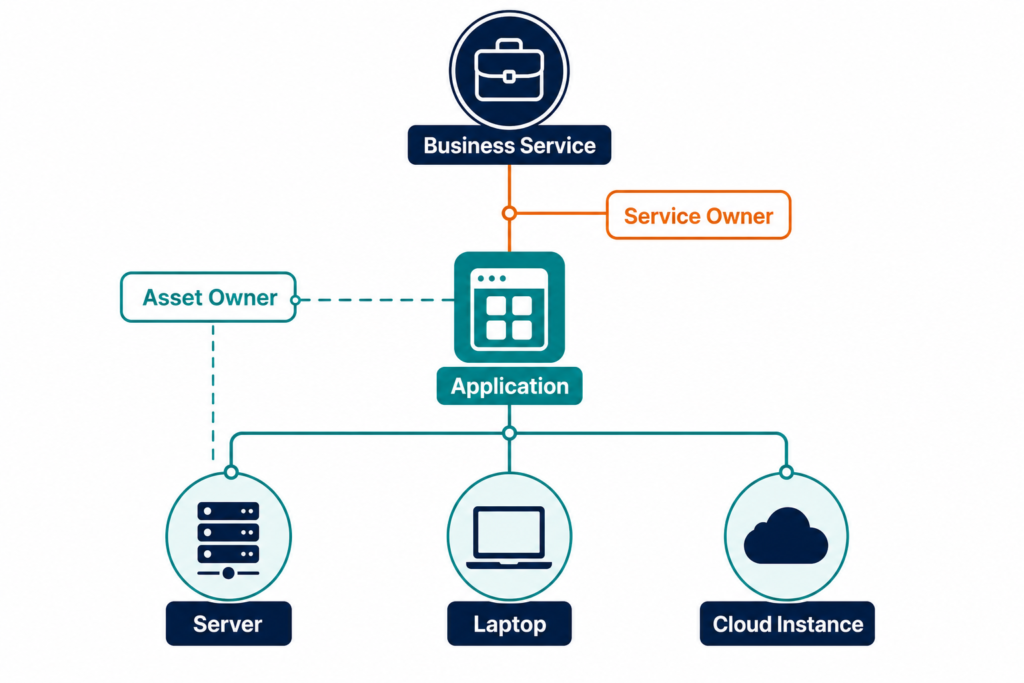
Service data describes what those components support — an application, databases, infrastructure, and external connections — plus an owner and business importance.
Put simply: an asset inventory lists what an organization owns, while a CMDB adds the relationships between those assets and the services they support. IT asset and service data spans both layers.
The distinction matters during an incident: an asset record identifies a failed server, while a service relationship shows which application depends on it. That relationship needs maintenance alongside the asset record — a current server record doesn’t prove its service dependency is current — so teams should review both when infrastructure or application architecture changes.
Step 1: Choose the decisions your data must support
Begin with the decisions an IT organization makes regularly — incident response, change approval, software renewal, and asset retirement are useful starting points. For each decision, identify who makes it and what that person needs before acting:
| Decision | Who decides | Information needed |
|---|---|---|
| Incident response | On-call engineer / service desk | Affected service, escalation contact, known dependencies |
| Change approval | Change manager | Affected service, owner, dependency map |
| Software renewal | Asset manager | Installation records, contract terms, renewal dates |
| Asset retirement | Asset manager | Lifecycle status, remaining dependencies |
Document where each answer comes from today — the information may sit across a service desk, spreadsheets, cloud accounts, and procurement records. Then identify which gaps cause repeated investigation, and prioritize records that support frequent decisions or high-impact services. This gives the team a manageable starting scope.
Virima calls this approach Trusted Runtime Truth: information about what exists, how it connects, what changed, what may break, and who owns it. Explore Trusted Runtime Truth to see how those records support IT decisions.
Step 2: Establish an asset inventory
Create an inventory of the environments within the initial scope — physical infrastructure, virtual machines, cloud resources, and endpoints. The National Institute of Standards and Technology includes asset management in its Cybersecurity Framework 2.0, with outcomes covering inventories of hardware, software, and services.
Scheduled discovery cycles collect information from environments that change frequently, so teams can compare results against existing records and investigate differences. That gap is common. An EMA Research benchmark published in October 2026 found that 65.5% of organizations still populate their CMDB at least partly by hand. It named integration (31%) and accuracy (27%) as the biggest asset data gaps, ahead of coverage at 13%.
Discovery still needs configuration and oversight: confirm credentials, network access, scan coverage, and account permissions before relying on results, since a scan that can’t reach an environment can’t confirm its contents. Include relevant AWS and Azure accounts, and for virtual infrastructure, the VMware and Hyper-V environments an organization operates.
Compare discovery coverage against a separate list of expected accounts, network ranges, and locations to expose environments that have never been scanned.
Reconcile records carefully
The same asset may appear in more than one source — a discovery result, procurement record, and service ticket may each describe the same device, and once it’s linked to a service relationship, that record becomes a configuration item, or CI.
Use a durable identifier when matching records. A hardware serial number or cloud instance ID provides a stronger match than a hostname, which can change when a system is renamed — so a hostname should support identification rather than serve as the sole durable join key. Check the identifier’s scope and lifecycle before relying on it.
When identifiers conflict, send the record for review. An incorrect merge can hide two assets inside one record, and a missed match can leave duplicate records that receive conflicting updates.
What should teams check before trusting a discovery result?
Teams should compare discovery coverage with the environments they expect to scan. Review account permissions, network access, credentials, and the time of the last successful scan. An empty result may indicate a coverage problem, rather than proof that an environment contains no assets.
Step 3: Connect assets to business services
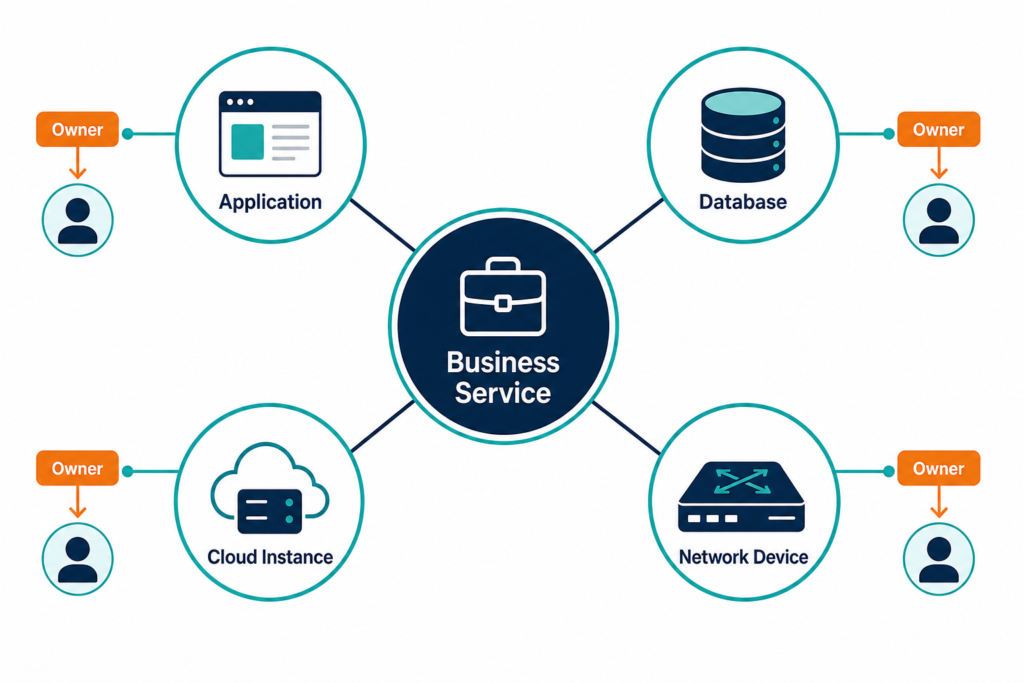
An inventory becomes more useful once teams connect assets to services. Start with services that have clear business importance and identifiable owners, and ask each owner to describe the applications and websites in the service, its key dependencies, and incident/change contacts.
Virima requires service definitions as an input — provided manually, imported from a spreadsheet, or supplied through supported integrations. ViVID™ then builds dependency maps from those definitions, which both the service owner and technical team should review: owners confirm business boundaries, engineers inspect infrastructure relationships, and disagreements get resolved before the map counts as authoritative.
Begin with a small group of critical services, record why each matters and how recently its map was reviewed, and expand once the review process works. A missing relationship gets a clear “needs investigation” status rather than an assumption of no dependency, so change managers know where to check further.
Record the boundaries of each map
A service map reflects the information available to build it — its usefulness depends on discovery coverage and the accuracy of the service definition. Record the environments included in each map, and note any external services or restricted networks the team hasn’t checked.
When a change affects an unverified area, the change owner can request additional review. That step prevents an incomplete map from being mistaken for a complete impact assessment.
Step 4: Assign owners and set review cycles
Asset records need people who can resolve questions about them. Assign an accountable owner for each service and an owner for each major asset group. Before You Run AI Agents on ServiceNow, Answer These 5 Questions About Your CMDB
The service owner confirms business purpose and contacts, technical owners validate infrastructure and dependencies, and asset owners maintain lifecycle details where discovery can’t supply them.
Define a review interval that fits the service and its rate of change — critical services or frequently changing environments need closer attention than stable ones. A review should cover the service definition, key dependencies, owner details, and known coverage gaps; record the review date and any unresolved questions.
Give teams a straightforward way to report an incorrect record — an engineer who finds a missing dependency should know where to send the correction, and the service owner can confirm the change or route it to the right technical team. This handoff matters because discovery evidence and business ownership often come from different people.
Make ownership usable during an incident
An owner field helps only when responders can act on it — include a current team contact or escalation route alongside the named owner, and test that contact path during routine service reviews so a role change gets caught before the next incident.
For shared infrastructure, identify who manages the underlying component and who owns the affected services, since these responsibilities may belong to different teams.
Step 5: Use the records in daily workflows
Teams are more likely to use asset information when it appears alongside their work — start with the workflows chosen during initial planning.
For incident response, make the affected service and its owner visible to responders, and link the ticket to relevant asset records and known dependencies. For change management, review connected services before approving work, and include the appropriate owner in the assessment if a dependency hasn’t been verified.
For security work, use asset ownership and service importance to inform prioritization — security teams should still use their own dedicated vulnerability tools and validation processes.
For IT asset management, compare software installations with entitlement and contract records; usage information, where available, can help the team investigate renewal decisions. Best Software License Management Tools in 2026 (Reviewed & Ranked)
Virima supports integrations with platforms including ServiceNow, Jira Service Management, Ivanti, HaloITSM, Xurrent, and Hornbill. Review the supported integration options when planning how records should reach existing workflows.
Agree on which system owns each field
Connected systems can contain different values for the same asset, so agree on the source responsible for each important field before exchanging records. Discovery may provide technical attributes, procurement maintains purchase details, and a service owner maintains the business owner and service criticality field.
Document how the team resolves conflicts between those sources, and decide who reviews records when a source stops reporting. This agreement prevents one update from overwriting information another team maintains, and gives staff a clear route for correcting conflicting values.
Step 6: Measure data quality and operational results
Choose a small set of measures tied to the original decisions, and establish a baseline first.
Data-quality measures show whether records are becoming more complete:
- Percentage of in-scope assets with an assigned owner.
- Percentage of critical services with a reviewed dependency map.
- Percentage of expected environments covered by successful discovery.
- Number of unresolved duplicate or conflicting asset records.
Define the denominator for each measure — which environments count as in scope for discovery coverage, for example — or an increase in coverage may just reflect a narrower scope, not real progress.
Operational measures show whether the records are useful: how often incident responders must investigate an unknown service owner, and how often an undocumented dependency affected a change assessment.
For software delivery teams, Google Cloud’s Four Keys guidance covers change failure rate and time to restore service — use those where they fit a team’s definitions.
Interpret results alongside other organizational changes. Better records alone don’t prove why a restoration time changed, since staffing, process, architecture, and incident severity also affect the outcome. Review a sample of real incidents and changes each month, and ask whether the information was available, current, and useful at the decision point.
Common mistakes to avoid
Building maps without review owners
A service map needs an owner who can confirm its business boundaries. Technical teams also need a route to report missing or incorrect dependencies.
Set review dates and assign follow-up work for uncertain relationships. Keep unresolved gaps visible to the people who approve changes.
Measuring record counts without testing decisions
A growing asset count can reflect better discovery coverage. It can also include duplicates, retired systems, or records without owners.
Pair inventory counts with completeness checks and workflow reviews. The more useful question is whether a team can make a specific decision with the available information.
Treating cleanup as a one-time project
Inventory quality depends on what happens after the initial cleanup. New assets, retired systems, and ownership changes all require updates.
Scheduled discovery, reconciliation, and owner reviews give teams opportunities to catch those changes. Define who investigates discrepancies and how corrections reach connected systems.
Build a practical foundation for better IT decisions
Start with one set of decisions and the IT asset and service data needed to support them — confirm discovery coverage, define critical services, and assign owners who can resolve gaps. Use incident and change reviews to test whether the information helps, and expand the approach once teams can maintain the records within their normal work.
Frequently Asked Questions
How can an IT organization improve performance with its existing team?
Start by identifying work delayed by missing information or unclear ownership. Improve the records and handoffs that support those decisions. Review incident and change records afterward to see whether teams can find the information they need.
What is the difference between an asset inventory and a CMDB?
An asset inventory records technology assets and their attributes. A configuration management database, or CMDB, can also record configuration items and their relationships. Those relationships help teams investigate how an asset may support a service.
How often should an organization review IT asset data?
Choose review intervals based on the environment’s change rate and business importance. Schedule discovery for technical updates and assign owners to review service definitions. Increase review frequency when material changes occur more often.
How does Virima create service dependency maps?
Teams provide service definitions manually, through spreadsheet imports, or through supported integrations. Virima uses those definitions to build dependency maps with ViVID™. Service owners and technical teams can then review the mapped relationships.
Can Virima share asset data with an IT service management platform?
Virima supports integrations with several IT asset management and IT service management platforms. Integration capabilities vary by platform, so teams should confirm the available data exchange for their chosen system. They should also agree which system owns each shared field.