How Do You Move from Spreadsheets to an Asset Management Tool?

Most IT teams know the tipping point. Spreadsheets work fine when an organization tracks fewer than a hundred static devices. Add remote workers scattering laptops across regions, cloud servers spinning up on demand, and software subscriptions multiplying by the month, and manual registers start to fail. Columns fall out of date, duplicate entries pile up, and nobody can say whether an unreturned laptop was reassigned or stolen. That breaking point is exactly when teams start researching how to move from spreadsheets to asset management tool options they can actually trust.
Start by running discovery to find what you really own, import the spreadsheet as a baseline, reconcile the differences, then retire the spreadsheet once the tool is the source of truth. Moving off manual sheets closes the blind spots and compliance risks that spreadsheet formulas were never built to catch. If you haven’t settled on a destination platform yet, Virima’s roundup of the best IT inventory management software is a useful starting point before you run Phase 1 discovery below.
Replacing manual rows with an automated platform is not a matter of clicking CSV import. Dump messy, unverified rows into a new tool, and you merely create an expensive digital replica of your bad spreadsheet. A successful transition pairs scheduled network and cloud discovery with disciplined record reconciliation. Complete IT asset visibility sits at only 36% across organizations surveyed in Flexera’s 2026 State of ITAM report. That gap is exactly what trusted runtime truth across physical hardware, virtual machines, and cloud instances is built to close — so your team operates from verified baseline data instead of guesswork.
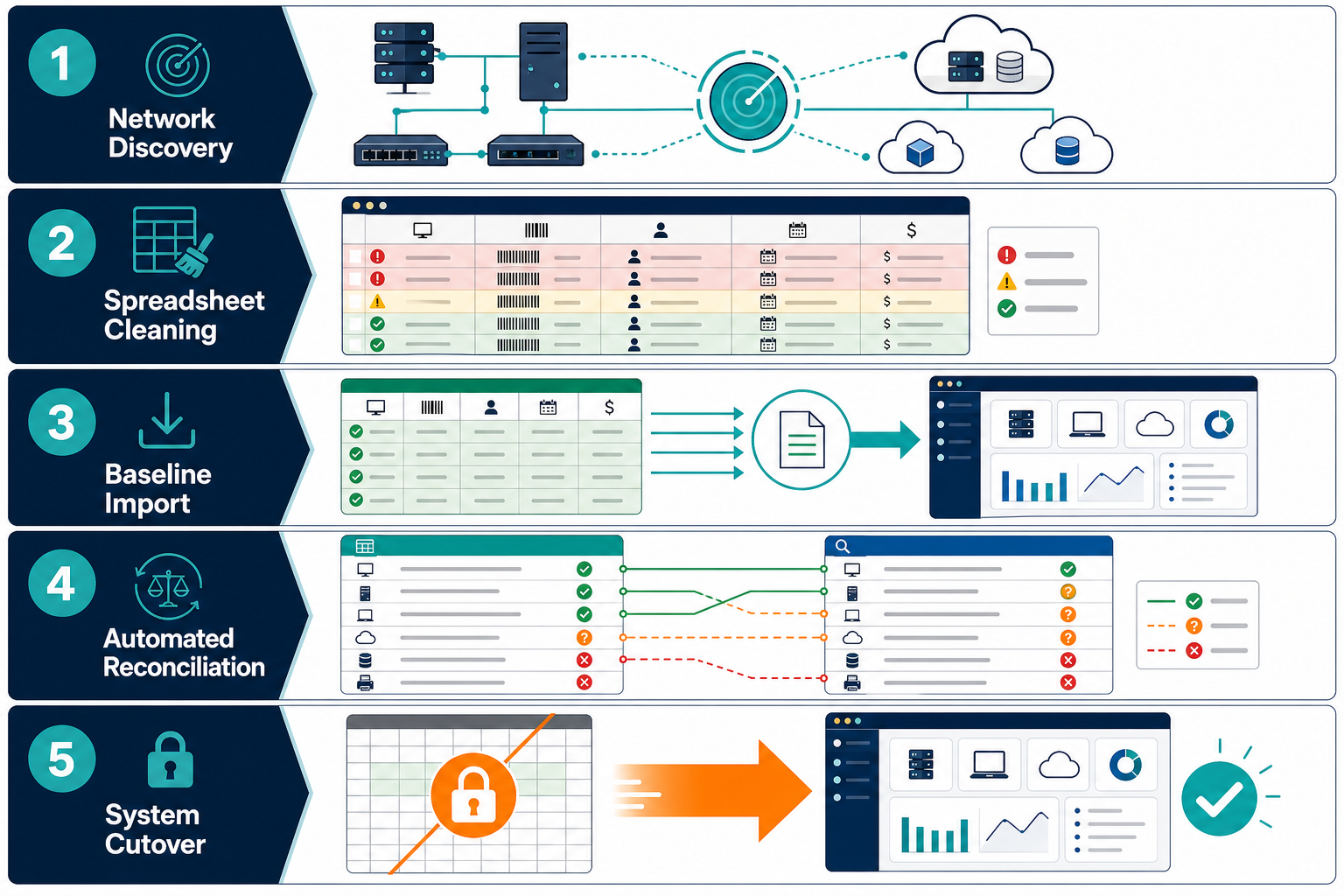
5-step migration roadmap from Excel to ITAM
Migrating from spreadsheets to a dedicated IT asset management system succeeds when broken down into five distinct operational phases.
+-------------------------------------------------------------------------------+
|                 5-STEP SPREADSHEET TO ITAM MIGRATION ROADMAP                  |
|                                                                               |
|  [Phase 1] Estate Discovery  --> Discover active hardware, subnets, and cloud |
|                                                                               |
|  [Phase 2] Data Sanitization --> Normalize serial numbers, vendors, and users |
|                                                                               |
|  [Phase 3] Baseline Import   --> Ingest clean financial and procurement data  |
|                                                                               |
|  [Phase 4] Reconciliation    --> Match discovery to financial records         |
|                                                                               |
|  [Phase 5] Cutover & Lockout --> Decommission spreadsheets, enforce workflows |
+-------------------------------------------------------------------------------+
That sequencing matters because visibility rarely improves on its own. The same Flexera report found 48% of organizations underwent a software audit in the past year, and an audit is exactly when an unreconciled spreadsheet turns into unbudgeted risk.
Phase 1: Run automated estate discovery first
Never begin by importing your spreadsheet. Always begin by running agentless network and cloud discovery across your enterprise.
Discovery scans IP subnets, directory services, hypervisors, and cloud accounts to compile an objective inventory of physical and virtual assets responding across the wire. This step reveals reality before your spreadsheet can introduce historical bias. Discovery uncovers ghost assets, decommissioned gear that remains plugged into rack switches, and unmanaged endpoints that bypassed procurement.
Phase 2: Audit and clean the existing spreadsheet
While discovery scans your environment, prepare your spreadsheet records for ingestion. Clean data prevents downstream reconciliation errors. Standardize manufacturer names, scrub formatting anomalies from serial numbers, and verify active user email addresses against your identity provider.
Flag items marked as active that have not had an updated audit date in twelve months. If your spreadsheet lacks durable join keys, such as valid hardware serial numbers or system UUIDs, mark those rows for physical verification.
Phase 3: Perform a controlled baseline import
Once discovery finishes its initial cycles, map your cleansed spreadsheet fields to the target platform schema. Import non-discoverable operational attributes into your IT asset management platform.
These fields include purchase order numbers, invoice dates, lease agreements, depreciation schedules, and vendor support contracts. Automated network scans discover CPU architectures and MAC addresses, but they cannot read your paper accounting filing cabinets.
Phase 4: Reconcile discovery records against spreadsheet data
Run automated matching algorithms using serial numbers, cloud instance identifiers, and MAC addresses as durable join keys. Group assets into three clear reconciliation buckets:
- Matched Assets: Hardware confirmed by discovery with corresponding purchase and warranty records from your sheet.
- Unmanaged Assets: Devices actively responding on network subnets or cloud environments that have zero documentation in your legacy register.
- Missing Assets: Equipment recorded as active in your spreadsheet that cannot be reached or identified through discovery.
Phase 5: Enforce spreadsheet retirement and workflow cutover
Set your spreadsheet permissions to read-only, archive the document to a secured records folder, and announce the formal cutover. Run the spreadsheet in read-only parallel mode for one week before full lockout — this catches reconciliation misses that didn’t surface during Phase 4. Update help desk workflows so technicians can log hardware handoffs, reassignments, and retirements exclusively within the new asset management platform.
If staff members maintain personal shadow spreadsheets, your new platform data will quickly drift out of synchronization. For more on what breaks when CMDB data goes stale, see enterprise asset management fails with bad data.
How do you move from spreadsheets to an asset management tool?
Move from spreadsheets to an ITAM tool by running discovery to capture live assets, cleaning spreadsheet data, importing financial details, and reconciling discrepancies using durable join keys. Once verified, lock spreadsheet access and route all procurement, assignment, and disposal tasks exclusively through the new platform.
Reconciling spreadsheet records against automated discovery
Reconciliation is the hardest part of any asset migration project. Discovery tools capture what is currently running, while spreadsheets reflect what someone purchased. Reconciling the two is how a trustworthy CMDB actually gets built, rather than assumed.
Discrepancies inevitably surface between these two data sources. A spreadsheet might show a server operating in building three, while network discovery reveals that server’s MAC address running in an off-site laboratory. Alternatively, discovery might flag forty virtual machines in an AWS account that nobody recorded in the IT budget.
+-------------------------------------------------------------------------------+
|                       ASSET RECONCILIATION TRIAGE                             |
|                                                                               |
|   SPREADSHEET (Purchased Truth)       DISCOVERY (Operational Runtime Truth)   |
|   * PO Number, Vendor Invoice         * Active IP, Responding Open Ports      |
|   * Assigned Department Owner         * Installed OS Version, Patch Build     |
|   * Book Depreciation Value           * Network Switch Port Location          |
|                                                                               |
|                               MATCH KEY:                                      |
|                 [ Hardware Serial Number / Cloud UUID ]                       |
|                                    |                                          |
|            +-----------------------+-----------------------+                  |
|            |                                               |                  |
|     [MATCH SUCCESSFUL]                            [DISCREPANCY FLAGGED]       |
|     Record is enriched with                       * Ghost Asset on Network    |
|     financial and runtime data.                   * Missing Asset from Office |
+-------------------------------------------------------------------------------+
Relying on hostnames to match systems is unreliable. Hostnames change during operating system re-imaging, DNS migrations, or departmental transfers. A hostname is not a durable join key.
Instead, configure matching rules using immutable hardware attributes:
- Hardware Serial Number: Stamped into device chassis firmware and queryable across WMI, SSH, and SNMP.
- Cloud Resource ID: Immutable strings assigned to virtual machines and storage volumes by AWS or Azure.
- Primary Network MAC Address: Physical network interface addresses burned into network interface cards.
When resolving discrepancies, establish clear triage protocols. Unrecorded devices found on sensitive production subnets should trigger security reviews before assignment. Devices listed in your spreadsheet that cannot be located after multiple discovery cycles across network ranges and VPN pools should be classified as missing and queued for inventory write-off.
The National Institute of Standards and Technology provides detailed guidance on asset identification and tracking methodologies in NIST SP 1800-5 IT Asset Management, emphasizing automated verification over manual registers.
This reconciliation work only stays done if discovery keeps running after cutover. Continuous, scheduled discovery — not a single import — is what keeps the matched, unmanaged, and missing buckets from reopening six months later as new laptops ship, cloud instances spin up, and employees change roles. That is the practical difference between a platform that discovers once and one built for ongoing, automated reconciliation.
How do you handle duplicate records during an asset management migration?
Handle duplicate records by establishing durable join keys such as hardware serial numbers, chassis UUIDs, or cloud instance identifiers rather than device hostnames. Merge duplicate rows into a single primary record that combines historical purchase data with live discovery attributes, archiving redundant entries.
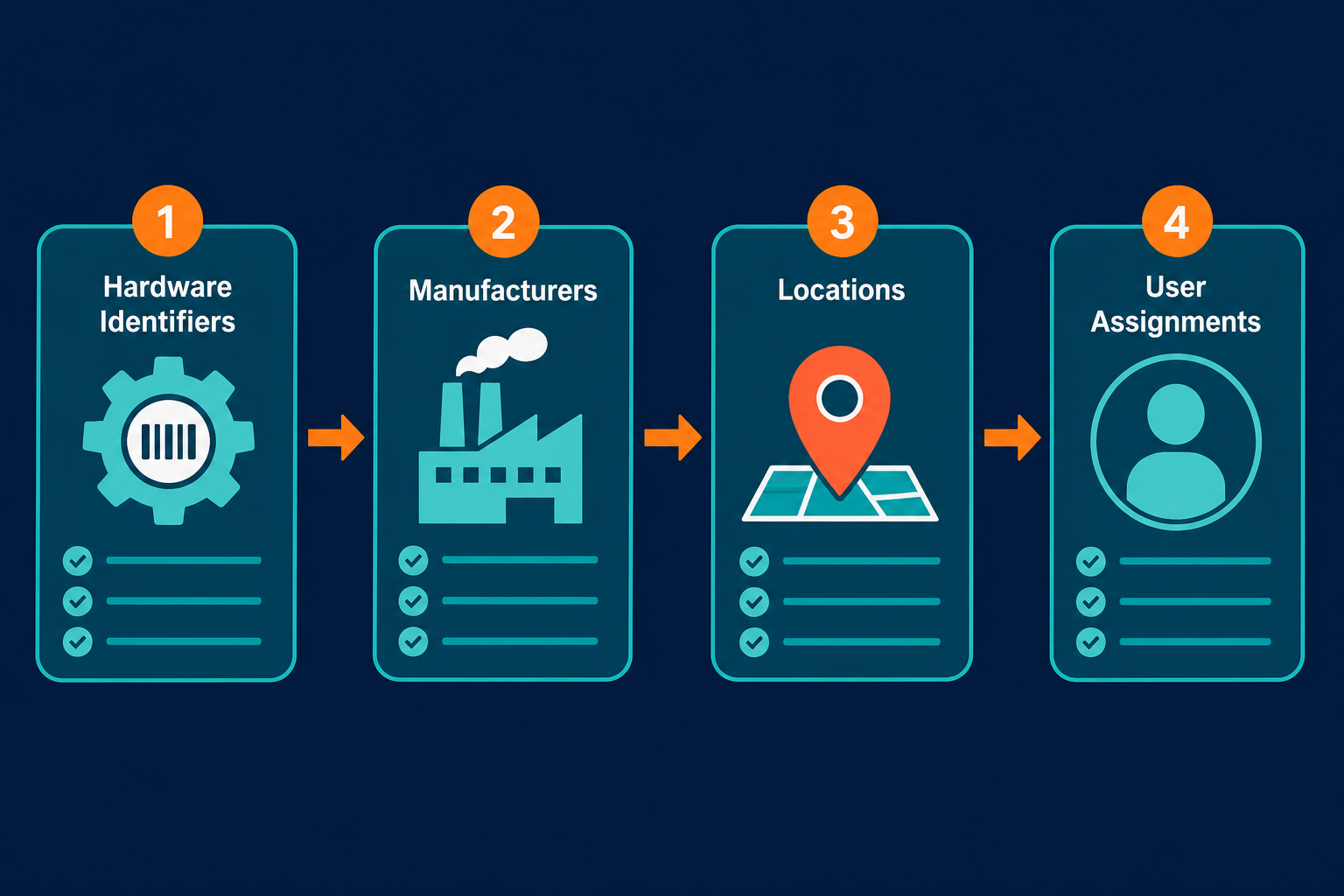
ITAM data cleanup checklist: essential fields before CSV import
Dumping raw Excel files into a relational database creates duplicate records and broken taxonomies. Clean and normalize five specific data categories before running your import scripts. That cleanup task is bigger than most teams expect: Torii’s 2025 SaaS Benchmark Report found organizations manage an average of 668 applications, with 54% operating as shadow IT outside any central record. That is exactly the kind of untracked software this cleanup step is meant to catch.
1. Unique hardware identifiers
Ensure every physical laptop, server, and appliance contains an alphanumeric serial number. Strip out placeholder values like pending, unknown, or N/A that previous administrators used when records were incomplete. Remove spaces, dashes, or special characters introduced by optical barcode scanners.
2. Standardized manufacturer and model names
Spreadsheets frequently contain inconsistent naming for identical hardware. One administrator logs an endpoint as Dell Inc., another writes Dell Computers, and a third enters Dell Technologies. Standardize these variations to a single normalized vendor name.
Do the same for model variants so that Latitude 5420 and Lat 5420 map to the same catalog entry. Consistent normalization enables accurate hardware lifecycle planning.
3. Department, location, and cost centers
Map free-form location text to strict hierarchical naming conventions. Replace casual entries like second floor server closet with a standardized structure: Data Center One, Building B, Room 204. Validate internal billing codes against current general ledger accounting tables so asset depreciation maps cleanly to department budgets.
4. Hardware status and operational state
Consolidate dozens of ambiguous spreadsheet status descriptions into five lifecycle stages: in storage (configured and ready for deployment), in use (assigned to an active employee or workload), in repair (temporarily offline for maintenance), retired (decommissioned and awaiting disposal), and disposed (sanitized, recycled, or returned to a lease vendor). Map every status variant in your spreadsheet to one of these five before import — not a sixth or seventh custom label.
5. Custodian identity and user assignments
Reconcile employee names against Active Directory or Entra ID user principal names. Spreadsheets often list former employees who left the organization years ago. Re-assigning or unassigning these items before import ensures hardware handoffs are accurately recorded.
For more on why structured field taxonomies prevent operational friction, see Virima’s guide on why your business needs asset inventory software.
First 30 days post-cutover checklist
The work does not conclude when your data is imported. The first month determines whether your team embraces the new platform or reverts to offline tracking habits.
+-------------------------------------------------------------------------------+
|                    FIRST 30 DAYS POST-CUTOVER CHECKLIST                       |
|                                                                               |
|  WEEK 1: ACCESS & ISOLATION                                                   |
|  [ ] Revoke write access to all shared legacy spreadsheets                    |
|  [ ] Verify daily automated network and cloud discovery schedules             |
|  [ ] Confirm IT service desk integration for asset lookups                    |
|                                                                               |
|  WEEK 2: WORKFLOW ENFORCEMENT                                                 |
|  [ ] Route all hardware provisioning through the new platform                 |
|  [ ] Audit newly discovered unmanaged devices found during daily scans        |
|  [ ] Conduct technician training on check-in and check-out workflows          |
|                                                                               |
|  WEEK 3: VENDOR & WARRANTY AUDIT                                              |
|  [ ] Ingest warranty expiration and lease return dates                        |
|  [ ] Build automated alerts for end-of-life and warranty expirations           |
|  [ ] Reconcile contractor hardware returns against HR exit logs               |
|                                                                               |
|  WEEK 4: EXECUTIVE BASELINE REPORTING                                         |
|  [ ] Generate first reconciled estate baseline report for leadership          |
|  [ ] Identify rogue software installations and shadow cloud workloads         |
|  [ ] Review discovery exception logs and adjust network probe subnets         |
+-------------------------------------------------------------------------------+
During week one, ensure automated discovery runs on predictable schedules across all office subnets, data centers, and cloud regions. Integrate the platform with your IT service desk so technicians see asset details directly within incident tickets.
During week two, enforce operational governance. Every new laptop configured by desktop support must be scanned and registered in the platform before handoff to an employee. When an employee departs, their hardware return must be logged in the system to close their custodian profile.
By week four, present a verified baseline report to executive leadership. Compare total active assets identified by discovery against your original spreadsheet count. Highlighting reclaimed software licenses and retiring untracked hardware demonstrates immediate return on investment. The same Flexera report found 44% of organizations spent over $1 million on software audits in the past three years. A verified baseline report is exactly what helps leadership avoid landing in that group next audit cycle. Frame this report in board-reportable terms — reclaimed license spend and audit exposure avoided, not just device counts — since this is the moment a CIO reads the numbers, not just the IT Asset Manager who built them. For additional cost-reduction tactics once the baseline is set, see Virima’s guide on minimizing IT asset management costs.
Who is responsible for data quality during an ITAM cutover?
Data quality during cutover is jointly owned by the IT Asset Manager and the Systems Administrator. The IT Asset Manager governs data taxonomy, accounting attributes, and lifecycle policies, while the Systems Administrator oversees automated discovery accuracy, network subnet coverage, and identity provider synchronization.
Tired of maintaining fragile asset spreadsheets? Replace manual data entry with discovery-driven IT asset management that stays accurate automatically.
Common pitfalls to avoid during the transition
Organizations moving off manual asset registers repeat the same avoidable mistakes, several of which show up in IT asset management statistics gathered across the industry.
Importing unverified spreadsheet rows as gospel
Assuming historical spreadsheet entries represent accurate inventory is a common failure mode. A row stating that a database server runs in a secondary rack might have been written five years ago by an administrator who has since left the company. Always validate spreadsheet rows against automated discovery results before confirming records as verified assets.
Treating asset management as a one-time project
Asset management is not an administrative task that finishes when the spreadsheet is archived. It is a continuous operational discipline. Infrastructure changes every day as servers restart, developers spin up virtual machines, and employees receive replacement laptops. Without scheduled discovery cycles, any asset database will drift into inaccuracy within ninety days. The same pattern shows up in software: the same Torii benchmark found 61% of SaaS applications sit inactive while organizations keep paying for them. That’s the direct result of discovery cycles that stopped running.
Omitting network switches and non-agent hardware
Teams often deploy software agents across endpoints and assume their estate is completely cataloged. However, infrastructure devices like routers, core switches, hypervisors, network-attached storage arrays, and network printers do not support agent installation.
Ensure your platform includes agentless discovery protocols like SNMP, WMI, and SSH. Capturing physical network topography is essential for connecting assets to business operations.
Closing: build on trusted data, not fragile formulas
Retiring spreadsheets in favor of a modern asset management tool eliminates blind spots and establishes control over your enterprise infrastructure. Spreadsheets document what you hoped was purchased; automated discovery establishes what is actually running across your enterprise.
A successful move from spreadsheets to asset management tool platforms doesn’t just copy rows from Excel into a web interface. It combines automated discovery, disciplined data sanitization, and structured reconciliation into one authoritative record of enterprise hardware and software. Retiring manual sheets and anchoring governance in discovery-sourced truth reduces security exposure, cuts audit risk the board will ask about, and eliminates redundant hardware spend.
Frequently Asked Questions
Can I import an existing Excel spreadsheet into an ITAM tool?
Yes. Most modern ITAM tools support bulk CSV and Excel imports. Clean and normalize your data first, and map procurement attributes like purchase orders and lease agreements to discovered hardware records.
How long does it take to migrate from spreadsheets to ITAM?
A typical migration takes between two and six weeks for mid-market organizations. The timeline depends on estate size, initial spreadsheet cleanliness, and how quickly network discovery subnets are configured.
How do I handle duplicate records during migration?
Configure reconciliation rules based on durable identifiers such as hardware serial numbers, chassis UUIDs, or cloud instance IDs. Merge duplicate spreadsheet entries into a single primary record enriched with discovery data.
Does Virima’s discovery support agentless scanning during an ITAM migration import?
Yes. Virima runs agentless network discovery alongside agent-based and API-based methods, so reconciliation can include routers, switches, and hypervisors that can’t run an agent — the same infrastructure that spreadsheet-only inventories typically miss.