When Free IT Inventory Software Is Not Enough for You to Pass an Audit

A small IT team has run the same free inventory tool for a year or two. Hardware counts look tidy enough for day-to-day work. Then someone asks an ordinary question: how many laptops are still under warranty, or which devices sit on the customer-facing VLAN. A security questionnaire asks for evidence of what is on the network and who owns it. The answer takes an afternoon of spreadsheets, half-remembered emails, and export files when a current system of record would answer in minutes.
Free tools are a reasonable place to start. The harder part is recognizing when the tool still “works” on paper while every audit, software true-up, or ownership question burns hours the team no longer has. Many teams also assume the only next step is a heavy enterprise platform with long deployment cycles and enterprise-only pricing. That binary is the assumption worth correcting.
Teams that need full hardware and software lifecycle tracking past basic check-in and check-out reach for a discovery-sourced inventory and CMDB layer that still fits a lean operating model.
What Free IT Inventory Tools Get Right
Free IT inventory software earns its place for a first pass at ownership. Basic discovery, device counts, simple location fields, and a shared list of what the company bought are genuine progress over sticky notes and personal spreadsheets. Several widely used free tiers keep asset or device counts open while they gate something else. That design is why a growing mid-market team can stay on free tooling longer than a pure feature matrix would predict.
Community strength is another real advantage. Active forums, long setup threads, and peer troubleshooting reduce the cost of getting started. When one admin leaves, the next person can often find a guide someone else already wrote. That social layer is a legitimate reason teams stay longer on free inventory software, and it belongs in any honest account of why free tools still win early stages.
Where free tiers usually tighten first is seat and technician count. On patterns documented for free IT ticketing and inventory-adjacent free plans, the technician cap is the upgrade trigger while assets and end users stay comparatively open. Spiceworks-style free Core plans, for example, are widely described as capping a small number of technician or admin seats even when device volume stays generous. The wall many teams feel first is “we need another admin seat,” then “we need answers the tool was never built to produce.”
The seat cap is the most obvious wall. The more common ceiling appears later, when capability gaps show up in audits and change work long after pricing meters stay quiet.
The Free-Tool Ceiling: Five Signs You’ve Hit It
The ceiling shows up as recognizable operating moments teams already live through each quarter.
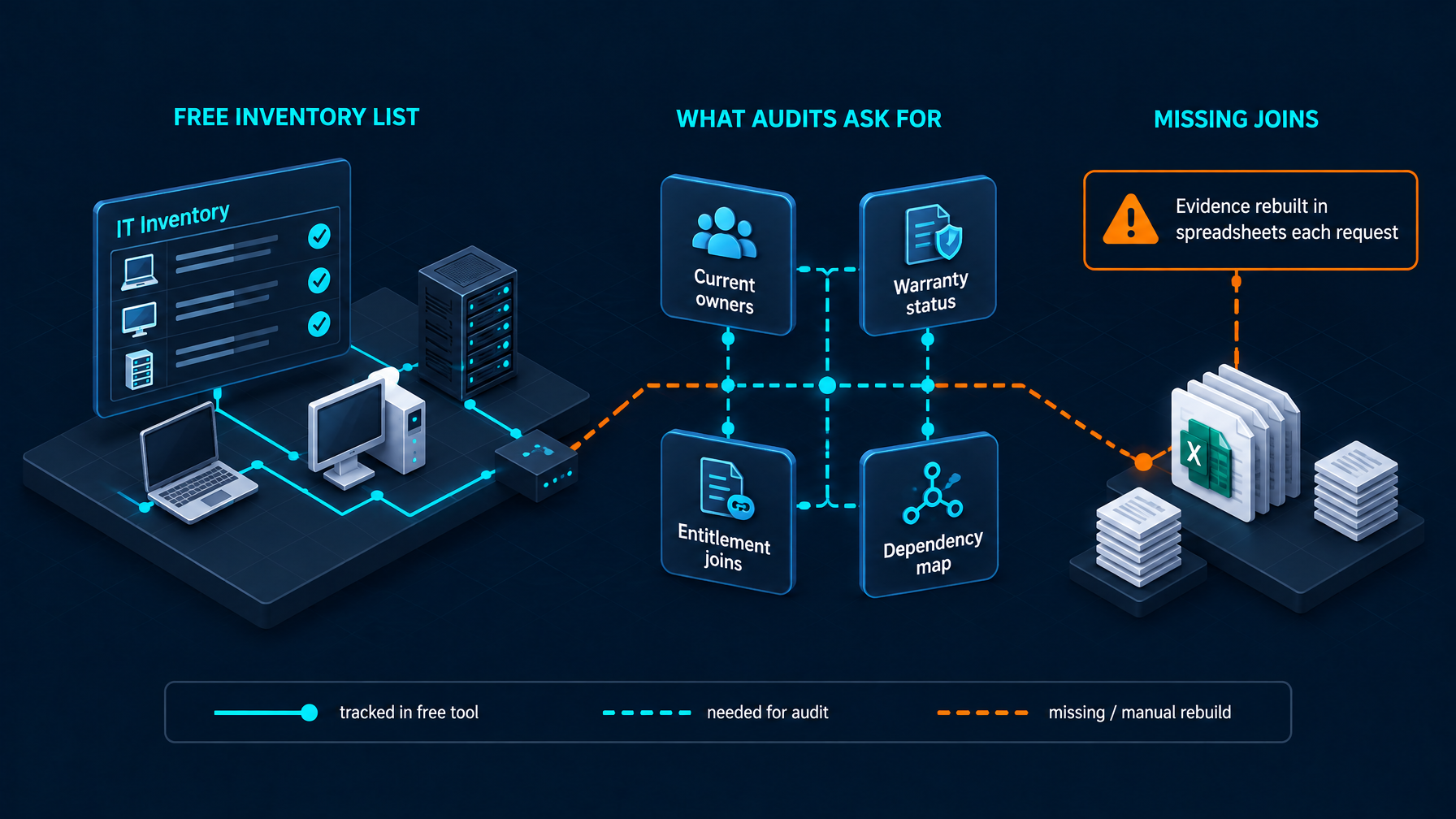
A questionnaire asks for evidence you cannot pull from one place. Insurance renewals, customer security reviews, and internal compliance packs want current inventory, owners, and locations in a form someone else can verify. When the free tool holds only a partial list, the rest lives in procurement mail, HR offboarding sheets, and cloud consoles. The team rebuilds the answer for every request.
A software audit turns into a multi-day spreadsheet project. Entitlements live in purchasing. Installs live in the free inventory export or endpoint tool. Matching them becomes multi-day manual reconciliation when a standing entitlement report should already exist. Flexera’s 2026 State of ITAM reporting notes that 44% have spent more than $1 million on audit-related expenses over a three-year window among surveyed ITAM professionals, with nearly half facing an audit in the prior year. Those numbers describe how expensive weak entitlement-to-install joins become once auditors arrive.
Nobody can say what else runs on a device before it gets touched. Free inventory often tracks the box well enough. It rarely tracks the services and dependencies that fail when that box changes. Change windows then start with tribal knowledge calls while teams scramble for a dependency view.
Asset data and ticket data never meet. Many free inventory products stop at the asset record. The helpdesk stays in a separate system. When 67% still rely on manual work or spreadsheets between IT service and asset practices, as EasyVista and OTRS Group reported in their State of SMB IT for 2026 research, ticket context and inventory context stay disconnected by design. Incidents open against names that no longer match the estate.
The team keeps finding devices, cloud accounts, or SaaS subscriptions it never pointed the free tool at. A scan of known subnets is only as complete as the list of targets. Shadow endpoints, leftover lab gear, and cloud instances created outside the usual request path stay invisible until an outage or a security review. Trend Micro’s April 2025 newsroom release on unmanaged assets found that 74% of cybersecurity incidents in a global study of over 2,000 cybersecurity leaders involved unknown or unmanaged assets. Inventory that only sees what it was aimed at leaves that gap open.
These moments show free tools still did their original job. Free tools were built for a thinner question set than audits, entitlement true-ups, dependency-aware change, and ITSM-aligned ownership require.
The Assumption Worth Correcting
Once those signs appear, teams often jump to a single conclusion: the only serious next step is a full enterprise platform, with enterprise deployment calendars, professional-services packages, and enterprise contract structures. That assumption is the trap. The free tool was thin on evidence and relationships. The needed step is fuller discovery-sourced inventory, configuration context, and service dependency truth, packaged so a small IT group can run it without an army of implementers.
Enterprise capability without the enterprise-only assumption
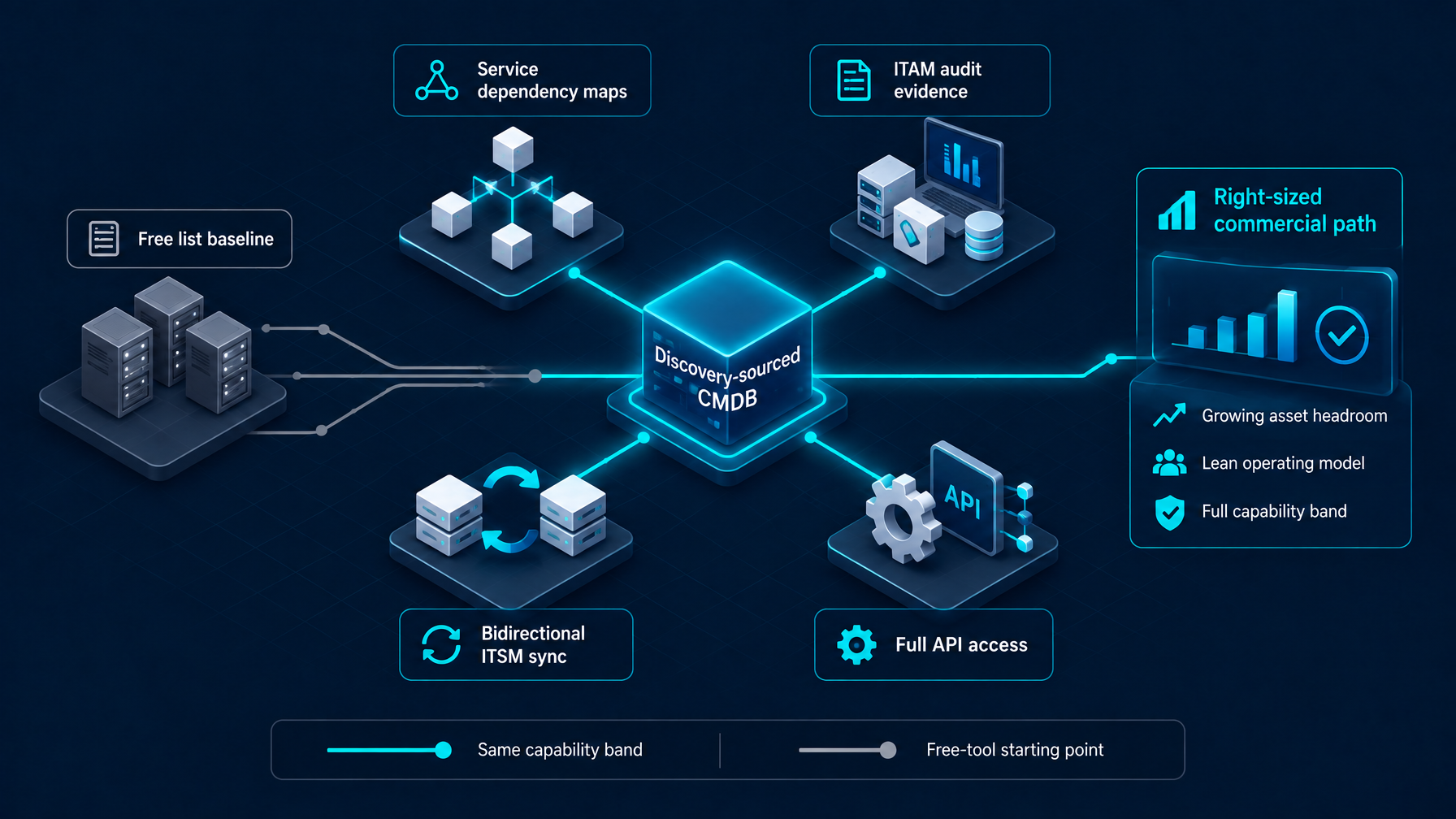
Enterprise-grade capability and a lean commercial envelope can sit on the same platform. Lean IT still needs the same class of truth large organizations use for change and audit. Headcount and time are packaging constraints that right-sized plans are built to absorb, while core depth stays aligned as estates grow.
What stays on the same capability band as you step up from free inventory:
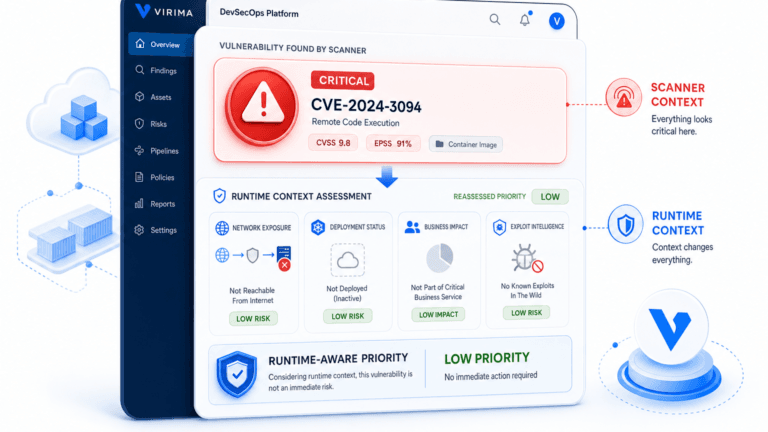
- ViVID™ service mapping and ViVID™ Insights, dependency views, and blast-radius style context once services are defined, available to growing teams on the same capability band larger contracts use.
- Bidirectional ITSM integration, asset lists, and ticket exchange current owners, locations, and CI identity across one shared record path.
- Audit-oriented ITAM tracking, licenses, contracts, and inventory join so entitlement and install evidence can be assembled from standing records on every request.
- Full API access, the same integration surface lean teams need to keep records in the tools they already run.
What usually differs at larger tiers is operating envelope while core maps and relationships stay aligned:
- Discovery install count
- Multi-tenant or private hosting options
- Support intensity
Maps, ITAM modules, automation paths, and the ITSM sync model are meant to stay coherent. Smaller plans are sized for estate and support needs while dependency truth stays in the package.
Virima is built for that middle path: full discovery-sourced CMDB, ITAM, ViVID™ maps and insights, and bi-directional ITSM integrations, sized for lean teams rather than a heavyweight enterprise rollout. Scope and discovery footprint are set through a contact-led conversation so configuration matches the estate you actually run.
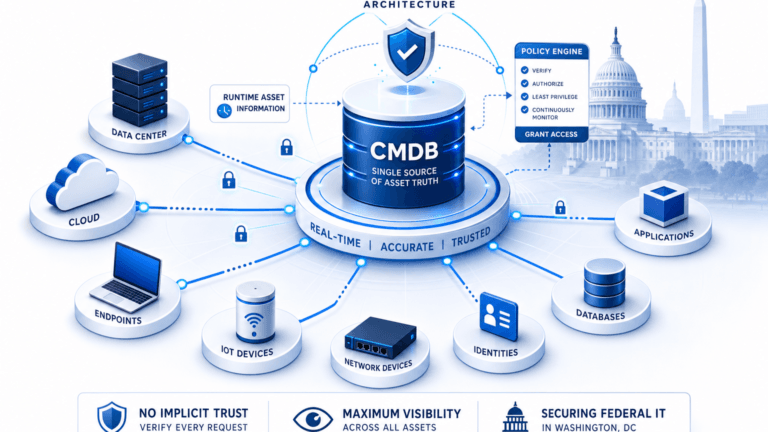
Trusted Runtime Truth is the category name for that discovery-sourced ground truth: what exists, how it connects, what changed, what will break, and who owns it. Growing teams need that layer when free inventory stops answering audit and change questions, and they can get it on a right-sized commercial path.
The Capability Bar Once You’re Past Free
Once free inventory is no longer enough, evaluate the next platform against a functional operating bar.
- Discovery should use more than one method. Agentless network and API collection plus agent-based coverage for endpoints that sit off the easy scan path give a fuller estate picture across hybrid paths. High-frequency scheduled discovery cycles keep records current enough for weekly operations on a cadence the product actually runs today.
- Coverage should span on-premises and cloud. Local network lists alone miss cloud instances and SaaS-adjacent infrastructure that still carry license, ownership, and change risk. AWS and Azure estates need the same identity and ownership discipline as racks in the closet.
- A dependency or service view has to sit above the device list. Device inventory answers “what is this.” Service and relationship context answers “what fails if we change it,” which is how checkout lists become change-ready configuration data.
- Native ITSM sync should be bidirectional in practice. Tickets need current CI identity, owner, and location. Inventory needs the status signals operations already captures in the desk. Partner names such as ServiceNow, Jira, and Ivanti stay plain in conversation; evaluate the integration surface through a single integrations hub that keeps exports and sync paths under one review.
- License and contract tracking must survive an audit request. Purchases, installs, and assignments need a join that someone can re-run, with owners who still work at the company.
- The record has to survive the person who set it up. A free tool configured by one admin, with no second operator and no documented identity rules, stays a single point of failure after the project looks complete. Runbooks, shared credential vaults under policy, and more than one person who can explain match rules keep the record operable when staffing changes.
Open-source and free shortlists still help teams start. The shortlist can stay free while the operational ceiling still arrives when audits, dependencies, and ITSM alignment enter the weekly workload. When teams move into a CMDB-shaped record, start with a minimum viable set of configuration items that discovery can keep honest from the first operating week.
Already on Spiceworks or Snipe-IT?
Many readers already know which free or freemium tool they run. If the ceiling signs above match your week, use the deeper feature and limitation pieces written for those exact decisions:
- Spiceworks features and limitations
- Snipe-IT features and limitations
- A closer look at free ITAM software’s tradeoffs
This article stays on the diagnostic moment: how you know free inventory is no longer enough, and what “enough” requires next.
Outgrow Free Inventory Without Assuming Enterprise Overhead
Outgrowing free IT inventory software is a normal operating signal. The estate, the audit calendar, and the ticket load asked for more evidence and more relationship context than a free list was built to hold. The next step is a discovery-sourced inventory and CMDB layer with service maps, ITAM depth, and ITSM sync, packaged for lean teams on a right-sized commercial path.
If that is where your team sits, schedule a demo against your environment and pressure-test the record where questionnaires and change windows actually start.
Frequently Asked Questions
How do I know free IT inventory software isn’t enough anymore?
Watch for repeated multi-hour rebuilds when audits, warranties, or ownership questions arrive, plus missing dependency context before changes and inventory that never meets the helpdesk. Those patterns mean the free list no longer matches the questions your week asks.
Is free IT asset management software safe to use for compliance or audits?
Free tools can support early inventory hygiene. Audit and compliance programs need current owners, entitlement-to-install joins, and evidence someone else can re-run. Treat free inventory as a starting record, then add discovery-sourced CMDB and ITAM depth before you rely on it as audit evidence.
Do I need an enterprise platform once I outgrow a free inventory tool?
You need enterprise-grade discovery, maps, ITAM, and ITSM sync. Right-sized packages can keep full capability while asset ceilings and support intensity scale with the estate.
Can a free tool and a paid ITAM or CMDB platform run at the same time?
Yes, during migration. Keep the free tool as a temporary checkout or lab list while discovery-sourced records become the system of record for audit, change, and ITSM. Retire dual entry once owners trust the new identity and match rules.
What’s the difference between IT inventory software and a CMDB?
Inventory answers what you own and where it sits. A CMDB adds configuration items, relationships, and service context so change and incident work know dependencies and owners. Discovery keeps both layers current enough to trust under pressure.