Active vs. passive IT asset discovery: which one works better?

A contractor laptop joins overnight. An IoT sensor appears on a plant VLAN. A lab server still draws power but has not been touched in months. If those devices sit on your network and never enter inventory, you cannot patch them, scope an incident, or prove control coverage with confidence. That is the gap IT asset discovery is built to close.
Active discovery probes devices to pull deep inventory, including idle hosts. Passive discovery listens to traffic already on the wire, so it adds no scan load and suits fragile segments, but it misses assets that stay silent. Most enterprises need both. This guide covers how each method works, where each fails, how hybrid and agent designs fit together, and how often to scan by environment.
Active vs passive IT asset discovery: which one works better?
Active discovery sends probes or credentialed queries to inventory devices in depth and can find idle hosts. Passive discovery only watches traffic already on the wire, so it adds no scan load and suits sensitive or OT segments, but it cannot see assets that stay silent. Neither method alone is complete. Hybrid coverage is the practical design.
What is IT asset discovery?
IT asset discovery is the process of finding every device, application, and cloud resource connected to your network. That includes hardware like servers, laptops, routers, switches, and IoT sensors. It also includes software: installed applications, licenses, SaaS subscriptions. Cloud resources like virtual machines, containers, and storage buckets fall under its scope too, along with network components such as firewalls, load balancers, and access points.
The goal is simple: know what exists, where it sits, and what state it’s in. Without that baseline, security patches go undelivered, compliance gaps stay hidden, and incident response starts with guesswork instead of data.
Consider a scenario that plays out constantly: your organization adds a batch of remote laptops for a hybrid workforce. Without a discovery process, some of those laptops never get security updates. Each unpatched device becomes a potential entry point.
Inventory is also a control expectation, not only an operations convenience. CIS Controls treat enterprise asset inventory as a foundational control family. The assessment guidance for using a passive asset discovery tool under Control 1.5 is a concrete public reference point when auditors ask how silent or unmanaged joins are detected without unsafe probing. Pair that baseline with scheduled active enrichment so idle systems do not stay invisible. For the broader control family, see CIS inventory and control of enterprise assets.
What is active IT asset discovery?
Active discovery sends probes across the network to identify devices and pull data from them directly. Think of it as knocking on every door in a building to find out who’s home and what they’ve got inside.
Common active discovery methods include:
- Ping sweeps, which send ICMP echo requests to a range of IP addresses
- Port scanning to check open ports and identify running services
- SNMP polling, which queries devices using Simple Network Management Protocol
- Credentialed scans that log into devices with valid credentials for a full hardware and software inspection
- WMI queries that pull configuration data from Windows environments
Active scanning returns detailed inventory on each responding device. It catches dormant and idle assets that are not generating traffic on their own. Credentialed passes can also surface exposed services and outdated software versions as inventory signals. Treat those findings as inputs for dedicated vulnerability and identity tooling, not as a full multi-OS vulnerability management program by themselves.
The trade-off is network impact. Active scans generate traffic, and on congested networks that matters. Credentialed scans need secure credential management. In sensitive environments like OT/ICS, active probes can disrupt industrial control systems if they’re not scheduled during planned maintenance windows.
Real-world example: A financial institution runs credentialed active scans after market hours to inventory all trading floor workstations without touching operations during the trading day.
What is passive IT asset discovery?
Passive discovery takes the opposite approach. Instead of sending probes, it monitors the traffic devices that are already generating. That includes syslogs, DHCP requests, ARP broadcasts, and DNS queries. Over time, it builds an inventory from that data. The difference between active and passive is essentially knocking on doors versus listening from the hallway.
The big advantage is zero additional network load. That makes passive discovery safe for fragile or sensitive environments where active scanning could cause problems. It aligns with CIS Control 1 (inventory and control of enterprise assets) by providing ongoing visibility without any scanning risk.
Passive discovery also catches assets that active scans sometimes miss. Devices that rarely respond to probes, or machines that only appear on the network at odd hours, eventually get picked up as their traffic accumulates. Historical data helps too. Assets missed in earlier windows surface later.
The limitation is depth. Passive monitoring collects less detail per device than a credentialed active scan. Any device that isn’t generating traffic stays invisible. A dormant backup server that hasn’t been powered on in months won’t show up until someone plugs it back in.
Real-world example: In a manufacturing plant, passive discovery captures syslogs from PLCs and HMIs without disrupting production lines. But a test server sitting offline in a rack won’t appear until it reconnects.
Active vs. passive IT asset discovery: key differences
| Dimension | Active discovery | Passive discovery |
| How it works | Sends probes and queries to devices | Monitors existing network traffic |
| Network impact | Generates additional traffic | Zero additional load |
| Detail per device | Deep — full hardware/software inventory | Lighter — traffic metadata only |
| Speed | Fast, on-demand results | Gradual, builds over time |
| Dormant devices | Detects idle and offline assets | Misses devices not generating traffic |
| Sensitive environments | Can disrupt OT/ICS systems | Safe for fragile environments |
| Credentials | Requires secure credential management | No credentials needed |
| Best for | Scheduled deep scans, vulnerability auditing | Continuous baseline monitoring, OT environments |
Use the comparison dimensions above to choose mechanisms. Use the failure modes below to pressure-test a single-method design before you lock architecture.
| If you only run… | You typically miss… |
|---|---|
| Scheduled active scans alone | Short-lived joiners between scan windows; some quiet paths without credentials |
| Passive listening alone | Powered-off, idle, or non-talking gear until it generates traffic again |
| Agents alone | Many network devices and OT assets you will not agent |
| Agentless network scans alone | Roaming laptops and WFH endpoints rarely on the corporate LAN |
This page covers IT asset inventory discovery for hardware, software, network, and cloud resources. It is not a guide to active versus passive vulnerability scanning methods, network performance monitoring alone, or biometric liveness checks that reuse similar wording in search results.
Why you need both: the hybrid discovery approach
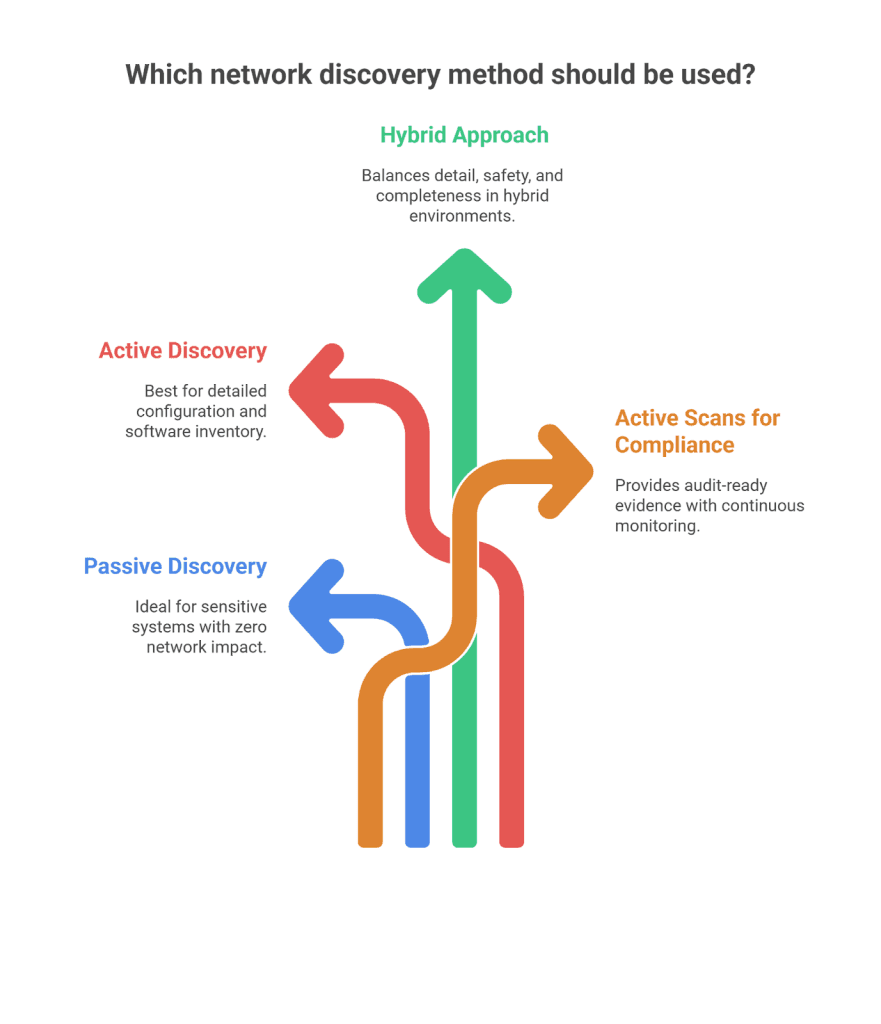
Neither active nor passive IT asset discovery covers everything on its own. Active scans catch dormant assets, forgotten servers, decommissioned endpoints still drawing power, and lab gear nobody has touched in months. Passive monitoring catches live devices as they connect, including IoT sensors, contractor laptops, and rogue access points. Treat observation mode and collection reach as separate design choices.
| Design axis | Options | Question it answers |
|---|---|---|
| Observation mode | Active / Passive | Do we probe devices or only listen to traffic? |
| Collection reach | Agentless / Agent-based | Can we see off-LAN endpoints and deep local state? |
The hybrid approach works in layers:
- Passive monitoring runs on an ongoing basis, capturing devices as they generate traffic and building an observed baseline of what is speaking on the network.
- Active scans run on a schedule (daily for servers, weekly for endpoints, quarterly for OT), filling in the gaps by probing devices that passive monitoring can’t see.
- Agent-based discovery extends the reach to remote endpoints and work-from-home devices that aren’t sitting on the corporate network.
What you get is full visibility: what’s running right now, what exists but isn’t active, and what just appeared for the first time.
What is agentless vs. agent-based discovery?
Active and passive describe what a scan listens for. Agentless and agent-based describe how it connects to devices. They’re separate axes, and the distinction matters.
Agentless discovery scans devices remotely over the network using protocols like SNMP, WMI, and SSH. Nothing gets installed on endpoints. It’s fast to deploy and low-maintenance, but it needs network line-of-sight to the target.
Agent-based discovery puts a lightweight agent on each device. That agent reports back regularly, even over the internet, tracking daily configuration changes, even when the device is off the corporate network. Deeper data, better for remote or WFH endpoints, but it means deploying and maintaining agents.
Virima supports both. Agentless scanning handles on-network assets. Agents cover Windows, macOS, and Linux endpoints that don’t routinely connect to the corporate network.
How often should you run IT asset discovery scans?
There’s no single right answer — scan frequency depends on the environment and the risk profile of what you’re scanning.
| Environment | Active scan frequency | Passive monitoring | Why |
| Core infrastructure (servers, network gear) | Daily or weekly | Continuous | High-value assets with frequent config changes |
| Virtual and cloud assets | Weekly active + cloud API sync | Continuous | Cloud footprints grow fast; APIs catch provisioning in real time |
| Remote workforce endpoints | Periodic off-hours scans | On arrival (passive) | Minimizes user disruption while catching new devices |
| OT/ICS environments | Quarterly or event-driven | Continuous (passive only) | Active scans risk disrupting production systems |
The key is layering. Passive monitoring provides the baseline. Active scans fill the gaps. Both feed the CMDB so your asset records stay current instead of drifting.
Cloud and ephemeral assets need more than LAN scans
Cloud estates change faster than many on-prem scan calendars. Virtual machines, containers, and storage objects can appear through provisioning workflows that never touch the corporate DHCP scope your passive sensors watch. Scheduled active sweeps of private ranges still matter for dual-homed and hybrid-connected workloads, yet they will not see every object that only exists as a cloud control-plane record.
Practical hybrid design therefore adds cloud inventory sources next to network observation. API-based inventory from your cloud accounts captures provisioned resources on a recurring cycle. Passive and active network methods still catch what actually speaks on connected segments. Together they reduce the blind spot where a resource is billable and reachable but missing from the CMDB.
Cadence should match churn. High-change cloud accounts deserve more frequent inventory pulls than stable core routing tiers. Keep the same rule you use on the LAN: observation for what is speaking, scheduled enrichment for depth, and a single configuration system of record so operations does not reconcile three consoles during an incident.
Credential management for active scans
Active credentialed scans pull the deepest asset data, but credentials need careful handling:
- Use read-only access with the minimum permissions needed
- Grant elevated credentials only for devices that require deeper inspection — patch audits, configuration checks
- Store credentials in a secure vault with access logging and automatic rotation
- Rotate scan credentials on a schedule so they don’t become a standing security liability
Getting this active scanning vs passive scanning right means your scans stay thorough without opening new attack vectors.
How discovery platforms operationalize hybrid coverage
Educational designs only stick when inventory lands in systems operators already use. In practice, that means agentless active scanning for on-network depth, agents where endpoints sit off the corporate LAN, and a path into the CMDB so configuration items, software, and relationships stay current instead of rotting in spreadsheets.
Platforms differ on probe libraries, scheduling safeguards, remote reach, and how cleanly discovery updates configuration records. When you evaluate tools, prioritize hybrid observation (active plus passive where the product supports it), agentless defaults with optional agents, and direct CMDB handoff over one-off exports.
Virima’s IT Discovery follows an agentless-first model for on-prem and cloud targets, with lightweight agents for Windows, macOS, and Linux endpoints that rarely sit on the corporate network. Discovered data can update CMDB configuration items so change and incident work runs on current inventory rather than last quarter’s list.
Need inventory your operators and AI workflows can trust? See how discovery-sourced records become Trusted Runtime Truth across assets, relationships, and change context. |
FAQs
How does IT asset discovery feed a CMDB?
Discovery’s primary operational output is current configuration data. Each found asset, with hardware, software, and relationship signals, should update configuration item records so change, incident, and audit work use one system of record. Without automated feed and reconciliation, CMDB rows drift as cloud provisioning and device turnover outpace manual edits. Platforms that write discovery into the CMDB reduce spreadsheet rebuilds between audit cycles.
How does IT asset discovery detect shadow IT?
Shadow IT is any device, application, or cloud service in use without IT approval. Active scans find unknown responders inside address ranges you own. Passive monitoring flags traffic sources that never appeared in the approved inventory. Used together across a few scan and observation cycles, most unmanaged joins surface before they become a long-lived blind spot.
How does IT asset discovery improve security and compliance?
Discovery shows security and GRC teams what is exposed to policy: unpatched systems, unauthorized devices, and inventory gaps against frameworks that require asset control. CIS Controls, NIST, and ISO 27001 programs all assume you can list what you operate. Automated discovery keeps that list closer to runtime than a quarterly spreadsheet that is stale before the audit meeting ends.
What is the difference between IT asset discovery and IT asset management?
Discovery answers what exists and in what technical state. IT asset management answers how each asset is owned, costed, licensed, and moved through lifecycle states through disposal. Discovery feeds ITAM. Without it, lifecycle records lag because manual updates cannot match provisioning speed.
How do you choose the right IT asset discovery tool?
Require coverage across hardware, software, cloud, and network devices. Confirm support for both observation modes and both reach models where your estate needs them: active and passive where available, agentless defaults, and agents for off-LAN endpoints. Demand a clean path into your CMDB and ITSM tools without spreadsheet exports. Prefer agentless-first designs that add agents only where line-of-sight or remote reporting truly requires them. When you want to walk hybrid discovery against your own ranges and CMDB targets, request a demo.