Find Which Servers Have PXE Boot Enabled Across Your Fleet

A server can have network boot enabled long after its last provisioning job, and most infrastructure teams lack a reliable, standardized way to find which servers have PXE boot enabled across the fleet. They may need that setting for recovery, but they may not know which machines retain it. A server list alone cannot answer the question because boot settings live in firmware and controller interfaces.
Finding those servers requires a read-only inventory of firmware settings, network adapters, and boot priority. A dependable PXE inventory separates confirmed firmware evidence from missing evidence — a server list or network scan alone cannot make that distinction, because boot state lives in firmware and controller interfaces, not in the OS or the wire. Owners can then review exceptions without disrupting systems that still need network provisioning.
Define what enabled PXE boot means
Preboot Execution Environment (PXE) lets a machine start a network-based boot process before its operating system loads. In a provisioning environment, the server obtains boot information and loads a deployment environment from the network. The details depend on firmware, network configuration, and provisioning tools.
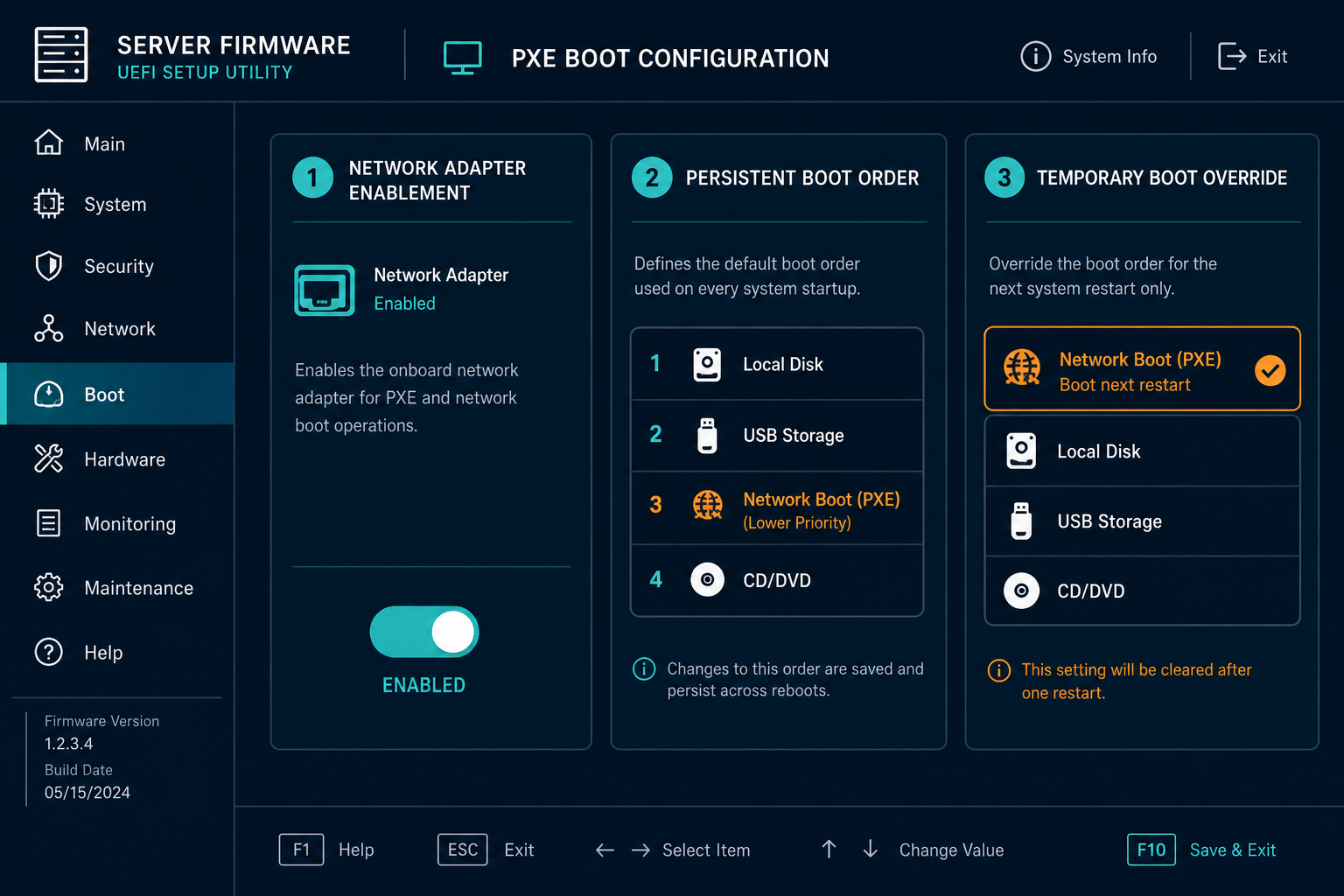
A useful inventory distinguishes several settings often grouped under the word enabled:
- Adapter setting: Whether a specific network interface is configured for PXE or network boot.
- Boot entry: Whether a network-boot option exists and is enabled in the firmware boot configuration.
- Boot priority: Where that entry appears in the persistent boot order.
- Temporary override: Whether a one-time boot selection is configured for the next restart.
- Network availability: Whether the relevant interface can reach the approved provisioning environment.
These fields answer different questions — an enabled network adapter can sit below a local disk in the boot order, and a temporary override can select network boot for the next restart without changing the persistent sequence. Firmware menus vary by manufacturer and model, so record the precise field and its source.
Dell’s boot mode guide describes Unified Extensible Firmware Interface (UEFI) PXE client configuration for supported Dell systems. Use it as a platform example and check the documentation for your own hardware and firmware version.
Is PXE boot enabled by default on new servers?
Default PXE behavior varies by vendor and model — some ship with network boot enabled on at least one adapter, others ship disabled. A fleet audit should not assume a uniform default; it should record the observed setting per server rather than inferring it from manufacturer or purchase date.
Does a server with PXE enabled always boot from the network?
A server with Preboot Execution Environment (PXE) enabled may still boot from local storage first. Persistent boot priority, temporary overrides, and available boot devices affect the selected path. A network boot entry also requires the relevant network and provisioning services to be available when the server attempts to use them.
Build the server population before checking firmware
Start with the physical servers your team is authorized to assess, including the sites, racks, and management networks in scope, and record the owner of each environment and whether another provider manages its hardware.
Export a server population from existing asset registers and discovery records, capturing:
- Serial number or vendor service tag (a stronger reconciliation key than a hostname, which can change or be reused)
- Model and location
- Owner and lifecycle state
- Management-controller reference, when available
That register-first step matters more than it used to. Flexera’s 2026 State of ITAM Report found that on-premises hardware visibility slipped from 76% to 74% year over year, even in the asset category organizations have tracked longest — a PXE review built on an incomplete population inherits that same blind spot before the first controller is queried.
Separate physical servers from virtual machines, which have their own virtual firmware and network-boot settings managed through the virtualization platform — include those only if the assessment covers VMs explicitly, and don’t combine a VM’s boot state with its host’s firmware record.
Mark the expected population before collecting results: servers without an accessible controller, valid credentials, or supported interface must remain in the denominator, or the report will appear complete while silently excluding machines that could not be checked.
For wider server context, explore Trusted Runtime Truth — Virima connects discovery-sourced records with what exists, how infrastructure connects, and who owns it, helping teams route configuration questions to the right owners.
Read PXE settings through the server’s management tools
The most reliable source is the firmware configuration exposed by the server’s supported management interface: a vendor console, a baseboard management controller (BMC), a supported management API, or local firmware setup. Treat this as an ongoing firmware boot configuration audit, not a one-time check — access depends on model, credentials, and permissions throughout.
Start with a read-only vendor inventory
If the infrastructure team already uses a vendor management console, check whether it can report firmware settings for the relevant models, then export the available PXE adapter settings, boot entries, and boot sequence with the collection time.
Confirm whether the report reflects the active configuration or a pending change — firmware can show settings waiting to take effect after a restart. Preserve both states when exposed, and keep the raw attribute name alongside the normalized result, since field names vary across generations.
Inspect individual controllers where necessary
A server’s remote management interface can expose firmware information without relying on its host operating system, using the vendor’s documented read operations for the exact model and controller version. Dell’s server configuration profile guide describes configuration attributes and export methods — including PXE device settings — for supported systems; verify the equivalent attribute names for your own hardware first.
Redfish, defined by the DMTF Redfish specification, provides a standardized interface, but available resources and attribute names still depend on the implementation — a boot override in a response does not describe the persistent firmware setting.
Where vendor interfaces do not expose a required field, check firmware setup locally or through a remote console and record the result as a manual observation. Do not schedule a restart solely to collect inventory without an approved change window.
Treat operating system evidence as supporting context
Operating system tools can report hardware and adapters, but they may not expose a reliable PXE enablement setting for every model — an installed deployment agent alone cannot establish firmware PXE status. Use OS data to identify the server, then confirm PXE status through the supported firmware source. If no source exposes the setting, classify the server as unknown and assign a follow-up owner.
Can a network scan confirm that PXE is enabled on a server?
A network scan can identify responsive devices and services, but it cannot establish a server’s firmware configuration by itself. Preboot Execution Environment (PXE) enablement requires evidence from the server’s firmware or a supported management interface. Record an unknown result when the setting cannot be read.
Build a report that shows which servers have PXE boot enabled
A useful server PXE inventory report contains one record per server and enough adapter-level detail to explain the result. When several interfaces have separate settings, use one row per interface or a linked detail table rather than collapsing conflicting adapter values into a single unexplained flag.
Capture these fields where the source provides them:
- Server identity: Serial number or service tag, model, and location.
- Controller context: Management address, platform, and collection method.
- Firmware context: Firmware version and boot mode (UEFI or legacy BIOS).
- Adapter details: Interface identifier and reported network-boot setting.
- Boot configuration: Persistent boot entry, enabled state, and position when available.
- Override and pending state: Next-boot override and pending configuration when exposed.
- Evidence: Source, raw value, observation time, and collection result.
- Accountability: Owner, approved purpose, exception status, and review date.
Keep evidence linked to its source and timestamp
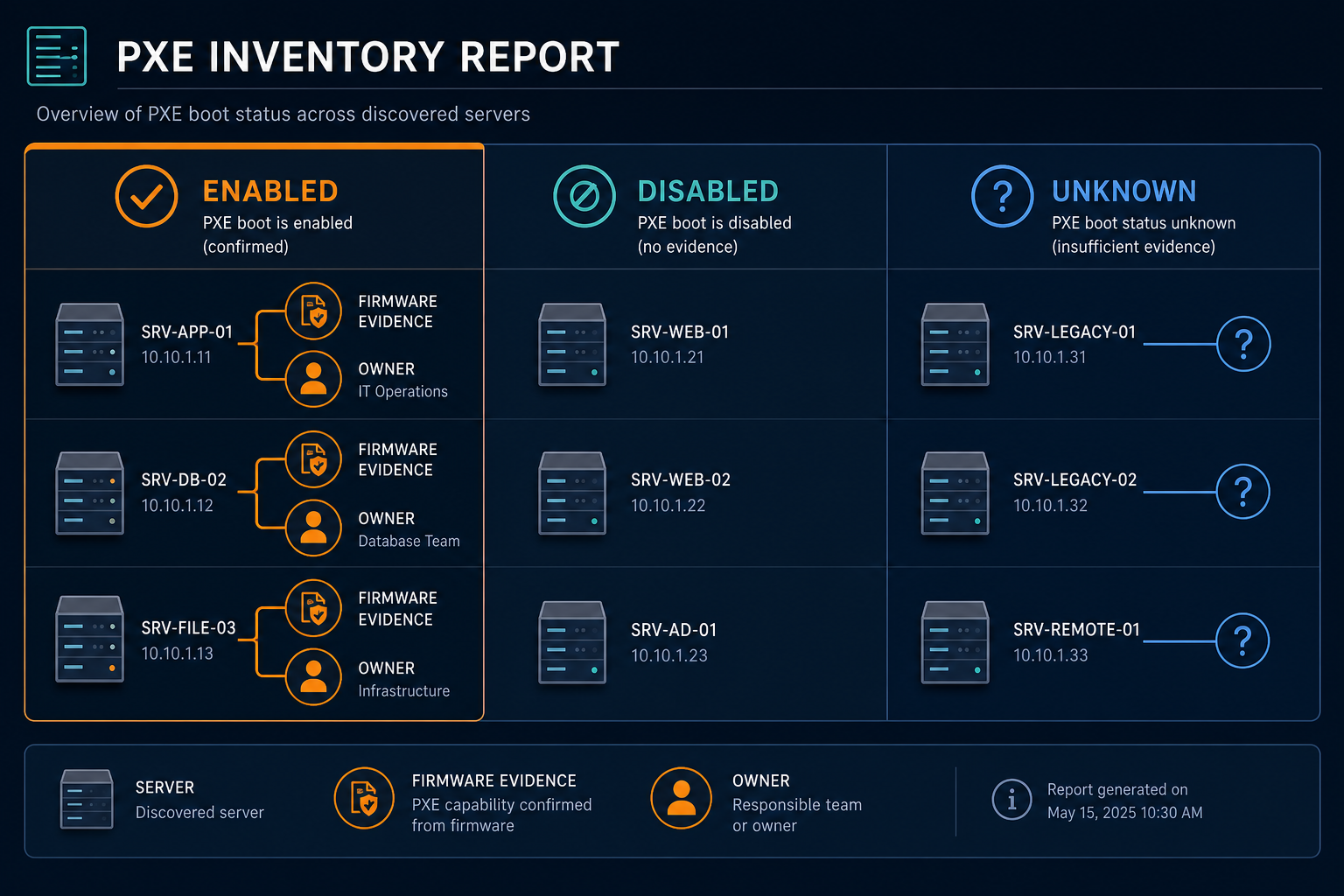
Normalize the outcome into confirmed enabled, confirmed disabled, and unknown, using confirmed enabled only when a supported source reports the setting, and keep the raw value since an adapter setting and an enabled boot entry can disagree.
For an unknown result, record the reason instead of leaving an empty field — unreachable controllers, insufficient permissions, unsupported models, and missing attributes are common causes. A failed check should never be silently converted into disabled.
Match the controller response to the physical server using a verified serial number or service tag rather than a management address, which can change, and keep an older observation’s timestamp visible — a setting collected before a firmware change cannot establish the current state.
How should a PXE audit treat an unreachable management controller?
An unreachable management controller leaves the server’s Preboot Execution Environment (PXE) state unknown until another trusted source supplies evidence. Record the failed attempt and preserve the last successful observation separately. Assign the access issue to an owner and report it as an inventory coverage gap.
Investigate PXE results before changing configuration
An enabled setting can support planned deployments, disaster recovery, or a hardware replacement workflow. Ask the service and infrastructure owners why the setting is present before classifying it as an exception — that context, plus an approved purpose and review date, is what makes the decision traceable.
An unmanaged PXE-enabled interface is also a security question, not just an inventory one: an unauthorized or rogue DHCP/PXE responder on the same segment can hand a booting server a malicious boot image, so security teams should assess exposure alongside network segmentation and controller access.
A disabled setting can require review too — if a recovery procedure expects network provisioning, the owner should validate that requirement against the observed configuration rather than assuming one configuration fits every server. Review unexpected one-time overrides separately from persistent boot order, checking the associated change record and reset behavior for the model.
Check provisioning dependencies and network boundaries
PXE enablement on a server is only one part of a network boot path: a successful provisioning attempt also depends on the configured interface and the services available on its network, and requirements vary with boot mode and deployment platform. Microsoft’s PXE boot documentation describes how Configuration Manager clients locate boot resources — use the documentation for your own deployment stack.
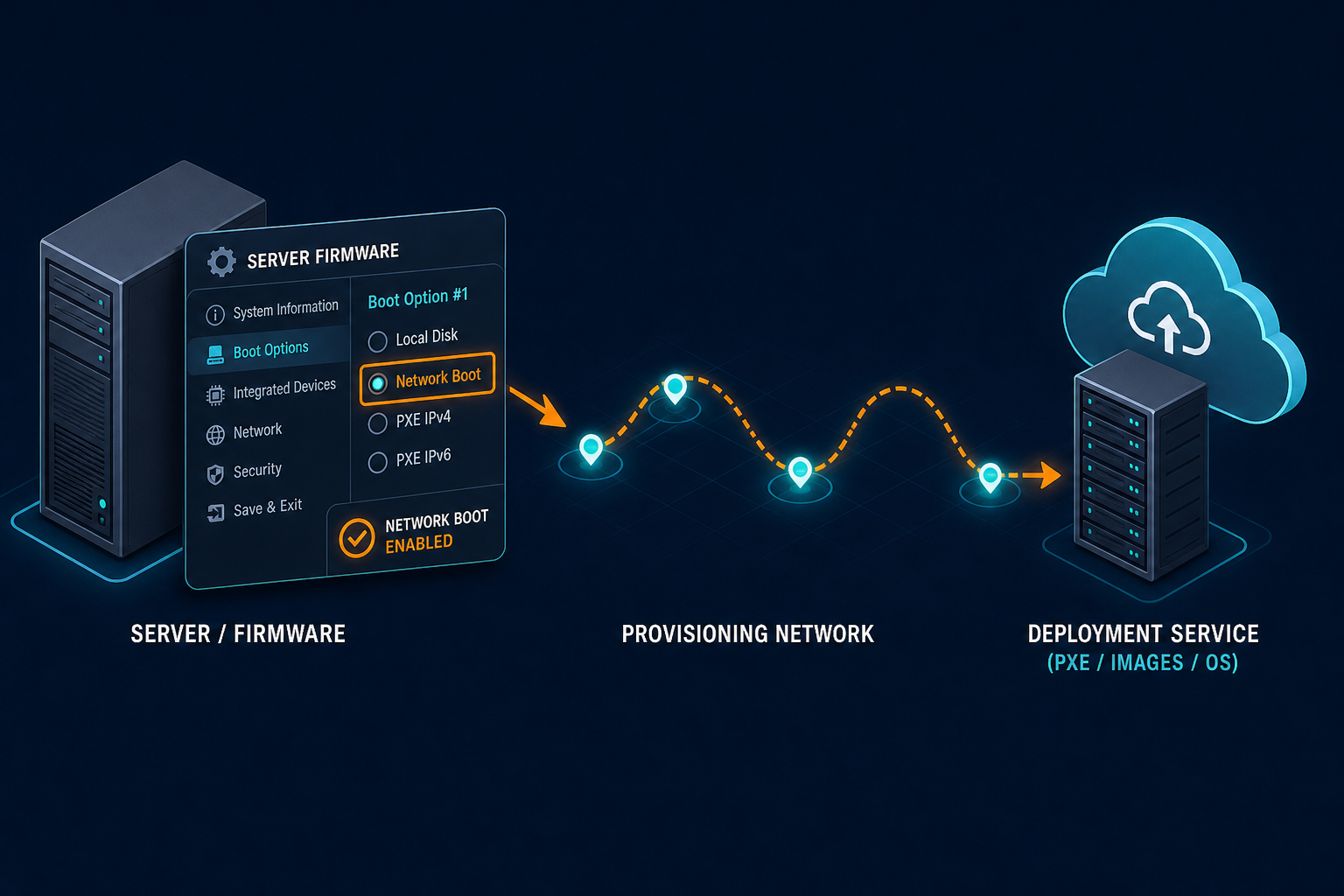
Ask the network team to identify the approved provisioning segment, whether the server interface belongs on it, and whether the deployment process requires user interaction. A firmware inventory does not prove a deployment service is reachable, and a provisioning log shows only observed requests, not every server configured to attempt network boot — investigate the network path only after the firmware setting is confirmed, using minimum-permission accounts and policy-validated certificates to protect the provisioning infrastructure itself.
Connect the result to server ownership and change records
Virima supports configured discovery of infrastructure and maintains configuration item records and relationships in its configuration management database (CMDB). A server record can provide ownership, lifecycle, and location context for the team reviewing firmware evidence, though coverage depends on the configured discovery scope, access, and source data.
The firmware or management platform remains the evidence source for the PXE setting. Teams can compare an approved export against CMDB server records using verified identifiers, validating the fields and handoff method in the actual environment first.
Record which source owns each attribute — the management tool supplies the firmware value, while the CMDB records the server’s assigned owner. If the two disagree about identity, resolve the conflict before attaching the result to a server record.
Where service definitions have been supplied, Virima’s ViVID™ service maps can build dependency maps from those inputs so an infrastructure owner can discuss the impact of a proposed change — confirm the affected service with its owner, since the map depends on the supplied definitions. CMDB data manager: How it simplifies managing your configuration items (CIs)
Maintain the inventory after the first review
Schedule the collection cadence around the rate of server changes and risk requirements, recording collection times separately since sources refresh on different schedules. Review the report after deployment, replacement, firmware updates, and major provisioning changes, since updates can alter exposed attributes or naming conventions. Active vs. passive IT asset discovery: which one works better?
Track three measures separately: servers expected in scope, servers with a confirmed result, and servers awaiting investigation — within confirmed results, keep enabled and disabled settings distinct so an unknown state never disappears from reporting. Assign each exception to a named role: the infrastructure owner verifies the setting, the provisioning owner explains the requirement, and security reviews the access boundary. Close it only once that evidence and decision are recorded.
Coordinate any resulting changes through the established change process, capturing the current configuration, affected service, rollback approach, and maintenance window — adapter enablement and boot priority may be controlled separately, so confirm each setting’s effect before changing it. Change risk assessment in IT: How to know your blast radius before you approve covers how to validate a change like this before it reaches a maintenance window.
Review PXE settings with their server owners
A dependable report answers the question of which servers have PXE boot enabled by combining a defined server population with firmware evidence and a clear owner. Preserve unknown results until an authorized source confirms them, and review network provisioning requirements before changing adapter settings or boot order — treat the report as a living record that needs re-verification after every firmware update or hardware refresh, not a one-time audit.
Frequently Asked Questions
How can I tell whether PXE boot is enabled on a server?
Inspect the server’s firmware settings through a supported vendor console, management interface, or firmware setup. Record the network adapter setting, persistent boot entry, and any temporary override separately. Field names depend on the hardware and firmware version.
Does PXE enabled mean the server will always boot from the network?
Boot order and temporary overrides influence the selected boot path. A server may have network boot enabled while a local device has priority. The available hardware and provisioning services also affect the outcome.
Can I verify PXE settings without restarting a server?
Some management interfaces expose firmware settings through read-only access while the server is running. The available fields depend on the model, controller, firmware, and permissions. Check the vendor documentation before choosing a collection method.
How can Virima support a server PXE review?
Virima can maintain discovered server records and available ownership or relationship context. Teams can compare those records with firmware evidence from their supported management tools. Validate the available fields and handoff method for your environment.
Can Virima show the services associated with a server?
Virima’s ViVID™ can build service dependency maps after the team supplies service definitions. The view depends on the supplied definitions and available infrastructure relationships. Service owners should confirm the impact before a firmware change.