Device42 auto discovery: Features, Process, and Alternative

Managing your IT infrastructure gets harder as new devices show up and others slip off the radar. Device42 auto-discovery handles this by scanning your environment to find every physical and virtual asset. You get visibility into your network, servers, software, and connected devices.
Plenty of organizations use Device42 to surface hidden assets and tighten control over their IT resources. But if you need something more affordable and easier to scale, Virima is worth evaluating.
Virima’s IT discovery tools scan assets across your network on a recurring schedule, giving you near-real-time insight into what’s running and where. Flexible pricing means you can start small and grow without the steep costs that come with many enterprise platforms.
This post breaks down how Device42 auto-discovery works, what it does well, where it falls short, and why Virima may be a better fit for your IT management needs.
Overview of Device42 auto-discovery
Device42 auto-discovery finds and tracks IT assets automatically. It scans your network to detect hardware, software, and configurations, then builds an accurate inventory of your infrastructure.
Key features of Device42 auto-discovery
Broad environment coverage
Device42’s discovery process covers multiple environments:
- Network devices: Identify switches, routers, and their configurations.
- Virtual servers: Pull data from hypervisors like VMware and Citrix.
- Cloud resources: Picks up assets from cloud providers like AWS, Azure, and Google Cloud Platform.
Scheduled and on-demand discovery
You can schedule Device42 auto discovery jobs to run on a recurring basis or trigger them manually. This keeps the Configuration Management Database (CMDB) current with minimal hands-on effort.
Remote Collector
The Remote Collector lets you run discovery jobs across different network segments securely. It comes in handy in environments where direct access is locked down.
Job cloning
You can duplicate discovery jobs quickly. This saves time and skips the manual re-entry when configuring scans for different environments.
Exclusion lists
Devices can be added to a global exclusion list so they get skipped during discovery. The list applies automatically to all new jobs.
Application dependency mapping
Device42 maps dependencies between application components and infrastructure automatically. This helps you see how assets relate to each other and understand the ripple effects of changes across your IT landscape.
Benefits of Device42 auto-discovery
Boosted productivity
Device42 saves IT teams time on manual inventory tracking. Automating asset discovery frees staff to focus on higher-priority work instead of documenting every change by hand.
Improved disaster recovery planning
Near-real-time visibility into network assets and their connections strengthens plans. Some organizations using Device42 have reported cutting recovery times from days to hours.
Regulatory compliance
By documenting all network assets and their relationships, Device42 helps maintain compliance with industry regulations. This also simplifies audit preparation and speeds up responses to compliance requirements.
Cost savings
Accurate tracking of software licenses and identification of unused assets helps organizations avoid unnecessary spending on licensing fees and underused resources.
Faster incident resolution
Organizations using Device42 have reported up to 30% faster resolution times for IT issues. Quicker incident handling adds up to real savings in downtime costs over time.
Drawbacks of Device42 auto-discovery
- Credential risk: Using production account credentials for scans can cause lockouts and outages. A dedicated service account is the safer bet.
- Steep learning curve: The wide range of features can overwhelm new users, slowing adoption across the team.
- High cost: Pricing can be prohibitive for small and mid-sized businesses, especially if they don’t use all available features.
- Complex interface: New users often struggle to navigate Device42’s UI and find the tools they need.
- Limited reporting: SNMP discovery lacks detailed reporting on component-level changes like CPU, memory, or firmware updates.
- Maintenance overhead: Regular updates and ongoing maintenance demand additional IT time and resources.
How does Device42 integrate with ITSM platforms?
Device42 supports integration with ITSM tools, but its ServiceNow CMDB integration is one-way. Data flows from Device42 into ServiceNow, but there is no bi-directional sync and no visibility into ITSM records like open incidents or pending changes. This limits operational insight for teams that treat their ITSM platform as the single source of truth.
If tighter ITSM integration matters to your workflow, this is something to weigh carefully when evaluating discovery tools.
Virima: A scalable alternative to Device42 auto discovery
If you’re evaluating alternatives to Device42, Virima covers IT discovery, CMDB, IT Asset Management, service mapping, and ITOM in a single platform.
Automated asset discovery
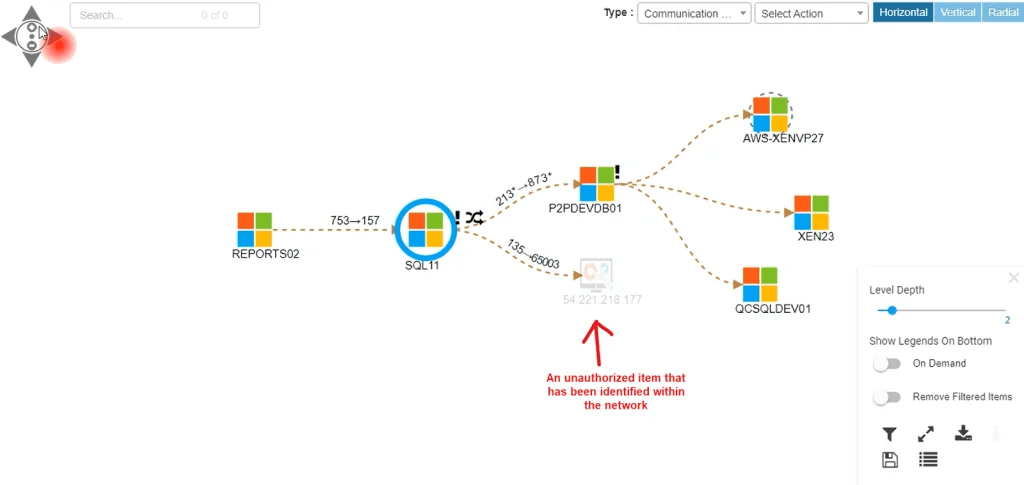
Virima uses over 140 extendable probes for both agentless and agent-based discovery. These probes scan physical and virtual machines across on-premise, cloud (including AWS and Azure), and hybrid environments.
The Discovery Agent supports Windows, macOS, and Linux. It tracks configuration changes and software usage even for devices that roam off-network. That makes it especially useful for remote and hybrid workforces where laptops don’t stay connected to the corporate network.
If you’re specifically weighing alternatives to Device42 Windows discovery, Virima’s discovery agent typically delivers richer endpoint coverage — including persistent monitoring of roaming devices and detailed software metering that agentless scans alone can’t capture.
You can schedule recurring scans to keep your asset inventory current without manual effort.
How does IT asset discovery help with CMDB management?
IT asset discovery feeds accurate, current configuration data directly into the CMDB. Without automated discovery, teams end up relying on manual imports and spreadsheets that go stale within weeks.
Virima’s discovery populates the CMDB with hardware specs, software versions, OS details, and network configurations. Each scheduled scan captures new assets and flags configuration changes on existing ones. That keeps the CMDB trustworthy for incident response, change management, and audit preparation.
Cost savings
Automating asset discovery cuts the time teams spend on manual tracking. Recurring scans also reveal underused resources, helping you reduce over-provisioning and reclaim wasted licenses.
Virima’s pricing stays predictable as you scale. Unlike Device42, adding service mapping or new discovery locations does not bump up your licensing cost.
Growth potential
Virima’s discovery tools scale with your infrastructure. Whether you’re adding cloud services or new office locations, the platform adapts without extensive reconfiguration. Agentless scanning means new assets get picked up automatically during the next scheduled scan.
ViVID™ service mapping and visualization
Virima’s Visual Impact Display (ViVID™) adds operational context that standard service mapping tools don’t provide. ViVID™ overlays ITSM records, including open incidents, pending changes, and event management alerts, directly onto dynamic service maps. This gives IT teams a visual heads-up display for change impact analysis, root cause identification, and stakeholder coordination.
Where Device42 offers basic dependency mapping with one-way ITSM integration, Virima provides bi-directional ITSM integration with platforms like ServiceNow, Ivanti, Jira Service Management, HaloITSM, and Cherwell. Virima also integrates with Xurrent and Hornbill, overlaying their ITSM records onto ViVID™ service maps.
NVD integration for vulnerability management
Virima integrates with the National Vulnerability Database (NVD) at no additional cost. During discovery, the platform checks assets against known CPEs and CVEs, helping teams identify vulnerabilities and prioritize fixes based on both severity and the criticality of the affected business service.
How does Device42 compare to Virima for IT asset discovery?
| Capability | Device42 | Virima |
| Discovery method | Agentless + agent-based | Agentless + agent-based (140+ probes) |
| Cloud discovery | AWS, Azure, GCP | AWS, Azure |
| CMDB integration | One-way (ServiceNow) | Bi-directional (ServiceNow, Ivanti, Jira, HaloITSM, Cherwell, Xurrent, Hornbill) |
| Service mapping | Basic dependency mapping | ViVID™ with ITSM/NVD overlays |
| ITSM record visibility | Not on maps | Open incidents, pending changes, alerts overlaid on maps |
| Deployment | On-premise | Cloud-native SaaS |
| NVD integration | Not included | Included at no extra cost |
| Pricing model | Per-feature licensing | Predictable pricing, service mapping, and locations included |
| Certifications | Not specified | PinkVERIFY 4 certified (6 processes: SACM, change, incident, problem, request, knowledge), SOC 2 Type II | |
What is the best Device42 auto-discovery alternative for small and mid-sized businesses?
For smaller IT teams, the right discovery tool balances depth with simplicity. Virima fits that profile well. Its cloud-native SaaS platform requires no on-premise infrastructure, and white-glove implementation support means you can have discovery results and your first service maps running within days, not months.
Predictable pricing without per-feature add-ons keeps costs in check as your environment grows. Teams already running ServiceNow or Jira Service Management can plug Virima in without displacing their existing ITSM investment.
Why Virima edges out Device42 auto-discovery?
Device42 auto-discovery provides solid features for identifying hardware, software, and network components. It gives organizations a clearer picture of their IT environment.
Virima goes further. With 140+ discovery probes, bi-directional ITSM integrations with major platforms, ViVID™ service mapping with ITSM and vulnerability overlays, and a cloud-native platform that scales without cost surprises, you get more visibility and faster time to value.
Schedule a demo to see how Virima can strengthen your IT management.