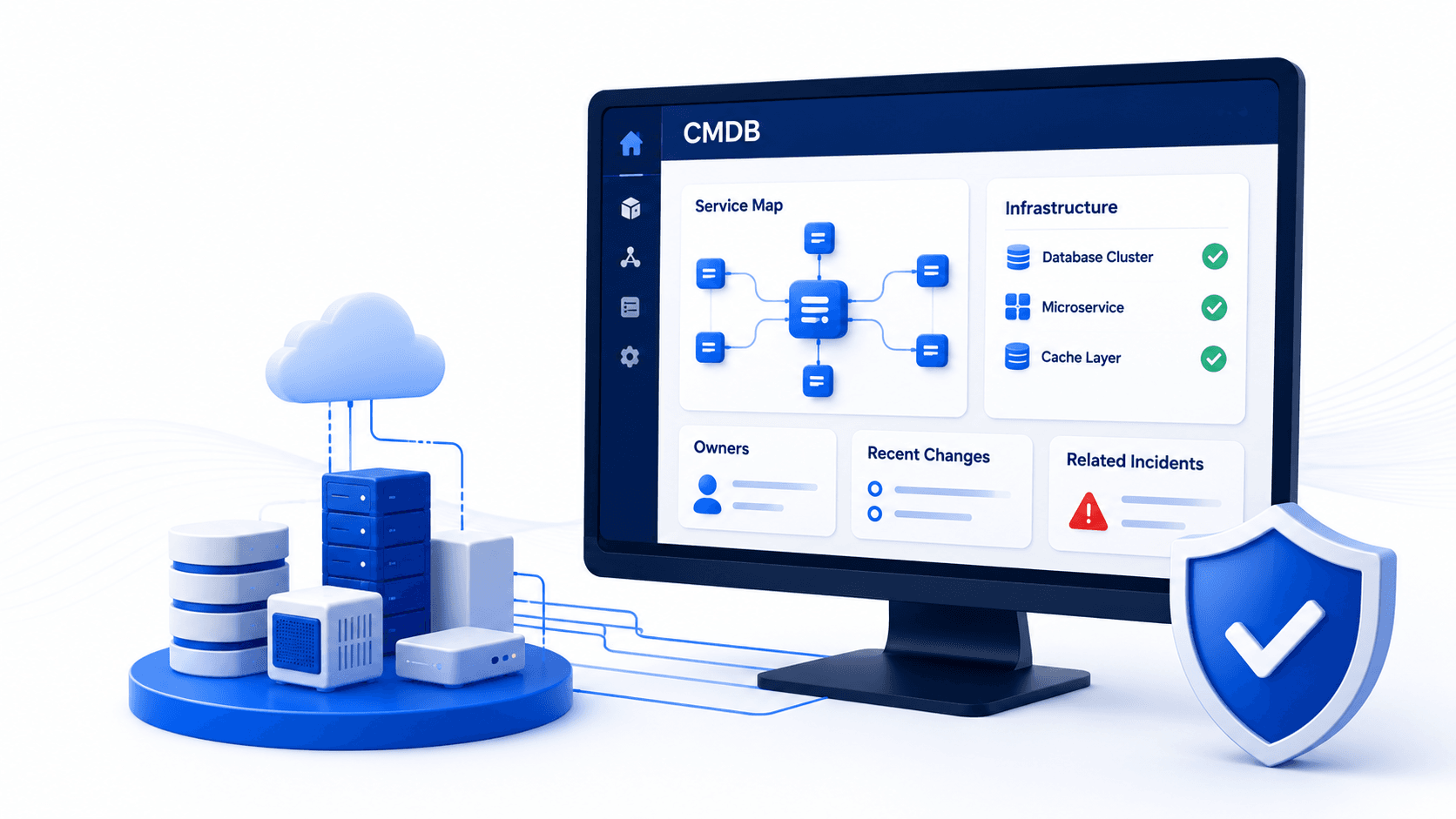
CMDB Buyer Guide: How to Evaluate Platforms for SRE and IT Ops

A critical production outage just hit your platform. Your incident commander opens the CMDB expecting to understand service dependencies and trace the blast radius. Instead, they find stale data; a database cluster shows as “running” when it was replaced three weeks ago. A microservice that shut down three months ago still appears as an active dependency. Now your team is digging through Slack threads, calling teams that supposedly own systems they can’t quite locate, and burning minutes while customers see errors.
This scenario plays out regularly across IT teams, and it is the moment CMDB quality becomes a direct threat to business continuity. For site reliability engineering teams operating at scale, an inaccurate configuration management database is the difference between a 15-minute incident resolution and a 2-hour outage that impacts customer revenue. Industry analysts have long argued that static configuration stores struggle when IT estate graphs change faster than manual upkeep can keep up; Forrester’s take on moving past the classic CMDB framing is one public example of that pressure.
Yet most organizations don’t recognize this problem until it is too late. They have already bought a CMDB platform, spent months trying to populate it, watched adoption falter, and eventually accepted that their system of record isn’t authoritative anymore.
This guide exists to help you avoid that outcome, whether you are an IT operations leader evaluating a CMDB for the first time, weighing options after an existing setup has stopped keeping pace, or a team leading the shift off spreadsheet-based tracking as infrastructure scale outgrows manual upkeep. The decisions you make now determine whether your CMDB becomes a strategic asset or an expensive data graveyard.
| When incident and change decisions need current CIs and service paths, not only a CMDB purchase checklist, the missing layer is discovery-sourced runtime accuracy. Explore Trusted Runtime Truth. |
What should SRE and IT ops leaders evaluate in a CMDB platform?
Prioritize discovery that keeps infrastructure state current, service maps that answer blast-radius questions during incidents, multi-source reconciliation for CI attributes, ITSM ticket context, and time to value on your estate rather than a curated demo. Feature checklists matter less than whether data stays trustworthy after go-live.
What SRE teams need from a CMDB
If you lead or staff an SRE function, start with what happens when a page fires. Your team needs to understand infrastructure state immediately, not eventually, and not after a long synchronization wait. The moment an incident fires, infrastructure state becomes critical.
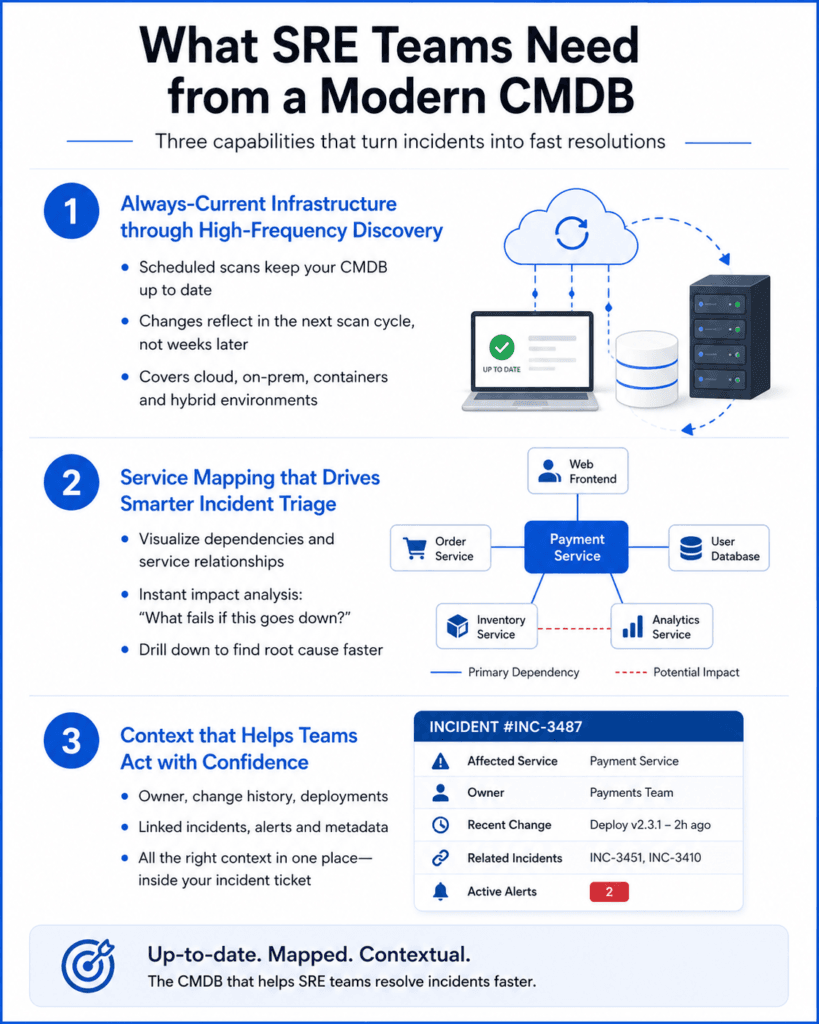
Three things come together to give SRE teams what they need from a CMDB during an incident:
- First, discovery keeps the infrastructure state current in the CMDB through frequent, scheduled scans. When a container spins up, when a database replica gets added, when a cache layer gets modified, that change reflects in your CMDB on the next scan cycle, not after a stale record sits unnoticed for weeks.
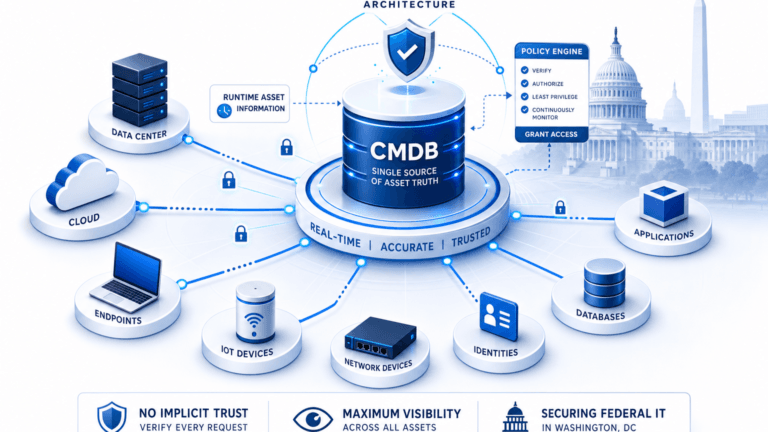
- Second, service mapping visualizes relationships between systems in a way that supports incident triage. Your team should be able to see that “if this service goes down, these five downstream services fail immediately.”
- Third, the CMDB provides context that helps teams make decisions quickly. Owner information, change history, recent deployments, linked incidents, and related alerts are accessible in one place.
Traditional CMDB setups struggle to deliver all three. They are built on the assumption that infrastructure changes on a schedule, that teams will manually update records, and that incident response can wait for a synchronization job to complete. None of that matches how modern infrastructure works.
High-frequency scheduled discovery is where this gets solved. Tools that scan your environment on a frequent, automated cycle and update your CMDB without manual data entry reduce the data staleness problem. Platforms that offer both agent-based and agentless discovery across cloud and on-premises infrastructure reduce friction and let you match method to asset class. When discovery feeds directly into your CMDB, infrastructure relationships can be established from what discovery finds, instead of being reconstructed manually from memory during an incident.
The second requirement: visualization that supports decision-making under pressure.
- Dependency maps that show service relationships
- Impact analysis that answers “what fails if this component goes down?”
- Drill-down capabilities that help teams trace root cause
Generic tables and list views don’t cut it when an incident is active, and your mean-time-to-resolution is measured in minutes.
The third requirement: native integration with your incident management platform.
When a page fires and an incident ticket opens, that ticket should immediately display:
- The affected service and its dependencies
- Recent change history
- The owning team and related incidents
That context shortens incident resolution time significantly. Integration also means that when you resolve an incident and learn something about that service, you can document it directly in your CMDB, keeping knowledge current and accessible to the next team that encounters a related issue.
Modern platforms like Virima bring these pieces together. Discovery-driven CMDBs reduce manual data entry and keep infrastructure visibility current with a mix of agent and agentless methods, not agents on every system by default. Service mapping tools visualize dependencies in ways that support incident response workflows, not only demos. Native ITSM integrations mean your incident tickets can surface the context your team needs to resolve issues faster.
For SRE teams, the practical difference comes down to this: a CMDB that stays current on a schedule you can trust, or one your team has to maintain by hand during every change.
See how Trusted Runtime Truth keeps discovery-sourced CMDB data usable when an incident is live.
What IT leaders should look for during evaluation
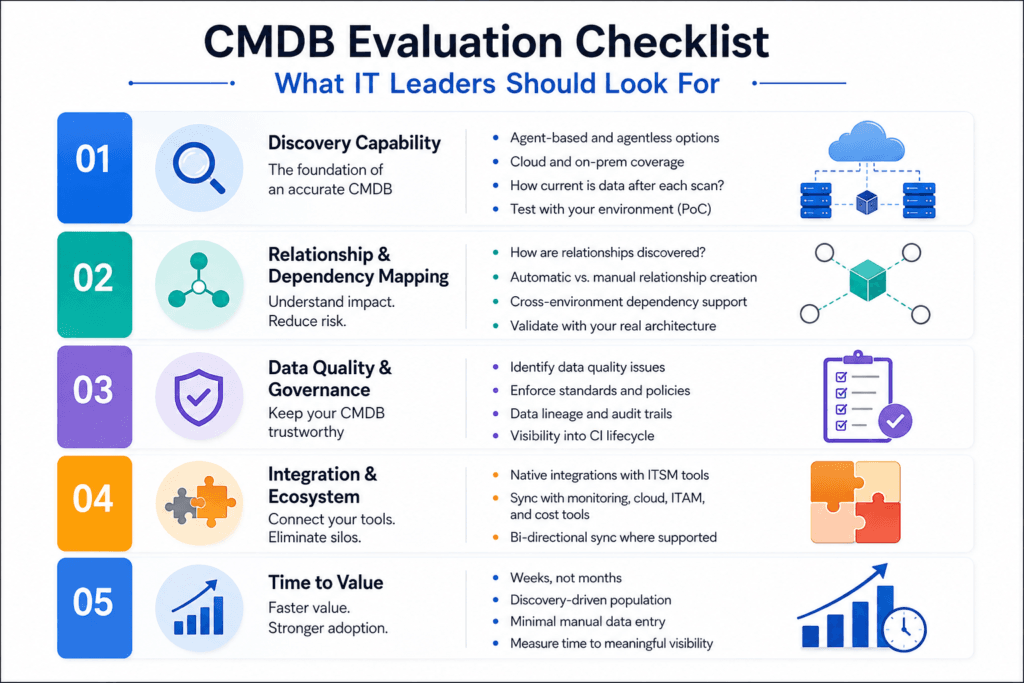
If you are an IT leader evaluating CMDB solutions, you face a different set of questions than SRE teams. Your concerns span multiple use cases: incident response matters, but so do change management, compliance reporting, asset lifecycle management, and capacity planning. You need a platform that scales across your entire organization, and this is where evaluation discipline matters.
Too many CMDB evaluations fail because organizations compare feature checklists instead of testing against real workloads. A platform that looks broad in a demo often reveals major gaps once you try to load production data. Consider these evaluation areas carefully.
First, discovery capability.
Ask each vendor how their discovery works:
- Does it require agents on every system, or can it combine agent-based and agentless methods?
- How does it handle cloud environments?
- How current is the data after a scheduled scan cycle?
- Which classes of infrastructure does automatic discovery cover in your estate, and which classes need manual input or a proof-of-concept test (including short-lived or highly dynamic workloads)?
Proof-of-concept testing matters here. Load your actual environment and see what gets discovered automatically, what requires manual input, and what gets missed entirely. A CMDB that misses a meaningful share of your infrastructure during automatic discovery is a CMDB your team will eventually stop trusting.
Second, relationship and dependency mapping.
This is where many platforms falter. Automatic discovery finds systems, but establishing the relationships between them remains largely manual in older setups. Ask vendors specifically:
- How do relationships get established?
- Do they infer infrastructure relationships from network scanning and API inspection, or do they require teams to manually define each relationship?
- How are business services defined (manual entry, import, or EA tool integration), and what does the platform automate after those definitions exist?
- Can they handle cross-environment relationships where a service in your cloud platform depends on a legacy database running on-premises?
Test this with your actual architecture. Dependency maps that don’t reflect reality are worse than no dependency maps at all, because teams will make decisions based on incorrect assumptions.
Third, how the platform handles data quality and governance.
A CMDB filled with inaccurate or incomplete data is actively harmful. Evaluate these capabilities:
- Does the platform include tools to identify data quality issues, like orphaned configuration items with no relationships, or services missing ownership information?
- Can it enforce standards at entry time?
- Does it provide visibility into data lineage, showing you which discovery method populated each attribute, so you understand confidence levels?
Governance frameworks keep CMDBs usable over time. They specify who can edit what, how changes get tracked, and how long configuration items persist before getting reviewed for retirement.
Fourth, integration with your existing tool ecosystem.
Your CMDB data doesn’t stay useful in isolation. The platform needs to:
- Feed CMDB data to your ITSM platform, including ServiceNow and Jira Service Management
- Sync with cloud cost management tools and integrate with monitoring platforms
- Support change management and compliance reporting processes
A CMDB that requires custom API integrations and heavy scripting becomes difficult to maintain. Native, out-of-the-box integrations that maintain synchronization automatically are non-negotiable for long-term success.
Fifth, time to value.
This category matters because implementation speed determines success:
- Can you get a meaningful configuration view of your environment within weeks, or does the project require months of data modeling and custom development?
- Some modern approaches use discovery-driven population, where discovery automatically populates your CMDB, reducing time-to-value.
- Others require you to manually define your entire data model before you load any data.
The difference between those approaches often determines whether your project succeeds or stalls.
| Evaluation criterion | What to test on your estate | Pass signal |
| Discovery coverage | Agent, agentless, and API paths against hybrid hosts and cloud accounts you actually run | New and retired CIs appear within your agreed scan cycle without manual spreadsheet loads |
| Service and dependency maps | Blast-radius questions on a real production path after service definitions you provide | Maps reflect definitions plus discovered relationships; composition is not invented |
| Data quality and governance | Multi-source conflicts, stale attributes, ownership fields on high-change CIs | Authoritative values reconcile predictably; drift is visible and fixable |
| ITSM and tool ecosystem fit | Ticket and change context using your ITSM of record | CI, owner, and recent change appear where operators work, without rip-and-replace |
| Time to value | Days to usable discovery on a non-demo slice of production data | Teams use the CMDB in incident or change work within the evaluation window |
Treat this scorecard as a buyer worksheet. Weight each row for your SRE and IT ops pain, then score vendors only after they load a slice of your estate rather than a curated lab.
A framework for smarter evaluation
These five evaluation areas will help you move past vendor checklists and assess whether a platform will work in your environment. During your evaluation, test each area against your actual infrastructure. See which vendors can handle your real complexity, not their demo complexity.
How often should CMDB discovery run for cloud-native environments?
Match scan cadence to change rate. Container and cloud estates often go stale on weekly or monthly cycles. Test frequency against incident and change decisions on your estate. Higher-frequency scheduled scans usually close most of the gap without always-on event-driven discovery architecture.
Evaluation mistakes that derail CMDB projects
Understanding what goes wrong in CMDB evaluations helps you avoid common pitfalls:
- The first mistake: Evaluating platforms in isolation instead of with your actual IT environment. Demo environments are clean, standardized, and predictable. Your actual environment is messy, heterogeneous, and constantly changing. Always insist on a proof-of-concept that loads your real data, discovers your actual infrastructure, and tests against your environment’s specific complexity. If a vendor refuses, that tells you something important about whether their platform can handle reality.
- The second mistake: Treating CMDB as a one-time project instead of a program. CMDBs fail when organizations expect to implement them once, then leave them static while the actual infrastructure evolves. A successful CMDB requires ongoing governance, frequent updates from discovery, and active management of the data model as your environment changes. If your evaluation doesn’t assess the vendor’s capabilities for keeping data current indefinitely, you are planning for failure.
- The third mistake: Underestimating the importance of user adoption. A CMDB is only useful if people use it. If your incident response team doesn’t check the CMDB during incidents because the data is stale, if your change management team doesn’t consult it before deploying changes because it doesn’t reflect reality, if your asset management team maintains parallel spreadsheets because the CMDB doesn’t answer their questions, the platform is dead weight. During evaluation, assess how easy the platform is to use, whether the interface supports your team’s workflows, and whether integrations are smooth enough that people see value in using it as part of their daily work.
- The fourth mistake: Focusing on features instead of outcomes. A CMDB with 200 configurable fields might sound impressive until you try to populate and maintain all of them. A platform with a more focused data model that captures what matters for your organization and keeps that data current might serve you far better. During evaluation, define the specific problems you are solving, then assess each platform’s ability to solve those problems.
Avoiding these mistakes starts with the right platform choice. If a vendor can’t show you rapid time to value with your actual data, if they can’t demonstrate how they keep data current indefinitely, if they can’t explain how adoption happens in your real workflows, those are red flags.
That is why discovery-driven approaches hold up against all four of these mistakes. Virima’s approach is built on automated discovery, frequent scheduled refresh cycles, native integration, and a weeks-to-value implementation timeline.
How Virima’s approach differs in evaluation
Virima’s CMDB strategy centers on discovery-driven population and scheduled discovery cycles. Rather than requiring teams to manually build every CI record, the platform discovers infrastructure automatically and populates configuration items from those scans. Multi-source reconciliation determines the authoritative value for each configuration item attribute. Service dependency maps are built after service definitions are provided (manually, via spreadsheet import, or via integrations such as Lean IX). The automation applies to map building from those definitions and discovered infrastructure, not to inventing service composition without input. This approach addresses the staleness and accuracy problems that plague traditional CMDBs.
- Discovery and Infrastructure Coverage
Discovery works with agent-based and agentless methods across cloud platforms and on-premises infrastructure. You are not forced to install agents on every system, and you are not limited to a single collection method. API-based discovery handles cloud providers, agentless network scanning identifies on-prem systems and appliances, agents provide deeper endpoint detail where you choose them, and integrations with your existing tools pull additional context. Everything that gets discovered feeds directly into your CMDB.
This approach means you can test Virima’s discovery against your actual environment in days, not weeks. Load your production data, run discovery, and see what you get in practice, not only what is possible in theory. Use the PoC to confirm coverage for the asset classes that matter in your estate, including any short-lived or highly dynamic workloads you care about.
- Visualization and Decision Support
Virima’s ViVID™ service mapping translates defined services and discovered infrastructure into business context. Rather than displaying a flat list of systems, it visualizes how systems relate to each other, how dependencies flow, and how services connect to the infrastructure that supports them once those services are defined. During incident response, this matters. Your team can see which systems depend on the failed component, which teams you need to notify, and where to focus investigation first.
This visualization changes how incident response happens. Instead of teams hunting through multiple tools, they see impact sooner.
- Integration and Synchronization
The platform integrates with ITSM systems, including bidirectional CMDB sync with ServiceNow where that path is supported, so incident tickets, change requests, and service catalog workflows can stay aligned with discovered infrastructure. Supported partner integrations also include Jira Service Management, Ivanti, HaloITSM, Xurrent, and Hornbill. This reduces the fragmentation problem where different systems maintain different versions of the same data.
- Evaluation Criteria Alignment
For IT leaders specifically, Virima’s approach addresses the evaluation concerns above directly:
- Discovery capability: Agent-based and agentless options; not agent-only and not “no agents ever”
- Relationship mapping: Infrastructure relationships from discovery; business service maps after service definitions are supplied
- Data quality governance: Audit trails tracking changes, data quality scoring showing where data is weak, and policies managing CI lifecycle
- Integration: Native paths into major ITSM and related tools
- Time to value: Weeks rather than months for many discovery-led starts, since you are not building the entire CMDB by hand
Understanding what to look for in a CMDB, and how different vendors address those requirements, helps you make an evaluation that sets up long-term success. Prioritize the platform that will stay current, support your teams’ real workflows, and solve the specific problems that matter in your organization over the one with the longest feature list.
How does Virima approach CMDB population and service mapping?
Virima populates CIs through high-frequency scheduled discovery using agent-based and agentless methods, with multi-source reconciliation for authoritative attributes. Business services are defined by the customer. ViVID™ then builds dependency maps from those definitions and discovered infrastructure and does not invent service composition without input.
Common evaluation questions answered
Q: Do we really need high-frequency discovery, or would weekly or monthly scheduled scans be sufficient?
A: It depends on your rate of infrastructure change. Consider these scenarios:
- For SRE teams operating container platforms or managing cloud-native infrastructure, weekly updates mean your CMDB is stale for most of that week.
- For traditional data center environments with slower change cycles, monthly updates might be acceptable.
Test both scenarios with your actual environment and measure how often stale data affects incident response or change decisions. Most teams find that scan frequency has a much larger impact on usability than they initially expected, and moving to a higher-frequency scheduled scan closes most of that gap without requiring always-on event-driven discovery architecture.
Q: How important is the ability to handle cost and ownership data in the CMDB?
A: Very important, but often overlooked during evaluation. Consider these benefits:
- Cost data in the CMDB enables you to understand the financial impact of infrastructure changes.
- Ownership data enables you to route questions and decisions to the right teams immediately.
If your CMDB can’t tell you who owns a service or how much it costs to run, it can’t support asset lifecycle management or financial governance decisions effectively.
Q: What’s a realistic timeline for CMDB implementation?
A: For a discovery-driven approach with modern tools, the timeline typically breaks down into two phases:
- Basic implementation: a usable CMDB with core configuration items and relationships in place, driven mainly by initial discovery scans.
- Advanced features: additional time for more complex data models, custom fields, and advanced governance policies.
A project that keeps stretching well past the basic phase without clear new functionality being added usually indicates excessive customization, which becomes a maintenance burden. Alternatively, it signals the platform requires significant manual data entry, which creates ongoing maintenance challenges.
Discovery-driven approaches like Virima’s CMDB implementation strategy accelerate time-to-value by frequently populating your configuration database rather than requiring manual data entry. Learn more about CMDB fundamentals to understand what affects implementation speed.
Q: Should we migrate data from our old CMDB to the new one, or start fresh?
A: Starting fresh with discovery-driven population is usually the better approach. Here is why:
- Old CMDB data often contains years of accumulated inaccuracies, outdated systems, and broken relationships.
- Discovery-based population gives you current, accurate data from day one.
- Historical access: You can reference the old system if you need historical information, but don’t let old data quality problems infect your new CMDB.
Q: How do we measure CMDB success after implementation?
A: Begin by defining specific metrics during the evaluation phase. Track these key indicators:
- Incident resolution time before and after CMDB implementation
- CMDB consultation rate during incident response (adoption metric)
- Data quality scores for key configuration item types
- Change request references to CMDB data for impact analysis
- Overall improvements in incident response speed, change success rate, and compliance audit readiness
Track these indicators from your baseline through your first few review cycles to see whether the platform is delivering.
What metrics show a CMDB evaluation succeeded after go-live?
Track incident time-to-context, change windows that miss known dependencies, CI drift between discovery and the system of record, and whether tickets carry owner and recent-change context. Success is operational trust under load, not only initial load counts at cutover.
Next steps for your CMDB evaluation
Evaluating a CMDB is one of the most consequential IT operations decisions you will make. The wrong choice costs months of wasted effort and stalled projects. The right choice transforms how your teams understand and manage infrastructure.
Start your evaluation by testing against your actual environment, not a demo setup. Ask vendors hard questions about discovery, data quality, integration, and ongoing maintenance. Measure time to value carefully, and keep evaluating the platform well after implementation wraps, since that is when governance and adoption get tested.
For IT leaders and SRE teams ready to modernize their CMDB approach, Virima offers a discovery-driven platform that addresses the core problems that plague traditional CMDBs. The platform uses high-frequency scheduled discovery to keep data current, relationship mapping built from infrastructure analysis and defined services, and native integrations to synchronize your ITSM, asset management, and compliance systems.
Check out our detailed comparison of CMDB platforms to understand how modern solutions stack up.
Use the scorecard and estate tests above before you commit budget. The goal is a CMDB your SRE and IT ops teams trust on the next incident, not only a clean vendor deck.
See how high-frequency scheduled discovery and ViVID™ maps after service definitions support CMDB evaluation criteria SRE and IT ops teams actually test under incident and change load.
Frequently Asked Questions
What should SRE teams prioritize when evaluating a CMDB?
Prioritize high-frequency scheduled discovery that keeps infrastructure state current, service mapping that supports blast-radius questions during incidents, and ITSM context on the ticket (owner, recent change, related incidents). If those three fail under a real page, feature checklists will not save the evaluation.
How often should CMDB discovery run for cloud-native environments?
It depends on change rate. Container and cloud-native estates often go stale on weekly or monthly cycles. Test scan frequency against incident and change decisions in your estate. Higher-frequency scheduled scans usually close most of the gap without requiring always-on event-driven discovery architecture.
Should we migrate an old CMDB or start fresh with discovery?
Starting fresh with discovery-driven population is usually better. Legacy CMDBs often carry years of stale CIs and broken relationships. Keep the old system for historical reference if needed, but avoid loading known-bad data into the new system of record on day one.
How does Virima approach CMDB population and service mapping?
Virima populates CIs through scheduled discovery using agent-based and agentless methods, with multi-source reconciliation for authoritative attributes. Business services are defined by the customer (manual entry, import, or tools such as Lean IX). ViVID™ then builds dependency maps from those definitions and discovered infrastructure and does not invent service composition without input.
What metrics show a CMDB evaluation succeeded after go-live?
Track incident time-to-context, change windows that miss known dependencies, CI drift between discovery and the system of record, and whether tickets carry owner and recent-change context. Success is operational trust under load, not only initial load counts at cutover.