
What Is a CMDB? A
Complete Guide for IT Teams
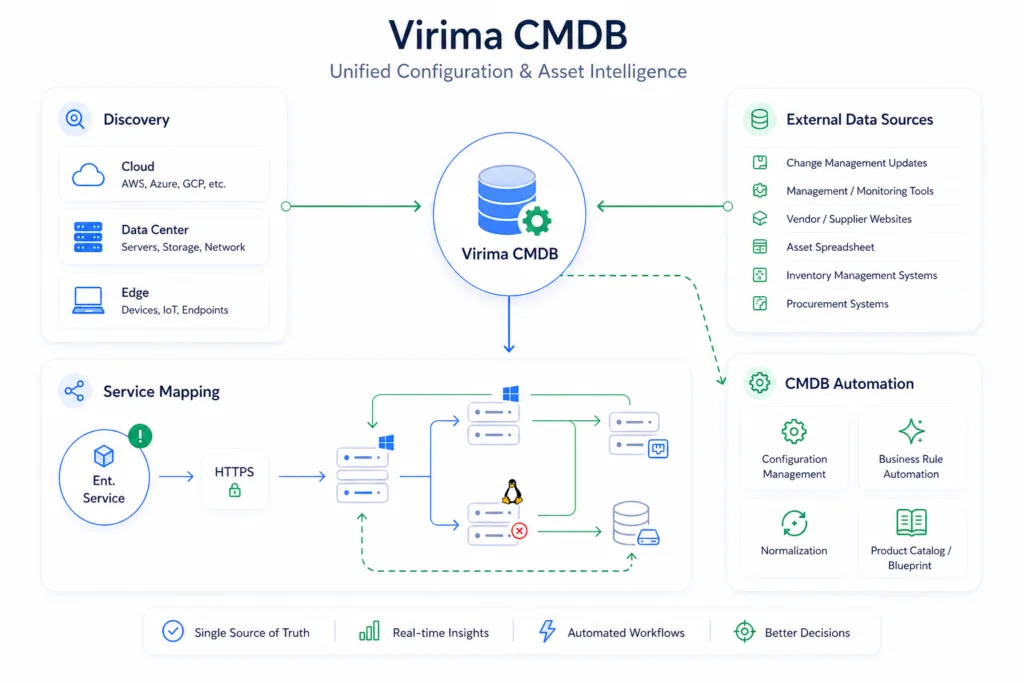
In a nutshell, a configuration management database (CMDB) is a central repository of all components an organization wants to manage across its IT infrastructure. Whether it be a CCTV camera, a router, a server, APIs etc, each of these, and many more, are a configurable item that sits as an independent entry inside a CMDB.
A CMDB acts as a single source of truth for every piece of IT hardware, software, and associated records like certificates and licenses that an organization runs. Every action, every change, every dependency and every incident resolution depends on an updated CMDB for accurate execution and reconciliation.
On this page
What Is a CMDB?
A configuration management database (CMDB) is a structured database, typically a module within an IT service management (ITSM) or IT asset management (ITAM) A configuration management database (CMDB) is a structured database that stores configuration items (CIs): the individual hardware and software components that make up an IT environment, along with their attributes and relationships to each other. It can exist as a standalone system or as a module within a broader IT service management (ITSM) or IT asset management (ITAM) platform.
Take a single server as an example. Inside the CMDB, that server exists as one CI with its own record: OS version, patch level, installed applications, and IP address. The CMDB also maps what depends on it. If the server hosts a billing application, that dependency gets recorded too. So when the server needs a patch or goes down, the CMDB shows exactly what else gets affected before the change happens or the incident spreads.


Server (CI)


Billing application
Dependency recorded in the CMDB

This relationship data is what separates a CMDB from a plain inventory list. An inventory tells you the server exists. A CMDB tells you what breaks if it doesn’t, and who owns it, so the right team gets contacted the moment something goes wrong.
What Does CMDB Stand For?
CMDB stands for configuration management database. The name breaks into two parts: CM (configuration management) and DB (database). Neither word describes the tool in isolation, “configuration management” is the discipline, “database” is just the storage layer, but together they name what the tool actually is: a database purpose-built to support the configuration management discipline, rather than a generic data store repurposed for the job.
The term originates from ITIL (IT Infrastructure Library), a framework developed for the UK government starting in 1989. ITIL formalized configuration management as a defined process in its second version, released in 2000, establishing the CMDB as the system of record for configuration items (CIs).
How a CMDB Works


STEP 1
Discovery


STEP 2
CI Creation


STEP 3
Relationship Mapping


STEP 4
Reconciliation
STEP 1
Discovery
Discovery runs on scheduled scan cycles that scan the environment for devices and applications. When a scan finds a new asset, such as the server from earlier, it captures that asset's attributes: OS version, IP address, installed software, and more. Services aren't discovered the same way: mapping a set of CIs to a named business service requires manual definition, or a service model applied on top of what discovery finds, since there's no way to scan for what counts as "the billing service" without someone first defining its boundaries. server from earlier, it captures that asset's attributes: OS version, IP address, installed software, and more.
STEP 2
CI Creation
CI creation turns that captured data into a formal configuration item (CI) inside the CMDB. The server becomes its own CI record, with a unique identifier, defined attributes, and a lifecycle state, typically commissioned or decommissioned, that tracks whether it's actively deployed or retired from use.
STEP 3
Relationship Mapping
tracks whether it's actively deployed or retired from use. Relationship mapping links that CI to everything it connects to. If the server hosts a billing application, the CMDB records that dependency, along with any upstream systems the server relies on. Where a service model has been defined, that same dependency also surfaces which named business service, like billing, sits downstream of the server.
STEP 4
Reconciliation
Reconciliation compares each new scan against the existing CI record and updates it: patch level changes, new software installs, retired dependencies. Many organizations anchor this process against a configuration baseline, an approved snapshot of a CI's state at a known point in time, so any drift from that baseline is easy to spot rather than buried in a stream of incremental changes. This keeps the server's record current with what the scan actually finds, giving the CMDB standing as an authoritative source of reconciliation rather than a one-time snapshot.
How well this works in practice depends on the data model behind it. A common service data model (CSDM) defines consistent categories and relationships across CI types, which is why CSDM matters for CMDB success: without it, the same asset can get classified differently across teams, and relationship mapping breaks down.


CMDB vs. IT Asset Management (ITAM)
A CMDB tracks the relationships and current state of configuration items. IT asset management (ITAM) tracks ownership, cost, and lifecycle stage of those same assets. The two overlap on the underlying data but answer different questions: a CMDB shows what’s connected to what and what breaks if it fails, while ITAM shows who owns an asset, what it cost, and when it needs replacing.
Many organizations run both, feeding the same asset data into each system for a different purpose. A CMDB and ITAM, even though separate parts in an IT stack, converge and diverge significantly in their utility and purpose. For operators and executives it becomes crucial to know the difference between ITAM and a CMDB.


CMDB
A CMDB tracks the relationships and current state of configuration items.


ITAM
IT asset management (ITAM) tracks ownership, cost, and lifecycle stage of those same assets.
CMDB in ServiceNow (and Other ITSM Platforms)
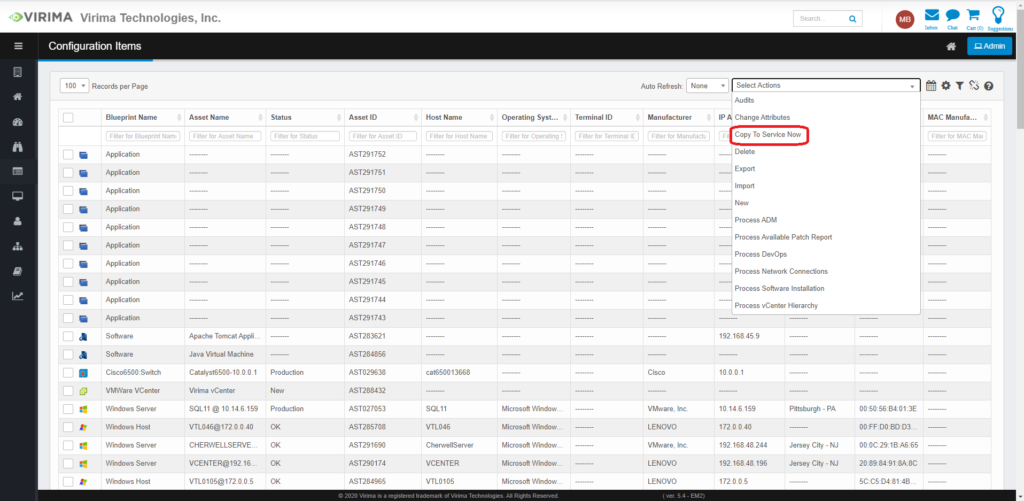
ServiceNow ships its own CMDB as part of the CI/CMDB module built into its ITSM platform. Inside ServiceNow, a CI follows the platform’s own class hierarchy, with predefined tables for servers, applications, network devices, and other configuration item types, each with its own set of attributes and relationship rules.
This leads to a common point of confusion: many teams use “CMDB” and “ServiceNow CMDB” interchangeably. A CMDB is a platform-agnostic concept, a database of configuration items and their relationships, that can exist inside any ITSM tool or as a standalone system. ServiceNow’s CMDB is one specific implementation of that concept, built to work within ServiceNow’s own data model and workflows.
ServiceNow’s native discovery populates that CMDB using MID Servers, on-premises components that scan devices within network reach using protocols such as WMI, SNMP and SSH. That architecture works well for tightly governed, on-premises environments, but it creates coverage gaps: distributed or off-network endpoints fall outside MID Server reach, and discovery cadence is constrained by MID Server capacity, leaving a window between scans where configuration changes go undetected.
This is why many ServiceNow customers run a discovery layer alongside ServiceNow’s CMDB rather than relying on MID Server discovery alone. Virima’s agentless and agent-based discovery reaches distributed and off-network assets that MID Servers can’t, then reconciles that data against existing ServiceNow CI records before syncing, so the CMDB stays populated with fewer coverage gaps and less manual cleanup. ServiceNow still runs the workflows; the CMDB underneath them gets built from a wider set of sources.
Other ITSM platforms, including Atlassian’s Jira Service Management and Ivanti, follow the same basic pattern: each ships a CMDB or CI repository native to its own platform, built to the same core concept but implemented differently.


enhance and fully integrate our CMDB into all of our ITIL
processes. The seamless integration gives us the ability to
leverage the best of both Virima and ServiceNow.”


Keith Lee
VP Disaster Recovery and IT Risk
Core Benefits of a CMDB
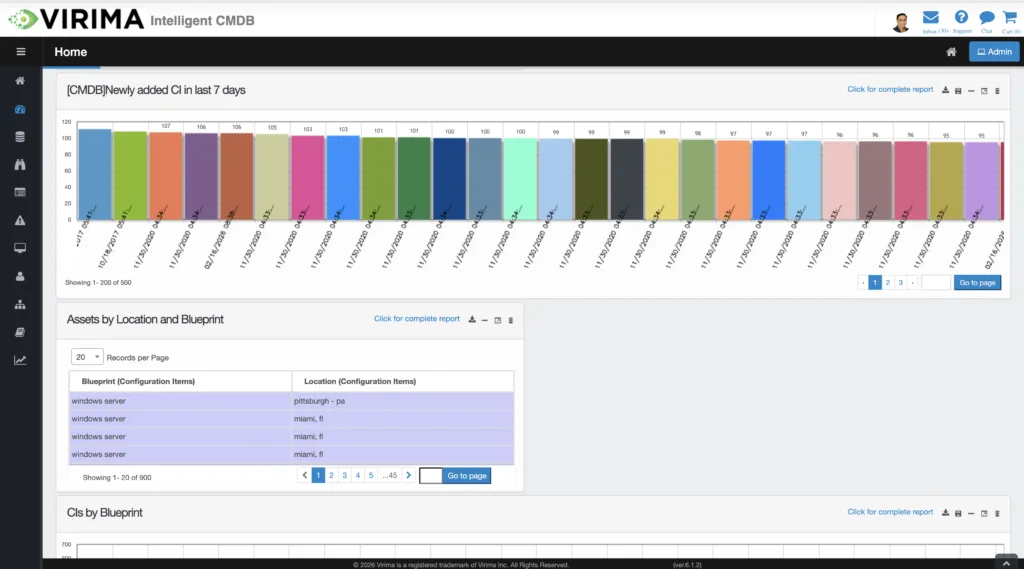
A CMDB’s value isn’t tied to one team or one use case. It’s what accurate configuration and dependency data enables across the organization: faster mean time to repair (MTTR) when an incident hits, a smaller blast radius when a change goes wrong, and fewer blind spots between security, finance, and operations. Every benefit below traces back to the same source: current, relationship-aware data that teams can act on instead of guessing from.
Here is how a CMDB enriches major functions of enterprises:


Operational
Change management depends on knowing what a proposed change will affect before it's approved. Without that visibility, teams approve changes on assumptions, and the real blast radius only surfaces once services start failing. With thousands of interdependent moving parts in a typical IT stack, one small change can trigger a domino effect that cascades into service disruption.
A change advisory board reviewing a proposed database migration works from current dependency data instead of a six-month-old spreadsheet export. They see which applications connect to that database, which teams own them, and what breaks if the migration goes wrong, before the change window opens instead of after an outage.


IT Asset Management
IT asset management (ITAM) teams need to know what's deployed, who owns it, and what stage of its lifecycle it's in, but that data means little without knowing what each asset actually connects to. A CMDB gives ITAM teams that missing context: not just an inventory count, but which assets are load-bearing and which aren't, along with operational visibility into the ghost assets sprawling in the system.


Financial
Every unused or underutilized asset still on the books represents money spent without a return, and most organizations can't see that gap without dependency data to prove an asset is actually idle. A CMDB linked to asset data closes that gap by showing what's connected to what, not just what was purchased.
When a server's CI record shows no active dependencies for months, that's a candidate for decommissioning rather than a renewed contract, freeing up budget that was quietly funding infrastructure nobody uses.


Compliance
Auditors don't ask what an organization believes its environment looks like, they ask for evidence. Without a CMDB, that evidence gets assembled manually, system by system, and the gaps in that process are exactly where audit findings come from.
An auditor asking for evidence of every system that touches cardholder data gets a direct answer from the CMDB's relationship records, rather than a scramble across five different spreadsheets maintained by five different teams.


Cybersecurity
Security teams can't protect what they can't see, and a vulnerability's real risk depends on what it's connected to, not just where it lives. A CMDB gives security teams that connective layer, turning a list of vulnerable assets into a prioritized list of business-critical exposures.
When a critical vulnerability is disclosed for a specific software version, a security team queries the CMDB for every CI running that version, maps which ones support revenue-generating services, and prioritizes patching by actual business impact instead of patching alphabetically.

Best Practices for CMDB Success


Define a clear CI scope before populating data
Decide which configuration items belong in the CMDB and at what level of detail. A CMDB that tries to track everything becomes as unusable as one that tracks too little; scope has to match what change, incident, and compliance processes actually need.


Establish a baseline before layering on updates
A CMDB needs an accurate starting snapshot of the environment before ongoing discovery can maintain it. Without that baseline, discovery just perpetuates whatever gaps or errors existed at the start. Getting the baseline right is foundational enough that it's worth its own dedicated look at why a CMDB baseline matters.


Run discovery on a scheduled, high-frequency cadence
Manual updates can't keep pace with a changing environment. Scheduled scans catch configuration drift, new deployments, and decommissioned assets closer to when they actually happen.


Model relationships, not just inventory
A list of assets without dependency data answers "what do we own" but not "what happens if this fails." Relationship mapping is what makes a CMDB useful for change and incident management rather than just asset tracking.


Assign clear ownership for CI data quality
Every configuration item needs an owner accountable for its accuracy, or data quality erodes as an organization grows and no one is responsible for catching drift.


Align with ITIL configuration management guidance
ITIL frames the CMDB as the system of record supporting change, incident, and problem management. Following that structure keeps a CMDB's data model consistent with the ITSM processes it's meant to support.


Measure accuracy on an ongoing basis, not just at rollout
A CMDB that was accurate at launch can still drift over time. Regular accuracy checks catch that drift before it undermines the processes depending on the data, following an established method for determining CMDB accuracy.
Common CMDB Challenges (and How to Address Them)
A CMDB is most useful when it is regularly updated with fresh scans. Between that scan and the present moment, the environment keeps changing: new deployments, decommissioned assets, configuration drift that nobody logged.
It creates a gap between what exists in the estate and what the CMDB shows. And change advisory boards approve changes based on data that no longer matches reality, and where audits surface assets nobody accounted for.
This isn’t a tooling defect so much as a structural fact of how CMDBs work: they capture state at discrete points in time, and the interval between those points is where risk accumulates. A CMDB without regular discovery behind it drifts further from reality with every passing week, until the gap between what the CMDB shows and what actually exists becomes wide enough to cause real damage during a change window or an audit.
This isn’t a tooling defect so much as a structural fact of how CMDBs work: they capture state at discrete points in time, and the interval between those points is where risk accumulates.
Shrinking that gap also depends on how the CMDB gets populated in the first place. Organizations relying on manual or infrequent updates carry a wider staleness window than those running scheduled discovery. The choice of discovery approach, and how often it runs, directly determines how current the CMDB stays
The discovery method itself matters too, since different techniques reach different parts of an environment and update at different cadences. And because a CMDB’s relationship data underpins service mapping, the accuracy problem doesn’t stay contained to the CMDB alone, it flows into every service map built on top of it.
CMDB Tools and Software Landscape


Platform-native
Platform-native CMDBs work well when an organization is fully standardized on that platform, since the CMDB shares the same data model as the rest of the ITSM workflows.


Standalone
Standalone solutions typically prioritize discovery breadth and cross-platform reconciliation, feeding data into whichever ITSM platform a team already uses rather than requiring a switch.


Cloud-native
Cloud CMDB tools focus specifically on tracking cloud resources, which move and scale differently than traditional on-premises infrastructure.

The right CMDB tool depends on what an organization is trying to solve: platform consolidation, discovery coverage across a hybrid estate, or cloud-specific tracking. Each comes with different tradeoffs around setup complexity, licensing structure, and how much of the existing ITSM investment it requires giving up.
a US-based Bank


Robert Hanson
IT Manager and Director
How Virima Approaches CMDB Differently
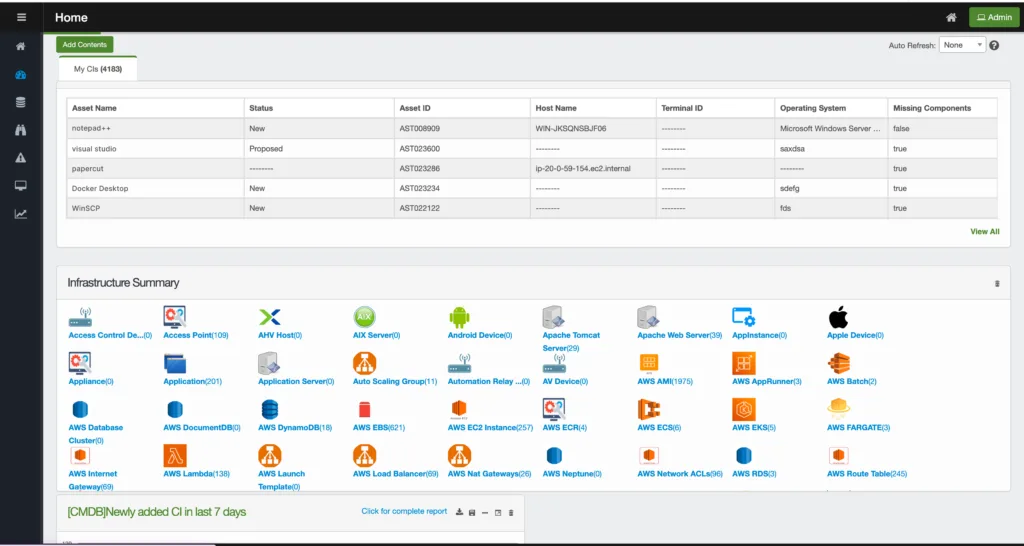
Most of the challenges above come down to one thing: how often the CMDB gets refreshed against what’s actually running. Virima’s discovery model runs on scheduled, high-frequency scan cycles, closing the staleness gap between updates faster than periodic manual audits allow, and giving change advisory boards, auditors, and security teams a record that reflects a recent state of the environment rather than a months-old snapshot.
That discovery layer works alongside existing ITSM platforms rather than requiring teams to replace them. Virima feeds current CI and relationship data into the CMDB tables a team already uses, whether that’s ServiceNow, Jira Service Management, or another platform, reconciling data from multiple sources into a single record rather than leaving teams to manually merge conflicting updates.
This same current, relationship-aware data becomes the foundation AI agents need when handling incident triage, change risk assessment, or remediation workflows. An AI agent acting on stale CMDB data can misjudge a change’s blast radius or miss a dependency entirely; an agent acting on discovery-refreshed data has an accurate picture of what it’s actually operating on. Virima provides that current data foundation; the broader governance and access controls around agentic action sit with platforms purpose-built for that layer.
Everything on this page, from discovery to reconciliation to how a CMDB supports change, incident, and compliance work, comes together in Virima’s CMDB feature.


— Frequently asked questions
CMDB Questions, Answered.
What does CMDB stand for?
What is CMDB software?
Is a CMDB the same as an asset inventory?
What is CMDB architecture?
How is a CMDB kept up to date?
What's the difference between a CMDB and a network discovery tool?
What is an example of a CMDB configuration item?
What is a CMDB schema (or CMDB blueprint)?
What kinds of entities does a CMDB track?
— Get started
Move faster. Act safely.
without platform lock-in.