CIO IT Service Health Dashboards: What to Track and How to Build Them

A CIO IT service health dashboard is a unified view of the operational status of your critical business services. It combines uptime data, incident metrics, SLA compliance, change history, and CI dependency maps into one decision-grade display. IT leaders use a CIO IT service health dashboard to spot risk before it escalates and to communicate service performance to business stakeholders with accuracy.
Resilience metrics are now standard practice for the teams these dashboards serve. Atlassian research has found that mean time to resolve (MTTR) is one of the most widely adopted incident management indicators, tracked by 86 percent of respondents (Atlassian incident management KPIs).
Why You Need a Dedicated Service Health Dashboard
- Most IT monitoring tools are built for engineers. They show infrastructure metrics: CPU usage, memory, disk throughput, and network latency. Those metrics matter, but they do not tell you whether payroll processing, the customer portal, or the ERP system is at risk today. A different kind of visibility layer is needed for service-level decisions.
- A service health dashboard translates infrastructure signals into business service outcomes. Instead of showing server uptime in isolation, it shows whether the service that server supports is meeting its SLA commitment. That distinction matters when you are reporting to the board, approving a major change, or deciding whether to escalate a P1 incident.
- As change activity increases during a cloud migration, a merger, or a quarter-end freeze, service health visibility becomes more critical. Without it, you approve changes without knowing the downstream impact. With it, you see which services, assets, and teams sit in the path of every change before you sign off. A CMDB built for change management is what makes that impact picture trustworthy.
- The shift from reactive monitoring to proactive service governance is exactly what a CIO IT service health dashboard supports. It is not a NOC dashboard dressed up for the boardroom. It is a different tool with a different data foundation.
The Eight Metrics Every CIO Service Health Dashboard Should Track
Not every metric from your monitoring stack belongs on a service health dashboard at the leadership level. The goal is signal, not noise. These eight metrics give you full coverage from availability to risk.
| Metric | What it tells you | Why it belongs at the leadership level |
|---|---|---|
| Service availability (uptime %) | Is the service running? | Directly tied to SLA commitments |
| Mean time to detect (MTTD) | How quickly issues are spotted | Slow detection compounds damage and cost |
| Mean time to resolve (MTTR) | How fast your team restores service | Core resilience benchmark for board reporting |
| SLA compliance rate | Are you meeting your commitments? | Business and contractual accountability |
| Change success rate | What share of changes land without incident? | Flags process or data quality risk |
| Open P1 / P2 incidents | How many high-impact issues are active? | Immediate operational risk signal |
| CMDB accuracy / CI health score | Is your configuration data trustworthy? | Stale CI data produces false health signals |
| Impact exposure | Which services are affected by a failing CI? | Change and incident impact scoping |
Tracking MTTR in service context, alongside the SLAs it affects, is what separates a leadership dashboard from a raw monitoring feed.
The last two metrics on this list are the ones most dashboards miss. CI health score and impact exposure both depend on accurate, discovery-driven configuration data. Without that data foundation, those metrics do not exist on your CIO IT service health dashboard.
The Foundation Problem: Why Most Dashboards Fall Short
Here is where most CIO IT service health dashboards break down. They pull data from monitoring tools and ITSM platforms, but skip the layer that explains why something failed: accurate, discovery-driven configuration item data.
When your CMDB is stale, your dashboard shows incident alerts without showing which CIs caused them. It cannot trace a failing server to the three business services it supports. It cannot show you that a scheduled change touches a CI shared by payroll and the customer portal. That is not a monitoring problem. It is a data foundation problem most CMDB projects share.
Virima addresses this through IT discovery that runs high-frequency discovery cycles across your on-premises, AWS, and Azure environments. Each cycle refreshes CI data and relationship maps, so your dashboard is built on a discovery-driven foundation rather than a manually maintained snapshot from last quarter.
| See how Virima keeps your CMDB accurate enough to power service-level decisions. Request a demo |
How ViVID™ Builds the Visual Layer for Service Health
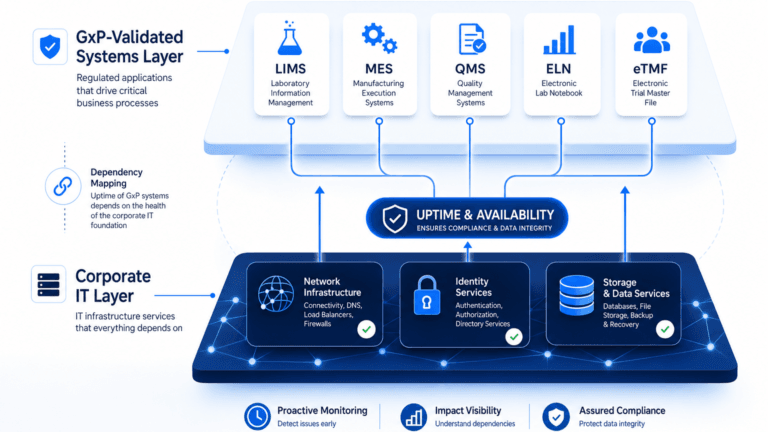
Standard dashboards show CI status as a flat list or a table. ViVID™ service maps show it as a dynamic dependency map. That difference matters more than it sounds.
ViVID™ displays each business service as a connected graph of the CIs that support it. When a CI shows an active incident or a pending change, the map highlights which services sit in the impact path. You do not need to chase down relationships manually. The visual context is already there.
Change history is embedded in the same view. So when something breaks during a late-night maintenance window and your team pulls up the dashboard, they can see that a configuration change touched a related CI three hours earlier. That context cuts triage time. It also gives you a clear post-incident record showing what changed, when, and what was affected downstream.
ViVID™ works because Virima builds the dependency map from discovery-sourced CI data. Once you provide your service definitions, through manual entry, spreadsheet import, or third-party integrations, Virima constructs and maintains the maps as your infrastructure changes. The maps stay current without manual maintenance cycles.
Five Steps to Build a CIO IT Service Health Dashboard
Building a dashboard that is useful at the leadership level takes more than plugging in monitoring feeds. Follow these five steps to build one that holds up under board scrutiny.
- Define your critical services. Start with the ten to fifteen services that matter most to business continuity: your ERP, HRMS, customer-facing portal, and key internal platforms. Service definition is the required input for ViVID™ to build its dependency maps.
- Populate your CMDB with discovery-driven CI data. Manual CMDB entry does not scale and produces stale records that corrupt every downstream decision. Use Virima’s high-frequency discovery cycles to build a CMDB that stays accurate as your environment changes. This step is what makes the rest of the dashboard trustworthy.
- Map dependencies with ViVID™. Once CI data is current, ViVID™ builds the visual dependency map for each service. You can see which servers, databases, and network devices underpin each business service, and which teams own them.
- Layer in change history and risk. Connect your ITSM platform so that change records, incidents, and problem tickets appear in context on the service map. A change scheduled against a shared CI should surface on the service health view before the change window opens.
- Set SLA thresholds and alert rules. Define what healthy means for each service: availability targets, MTTR thresholds, and maximum open incidents. Your dashboard should alert you when a service trends toward breach, not after it breaches and the business is already impacted.
Reducing detection time often has more impact than reducing resolution time, and step four is where that detection advantage comes from. When change history is visible on your service map, your team detects the cause faster.
Connecting Your Dashboard to ITSM Platforms
A service health dashboard without ITSM integration is a monitoring screen. The real value arrives when discovery-driven CI data flows into your ticketing and change management workflows, and vice versa.
Virima integrates with ,ServiceNow, Ivanti, Halo, Jira Service Management, and Xurrent. Each integration pushes accurate CI and relationship data into your existing ITSM workflows. Change records reference the actual CI dependencies. Incident records show the affected services. Your teams stop working from memory and start working from verified data.
That two-way data flow also keeps your dashboard current. When an incident is raised in your ITSM tool, it appears on the ViVID™ map against the relevant CI. When a change window closes, the map reflects the updated state. The result is a service health view that tracks what is happening in your environment, not what was true six months ago when someone last updated a spreadsheet.
Your Dashboard Is Only as Reliable as Your CI Data
Before you build the dashboard, address the data quality question directly. A dashboard built on stale or manually maintained CI data will show you false confidence. You will see green lights on services that are one undiscovered change away from an incident.
Virima’s discovery-driven approach means your IT asset management data, CI relationships, and service maps all refresh through recurring scheduled scans. AWS and Azure cloud assets are covered through API-based discovery. On-premises assets are covered through agentless and agent-based methods. The result is a CMDB health score you can trust, rather than one you need to validate by hand before every board report.
When you can see which services share a CI about to be changed, the approval decision changes. You stop approving on faith. You approve with evidence instead. That shift from intuition-based to evidence-based change approval is where a CIO IT service health dashboard delivers its clearest return.
From Status Page to Decision Tool: What a Mature Dashboard Delivers
The difference between a status page and a decision tool comes down to context. A status page tells you what is broken. A decision-grade service health dashboard tells you what changed, what is connected, what is at risk, and who owns it.
That context turns IT operations data into boardroom-ready intelligence. You move from responding to outages toward preventing them. You approve changes with evidence. You report service performance against business commitments rather than against raw uptime percentages.
Virima’s discovery-driven CMDB, IT discovery cycles, and ViVID™ visual maps give you that decision-grade foundation. When your environment changes, your dashboard keeps up. When a risk appears, you can see it before it escalates into an incident that lands on the board agenda.
| See how Virima helps IT leaders build service health dashboards that support faster decisions, safer changes, and stronger board-level reporting. Request a demo |
Frequently Asked Questions
What is the difference between IT service health monitoring and infrastructure monitoring?
Infrastructure monitoring tracks the performance of individual components: servers, networks, and databases. IT service health monitoring maps those components to the business services they support. It shows whether those services are meeting SLA commitments, not just whether individual CIs are operational. The service layer connects IT performance to business outcomes.
How often should you review the service health dashboard?
Most IT leaders review a high-level service health summary daily, with automated alerts configured for SLA breach events. During major change windows, cloud migrations, or periods of elevated incident volume, the ViVID™ dependency map provides an early impact signal before issues escalate to P1 status.
What makes a CIO dashboard different from a NOC dashboard?
A NOC dashboard is built for engineers who need alert volume, signal triage, and technical detail. A CIO IT service health dashboard is built for decision-making. It shows service-level outcomes, SLA compliance, change risk exposure, and CMDB accuracy scores. It answers whether the business is at risk rather than which server has the highest CPU load.
Can you build a service health dashboard without replacing your existing monitoring tools?
Yes. Virima sits alongside your existing monitoring stack. It adds the CMDB foundation, service dependency maps, and change history layer that most monitoring tools lack. Your existing tools keep doing what they do. Virima provides the service-level context that turns their alerts into actionable service health signals.
How does impact visibility change how leaders approve changes?
When you can see which business services share a CI involved in a pending change, you move from approving on faith to approving with evidence. ViVID™ shows the dependency path of every CI in a pending change. That visibility helps reduce failed changes and gives you a defensible record of the risk assessment behind each approval decision.