Asset Management Integration: Intune, Entra ID & Jamf

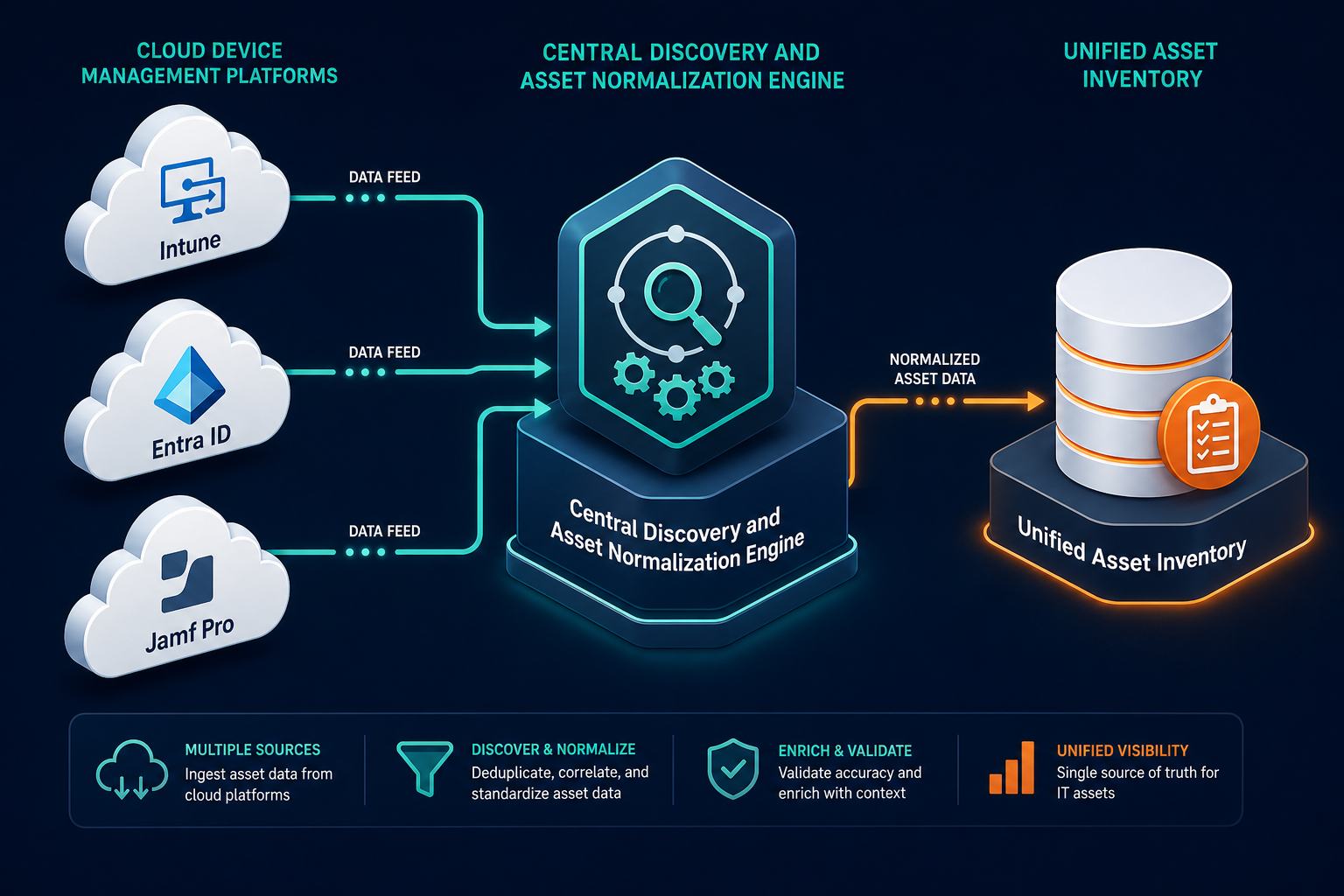
A new hire’s MacBook shows up in Jamf as enrolled, compliant, and fully patched. Three unmanaged switches, an aging hypervisor, and a contractor’s personal laptop sit on the same floor, invisible to every console your team watches, until an incident forces someone to ask what else is connected that nobody tracked. That blind spot is exactly what a solid asset management integration with Intune, Entra ID, and Jamf is supposed to close. Modern IT asset management software connects directly to Microsoft Intune, Entra ID, and Jamf Pro through authenticated REST APIs. The connection pulls managed endpoint inventory, operating system builds, hardware serial numbers, and primary user assignments without manual CSV exports or duplicate desktop discovery agents.
For system administrators and endpoint engineering teams, connecting MDM and directory feeds into asset management eliminates weeks of tedious manual reconciliation. When a laptop ships through Windows Autopilot or a new Entra ID account gets provisioned for a contractor, the hardware record, warranty date, and user assignment should populate the central asset repository without someone re-typing it from a spreadsheet. Understanding what these cloud APIs actually synchronize, how permissions work, and where physical network discovery still has to carry the load protects organizations from incomplete asset governance.
What MDM and identity synchronization covers
Cloud-based device management and identity platforms hold rich configuration details for provisioned endpoints. When asset management software queries these platforms, it extracts operational and identity attributes that form the core of hardware and software lifecycle records.
Microsoft Intune delivers endpoint telemetry captured during device check-in cycles. Through the Microsoft Graph API, asset management software ingests device manufacturer, model, serial number, OS version, encryption status, compliance state, and the inventory of installed software across managed Windows, macOS, iOS, and Android devices.
Entra ID (formerly Azure Active Directory) contributes identity context: user profiles, department allocations, manager hierarchies, and device enrollment join type (Microsoft Entra joined versus registered). Linking those identity records to the matching Intune endpoint record lets the asset platform map cost centers, departments, and custodians for every device automatically.
Jamf Pro provides the equivalent depth for Apple fleets. Its REST APIs expose Apple silicon specifications, battery health cycles, macOS build versions, FileVault enforcement, enrollment dates, and warranty metadata, so mixed environments end up with one inventory spanning Windows, Linux, and Apple hardware instead of three separate ones.
How does asset management software sync with Intune and Entra ID?
Asset management software connects to Microsoft Graph APIs using an enterprise app registration. It queries Intune for managed device hardware, OS builds, and installed software, while querying Entra ID for user profiles, department structures, and group assignments to reconcile endpoint ownership.
Four-way integration matrix: comparison of sync methods and data models
Different endpoint platforms expose distinct capabilities, protocol requirements, and refresh schedules.
| Platform | Primary Protocol | Authentication Model | Synchronized Data Points | Typical Sync Cadence | Integration Blind Spots |
|---|---|---|---|---|---|
| Microsoft Intune | Microsoft Graph REST API | OAuth 2.0 Client Credentials (Azure App Registration) | Serial number, device model, OS build, compliance, primary user, installed apps | Scheduled polling cycles (typically every 6 to 24 hours) | Unmanaged network infrastructure, servers, IoT, offline non-enrolled hardware |
| Microsoft Entra ID | Microsoft Graph REST API | OAuth 2.0 Client Credentials (Azure App Registration) | User profiles, departmental hierarchy, manager, device registration state, group membership | Scheduled batch queries or Graph change notifications | Physical hardware specs, internal peripheral components, switch port locations |
| Jamf Pro | Jamf Pro Classic & Pro REST APIs | OAuth 2.0 Bearer Token or API Client Credentials | Apple serial number, processor model, FileVault state, battery cycles, Jamf management ID | Scheduled polling cycles or Jamf webhook triggers | Non-Apple infrastructure, on-premises printers, data center storage arrays |
| Active Directory (On-Prem) | LDAP / LDAPS Protocol | Service Account with Domain Read Privileges | Domain computer objects, organizational units, legacy group policies, domain user SID | Scheduled interval queries via network collector | Remote devices disconnected from VPN, cloud-native SaaS usage, mobile devices |
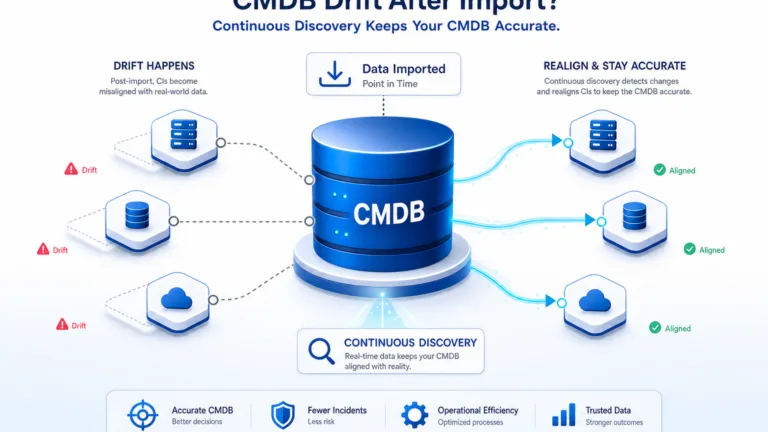
This operational matrix demonstrates that while each provider governs a specific operating system or identity boundary, none of them maintains complete multi-protocol visibility across the entire corporate IT footprint. That gap is a large part of why the unified endpoint management category exists at all. Fortune Business Insights estimated the global UEM market at $8.48 billion in 2025, projecting growth at nearly a 24% compound annual rate through 2034, as organizations look for a single layer to reconcile device data that Intune, Jamf, and on-prem directories each only partly cover.
Step-by-step setup and API permission guidance
Configuring automated synchronization between endpoint managers and asset management software requires administrative credentials, precise API permissions, and secure credential storage.
1. Configuring Microsoft Intune and Entra ID via Microsoft Graph
To connect an asset management platform to Microsoft endpoint feeds, administrators create a dedicated Enterprise App Registration within the Microsoft Entra admin center:
- Register a new application in Entra ID, naming it for your asset management platform, and record the Application (Client) ID and Directory (Tenant) ID.
- Generate a secure Client Secret or upload a cryptographic certificate for non-interactive service-to-service authentication.
- Grant the application read-only permissions:
DeviceManagementManagedDevices.Read.Allto extract Intune hardware and software state,Device.Read.Allto capture Entra registered hardware, andUser.Read.Allto ingest departmental profile data. - Have a Global Administrator or Privileged Role Administrator grant tenant-wide admin consent for the configured application permissions.
- Configure connection parameters and set scheduled discovery scan intervals within your asset management console.
Those three scopes cover the full read-only footprint the integration needs — nothing broader should be required.
For teams deploying broad infrastructure visibility, organizations can review how to auto import AWS, Azure, and Intune assets into a CMDB to streamline multi-cloud device enrollment.
2. Configuring Jamf Pro API synchronization
Integrating Apple fleets managed under Jamf Pro follows a parallel administrative workflow:
- In Jamf Pro User Accounts and Groups, create a dedicated API Role configured strictly with read privileges for Computers, Mobile Devices, Extension Attributes, and User Profiles.
- Register an API Client under Jamf Pro System Settings’ API integrations section, assigning it the read-only role just created.
- Generate a Client ID and Client Secret, then enter the endpoint URL and secret into your asset management configuration interface.
- Map custom Jamf extension attributes, such as procurement cost codes or physical building tags, to the corresponding asset management schema fields.
Following strict principle-of-least-privilege permissions protects the enterprise directory while maintaining reliable asset reconciliation.
Does Intune integration require a local discovery agent?
No. Integrating asset management software with Microsoft Intune is entirely agentless on the local endpoint. The asset management platform connects directly to the cloud-hosted Microsoft Graph API using secure OAuth credentials, pulling hardware and software inventory without deploying software to end-user machines.
Why network discovery remains mandatory despite cloud MDM
A frequent architectural mistake made by IT teams is assuming that complete MDM adoption eliminates the need for physical and agentless network discovery.
While Intune and Jamf excel at tracking provisioned user endpoints, enterprise estates contain thousands of connected devices that cannot support MDM management profiles. Hypervisors, storage area network arrays, core network switches, unmanaged printers, building security controllers, badge readers, and manufacturing IoT hardware never enroll in Intune or Jamf. Relying solely on MDM creates an invisible operational layer across critical network segments — and unmanaged devices aren’t only a visibility gap, they’re a security one.
Are unmanaged devices actually a security risk, or just a visibility gap?
Both. Verizon’s 2025 Data Breach Investigations Report found that 46% of infostealer-infected systems holding corporate login credentials were on unmanaged devices, compared with 30% on corporate-managed machines, often tied to BYOD use. MDM platforms like Intune and Jamf can only enforce policy on devices enrolled in them — unmanaged hardware gets neither visibility nor protection.
Endpoint management tools also only record devices that successfully maintain connectivity with cloud enrollment servers. If an employee terminates employment and disconnects a company laptop from the internet, or if a compromised device has its MDM profile disabled, cloud consoles report only historical state. Dedicated IT discovery uses multi-protocol scanning (including SNMP, SSH, WMI, and passive packet inspection) across local subnets to detect unmanaged hardware and unauthorized devices that evade MDM enforcement. Master network configuration change management with Virima walks through the specific scan types that catch what MDM consoles cannot see.
+-------------------------------------------------------------------------+
|                  ENTERPRISE IT ESTATE VISIBILITY GAP                   |
|                                                                         |
|   VISIBLE TO MDM (Intune / Jamf):          INVISIBLE TO MDM:            |
|   --------------------------------         --------------------------   |
|   * Provisioned employee laptops           * Core network switches      |
|   * Corporate iPhones and iPads            * SAN storage controllers    |
|   * Managed virtual desktops               * Hypervisors (ESXi/KVM)     |
|   * Compliant desktop workstations         * Badge readers and IoT      |
|                                            * Unmanaged lab servers      |
|                                            * Shadow contractor devices  |
|                                                                         |
|            +-----------------------------------------------+            |
|            |  SOLUTION: Multi-Source Reconciliation         |            |
|            |  (Cloud API Ingestion + Scheduled Network Scans)|           |
|            +-----------------------------------------------+            |
+-------------------------------------------------------------------------+
To establish total estate visibility, leading organizations unite API feeds with active discovery to maintain trusted runtime truth across every physical and virtual configuration item.
Reconciling asset identity across multiple feeds
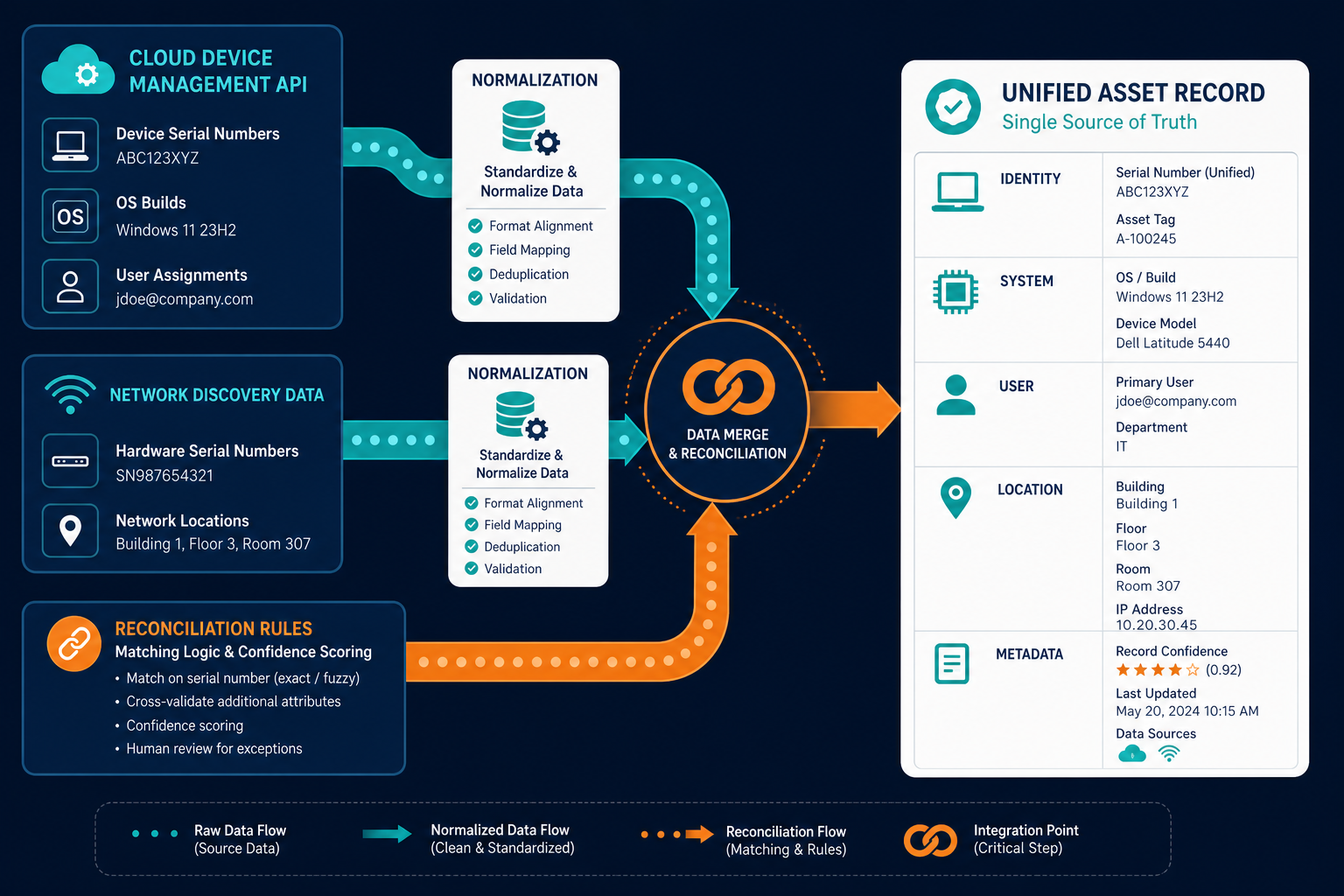
When an organization synchronizes endpoints from Microsoft Intune, Jamf Pro, and network discovery simultaneously, identical physical machines frequently generate conflicting records.
For example, a dual-homed corporate laptop may present one IP address across Wi-Fi, another over a docking station Ethernet adapter, and a virtual IP address over an enterprise VPN tunnel. If an asset tool relies on volatile identifiers such as IP address or hostname, the system creates three separate records for one machine. Similarly, when a MacBook is enrolled in Jamf and simultaneously registered in Entra ID for Conditional Access authentication, disconnected databases double-count hardware assets.
A well-designed IT asset management software solves this reconciliation problem with durable join keys instead of volatile network identifiers: the hardware serial number extracted from BIOS/UEFI or Apple firmware as an immutable anchor, the Intune Device ID or Jamf Management UUID binding MDM records to that physical hardware, the burned-in MAC address of the physical network adapter while ignoring transient virtual adapters, and the AWS EC2 or Azure Resource Manager instance ID for cloud-hosted virtual machines.
By normalizing multi-source data through these durable join keys, the asset platform unifies disparate feeds into a single authoritative lifecycle record.
Bridging endpoint inventory into enterprise CMDB relationships
Tracking hardware counts and warranty dates satisfies financial procurement, but operational IT teams require service relationship context. MDM enforces configuration and security policy on the endpoints enrolled in it; a CMDB tracks how those endpoints — and everything else in the environment — relate to users, applications, and the services the business actually runs.
A specialized CMDB elevates raw MDM inventory by mapping how individual endpoints, user personas, and backend server infrastructure support those operational business services. While Intune indicates that an executive laptop has an outdated operating system, a connected CMDB shows that this specific laptop holds administrative credentials to the payment gateway cluster. When planned changes occur or security incidents unfold, understanding technical dependencies prevents cascading operational outages. Virima blog post on building an audit-ready CMDB from synced endpoint and identity data covers how to turn this reconciled record into something an auditor will accept.
Connecting asset discovery to a documented integrations hub ensures endpoint telemetry feeds downstream ITSM, SecOps, and service desk applications across the enterprise without manual data re-entry.
How often does asset data synchronize from Entra ID and Intune?
Asset management platforms synchronize data from Microsoft Graph APIs on configurable schedules, typically executing incremental or full polling cycles every 6 to 24 hours. Some systems also use Microsoft Graph change notifications and webhooks to trigger near-immediate updates when device states change.
Evaluating endpoint integration capabilities in asset management
When assessing asset management solutions, technology buyers must examine how effectively products handle complex hybrid endpoint environments. Review vendor platforms against whether they support multiple Microsoft Entra ID tenants at once — critical for decentralized business units or M&A environments — natively parse Jamf Pro hardware extension attributes and Apple security settings without third-party scripts, automatically de-duplicate overlapping Intune, Jamf, and discovery records using durable hardware identifiers rather than leaving duplicate configuration items in the database, synchronize discovered endpoint and user data bidirectionally into ITSM platforms such as ServiceNow, Jira Service Management, or Ivanti, and combine cloud API integrations with agentless network scanning to reveal unmanaged subnets, legacy servers, and unauthorized IoT devices.
Virima’s discovery and CMDB platform is built to clear all five of these criteria out of the box, which is what makes it possible to treat Intune, Entra ID, and Jamf as inputs to one asset record instead of three separate consoles.
Looking to unify Intune, Jamf, and on-premises network discovery into a single authoritative asset repository? See how Virima automates endpoint reconciliation.
Closing: building unified visibility across modern endpoints
Cloud-based MDM platforms like Microsoft Intune and Jamf Pro have changed endpoint management, while Entra ID provides central governance over enterprise identity. However, these tools were designed to enforce configuration profiles and security policies, not to serve as complete IT asset management systems or service-aware configuration repositories.
By integrating Intune, Entra ID, and Jamf with specialized asset management software backed by deep network discovery, organizations achieve complete estate visibility. IT teams eliminate manual data entry and optimize software licensing costs. They also maintain continuous audit readiness and keep unmanaged infrastructure from becoming a blind spot.
Frequently asked questions
Can I automatically import Intune devices into a CMDB?
Yes. Enterprise CMDB and asset management platforms use Microsoft Graph API integrations to pull managed devices from Intune directly into the database. Discovered attributes include serial numbers, operating system versions, hardware specs, and user assignments, mapped directly into configuration items.
Does Intune integration require a local agent?
No. Connecting asset management software to Microsoft Intune does not require an additional local agent. The integration functions via cloud-to-cloud API queries using an Entra ID app registration, extracting data already gathered by the native Intune management channel.
How often does asset data sync from Entra ID?
Asset platforms typically synchronize Entra ID data on scheduled polling intervals ranging from every few hours to daily batch updates. Many systems can also configure webhook subscriptions to receive immediate notifications when users or directory attributes update.
Does Virima merge Intune, Jamf, and network discovery records into one asset without duplicates?
Yes. Virima matches devices across Intune, Jamf Pro, and agentless network discovery using durable identifiers — hardware serial number, MDM enrollment ID, and physical MAC address — so one laptop seen through three sources resolves to a single configuration item instead of three.