What Does ServiceNow’s AI Do for Discovery?

A duplicate CI gets marked resolved by an AI summary that never checks whether the record underneath is accurate — and nobody notices the listed owner left two quarters ago until a change window breaks on a server that was supposed to be retired. So what does ServiceNow’s AI do for discovery, specifically? It works only on records Discovery has already written to the CMDB; it does not run the scan itself. That difference sets what you can expect from it, and what you still have to fix upstream yourself.
ServiceNow’s AI starts after Discovery ends
ServiceNow’s documentation for ServiceNow Otto for CMDB, previously branded ServiceNow Now Assist CMDB, lists what the product covers. Users can search the CMDB with agentic AI and summarize discovery, ownership, and related information for a CI. They can also fix failed Service Graph Connector import sets. The product guides step-by-step remediation of duplicate CIs and helps improve CMDB accuracy, completeness, and health.
The same page describes two building blocks. AI skills produce concise summaries of key CI data. Agentic workflows chain several AI agents to finish a task, such as a CMDB search or a deduplication. Administrators can choose Now LLM Service, Azure OpenAI, Google Gemini, or Anthropic Claude as the model provider.
Does ServiceNow’s AI perform discovery?
Public ServiceNow documentation describes AI features that work on data after collection. Discovery gathers that data through MID Servers using probes and patterns. The AI then summarizes discovery information for a CI, guides duplicate remediation, and fixes failed Service Graph Connector import sets. One documented exception is a staleness agentic workflow that can trigger rediscovery of CIs it flags as stale, using your existing Discovery schedules and credentials — it does not add new scan targets or credentials of its own.
How ServiceNow Discovery collects data before the AI sees it
Discovery runs through a MID Server. The MID Server uses stored credentials to reach devices on your network and in your cloud accounts. Horizontal discovery with patterns follows four phases, and each run ends with records sent to the CMDB. The Identification and Reconciliation Engine (IRE) then checks each prospective CI. It confirms the record is correct, complete, and not a duplicate.
Everything the AI later summarizes sits downstream of those steps. A failed credential, a subnet outside a schedule, or a connector import that errors leaves a gap in the record. Structural causes like these explain why a ServiceNow CMDB drifts even while Discovery keeps running, and the gap exists long before any ServiceNow Discovery AI feature reads the record. An AI summary can only restate the fields a CI record holds, including an out-of-date last-discovered value.
What the AI does with Discovery data
The documented capabilities fall into four groups. Each one depends on a specific input that Discovery or another source supplies.
| AI capability | What the documentation describes | Input it depends on |
|---|---|---|
| CI summarization | Concise summary of key CI data, including discovery and ownership information | Fields populated by Discovery and other sources |
| Duplicate CI remediation | Step-by-step guidance to resolve duplicate CIs | Identification rules and overlap between sources |
| Import set repair | Finds and fixes failed Service Graph Connector import sets | Third-party connector data |
| CMDB search | Searches the CMDB with agentic AI | Relationship records between CIs |
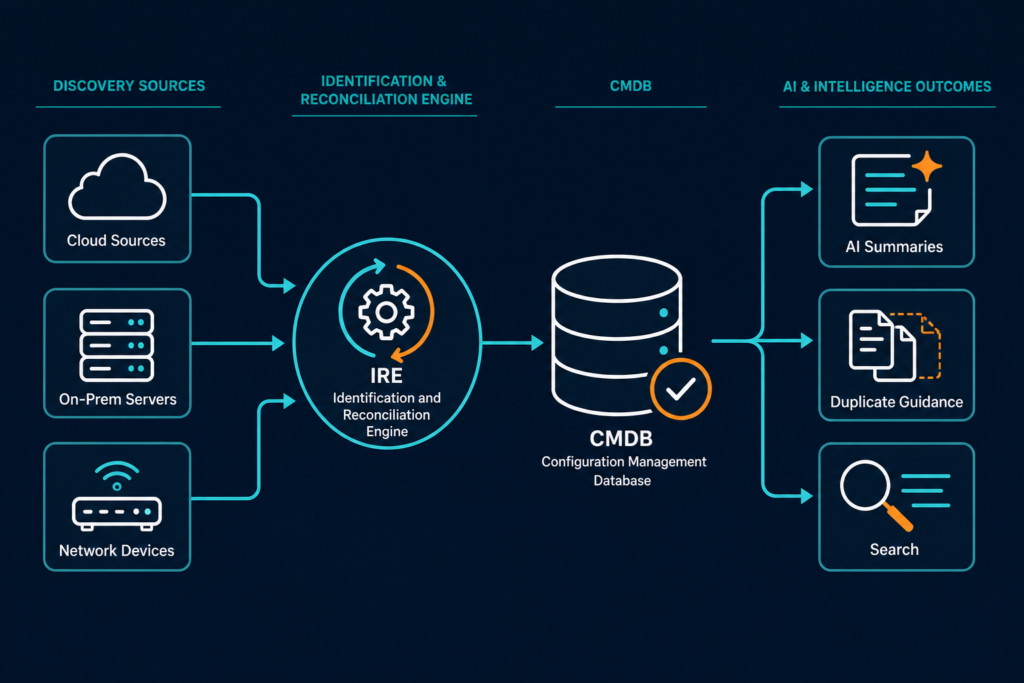
Each capability draws on a different part of the record. A CI summary draws on attribute fields such as ownership and last discovery information. Duplicate guidance draws on how identification rules matched records from separate sources. Import set repair draws on the data a Service Graph Connector delivers. Search draws on relationship records between CIs. A gap in any of those inputs shows up directly in the matching AI output, so each input needs an owner.
A natural language search that navigates relationships returns only the links the CMDB already holds. If a load balancer to application relationship was never discovered or imported, the query cannot return it. The same holds for ownership fields that Discovery cannot read and that nobody populated by hand.
A CMDB owner is usually questioned first when an AI summary names the wrong owner or lists a retired server. The repair for that problem sits in discovery and reconciliation, ahead of any AI layer. Explore how Trusted Runtime Truth gives AI a verified record. That record covers what exists, how it is connected, what changed, what will break, and who owns it.
Limits stated in ServiceNow’s own documentation
What this means for ServiceNow AI CMDB data quality
The documentation says AI outputs may not be accurate or appropriate. It tells customers to test outputs rigorously, apply human oversight, and avoid sole reliance on AI-generated information. Teams still weighing whether ServiceNow Discovery fits their environment should apply that same scrutiny before adding an AI layer on top of it.
That guidance matters most for security and change work, where an outdated summary can mislead a team. Treat each summary as a starting point for review. Reviewers need a way to trace each summary back to its source record.
Availability by region
Availability of AI features varies by deployment location. Some features and model providers are unavailable in certain regions and regulated markets. Examples include FedRAMP, NSC DOD IL5, and Australia IRAP-Protected data centers. Verify availability against your own data center before planning a rollout.
Data handling and opt-out
Data handling needs a review before activation. The documentation says data from customer instances moves to centralized ServiceNow environments and third-party cloud providers. Inputs, outputs, and edits are collected to improve ServiceNow AI technologies, and customers can opt out at any time. Confirm the opt-out setting with your ServiceNow administrator before activation.
Discovery owners can act on these limits in four ways:
- Review each AI-generated summary like a change record, because the CI fields underneath may lag the environment.
- Record which model provider each skill uses, since providers differ by region.
- Decide before activation whether your policy allows inputs, outputs, and edits to leave your instance.
- Schedule a recurring review of the duplicate and import set queues that feed the AI workflows.
Work through the AI Readiness Checklist for ServiceNow CMDB landing page before turning any of these skills on in production.
ServiceNow’s Otto documentation also describes a CMDB Success Advisor for Data Foundations with a staleness agentic workflow: it flags CIs it judges stale and can trigger rediscovery of those specific CIs using your existing Discovery schedules and credentials. That’s narrower than it sounds — the workflow re-runs Discovery against assets you already scan; it does not add new credentials, widen scan ranges, or find assets Discovery never reached. Virima is one second source for that broader coverage across hybrid estates. This native ServiceNow Discovery comparison shows where the approaches differ.
What are the limits of ServiceNow’s AI for CMDB data?
ServiceNow’s documentation warns that AI outputs may be inaccurate and calls for human oversight. Some features and model providers are unavailable in regulated regions. Customer data moves to ServiceNow and third-party cloud environments, with opt-out available. One workflow can trigger rediscovery of CIs it already flags as stale, but the documentation describes no AI that adds new scan targets, credentials, or coverage beyond what Discovery already reaches.
A separate feature: AI asset discovery in Control Tower
ServiceNow also documents Now Assist AI asset discovery, a different feature with a similar name. It syncs AI assets into the AI Asset Inventory of Control Tower. Those assets include models, datasets, prompts, skills, and agentic AI components.
Records come from source tables such as the Now Assist skill configuration table. Models sync only when active, and prompts sync only with an active model and a linked skill. Each source table maps to CMDB product model target tables, such as the AI system and AI prompt tables. An active skill is marked Deployed, and a retired skill is marked Retired. This feature governs the AI estate and leaves servers, network devices, and cloud workloads to Discovery.
Why discovery quality sets the ceiling for AI answers
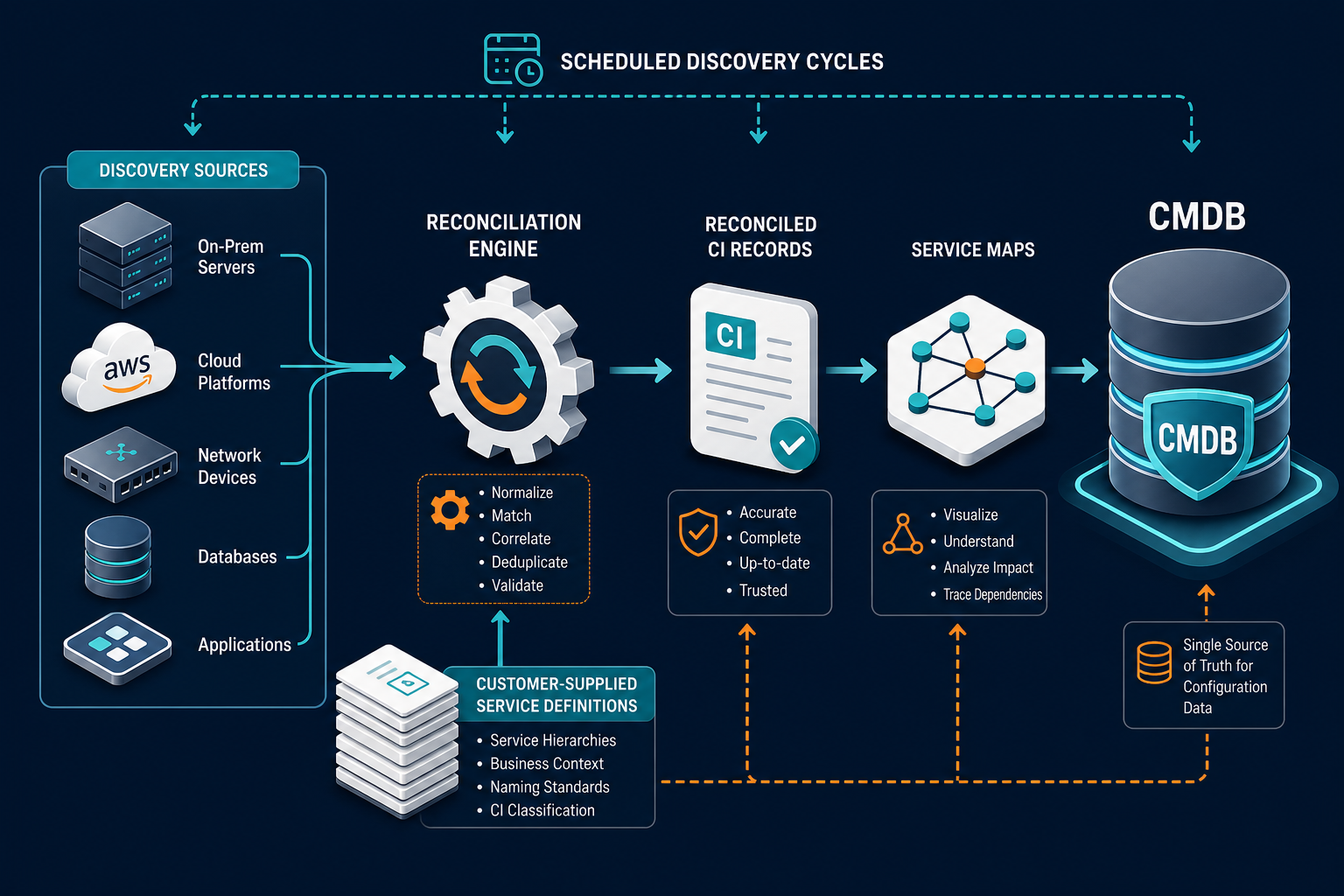
Virima approaches the data layer through scheduled IT discovery cycles. It combines agent-based and agentless methods. Coverage includes network devices, VMware and Hyper-V virtual machines, and cloud assets in AWS and Azure. Data from several sources merges into one authoritative record per CI inside Virima’s CMDB, and CMDB health scoring tracks accuracy, completeness, and staleness. Teams can see those gaps before an AI skill summarizes them. Change impact analysis shows downstream CI impact before a change is approved.
ViVID™ service maps add dependency context once your team supplies service definitions. Definitions come from manual entry, spreadsheet import, or an integration such as Lean IX. Virima then builds the application-to-infrastructure map from those definitions, which gives CI summaries a service to attach to.
For ServiceNow customers, Virima pushes discovered CIs and relationships into the ServiceNow CMDB through a bi-directional sync. Partner and integration details sit on the full Virima integrations list.
Five checks before you rely on AI for discovery data
- Compare last-discovered timestamps on key CIs against your discovery schedule. An AI summary restates whatever the record holds, including a value older than the scheduled cycle.
- Clear failed import sets and open duplicate tasks before enabling AI skills. Those queues are the inputs the import and duplicate workflows act on.
- Confirm that your region and model provider support the planned features, using the availability notes in the product documentation.
- Assign a named reviewer for AI summaries that feed change or security decisions, in line with ServiceNow’s human oversight guidance.
- Test summaries against five CIs whose owner, dependencies, and status you already know. Record every mismatch and trace it to a discovery source.
A mismatch usually traces to one of three places. The discovery schedule skipped the asset, a credential failed, or a source never wrote the field. Fixing it at that source corrects every later summary, search result, and duplicate task that reads the record. Log each fix against the CI it corrected, so the next review starts from a known list of changes. Record the baseline counts before activation of any skill, because a later comparison needs the same measures.
Putting AI on top of trusted discovery data
ServiceNow’s documented AI skills help teams search, summarize, and clean CMDB records. Their output depends on the completeness of those records. Fixing coverage, reconciliation, and service definitions first gives every AI answer a stronger base. Measuring the CMDB before and after enabling AI separates AI gains from data quality gains. Track duplicate counts, failed import sets, and stale CI percentages for 30 days on both sides of the change.
Frequently Asked Questions
Does ServiceNow Discovery use AI to find assets?
ServiceNow’s public documentation describes Discovery collecting data through MID Servers with probes and patterns. The documented CMDB AI features summarize CI data, guide duplicate remediation, and fix failed import sets after data arrives. One documented workflow can trigger rediscovery of CIs it flags as stale, using existing Discovery schedules and credentials, but the documentation describes no AI that adds new scan targets of its own.
What is ServiceNow Otto for CMDB?
ServiceNow Otto for CMDB, previously branded ServiceNow Now Assist CMDB, is an application with AI skills and agentic workflows. It searches the CMDB, summarizes CI information, fixes failed Service Graph Connector import sets, and guides remediation of duplicate CIs.
Can ServiceNow’s AI fix a stale CMDB?
The AI can flag duplicates, guide data quality work, and trigger rediscovery of CIs it judges stale using your existing Discovery schedules — but it cannot supply records that Discovery never collected in the first place. ServiceNow also advises human oversight and rigorous testing of AI output. Stale records still need fresh discovery cycles and reconciliation upstream.
Can Virima send discovered CIs to ServiceNow?
Yes. Virima pushes discovered CIs and relationships into the ServiceNow CMDB through a bi-directional sync. Scheduled discovery cycles and multi-source reconciliation prepare the records before they arrive.
What is the difference between ServiceNow Discovery and Virima?
ServiceNow Discovery collects data through MID Servers with probes and patterns inside ServiceNow. Virima runs scheduled agent-based and agentless discovery. It reconciles several sources into one record per CI and syncs the result to the ServiceNow CMDB.