Virima vs. ManageEngine ServiceDesk Plus 2026: What to Know Before you Buy

ManageEngine ServiceDesk Plus is one of the most-deployed ITSM products in the SMB market and holds a 4.2/5 on G2 across 248 reviews. Its bundled asset module is a popular starting point for SMB ITSM buyers. But teams that pick SDP for its simplicity often outgrow it fast — usually the moment hybrid cloud, AI agents, or audit pressure enters the picture.
That sets up any honest Virima vs ManageEngine ServiceDesk Plus review in 2026. SDP’s CMDB was built for help-desk tickets, not for the data your IT decisions run on today.
Virima sits in a different lane. It does not try to be your ticket queue. Instead, it feeds your existing ITSM a multi-source CMDB — whether you run ManageEngine or anyone else. Each record carries source attribution and a confidence score. So the data your team (and your AI agents) act on stays current.
Full transparency: this is a Virima-published comparison, and Virima is the product we know best. We’ll keep the framing honest. ManageEngine wins on a few real dimensions, and we’ll call those out.
According to Flexera’s 2024 State of the Cloud Report, 89% of enterprises now run a multi-cloud strategy. That shift breaks bundled CMDBs designed for on-prem help desks. So this piece walks through the eight decisions that matter when you evaluate ManageEngine ServiceDesk Plus alternatives: CMDB freshness, discovery depth, service mapping, ITSM portability, audit posture, MSP support, hybrid cloud coverage, and total cost.
Snapshot comparison: Virima vs ManageEngine ServiceDesk Plus
| Dimension | ManageEngine ServiceDesk Plus | Virima |
| Category | Bundled ITSM with an asset module | Trusted runtime truth for ITAM, CMDB, and service mapping |
| Discovery model | Scheduled scans inside SDP; deeper coverage needs separate ManageEngine products | Three methods in one product: agentless, agent-based, and API connectors. All feed one CMDB. |
| Hybrid cloud | Limited natively in SDP core | Native AWS and Azure API connectors land in the same CMDB as on-prem |
| CMDB freshness | Manual relationship upkeep; drifts between scans | Confidence scores per CI; refresh on demand when data degrades |
| Service mapping | Manually entered CI relationships; no live blast-radius view | ViVID™ Service Mapping with live dependency, ownership, incident, and vulnerability overlays |
| ITSM integration | Strongest inside ManageEngine’s own ITSM stack | Two-way sync with ServiceNow, Ivanti, Halo, Xurrent, Jira Service Management, and TeamDynamix |
| Audience | SMB help desks; MSP edition customers inside the ManageEngine product family | IT Directors, ITAM leaders, GRC and compliance leaders, and MSPs running mixed-vendor estates |
| Pricing model | Per-technician licensing, all-in-one bundle | Asset- and capability-based; sits underneath your existing ITSM |
Platform overview
ManageEngine ServiceDesk Plus is a bundle. The pitch is that incident, change, and problem management — plus a basic asset module — all live behind one login. For first-time ITSM buyers, that limits the number of vendor logos in your stack.
The asset module inside SDP scans Windows and Linux endpoints. It captures inventory and stores CIs in a CMDB that other SDP modules can use. As a result, you get a workable inventory. However, in 2026 it is not a CMDB built for AI agents, hybrid cloud, or auditors who want to know where each attribute came from.
Virima takes the opposite approach. Instead of bundling ITSM and asset management together, Virima focuses on the layer underneath ITSM — a discovery-sourced CMDB with confidence scores, source attribution, and a live service map. It plugs into whichever ITSM platform you already run.
The bet is simple. You will keep upgrading your ITSM choices over the next decade. So you should not have to build a CMDB from scratch every time you do. Virima holds a 4.6/5 on Capterra, with reviewers calling out fast deployment and a CMDB that does not require a graduate degree in boolean operators to navigate.
Who buys each
ManageEngine ServiceDesk Plus is a fit for:
- Small-to-midsize IT teams that need a help-desk-plus-asset-tracking starter kit
- Schools, local government, and other organizations inside a defined Windows estate
- MSPs that run ManageEngine’s MSP edition for small clients with similar setups
Virima is a fit for:
- IT Directors and IT Asset Managers running mixed on-prem and cloud estates
- GRC leaders, compliance officers, and audit teams who need source-attributed evidence for SOC 2, ISO 27001, and HIPAA reviews
- Enterprises already on ServiceNow, Ivanti, Halo, Xurrent, or Jira Service Management who want cleaner data feeding those workflows
- MSPs managing many clients across different ITSM platforms
Virima vs ManageEngine ServiceDesk
Here is the honest difference. ManageEngine’s CMDB is a place to put the things you find. Virima’s CMDB is built to tell you which of those things is still true.
SDP captures CIs during scheduled scans. It stores hostname, IP, OS, installed software, and owner. But relationships between CIs (this app runs on that server, which depends on this database) get entered by hand. So when the environment changes between scans, the CMDB drifts.
Most SDP customers solve this by treating the CMDB as a reference rather than as truth. Then they verify dependencies in spreadsheets and tribal knowledge before every change window. That works until it does not.
Virima fills CIs from many sources at once. Sources include its own agentless and agent-based discovery, plus API connectors to AWS, Azure, SCCM, and Intune. Two-way sync with the ITSM platforms above pulls in extra context. Every attribute carries its source (“OS from Virima Discovery, ownership from ServiceNow, patch state from Intune”) and a confidence score.
That score tracks how recently the data was checked. When confidence drops below a threshold, Virima refreshes on demand. So a device that goes offline, or a dependency that stops responding, triggers a fresh pull instead of a full estate scan. This is the runtime truth model: demand-driven, source-attributed, and defensible at audit time.
Discovery: what you actually see
ManageEngine’s discovery story inside ServiceDesk Plus core is built for Windows and Linux endpoints on your corporate network. Cloud, OT, and SaaS coverage live in other ManageEngine products: Endpoint Central, OpManager, and AssetExplorer. You license those separately and stitch them together.
If your estate fits inside the SDP scanner’s scope, that works fine. But if it does not, the path gets expensive. And your data ends up across multiple ManageEngine CMDBs.
Virima ships three IT discovery methods inside one product:
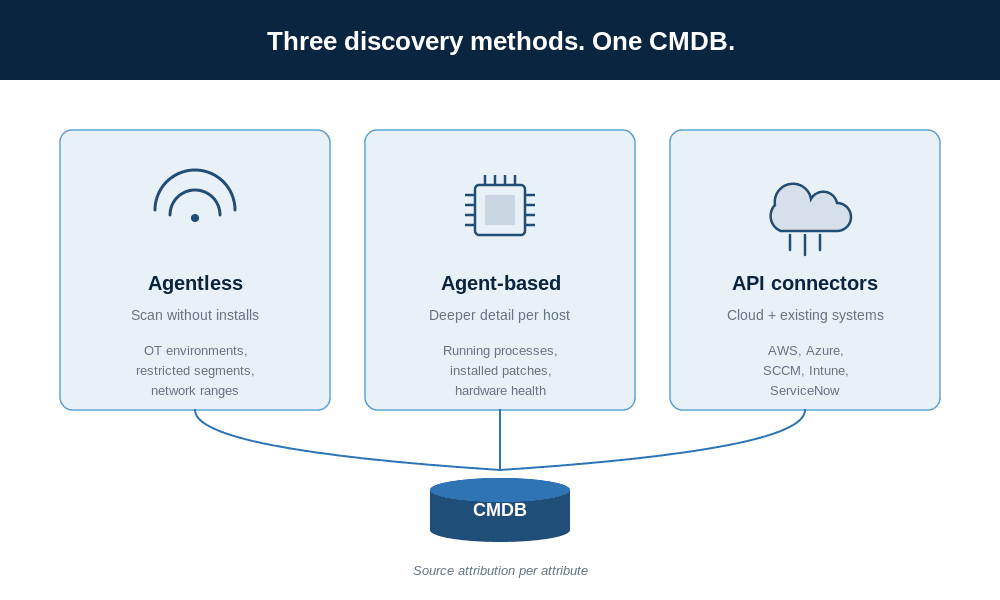
- Agentless discovery for network ranges, servers, and devices where you cannot install software. This works well in OT environments and tightly governed network segments.
- Agent-based discovery for endpoints where you need deeper detail like running processes, installed patches, and hardware health.
- API connectors for AWS, Azure, SCCM, Intune, and more. EC2, S3, RDS, VPCs, Lambda, Azure VMs, and Resource Groups all land in the same CMDB as your on-prem servers.
All three feed one CMDB that tags every attribute with its source. So a server discovered by agent and confirmed by SCCM shows both sources. And conflicts surface as conflicts instead of getting silently overwritten.
Service mapping and blast radius
This is the section where the two products are not really comparable. SDP can record relationships between CIs and show them in basic dependency views. Virima’s ViVID™ Service Mapping is a visual product in its own right.
ViVID™ renders live service maps with several overlay layers at once. You see topology, ownership, incident status, change activity, and vulnerability data on the same map. Right-click a CI and you can see which services depend on it. You can also see who owns it, what incidents are open against it, and what CVEs are unpatched on it.
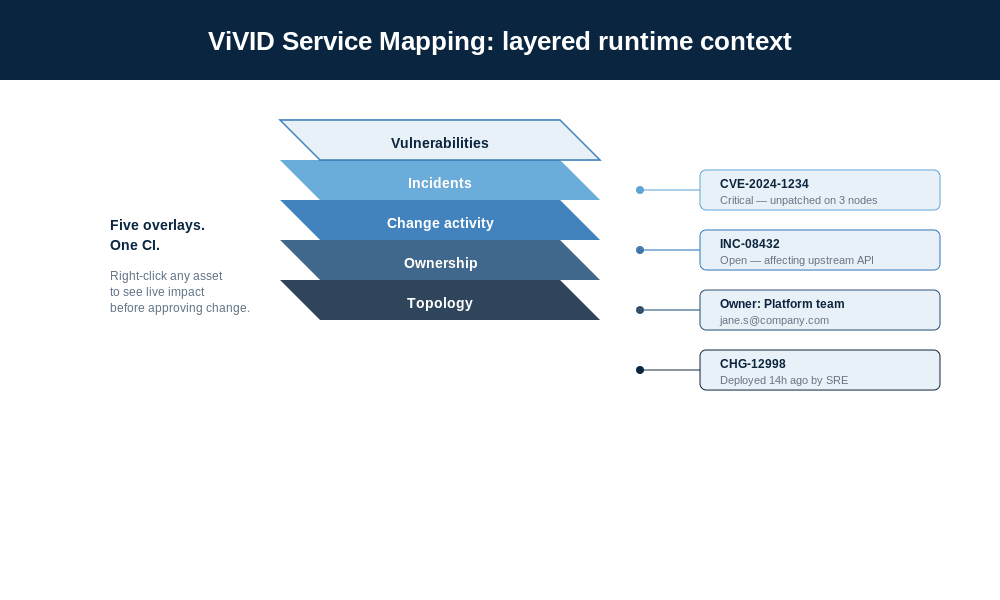
The practical effect at change-approval time is direct. Instead of asking “are we sure nothing breaks?” and trusting the answer, your change manager opens the map. Then they see the live blast radius and approve with the real downstream impact in front of them.
During incidents, the on-call engineer sees the failed service plus the recent changes plus the owner of every upstream dependency in one view. As a result, mean time to identify shrinks. The context is already on screen.
ITSM integration: bundled or portable
If you want to run everything inside one vendor, ManageEngine’s bundled approach is easier. Asset data flows straight into SDP tickets because both modules share the same database. You can integrate SDP with a third-party ITSM platform through APIs. However, that is rarely how customers run it.
Virima’s design assumption is the opposite. Most enterprises run several ITSM tools across business units, acquisitions, and MSP relationships. And they swap one out every few years. So Virima offers two-way sync with popular ITSM platforms. That list includes ServiceNow, Ivanti, Halo, Xurrent, Jira Service Management, and TeamDynamix.
Here is what that means in practice. When a Virima-discovered server gains a new owner, the owner field updates in ServiceNow. When a ticket closes in Jira Service Management, the related CI’s incident overlay clears in ViVID™. And when you decide next year to move from Ivanti to Halo, your CMDB does not have to move with you.
Pricing and total cost
ManageEngine ServiceDesk Plus is priced per technician across three tiers. According to ManageEngine’s published pricing, Standard starts at $13/technician/month (help desk only), Professional at $27/technician/month (help desk plus asset management), and Enterprise at $67/technician/month (the full ITSM stack with change management and projects). There’s also a free Standard edition capped at five technicians — useful for very small teams, and a real reason many SMBs start here.
Worth noting: the asset module only ships in Professional and above. So if you’re picking SDP for asset tracking, your real entry price is closer to $27/tech/month than the headline $13.
Virima is priced differently. Licensing scales with assets and capabilities rather than technician seats. The typical buyer compares it against the cost of running stale CMDB data, not the cost of an ITSM seat. So the framing is faster time to value at lower TCO — particularly for customers paying premium ITSM prices to maintain a CMDB module they barely trust.
Here is where the math turns:
- If your environment is Windows-only, fewer than 500 endpoints, no cloud, and no audit pressure, SDP is the cheaper start. This is especially true if you do not have an existing ITSM platform.
- If you run hybrid cloud, regulated workloads, an existing ITSM, or AI initiatives that need accurate CMDB data, Virima is the better fit. It cuts the cost of keeping that CMDB accurate. And that is usually your larger line item.
Use cases: which one fits where
Small IT team, single ITSM, simple estate
ManageEngine ServiceDesk Plus is the rational pick. Buy the bundle. Learn the product. Run it.
Enterprise hybrid estate with existing ITSM
Virima slots underneath your existing ITSM platform. That could be ServiceNow, Ivanti, Halo, Xurrent, Jira Service Management, or TeamDynamix. Then it feeds discovery-sourced CIs with freshness ratings into the workflows your team already runs. You do not replace the ITSM. Instead, you stop maintaining its CMDB by hand.
Compliance-heavy industries
GRC leaders, compliance officers, and audit teams use Virima’s source-attributed asset records. They defend evidence during SOC 2, ISO 27001, and HIPAA audits without the audit-day scramble. SDP can support basic asset evidence collection. But it does not record which source each attribute came from.
MSPs
Both platforms have MSP-oriented offerings. ManageEngine’s MSP edition works well for MSPs whose clients all run inside the ManageEngine product family. Virima’s strength is variety. So MSPs whose clients run different ITSMs, different clouds, and different agent stacks find that Virima carries one asset model across all of them.
Deployment and migration
ManageEngine ServiceDesk Plus runs on-prem or in ManageEngine’s cloud. Implementation cost stays low because the product is heavily templated. However, the larger lift is migrating from another ITSM platform — exporting tickets, mapping fields, and rebuilding workflows takes longer than the asset module setup (which is the kind of cost you find out about after the contract is signed).
Virima implementation usually starts with agentless discovery. It captures initial inventory without requiring software installation across the estate. From there, you add agent-based discovery for deeper attribute capture. Then you add API connectors for cloud platforms and existing systems.
Because Virima plugs into your existing ITSM rather than replacing it, the workflows your team uses every day do not change. Only the underlying CMDB does.
Decision scorecard: Virima vs ManageEngine ServiceDesk Plus
| Dimension | ManageEngine SDP | Virima | Verdict |
| Discovery breadth | ★★★ | ★★★★★ | Virima: three methods in one product, all feeding one CMDB |
| Hybrid cloud coverage | ★★ | ★★★★★ | Virima: native AWS and Azure connectors; SDP needs separate ManageEngine products |
| CMDB freshness model | ★★ | ★★★★★ | Virima: confidence scores and source attribution per attribute |
| Service mapping and blast radius | ★★ | ★★★★★ | Virima: ViVID™ overlays for ownership, incidents, vulnerabilities |
| ITSM portability | ★★ | ★★★★★ | Virima: two-way sync with six major ITSMs |
| Bundled ITSM (incidents, problems, changes) | ★★★★ | n/a | SDP: Virima does not ship ITSM; it feeds yours |
| Help-desk simplicity | ★★★★★ | ★★★ | SDP: the bundled UI is simpler for help-desk-only teams |
| Audit-ready evidence | ★★ | ★★★★★ | Virima: discovery source per field speeds up audit prep |
| Total cost at the small end | ★★★★ | ★★★ | SDP: cheaper for small Windows-only estates |
| Total cost at scale | ★★ | ★★★★ | Virima: manual CMDB upkeep on SDP grows with the estate |
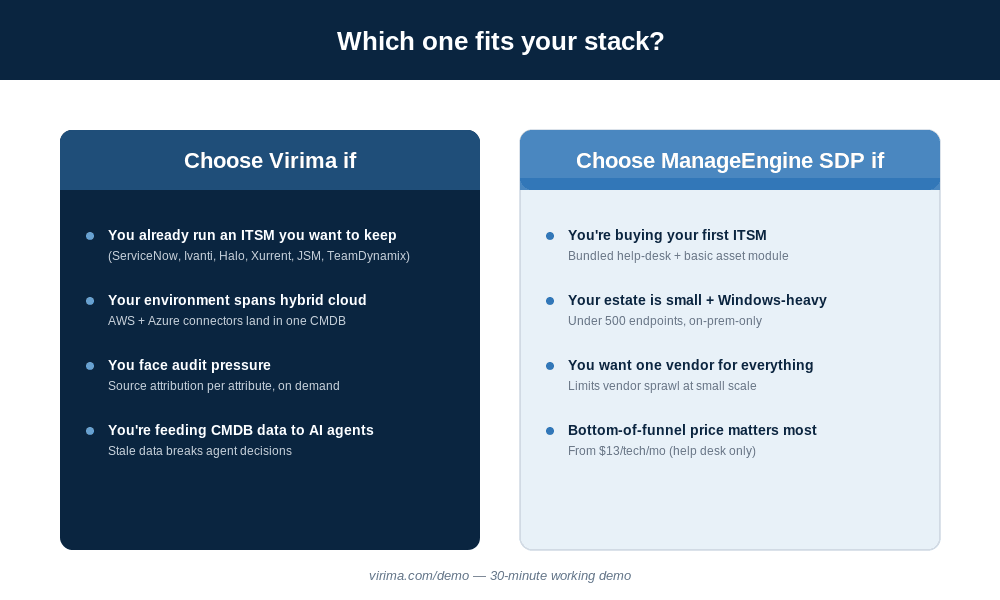
Choose ManageEngine ServiceDesk Plus if you need a bundled ITSM platform with basic asset tracking. It fits a small-to-midsize team operating in one estate. It also fits if you are buying your first ITSM and want to limit vendor sprawl.
Choose Virima if you already run an ITSM platform you want to keep. It also fits if your environment includes hybrid cloud or regulated workloads. And it fits if you need audit-ready source attribution per CI attribute, or you are feeding CMDB data into AI agents.
What real users say
The review data tells a consistent story for both products. Here’s the read.
ManageEngine ServiceDesk Plus sits at 4.2/5 on G2 and 4.4/5 on Capterra (223 reviews). Reviewers consistently praise the interface as easy to learn, the integration with other ManageEngine products, and the value for money — especially for SMBs. The recurring complaints cluster around three things: setup complexity for larger deployments, slow customer support response times, and patch cycles that occasionally introduce new bugs while fixing old ones.
Virima holds a 4.4/5 on G2 and 4.6/5 on Capterra. The smaller review pool (15 on Capterra vs. SDP’s 223) reflects Virima’s narrower category — it’s an ITAM/CMDB specialist, not a help-desk tool. Reviewers call out fast deployment, accessible search (one Capterra reviewer noted you don’t need “a graduate degree in boolean operators” to find what you’re looking for), and Business Service Maps that surface communication paths between endpoints. The most common ask: smoother form design and customizable column widths in the UI.
The honest read across both: ManageEngine wins on familiarity, breadth of help-desk capability, and bottom-of-the-funnel pricing. Virima wins on discovery depth, CMDB accuracy, and the visual service map. Different jobs, different scoreboards.
Next steps for your Virima vs ManageEngine ServiceDesk Plus decision
If you are buying your first ITSM and your environment is small, Windows-heavy, and on-premises, ManageEngine ServiceDesk Plus is a fine starting point. It is bundled, it is cheap at small scale, and it works.
If you are running an enterprise hybrid estate, sitting under audit pressure, or feeding CMDB data into AI agents, Virima is built for that job. SDP is not. So adding Virima underneath your existing ITSM gives you discovery-sourced runtime truth with source attribution and confidence scores. And your team does not have to learn a new ticket queue.
See Virima’s discovery-sourced CMDB and ViVID™ Service Mapping in a 30-minute working demo. You get runtime truth feeding the ITSM you already run. Schedule your demo →
Frequently asked questions
Can Virima replace ManageEngine ServiceDesk Plus completely?
No, and it is not trying to. Virima does not ship help-desk ticketing, change workflows, or service request portals. So if you only use SDP for the asset module, Virima can replace that part. Then it feeds your CMDB into whichever ITSM you choose. If you use SDP’s ITSM features, Virima sits underneath them or alongside your next ITSM choice.
How does cloud asset coverage compare?
Virima ships AWS and Azure API connectors. They pull EC2, S3, RDS, VPC, Lambda, IAM, Azure VMs, Resource Groups, and configuration data into the same CMDB as your on-prem assets. ManageEngine’s ServiceDesk Plus core has limited native cloud asset discovery. Deeper cloud coverage needs more ManageEngine products like Endpoint Central, OpManager, and CloudSpend, which you license separately.
Which ITSM platforms does Virima integrate with?
Virima offers bidirectional sync with popular ITSM platforms. The list includes ServiceNow, Ivanti, Halo, Xurrent, Jira Service Management, and TeamDynamix. ManageEngine ServiceDesk Plus integrates most fully with other ManageEngine products. It also offers API access for third-party connections.
Does ManageEngine support MSPs?
Yes. ManageEngine ServiceDesk Plus MSP edition supports multi-client deployments. It works well for MSPs whose clients run inside the ManageEngine product family. Virima’s MSP fit is different. It carries one asset model and service map across clients running different ITSMs, different clouds, and different agent stacks.
How does Virima keep the CMDB current without scanning everything 24/7?
Each CI attribute carries a confidence score. The score reflects how recently the data was checked and which source it came from. When confidence drops, Virima refreshes on demand. That might happen because a device has not been reachable, a connector has not refreshed, or a dependency has shifted. Then AI agents that consume Virima data can check the freshness rating and request a refresh before they make a decision.
Which platform supports audits better?
Virima’s source-attribution model is the practical difference. When auditors ask “where did this asset record come from?” you get an answer. You see the source (Virima Discovery, Intune, SCCM, ServiceNow) and the timestamp on every attribute, without manual evidence prep. ManageEngine ServiceDesk Plus carries basic asset history. But it does not store per-attribute source attribution. So audit prep on regulated workloads tends to be much faster on Virima. Reviewing the ITIL service management framework on configuration management makes the distinction clearer for compliance teams.