Taxonomy and CI Classification Mapping When Migrating From ServiceNow

An Indian bank needed its ServiceNow configuration management database (CMDB) to represent data-center equipment alongside IT infrastructure. In a published case study, implementation partner LMTEQ described creating custom configuration item classes for chillers and power equipment. The team also documented relationships between physical assets and IT infrastructure.
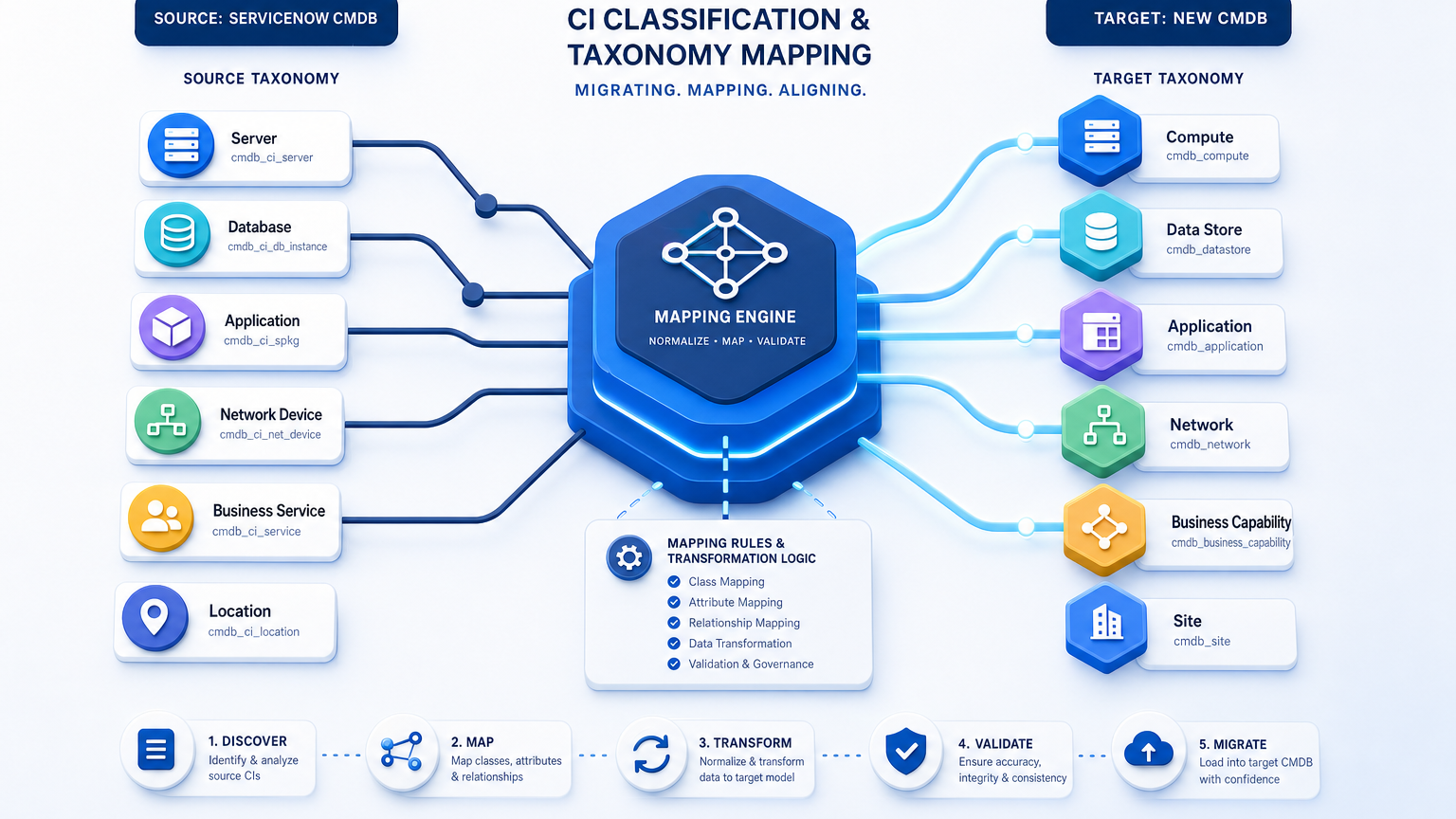
That case illustrates the classification decisions a migration team must preserve. When moving CMDB data out of ServiceNow, identify where custom classes, attributes, and relationships belong in the destination.
Taxonomy and CI classification mapping when migrating from ServiceNow gives the team a shared record of those decisions. It covers classes, attributes, lifecycle values, and relationships before they reach the destination.
The method applies when an organization moves only its CMDB or undertakes a broader platform migration. ServiceNow can also remain part of the operating environment after selected data moves elsewhere.
Understand the ServiceNow class model
A configuration management database (CMDB) organizes CIs into classes with shared attributes. The ServiceNow CMDB schema documentation describes the base cmdb_ci table and its extended classes.
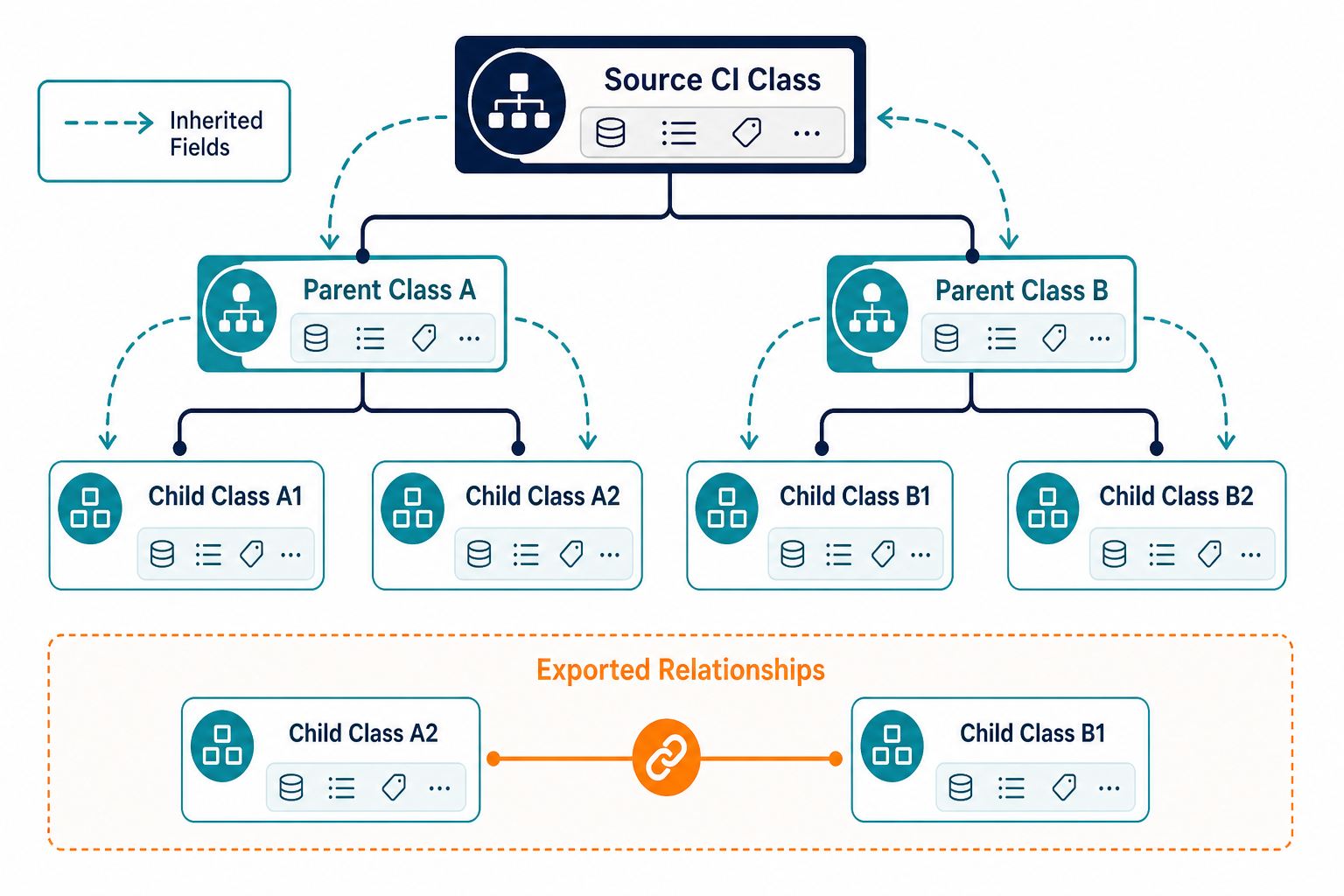
A child class inherits attributes from its parent and can add fields of its own. Server records, for example, belong to a more specific branch of the computer hierarchy. Database records belong to another branch.
An export therefore contains more than a list of class names. Its fields may combine inherited properties with properties defined for a particular class. A destination class must accommodate the fields that the organization intends to retain.
Relationships need their own treatment. The cmdb_rel_ci table records relationships between CIs, including their endpoints and relationship types. Importing the CI records alone cannot establish whether those relationships survived the move.
Related reference data also needs attention. Users, groups, companies, and locations may be stored separately from CI records. Agree on how each reference will resolve in the destination before using it for ownership or reporting.
If your instance uses Common Service Data Model (CSDM) concepts, inventory the populated service-layer tables separately. Their treatment depends on the source instance and the destination’s model.
Inventory classes and fields before mapping
Start with the source instance that will supply the migration. A schema diagram provides the class structure, while record counts reveal which branches contain data. Include empty classes in the inventory because reports or future workflows may still reference them.
| Inventory item | Evidence to collect | Migration decision |
|---|---|---|
| CI classes | Class names, parent classes, and record counts | Retain, combine, split, or exclude each class |
| Custom classes | Table names, inherited fields, and added fields | Assign a destination class and preserve needed details |
| Attributes | Field types, populated values, and reference targets | Map, transform, archive, or exclude each field |
| Relationships | Types, direction, endpoint classes, and counts | Identify the destination representation and import order |
| Lifecycle values | Values in use and their business meanings | Translate values without losing important distinctions |
Check population rates alongside field definitions. A field with no values may be removable, but confirm whether integrations or upcoming workflows depend on it. A rarely populated field may still support a critical audit or operational process.
List custom classes from the instance’s table and schema views. A custom table prefix can help identify candidates, but confirm the actual parent and purpose with the instance owner. Naming conventions alone cannot establish how a particular class is used.
Record the identifiers available for each class family. Preserve the source record ID in your migration working files, alongside any stable asset identifiers used for reconciliation. Hostnames and IP addresses can change, so treat them as matching inputs rather than durable identifiers.
The broader CMDB migration guide covers import planning and validation. Use the inventory here to prepare the taxonomy decisions that precede an import.
Build the class and attribute crosswalk
A crosswalk is a decision record connecting source data to its destination. Give each row an owner, an approval status, and a reason for the mapping. Store the approved version with the migration extracts so the team can reproduce decisions later.
Map classes to their intended use
Start with the source class, its parent, and its record count. Add the intended destination class and the mapping pattern: one-to-one, many-to-one, or split by an attribute.
For a split, document the rule that assigns each record. For example, one source class might map into two destination classes based on a verified device type. Assign an exception outcome for missing or ambiguous values.
For a many-to-one mapping, preserve the distinction somewhere useful when reports depend on it. A destination attribute may carry the original subtype without recreating the entire source hierarchy.
Map inherited and class-specific attributes
For each field, record the source column, destination property, data type, and transformation. Mark whether the destination requires a value and identify the person who approves exceptions.
Review inherited fields together with class-specific fields. If several source classes converge on one destination class, check for fields with matching names but different meanings. Record units and date formats rather than assuming they are interchangeable.
A field may be mapped directly, transformed, stored as a custom property, archived, or excluded. Exclusion should be a deliberate decision supported by the field owner. Keep the original extract until the migration and retention requirements are satisfied.
Translate lifecycle values
Inventory the status values that your instance uses and ask their owners what each value means. Then map each source value to a destination value with an equivalent operational meaning.
A retirement status may indicate an approved disposal in one workflow and a pending task in another. Preserve that distinction when downstream teams rely on it. Send unmapped values to an exception list rather than silently assigning a default.
Map relationships and direction
For each relationship type, record its source and target classes, direction, and destination equivalent. Confirm whether the destination expresses the same relationship from the opposite endpoint.
Retain source identifiers for both endpoints in the working extract. The import process needs a reliable way to resolve those endpoints to destination records. Validate relationship types separately from CI attribute mappings.
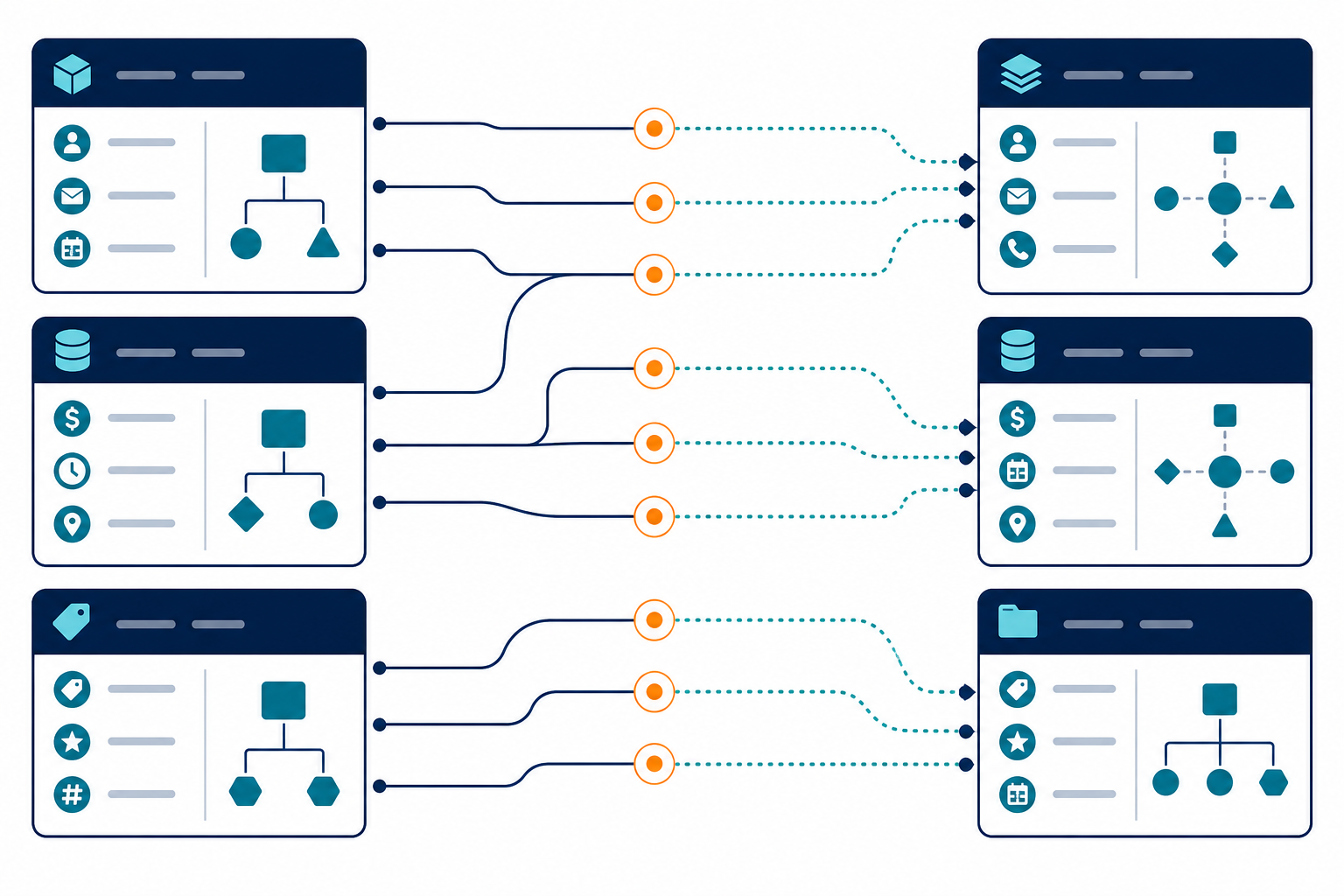
The table below is hypothetical and does not represent a product-specific class mapping.
| Source example | Destination example | Decision to verify |
|---|---|---|
| Two server subclasses | One server class | Retain the original subtype for reporting |
| Custom device attribute | Custom destination property | Confirm field type and authorized owner |
| Retirement status | Destination lifecycle value | Confirm the same business meaning |
| Application depends on server | Equivalent dependency | Resolve endpoints and preserve direction |
Decide how to handle custom classes
A custom class may contain attributes that support a specific operational or reporting requirement. Ask its owner which decisions depend on that distinction before mapping it to a broader destination class.
Keep a separate class when the destination needs a distinct schema or behavior. Combine classes when their differences can be represented meaningfully by attributes. Preserve required fields even when the class hierarchy becomes flatter.
For a proposed custom property, document its definition, accepted values, and owner. Check whether the destination already has a suitable property before adding another one. Duplicate fields can create competing answers in later reports.
Rarely used classes deserve investigation rather than automatic deletion. A small class may represent regulated equipment or a business service with significant dependencies. Record the rationale and approval for each retained, combined, or excluded class.
A discovery-sourced view can support the post-migration review of what exists, how assets connect, and what has changed. People still need to confirm ownership and the business meaning of the records. Explore Trusted Runtime Truth for a broader view of discovery-sourced infrastructure context.
Export the data with its context intact
Confirm the export method and limits for your own ServiceNow release and instance. The ServiceNow export documentation describes available formats and export behavior. Administrators should test a representative extract before planning the full run.
Large exports may require batches. Choose a repeatable filter for each batch and record its boundaries, time, record count, and source class. Check that the batches do not overlap or omit records.
Export relationship records separately and preserve their endpoint references. Also identify the user, group, location, and other reference records needed to resolve ownership and reporting fields. A CI extract can appear complete even when its referenced records are absent.
Test whether each exported reference contains an identifier, a display value, or both. Confirm character encoding with names that contain non-ASCII characters. Check date formats and dot-walked field names against the destination mapping.
Retain the source class name and a stable source identifier in the migration working set. Restrict access to extracts according to your organization’s data-handling rules. Agree on the retention period before deleting source files.
Changes may occur between batches or between the export and cutover. Record the extraction window and agree on a delta process with the source owner. The process should account for created, changed, and retired records.
Pilot one class family and validate the results
Choose a class family with known owners and meaningful relationships. Servers are one possible starting point when the team has reliable source records. Include representative records with different ages, statuses, and owners.
Run the pilot through extraction, transformation, import, and validation. Compare source and destination counts by class, accounting for approved exclusions and splits. Investigate unexplained differences before expanding the scope.
Sample the mapped attributes with the people who use them. Check identifiers, lifecycle values, ownership references, and any custom properties. Review rejected records and document the correction for each recurring error.
Trace selected relationships in both directions. Confirm the endpoint records, relationship type, and direction against the source extract. Identify orphaned relationships where an endpoint was excluded or could not be resolved.
Test a downstream report or operational workflow with its owner. A successful import count does not establish that a report still answers the same question. Capture the results and update the crosswalk before the next class family.
Choose when to mirror the source hierarchy
Mirroring the source hierarchy can reduce initial mapping decisions. It may also help teams preserve familiar report groupings during a transition. Validate that the destination can represent the fields and relationships those reports require.
Some source branches may have been created for workflows that no longer apply. Others may carry a distinction that remains important for operations or audit evidence. Review each branch against current use before deciding whether to retain it.
A partial mirror can preserve meaningful classes while consolidating redundant ones. Document the tradeoff and test affected reports with their owners. Revisit the decision when a previously excluded workflow enters scope.
Map ServiceNow classes to Virima blueprints
Virima calls its destination CI schemas blueprints. Its CI import instructions state that the Blueprint Name must match an existing blueprint. Use the confirmed destination name in the crosswalk rather than assuming a source class has a direct equivalent.
For new CI imports, the documented process requires a blueprint name and a correlator defined by that blueprint. The documentation lists IP address, host name, and MAC address as possible correlators. Existing-record updates require an Asset Id.
Those import requirements are matching rules, so evaluate their suitability for each class family. Keep stable source identifiers in the working crosswalk even where the import uses another correlator. Confirm current product behavior and blueprint settings before preparing production files.
The upload preview shows column mappings and flags unmapped properties. Review those mappings before submission, and use the documented skip option for columns intentionally excluded. Confirm the relationship import format with your Virima team and the current product documentation before loading dependencies.
Virima can also work alongside ServiceNow where teams retain existing workflows. Review the available integration options with the team responsible for the target operating model.
Start with one approved crosswalk
Select a class family, identify its owners, and document its source fields and relationships. Approve the proposed destination mappings before preparing the first extract. Use the pilot results to correct exceptions and establish the next migration scope.
To review how Virima could support your CMDB migration, request a migration demo with your class and relationship questions ready.
Frequently Asked Questions
What is a CI class in ServiceNow?
A CI class groups configuration items with a shared schema. Classes can inherit attributes from a parent and add fields for a more specific type of item.
How do I find custom CI classes?
Review the instance’s table and schema views with an administrator. Check each candidate’s parent, fields, record count, and business use before assigning a destination class.
How do I export ServiceNow CI relationships?
Plan a separate extract from the CI relationship table. Preserve relationship types and endpoint references, then confirm how those references resolve to destination records during the pilot.
How are ServiceNow classes mapped to Virima?
Map each source class to a confirmed Virima blueprint and review the fields required by that blueprint. Test correlators and attribute mappings with a pilot before a broader import.
Can Virima work alongside ServiceNow during migration?
Virima can work alongside ServiceNow, depending on the chosen operating model and integration configuration. Confirm responsibilities for CI fields and relationships before moving or synchronizing data.