How to Migrate to Virima from Lansweeper, Faddom, or Any Other CMDB

Two years of configuration item data sit inside Lansweeper or Faddom, and the CMDB migration project everyone kept deferring now has a go-live date. Get the field mapping wrong and relationship data built up over years shows up broken during the next incident, or missing entirely at the next audit. That risk, not inertia, is why teams holding CI data in Lansweeper, Faddom, or another discovery tool stay on a platform that no longer fits their needs. What determines whether a CMDB migration goes clean or goes sideways is the mechanism: how the source schema maps to the destination blueprint, and whether mismatches surface before records go live or after.
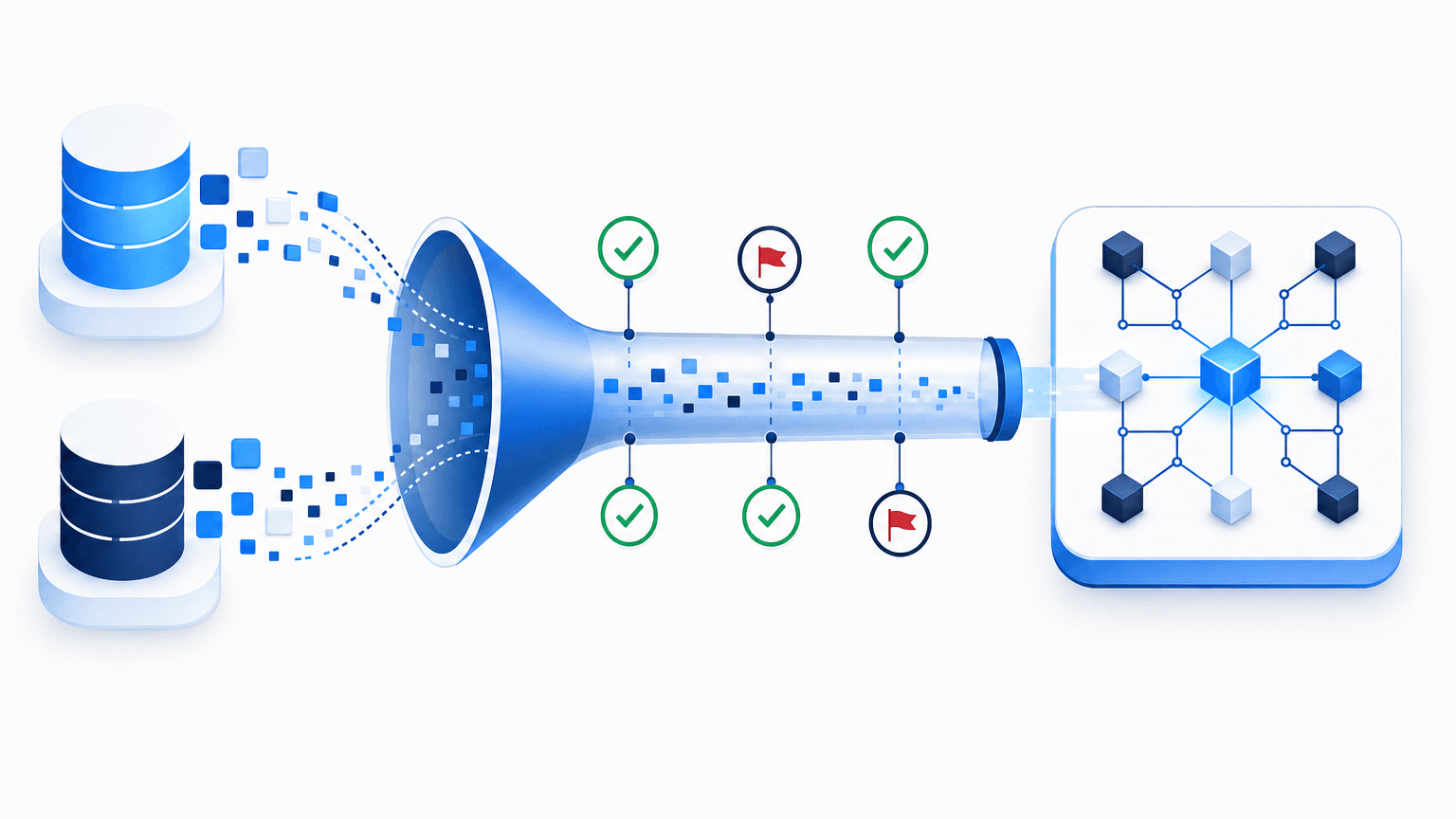
Virima addresses this with built-in import capabilities and API accessibility. Moving CI data into Virima’s CMDB runs on two primary paths: exporting and importing data as CSV, or pushing data directly through Virima’s API. Both methods flag structural mismatches before data reaches the live CMDB, because catching a bad mapping during import is cheaper than catching it during an incident.
The two ways to migrate to Virima
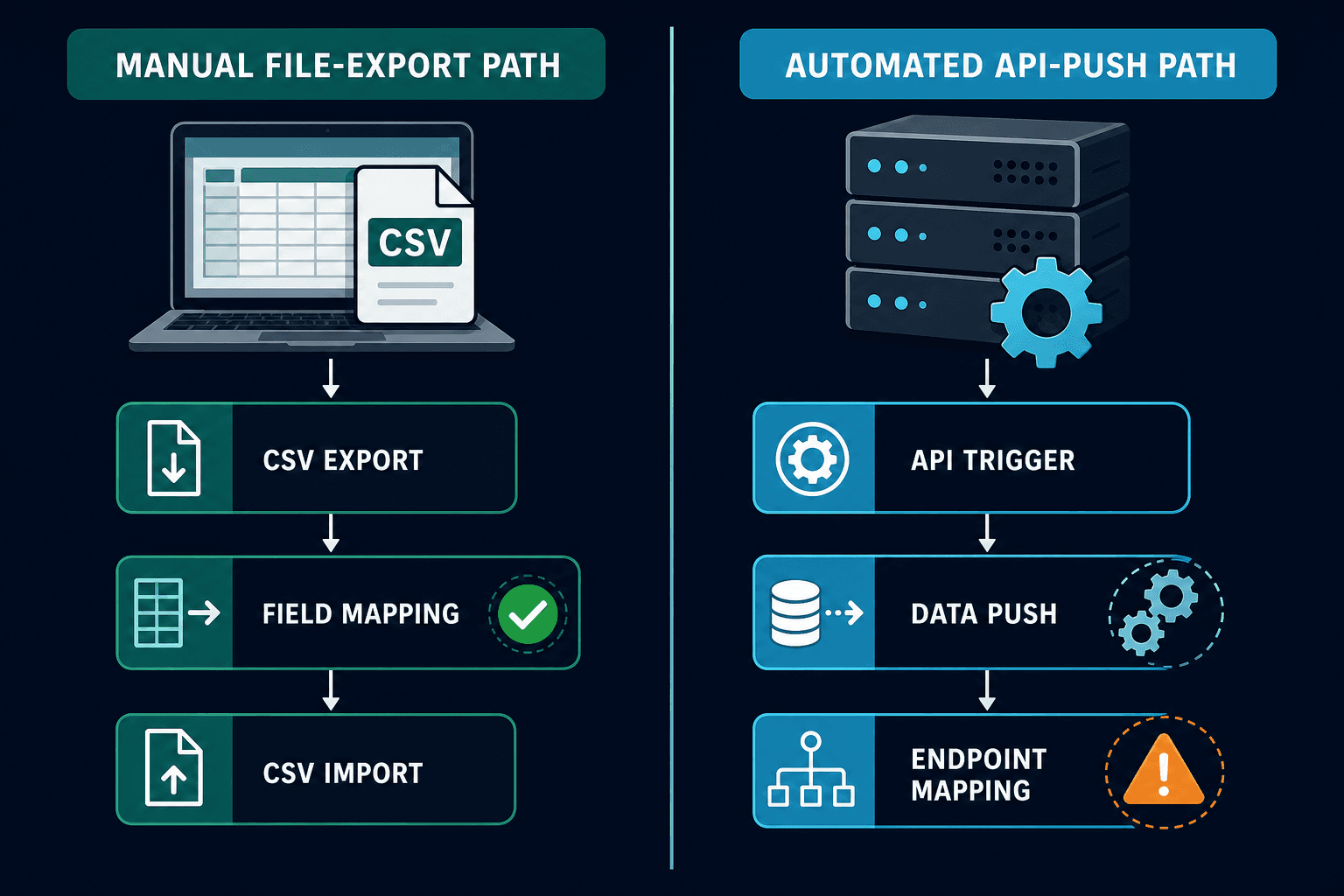
Migrating CI data into Virima’s CMDB follows two core technical paths. The first is export and import through CSV files, which remains the standard route supported by most discovery tools. The second is an API-based push, available when the source tool supports outbound API calls.
A third option sits on Virima’s side: building a native pull integration with a specific source tool, similar to Virima’s existing integrations with ServiceNow and Ivanti. This requires product development on Virima’s side before becoming available for a given tool.
For teams evaluating a switch, Virima’s CMDB supports the requirements a migrated CI record needs to be useful on day one: relationship mapping between assets and services, reconciliation against what discovery finds running in the environment, and ongoing discovery that keeps records current after the cutover. A CSV import or API push gets data into the system once. Discovery and reconciliation are what keep it accurate after that, which is the part a one-time migration project can’t solve on its own.
Path 1: export and import (CSV)
Most discovery tools, including Lansweeper and Faddom, support CSV export and import out of the box.
The process starts when you export current CI data as a CSV file from your existing tool. That exported data requires mapping to Virima’s blueprint before import, as Virima’s backend schema and CI structure differ from other source platforms.
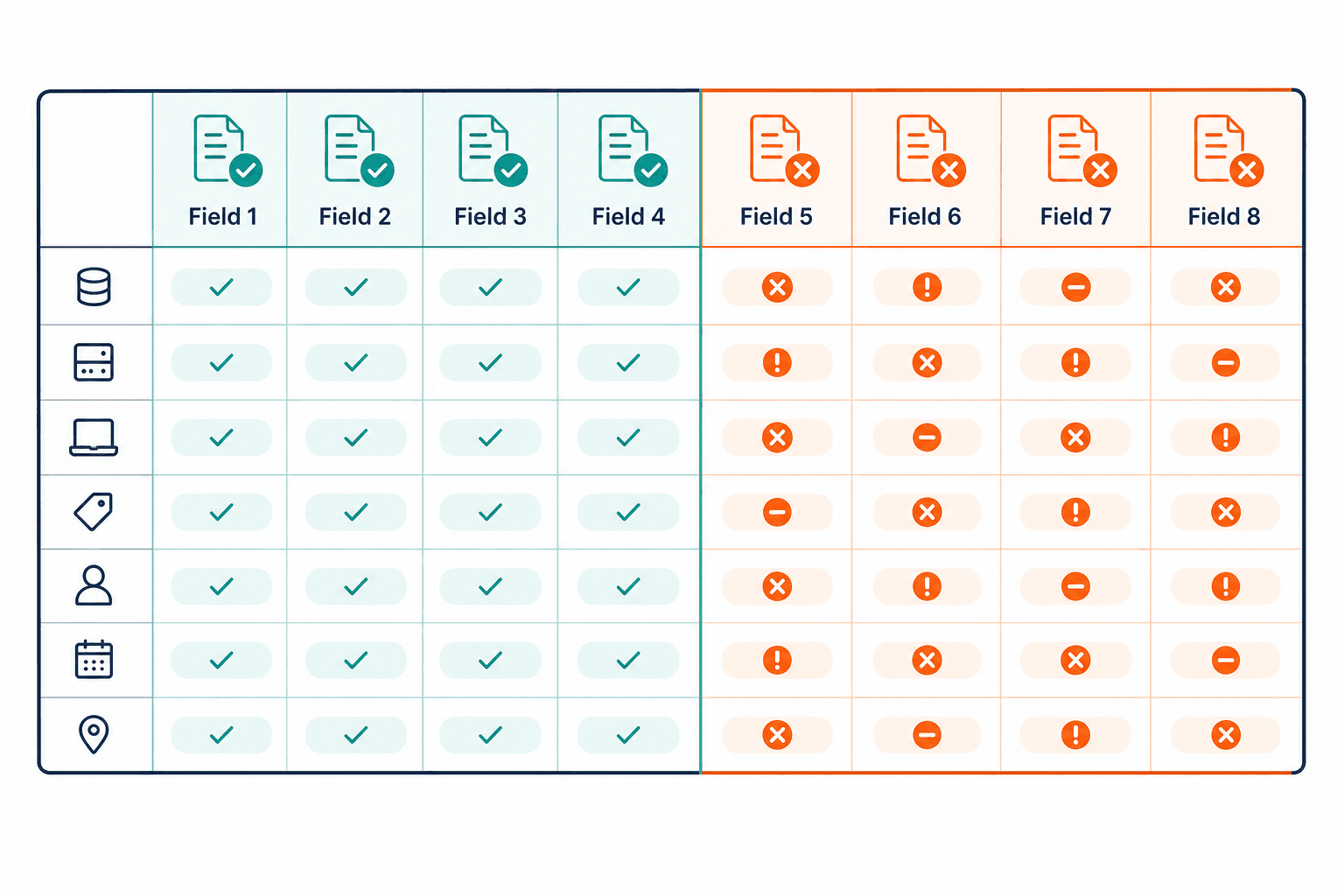
Blueprint mapping involves renaming the exported table’s column headers to match Virima’s field names. When you import the file, Virima automatically flags each row: matched fields appear in green, while mismatched fields display in red. For every red row, a dropdown lets you select the correct Virima field name. This visual feedback catches mismatches before the import completes, allowing your team to resolve discrepancies directly rather than discovering them later inside a live CMDB.
This mapping step can be completed by any administrator. Virima’s team can walk you through the initial import flow, while mapping decisions stay entirely under your control. That matters for audit trails too: whoever owns the mapping decision is the same person who can explain it later, instead of a vendor’s implementation team making silent judgment calls on your data.
Path 2: API-based push
The second path uses Virima’s API. Virima provides API keys alongside documentation covering available endpoints and calls, including CI creation, attribute updates, and relationship mapping. When your source tool supports outbound API calls, your engineering team can trigger data pushes directly from your existing platform into Virima.
Feasibility depends on whether your source tool exposes outbound API triggers. This path carries more variable implementation factors than the CSV route, as API capabilities vary by vendor. You can review the all-integrations hub to see the platforms Virima supports natively, including ServiceNow and Ivanti, where a native pull integration already exists instead of requiring a custom push.
Teams choosing this path usually already have engineering time budgeted for the migration, since a custom push script needs someone to build, test, and maintain it against Virima’s documented endpoints.
Migrating from Lansweeper to Virima
Lansweeper supports CSV export natively, making Path 1 straightforward. Teams typically migrate off a discovery-only tool once they need two-way reconciliation between what discovery finds and what the CMDB records, rather than a one-way feed into a separate, self-maintained system.
Moving CI data into Virima gives your assets a native home within a platform that handles both discovery and CMDB functionality, so relationship data and vulnerability context live in the same record instead of two systems that need to be cross-referenced by hand.
Migrating from Faddom to Virima
Faddom focuses primarily on dependency mapping, meaning its CI data structure can differ from Virima’s blueprint more than Lansweeper’s does. Faddom builds its initial dependency map by analyzing a copy of network traffic rather than installing agents, producing a first map in roughly an hour and refreshing it continuously rather than on a scheduled scan. That real-time approach is a strength for visualizing application dependencies. Virima’s CMDB is built to carry the fuller CI attribute set a governed record needs ownership, license data, hardware lifecycle alongside that dependency context, so migrating teams gain attribute depth rather than losing the mapping strength they started with.
As a result, Faddom migrations may require additional field mapping during the initial import step, since the source data captures dependencies well but often lacks the fuller CI attribute set a CMDB record needs.
How does Virima prevent data corruption during CMDB migration?
Virima’s import engine validates data against its blueprint before ingestion. Matched attributes highlight in green while mismatched fields flag red, forcing explicit manual mapping via dropdowns before records enter the live CMDB.
Common CMDB migration risks and how each path handles them
The three failure modes teams worry about most are data loss, broken relationship mapping, and gaps that surface after go-live instead of before it. Each shows up differently depending on the migration path.
With CSV import, the main risk is a silent field mismatch that gets waved through instead of corrected. Virima’s color-coded validation step exists specifically to prevent that: a red flag forces a decision before the row enters the live CMDB, rather than after.
With an API push, the risk shifts toward incomplete data in transit. Since your engineering team controls the push logic, a bug in that script can drop or mis-map records without the same file-level check a CSV upload gets, because there is no single file for Virima to validate against before ingestion. Testing the push against a staging environment before the production cutover is the practical safeguard.
The compliance stakes are real either way. Records that go live with gaps or unresolved ownership carry the same audit exposure as incomplete asset inventories elsewhere: IBM’s 2026 Cost of a Data Breach Report puts the global average breach cost at $4.99 million, a 12% year-over-year increase. A migration that skips validation to save time can end up creating the exact audit gap the new CMDB was supposed to close. For the full cost breakdown of what inaccurate CI data costs across operations, finance, and compliance, see Virima’s CMDB TCO analysis.
Validating your CMDB after migration
A successful import isn’t the finish line. Virima’s own guidance on CMDB governance and data quality sets a composite data quality target of 90% or higher for business-critical CI classes, and 75% or higher for supporting classes, benchmarks worth applying to freshly migrated data before you treat it as trustworthy.
Run Virima’s IT Discovery against the migrated environment shortly after cutover. Discovery reconciles what your new CMDB records against what’s actually running, which catches records the CSV export missed or the API push mis-mapped, since a migration only moves what the source tool already tracked, and no source tool tracks everything.
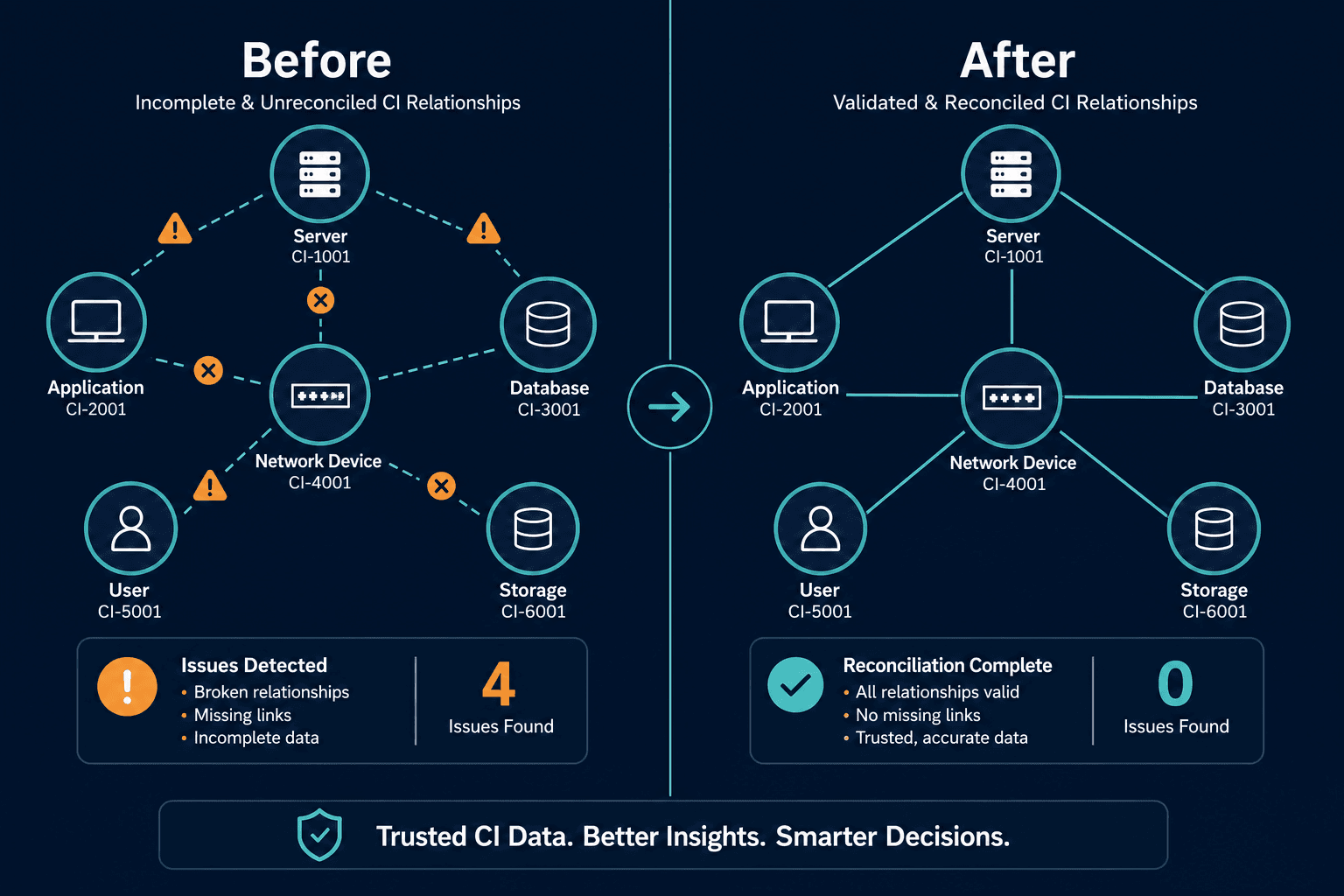
Multi-Source CMDB Reconciliation: Why Last-Scan-Wins Destroys Data Quality covers the reconciliation cadence in more depth. Treat the first 30 days after migration as a validation window, not a wrap-up period.
Choosing the right migration path
Teams seeking a fast switch should use CSV export and import. It requires no custom engineering, and the color-coded field mapping maintains import accuracy.
Teams with established API workflows or engineering resources should consider the API path. It suits organizations comfortable pushing data programmatically from tools with well-documented outbound APIs.
Either way, budget time for validation after the cutover, not only the import itself. A migration that gets every record imported but skips reconciliation against live discovery data has only finished half the job.
If change and incident work still hunt for live CIs and owners, see how discovery-sourced CMDB truth sits under the estate without replacing your ITSM overnight.
Frequently Asked Questions
Will I lose data during a CMDB migration?
Virima’s import flow flags mismatched fields in red and provides dropdowns to correct them before import completion. Matched fields display in green, surfacing gaps before records reach the live CMDB.
Do I need technical help to migrate from Lansweeper or Faddom?
The CSV mapping step can be completed independently by system administrators. Virima’s technical team can guide you through the initial setup while your team maintains control over field mapping decisions.
What data can be exported from Lansweeper or Faddom?
Most discovery tools, including Lansweeper and Faddom, export core CI attributes, device relationships, and hardware inventory as standard CSV files.
How long does migrating from Lansweeper or Faddom to a new CMDB take?
Timeline depends on CI volume and how closely your source schema matches Virima’s blueprint. CSV migrations with clean, well-labeled export data typically move faster than API-based pushes, which require custom trigger development and testing on the source side before cutover.
Does Virima support both CSV import and API-based migration for Lansweeper or Faddom data?
Yes — Virima supports CSV export/import with color-coded field validation, and API-based data pushes for source tools with outbound API support. Most teams start with CSV since it requires no custom engineering.