Virima Discovery vs Lansweeper vs Cloud-Native Inventory: Which Gap Can You Afford?

Flexera’s 2026 State of ITAM report found that complete IT asset visibility sits at just 31% across organizations, a gap Flexera attributes to growing complexity across AI, SaaS, and cloud environments. For an IT Director, that number turns a tooling debate into a risk question: in a Virima Discovery vs Lansweeper vs cloud-native inventory decision, which part of the estate will your inventory miss, and who will cover it by hand?
Most shortlists hold three approaches: a cloud-native inventory from your cloud provider, a discovery-first inventory such as Lansweeper, and Virima Discovery feeding a CMDB. Each one is built around a different boundary.
This comparison uses each vendor’s own documentation wherever possible. It also names the cases where Virima is not the right pick.
Virima Discovery vs Lansweeper vs cloud-native inventory: what are you actually comparing?
These three products start from different places and answer different questions, so a feature checklist hides the real decision.
| Approach | Where the data comes from | The question it is built to answer |
|---|---|---|
| Cloud-native inventory (AWS Config, Azure Resource Graph, Google Cloud Asset Inventory) | The provider’s own control plane | What exists in our cloud accounts, and what changed? |
| Lansweeper | Network scanning, an endpoint agent, and cloud connections | What devices and software do we have across the estate? |
| Virima Discovery | Agentless probes, an agent, and API-based cloud discovery, reconciled into the Virima CMDB | Which configuration items exist, how do they depend on each other, and what does the ITSM record say? |
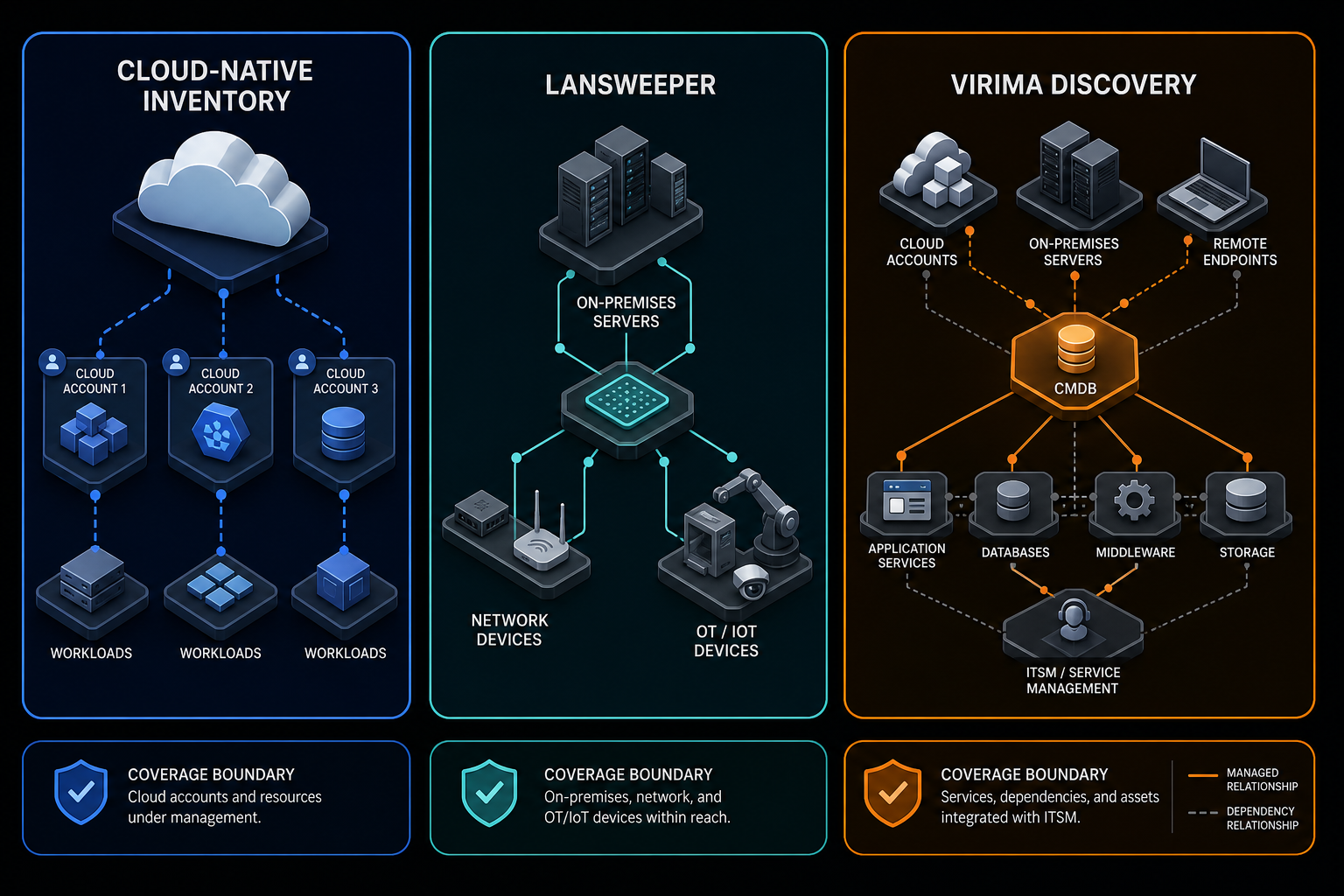
The useful test for each row is the edge of its coverage. Everything past that edge becomes a manual process, a second tool, or an unknown.
What does a cloud-native inventory cover on its own?
Each major provider documents an inventory service, and each performs well inside its own, quite specific boundary.
AWS Config records configuration changes for supported resource types, and it can record all of them or only the types you choose. AWS documents that resources are regional or global, which affects where recording must be enabled. Software inventory on instances follows a separate path. AWS documents that recording managed instance inventory requires the machine to be a Systems Manager managed instance with SSM Agent installed. AWS also states that configuration items for unmanaged instances do not receive additional updates.
Azure Resource Graph queries across a set of subscriptions and returns supported resource types. Microsoft documents a window of the last 14 days of resource configuration changes. Microsoft also states that the data is not strongly consistent because it is indexed with a short latency.
Google Cloud Asset Inventory is a metadata inventory service for Google Cloud resources and the policies set on them. Google documents that create, update, and delete history is kept for up to 35 days. Google also notes that the service is not designed for real-time querying of assets.
For a director, the pattern matters more than any single feature. Each service describes resources inside one provider. A three-cloud estate means three tools, three query models, and three retention windows. The pages we read do not describe laptops, switches, or on-premises servers outside that provider’s own tooling.
This scope is what a control-plane inventory is built for. It becomes a gap when the tool is asked to serve as the inventory for the whole estate. Virima’s API-based discovery article covers the cloud approach in more detail.
What Lansweeper documents, and what to confirm
Lansweeper’s documentation describes three discovery systems. Network Discovery scans the local network and covers servers, workstations, IoT, and OT devices. IT Agent Discovery tracks endpoints that are off-network or intermittently connected. Cloud Discovery inventories assets across AWS, Azure, and Google Cloud.
Several details deserve credit, starting with the agent. Lansweeper’s IT Agent Discovery documentation says the agent runs on Windows, Linux, and macOS, stores results locally, and syncs when the device reconnects. It sends data over HTTPS with no VPN or inbound ports required. The Cloud Discovery documentation says it uses machine-to-machine connections, stores no credentials in Lansweeper, and needs no local component. The documentation also describes a reconciliation engine that merges matching records into one asset, and diagrams that map relationships between assets.
Explicit OT and IoT coverage stands out. If your estate includes operational technology, Lansweeper’s documentation names it directly — a real differentiator over the cloud-native options above.
Four points need written confirmation before you rely on them:
- The cloud sync schedule isn’t specified — Lansweeper’s Cloud Discovery documentation says scans can be scheduled across accounts but states no interval.
- Relationship depth needs confirming — Lansweeper documents asset relations and diagrams, so ask how business-service maps are built and who maintains them as the estate changes.
- ITSM sync direction needs confirming — Lansweeper’s documentation lists a CI Sync for the ServiceNow CMDB and a sync into Jira Service Management Assets, so confirm which fields flow in which direction.
- Method status needs confirming — the pages we read make no beta or early-access statement for the agent or cloud discovery, so ask for the current status of each method you plan to use.
Lansweeper’s own claims, such as full visibility in under 30 minutes in most environments, are vendor statements. Treat them as test targets, the same way you would treat ours.
What does hybrid IT discovery with Virima Discovery add?
Hybrid IT discovery with Virima Discovery collects from several methods, reconciles the results, and writes them into a CMDB that your ITSM can use. Virima documents agentless collection across SNMP, WMI, SSH, and other protocols. The Virima agent covers Windows, macOS, and Linux. Cloud and virtualization sources are read through APIs, including AWS and Azure for cloud, and VMware and Hyper-V for virtual machines.
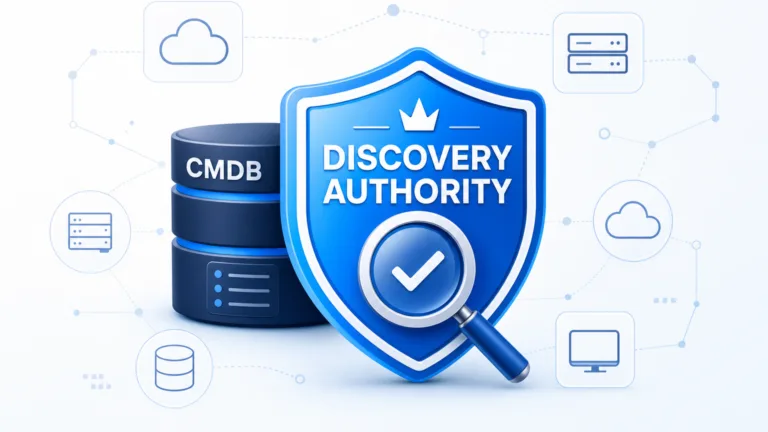
Reconciliation is the part a director funds. Results are merged into the Virima CMDB, with attribute-level authority rules deciding which source wins each field. Conflicts are logged with the source, the timestamp, and the rule applied. Virima blog post on how CMDB reconciliation and attribute-level authority rules work covers that process in more depth.
Virima Discovery reconciles agentless, agent-based, and API-sourced data into the CMDB using those attribute-level authority rules — when two sources disagree on a field, the winning rule, source, and timestamp are logged. This CMDB reconciliation, not raw collection, is what a bi-directional ServiceNow or Jira Service Management sync depends on.
ViVID™ service maps build dependency maps from the discovered relationships, once your team provides the service definitions.
Virima integrates directly with ServiceNow to enrich your CMDB with discovery-sourced ground truth — a bi-directional sync, not a replacement — alongside integrations with Jira Service Management, Ivanti, Cherwell, HaloITSM, Xurrent, Hornbill, and TeamDynamix. The integrations hub lists each partner. Virima runs high-frequency scheduled discovery, with the schedule set in the Discovery App.
Three limits belong in your evaluation notes:
- Virima’s pages do not document OT or IoT coverage comparable to what Lansweeper’s documentation names, so test it if OT matters to you.
- API-based cloud discovery reads provider APIs on a schedule. If you need a record at the moment a policy is edited, a native service built for change recording is the better source.
- Virima’s FAQ says the agent supports “many versions of Linux and macOS” without listing them — ask for the supported distribution list.
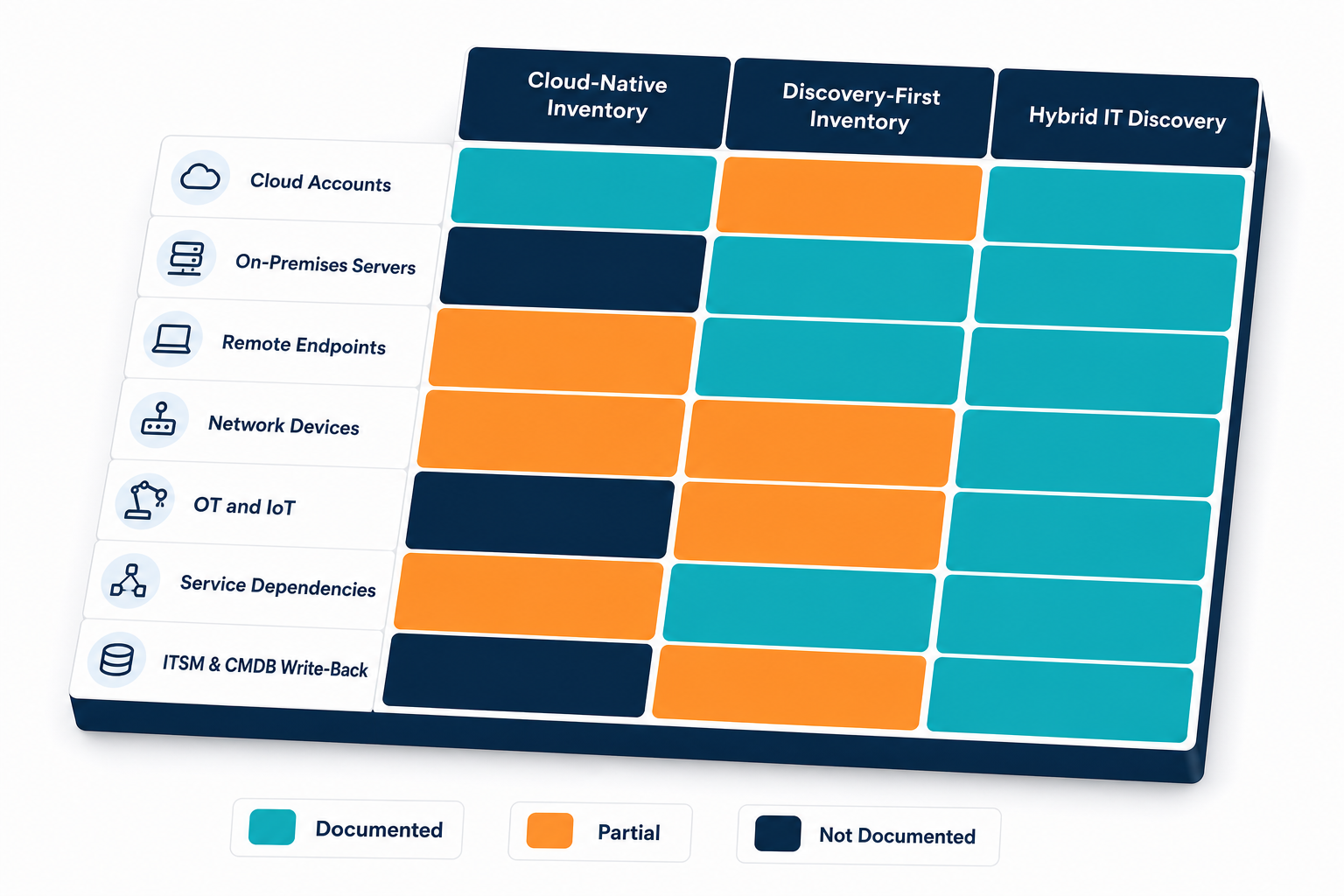
A boundary scorecard: seven estate segments
This table summarizes what each vendor’s own documentation says. A “not documented” entry reflects what the pages say and does not prove absence, so treat it as a question for the vendor.
| Estate segment | Cloud-native alone | Lansweeper (per its docs) | Virima Discovery (per Virima docs) |
|---|---|---|---|
| Cloud accounts and workloads | Strong inside one provider; one tool per provider | AWS, Azure, GCP through machine-to-machine connections | API-based for AWS and Azure |
| On-premises servers | Software inventory only for managed instances (AWS) | Network Discovery, agentless | SNMP, WMI, and SSH probes, or the agent |
| Remote endpoints | Not documented | Agent with offline store and sync | Agent for Windows, macOS, Linux |
| Network devices | Not documented | Network Discovery | SNMP and SSH probes |
| OT and IoT | Not documented | Named in documentation | Not documented; test it |
| Service dependencies | Resource-level only | Relationship diagrams | ViVID™ service maps |
| ITSM and CMDB write-back | Not documented | CI Sync and JSM Assets listed; direction to confirm | ServiceNow bi-directional; other ITSM integrations |
Cloud-native tools win on depth inside one provider. Lansweeper’s documentation is broad on device types, including OT. Virima’s case rests on the last two rows, where reconciled relationships and ITSM write-back matter most — the segments that decide whether change and incident teams can trust what the CMDB tells them.
What each choice costs your team
The licence line is the smaller number. The larger one is the work your team does to close each gap, so ask who owns that work before you sign anything.
With a cloud-native inventory alone, someone writes and maintains queries per provider, then joins that output to whatever describes on-premises assets and end-user devices — a standing task, not a one-time setup.
With a discovery-first inventory, the device layer is covered, but the dependency layer needs an owner. If your CMDB lives in an ITSM platform, someone also owns the sync rules and the reconciliation of what arrives there.
With Virima, your team owns credentials, probe scheduling, and the authority rules. That effort buys a reconciled CMDB — the join work moves into the platform instead of onto a person’s calendar. Virima’s blog post on calculating total cost of ownership for discovery and CMDB tools compares that effort across vendors.
See how Virima’s reconciliation rules remove this join work. Halo Integrations Offer The Full Power Of Virima IT Discovery
Ask each vendor for the recurring tasks your team will inherit, and compare those lists alongside the feature sheets.
When another choice is the better one
A fair comparison includes the cases Virima does not win — useful context if you’re weighing Lansweeper alternatives broadly, not evaluating Virima alone.
Cloud-native inventory alone is enough when your estate sits mostly in one cloud, your on-premises footprint is small, and you do not run a CMDB. Native tools sit close to the source of truth and cost your team little to adopt.
Lansweeper is the stronger fit when you need device and software inventory first, and when OT or IoT assets are a material part of the estate. Its documentation names those classes directly.
Virima Discovery fits when the estate is hybrid, when change and incident teams must trust your CMDB or ITSM, and when service dependencies drive your risk decisions. In that case, the reconciliation and write-back rows decide the outcome.
Many estates mix these approaches, and a native cloud feed alongside a reconciled discovery platform is a reasonable design, provided one system holds the authority rules.
Five questions for every vendor, including us
Put these to each vendor in writing, and keep the answers for the decision record.
- What is the scan or sync schedule for each source, and can we set it per source?
- When two sources disagree about an attribute, which one wins, and where is the conflict logged?
- Which direction does the ITSM sync run, and what does it overwrite?
- What is the current release status of each collection method we plan to use?
- Which segments of our estate does your documentation leave uncovered?
The fifth question tests candor, because a vendor that names its own gaps is easier to plan around.
A two-week side-by-side on one business unit
A proof on your own data settles more than any comparison table. Choose one business unit that includes a mix of server, endpoint, network, and cloud assets.
In week one, run each candidate against the same unit with the same scope. Export the record counts for each of the seven segments in the scorecard, and record every credential, firewall change, and agent install your team performed.
In week two, compare each export with a list you already trust, such as hypervisor inventories, cloud account listings, or recent change records. Count the records that are missing, duplicated, or unexplained, and log how many hours your team spent resolving them.
Decide the pass criteria before the test starts. A reasonable set covers every segment you own, gives a documented reason for every mismatch, and produces a recurring-task list your team can accept. A candidate that cannot show its work on your data has given you the finding.
Run the comparison on one business unit
Download the Two-Week Discovery Proof Plan — the same test plan, boundary scorecard, and five vendor questions from this article, formatted to run your own Virima Discovery vs Lansweeper vs cloud-native inventory evaluation against one business unit. Halo Integrations offers the full power of Virima IT Discovery.
For a feature-level view of Lansweeper specifically, read Virima’s Lansweeper comparison. When your team is ready to put the five questions above to us directly, schedule a demo.
Frequently Asked Questions
What is IT discovery with Virima Discovery?
It is Virima’s approach to collecting asset data through agentless probes, an agent, and API-based cloud discovery, then reconciling the results into the Virima CMDB. ViVID™ service maps and ITSM integrations build on that reconciled data.
Can a cloud-native inventory replace a discovery tool?
It can when your estate sits almost entirely inside one provider. The documentation we reviewed describes resources within that provider, so on-premises servers, network gear, and endpoints need another source of inventory data.
Does Lansweeper replace a CMDB?
Lansweeper’s documentation describes syncing into the ServiceNow CMDB and Jira Service Management Assets. Virima includes its own CMDB, so your choice depends on whether your ITSM already holds the configuration record your teams trust.
Does Virima Discovery integrate with ServiceNow and Jira Service Management for a hybrid estate?
Yes. Virima documents a bi-directional ServiceNow integration plus syncs with Jira Service Management, Ivanti, Cherwell, HaloITSM, Xurrent, Hornbill, and TeamDynamix, so a hybrid estate’s discovery data reaches the ITSM platform your teams already use.
How long should a fair IT discovery proof take?
Two weeks is enough for one business unit: one week to collect and one to verify against records you trust. Agree the pass criteria first, so the result becomes a decision.