

Halo CMDB: How Virima enhances it?

Halo CMDB gives your team a central place within a configuration management database CMDB to store and track configuration items CIs, their attributes, and their relationships. within an ITSM CMDB environment. It handles asset tracking, change logging, and license management well. But when your IT environment grows across cloud, on-prem, and hybrid infrastructure, you need CMDB auto-discovery and service mapping to keep that CMDB accurate without manual effort.
Virima pairs with HaloITSM to add IT discovery tools, service mapping, and ViVID™ visualization. Your ops team gets the dependency visibility that Halo’s native CMDB doesn’t provide on its own, a crucial advantage given that 54% of teams using GenAI in ITSM reduce average incident resolution time significantly.
We’ll cover what Halo CMDB does well, where it falls short for complex environments, and how Virima fills those gaps.
What Halo CMDB does well
Halo CMDB is a central hub for storing detailed information about hardware, software, network devices, and their connections. For teams already running HaloITSM, the CMDB is tightly integrated with the service desk as part of service management ITSM as part of a broader ITSM CMDB setup. Tickets, changes, and asset records all live in the same platform.
Here’s what Halo CMDB handles natively:
Asset tracking and accountability
Halo CMDB records every configuration change with a traceable history: who made the change, when, and what they altered. Every action ties back to a user, so your team has full accountability during audits or incident investigations.
Your team can plan and execute changes at any scale with a clear record trail inside the CMDB.
Configuration data and customization
Halo lets you customize fields for tracking devices, assets, and other CIs using ITIL labels. You control asset group organization, field names, and validation rules. That flexibility lets you capture specific data types like IP addresses, dates, and warranty info without workarounds.
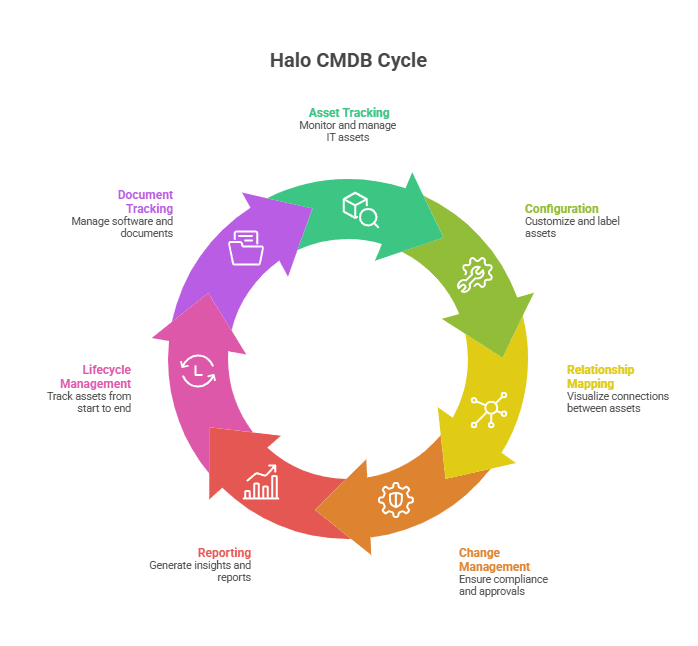
Relationship mapping
Halo CMDB links assets and maps their relationships, so you can see how different CIs connect. This helps your team understand the impact of a change on business services before approving it and reduces the risk of unplanned disruptions.
Change management and control
Users can log changes with justifications and follow access controls. Approve software updates and maintain records. This supports a structured change management approach that keeps audit trails clean and helps ensure compliance, and lowers the risk of failed changes.
Reporting and analytics
Halo provides reporting tools that cover configuration details, usage metrics, and asset status. Teams can generate reports on tracked parameters to surface the data they need for reviews and IT audits.
Asset lifecycle management within asset management ITAM
Halo retains asset data even after decommissioning, preserving a complete history. Maintenance requests can be auto-generated at set intervals to keep asset records current and validated.
Document management and license tracking
Users can attach manuals, specs, and warranties directly to asset records. Halo also tracks software license usage for each software asset to help maintain compliance and manage how licenses are allocated across the organization.
Where Halo CMDB needs help, and how Virima fills the gaps
Halo CMDB is a solid CMDB solution for tracking and managing CIs within its native workflow. But for teams running complex, hybrid environments, the CMDB needs CMDB auto-discovery and service mapping to stay accurate and useful. Without those, your CMDB data drifts, and stale data means bad decisions during incidents and changes.
Virima integrates with HaloITSM to add the capabilities that Halo’s native CMDB doesn’t cover.
How is Halo CMDB different from Virima’s CMDB?
Halo CMDB stores and organizes the configuration data your team enters or imports.It’s a well-structured database with strong change logging and ITSM CMDB integration. But Halo relies on manual input or basic imports to populate that data.
Virima adds CMDB auto discovery that scans your network, identifies assets, maps their relationships, and feeds that data into the CMDB through recurring scheduled scans.
Where Halo stores what you tell it, Virima discovers what’s actually there and keeps the CMDB accurate over time without manual data entry.
Accurate Halo CMDB data through automated discovery
Manual CMDB updates go stale fast. A server gets decommissioned, a new cloud instance spins up, a network device gets swapped, and the CMDB doesn’t reflect any of it until someone remembers to update the record.
Virima’s CMDB auto discovery runs recurring scheduled scans across your infrastructure using agentless IP-based scanning and agent-based options where needed. Discovered assets and their relationships populate the CMDB automatically, so your team makes decisions based on near real-time data rather than whatever was last entered manually.
Halo CMDB service mapping and ViVID™ visualization
Virima’s service mapping uses machine-learned relationship and dependency mapping to trace connections across applications, network components, and system communications. Your team gets a clear view of which services depend on which infrastructure, which matters when you’re approving a change or triaging an incident.
Flexible discovery for hybrid IT
Virima’s discovery covers on-premises, cloud (AWS and Azure via API integrations), and virtualized environments using agentless IP-based scans. Agent-based options through the Discovery Agent are available for Windows, macOS, and Linux, including off-network monitoring for work-from-anywhere devices.
This ensures that Halo’s CMDB reflects your full environment, not just the portions that are easy to scan.
How Virima improves MTTR, change success, and Halo CMDB asset management
Pairing Halo with Virima directly impacts the metrics your ops team owns.
When an incident fires, ViVID™ shows you the affected service map with dependency context. Your team identifies the root cause faster because they can see what’s connected and what’s already flagged. That’s a direct reduction in MTTR.
Accurate dependency maps also mean your change advisory board reviews changes against current infrastructure data, not data that’s three months stale. Your change success rate goes up because the information is actually trustworthy.
On the asset side, Virima’s discovery combined with ASD gives your asset managers a complete, continuously updated inventory that supports lifecycle decisions, license compliance, and audit readiness. That’s where IT Asset Management stops being a spreadsheet exercise and becomes a reliable process.
Why Halo CMDB teams choose Virima as their discovery and mapping layer
For teams running HaloITSM, Virima adds the discovery and visualization layer that makes your existing Halo CMDB operationally reliable. Automated discovery keeps CI data accurate. Service mapping reveals the dependencies your team needs for incident and change workflows. And ViVID™ turns static CMDB data into dynamic visualizations, giving your entire team a shared operational view for change planning, incident response, and vulnerability prioritization. The result is faster incident resolution, more confident change approvals, and a Halo CMDB that your team actually trusts.
Ready to see how Virima enhances your Halo CMDB? Explore the HaloITSM integration or connect with us for a walkthrough. You can also download the HaloITSM data sheet for a detailed overview of the integration.
FAQ
What is Autonomic Social Discovery, and why does it matter?
Not every asset attribute can be picked up by a scan. Ownership, business criticality, lifecycle status, policies, and SLA assignments are human knowledge. They live in people’s heads, not on the network.
Virima’s Autonomic Social Discovery (ASD) automates human intelligence gathering for these non-discoverable attributes. Any CI property can be tagged for ASD integrity checks. When the system detects that a required piece of information is missing, it notifies the listed owner to provide the data. Assignees can reassign ownership or individual tasks to other users, and the system adapts to determine the best resource for future intelligence gathering.
For Halo CMDB users, this means more complete asset records without chasing people for spreadsheet updates.
How does Virima integrate with HaloITSM?
Virima connects to HaloITSM through a bi-directional API integration that syncs discovered CIs and their relationships with Halo’s ITSM CMDB. The HaloITSM integration keeps asset records current as Virima’s scans detect changes across your environment, and data flows both ways between platforms.
Setup is codeless. Virima uses pre-built, customizable blueprints that map directly into Halo’s asset groups and types through a no-code UI. Your team can start seeing updated data quickly once the integration is live.
What is ViVID™ and how does it work with Halo CMDB?
ViVID™ (Virima Visual Impact Display) overlays ITSM incidents, change records, event management alerts, and NIST NVD vulnerability data onto the service maps built by Virima’s Discovery and Service Mapping. Instead of flipping between your ITSM tickets and a static topology diagram, ViVID shows you where active incidents and vulnerabilities sit within your actual service dependencies and organizations, using GenAI saved an average of 4.87 hours per incident in resolution time.
For a Halo ops team, this means faster root cause identification. When a service goes down, you see the impacted dependencies, related incidents, and problem management context on a single map instead of correlating tickets manually.
ViVID also helps with change planning. Before your team approves a change, ViVID’s overlays let you identify stakeholders and anticipate how a modification could affect connected services, reducing the risk of change-induced incidents.





