EOS Switches Found 4 Weeks Before the Budget Cycle Closed

| End-of-life network switch discovery exposed 23 Cisco Catalyst 2960-X switches approaching their end-of-support deadline with no replacement budget in place. This post covers what the scan found, why the ITAM system missed the risk for seven years, and the process changes that now surface hardware lifecycle exposure before it forces an emergency decision. |
We ran our quarterly discovery scan in late October. Three weeks before the infrastructure budget cycle closed for the year, the results returned something we had not planned for: 23 Cisco Catalyst 2960-X switches, spread across four of our eight on-premises sites, had already crossed their end-of-sale date and were within 90 days of their end-of-support window. No replacement budget. No project in the queue. Four weeks to either act on this or carry the risk into the next fiscal year.
The incident revealed a deeper problem. Our ITAM system was tracking purchase history, not lifecycle status. The gap between what end-of-life network switch discovery found and what ITAM records showed had widened for seven years without anyone noticing. And when it surfaced, it forced an emergency decision with a $142,000 price tag.
What the Discovery Scan Actually Showed
| End-of-life network switch discovery works by matching scanned device models against vendor lifecycle tables. When a discovered serial number maps to a model past its end-of-sale or end-of-support date, that record surfaces in lifecycle reports — giving infrastructure teams actionable data before hardware enters an unsupported state and before the budget window closes. |
The 23 switches were not invisible to our infrastructure team. They appeared in our IT asset management system, logged at the point of purchase in 2017. What was missing was lifecycle tracking.
When IT discovery ran across our environment, it pulled device model numbers, firmware versions, serial numbers, and network positions. Matching those results against Cisco’s published lifecycle tables took 40 minutes. Our ITAM records accumulated as a liability for seven years, quietly, without a formal review, and one scan exposed the full extent.
What we found:
- 23 switches actively handling traffic at core and distribution layers across 4 sites
- Average device age: 7.3 years
- All had crossed end-of-sale in 2022, two years prior to this scan
- 18 were at distribution layer, 5 at core layer
- Nobody had opened a replacement ticket for any of them in our ITSM platform
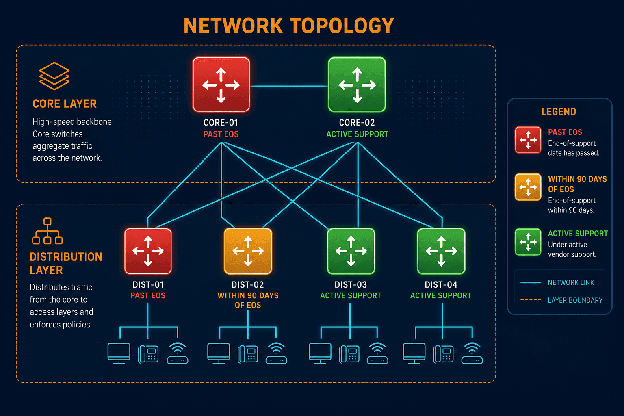
Conceptual diagram showing a network topology with flagged EOS switches at core and distribution layers, color-coded by lifecycle status
The Budget Crisis That Followed
At list pricing, 23 enterprise-grade replacement switches at the tier we needed ran approximately $340,000 in hardware. Adding installation labor across four sites brought the estimate to roughly $420,000. The fiscal year budget cycle was four weeks from closing.
We had two paths. Push for urgent budget approval (which meant escalating to finance with a risk justification explaining why our ITAM system had not surfaced this proactively). Or defer to the next fiscal year and accept operating on unsupported hardware for 9 to 12 months while waiting for new budget.
Neither option was straightforward. The urgent approval path required a post-mortem conversation nobody wanted to have: why had seven years of ITAM records failed to surface EOS risk before it became a budget crisis? The deferral path meant running core network infrastructure with no vendor patches, no security updates, and no Cisco incident support for any failure during that window.
We approved urgent replacement for the highest-risk sites (the 5 core-layer switches across two sites). We formally deferred the 18 distribution switches with a signed risk acknowledgment from the IT Director, documented for audit purposes. Total unplanned spend: $142,000 for hardware and installation.
For teams without a formal IT hardware asset management process, this scenario plays out more often than most organizations track. The gap usually stays invisible until a scan or an audit forces it into view.
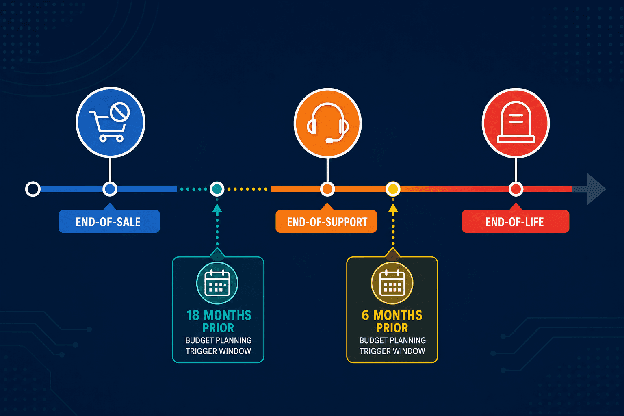
Illustrative timeline showing end-of-sale, end-of-support, and end-of-life milestones for network hardware, with budget planning windows annotated
What ITAM Should Have Caught Earlier
The root cause was not the discovery scan. The discovery scan performed exactly as designed. The root cause was that our ITAM platform was tracking purchase records rather than lifecycle status.
A CMDB or ITAM platform should flag a device as it approaches end-of-sale, not after it crosses into the unsupported window. Our records showed model number and purchase date. They did not include the Cisco lifecycle dates that had been publicly available for years.
The security stakes are real. According to the Cisco Talos 2025 Year in Review, nearly 40% of the top 100 most-targeted vulnerabilities in 2025 impacted end-of-life devices. That exposure starts the moment a device leaves vendor support, and it grows every day patches stop shipping.
Three specific process failures contributed:
No lifecycle date enrichment. Staff entered purchase records at acquisition and never updated them. The model-to-lifecycle mapping that flags EOS status requires an active data source, not a static entry.
No discovery-to-ITAM reconciliation schedule. The gap between what the CMDB held and what discovery found had widened for seven years without anyone running a formal comparison.
No budget trigger. Even if lifecycle dates had been accurate, no workflow translated an approaching EOS date into a budget planning ticket with enough lead time to act inside a normal fiscal cycle.
| What is end-of-life network switch discovery? End-of-life network switch discovery is the process of scanning network infrastructure to identify devices that have crossed their end-of-sale or end-of-support dates. By matching discovered device models against vendor lifecycle tables, IT teams surface hardware at risk before it enters an unsupported state and before budget cycles close. |
The Discovery-ITAM Gap Is the Actual Risk
Two Systems. One Asset. Zero Agreement.
What this incident made clear: discovery data and ITAM data need to share the same source of truth, not drift apart as two separate systems over time.
Our IT discovery tool found what the network contained. Our ITAM tool tracked what we had purchased. Neither was wrong on its own terms. The problem was the gap between them. Seven years of device refreshes, informal decommissions, and site reconfigurations had widened that gap to the point where ITAM records were unreliable for lifecycle planning.
Discovery-driven ITAM closes that gap. When discovery finds a Catalyst 2960-X with a serial number that maps to a specific purchase record, it should also pull the published lifecycle status for that model and surface it in the ITAM record. This is not an instant or real-time requirement (it is a scheduled enrichment job that runs on the same cycle as discovery). The approach treats discovery data as the authoritative source for asset state, with ITAM records drawn from that source rather than hand-maintained as a parallel system.
Had the team been reconciling discovery against ITAM on a scheduled basis, these 23 switches would have appeared on a lifecycle risk report well before the budget cycle closed. That is the core case for end-of-life network switch discovery: making the invisible visible on a predictable schedule.
The distinction between what a CMDB tracks and what ITAM tracks is worth understanding before you design this reconciliation process. Our breakdown of CMDB asset management vs. ITAM covers a practical framework for which system should own which data.
| Why do ITAM records miss end-of-life network hardware? ITAM records often reflect purchase data that staff entered at acquisition and never updated. Without active reconciliation between discovery scan results and vendor lifecycle tables, devices age out of support silently. The gap between what an organization owns and what its ITAM records show can widen for years before a scheduled scan or audit surfaces it. |
What We Changed After the Emergency Approval
Following the unplanned spend, we rebuilt our ITAM lifecycle tracking process. The changes we made:
- Scheduled IT discovery scans across all sites on a defined cycle, with results feeding directly into ITAM record updates
- Added vendor lifecycle data enrichment to all network hardware records, refreshed from vendor lifecycle tables every quarter
- Set budget planning reports to generate every June and December, flagging any device within 18 months of end-of-support
- Configured a formal EOS project ticket to open automatically when any hardware record crosses the 18-month threshold
The following June, the planning cycle surfaced 11 additional switches at two other sites approaching end-of-sale in 18 months. Those are now in the budget for the next fiscal year. No urgent approvals required.
For teams managing distributed network infrastructure, the lesson is clear. ITAM accuracy depends on discovery frequency and lifecycle enrichment, not purchase history. A device record from 2017 will not tell you what that device needs in 2024 unless an active process keeps it current.
Building this process from scratch is easier when you have a structured framework. Our guide to asset lifecycle management best practices covers the end-to-end lifecycle stages and where discovery data fits at each phase.
How does scheduled discovery improve ITAM lifecycle tracking?
Scheduled discovery scans pull current device model numbers, firmware versions, and serial numbers from the network on a defined cycle. When those results feed directly into ITAM records, lifecycle status updates automatically rather than sitting as a stale purchase entry. Teams see accurate refresh timelines and can plan budgets before hardware approaches end-of-support.
Making Lifecycle Visibility a Standard Part of ITAM
The $142,000 unplanned spend was not the most significant cost in this incident. The escalation to finance, the risk acknowledgment documentation, and the operational disruption from unplanned procurement all carried costs that did not appear in the hardware invoice.
Discovery fixed the immediate visibility gap. Rebuilding the process behind it prevented the next one.
For infrastructure teams managing aging hardware across distributed sites, the CMDB best practices that matter most are not about CI schemas or data models. They are about keeping discovery and ITAM synchronized so that end-of-life network switch discovery surfaces lifecycle risk before it forces a budget problem. A good starting point is understanding what a CMDB without discovery actually costs, and why that gap tends to compound silently over years.
How do I know if my network switches are approaching end-of-life?
Run a discovery scan to pull current device models and serial numbers, then match those results against your vendor’s published lifecycle tables. For Cisco hardware, compare scanned models against the Cisco End-of-Life Products database. Any device within 18 months of its end-of-support date should trigger a replacement budget ticket in your next planning cycle.
Frequently asked questions
What happens to IT infrastructure when network switches pass their end-of-support date?
After end-of-support, the vendor stops issuing security patches, bug fixes, and firmware updates. Organizations running unsupported switches carry unpatched CVEs with no remediation path. Technical support requests are declined. In regulated environments, unsupported network infrastructure can trigger compliance findings that require remediation on timelines that do not align with normal procurement cycles. ServiceNow, Ivanti, Halo, Jira service management, Hornbill, Xurrent.
Why do discovery scans find hardware that ITAM records miss?
Discovery scans interrogate devices directly, pulling current model numbers, serial numbers, and firmware versions from the network. Staff enter ITAM records manually at purchase and rarely update them afterward. In environments with 5 or more years of history, the two datasets diverge substantially. Teams move devices between sites, swap them for different models, or decommission them informally, and static purchase records capture none of it.
How should IT teams structure budget planning triggers for EOS hardware?
The most effective approach is an 18-month early-warning threshold tied to discovery data. When a device model’s end-of-support date falls within 18 months, a budget planning ticket should open automatically. This gives enough time for vendor selection, procurement approval, and installation scheduling inside a standard fiscal year cycle, without requiring urgent approvals.
Can discovery tools surface EOS risk proactively from asset data?
Yes. When discovery results match against vendor lifecycle records, devices approaching end-of-sale and end-of-support surface in ITAM lifecycle reports. Teams see hardware risk before it becomes a budget problem rather than discovering it during an audit or incident. The key is scheduling the match between discovered device models and published vendor lifecycle data, then surfacing results in reports tied to budget cycles.
What is the difference between end-of-sale and end-of-support for network hardware?
End-of-sale is the date the vendor stops selling the product. End-of-support (also called end-of-life) is the date the vendor stops providing patches, updates, and technical assistance. Organizations can continue using hardware after end-of-sale with no immediate risk. Running hardware past end-of-support is where security and compliance exposure typically begins. The gap between the two dates is often 3 to 5 years, which is the window ITAM systems should use for replacement planning.
| See how discovery-driven lifecycle enrichment feeds end-of-life network switch discovery data directly into your CMDB and ITAM records. Schedule a demo |