CMDB Automation for Distribution and Logistics Networks in Denver: Know Every Site

Denver-area distributors and 3PLs are leasing industrial space faster than many IT records can absorb a new building. CBRE’s Q3 2026 Denver Industrial Figures report 4.6 million square feet leased in the quarter, nearly 28% above Q2, with 1.4 million square feet of net absorption and 1.2 million square feet delivered (about 75% preleased). Total vacancy sat at 8.6%, and the Airport and I-76 corridor submarkets led. Each lease-up raises the same operations question: how fast does a new site join the IT record, and who confirms every device before peak week?
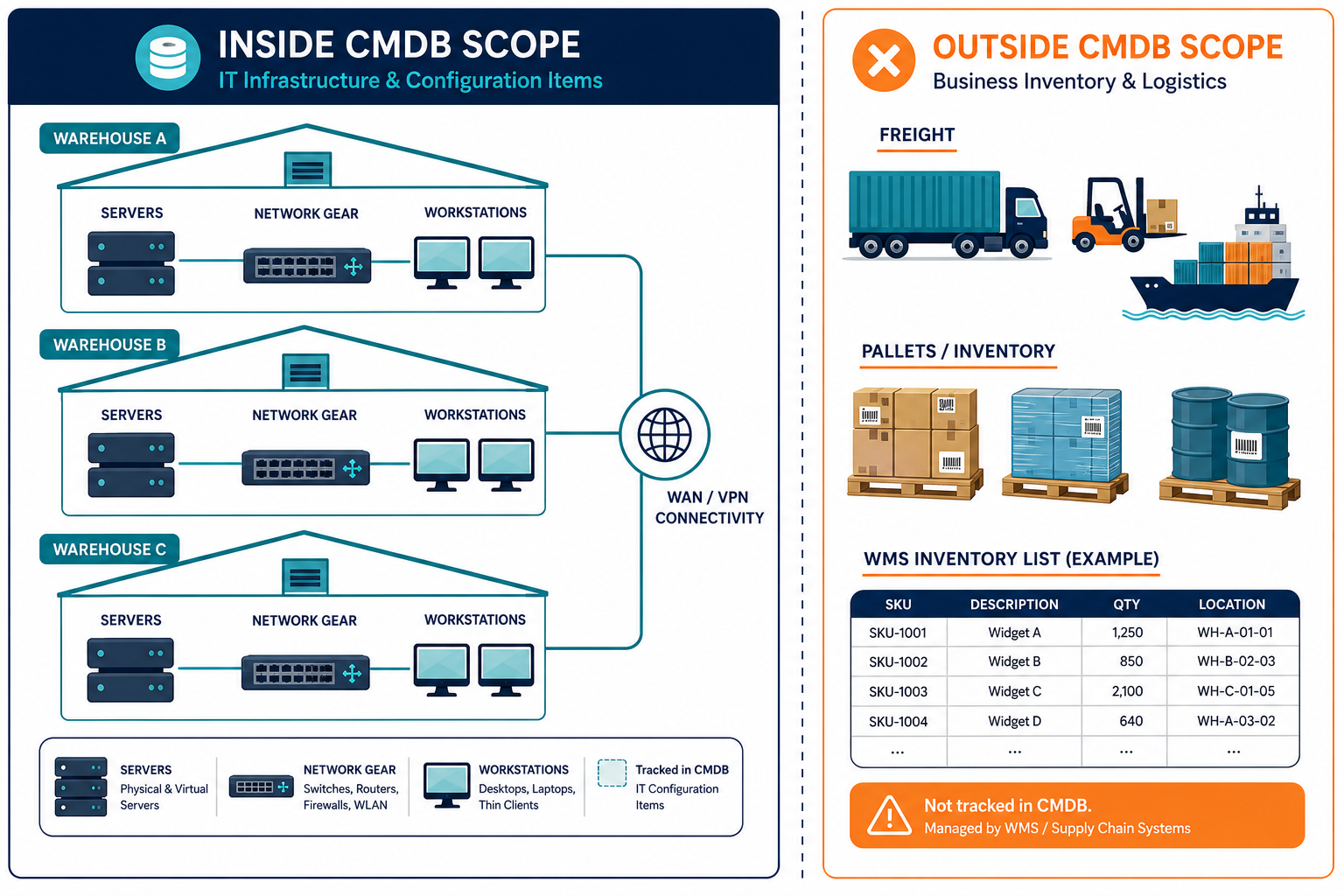
That question is the practical core of CMDB automation for distribution and logistics networks in Denver. The configuration management database holds IT infrastructure and relationships across sites. It does not track freight, pallets, or trailers. When a dock door fails because a switch was never added to the email equipment list, the gap is in the IT record, not in the warehouse management system.
For example, if an IT lead signs off a new building in the Airport submarket. Handhelds, access points, switches, and a WMS connection sit in a thread. During the first peak week, an unrecorded switch loses power and scanning stops at one door. The fix is operational, but the lasting issue is whether the next site will open with owners and verified gear already in the register.
What a distribution network’s IT record has to cover
In logistics, “asset” often means a trailer, pallet, or piece of material-handling equipment. A CMDB records servers, network gear, workstations, endpoints, cloud accounts, and the relationships among them. Readers who expect inventory tracking of freight should look to WMS and yard systems instead.
Across multi-site distribution and logistics networks, three patterns show up often.
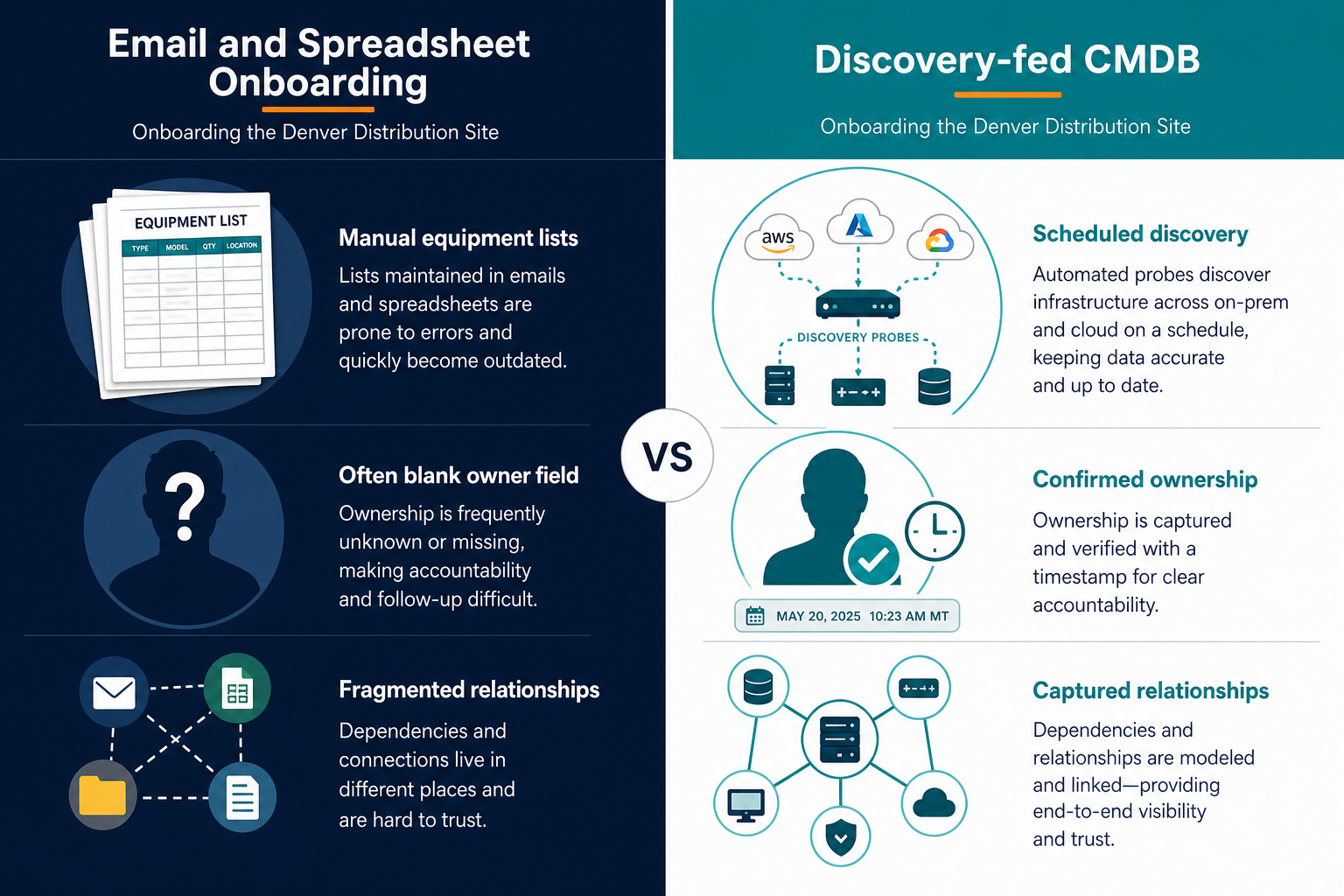
- New sites onboarded from an email thread. Network gear, servers, and workstations are typed by hand during fit-out. Result: the site goes live with a record that is missing equipment.
- Site and vendor-run equipment sits outside the register. Third-party logistics providers and carriers run systems that connect to yours. Result: when something fails, nobody can say who owns the connecting path.
- Peak-season and closed-site equipment is never retired. A named owner must decide each retirement. Result: stale records remain, and equipment and licenses stay on the books after the site or season ends.
These patterns describe common multi-site behavior. They are not findings about specific Denver firms. Similar drift across multi-site logistics estates shows up whenever new buildings outpace the register. The fix starts with scheduled discovery and named ownership, not another spreadsheet tab.
What the numbers say
Cross-industry research sets the visibility baseline. Flexera’s 2026 State of ITAM survey (n=512) found that 36% of respondents report complete visibility, down from 43%, while 78% name an accurate inventory as their top priority. The same report notes that 48% were audited in the past year, 44% spent over $1 million on audits across three years, and 43% see significant savings from license reuse. Those figures are global and cross-industry. They do not describe Denver logistics alone.
IBM’s Cost of a Data Breach Report 2026 puts the global average breach cost at $4.99 million, up 12%. That number is also global and cross-industry. It supports why incomplete inventories raise incident cost. It does not supply a logistics-sector average.
Denver industrial leasing data shows more space coming online. It says nothing about IT completeness by itself. Keep the market story and the inventory story on separate lines of evidence.
What automation means here, and where it stops
Here, automation means high-frequency scheduled discovery that updates records on a cadence the customer sets, with a person confirming ownership and criticality. It does not mean event streaming. Short-lived resources can fall between cycles and need the next pass or a manual entry.
Coverage stops at clear boundaries. Discovery reaches devices on the network that speak a compatible protocol. Devices that resist discovery are registered manually. OT and industrial control equipment such as conveyors stay out of scope unless they are reachable on the IT network. Discovery does not read application data content or browser content. Cloud imports cover AWS and Azure when credentials are configured in the product UI.
What the record holds includes servers, network equipment, workstations and endpoints, AWS and Azure accounts, and the relationships between them. When sources disagree, multi-source reconciliation decides which attributes win so the CMDB stores one authoritative row per item.
The same honesty on scope applies in heavy industrial settings: IT-reachable infrastructure is in; unreachable plant control stays elsewhere, as outlined for Houston ship-channel logistics networks.
CMDB automation for distribution and logistics networks in Denver: scheduled discovery across every site
For regional distributors, 3PLs, carriers, and retailer distribution networks around Denver, CMDB automation for distribution and logistics networks in Denver is four linked mechanisms.
- Discover each site. Agentless probes and agents run on a recurring schedule across each site network. AWS and Azure imports pull cloud-hosted WMS components and integrations when those accounts are connected. Coverage still follows network reach and protocol limits. Handheld scanners and similar devices appear only when they are on the network and speak a supported protocol. Everything else is registered by hand or tracked in another system.
- Show the relationships. ViVID™ service maps build dependency views from communication flows by port and protocol once people define which applications and websites make up each service. Maps can show which warehouse systems talk to the WMS, carrier interfaces, and the network path. People supply service composition; map building follows from that input.
- Put an owner on every record. People confirm ownership and criticality. Records carry a source and timestamp so a new site’s configuration items have a named owner before go-live. The CMDB stores and displays those fields. People remain accountable for confirmation.
- Connect change. ITSM platforms such as ServiceNow, Jira Service Management, Ivanti, Hornbill, Halo, Xurrent, and TeamDynamix can carry change activity into the record through Virima integrations. A site build or retirement should prompt an update path, not a forgotten email.
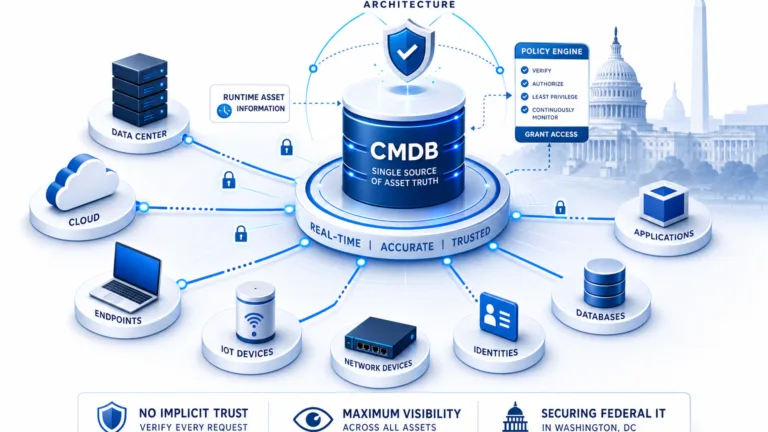
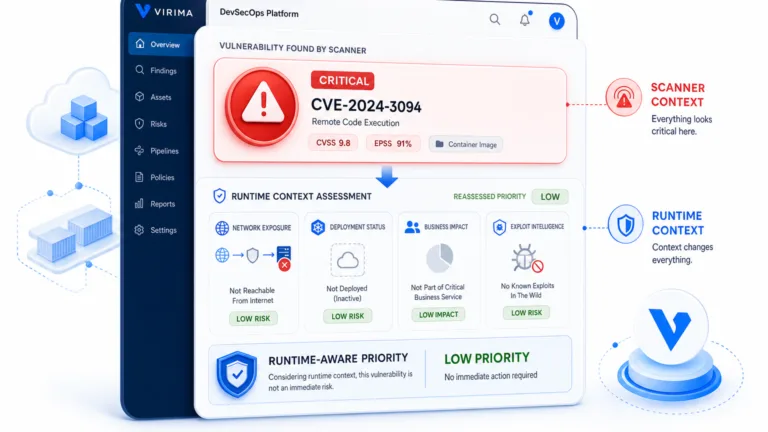
Teams evaluating Trusted Runtime Truth can treat discovery-sourced records and owned relationships as the ground truth layer that change and incident workflows depend on.
| Dimension | Email and spreadsheet onboarding | Discovery-fed CMDB |
|---|---|---|
| How a new site is listed | Manual equipment lists and threads | Scheduled probes, agents, and AWS/Azure imports, plus manual rows for gaps |
| Owner field | Often blank or informal | Named owner with source and timestamp after confirmation |
| Relationships | Rarely captured | Port and protocol flows once services are defined |
| Evidence of currency | Last email date | Last discovery cycle and reconciliation decision |
| Effort before go-live | High typing and chase-down | Discovery run plus gap review |
| What still needs people | Nearly everything | Ownership confirmation, service definitions, OT and non-discoverable devices, retirement decisions |
Cadence stays high-frequency and scheduled. Customers set the interval their operations can keep. That is the automation contract for multi-site Denver logistics IT.
Product depth for this model sits on the CMDB, IT Discovery, and service mapping feature pages. Change impact analysis then uses the same relationship graph before a maintenance window.
What the CMDB settles, and what stays elsewhere
| Question | Answered by the CMDB | Owned elsewhere |
|---|---|---|
| What IT infrastructure exists at each site? | Yes, for discovered and registered items | Physical inventory of freight and trailers |
| What does that infrastructure connect to? | Relationships and service maps after definitions | Carrier contracts and commercial SLAs |
| Who owns each IT record? | Stored owner fields people confirm | HR and vendor management for people and suppliers |
| When was the record last verified? | Discovery and audit timestamps | Warehouse execution metrics in WMS/WES |
| How do handhelds get managed day to day? | Only if present as network-visible CIs | Mobile device management and vendor tools |
| Do conveyors and plant controls run correctly? | Only if on the IT network and in scope | OT and industrial control systems |
| Is the building network designed correctly? | Inventory of devices, not design authority | Network engineering |
| Who responds to a security event? | Asset and ownership context for triage | Security operations playbooks |
For a CIO or VP of IT, the message is narrow and useful. The record shows what IT exists, how it connects, who owns it, and when it was last verified. Operations decisions about freight, labor, and carriers stay with operations.
Where the efficiency and savings come from
Savings claims stay conservative. Mechanisms and internal measures matter more than vendor percentages.
- New site onboarding. Measure days from lease commitment to a record that carries an owner for each device, and separately track how many of those records are confirmed before the site’s first peak day rather than after. That second number is the real signal: a fast record that nobody has signed off on still leaves ownership gaps at go-live.
- Rework from missed equipment. Count incidents in the first 30 days after go-live that trace to unrecorded network or endpoint gear. Fewer missing rows means fewer dock and scanning failures caused by unknown infrastructure.
- Change impact before a window. Measure hours spent listing affected systems for one change. Relationship data reduces spreadsheet archaeology when a switch or WMS path is in scope.
- Peak and closed-site equipment. After each season or site closure, count records that still lack a named retirement decision. A named owner closes the loop so licenses and hardware leave the books.
- Software audits and licenses. Use installed-versus-entitled reviews before and after a cleanup. Flexera’s cross-industry 2026 ITAM data shows audit frequency and license-reuse savings as industry context. Pair that with your own IT asset management position rather than assuming a fixed percentage.
- Incident scoping. Time a drill from alert to a named system list with owners. Completeness of the CMDB shortens that path. IBM’s global breach-cost average is background risk context only.
For audit prep patterns, see how teams simplify IT asset management audits with a maintained inventory. Hours-per-week recovered for a CMDB owner should come from your own baseline, not from an invented benchmark.
Onboarding the next site: the first 90 days
- Days 1 to 15. Name a CMDB owner for the program and a site IT owner for each location. Decide who confirms records before go-live. Pick one existing site and one new build as the pilot pair.
- Days 16 to 45. Run discovery on both sites on a cadence the team can keep, covering switches, access points, servers, and workstations. The core equipment types a new site’s onboarding list should name explicitly. Import AWS and Azure accounts that host WMS or integration workloads. Reconcile discovery output against equipment lists and email threads. Record every gap with an owner and a decision: add, retire, or track elsewhere.
- Days 46 to 75. Define services for the pilot sites so ViVID™ maps can show warehouse-to-WMS and network paths. Confirm ownership fields with source and timestamp. Connect the ITSM path your change process already uses through the integrations hub, so site builds and retirements update the register.
- Days 76 to 90. Rerun discovery after the first corrections. Compare the go-live checklist to the CMDB. Only then scale the same pattern to the next Airport or I-76 corridor building. Keep OT, freight systems, and non-network devices on their own systems of record.
Start with one site and one equipment list
Run a discovery pass on one Denver distribution site and compare the result to its current equipment list. Gaps and unnamed owners become the first backlog. Use the 90-day plan above as your onboarding checklist for the next site, or request a demo if you want that walkthrough run against your own topology.
Frequently Asked Questions
What does CMDB automation mean for a distribution network?
Scheduled discovery updates IT records across sites on a cadence you set, and people confirm owners and criticality. Short-lived resources can miss a cycle and need the next pass or a manual entry.
Does a CMDB track warehouse inventory or freight?
No. A CMDB records IT infrastructure and relationships only. Freight, pallets, trailers, and physical stock stay in warehouse management, yard, and inventory systems.
Can discovery find handheld scanners and conveyors?
Only when those devices sit on the network and speak a compatible protocol. OT and other non-reachable equipment are registered manually or tracked in dedicated control and device tools.
How fast can Virima get a new Denver site into the CMDB before go-live?
Timing depends on site size and network access, but scheduled discovery can run its first full pass within days of connecting to a new site’s network — giving the site a verified IT record with named owners before go-live, rather than after the first peak-week outage.
Does Virima connect to ServiceNow or Jira Service Management?
Yes. ServiceNow, Jira Service Management, Ivanti, Hornbill, Halo, Xurrent, and TeamDynamix are supported integration paths so changes and CI data can move with your existing ITSM process.