
Achieving IT Excellence With ITIL Change Management Software

By Team Virima. September 22, 2025 | Updated July 2026
Picture this: it’s Monday morning, and your IT environment is flawless. By Tuesday, a small update slips through the cracks, and suddenly, critical systems crash. The real problem isn’t the outage—it’s the ripple effect that spreads across every corner of the business.
Most outages stem not from technology but from how people and processes manage change. Gartner reports that 80% of unplanned outages result from poor change and configuration management practices. The problem compounds in hybrid environments: a patch on one server can silently break a microservice three tiers away, especially when infrastructure dependency maps are outdated or missing. Without a strong approach, the very updates meant to drive progress can quickly become liabilities.
This is where ITIL change management software comes in. Instead of treating change as chaos to control, ITIL transforms it into an engine for growth. Every update, from patches to full replacements, aligns with business goals through proper structure. Thereby, it reduces the risk and drives momentum.
In this guide, we’ll explore what ITIL change management software is and why it matters. We’ll also show how it helps organizations build discipline without slowing innovation. You’ll discover practical steps and best practices.
Finally, you’ll see how a platform like Virima brings order, clarity, and confidence to every change initiative.
What is ITIL change management software?
What is ITIL change management software?
ITIL change management software is an ITSM tool that structures how system updates, patches, and configurations are assessed, approved, and deployed. By evaluating dependency risks, automating approvals, and maintaining full audit trails, it reduces service disruptions and prevents costly unplanned downtime.
ITIL change management software helps organizations manage IT changes the right way. It is usually part of a larger IT Service Management platform. Its main job is guiding you through planning, approving, testing, and reviewing changes. A note on terminology: ITIL v4 renamed this practice from “Change Management” to “Change Enablement” to reflect a shift from controlling change to enabling it at speed without sacrificing oversight. Most practitioners and tools still use “change management” as the working term, so both are used interchangeably throughout this guide.
| Change Type | Definition | Approval Workflow |
|---|---|---|
| Standard | Pre-approved, low-risk, recurring changes following a documented procedure | Auto-approved; no CAB review required |
| Normal | Planned changes assessed for risk and impact before approval | Full CAB review; risk and impact analysis required |
| Emergency | Urgent changes needed to restore service or prevent imminent failure | Emergency CAB (eCAB) or delegated authority; post-implementation review required |
ITIL-based workflows track and check every request. Team reviews risks, conducts tests, and grant approval before anything goes live. Even free ITIL change management software can help you manage these steps.
The goal is simple: make changes smooth and reduce risks or service disruptions.
In practice, these tools usually come with helpful features. For example, you get one place to store all change requests.
You can connect with a CMDB to see system links and dependencies. Automated approvals make it easier to notify groups, like the Change Advisory Board, for big changes. Templates and checklists also keep things consistent.
By using this ITIL change management software, IT teams get a clear view of all planned changes. They can spot conflicts early and avoid business disruptions. In short, the software makes IT changes safer and easier to manage.
What problems does ITIL change management solve?
Organizations use ITIL change management to reduce risks and prevent chaos during IT changes. Without a clear process, even small updates, like a server patch or firewall change, can cause big problems. If you miss a dependency, you may face outages or security issues.
Poor coordination is one of the top reasons for downtime and cyberattacks. These failures can hurt your IT team’s reputation and cost the business money. A single hour of critical application downtime costs between $500,000 and $1 million for most enterprises, and significantly more for Fortune 500 organizations (ITIC, 2024 Hourly Cost of Downtime Survey).
How does ITIL change management prevent costly IT downtime?
ITIL change management prevents downtime by requiring risk and impact analysis before changes go live. Structured workflows, automated dependency checks, and Change Advisory Board reviews catch conflicts early, ensuring updates deploy without breaking downstream business services and audit trails help teams recover faster when issues occur.
By adopting an ITIL-based change management system—whether a premium solution or free ITIL change management software—companies can fix many common problems, such as:
1. Lack of visibility into changes
Many times, different IT teams make changes at the same time without knowing it. This often creates conflicts and problems.
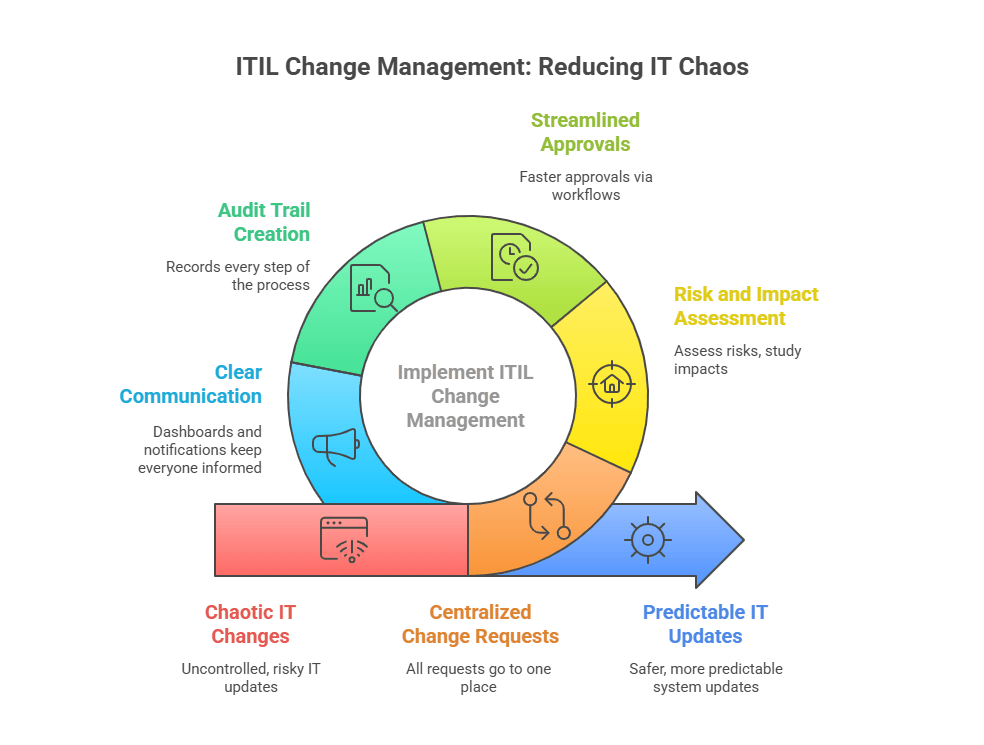
With ITIL change management, all change requests often go to one central place. The system confirms nothing slips through or stays hidden. Everyone can view plans and timelines.
This means no more surprise updates. Every team member and stakeholder stays informed and prepared.
2. High change failure rates
If you skip proper testing, a change can fail in production. It may even cause serious incidents.
A structured change process helps you avoid this. It makes you assess risks, study impacts, and test everything first. Only then does the change go live. This also greatly improves success rates.
Research shows that organizations with strong change management have fewer emergencies. They also face fewer incidents caused by failed changes.
3. Slow, bureaucratic approvals
In many companies, change approvals take far too long. Email chains and random meetings often cause delays.
ITIL tools streamline the approval process and make approvals faster. They set up workflows, such as manager approval for small changes or CAB approval for major ones. The system grants automatic approval for routine, low-risk changes.
This way, you get the best of both worlds. Approvals remain fast as IT governance and control stay intact. You no longer wait weeks for a simple update to move forward.
4. Compliance and audit issues
Many industries must follow strict rules, like ISO 20000 in IT or SOX in finance. These rules require proof that changes are well-controlled.
An ITIL change management system helps with this. It records every step of the process. You can see who requested the change, who approved it, when it happened, and what the results were.
This creates a full audit trail. It also shows you followed the rules and makes compliance much easier to maintain.
5. Communication breakdowns
A common problem happens when the IT team deploys an update but forgets to tell others. Surprises never catch the support desk or users. This creates confusion and frustration.
The ITIL process fixes this with clear communication and proper documentation. In addition, ITIL change management software includes dashboards and notifications. These tools keep everyone informed about upcoming changes, planned downtimes, or new features.
With this setup, IT and business teams stay on the same page. Users know what to expect, so they resist less and accept changes more easily.
In short, ITIL change management helps stop the chaos of random IT changes. When done right, it creates a safer and more predictable way to update systems.
This means your business can roll out new technology or updates without breaking things. No more constant fear of outages or hidden risks.
So, why does your organization need change management? The answer is simple. It prevents costly downtime, keeps control as you grow, and lets you innovate faster with confidence.
Key benefits of ITIL change management software
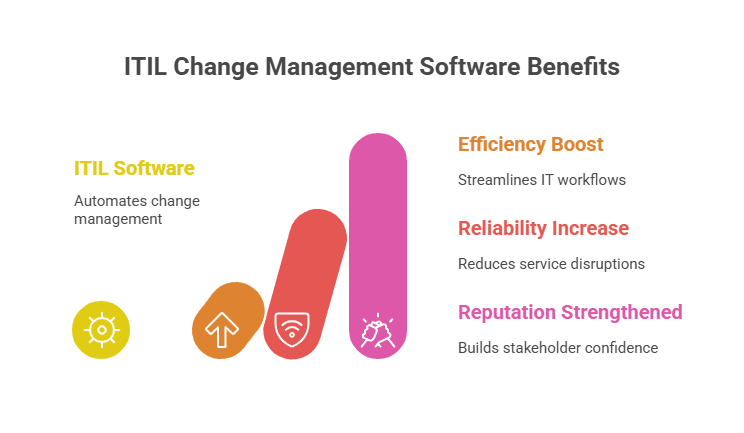
- A dedicated ITIL change management tool can greatly improve your IT team’s work. It boosts efficiency, builds reliability, and strengthens your reputation.
- For small IT teams or startups, free ITIL change management software provides a cost-effective way to start applying these best practices before scaling into enterprise-grade tools.
- The software puts ITIL change management best practices right into daily workflows. This removes guesswork and cuts down on manual effort. It also makes the change process more consistent and less stressful.
- Here are some of the main benefits organizations gain when using ITIL change management software:
Automated approvals and workflows
- Good IT change management tools simplify approvals by automating the process. As a result, there’s no need to chase managers or hold lengthy CAB meetings for every change.
- Instead, you can set rules to send requests to the right approvers. Standard, low-risk changes can even be auto-approved. This speeds up the process while keeping proper oversight.
- The software also sends automatic notifications and assigns tasks. This way, the approval chain loses or forgets nothing.
Near real-time insights and tracking
- With an integrated change platform, IT teams can see updates in near real time. Every step is visible, from submission and review to testing and deployment.
- You can quickly check a change’s status, like “awaiting approval,” “in testing,” or “scheduled for deployment.” It also shows who is responsible at each stage.
- Dashboards and reports provide instant insight into volumes, backlogs, and success rates. This transparency also helps managers identify delays, remove bottlenecks, and allocate resources wisely.
Enhanced communication & documentation
- Change management software acts as a central hub for communication and documentation. The system stores all change details in one place.
- Teams can attach technical plans, notes, and backout steps directly to the ticket. Stakeholders can also share comments and updates there. As a result, everyone stays on the same page. Centralizing everything further builds team alignment and improves accountability.
- Centralizing everything builds teamwork and encourages knowledge sharing. It also creates a lasting record of every change. This history is extremely helpful for IT audits and future troubleshooting.
Better risk assessment and mitigation
- Built-in risk management features help you spot problems before a change gets approved. For example, the software may ask you to complete an impact analysis or a risk checklist.
- Advanced tools can even connect to your CMDB. They automatically flag risks, like changes that affect a critical server or break a policy.
- By catching issues early, your team can adjust plans or add safeguards. You might schedule the change during a maintenance window or alert business units ahead of time. This helps prevent incidents and failed changes.
Compliance and governance enforcement
- An ITIL-aligned change system makes sure every change follows your company’s rules. It also supports compliance with industry standards.
- You can use ready-made templates and workflows built to match frameworks like ITIL, COBIT, or ISO. For example, if your policy requires a security review for all production changes, the tool will enforce that step automatically.
- This consistency keeps you compliant and protects governance standards, and ensures leadership has the insight needed for informed decisions. In regulated industries, software logs and reports serve as audit proof. They also demonstrate strong control over every change.
Reduced downtime and faster incident recovery
- All these benefits lead to the biggest win: less downtime and fewer disruptions. In fact, careful tracking and assessment greatly reduce the risk of a bad change breaking a service.
- And if something does go wrong, the documentation helps. Teams can quickly find the cause, resolve any incident problem, and roll back when needed. This means faster recovery and less stress.
- Strong change management improves overall IT stability and performance. In short, you get fewer emergencies and smoother rollouts. Both IT staff and business users gain confidence in the process.
- These benefits explain why many IT leaders see change management as a worthwhile investment. As a result, it delivers strong returns by improving operations and reducing chaos.
- If you’re thinking about using such a tool, your goals are likely clear. You want faster updates with fewer problems. You want IT and business changes to stay aligned. And you want a culture that plans ahead instead of reacting to emergencies.
- An ITIL change management platform helps you reach these goals. It combines proven processes with smart technology. As a result, change becomes smoother and more effective.
5 best practices for successful ITIL change management
Using ITIL change management software is not only about the tool itself. Success also depends on the best practices and strategies you follow.
Whether you’re using an enterprise-grade solution or free ITIL change management software to get started, these steps apply equally.
Here are five proven steps with practical tips to help you succeed with ITIL change management in your own environment:
1. Plan and document every change thoroughly
- Always start a change with a strong plan and clear documentation. It may sound simple, but many teams skip this step when busy. That often leads to mistakes and missed details.
- Think of each change as a mini-project. Define the scope, set the goals, and list the steps to follow. Determine all systems or items the change affects.
- Also, write down a rollback or backup plan in case things go wrong. By capturing these details in the change record, you cover all scenarios before moving forward.
- Good documentation should cover both technical details and people-related needs. Include scripts, version numbers, and people to inform or train.
- This helps the person making the change and gives approvers the full picture. For example, if a manager sees a plan with risk checks and test results, approval comes faster.
- The documentation is also useful later. When a similar change comes up, you can look back at past plans. This saves time and prevents repeating mistakes.
2. Streamline change execution with automation and integration
- Use automation whenever you can in the change process. Manual steps take longer and are more likely to cause mistakes.
- Most ITIL change tools let you automate parts of implementation. For example, you can use scripts or orchestration tools to update many servers with just one click.
- If you want to cut down errors, automation is the answer. By scripting tasks like copying files, updating settings, or restarting services, you ensure the same process runs every time.
- It’s also important to connect your change management software with other IT systems. Integration makes sure your change process uses accurate data and triggers the right actions.
- For example, link your change platform to your CMDB and monitoring tools. When someone opens a request, they can see near-real-time configuration data and dependency maps. After deployment, monitoring tools can send back success or failure results automatically.
- Connecting with your service desk or incident system also helps. If a change causes an incident, the link is clear. The system saves the record when a change fixes an incident.
3. Validate changes in a safe environment before production
- Never push a change into production without testing it first. Always validate in a safe space like a QA lab, staging area, or pilot group. This step acts as your safety net to catch problems before they hit live systems.
- Even the best plans can miss hidden issues. A patch may work fine in testing, but clash with another app in production. It’s far better to find that early than during a live rollout.
- To test effectively, build non-production replicas of your key systems. You can also use methods like blue-green deployments or canary releases. These let you test with a small group of servers or users before going wide.
- Involve both implementers and end-users in validation. Users may spot workflow or usability issues that technical tests overlook. Record your results in the change record. Fix any defects and test again until you’re confident.
- This process may take extra time up front, but it saves you from bigger troubles later. Remember the saying: “Measure twice, cut once.” A little more testing now can prevent hours of downtime or recovery work later.
4. Keep your team and stakeholders informed
- Change management is a team sport, and communication is key at every step. Everyone involved should know about upcoming changes and their role in the process.
- Start with your IT team. System administrators, support staff, and others need to be aware of major updates. For example, if a network upgrade is planned, the help desk should be ready for user calls. At the same time, the network team should have someone monitoring the change.
- Use your change management tool’s notifications to share schedules and status updates. This keeps the right people informed at the right time.
- For big changes, many organizations use a Change Advisory Board (CAB). See this not only as approval but also as a hub for coordinating communication and schedules across teams.
- Don’t forget business stakeholders and end users when planning changes. If downtime or user-facing updates are coming, announce them early. Use the right channels like email, intranet, or a change calendar.
Gartner finds that adopting an ‘open-source’ (high-involvement) change strategy makes organizations up to 14× more likely to achieve change success, while reducing change fatigue by 29 percentage points and boosting intent to stay by up to 19 points.
5. Monitor the outcome and continuously improve
- The change process does not end once deployment is done. Post-implementation monitoring and review are the final key steps.
- After a change goes live, keep a close watch on the affected systems. Verify that the team met the goal, such as improved performance or a fixed bug. At the same time, look for any unusual issues.
- For critical changes, use a “change freeze” or observation period. The team halts other changes and monitors the new update during this time. Keep staff on standby to act if needed.
- If problems appear, respond quickly. You may roll back the change or apply a minor fix. Early detection is vital, often making the difference between a small hiccup and a major outage. Use monitoring tools, error logs, and user feedback for the full picture.
- After things settle, hold a post-change review—often referred to as a post-implementation review or post-mortem. Bring the team together and ask key questions. Did the change meet its goals? What worked well? What didn’t? Were there steps that went off plan, and why?.
- Always document these lessons and adjust your process. Many organizations also track metrics like success rate, change volume, approval time, and incident rate. These numbers show how well your process works and where it can get better.
How Virima enhances the ITIL change management process
Using change management best practices is important, but the right software makes them easier to follow. One strong option is Virima, a cloud-based IT management solution with powerful ITIL change management features.
While free ITIL change management software can be a good starting point, Virima provides advanced automation, discovery, and visualization to scale with enterprise needs.
Virima is more than just a ticketing tool. It adds automation, discovery, and visualization that take your change management process to the next level. It can also connect with ITSM tools you already use.
Virima’s approach is grounded in Trusted Runtime Truth. Live, explainable, discovery-sourced data about what exists, how it’s connected, and what will break. So every change decision is based on what’s actually running, not what a stale record says.
Next, let’s look at some of Virima’s key features and how they solve common ITIL change management challenges.
1. Automated service mapping for deeper insights
One of Virima’s biggest strengths is automated IT service mapping. As a result, you gain clear visibility into your entire infrastructure and how everything connects.
Normally, building a service map takes a lot of manual work. You have to draw out how servers, apps, databases, and network devices link together. And by the time you finish, something has already changed, making the map outdated.
Virima solves this by automating the discovery process. It runs scheduled discovery scans across your environment, finds all your IT assets, and maps the relationships between them at the infrastructure level. For service dependency maps, Virima builds from service definitions you provide, either manually, via spreadsheet import, or through integrations such as Lean IX. Once those definitions are in place, Virima automatically constructs and maintains the full dependency map as your infrastructure changes.
This gives you an up-to-date service map with very little manual effort.
So, how does this help with change management? Service mapping gives you X-ray vision into possible impacts.
| For example, imagine you plan to update a database server. With Virima’s live service map, you can instantly see which apps, services, or systems rely on that database. You might discover that the payroll system depends on it—a critical insight. That means you can schedule the update after hours and notify the payroll team in advance. |
By showing interdependencies, Virima helps you avoid missing important components. Because the maps update after each discovery cycle, you can trust that the data reflects your current environment. This removes much of the guesswork from risk assessment.
In short, Virima’s automated service mapping turns the lights on in the change process. You can clearly see downstream effects before making changes. Organizations that use this feature report smoother, safer, and more successful change implementations.
2. ViVID™ visual impact display for change analysis and communication
Another powerful feature from Virima is ViVID™ (Virima Visual Impact Display). This is a dynamic dashboard that goes beyond standard service maps.
ViVID™ gives you an actively maintained, visual layout of your IT environment. It shows exactly how a proposed change could affect connected systems. Instead of digging through spreadsheets or long lists, stakeholders can see the impact in a simple diagram. For example, a server node will highlight every component linked to it that might be affected.
How does dynamic service mapping improve ITIL change risk analysis?
Dynamic service mapping automatically discovers and visualizes IT asset dependencies from live infrastructure data. Before a change is approved, IT teams view the exact blast radius and downstream links, replacing static CMDB guesswork with accurate impact analysis. Reducing CAB review time and catching high-risk conflicts before deployment.
This visual context makes it much easier for both technical and non-technical people to understand the scope of a change at a glance.
Why does this matter? Because successful change management needs more than analysis—it also needs clear communication.
| ViVID™ helps bridge the gap between technical detail and executive understanding. An IT engineer can run impact analysis in seconds, a task that usually requires hours of connection tracing. It pulls data from live services, ensuring accurate and fast results. At the same time, ViVID™ makes approvals and CAB meetings smoother. The visuals are easy to understand, even for business users with little technical knowledge. This builds stronger collaboration and consensus around change decisions. |
ViVID™ also strengthens proactive risk management. The system highlights a change’s “blast radius,” making risks clear before action.In practice, ViVID™ reduces blind spots and misunderstandings. As a result, everyone shares the same clear view of dependencies and risks. This clarity leads to smarter choices and greater confidence in every decision.
3. Seamless ITSM integration for change execution and tracking
Many organizations ask, “Can we integrate our change management tool with our existing ITSM platform?” With Virima, the answer is yes.
Virima enhances your IT Service Management (ITSM) processes, supporting not only change but also release management. It adds richer data and smart automation. If you already use ServiceNow, Jira Service Management, Ivanti, or SolarWinds Service Desk, Virima integrates seamlessly. As a result, your change records become clearer and easier to manage.
Here are some key ways this integration makes ITIL change management stronger:
Automated change request population
- Virima can automatically fill change requests in your ITSM tool with detailed data from its service map.
- This means engineers don’t need to manually list every affected server or app. Virima’s discovery engine does it for them, adding all the context.
- The result is more complete and accurate change records with no extra effort. As a result, approvers get the full picture immediately, enabling faster and safer decisions.
Informed approval decisions
- With Virima’s integration, every change ticket can include a visual snapshot of impacted services.
- This gives CAB members and managers instant clarity on potential impacts. They don’t need to guess or dig through long reports.
- By seeing dependencies directly in the request, stakeholders can make smarter decisions. They ask sharper questions, like “Have we notified Team X about the impact?”
- This visual context builds confidence. Approvers base their decisions on accurate insight, not guesswork. That means fewer surprises later.
Centralized collaboration platform
- Virima brings everything together in one platform. In fact, discovery data, ViVID™ visuals, and change management workflows all live in the same place.
- In the past, teams had to switch between a CMDB (CMDB meaning), a change calendar, and network diagrams. With Virima, they can see it all in one view.
- This centralization makes collaboration easier. Application owners, network engineers, and security analysts use Virima or the ITSM tool to discuss changes with shared data.
- It removes silos that often slow down change management. Instead of each team only seeing part of the puzzle, everyone shares the full picture.
Risk reduction and compliance
- Virima lowers the risks of change by adding dependency details and enforcing process steps. Everyone can see the critical points of failure and plan ahead. For example, teams may schedule extra backups or keep on-call staff ready.
- It also supports compliance. The system ensures the inclusion of every required approval and validation. The system halts the change until someone fixes all missing items.
- This control reduces change-related incidents and leads to smoother rollouts. With Virima, changes happen with more safety and confidence
Integrating Virima with your change management process brings new efficiency and confidence. It doesn’t replace your ITSM tool. Instead, it supercharges it with richer data and smart automation.
The result is simple: changes stop being a headache. Your team spends less time chasing information or waiting for approvals. Instead, you focus on executing changes that deliver real value.
Achieving Operational Excellence With Effective Change Management
Many companies now use ITIL platforms to bring order and speed to change.
You may be looking for ways to reduce downtime or improve IT work. In many cases, ITIL change management is part of the answer. With the right steps and tools, change transforms from stress into strength.
| The path begins with asking the right questions. Why do we need this change? What will actually change? What is the impact? Then, use ITIL change management software to guide the process. This way, the system guarantees that no step is skipped or ignored. |
Next, follow best practices. Plan carefully, automate tasks, and test in safe setups. Also, share updates with your team and review lessons after every change. These actions make every rollout safer and smoother.
Virima makes this process even better. It offers automated service mapping, clear impact views, and ITSM integration. As a result, you can roll out changes faster and with less risk. Virima brings IT discovery, mapping, and workflows into one platform. As a result, many companies use it to improve their change process. They experience fewer problems, safer results, and stronger alignment with business goals.
Organizations that close the gap between structured change process and live dependency context see measurable reductions in failed changes and unplanned outages. Explore how automated service mapping and visual impact analysis support every step of the ITIL change process at Virima Service Mapping.
Frequently Asked Questions:
What is ITIL change management software?
ITIL change management software is a tool that helps IT teams plan, approve, implement, and track changes systematically. It reduces risks, avoids downtime, and ensures that updates align with business goals.
Why should organizations use ITIL change management software?
Without a structured approach, IT changes can cause outages, security issues, or compliance failures. ITIL change management software creates a clear process for handling changes, improving success rates, and reducing disruptions.
How does ITIL change management software reduce downtime?
By providing visibility into dependencies, enforcing testing and approvals, and centralizing communication, ITIL tools minimize the risk of failed changes. If issues occur, audit trails and rollback plans help teams recover faster.
Is there free ITIL change management software available?
Yes, several platforms provide free ITIL change management software or entry-level plans. These are great for startups and small teams that want to adopt best practices before scaling to enterprise-grade solutions.





