What is cloud asset management? Best practices & tools

Cloud asset management is the practice of discovering, tracking, and governing every resource an organization runs in the cloud — virtual machines, containers, storage, databases, and SaaS subscriptions — from provisioning to retirement. Cloud resources can be created and destroyed in minutes, often without a change ticket, so most teams only learn their inventory is wrong when an incident, audit, or unexplained bill forces the question.
This article explains what cloud asset management covers, why cloud environments break traditional ITAM approaches, the core practices that keep inventories accurate, and what the gap between cloud assets and CMDB data actually costs in operations.
One clarification before getting into it: cloud asset management is a distinct discipline from digital asset management (DAM), which covers media files, creative content, and brand materials. They share a name fragment but serve entirely different purposes. This article covers IT cloud assets only.
What cloud asset management covers
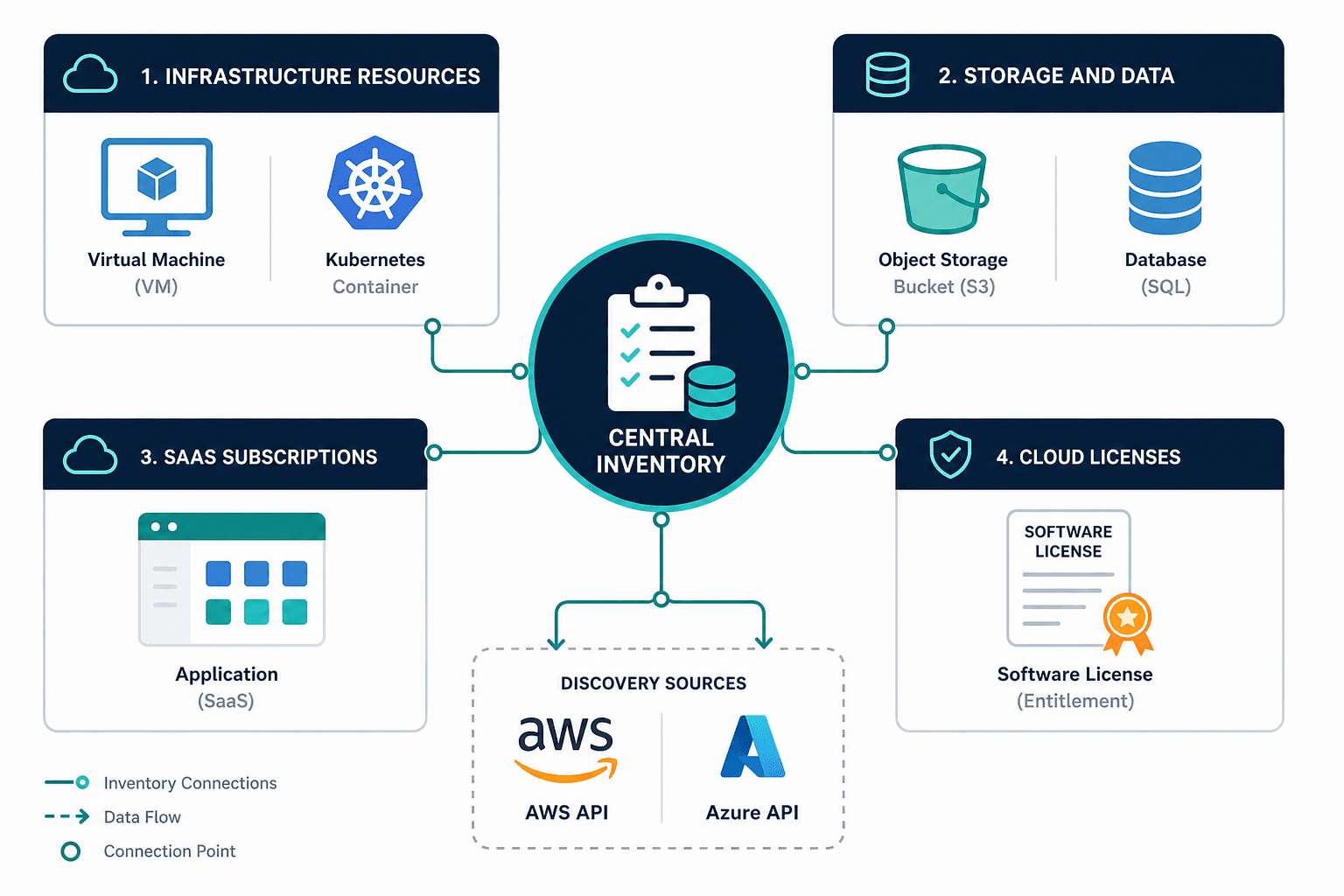
Cloud asset management (CAM) applies to four categories of cloud resources. Each has different tracking requirements and different rates of change.
Infrastructure resources include virtual machines, containers (including Kubernetes-orchestrated workloads), serverless compute functions, and network components: load balancers, VPN gateways, and firewall configurations. These assets exist across public cloud providers, private clouds, and hybrid environments simultaneously.
Storage and data resources cover object storage buckets, block volumes, managed databases, and data warehouses. These are typically the most compliance-sensitive assets because they store regulated or sensitive data.
SaaS subscriptions are the applications teams provision outside centralized procurement, often with a company card and no formal approval. According to Flexera’s 2025 State of IT Asset Management report, only 43% of organizations report complete visibility across their entire technology stack. SaaS remains the category with the largest blind spot in that report.
Cloud licenses and entitlements cover software running in cloud environments: OS licenses, database licenses, and bring-your-own-license arrangements for cloud-hosted applications.
| Category | Examples |
|---|---|
| Infrastructure resources | VMs, containers, Kubernetes-orchestrated workloads, serverless functions, load balancers, VPN gateways, firewalls |
| Storage and data resources | Object storage buckets, block volumes, managed databases, data warehouses |
| SaaS subscriptions | Applications provisioned outside centralized procurement |
| Cloud licenses and entitlements | OS licenses, database licenses, bring-your-own-license arrangements |
Tracking all four categories through a single, continuously updated inventory is what separates a cloud asset management program from a collection of disconnected cloud-provider consoles. For a closer look at how these categories map to discovery methods, see Agent-based vs. agentless discovery: which is best for your business?.
Why cloud environments break traditional asset management
On-premises asset management works because physical infrastructure is stable. A server gets racked, configured, and stays in that state for years. A weekly or monthly scan keeps records reasonably current.
Cloud environments operate on a fundamentally different cadence. A developer spins up a VM for testing and terminates it four hours later. A containerized workload deploys through a CI/CD pipeline with no change ticket. A team purchases a SaaS tool on a corporate card without IT involvement. None of these events touch a traditional asset register.
Cloud records do not go stale gradually. They go stale almost immediately when discovery depends on manual processes or periodic scans. The financial consequence is measurable. According to Flexera’s 2026 State of the Cloud report, organizations waste approximately 28% of their total cloud spend. That waste traces almost entirely to resources that were never tracked, never right-sized, and never decommissioned.
Shadow IT accelerates the problem in cloud environments more than anywhere else. Cloud resources require no physical hardware and often no IT approval process. Teams provision resources in accounts outside centralized governance regularly, creating inventory gaps that grow with each new project and each new team.
Core components of a cloud asset management program
An effective program operates across four layers. Each layer depends on the one below it.
Discovery and inventory
Discovery is the foundation. It means automatically identifying every active resource in your cloud environment, without requiring an agent installed on each resource or manual registration by the provisioning team.
Agentless discovery queries cloud provider APIs directly. AWS and Azure both expose resource APIs that return a live inventory including resource type, configuration, region, account, and current state. Because agentless discovery does not require per-resource deployment, it scales with the environment rather than falling behind it. Virima’s IT discovery capability uses this method to cover cloud environments without the enrollment overhead of agent-based approaches.
ITIL 4’s service configuration management practices define how configuration items should be tracked, owned, and managed throughout their life cycle. For cloud environments, that standard applies to every resource regardless of how short its life cycle is.
Tagging and ownership
Every cloud resource needs at least four tags: owner, cost center, environment (production, staging, development), and project. Tags applied at provisioning are accurate. Tags applied retroactively are incomplete.
Flexera’s 2026 State of the Cloud report identifies rightsizing as the top cost optimization activity practitioners report. Rightsizing requires knowing what each resource does and who owns it. Neither is possible without accurate tags from the point of provisioning.
Untagged resources have no accountable owner. No owner means no one is responsible for cost, security posture, patch status, or decommission. An unowned cloud resource is an unchecked liability.
Governance and policy enforcement
Governance means applying policies automatically: flagging resources that exceed cost thresholds, alerting on untagged resources, quarantining test instances past their approved lifespan, and blocking provisioning in unapproved regions.
Policy enforcement that depends on manual review cannot keep pace with cloud provisioning speed. It needs to run automatically against every new resource at the point of discovery. For a deeper walkthrough of how tagging and governance work together in practice, see Virima blog post on keeping CMDB data accurate at scale.
Life cycle management
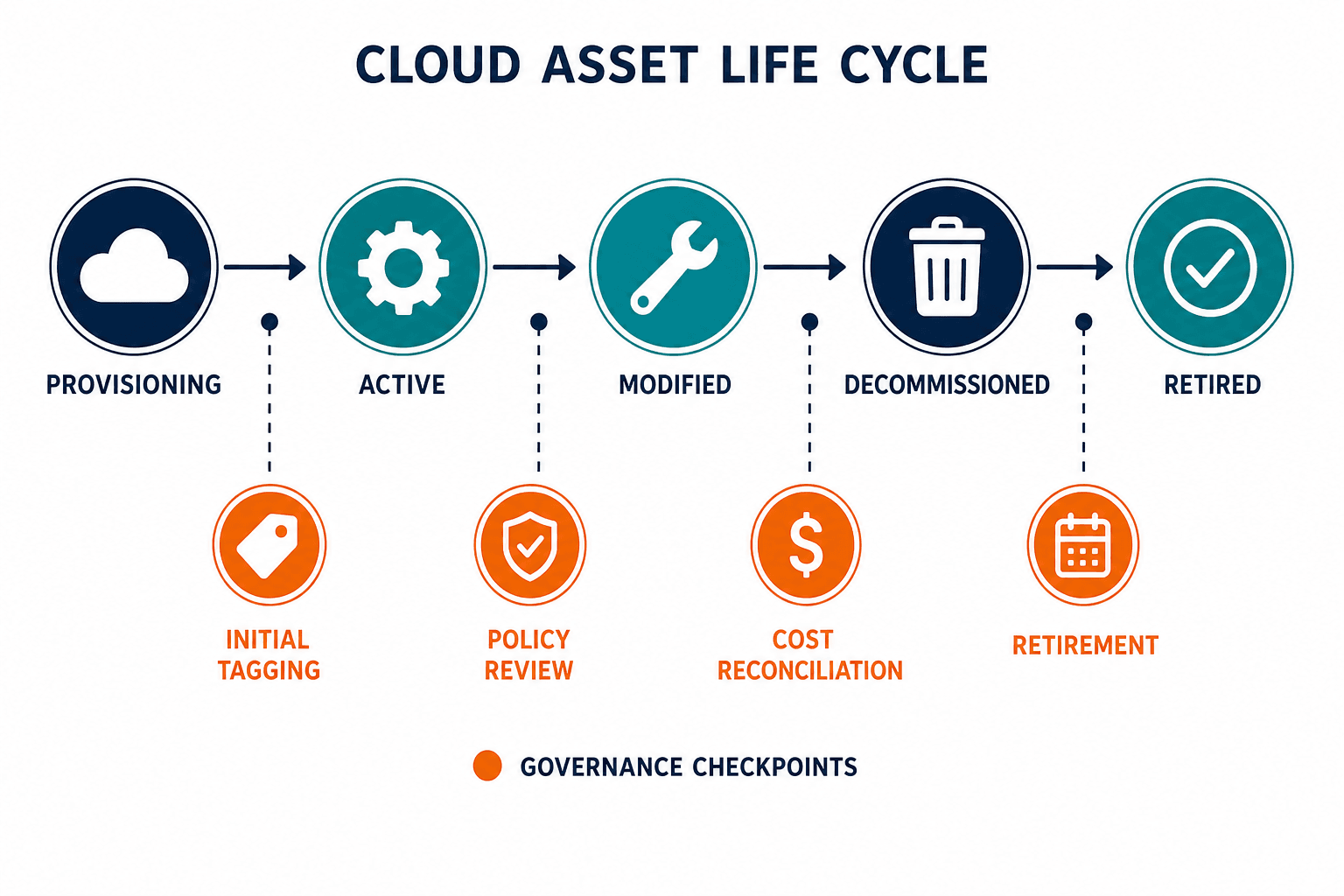
Cloud resources have a life cycle: provisioned, active, modified, decommissioned. Life cycle tracking ties each transition to a business context: who requested it, what change authorized it, what services it supports, and when it was retired.
Assets that pass through a governed life cycle leave an audit trail. Those that do not leave only a cost entry and an open question.
Cloud asset management best practices
Keep discovery running continuously. Periodic scans can’t keep pace with cloud provisioning speed (see Discovery and inventory above) — treat continuous discovery as the baseline, not an enhancement.
Connect cloud inventory to your CMDB. Cloud assets tracked only in a cloud console are invisible to change management, incident response, and compliance teams. When cloud resources populate your CMDB as configuration items, they participate in change impact analysis and incident triage. Virima’s CMDB capability takes discovered cloud resources and builds them into a governed, relationship-mapped configuration database.
Enforce the four required tags at provisioning, not after deployment. Retroactive tagging is where inventories fall behind (see Tagging and ownership above).
Assign ownership by resource category. Infrastructure, SaaS, and cloud licenses each need one team accountable for governance decisions. Shared ownership produces diffusion of responsibility and assets that nobody manages.
Reconcile cloud cost against inventory monthly. Cost anomalies almost always trace to untracked or untagged resources. Monthly reconciliation between cloud billing data and asset inventory surfaces waste before it accumulates across quarters.
Integrate cloud asset data with your ITSM platform. Cloud asset records that flow into ServiceNow, Jira Service Management, Ivanti, HaloITSM, Xurrent, or Hornbill give your service desk cloud context during incidents and changes. That context should cover cloud resources and on-premises resources in the same view, not two separate systems.
Flexera’s 2025 ITAM report found that 35% of organizations say SaaS waste increased over the prior year. The organizations reducing it share one common practice: they automated discovery and reconciliation rather than relying on periodic audits.
What cloud assets outside your CMDB cost you in operations
These three consequences land hardest on IT Ops Managers and ITSM teams at mid-to-large organizations running ServiceNow, Jira Service Management, or similar platforms — the people who own the CMDB and get paged when it’s wrong.
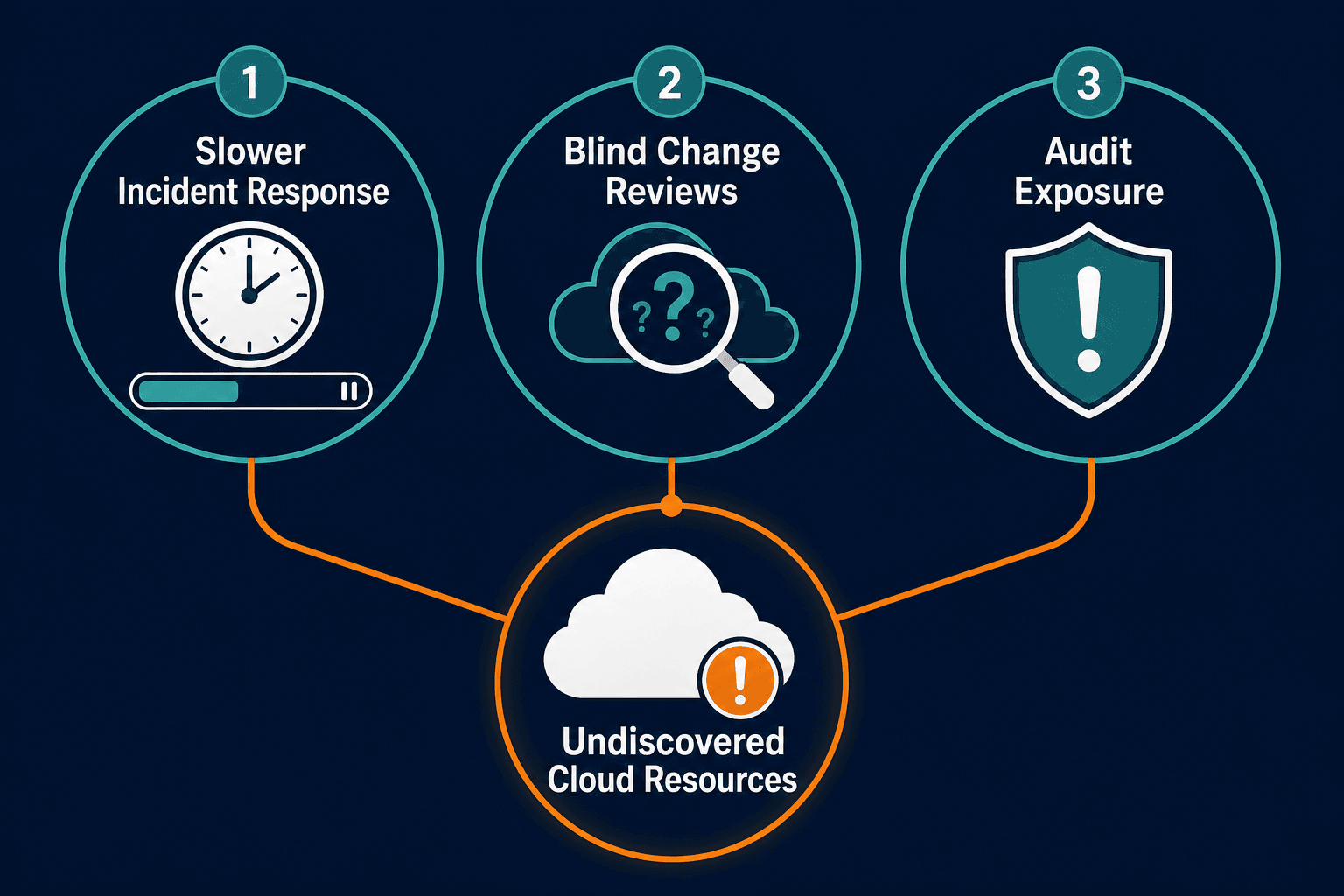
Poor cloud asset management has three operational consequences. None of them are minor.
Slower incident response. When an alert fires on a cloud workload, the on-call engineer needs context fast. They need to know which cloud resources support the affected service, what changed recently, and what else depends on those resources. Without that data in the CMDB, engineers reconstruct the environment from scratch instead of resolving the incident. In one illustrative scenario, an IT Ops team troubleshooting a database latency alert spent the first 40 minutes just identifying which application depended on the affected instance — time that would have gone to remediation if that dependency had already been mapped.
Blind change reviews. Change advisory board assessments depend on blast radius. Accurate blast radius analysis requires knowing what depends on the resource being changed. Cloud assets outside the CMDB are invisible to that analysis. A change that appears low-risk could affect cloud workloads that no one modeled, because those workloads were never in the inventory. Visualized service maps that show these dependencies — like Virima’s ViVID™ service maps — turn that blast-radius analysis from a manual lookup into a picture the change board can review in minutes.
Audit exposure. Cloud resources outside the CMDB are outside the compliance perimeter. Flexera’s 2025 ITAM report found that 45% of organizations spent over $1 million on software audits in the previous three years. Cloud assets that lack a tracked history are among the most common audit findings, because they cannot be reported against compliance requirements they were never associated with. For more on closing that gap before an audit lands, see How Virima simplifies IT asset management audits.
Before you can fix any of these three problems, you need an accurate count of what you have. Get the Cloud Asset Tagging & Discovery Checklist to start closing the gap: Cloud Asset Tagging & Discovery Checklist download page.
Virima uses API-based agentless discovery for AWS and Azure to build a continuously updated cloud asset inventory. Each discovered resource feeds into the CMDB as a configuration item with its relationships to other assets intact. Change and incident processes then have cloud context alongside on-premises context in a single, discovery-sourced view.
To see how cloud asset discovery feeds directly into a discovery-sourced, explainable, and governed CMDB, explore Virima’s Trusted Runtime Truth approach.