How Do You Track Warranties, Contracts, and Renewals for IT Assets?

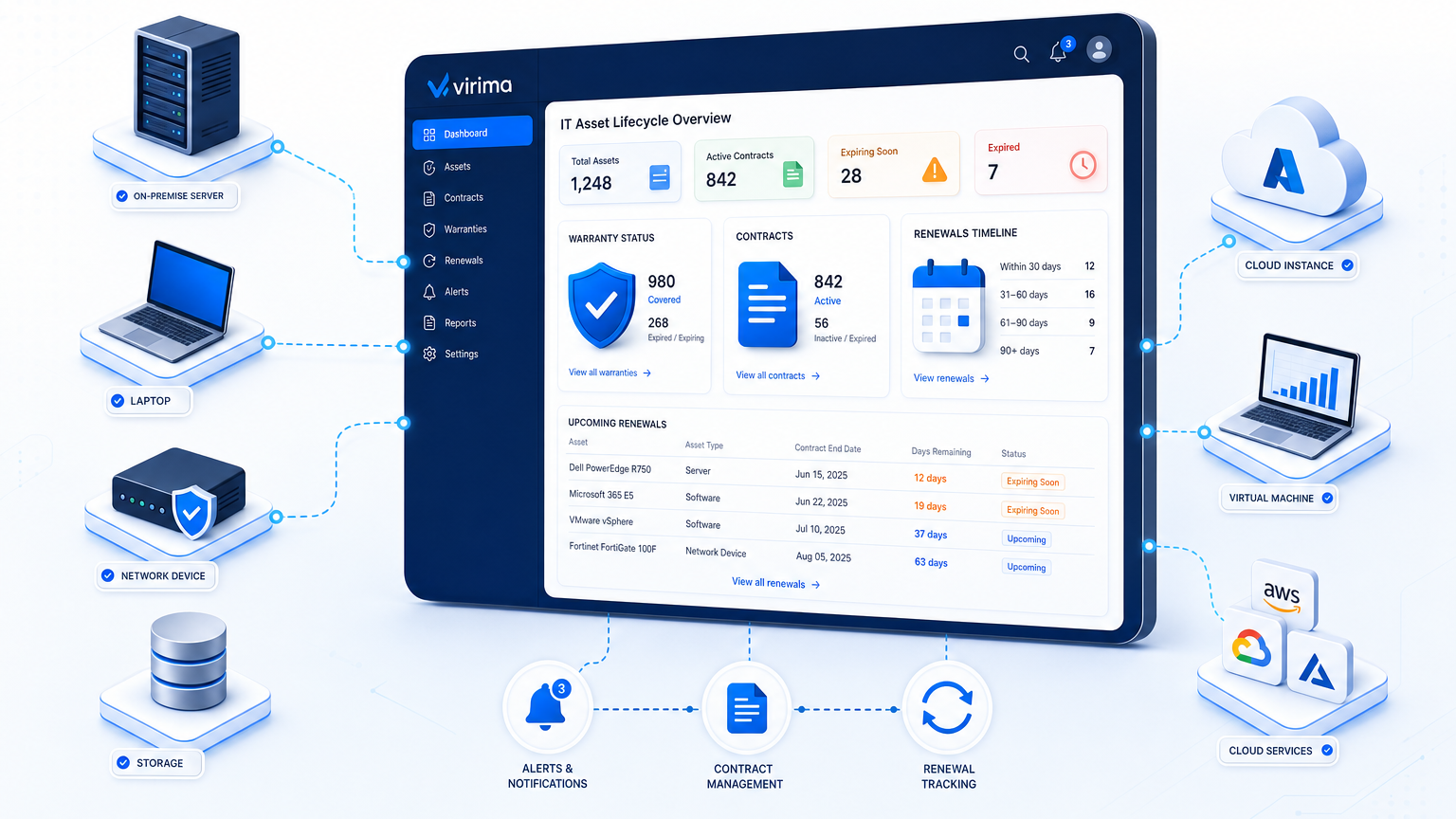
Store the warranty end date, vendor, and contract terms on each asset record, then set alerts 90, 60, and 30 days before renewals so you can renegotiate, replace, or retire the asset in time. Teams that want to track warranties, contracts, and renewals for IT assets stop treating spreadsheets as the system of record and attach commercial data to the same hardware and software records that already feed your CMDB.
Missed notice windows lock you into another year of unused seats. Expired hardware warranties show up only when a failed drive needs overnight parts. Procurement hears about both problems after finance has already booked the spend. The fix is operational: minimum commercial fields on every covered asset, timed alerts that match vendor notice periods, durable joins from contracts to installs, a shared renewal calendar, and reports finance can use in negotiation.
NIST’s SP 1800-5 practice guide frames IT asset management as lifecycle control across discover, manage, and report. Warranty and contract dates belong in that same lifecycle so support coverage and commercial obligations stay visible with the asset, not in a separate inbox folder.
Essential data points for IT asset warranty tracking
Commercial tracking fails when the register holds a serial number and little else. Each covered asset and each master agreement needs a short, complete set of fields that procurement, ITAM, and service desk can read without opening a PDF vault.
For hardware warranties and support contracts, capture at least:
| Field | Why it matters |
|---|---|
| Vendor / OEM name | Routes claims and escalations to the right counterparty |
| Contract or warranty ID | Matches tickets and invoices to the governing document |
| Coverage type | Distinguishes parts-only, NBD, 4-hour, and onsite terms |
| Start and end dates | Drives alerts and residual value decisions |
| Notice/cancel window | Sets how far ahead the 90-60-30 ladder must fire |
| Covered asset identifiers | Serial numbers or cloud instance IDs, never hostname alone |
| Cost and currency | Feeds renewal math and showback |
| Owner (ITAM / procurement) | Names who must act when an alert fires |
| Auto-renew flag | Marks agreements that renew unless notice is given |
For software and SaaS agreements, add entitlement quantity, metric (user, device, core), true-up rules, and the product family the seats apply to. Keep the legal PDF as an attachment or linked repository object, and keep the operational fields on the asset and contract records so discovery and inventory can stay aligned after each scheduled discovery cycle.
Hostname is a weak join key when devices are rebuilt or renamed. A durable asset identifier (a value that persists through reimaging, renaming, or redeployment, such as a manufacturer serial number or cloud instance ID) should anchor every contract and warranty link instead, so coverage data survives the asset’s full lifecycle rather than breaking at the first rebuild.
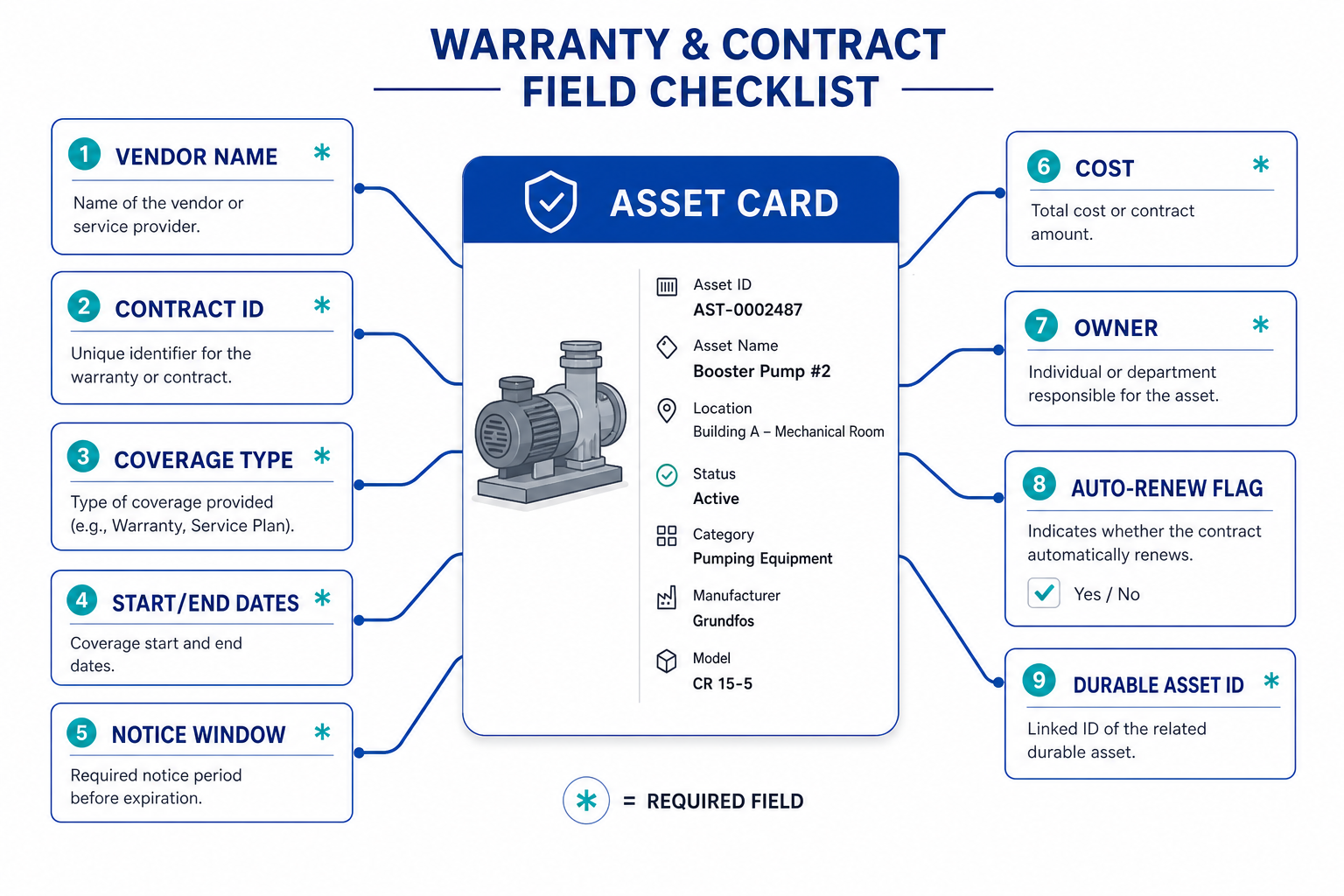
What data do you need on each asset to track warranties and contracts?
Store vendor, contract ID, coverage type, start and end dates, notice window, cost, owner, auto-renew status, and durable asset IDs such as serial number or cloud instance ID on the asset or linked contract record so alerts and claims resolve without opening separate spreadsheets.
90-60-30 day automated alert schedule
Calendar reminders that sit only in one person’s mailbox do not scale. A 90-60-30 day alert ladder (three checkpoints at 90, 60, and 30 days before a contract’s end date) gives ITAM, owners, and procurement the same lead time vendors already write into their terms. The ladder only works when each checkpoint has a named owner, a ticket queue, and the commercial facts needed for that stage of the decision.
90 days before end date
Confirm the asset still exists in inventory, confirm the business still needs the coverage, and open a renewal or replacement ticket. Pull usage or install counts for software so seat counts match reality before the vendor quote arrives. For hardware, verify serial numbers still match the warranty record and note whether the unit sits in production, spare pool, or decommission queue.
At 90 days, capture decision inputs while there is still time to change course. Record residual support cost, list services that depend on the asset, and flag any end-of-support date near the warranty end. If the contract auto-renews, calendar the legal notice deadline and assign who will draft notice if usage no longer justifies the spend.
60 days before end date
Compare vendor quote to current entitlement and alternatives. For hardware, decide whether to extend OEM support, move to third-party maintenance, or refresh the unit. For software, decide to renew, reduce, or exit, and draft notice language if the auto-renew flag is set. Bring finance into the thread so budget codes and multi-year options are visible before procurement commits.
Use the 60-day window for commercial pressure. Ask whether seat counts can drop without breaking a business service, and whether a third-party maintenance bid belongs in the file. Document the chosen path on the contract record so the 30-day step is execution, not a second debate.
30 days before end date
Execute notice, purchase order, or replacement order. If notice must land earlier than 30 days under the contract, move this step forward so the calendar respects the legal window rather than a generic month. Confirm the counterparty received notice through the channel the agreement requires, and store the proof on the contract object.
Close the loop on inventory when you renew or exit. If seats drop, schedule the next discovery cycle to re-check installs. If hardware leaves coverage, update the asset status and warranty end date so service desk triage does not promise OEM parts that no longer apply. If you replace the unit, link the new serial to the new coverage before the old record ages out of the active register.
A 90-60-30 day alert ladder gives IT asset management three checkpoints before a contract ends: 90 days to confirm need and pull usage data, 60 days to compare vendor quotes against alternatives, and 30 days to execute notice or a purchase order (shifted earlier whenever the contract’s notice period exceeds 30 days).
Tune the ladder when notice periods are longer. A 90-day cancel clause needs an earlier first alert so legal and procurement are not racing the clause. Some SaaS terms require 60 or 90 days of written notice before the anniversary; in those cases, the first checkpoint may sit at 120 days so the 90-day legal step still has working room. Pair every alert with an owner and a ticket queue so the event creates work, not only a notification.
The ITAM Review has argued that a renewal reminder alone is weak if it does not help teams prepare a commercial position. Your 90-day step should attach usage, owner, and coverage facts so negotiation starts with inventory truth rather than a bare date. When the ladder carries those facts forward, procurement enters the vendor call with install counts and a clear renew, reduce, replace, or retire recommendation.
When warranty and contract dates live on discovery-backed asset records, renewal decisions rest on what still exists and what still matters.
Explore Trusted Runtime TruthLinking contracts to hardware and software assets
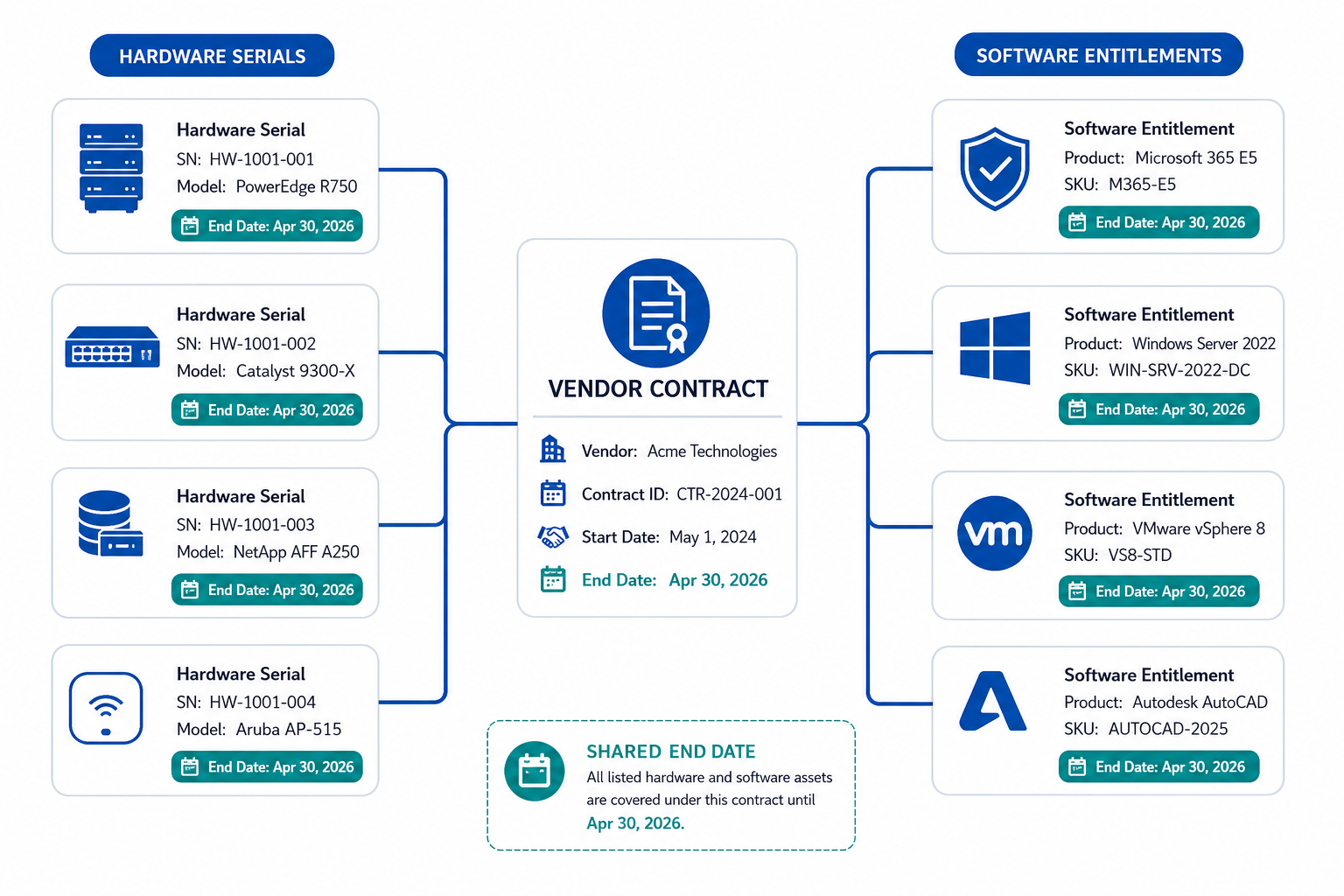
One vendor master agreement often covers racks of servers, stacks of laptops, or whole product families of software. Store the master once, then relate covered assets to that contract so a single end date fans out to every dependent record.
Hardware
Link each serial-numbered device to the warranty or support SKU that covers it. When discovery updates location or status, the commercial link stays on the asset so a failed unit still shows remaining coverage during triage. Virima’s agentless and agent-based discovery re-confirms serial numbers and instance IDs on every scheduled scan, so the contract-to-asset link survives a rebuild instead of silently breaking.
Software
Link the contract to the normalized product and to the installs or named-user counts that consume entitlement. Software license management depends on that join for software license compliance: seats without contracts cannot prove compliance, and contracts without installs cannot prove waste.
Many assets, one contract
Use a contract-to-asset relationship rather than pasting the same end date into hundreds of free-text fields. When the master renews or terminates, cascade the new dates from the contract object so bulk edits do not drift.
Cloud and SaaS
Treat subscriptions as assets with billing account, SKU, and renewal date, then relate them to the business service or cost center that pays. Keep AWS and Azure inventory imports on the same register so IaaS support plans and marketplace terms sit beside on-prem warranties.
Platforms that combine inventory with contract and warranty management, including Virima ITAM, keep those relationships inside the operational system of record. A side spreadsheet that ages between audits cannot do the same.
Building a contract renewal calendar
Alerts fire on individual dates. A renewal calendar shows the portfolio so leadership can see cash, risk, and workload by month.
Build the calendar from contract end dates plus notice windows, not only from invoice due dates. Group by vendor, by business unit, and by renew-or-replace decision state. Mark auto-renew agreements in a separate view so cancel deadlines stay visible.
Hold a monthly ITAM and procurement stand-up against the next 120 days of renewals. Confirm owners, confirm whether usage data is current after the latest scheduled discovery cycle, and confirm whether legal notice drafts are ready. Export the same calendar to finance so accruals match the operational pipeline.
When end-of-support and end-of-life dates sit near warranty ends, treat them as paired signals. Flexera’s guidance on EOL and EOS stresses planning before vendor support drops away. A calendar that shows warranty expiry next to EOS dates helps teams choose refresh versus extended support with fewer emergency purchases. For the mechanics of tracking those end-of-support milestones on their own, see Explore hardware and software asset management with Virima.
How should teams build an IT contract renewal calendar?
Pull end dates and notice windows from contract records linked to assets, group by vendor and owner, flag auto-renew clauses, and review the next 120 days monthly with procurement so renegotiate, reduce, replace, or retire decisions finish before legal cancel deadlines.
Executive reporting for procurement and finance
Boards and CFOs rarely need every serial number. They need concentration, timing, and decision options.
Useful executive views include:
- Renewal spend by quarter with committed versus optional renewals separated.
- Auto-renew exposure listing agreements that will extend without action, with notice deadlines.
- Warranty coverage gaps for production-class hardware that has left OEM coverage.
- Shelfware indicators where entitlement far exceeds active use after inventory reconciliation.
- Vendor concentration showing how much support and license spend sits with the top counterparties.
Each row should carry a recommended action: renew as-is, renew at reduced quantity, replace platform, move to third-party maintenance, or retire. Attach the asset count and the durable IDs behind the dollars so finance can audit the math without rebuilding the inventory. For more on building the audit trail finance and compliance teams expect behind these numbers, see audit-ready asset management dashboards.
Procurement enters negotiations with current install counts, remaining warranty months, and clear cancel dates in hand. That evidence holds quotes to operational facts instead of last year’s purchase order. That is the commercial payoff of treating warranties and contracts as first-class fields on the asset register.
Put warranty and contract tracking on the asset record
Teams that track warranties, contracts, and renewals for IT assets win when commercial data rides with inventory as part of ITAM lifecycle management. Capture the essential fields, run a 90-60-30 alert ladder tuned to notice periods, link masters to hardware and software with durable IDs, publish a shared renewal calendar, and give procurement reports that show action, not only dates.
If your register still stores serials without end dates, start with the highest-spend vendors and production hardware. Wire alerts to ticket queues, and expand until every auto-renew clause has an owner. Schedule a walkthrough of how discovery-backed ITAM can hold those fields and relationships in one place when you are ready to replace mailbox reminders with governed lifecycle data. When you want that walkthrough on your estate, schedule a demo and bring a sample of your warranty and renewal calendar.
Frequently Asked Questions
How far in advance should contract renewal alerts fire?
Use a 90-60-30 day ladder as the default, then pull the first alert earlier whenever the contract notice or cancel window is longer than 30 days so legal and procurement finish work before the clause locks the term.
Can one vendor contract cover multiple IT assets?
Yes. Store one master agreement and relate each covered hardware serial or software entitlement to that contract so end dates, coverage terms, and renewals update from the master instead of duplicated free text on every asset row.
How do I prevent auto-renewals on unwanted software?
Flag auto-renew on the contract record, set alerts ahead of the notice deadline, confirm usage against current installs, and send written notice through the channel the agreement requires before the window closes so the term does not extend by default.
How does Virima link contracts and warranties to discovered assets automatically?
Virima’s agentless, agent-based, and API-based discovery re-confirms each asset’s serial number or cloud instance ID on every scheduled scan, so contract and warranty records stay attached to the correct asset in Virima ITAM even after a rebuild, redeploy, or location change, without manual re-entry.