Autodesk license compliance: direct vs third-party installs

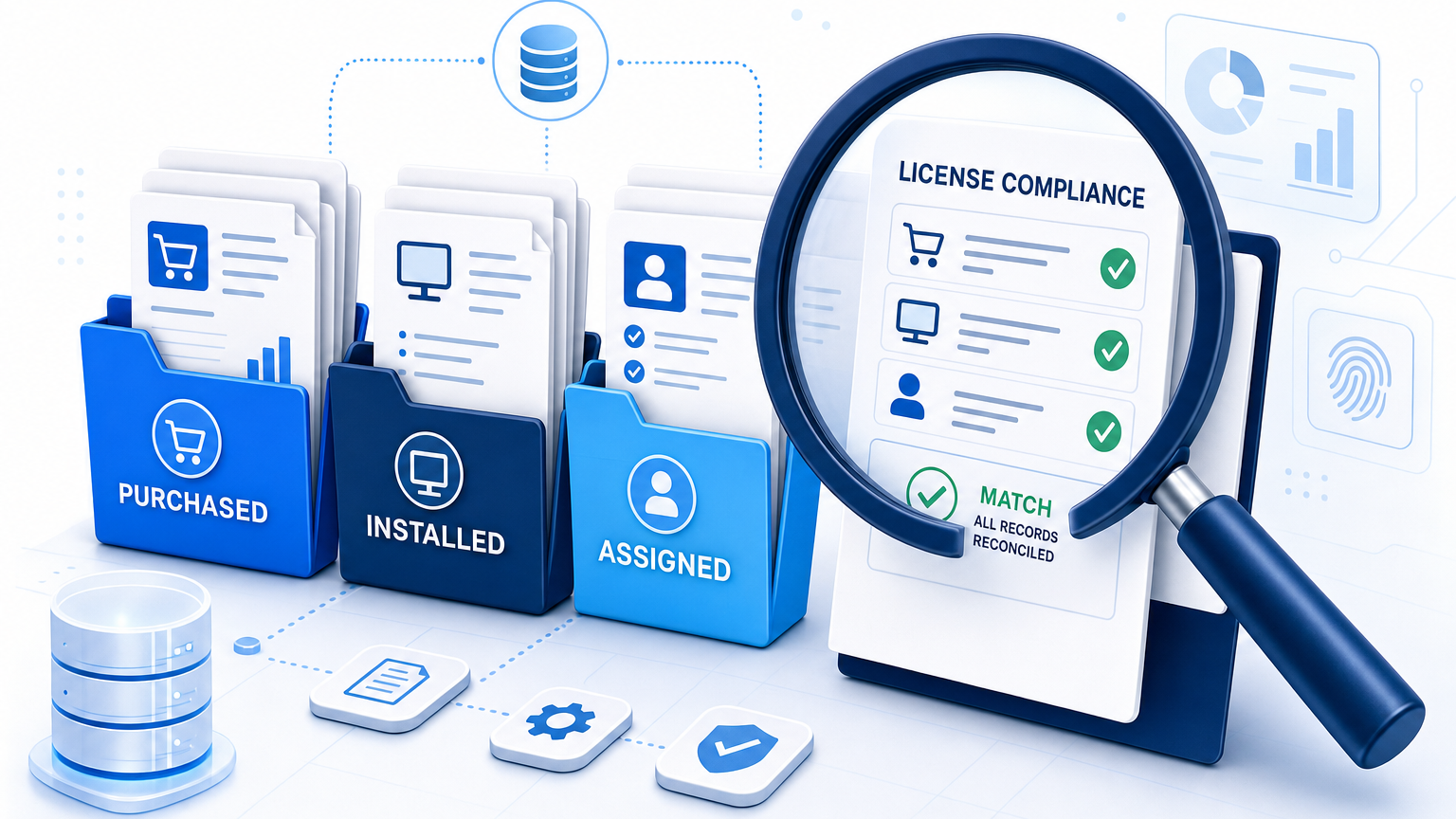
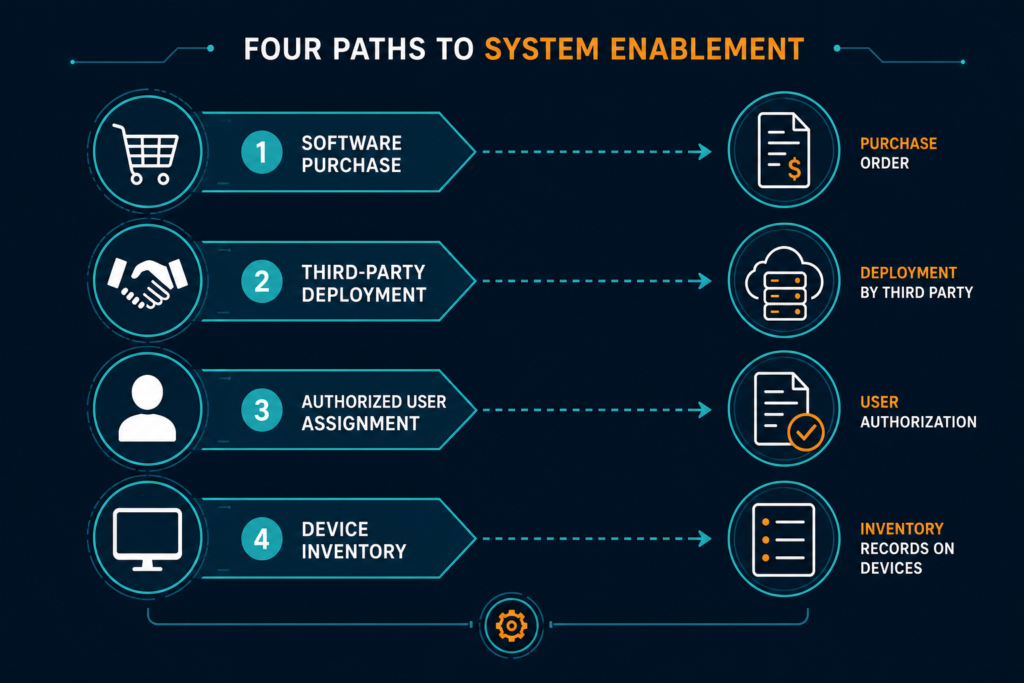
A software audit can expose installations with no matching purchase order, account assignment, or deployment record — and the IT asset manager has to explain each one before the auditor does. Software license compliance for direct and third-party installs depends on reconciling three separate records: what was purchased, what was installed, and who was assigned access. No single record answers all three on its own.
A review connects those records before the organization decides whether an installation needs remediation. The installation source matters, but it does not determine the license outcome by itself.
Direct and third-party installs: What changes?
A direct installation is deployed through a process the organization controls. An internal team might use its software deployment platform to install the application on a company-managed device.
A third-party installation involves another organization in procurement, deployment, administration, or access. A reseller, managed service provider, device supplier, or contractor may hold part of the evidence.
The software may be identical in both cases. The practical difference is often the location of the purchase records, deployment history, and account administration records.
That distinction carries more weight as audits become routine. Flexera’s 2026 State of ITAM Report found that 48% of organizations were audited by a software publisher in the last year, and 44% paid more than $1 million in audit costs over the previous three years. A documented process for tracing each installation’s source helps a team respond to those requests instead of reconstructing records after a demand letter arrives. Virima resource page for the software license exception review checklist offers a template for logging findings, evidence, and owners before that kind of request arrives.
| Arrangement | Question for the asset manager | Evidence to collect |
|---|---|---|
| Internal deployment | Which account and user are covered by the entitlement? | Order, assignment, deployment record, and applicable agreement |
| Reseller purchase | Which customer entity and account received the entitlement? | Reseller order, subscription confirmation, and customer account details |
| Provider-managed deployment | Who supplied the entitlement and who manages access? | Service agreement, deployment history, and assignment records |
| Contractor access | Which organization holds the rights for the contractor’s use? | Contractor agreement, identity record, assignment, and applicable terms |
| Bundled component | What was installed, and which terms cover its use? | Package documentation, component details, and supplier agreement |
Keep acquisition, deployment, account ownership, and access as separate fields. A provider may install software against the customer’s entitlement, while a reseller may handle the purchase without deploying anything.
An installation remains an open question until the relevant records are matched. Avoid labeling it compliant or noncompliant based only on who installed it.
Does a reseller purchase change software license compliance?
A reseller purchase adds a procurement record that the customer can use to trace an entitlement. The order should identify the purchasing entity, product, subscription period, and associated account. If those details differ from the account records, procurement can ask the reseller to resolve the discrepancy.
Begin with the applicable Autodesk agreement
A discovered application identifies software found on a device. It does not establish which agreement governs the installation or who may access the product.
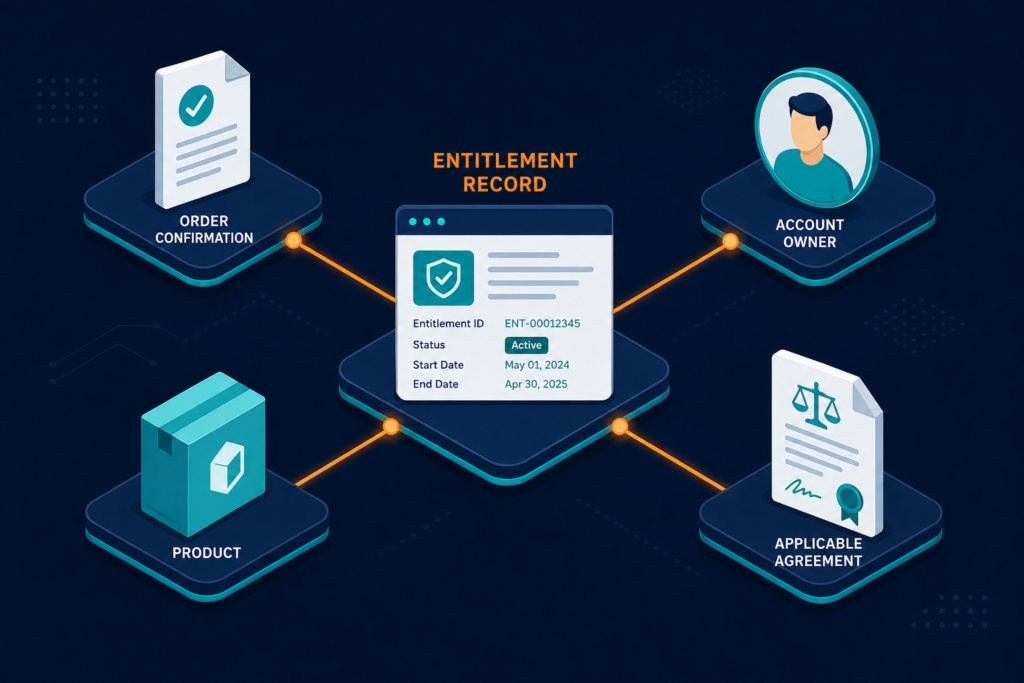
Start with the order confirmation, subscription details, applicable terms, and any negotiated amendments. Record the purchasing entity, product, account owner, license model, and subscription dates.
Autodesk subscription-type terms describe requirements for different offerings, including authorized-user access. Confirm which terms apply to the specific purchase and whether an amendment changes the assessment.
Avoid applying one rule to every Autodesk product or contract. Legacy arrangements, product-specific provisions, and negotiated terms may require separate treatment.
Retain the original documents alongside the summary record — that way the contract owner can trace a recorded entitlement back to its supporting order or agreement.
Separate installation records from licensed consumption
The agreement’s license metric determines what the team needs to assess. A device inventory shows installed software, while a named-user review also requires evidence about assigned people and their access.
For a named-user arrangement, named-user license reconciliation means comparing authorized-user records against the relevant entitlement and assignment rules. Investigate users who have left, changed roles, or appear under an unexpected account. A closer look at Best Software License Management Tools in 2026 (Reviewed & Ranked) can help a team build this comparison once, instead of rebuilding it for every audit.
Other license models may require different evidence. A concurrent-use arrangement, for example, may require usage records specified by its terms.
Installation counts help identify devices for review. They should become a one-installation-to-one-license calculation only when the applicable agreement supports that method.
Build an inventory with deployment context
Scheduled discovery cycles can identify installed products on devices within the configured discovery scope. The resulting inventory gives the asset team a population to compare against procurement and account records.
Retain the publisher, product name, version, device identifier, and discovery date. Add the device owner, business unit, deployment source, and support team when those details are available.
Use a durable identifier, such as a device serial number, when joining records across systems. Hostnames can change or be reused, so they should not serve as the sole durable join key.
Record devices that could not be reached during the discovery cycle. An unreachable device remains a coverage gap until the team verifies its state.
Virima’s IT Discovery capability runs these scheduled scans across on-prem, cloud, and hybrid environments to build that population automatically, and keeps it current as devices and installations change rather than only at the moment of an audit. That discovery-sourced data feeds the Trusted Runtime Truth layer, which records what exists, how it connects, what changed, and who owns it, so the entitlement comparison below can be rerun against current data instead of a one-time snapshot.
Distinguish applications from installed components
An inventory may show supporting components, utilities, and separately licensed applications. Similar names do not establish that two records have identical license requirements.
Compare the detected product and version with vendor or supplier documentation. A component installed by another package may be covered by the parent arrangement or may require separate review.
Record the evidence supporting the classification. If documentation is unclear, ask the supplier or Autodesk about the specific component and intended use.
Keep unfamiliar components in the review queue rather than deleting them from the inventory. The asset team can close the exception after establishing what was installed and which terms apply.
Reconcile an internally managed installation
Internal deployments usually leave a request or deployment trail. The asset manager still needs to connect that trail to the correct account, entitlement, and user.
Follow the records in this order:
- Identify the product, version, device, and discovery date.
- Locate the software request and deployment record.
- Identify the account and purchasing entity associated with the entitlement.
- Confirm the applicable license model and permitted use.
- Compare the relevant user, device, or usage evidence against those terms.
- Record the reviewer, result, and remaining questions.
For example, a company deployment tool may show that an internal administrator installed a product. That record explains how the application arrived on the device. A team building this process for the first time can start from What Is ViVID Service Mapping? How Virima Visualizes IT Service Dependencies rather than designing the full workflow from scratch.
The subscription and assignment records answer separate questions about access. If the assigned user cannot be established, keep the case open until the account administrator provides evidence.
Product names may differ between procurement and discovery records. Preserve both original names and document why the team considers them a match.
What should teams do when product names do not match?
Keep the original names from discovery and procurement, then document the reason for any normalized match. Product edition, version, and suite membership may affect the entitlement assessment. A reviewer can check vendor documentation before including an uncertain match in the license position.
Reconcile a third-party installation
Software license compliance for direct and third-party installs follows the same contract review for third-party software deployment as it does for an internal install. Start by identifying the service agreement and purchase records held by each organization involved — who purchased the software, who deployed it, and who administers access — since those responsibilities may belong to different organizations.
A managed service provider may install a product purchased by its customer. A device supplier may deliver a workstation with software already installed. In either case, the service or device contract should explain the supplier’s responsibilities.
Ask the relevant parties to establish:
- The legal entity holding the entitlement or subscription.
- The product and version included in the arrangement.
- The account used to administer access.
- The people or devices covered by the agreement.
- The deployment method and affected devices.
- The process for removing access when work ends.
A provider’s service agreement should be reviewed alongside the underlying purchase records and applicable Autodesk terms. An installation service does not, by itself, establish which party holds the software entitlement.
Review contractor access separately
Contractors may use customer-managed accounts or access supplied through their own organization. Identify which arrangement applies before comparing users with entitlements.
For customer-managed access, confirm that the applicable agreement permits the contractor’s use. Record the person’s identity, assignment, project owner, and expected access end date.
For contractor-supplied access, document which organization holds the entitlement. The contract owner should establish how the organization will verify the arrangement and handle changes to the contractor’s role.
When a project ends, compare the access record with the contract and assignment process. Keep evidence of the resulting action with the exception record.
Resolve disputed or incomplete records
An unmatched installation belongs in an exception queue with an owner and review date. Keep its status unresolved until the available evidence supports a decision.
The asset team can request deployment logs from the provider and purchase records from procurement. The account administrator can supply user-assignment details, while the contract owner reviews relevant terms.
Preserve the original finding and the evidence collected during the investigation. A reviewer should be able to understand why the team accepted, corrected, or escalated the record.
Possible actions include confirming existing rights, correcting an assignment, obtaining an appropriate entitlement, or removing software. The agreement and the facts surrounding the installation determine the appropriate action.
Establish a repeatable exception workflow
Turn the exception queue into a repeatable record by capturing the following fields for each case:
- Finding: Product, version, device, discovery date, and relevant user.
- Source: Internal deployment, reseller, provider, contractor, or unknown.
- Evidence: Orders, agreements, assignment exports, and deployment records.
- Open question: The specific fact or contractual term still under review.
- Owner and due date: The person responsible for the next decision.
- Resolution: The action taken, supporting evidence, and approval date.
Group cases by the evidence needed. Several devices managed by one provider may require the same deployment export, while an account mismatch may need procurement review. For a closer look at structuring this queue, see Best Software License Management Tools in 2026 (Reviewed & Ranked).
Missing evidence warrants investigation, but it does not independently establish a breach. Keep the case open until the appropriate owner can evaluate the records.
How should teams classify an unmatched installation?
An unmatched installation should remain an open exception until its product, deployment source, and applicable rights are established. Assign an owner and a review date, and preserve the original discovery record. The final classification should identify the evidence used and any corrective action taken.
Prepare an evidence package for review
A software installation license audit depends on a defensible license position tied to a defined date and scope. State which legal entities, devices, accounts, and products the review includes.
Assemble the entitlement documents, assignment exports, discovery results, deployment records, and exception decisions. Record the date of each export and the discovery cycle used for the relevant devices.
If a provider-managed segment was outside discovery scope, identify that limitation. The reviewer can then decide whether additional evidence is needed before drawing a conclusion.
The U.S. Government Accountability Office reported in 2026 that the Department of Veterans Affairs planned approximately $985 million in software spending for fiscal year 2025. The same statement described earlier gaps in tracking licenses in use and comparing inventories with purchase records.
That finding concerns the department’s software management practices across vendors. It illustrates the importance of connecting records; it does not establish an Autodesk-specific compliance rate.
A reviewer should be able to answer these questions:
- Which agreements and entitlements were included in the assessment?
- Which users and devices were included in the review?
- How did the team match products across its records?
- Which exceptions remain open after the current review?
- Who approved the assessment and its supporting evidence?
Keep supporting documents in an access-controlled location under the organization’s retention policies. Consult legal counsel before responding to a formal audit request.
How Virima supports the review
Virima’s ITAM capabilities combine software inventory and IT asset management records in one platform. Scheduled discovery cycles help teams identify installed applications on devices within the configured scope.
Virima can track software licenses, contracts, and related asset records. Its software normalization capabilities help standardize publisher and product names for review.
These records give IT asset managers a basis for comparing discovered installations with documented entitlements. Teams still need applicable agreements, user-assignment evidence, and third-party deployment records.
Contract owners remain responsible for interpreting product-specific terms and resolving contractual questions. Discovery provides evidence of what was found and when it was found.
Build a license position the team can explain
Software license compliance for direct and third-party installs depends on connecting observed software to the right entitlement and terms. The deployment source helps identify where the team should request evidence.
Start with a defined inventory scope and preserve the original records. Assign an owner to each mismatch and review user assignments separately when the agreement requires them.
Frequently Asked Questions
Does a third-party installation require a separate software license?
The answer depends on the product, use, entitlement, and applicable agreement. Identify who purchased the rights, who uses the software, and what the terms permit. Review supplier documentation before deciding whether separate rights are required.
Can installation counts establish named-user license compliance?
Installation counts identify devices with software present, while named-user assessments depend on the applicable user and assignment terms. Compare authorized-user records with the relevant entitlement. Use device findings as supporting evidence rather than assuming each installation requires one license.
How does Virima support software license reviews?
Virima’s scheduled discovery cycles inventory installed software and associate findings with asset records. Its IT asset management capabilities track licenses and contracts for use during reconciliation. Contract owners remain responsible for interpreting terms and resolving exceptions.
Does discovery tooling alone establish license compliance?
Discovery tooling, including Virima’s scheduled scans, can inventory software present on devices within its configured scope regardless of who performed the installation. The finding alone may not identify the installer or establish usage rights, so teams still need to compare it against provider, procurement, and account records before classifying it as compliant.