What Breaks in ServiceNow Workflows When the CMDB Is 60 Days Out of Date

ServiceNow workflow failures from a stale CMDB follow a predictable pattern: the platform executes its automation correctly against wrong data and produces outputs that feel authoritative while missing real risk. When 34% of CIs exceed the 60-day staleness threshold — modeled on failure patterns Virima’s implementation team observes across enterprise ServiceNow deployments, with quantified impact drawn from a single customer’s 2025 CMDB audit — five specific workflows break: incident routing, change impact analysis, CAB risk scoring, SLA breach prediction, and problem root cause linking. Each fails silently, each leaves a paper trail that looks clean until a post-incident review.
ServiceNow doesn’t generate routing or risk decisions independently. It reads fields. An incident routing rule that assigns tickets to “the team listed on the affected CI” is only as useful as the currency of that assignment group field. According to ServiceNow’s CMDB health best practices documentation, CMDB health relies on keeping field values current through regular reconciliation. The damage from CMDB staleness accumulates before it surfaces — in incident volume, SLA reports, and post-incident reviews.
At enterprises managing hybrid IT environments, stale CMDB data is nearly universal. Gartner reports that 75% of CMDB deployments fail to deliver their intended value due to data quality and completeness issues (Gartner, 2023). When 34% of your CI records are 60+ days stale, you’re experiencing not an edge case but a symptom of systemic staleness.
Understanding CMDB best practices is straightforward. Maintaining CMDB data freshness without discovery-sourced pipelines is not.
Why ServiceNow incident routing depends on fresh CMDB data
Incident routing in ServiceNow uses the Common Service Data Model (CSDM) to automatically assign tickets based on ownership and support group information stored in the CMDB. When an incident is created against a CI, ServiceNow queries that CI’s support_group field and assigns the ticket accordingly. This automation is the foundation of SLA-compliant incident management — no manual assignment, no delays.
But this automation fails silently. If the support_group field on a CI hasn’t been updated in 60 days, ServiceNow routes the ticket to a team that may no longer manage that asset. The platform executes the routing rule perfectly against stale data and moves on. No warning, no escalation flag, no alert to the incident manager.
Five workflow failures triggered by 60-day CMDB staleness
1. Change impact analysis missed downstream risk on 18% of changes
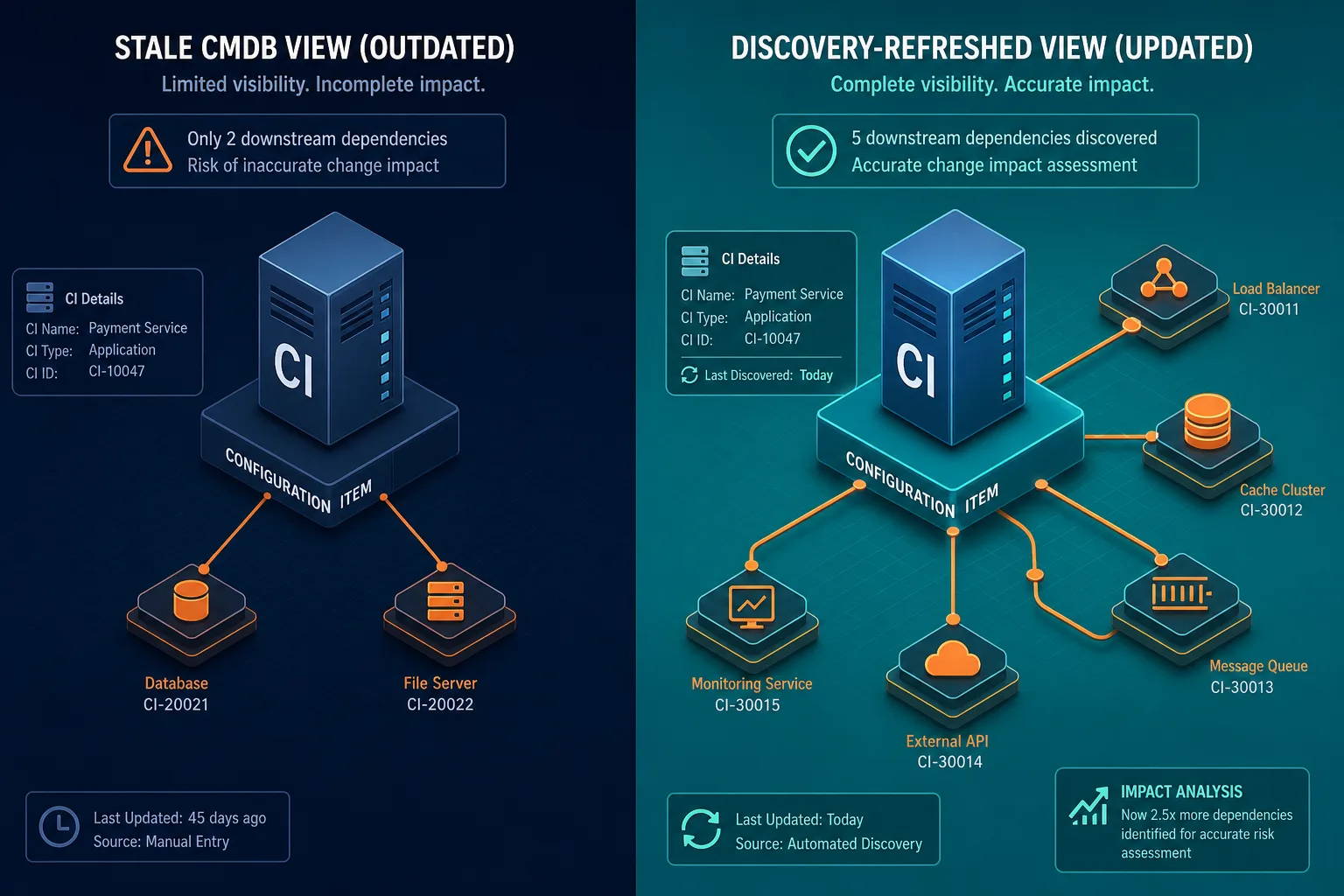
Change impact analysis in ServiceNow reads the relationship graph attached to the CI being changed. Virima’s ViVID service maps are built from live discovery data, but ServiceNow’s out-of-the-box impact analysis works only as well as the relationships in the CMDB itself. In the audited environment, change impact analysis flagged zero downstream risk on 18% of changes that had real downstream impact. The dependent CI relationships were from the pre-staleness state — they hadn’t been updated when the topology changed.
This is especially dangerous for changes classified as “standard” — those that bypass CAB review because their documented impact appears low. When impact analysis is incomplete, standard changes propagate silent failures downstream. The business service owner finds out about the disruption from users, not from the change ticket.
Virima’s continuous discovery cycle updates relationship records every time topology changes are detected — so change impact analysis reads the live graph, not a 60-day snapshot.
2. Incident auto-routing sent tickets to dissolved assignment groups
In this environment, 31% of incident tickets routed automatically went to the wrong assignment group. Assignment group fields on CI records pointed to teams restructured or renamed 8+ months earlier. Tickets arrived at assignment groups tied to teams that had been dissolved or restructured, leaving them unassigned for an average of 47 minutes before manual escalation. For production-critical incidents, that 47-minute gap appears in the SLA clock, in executive summaries, and in post-incident review data. It also compounds triage time — the escalating team spends minutes handing off before the right team even begins work.
This is not a ServiceNow bug. ServiceNow is routing the incident correctly according to the data. The data is wrong.
When assignment group data flows from continuous discovery rather than manual CMDB updates, misrouting becomes detectable and preventable before the next shift change. See how Virima surfaces stale CI ownership before it routes tickets to the wrong team.
3. CAB risk scores understated blast radius on 44% of reviewed changes
With 60-day-old relationships, 44% of actual CI dependencies were missing from the relationship graph. CAB risk scores understated blast radius on 44% of changes reviewed in that quarter. Changes that should have triggered extended CAB review and careful scheduling passed as standard risk and were approved for normal change windows.
ServiceNow’s risk calculator reads CI relationship depth from the CMDB. Fewer relationships in the graph = lower risk score. With stale data, that risk score is a fiction that the CAB acts on.
The SLA problem compounds this further.
4. SLA breach predictions drifted on recently promoted CIs
In this environment, 22% of CIs had criticality ratings untouched for 6+ months. Several infrastructure components had been promoted to production-critical roles without a corresponding CMDB update. SLA breach predictions were off by an average of 40 minutes on incidents touching those CIs. A database server promoted from development to production-critical may still carry “dev” criticality in the CMDB, causing ServiceNow to assign it SLA targets appropriate for non-critical infrastructure. When it goes down, the SLA clock was set for the wrong threshold.
See how IT change management looks when the CI data behind the tooling is current. Criticality, ownership, and support group data drive every automated decision ServiceNow makes about your incident — get this wrong and nothing downstream is reliable.
5. Problem management linked recurring incidents to the wrong root cause CI
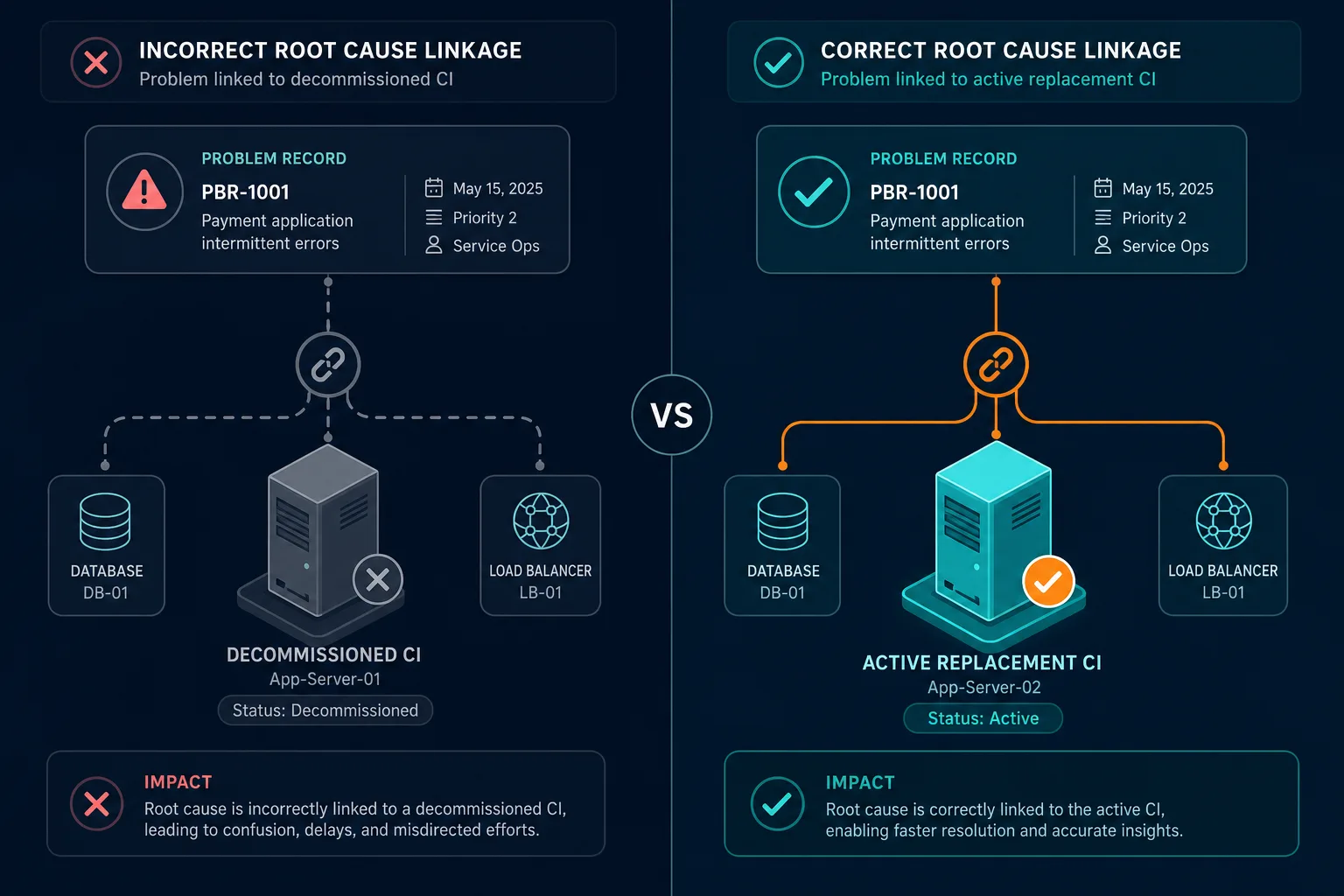
With stale CI records, 22% of recurring incidents were linked to the wrong root cause CI. The device had been replaced or replatformed, but the old CI still appeared as the relationship anchor in the CMDB. Resolvers followed workarounds designed for a device no longer in production, extending MTTR and frustrating teams trying to document real root cause.
The hidden cost of stale CMDB data
Each of these workflow failures executes correctly — against wrong data. That means they’re invisible to monitoring alerts. The platform completed its task — the incident routed, the change assessed, the SLA set. Nothing surfaced as broken. Only your outcomes were wrong.
The cost compounds fast. Unplanned outages originating from planned changes account for over 80% of enterprise IT disruptions (Gartner). When CAB risk scores are understated, more changes are approved at lower-risk levels. When impact analysis misses dependencies, more changes propagate silent failures. Each stale relationship increases the probability that your next change will trigger an unplanned outage.
In environments where downtime costs exceed $300,000 per hour — a threshold that applies to the majority of mid-size and large enterprises (Uptime Institute) — a single cascading failure from stale CMDB data can cost millions. Industry analyses estimate trading floor downtime at $6.48 million per hour; for healthcare systems, disruptions routinely reach $5 million per hour. The risk calculation is straightforward: stale CMDB data is too expensive to tolerate.
Agentic IT and the CMDB accuracy imperative
By 2028, 15% of IT operational decisions will be made autonomously by AI agents (Gartner). By 2026, 40% of enterprise applications will include task-specific AI agents (Gartner). These systems — AI agents handling ServiceNow approvals, recommending incident resolutions, or proposing change windows — require discovery-sourced ground truth that is not just recent but governance-ready.
What stale data means for autonomous systems
Gartner forecasts that by 2030, 50% of agentic AI project failures will stem from insufficient governance and stale discovery-sourced operational context. Stale CMDB data is a direct path to failed AI agents. An autonomous system that approves changes based on a relationship graph that is 60 days out of date will approve dangerous changes and cannot be held accountable for the failures they cause.
If your change management tooling will route tickets autonomously in the near term, a 60-day-stale CMDB isn’t just a current problem — it’s a liability you need to resolve before the automation goes live. Discovery-sourced CMDB data is a foundation requirement for agentic IT, not a feature upgrade.
From discovery-sourced data to operational confidence
Virima integrates directly with ServiceNow to enrich your CMDB with discovery-sourced ground truth. The ServiceNow integration syncs CI attributes, relationship records, assignment group data, and criticality classifications — all updated from what discovery finds in the live environment. Each discovery cycle updates the CMDB with current state, so your incident routing, change impact analysis, CAB risk scores, SLA predictions, and problem management all read from live data.
CMDB data freshness isn’t a maintenance task — it’s the baseline that makes every ServiceNow automation trustworthy. See how Virima keeps the CI data behind your ServiceNow workflows accurate and current, so your operations team can act with confidence. Schedule a demo to see ViVID service maps and discovery-sourced CMDB data in action.
Frequently Asked Questions
What happens to ServiceNow incident routing when CMDB data is stale?
support_group field on the affected CI. When that field is 60+ days stale, tickets route to the listed assignment group — even if that team has been restructured or dissolved. The platform executes the routing rule correctly; the data is wrong. In one audited environment, 31% of auto-routed tickets reached the wrong group and sat unassigned for 47 minutes on average before manual escalation.