A Laptop Lifecycle Asset Management Example: From Request to Disposal

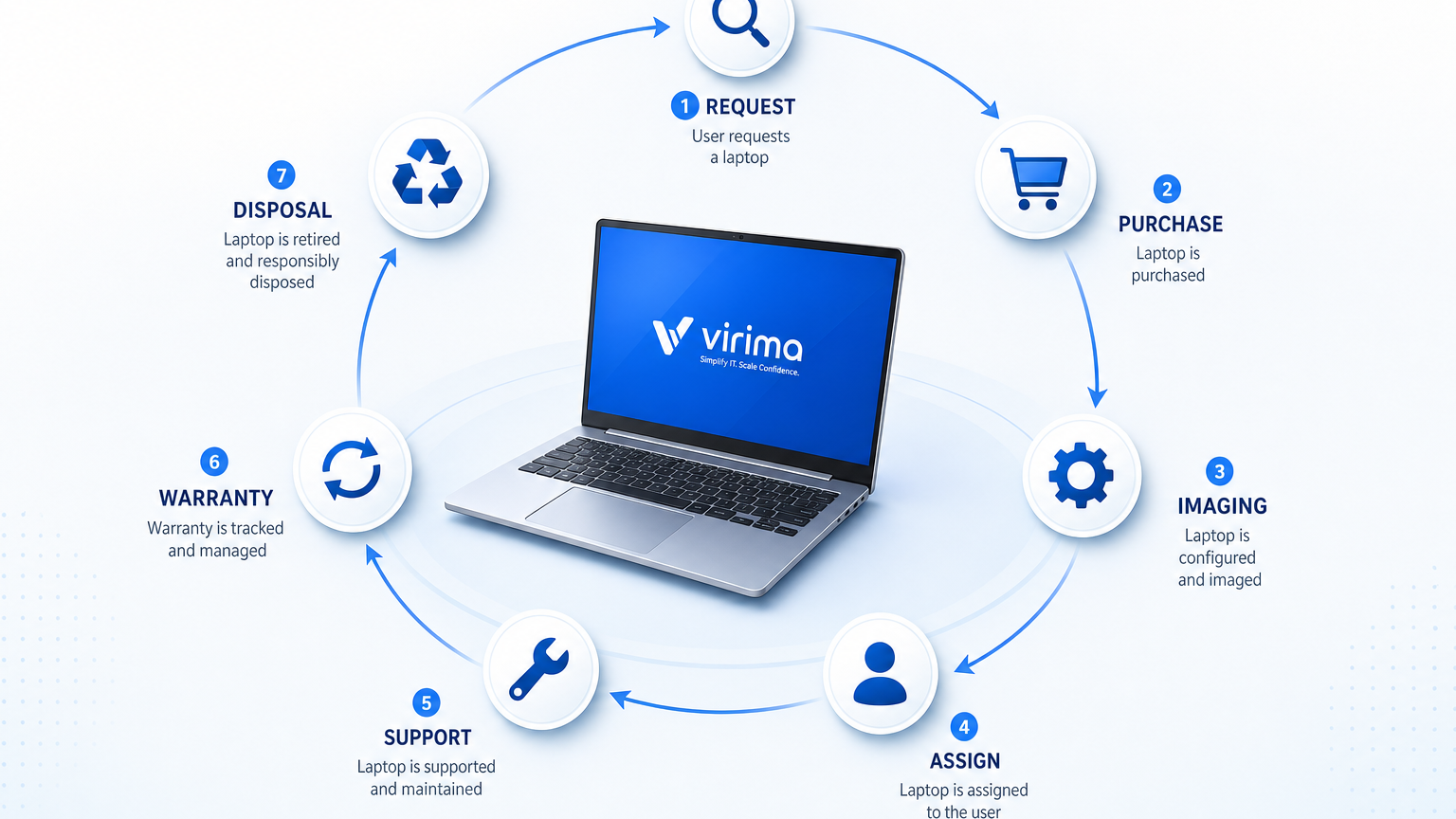
A laptop gets rebuilt at month fourteen, picks up a new hostname, and quietly splits into two records in the CMDB. By the time warranty tracking should flag it for refresh, nobody can say which row is current. The sanitization log for the retired unit is missing when an auditor asks for it. That gap starts the moment a device’s identity rides on hostname instead of serial number. This laptop lifecycle asset management example walks one endpoint through request, purchase, imaging, assignment, support, warranty, return, and disposal. Durable identity, not a naming convention, keeps a single CI trustworthy across its service life.
That single-record rule is what separates controlled IT asset management from a pile of tickets and spreadsheet rows. For the broader process map, use the IT asset management process flowchart. For category fundamentals, see what is ITAM.
Laptop asset lifecycle stages: the step-by-step table
The table below is the operational spine for one endpoint. Owners can be different people; the CI identity must not change when the hostname changes after a rebuild.
| Stage | Primary action | Record update | Typical owner |
|---|---|---|---|
| Request | Business need logged and approved | Create request ID; link cost center | Manager + IT intake |
| Purchase | PO issued; device ordered | Add PO, vendor, expected serial window | Procurement |
| Receive and tag | Unbox, asset tag, serial capture | Bind durable key (serial); set status Received | Depot / warehouse |
| Image and harden | OS image, agents, baseline config | Status Imaged; baseline version; discovery ready | Endpoint engineering |
| Assign | Issue to named user or role | Owner, location, assignment date; status In Use | IT support |
| Support and change | Break/fix, upgrades, moves | Ticket links; config changes; last-seen from discovery | Service desk + ops |
| Warranty and refresh | Track cover end; plan replacement | Warranty end date; refresh candidate flag | ITAM + finance |
| Return or reassign | Collect device; clear or re-seat user | Status Returned or Reassigned; new owner if reused | IT support |
| Sanitize and dispose | Wipe per policy; recycle or destroy | Sanitization method and date; disposal proof; status Retired | ITAM + security |
A laptop returned but left assigned in the service desk record is the most common point inventory drifts — closing the Return or Reassign stage means updating the CI’s owner field the same day the device physically changes hands, not at the next audit cycle.
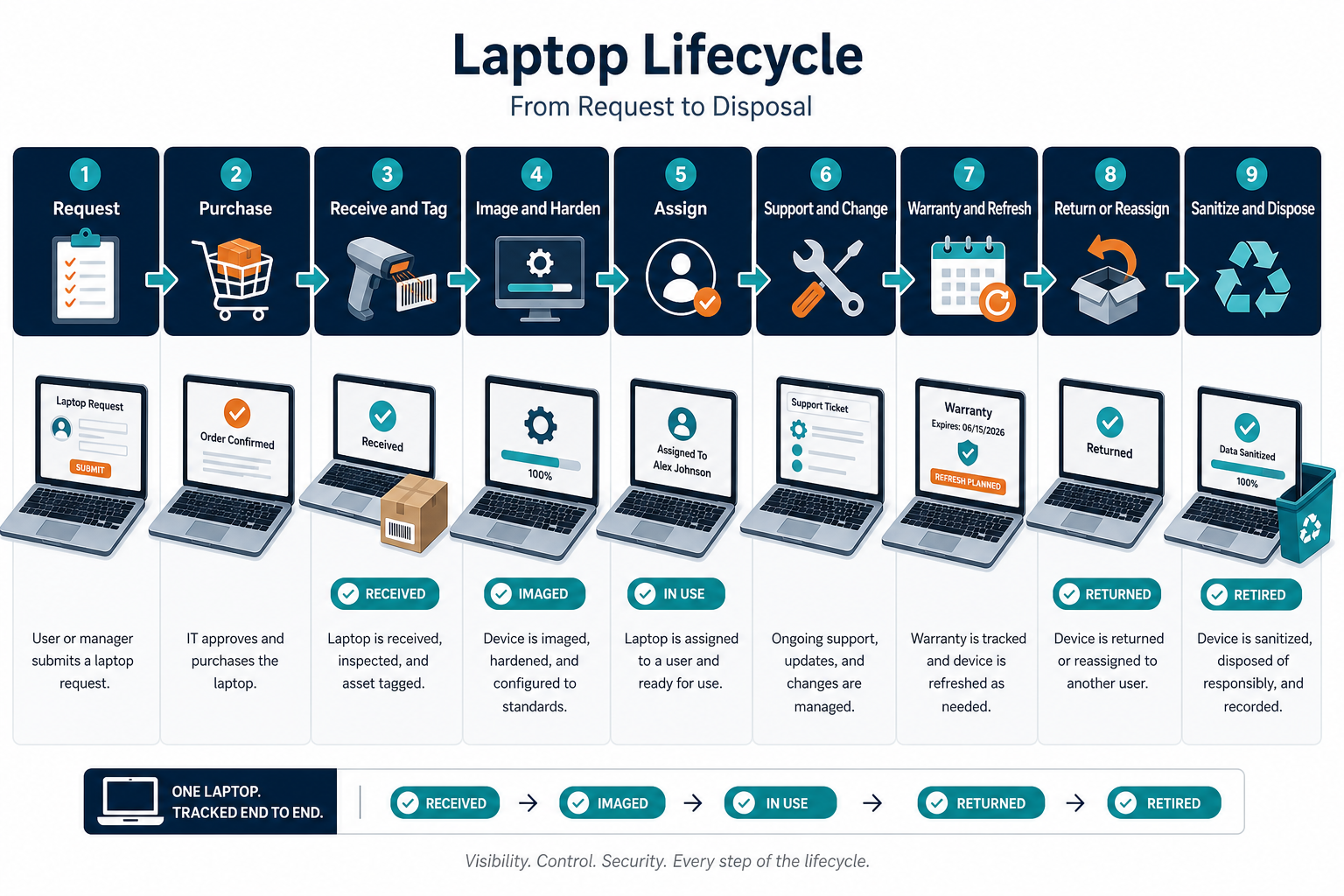
End-to-end laptop lifecycle asset management example
Start with a mid-market analyst hire approved on Monday. Procurement places the order Tuesday with a known model and expected delivery window. When the carton arrives, the depot scans the manufacturer serial into the asset system before the device leaves the cage. Hostname can wait until imaging; the serial is the durable join key that later discovery cycles must match.
Imaging loads the corporate baseline and endpoint agents. Assignment binds the user identity and cost center, then status moves to In Use. Over eighteen months the same CI absorbs ticket history for a failed battery, a RAM upgrade, and two office moves. Scheduled discovery refreshes last-seen and installed software without creating a second laptop row when the hostname changes after a rebuild.
At month thirty-six the warranty calendar flags the unit for refresh planning. The user receives a replacement; the old laptop returns to the depot with chain-of-custody notes. Sanitization follows the media-sanitization method required by policy, then disposal or certified recycling closes the record with evidence attached. Nothing in that path requires a second master record if serial-based identity held from day one.
What are the main stages in a laptop asset management lifecycle?
A controlled laptop lifecycle covers request, purchase, receive and tag, image, assign, support, warranty and refresh planning, return or reassign, then secure sanitization and disposal. Every stage should update one configuration item keyed by serial number or an equivalent durable identifier rather than hostname alone.
Data to capture at each milestone
Minimum fields that prevent audit pain later:
- Serial number and asset tag — serial is the durable key; asset tag is the human-readable label, and both coexist on the same CI
- Model and manufacturer
- PO and vendor
- Purchase and warranty dates
- Assigned user and cost center
- Location or site
- Status
- Last discovery source and timestamp
- Ticket or change references
Laptop CIs split into duplicate CMDB records when identity is tracked by hostname instead of serial number: a reimage changes the hostname, discovery sees a “new” device, and the original record goes stale — breaking warranty, ticket history, and audit trails that depended on it being one asset.
Remote laptop return tracking needs the same discipline. For remote workers, capture ship-to address, courier tracking on outbound and return, and the person who signed for the carton.
Software and configuration matter as much as the chassis. Record image version at assignment, major agent versions, encryption state, and whether the device is enrolled in directory or MDM. When discovery later reports a different hostname or IP, merge on serial so history stays continuous. NIST SP 1800-5 frames IT asset management as authoritative tracking across the estate; a laptop CI is the practical unit of that tracking for endpoint fleets.
Which fields should every laptop CI hold from day one?
Capture serial number, asset tag, model, purchase and warranty dates, assigned user, cost center, location, status, and discovery last-seen data. Add image version, encryption state, and return shipping evidence for remote devices so audits can reconstruct custody without rebuilding history from email.
Warranty expiry and hardware refresh cycles
Warranty end dates belong on the CI, not only in a vendor portal spreadsheet. Ninety days before cover ends, ITAM and finance should see the same candidate list discovery already knows is still active. Refresh cycles often run three to five years for knowledge-worker laptops, with shorter windows for heavy travel or high-risk roles. A 2024 survey covered more than 400 IT leaders at US and UK organizations with 1,000+ employees. The survey, run by Sapio Research for Scalable Software, found 33% replace hardware on a fixed three-year schedule and 30% on a two-year schedule regardless of device condition. That calendar-driven habit is exactly why the refresh trigger on a laptop CI needs to be warranty and usage data, not a fixed policy date. A written warranty and hardware refresh policy ties that trigger to data, not a calendar.
When a replacement ships, link old and new CIs so cost and custody stay auditable. Do not delete the retired row; close it with disposal evidence. That pattern keeps depreciation, loss, and security questions answerable years later.
When should a laptop enter the hardware refresh queue?
Enter refresh planning when warranty end dates, age policy, or repeated repair cost thresholds are met on the active CI. Discovery should confirm the device is still in use so finance does not fund replacements for assets that already left the estate.
Secure data wipe and disposal protocol
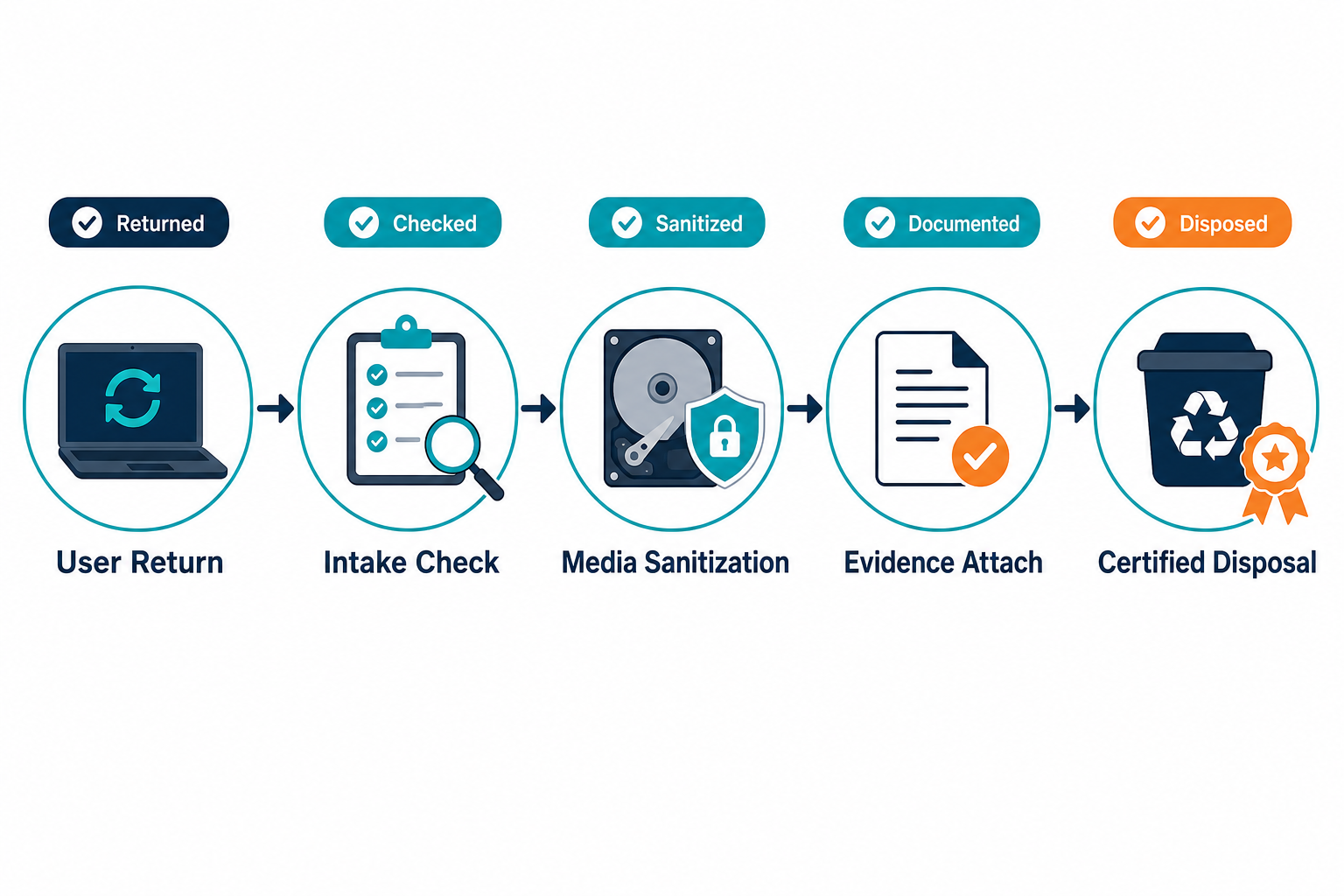
Before a laptop leaves controlled custody, media must be sanitized to the method your policy requires. NIST SP 800-88 Revision 1 is the common reference for clearing, purging, and destroying storage media. Record the method, tool or vendor, operator, date, and certificate or job ID on the CI before status becomes Retired. Missing any one of those four fields is the most common reason a laptop IT asset disposal audit trail fails review.
Operational how-to and responsible disposal practice live on Virima’s guides to best practices for the disposal of IT assets and responsible IT asset disposal. Chain of custody from user return through wipe to recycler is what auditors ask for when a device once held customer data.
How Virima keeps the laptop record honest
Virima discovery runs on a schedule across endpoints and related infrastructure so the laptop CI stays aligned with what is actually powered on and reporting. Serial and equivalent durable keys reduce false duplicates when hostnames churn. The IT asset management feature set holds contracts, warranty dates, and lifecycle status on the same configuration items discovery populates.
Once service definitions exist, ViVID™ service maps show which business services depend on endpoint classes and supporting infrastructure. ServiceNow, Jira Service Management, Ivanti, HaloITSM, Xurrent, Hornbill, and TeamDynamix remain systems of engagement for tickets and change; Virima feeds validated CIs through connectors listed on the integrations hub.
When custody and configuration must stay explainable from hire to recycle, start with Trusted Runtime Truth as the operating standard for discovery-sourced records.
Turn the field list above into a working checklist: see the IT asset management feature set that keeps every laptop CI — contracts, warranty dates, and lifecycle status — on one discovery-verified record.
Run the lifecycle on one record
A laptop lifecycle asset management example like this one is a chain of status and custody events on one CI, not a stack of disconnected forms. Request through purchase, tag, image, assign, support, warranty, return, sanitize, and dispose only works when serial-level identity and scheduled discovery keep the row true.
Use the stage table and field list above as a working checklist for your own fleet, then compare it against what your discovery data actually shows today.
Frequently Asked Questions
Does Virima track laptop warranty and refresh timing automatically?
Virima discovery runs on a schedule to confirm whether an endpoint is still active, and warranty end dates live on the same CI. ITAM and finance see one candidate list for refresh planning instead of reconciling a separate vendor portal.
What happens when a laptop warranty expires?
Warranty expiry should trigger a documented choice: extend cover, accept break-fix risk, or accelerate refresh. The CI must show warranty end date, current status, and owner so finance and IT share one candidate list instead of reconciling vendor portals after a failure.
How do we track laptop returns from remote employees?
Issue prepaid return labels tied to the asset tag and serial, require photo or scan confirmation at ship and receive, and update status when the depot accepts the device. Discovery last-seen helps confirm the unit left the user network before you close the assignment.
Can Virima prevent duplicate laptop CIs after a reimage?
Virima resolves identity on serial number and equivalent durable keys, so a hostname change after a rebuild merges into the existing CI instead of creating a second record. History, tickets, and warranty data stay attached to one row.
What data should we capture when a laptop is assigned?
At assignment capture user identity, cost center, location, assignment date, image version, encryption state, and confirmation that serial and asset tag match the physical unit. Those fields let later support, audit, and return steps reuse one record instead of rebuilding context from email threads.