IT Asset Management Process Flowchart: Step-by-Step Guide

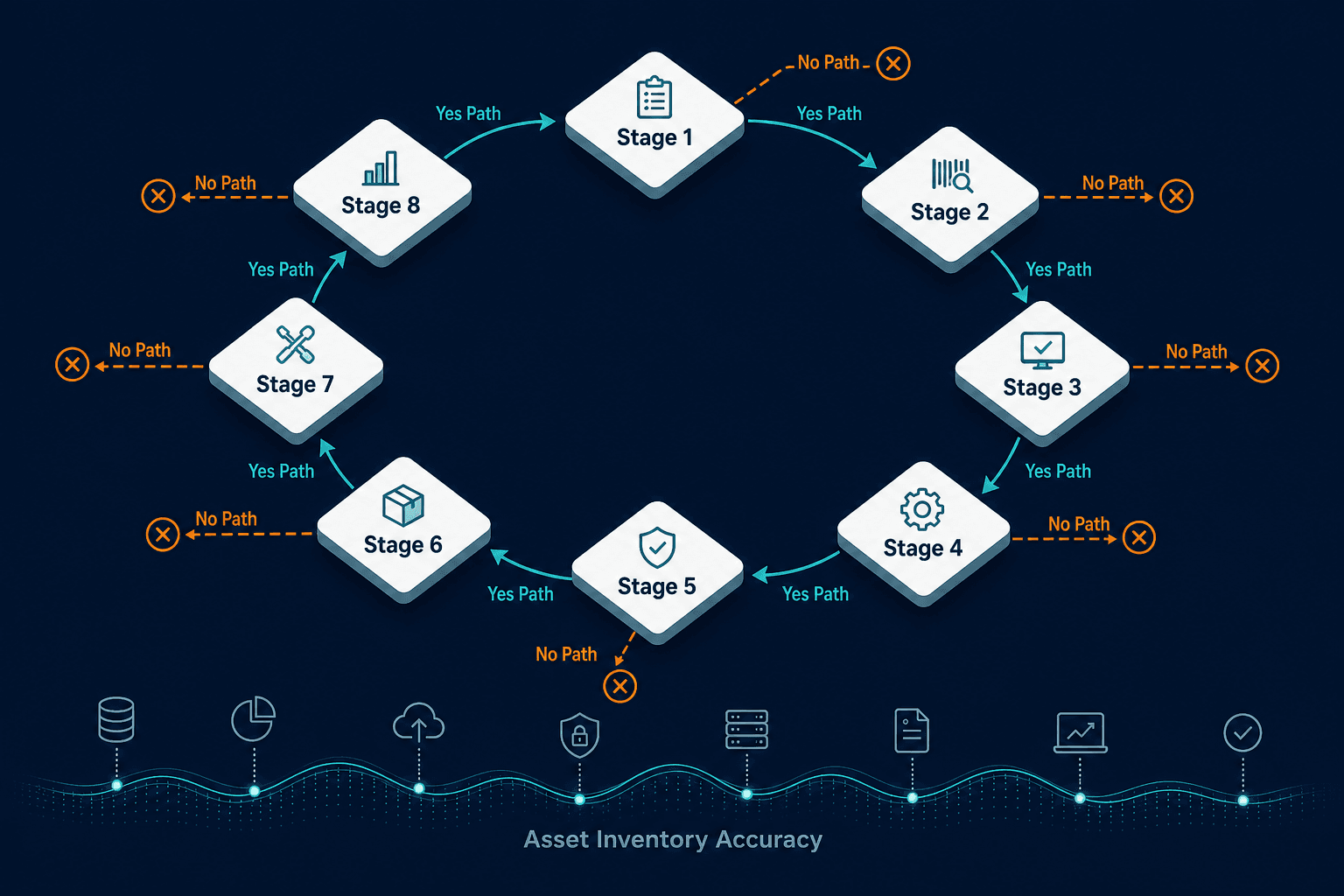
An IT asset management process flowchart maps eight ITAM lifecycle stages as decision nodes, not a linear checklist. Each node — request, procurement, tagging, deployment, monitoring, compliance, refresh, decommission — routes down a yes/no branch determined by the accuracy of the underlying asset inventory. When inventory data is wrong, the flowchart routes to the wrong outcome: unnecessary procurement, undetected compliance gaps, and hardware that costs money long after it should have been retired.
What an ITAM process flowchart actually shows
A linear step list tells you what happens in sequence. A flowchart tells you what happens at each decision point and what the consequences of each branch are.
The IT asset management process flowchart covers eight stages: request and approval, procurement and receiving, tagging and inventory registration, deployment and assignment, active monitoring and maintenance, compliance and audit readiness, refresh and replacement, and decommission and disposal. At each stage, there is at least one decision node: a question the ITAM process must answer before the asset can move forward.
The quality of the answer at each node depends on the accuracy of the underlying asset inventory. An inventory that is incomplete, stale, or manually maintained produces wrong answers at decision nodes. Wrong answers route assets down the wrong path. Those routing errors accumulate into overspend, compliance exposure, and operational risk.
What is an IT asset management process flowchart?
An IT asset management process flowchart maps the eight stages of the IT asset life cycle as decision nodes, each with a yes/no branch that determines the next action. Stages include request and approval, procurement, inventory registration, deployment, monitoring, compliance, refresh, and decommission. The accuracy of asset inventory data determines which path the organization takes at each node.
Stage 1: Asset request and approval
The flowchart begins when a user, team, or business unit submits a request for an IT asset. The first decision node asks: does an equivalent asset already exist in inventory that can be reallocated?
Yes path: An existing asset is identified, reassigned to the requester, and the inventory record is updated to reflect the new assignment. No new procurement required.
No path: No suitable asset exists. The request moves forward to the procurement stage.
This decision node is where unnecessary procurement most commonly originates. When the asset inventory is incomplete (assets that exist physically are not recorded, or records show assets as assigned that have actually been returned), the “no” answer fires incorrectly. The organization purchases hardware or software it already owns.
According to the Flexera 2026 State of ITAM Report, only 31% of organizations have visibility into IT asset spend as AI spend surges across their environment. For the other 69%, the reallocation check at Stage 1 is running against an inventory that cannot reliably confirm what is already owned.
Where this stage breaks: The inventory has not been updated since the last manual audit. Assets returned to the pool are not recorded as available. The check returns “no” and procurement proceeds for an asset the organization already has. This is the same inventory gap that shows up at audit time: see how 12% of devices with no assigned owner created downstream risk across four audit types in one environment.
Stage 2: Procurement and receiving
Once a request clears the approval gate, the asset is procured. The receiving decision node asks: Was the asset received as ordered – correct model, quantity, and condition?
Yes path: The asset proceeds to tagging and registration.
No path: A vendor dispute or return process is initiated before the asset enters the inventory.
The receiving stage is where the asset record must be created. The procurement order details (vendor, model, serial number, cost, warranty start date, and assigned cost center) become the initial asset record. A record created at this stage with incomplete fields becomes a gap that every downstream stage inherits.
Where this stage breaks: Receiving is handled by a warehouse or facilities team that does not have access to the ITAM system. Assets are physically received and stored without a corresponding record being created. The asset enters the environment without any formal inventory entry.
When should an IT asset be added to the inventory?
An IT asset should be added to the inventory at the point of receipt, when the asset arrives and is confirmed as delivered correctly. The initial record should capture vendor, model, serial number, cost, warranty details, and assigned cost center. Assets entered into the environment without an inventory record at this stage become invisible to every downstream ITAM process.
Stage 3: Asset tagging and inventory registration
Every physical asset receives a tag (barcode, QR code, or RFID label) that ties the physical object to its digital record. The registration decision node asks: does a record for this asset already exist in the ITAM system or CMDB?
Yes path: The existing record is updated with the tag ID and confirmed asset details.
No path: A new configuration item (CI) record is created, capturing the asset’s full attributes.
The tag is the link between the physical asset and every future ITAM process. An asset without a tag, or a tag that maps to an incorrect or missing record, breaks the chain. Discovery scans that find an asset on the network cannot reconcile it to an inventory entry if the tag-to-record link was never created.
Where this stage breaks: Tags are applied manually and inconsistently. Some assets are tagged in the field; others leave the receiving area without tags. The CMDB record is created days or weeks after the asset is physically deployed, by which point the details are reconstructed from memory rather than confirmed from the asset itself.
Stage 4: Deployment and assignment
The asset is configured and deployed to the user, location, or system it was requested for. The deployment decision node asks: does this asset require configuration before deployment?
Yes path: Configuration is completed (operating system installation, software provisioning, security policy application) before the asset is handed to the end user.
No path: The asset is deployed directly.
At this stage, three records must be updated simultaneously: the ITAM system (asset assigned to user/device, location confirmed), the CMDB (CI record updated with deployment details and relationships to other CIs), and any service catalogue entry if the asset supports a managed service.
Where this stage breaks: Deployment happens without triggering a record update. The IT operations team completes the configuration and hands over the asset without updating the ITAM system. The gap between physical deployment and inventory record creation widens as the asset accumulates configuration changes that are never logged.
Stage 5: Active monitoring and maintenance
Once deployed, the asset enters the longest stage of its life cycle: active use. The monitoring decision node asks: when an issue arises, is the asset covered by an active warranty or maintenance contract?
Yes path: A vendor support ticket is raised. Repair or replacement is handled under the contract terms.
No path: An internal repair or replacement decision is made. Cost is borne by the IT budget.
Active monitoring covers physical condition, location confirmation, warranty and contract expiry dates, software installed on the asset, and security patch status. Each of these data points requires a current inventory record to be actionable.
Virima’s IT asset discovery runs agentless and agent-based scans across on-premises, AWS, and Azure environments, maintaining a current record of what is deployed, what software it is running, and what has changed, without relying on manual updates from the teams managing those assets day to day.
Where this stage breaks: Warranty expiry dates are tracked in a spreadsheet that no one updates. An asset reaches the end of warranty with no notification. A support call is raised, and the vendor confirms the asset went out of warranty eight months ago. The repair cost falls entirely to the IT budget.
What does IT asset monitoring cover in the ITAM process?
IT asset monitoring covers physical condition, confirmed location, warranty and maintenance contract status, installed software, and security patch currency. Each data point requires a current inventory record to be actionable. When monitoring relies on manual record updates rather than automated discovery, gaps accumulate: warranty expirations go unnoticed, and security patch status becomes unreliable.
Stage 6: Compliance and audit readiness
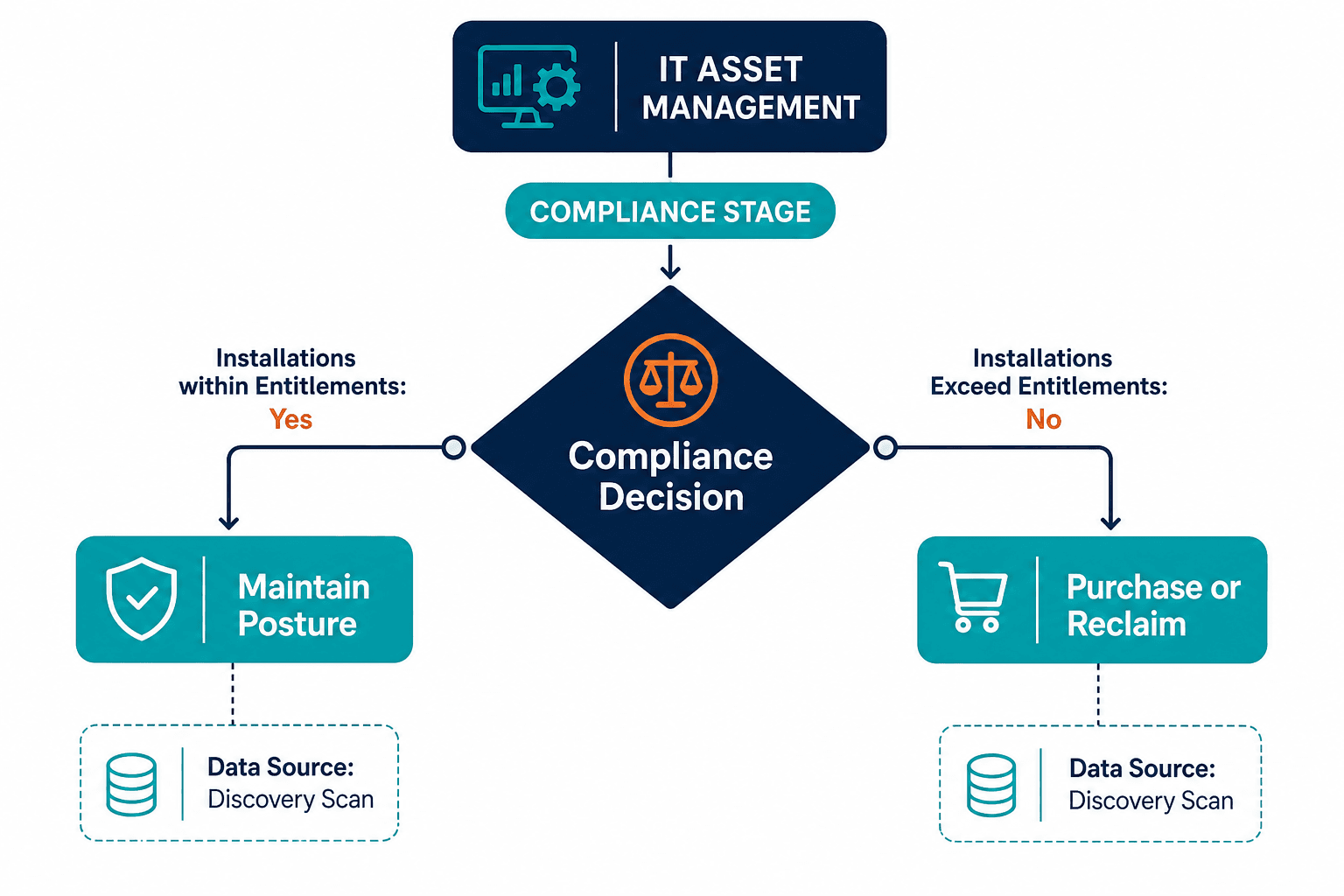
The compliance stage is where software license positions are reconciled against actual installations. The decision node asks: are software installations within licensed entitlements?
Yes path: The compliance posture is confirmed. Schedule the next review and maintain the current position.
No path: A remediation decision is required: purchase additional licenses to cover the gap, or reclaim unused installations to bring the position back into compliance.
This stage is where the cost of inaccurate inventory is most visible. The Flexera 2026 State of ITAM Report found 48% of organizations were audited in the past year and 44% spent more than $1 million on software audits over three years. Organizations that maintain a continuously reconciled compliance position resolve audits from a prepared stance. Those that reconstruct it under time pressure face higher costs, longer resolution timelines, and greater penalty exposure.
The Flexera 2025 State of ITAM Report found that 30% of desktop software spend is wasted even at organizations with advanced ITAM programs. Much of that waste is over-licensed software that the compliance check never identified as reclaimable.
Virima’s ITAM platform connects discovery-sourced installation data to license entitlement records, producing a continuously updated compliance position rather than a point-in-time snapshot built for each audit.
Where this stage breaks: Compliance reconciliation runs against stale discovery data. License entitlement records are incomplete. The compliance decision node fires a false “yes” because the inventory understates actual installations, and the gap is only discovered when the vendor audit letter arrives.
Why do software compliance audits cost so much?
Software compliance audits cost more when the compliance check runs against stale installation data instead of a continuously reconciled position. The Flexera 2026 State of ITAM Report found that 48% of organizations were audited in the past year, and 44% spent more than $1 million on software audits across three years. A compliance position that is reconciled continuously, rather than rebuilt from scratch at audit time, resolves those audits from a prepared stance instead of under time pressure.
Stage 7: Asset refresh and replacement
Every asset has a useful life. The refresh decision node asks: has this asset reached the end of useful life or end of vendor support?
Yes path: Initiate the refresh cycle. A replacement asset is requested (returning to Stage 1), and the current asset moves toward decommission.
No path: The asset remains in active use. Return to monitoring at Stage 5.
A second decision node within Stage 7 asks whether the end-of-life asset can be reallocated to a lower-demand use case before decommissioning.
Yes path: Reassign the asset to a role with lower performance requirements, extending its productive use and delaying replacement cost.
No path: Proceed directly to decommission.
Where this stage breaks: End-of-life thresholds are not defined or not tracked. Hardware continues in production past vendor end-of-support dates, accumulating security risk with no patch coverage. Assets flagged for replacement remain in the inventory as active, inflating refresh budget estimates and triggering unnecessary procurement decisions at Stage 1 for the next cycle.
How do you know when an IT asset should be decommissioned?
An IT asset should be decommissioned when it reaches the end of useful life, end of vendor support, or when repair costs exceed the value of continued use. Decommission triggers are most reliably tracked through an ITAM system that monitors warranty expiry dates, vendor end-of-support milestones, and age thresholds defined by the organization’s refresh policy, not through manual spreadsheet checks.
Stage 8: Decommission and disposal
The final stage removes the asset from active service. The decommission decision node asks: does this asset contain sensitive data?
Yes path: A certified data wipe or physical destruction process is required before disposal. This applies to endpoints, servers, storage devices, and any asset that processed or stored regulated data.
No path: The asset can be refurbished, donated, or recycled through standard channels.
Regardless of path, three actions must occur: the CMDB record is updated to reflect the asset’s retired status, finance is notified to remove the asset from the technology cost register, and any active software licenses or service subscriptions associated with the asset are reclaimed or cancelled.
Hardware that is physically disposed of without a corresponding CMDB update becomes a ghost asset: recorded as active, still drawing support contract costs and inflating the active inventory count used for future procurement decisions. For more on how these records compound over time, see how ghost servers corrupt CMDB data through CI lifecycle gaps.
For teams building decommission workflows that connect asset retirement to compliance reporting, Virima’s IT audit and compliance use cases cover how retired asset records feed into the full audit trail, confirming that licensed software was reclaimed and that disposed hardware was properly handled.
Where this stage breaks: The asset is physically removed and disposed of, but the CMDB record is never updated. The asset remains active in the inventory. Support contracts continue to renew against it. Software licenses assigned to it remain in the entitlement count. The organization pays for an asset that no longer exists.
What is a ghost asset?
A ghost asset is IT hardware that has been physically disposed of, retired, or moved but remains recorded as active in the CMDB or asset inventory. It continues drawing support contract renewals, inflating license entitlement counts, and skewing procurement budgets until someone manually finds and corrects the record.
Why ITAM flowcharts fail in practice: the data accuracy problem
Each of the eight stages above contains at least one decision node that routes the organization to a different outcome depending on the answer. Every answer is only as reliable as the inventory data behind it.
For IT Ops teams running ServiceNow, Jira Service Management, or a similar ITSM platform alongside a spreadsheet or manually-updated inventory, this shows up as the same recurring pattern: the ITSM workflow is solid, but the asset data feeding it is not. The reallocation check at Stage 1 fails when the inventory does not reflect what is actually available. The compliance check at Stage 6 fails when software installation data is outdated. The refresh trigger at Stage 7 fails when end-of-life thresholds are not tracked. The ghost asset problem at Stage 8 persists when decommission records are logged without discovery confirmation.
These are not process design failures. They are data accuracy failures. An ITAM flowchart built on top of a manually maintained, point-in-time inventory produces correct routing at each node only when the data was last updated, and produces wrong routing for every change that occurred since.
Automated discovery that runs on a high-frequency cycle, covers the full asset estate including cloud workloads and endpoints, and feeds directly into the ITAM system is the operational prerequisite for a flowchart that routes correctly at every stage.
Building an ITAM flowchart that routes correctly at every node
The eight-stage IT asset management process flowchart is not complex. The decisions at each node are straightforward. The challenge is maintaining the data accuracy that each decision node requires, across an estate that changes continuously as assets are deployed, moved, updated, and decommissioned.
Organizations that achieve reliable ITAM outcomes have one structural characteristic in common: their inventory stays current without manual effort. Discovery runs automatically. Changes surface as they happen. Every decision node draws from a record of what actually exists, not what someone last recorded.
See how Virima’s discovery-sourced inventory gives every stage in your ITAM flowchart accurate, current data to route from. Explore the Trusted Runtime Truth approach.