Kubernetes CMDB Discovery: How to Track EKS, ECS, AKS, and Containerized Workloads in Your CMDB

The Kubernetes CMDB Gap
Walk into any enterprise IT operations team managing a Kubernetes environment and ask them a simple question: “Is your CMDB current for your container workloads?” The answer is almost always no.
According to CNCF research, 88% of enterprises run Kubernetes across multiple clouds. Yet 70% report significant struggles with visibility and governance across those environments. The two facts together reveal an urgent problem: the infrastructure powering a growing share of enterprise applications is largely invisible to the CMDB.
This is not a theoretical gap. When a Kubernetes node group goes down and your incident response team cannot answer which business services are affected, that gap costs real hours of investigation time. When a compliance audit requires documentation of what compute resources processed regulated data, and those resources are container workloads that never appeared in your CMDB, that gap becomes a compliance finding.
The traditional CMDB was built for a world of servers that lived for years, each with an IP address, a hostname, and an OS that a discovery agent could interrogate on a weekly schedule. That world still exists — and still needs to be managed — but it now coexists with a Kubernetes world where infrastructure is defined as code, deployed in seconds, and torn down minutes later.
Bridging this gap requires a different approach to what counts as a configuration item, what level of granularity makes sense, and how frequently discovery must run.
Why Kubernetes Is Different from Traditional Infrastructure
To understand why Kubernetes presents such a challenge for CMDB, it helps to understand the core architectural difference.
In a traditional server environment, a CI is a physical or virtual machine. It has a stable identity: a hostname, a MAC address, an OS version, a set of installed software. Discovery runs once a week, finds the same servers, updates their attributes, and the CMDB stays reasonably current.
Kubernetes introduces an entirely different model:
Ephemeral workloads by design. A Kubernetes pod is not a server. It is a collection of one or more containers scheduled to run on a node. Pods are designed to be created and destroyed constantly. A deployment with three replicas will terminate and recreate those pods during every rolling update, every node recompaction, and every autoscaling event. A pod that exists today may not exist in an hour.
Dynamic scaling. Kubernetes Horizontal Pod Autoscaler adds and removes pod replicas in response to CPU or custom metrics. A cluster that runs 10 pods at 9 AM may run 80 pods at 2 PM. Traditional weekly discovery cannot capture this.
Cluster-level vs. workload-level CIs. The right level of granularity for CMDB is not the pod — it is the workload (Deployment, StatefulSet, DaemonSet) and the cluster infrastructure (nodes, node groups, namespaces). The pod is too ephemeral. The workload definition is stable and meaningful for change management.
Multi-cloud clusters. Enterprise Kubernetes environments typically span AWS EKS, Azure AKS, and sometimes self-managed clusters simultaneously. Each cloud platform has its own APIs, naming conventions, and resource hierarchies.
No agents. You cannot install a CMDB discovery agent on a container. Container-aware discovery must use Kubernetes API calls and cloud provider APIs to enumerate resources.
AWS EKS Discovery: Clusters, Node Groups, and Workloads
Amazon Elastic Kubernetes Service (EKS) is the managed Kubernetes offering from AWS. EKS handles the Kubernetes control plane — the API server, etcd, scheduler, and controller manager — while the customer manages the data plane: the EC2 node groups or Fargate profiles that run containerized workloads.
From a CMDB perspective, EKS introduces several distinct CI types:
EKS Cluster as a CI
The EKS cluster itself is the primary stable CI. Key attributes to capture include:
| Attribute | Description |
| Cluster name and ARN | Stable identity across deployments |
| Kubernetes version | Critical for change management; cluster upgrades are major change events |
| API endpoint | The address through which all cluster management traffic flows |
| Region and VPC | Location and network context |
| Status | ACTIVE, CREATING, DELETING, FAILED |
A cluster version upgrade from 1.28 to 1.29 is a significant change event. Without that CI in the CMDB, change management has no record of it, and incident correlation after an upgrade-related failure becomes guesswork.
Managed Node Groups as CIs
EKS Managed Node Groups are pools of EC2 instances that run container workloads. Each node group is a meaningful CI:
| Attribute | Description |
| Node group name and ARN | Unique identity for the node group |
| Instance type | e.g., m5.xlarge |
| Scaling configuration | Min/max/desired count |
| AMI type and version | Node group OS patches are change events |
| Labels and taints | Affect workload scheduling |
Individual EC2 worker nodes are lower-level CIs linked to their node group. They have stable identities (instance IDs) and matter for capacity planning and incident correlation.
Workloads as CIs
The workload level — Deployments, StatefulSets, DaemonSets, CronJobs — is where CMDB gets operationally useful. These are stable definitions that survive individual pod lifecycles. Key attributes:
| Attribute | Description |
| Workload name, namespace, and kind | Deployment vs. StatefulSet |
| Container image name and tag | A container image update is a change event |
| Replica count | Desired vs. available |
| Labels and selectors | Govern which pods this workload manages |
Handling Ephemeral Pods in CMDB
Pods should generally not be individual CIs in the CMDB. The volume is too high, the churn is too frequent, and the meaningful change signal comes from the workload definition, not the individual pod instance.
The exception: stateful pods running databases or other stateful services (typically via StatefulSets) where each pod has a stable identity and persistent storage. In that case, each pod replica may warrant a CI relationship to the StatefulSet parent.
The practical approach: track pods in monitoring and observability tools (Prometheus, CloudWatch Container Insights), but keep the CMDB at workload and cluster level. The CMDB relationship map connects workloads to node groups, node groups to clusters, and clusters to the VPCs and accounts they reside in.
AWS ECS Discovery: Tasks, Services, and the Serverless Container Model
Amazon Elastic Container Service (ECS) is AWS’s native container orchestration service, predating Kubernetes and designed with a flatter, simpler model. ECS integrates tightly with AWS Fargate, which removes the need to manage EC2 nodes at all — making it the closest thing AWS offers to truly serverless containers.
ECS introduces its own CI hierarchy:
ECS Cluster as a CI
The ECS cluster is the top-level resource. It is a logical grouping of services and tasks. Key attributes:
| Attribute | Description |
| Cluster name and ARN | Unique identity |
| Status | ACTIVE, INACTIVE |
| Capacity providers | EC2 vs. Fargate vs. Fargate Spot |
| Statistics | Running task count, service count |
ECS Services as CIs
An ECS Service is the stable, long-running workload unit. It maintains a desired count of task replicas and handles deployment of new task definition versions. This is the right level for CMDB:
| Attribute | Description |
| Service name and cluster association | Links the service to its parent cluster |
| Task definition family and revision | A task definition update is a change event |
| Launch type | EC2, FARGATE, EXTERNAL |
| Desired task count | Number of task replicas to maintain |
| Load balancer integration | Links the service to application load balancer CIs |
| Service discovery namespace | If registered with AWS Cloud Map |
ECS Task Definitions as CIs
A task definition is the blueprint for a containerized application. It specifies container images, CPU/memory allocation, networking mode, and environment variables. Task definitions have revisions, and each revision is a discrete change event:
| Attribute | Description |
| Family name and revision number | Versioned identity of the task definition |
| Container definitions | Image, memory, port mappings |
| Network mode | awsvpc, bridge, host |
| CPU and memory | For Fargate tasks |
ECS Tasks and the Fargate Model
Individual running tasks in ECS Fargate are the equivalent of pods — ephemeral compute instances that run a task definition. Like Kubernetes pods, individual tasks are too ephemeral for CMDB CIs. For other AWS compute resources that run alongside ECS workloads — including AWS Lambda, App Runner, and Batch — those require their own discovery model in Virima 6.1.1.
The key CMDB value in ECS: capturing the service-to-task definition relationship, tracking task definition revisions as change records, and mapping ECS services to the load balancers, VPCs, and downstream business services they support.
Azure AKS Discovery: Kubernetes on Azure
Azure Kubernetes Service (AKS) is Microsoft’s managed Kubernetes offering. Virima’s Azure Discovery integration covers AKS alongside other Azure resources in a unified cloud CMDB pipeline. From a CMDB perspective, AKS follows a similar structure to EKS — managed control plane, customer-managed data plane — but with Azure-native resource integration.
AKS Cluster as a CI
The AKS cluster is the primary stable CI:
| Attribute | Description |
| Cluster name and resource ID | Unique identity within Azure |
| Kubernetes version | Upgrades are change events |
| DNS prefix | The cluster API endpoint identifier |
| Node resource group | The Azure resource group where node VMs are automatically created |
| Power state | Running, Stopped |
| Provisioning state | Current provisioning status |
Node Pools as CIs
AKS uses node pools instead of node groups. Each node pool is a set of virtual machines with a consistent configuration:
| Attribute | Description |
| Node pool name and mode | System vs. User |
| VM size | e.g., Standard_D4s_v3 |
| OS type | Linux, Windows |
| Node count and autoscaling configuration | Min/max/desired count and scaling rules |
| Node image version | OS patches are change events |
| Kubernetes labels and taints | Affect workload scheduling and classification |
Azure Network Integration
AKS clusters integrate deeply with Azure networking. The CMDB relationship map for an AKS cluster includes:
- The Azure Virtual Network and subnet the cluster uses
- Network Security Groups applied to node VMs
- Azure Load Balancer or Application Gateway if ingress is configured
- Azure Container Registry if private container images are in use
Beyond AKS, Azure also runs PaaS workloads — including Azure Functions, Cosmos DB, and Key Vault — that require separate CMDB discovery coverage alongside your container estate.
Workloads in AKS
The workload-level CI model for AKS mirrors EKS: Deployments, StatefulSets, and DaemonSets are the meaningful stable units. The Kubernetes API is cloud-agnostic at the workload level, so the same attributes apply regardless of whether the cluster runs on EKS or AKS.
Change Impact and Relationship Mapping
The single most valuable thing a CMDB delivers for Kubernetes environments is relationship mapping for change impact analysis.
Consider a scenario: a node pool in an AKS cluster exhausts capacity due to a misconfigured autoscaler. Pods start failing to schedule. Three applications go partially offline. Which business services are affected?
Without CMDB relationship mapping:
- An incident responder checks the AKS cluster. They find failing pods. They do not know which pods belong to which application.
- They check application monitoring. They find three applications degraded. They do not know which business services those applications support.
- They escalate to multiple teams sequentially, losing 30–60 minutes in the process.
With CMDB relationship mapping:
- The AKS cluster CI is related to three Deployment CIs.
- Each Deployment CI is related to an application CI.
- Each application CI is related to a business service CI.
- The CI model surfaces the impact chain immediately: node pool failure → three Deployments → two customer-facing services + one internal reporting service → escalate to three product owners simultaneously.
Building this relationship model requires that Kubernetes cluster discovery populates the CMDB with correct parent-child relationships: cluster → node pool → node → workload → application → business service.
Kubernetes CIs in Service Maps: The ViVID Connection
Service mapping extends CMDB relationship data into dynamic, visual representations of how infrastructure components support business services. For Kubernetes environments, service mapping answers: what happens to my business services if this cluster has an outage?
Virima’s ViVID Service Mapping is built on the CMDB relationship graph. When EKS, ECS, and AKS resources are discovered and populated as CIs with correct relationships, ViVID renders those relationships into service dependency maps that IT operations and platform engineering teams can use directly.
The typical Kubernetes service map in ViVID traces:
| Layer | Example CI |
| Business Service | “Customer Portal” |
| └─ Application CI | “checkout-api” |
| └─ EKS Deployment | “checkout-api”, namespace: production |
| └─ EKS Managed Node Group | “prod-api-nodes” |
| └─ EKS Cluster | “prod-eks-us-east-1” |
| └─ AWS VPC | “vpc-prod” |
| └─ AWS Account | “Production” |
This map does not require manual construction. It is built automatically from the discovery data that populates the CMDB. The accuracy of the service map depends entirely on the completeness of the CMDB data — which is why Kubernetes discovery matters so much to service mapping outcomes.
Best Practices for Kubernetes Data in CMDB
1. Track at Cluster and Workload Level, Not Pod Level
Pods are the compute unit of Kubernetes, but they are not the right unit of CMDB management. Workloads (Deployments, StatefulSets, DaemonSets) are stable, named, and meaningful for change management. Clusters and node pools/groups are the infrastructure layer. Track both; skip individual pods except for stateful workload replicas.
2. Capture Container Image Versions as Attributes
A container image update — even a minor version bump of a base image — is a change event. CMDB should capture the current image and tag for each workload CI. Drift between what the CMDB records and what is actually running indicates a change that bypassed change management — a key indicator of CMDB accuracy.
3. Set Discovery Frequency by CI Type
| CI Type | Recommended Discovery Frequency |
| Cluster (EKS/AKS) | Every 4–8 hours |
| Node Group / Node Pool | Every 4–8 hours |
| Individual Worker Nodes | Every 4–8 hours |
| Workloads (Deployments, etc.) | Every 1–4 hours |
| ECS Services + Task Definitions | Every 1–4 hours |
| Running Pods / Tasks | Monitoring tools only |
Selecting the right CMDB discovery technique for each CI type ensures that discovery frequency matches the rate of change in your environment.
4. Use Kubernetes Labels as CMDB Attributes
Kubernetes labels (e.g., app: checkout-api, env: production, team: platform-engineering) map directly to CMDB attributes. A well-labeled cluster yields rich, searchable CMDB data. Enforce a labeling standard in your Kubernetes admission policy, and discovery tools can use those labels to automatically classify CIs by environment, application, and owning team.
5. Integrate Change Events, Not Just Snapshots
The CMDB gains the most value from Kubernetes when discovery captures not just the current state but the transition: node group scaling events, workload image updates, cluster version upgrades. Tie discovery into your change management process so that Kubernetes-sourced changes generate change records in your ITSM tool.
6. Map to Business Services Immediately
Every Kubernetes workload CI should have a relationship to an application CI and, through that, to a business service. Without this relationship chain, the CMDB data for Kubernetes is operationally inert — present but not useful for incident or change impact analysis. See our guide on how to create and maintain a reliable CMDB for the foundational practices that make this relationship data trustworthy.
How Virima 6.1.1 Supports Kubernetes Discovery
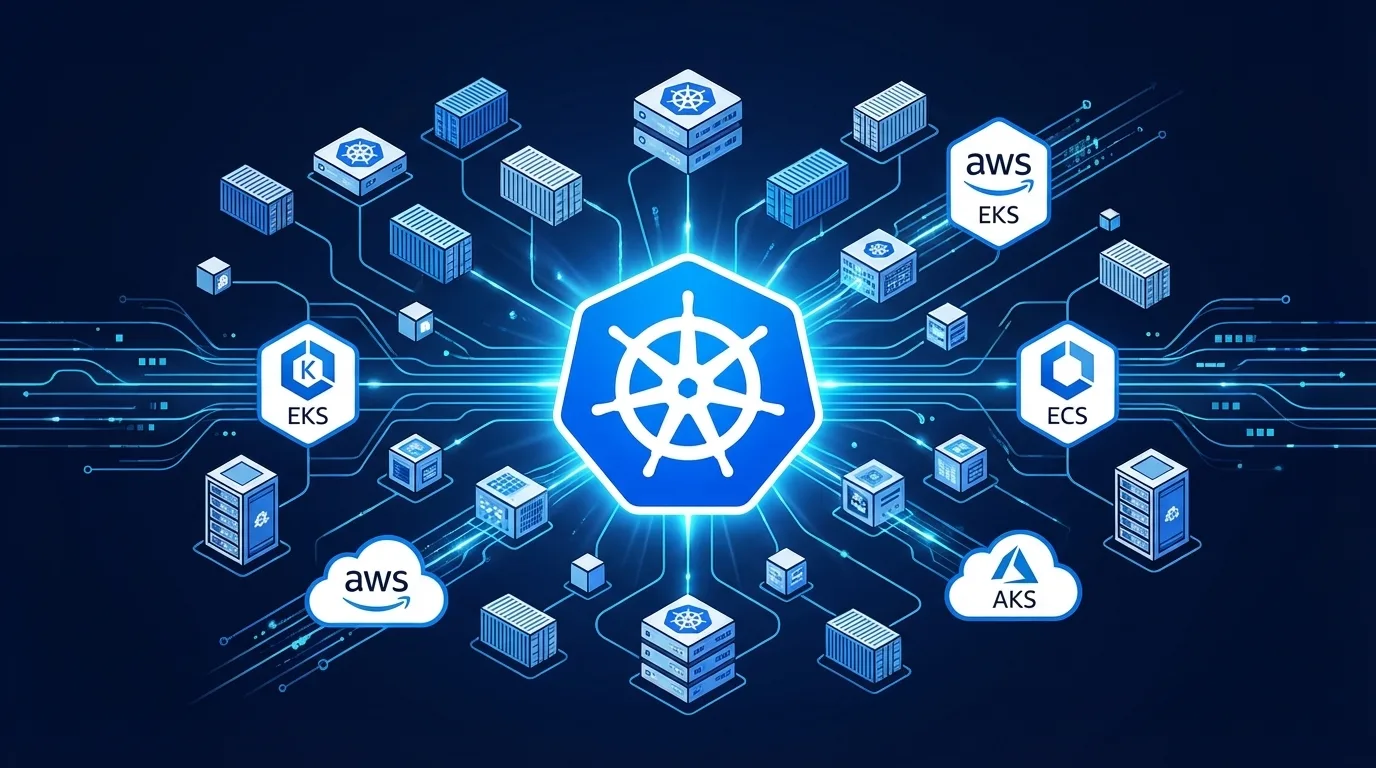
Virima 6.1.1 introduces native discovery support for AWS EKS, AWS ECS, and Azure AKS, addressing the Kubernetes CMDB gap directly for enterprise IT teams running multi-cloud container environments.
Virima’s IT Discovery platform discovers EKS clusters, managed node groups, and workloads via AWS APIs, captures ECS clusters, services, and task definitions, and maps AKS clusters and node pools from Azure Resource Manager. All discovered resources populate the CMDB as structured CIs with relationships, making them immediately available to ViVID Service Mapping for automated service dependency visualization.
For platform engineering and IT operations teams managing Kubernetes at scale, this means the CMDB reflects actual container infrastructure — including cloud assets in the CMDB — not a static snapshot of the server estate that existed before containers arrived.
For a complete breakdown of every cloud service Virima discovers — including Lambda, Azure Functions, and PaaS resources — see the complete cloud discovery eks ecs aks discovery coverage guide.
Ready to Close the Kubernetes CMDB Gap?
See how Virima 6.1.1 discovers EKS, ECS, and AKS environments and maps container workload cmdb mapping containerized workloads to business services.
Schedule a Demo at virima.com