How to determine CMDB accuracy?

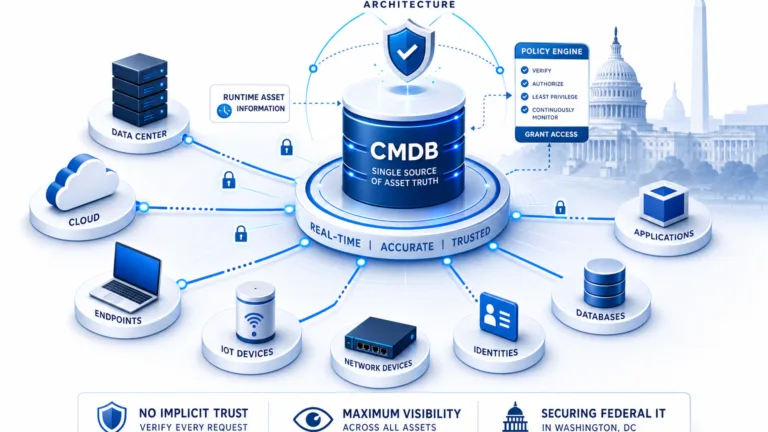
Establishing automated reconciliation rules and precedence logic ensures that incoming telemetry conforms to strict naming conventions and identification standards before entering the configuration repository. Enforcing these CMDB business rules eliminates duplicate configuration entries and maintains baseline accuracy across multi-source hybrid environments.
Table of contents
- What is CMDB?
- The criticality of CMDB for organizations
- Challenges of CMDB data
- Determining your CMDB’s accuracy: The 4 core health dimensions
- How does IT discovery keep your CMDB accuracy up-to-date?
- Importance of service mapping in maintaining an accurate CMDB
- Virima helps with you maintain a high CMDB accuracy
- Frequently asked questions about CMDB accuracy
To understand the critical importance of CMDB accuracy and why it needs to remain constantly precise, let us first understand the role it plays in your business.
Organizations, especially those that are large, can face the challenge of keeping track of all their configuration items used in their operations. This is a process that is not only challenging for IT teams, but also for businesses in general.
The good news is that this process can be streamlined through a CMDB, which allows managing and organizing assets to reduce operational and maintenance costs, reduce the redundancy of digital assets, and perform audits, among other numerous advantages.
What is CMDB?
CMDB stands for configuration management database. It is a database focused on the management and organization of all information regarding your company’s assets. It allows you to evaluate data such as names, characteristics, and details. In addition, it allows you to store data on the relationship between services and different CIs.
CI stands for configuration item, which can refer to a contract, computer, vehicle, cell phone, or any other asset required to carry out operations.
The Configuration Management Database (CMDB) is important because it allows you to reduce the redundancy of digital assets and expand their availability, which reduces operational and maintenance costs. It also enables you to quickly detect if there is something inappropriate according to the audit criteria, and it allows one to check that all inventory and infrastructure are in agreement, whenever new software or equipment is installed.
Read: What is a CMDB, and why is it important?
The criticality of CMDB for organizations
Configuration management databases are critical for your organization for two reasons. First, their CMDB accuracy ensures transparency within your IT environment by recording the relationships and dependencies of devices, applications and workloads. Second, they provide a way to manage changes to the environment so that they can be executed in a controlled manner.
It’s important to have the ability to monitor, track, and report on the complex relationships of environmental components. Having this information allows a company to be more efficient in its operations by understanding exactly what is needed to complete a given task or project.
Most large, enterprise-class organizations are challenged with capturing and maintaining an accurate and complete picture of the assets, software, and configurations which comprise their IT infrastructure. According to data collected by Gartner, only 25% of organizations get significant value from their CMDB investments.
The gap between investment and value often comes down to data quality — and the financial consequences of letting CMDB accuracy slip are far larger than most organizations realize until it’s too late.
For the CMDB to function properly and meet its objectives, it depends on frequent updates and accurate data. If you don’t keep your CMDB up-to-date with accurate information, you’ll lose track of key information about your IT assets or have trouble using them effectively. A well-maintained CMDB will also help you identify any gaps or discrepancies in your inventory and ensure that all of your employees have access to up-to-date information about what they need to do their jobs efficiently.
But how to ensure that your CMDB is always populated with accurate data? To get to that, you need to understand the challenges of CMDB data.
Challenges of CMDB data
As your business grows, your asset volume also increases. This has a direct impact on the cost of maintaining a correct CMDB and companies are often faced with these CMDB data challenges.
Data from multiple sources
One of the biggest challenges with CMDB data is that it is brought in from multiple platforms, which means it gets reported differently and duplicated in the CMDB. The fact that there are so many different ways to report on specific data makes it difficult to complete a single accurate report of all the information.
Noisy data
CMDB data is an important part of IT Service Management (ITSM), but the noise that often accompanies it can be overwhelming and unusable. This is particularly true when you’re managing a large number of systems. The problem with this kind of data is that it’s often not very useful for ITSM tools because it’s not easily accessible or formatted in a way that makes it easy to use. Most companies use a CMDB to store information about their hardware and software assets, but they don’t update the database regularly enough to maintain accuracy. As a result, many companies end up using unreliable data in their ITSM tools, which makes them less effective at managing their IT systems more efficiently
Lack of tracking usage
The minimal usage tracking of CMDB data is another major challenge for organizations because most organizations don’t have insights into their CMDB and IT environment. This lack of awareness means that even when they do realize there is a problem, they may not know how to go about fixing it.
Cloud adoption challenges
The growth in cloud adoption has led to a proliferation of disparate systems that make it difficult for IT teams to track the configuration management of their applications, which causes problems for both development and operations teams who are trying to quickly deploy new versions of software.
Additionally, traditional CMDB tools have been ineffective in keeping up with these changes because they lack the ability to manage multiple clouds and hybrid infrastructures. The result is that many companies are struggling with the problem of keeping their data up-to-date and accurate, which makes it difficult for them to identify when something goes wrong or needs fixing.
Lack of license tracking
CMDBs are a key tool for managing and tracking software licenses, but without a clear picture of what software is running on individual machines, teams can struggle to stay up-to-date with licensing requirements. This lack of insight can cause teams to miss risks such as out-of-control costs, cybersecurity vulnerabilities and compliance issues. The required fixes often involve lengthy, manual research.
Lack of automated CMDBs
The fact that most CMDB systems are managed by humans means that even the best-designed systems can fall victim to human error. Human error, in turn, leads to inaccurate data and improper configuration management. This is especially true when it comes to CMDB data. Without automated CMDBs, human errors in CMDB data are inevitable.
One effective way to close this gap is through well-defined business rules that enforce data standards automatically — a foundational step toward maintaining CMDB accuracy without relying on manual intervention.
Also read: How to create and maintain a reliable CMDB?
Determining your CMDB’s accuracy: The 4 core health dimensions
To determine the accuracy of your CMDB, you must audit data health across four objective operational dimensions:
1. Attribute completeness (field-level integrity)
Completeness measures whether mandatory and recommended CI attributes are populated with authoritative values. Critical attributes include serial numbers, IP addresses, OS patch levels, asset ownership, and environment tags. Missing primary keys lead to duplicate record creation during automated ingest.
2. Record correctness (staleness, duplicates, and orphans)
Correctness audits whether configuration records accurately reflect operational reality. This requires calculating staleness (CIs with no active scan update within 30 to 60 days), duplicate identifiers, and orphaned items that have been decommissioned physically but remain active logically in the database.
3. Relationship and topology fidelity
A CI list without accurate dependencies is simply an asset registry. Relationship accuracy validates that parent-child dependencies, network topology paths, and application communication links reflect active operational traffic rather than static architectural diagrams.
4. Policy and baseline compliance
Compliance audits whether active configuration items conform to organizational security standards, approved software baselines, and regulatory requirements (such as CIS benchmarks and lifecycle support windows).
| Health Dimension | Key Measurement Metric | Audit Formula | Target Benchmark |
|---|---|---|---|
| Completeness | Mandatory Attribute Rate | (Populated Mandatory Fields / Total Required Fields) × 100 | > 95% |
| Correctness | Stale CI Ratio | (CIs with No Update in >30 Days / Total Active CIs) × 100 | < 5% |
| Correctness | Duplicate CI Ratio | (Duplicate Hardware or Serial Records / Total Active CIs) × 100 | 0% |
| Relationship | Orphan Relationship Ratio | (Standalone CIs without Mapped Dependencies / Total CIs) × 100 | < 2% |
| Compliance | Non-Compliant Baseline CIs | (CIs Failing Security Baselines / Total Scanned CIs) × 100 | < 1% |
How does IT discovery keep your CMDB accuracy up-to-date?
IT discovery is critical to keeping your CMDB up-to-date with accurate and complete inventory. Manual discovery can lead to errors, which can be incredibly costly in terms of time and money.
It establishes a baseline for your infrastructure through auto-discovery, including hybrid and public cloud ecosystems.
This information is crucial for many reasons:
- It enables you to identify gaps in your asset inventory so you can fill them with accurate information.
- It allows you to make informed decisions about what changes need to be made in order to improve efficiency or security.
- It provides a reference point that can be used when making changes, so that you know what has changed since the last time it was documented in detail (which means less guesswork).
IT discovery automates the process of making sure that IT assets are always up-to-date, so you can focus on what’s important: delivering value to your company.
Service maps provide automated insight into complex relationships and dependencies. This means you can easily see what services are dependent on other services, and how they’re connected—without having to spend hours manually researching it all yourself.
High-frequency discovery cycles ensure that infrastructure changes are validated against physical reality before configuration drift degrades business services.
Importance of service mapping in maintaining an accurate CMDB
Service mapping is the process of mapping assets, services, and software components to their corresponding attributes in a CMDB. Effectively mapping your assets enables you to keep track of them more easily and ensures their correct usage. Understanding the relationship between services and their underlying software components is crucial. It is especially for determining the assets that need management within your organization.
Service mapping is also important when you want to get a network topology view. This view shows the relationship between all assets and it’s necessary to understand how things like network topology affect each other. For example, if you’re trying to map a new service onto your existing infrastructure, it’s important that you know what kind of connections are already in place. If there are no connections available, or if they aren’t adequate for the new service, this can impact your ability to maintain your CMDB.
To maintain an accurate CMDB, you need to have accurate service mapping data. This data can be obtained by using multiple sources of information, including network topology maps, DNS records, and configuration files.
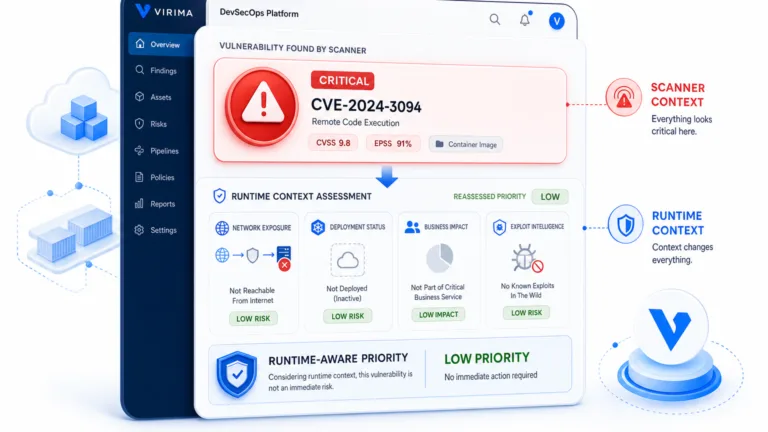
An authoritative configuration database requires continuous verification between discovered assets and live communication dependencies. Validating your infrastructure against trusted runtime truth ensures that configuration records, service topologies, and blast radius calculations reflect genuine operational reality rather than stale inventory.
Also read: CMDB Best Practices: How companies can get it right
Virima helps with you maintain a high CMDB accuracy
Virima’s CMDB is a modern, user-friendly, visual configuration management database that is ITIL-compliant and flexible.
The Virima CMDB helps you manage your IT assets with accuracy and speed. It enables you to visualize the relationships between your IT assets and their associated documentation. This way, you can swiftly identify what your team owns, who manages it, and how it’s being used.
With our dynamic, filterable visualizations of complex CMDB relationships, you can get a full picture of your CMDB assets and their dependencies. Our automatic application dependency and service mapping let you see exactly what applications are dependent on what services, so you can ensure that all of your applications run as expected.
By automating the process of updating your CMDB, Virima reduces the risk of human error and ensures that you have an accurate, timely and complete view of your IT assets.
Virima provides insightful CMDB visualizations comprising data and relationships between assets. You can utilize these visualizations to make informed decisions about the state of your IT infrastructure. Additionally, sharing them with others enhances communication across departments and ensures everyone is working toward a common goal.
What’s more? Virima supports dozens of other integrations, including monitoring, alerting, warranty and event management systems.
Virima’s customizable dashboards are designed to provide you with meaningful insights into the CMDB.
CMDBs can be difficult to manage, but Virima’s all-in-one solution makes it easy.We help keep your CMDB accurate and up-to-date, so your organization is always running at peak efficiency.
For more details, schedule a demo with our team today!
Frequently asked questions about CMDB accuracy
What is considered an acceptable CMDB accuracy benchmark?
Industry best practice targets an overall CMDB accuracy rate above 95 percent for mission-critical configuration items. Organizations should maintain less than 5 percent stale records (unverified for over 30 days), zero unmanaged duplicates, and less than 2 percent orphaned relationships across core business services.
How often should an enterprise CMDB be audited for accuracy?
Automated health dashboards should run daily to evaluate completeness, correctness, and compliance metrics. Formal sampling audits that cross-reference physical infrastructure against recorded CI attributes should occur quarterly, or immediately following major datacenter migrations and cloud consolidations.
Why does CMDB data degrade rapidly after a manual cleanup?
CMDB data decays quickly when organizations rely on manual record entry rather than automated discovery cycles. Ephemeral cloud instances, auto-scaling clusters, and uncoordinated software deployments create configuration drift within days unless governed by automated reconciliation and dynamic service mapping.
How does Virima automate CMDB accuracy verification?
Virima combines agentless network discovery, cloud APIs, and deep probes with ViVID dynamic service mapping. By reconciling multi-source telemetry against active communication dependencies, Virima updates configuration states and flags drift before inaccurate data enters enterprise ITSM workflows.