Kemp Load Balancer Discovery: What Changed in Virima 6.1.3

We released version 6.1.3 last month. Among the features that shipped in that release is support for Kemp Load Balancer, now added as a discoverable, configurable item in Virima’s discovery suite.
Kemp Load Master is an application delivery controller (ADC), a load balancer with a set of additional traffic-handling capabilities layered on top. At its core, it sits in front of a pool of backend servers and distributes incoming traffic across them, so no single server ends up carrying more load than it can handle. Clients connect to one address, the Load Master’s, and never talk to the backend servers directly, which means servers can be added, removed, or patched behind it without disrupting the client connection.
Beyond distribution, a Kemp Load Master runs continuous health checks on every server in its pool and stops routing to any server that fails a check. It handles SSL/TLS (Secure Sockets Layer/Transport Layer Security) termination, taking that processing load off the backend servers entirely. It supports session persistence for applications that need a user pinned to the same server across a session, and it offers a choice of distribution algorithms (round robin, least connections, weighted, and others), depending on how traffic needs to be spread. On top of the core load-balancing function, it layers in compression, caching, and web application firewall (WAF) capabilities, which is what distinguishes an ADC from a basic load balancer.
Kemp Load Master is available in three deployment forms: a dedicated hardware appliance, a virtual instance running on a hypervisor, and a cloud deployment on Amazon Web Services (AWS), Microsoft Azure, or Google Cloud Platform (GCP). All three run on the same underlying API and interface, so the way a device is managed does not change based on which form it is deployed in.
Here’s what changed with this release, why we built it, and what it means for anyone running Kemp in their environment.
What’s New In Virima 6.1.3
Kemp Load Master is now a discoverable, configurable item in Virima’s discovery suite. A scan against a Kemp device retrieves the device itself, every Virtual Service configured on it, and every Real Server sitting behind those Virtual Services, along with the device’s high-availability (HA) role and SSL certificate information, both validated against live data read from the appliance.
This applies across all three deployment forms Kemp supports: hardware, virtual, and cloud. A cloud-hosted Kemp Load Master on AWS, Azure, or GCP is discovered the same way, provided the appliance is reachable over the required ports from wherever the discovery scan runs.
Discovery happens through one of two methods. The Representational State Transfer (REST) application programming interface (API) is the primary path, reachable on port 443, and it returns the full picture in a single scan: the device, its Virtual Services, and their Real Servers, automatically. Simple Network Management Protocol (SNMP), on UDP port 161, is the fallback method: it returns device identification and basic system information, and how much Virtual Service and Real Server detail it can see depends on which Management Information Bases (MIBs) are enabled on the device. When both credential types are configured for the same scan, the REST API credential takes precedence if it succeeds.
Both methods require network reachability to the device’s management address. For most on-premises deployments, that means the scan has to run from within the same subnet as the Kemp device, since the management interface is not reachable from outside its own network segment. This is also why Kemp discovery does not currently offer a separate file-based import option the way some other integrations do: the connection is a direct call to a specific, subnet-bound address, rather than a batch import of exported data.
If a firewall blocks port 443 or UDP 161 between the discovery probe and the device, the scan fails without returning data. This is worth knowing, since a blank result can look identical to a “no device found” result when the actual cause is a blocked network path.
The Technical Architecture
A Kemp discovery scan builds a three-tier structure of configuration items (CIs) inside the configuration management database (CMDB).
At the top is the Kemp Load Master record itself, carrying its name, management IP address, model designation (hardware or virtual), firmware version, operational status, HA role, and SSL certificate data.
Beneath it are Virtual Service records, the front-door endpoints that clients actually connect to. Each Virtual Service carries a Virtual IP (VIP) address, a port, a protocol (TCP or UDP), and an enabled or disabled status. Each Virtual Service is linked to its parent Load Master by a Contains relationship, and carries a Supporting CI relationship back up to that same Load Master.
At the leaf level are Real Server records, the backend targets behind each Virtual Service, each identified by an IP address and port. A Virtual Service configured with no Real Servers assigned is still created as a CI; its Real Server list is simply empty.
On every scan after the first, Virima reconciles what it finds against existing CMDB records using configured correlators. When a discovered Real Server’s correlator matches an existing server record, the Windows or Linux server CI created by a separate scan of that same machine, the two are merged automatically. When there is no match, a new record is created.
The upward connection, from the Kemp Load Master to the business service or application it supports, is not something the Kemp scan builds on its own. It relies on Virima’s existing service mapping and prior discovery. The network devices along the path, including firewalls, are already known to Virima from earlier probes, and the Business Service Map (BSM) draws on that existing context to place the Kemp device within the fuller chain.
The complete structure, from the business service down through the firewall, the Load Master, its Virtual Services, and their Real Servers, renders as a single connected view inside the BSM. The diagram below shows how each tier connects, and which connections are made directly by the Kemp scan versus which depend on prior discovery or correlator matching.
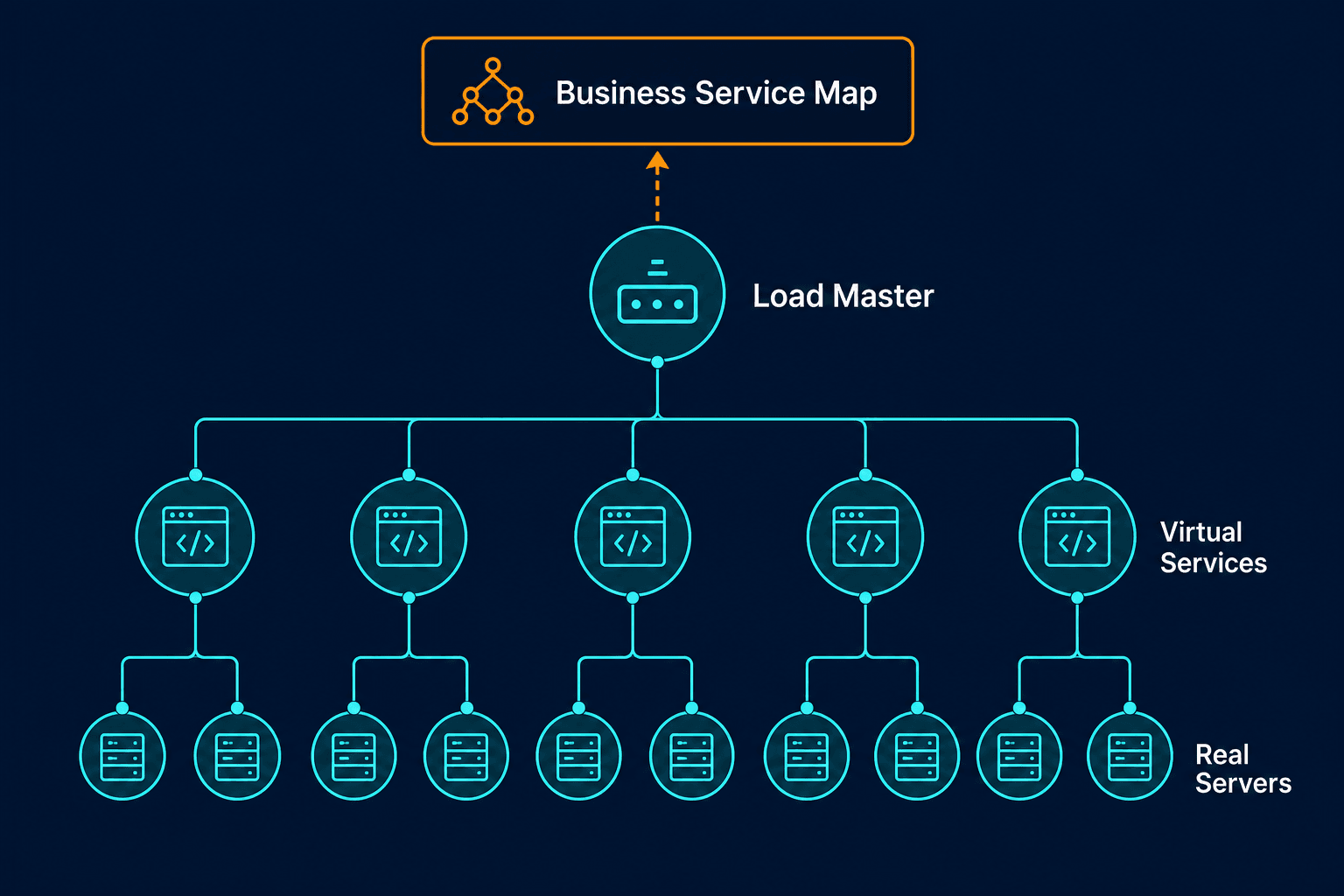
Kemp Load Master discovery and CI relationship map
One boundary worth stating plainly: the Virtual Service record captures endpoint identity and operational status: VIP, port, protocol, and enabled state. It does not currently capture the Layer 7 configuration behind that endpoint, such as content-switching rules or web application firewall settings. Virima shows what is running and where; the underlying traffic-handling logic within the device is not part of what is discovered.
The Customer Request That Triggered Engineering
This feature started with a customer request. During a proof-of-concept (POC) evaluation, a prospect asked specifically for Kemp Load Balancer support. It was the one capability their environment needed that Virima did not yet cover.
Building support for an unfamiliar device type usually depends on getting access to a live instance of it, ideally within the customer’s own environment, since that access is what lets an engineering team learn the device’s behavior firsthand. In this case, that access was not available. Virima’s team located a Kemp instance through open channels instead, and built and tested the integration against that instance.
One customer’s request closed a gap that applies to every organization running Kemp Load Master, not only the one that asked for it. That is the pattern behind most feature requests that make it into a release: a specific customer surfaces a specific gap, and if the gap is real, closing it benefits the whole install base running that device, not just the account that asked first.
The Benefits Users Will Get
Bringing Kemp Load Master into discovery means it stops being an object that only shows up in its own management console. It becomes part of the same CMDB and the same Business Service Map as every other device Virima tracks, connected to the servers behind it and the services above it, rather than sitting outside that picture.
Firmware visibility across the estate. Firmware version is a recorded CMDB attribute, which means an organization running multiple Kemp devices can see which ones are on outdated firmware from a single view, rather than checking each device individually.
HA pairing, confirmed rather than assumed. High-availability role is discovered and validated against live data from the appliance, so a team can verify that an active-passive pair is actually configured and current, rather than relying on whoever set it up remembering that it is.
Certificate expiry, visible ahead of time. SSL certificate information is discovered and validated against the live appliance. An expired certificate on a load balancer breaks every HTTPS connection that Virtual Service handles at the same moment, so visibility into expiry ahead of that point is a direct, practical benefit.
One map, not a separate one. Because the Kemp Load Master, its Virtual Services, and its Real Servers reconcile into the same CMDB as everything else, the Business Service Map shows the load balancer in the context of the actual service chain it supports, rather than as an isolated device.
What Breaks When a Load Balancer Goes Down and Nobody Can See It
A load balancer sits in front of every service it fronts, which makes it a single point of contact for all of that service’s traffic. When it fails and nobody has visibility into it, every service behind it can go down at the same time, even if every one of the backend servers is completely healthy. The outage looks like a much bigger problem than it actually is, because the one component actually responsible for it was never part of anyone’s inventory.
A few specific failure patterns make this worse:
An HA pair that looks configured but never actually fails over, because nobody has visibility into whether the standby unit is in a state to take over when it is needed.
An SSL certificate that expires quietly, taking down every HTTPS connection through that Virtual Service in a single moment, with no prior warning visible anywhere.
A misconfigured health check that keeps routing traffic to backend servers that are actually down, because the load balancer itself believes they are healthy. This is the most difficult version of this to catch, since every dashboard elsewhere still shows green while users see errors.
If your environment includes Kemp Load Master devices, this is available now in beta. Reach out to your Virima contact to get discovery configured against your Kemp environment.