IT Discovery vs. Manual Inventory: Why Automated Discovery Wins

Manual IT inventory depends on humans recording every asset change, and humans have limited capacity to do that extra administrative work consistently. Automated IT discovery removes that dependency by scanning on a schedule and identifying assets whether or not anyone logged them. When weighing IT discovery vs manual inventory, automated discovery keeps asset records current within hours of a change; manual inventory keeps them current until the next audit, which may be months away.
Somewhere in your organization is a spreadsheet that once represented every server, laptop, and application the team owns. It was accurate the day the last full audit finished. Hardware has been provisioned, decommissioned, and reassigned without rows updating. Manual IT inventory is a snapshot pretending to be a live system, and automated discovery closes that gap.
Why does automated IT discovery beat manual inventory?
Automated discovery scans on a schedule and reconciles what is live against the CMDB, so records stay current within hours of change rather than until the next audit. Manual inventory depends on human diligence and drifts as soon as provisioning outruns logging. Discovery still needs people for ownership and service definitions.
What manual inventory means in practice
Manual inventory is not just spreadsheets. It includes any process that depends on a human remembering to record a change: ticket-driven updates, periodic physical audits, or inventory fields inside a help desk tool that only get touched when someone has time. The system of record depends entirely on human diligence, and diligence has a shelf life measured in days, not months.
Why manual tracking degrades quickly
In hybrid environments, manual asset records often drift within weeks of a full audit as cloud and endpoint changes outpace logging. Teams routinely find that large shares of the catalog no longer match what is running by the time the next compliance cycle starts.
Degradation is continuous: laptops issue before logging, cloud instances spin up for short projects and linger, and contractor access never gets revoked when no one owns deprovisioning. That is the default wherever inventory accuracy depends on extra administrative work.
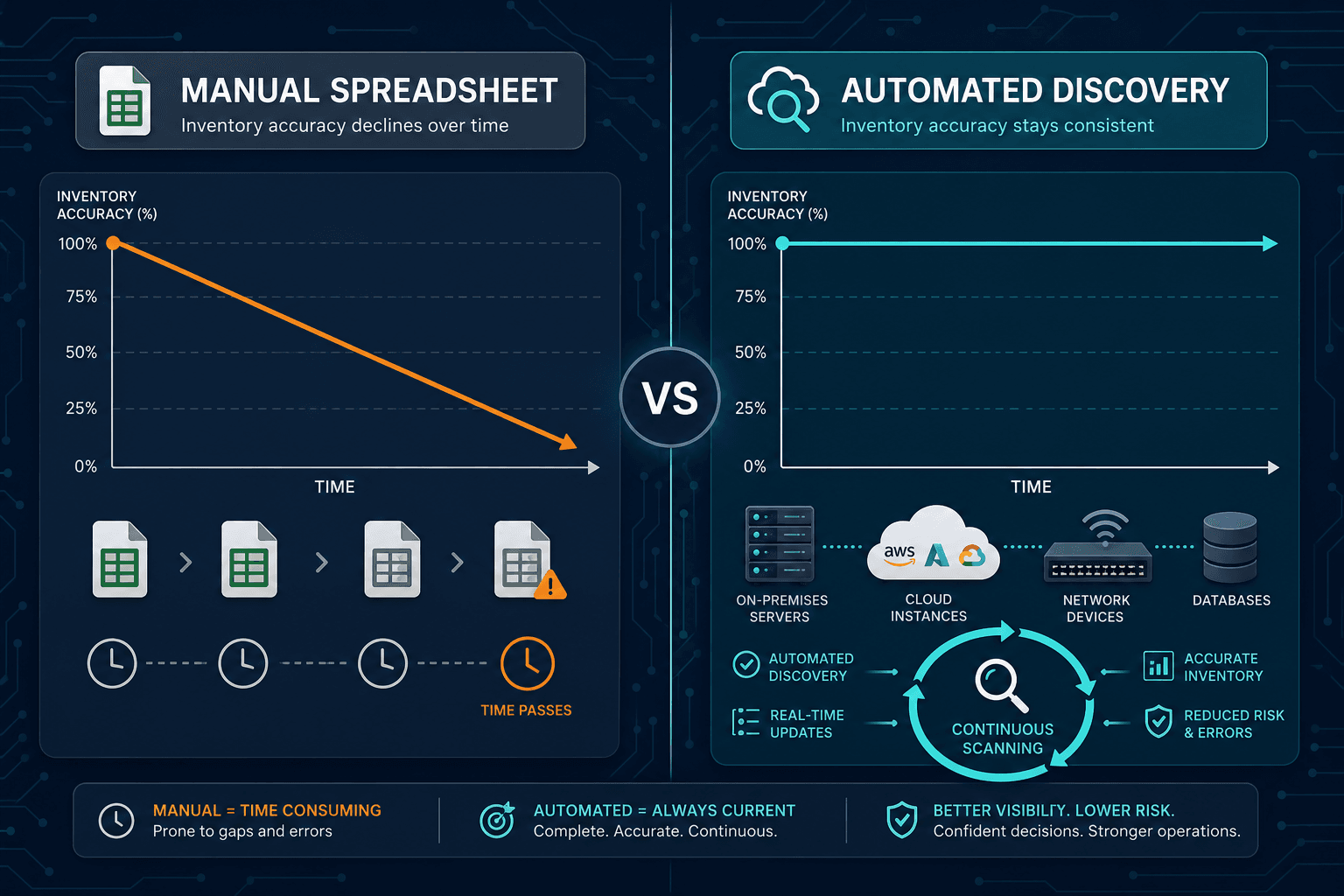
Incomplete or inaccurate asset data drives both security exposure and wasted software spend when decisions rest on records that no longer match what is deployed.
How automated discovery closes the gap
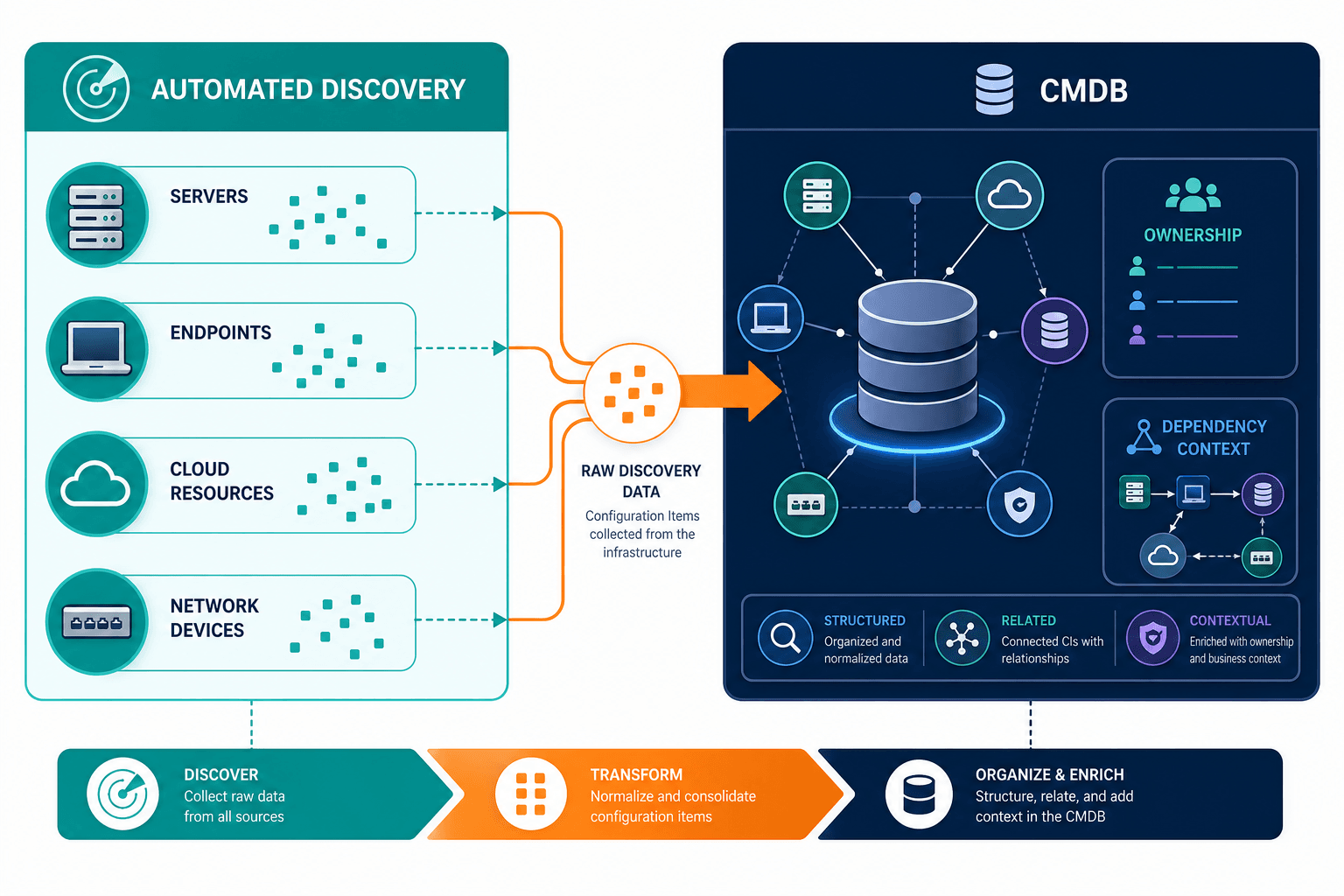
Automated asset discovery scans servers, endpoints, cloud resources, and network devices, then reconciles findings against the existing CMDB or asset database. AWS and Azure instances spin up and down faster than any manual process can track. Multi-method discovery (agent-based, agentless, and API-based) builds a picture of what is running, not what was documented at the last audit.
This produces high-frequency discovery cycles instead of point-in-time snapshots. The inventory is not perfect the instant something changes, but it is consistent enough that teams can treat it as a working reference rather than a historical document.
The practical difference: a side-by-side view
| Task / risk | Manual inventory | Automated discovery |
|---|---|---|
| New device on the network | Often invisible until someone reports it or an audit catches it | Picked up on the next discovery cycle |
| Software license reconciliation | Procurement records matched to hoped-for installs | Cross-checked against what is installed on live assets |
| Cloud churn (AWS and Azure) | Lag and orphan records as instances spin up and down | API and multi-method cycles keep cloud inventory moving with change |
| Decommissioned asset cleanup | Often skipped, leaving ghost assets in the system | Flagged when the asset stops responding to scans |
| Ghost / shadow assets | Rarely found between audits | Common first-scan finding when discovery runs against the live estate |
| Audit preparation | Requires a dedicated pre-audit sweep to catch drift | Records already reflect current state from recent cycles |
| Ownership and service context | Spreadsheet fields if someone maintains them | Still needs people to define ownership and services; discovery supplies the live base |
What is the difference between IT discovery and manual inventory?
Manual inventory is a human-maintained catalog that stays accurate only until the next missed update. IT discovery scans the estate on a schedule, reconciles live assets into the CMDB, and surfaces ghost devices and cloud instances people never logged. Ownership and service composition still require human-defined rules.
| See how discovery-sourced inventory becomes Trusted Runtime Truth your CMDB and ITSM teams can act on. Explore Trusted Runtime Truth. |
Why inventory accuracy affects security, spend, and incident response
An inaccurate inventory is not just an administrative annoyance. Unpatched or unknown devices are often the assets attackers find first. License true-ups built on stale install data do not survive scrutiny. When an incident hits, a six-month-old record can send responders in the wrong direction.
The IBM Cost of a Data Breach Report has highlighted unmanaged and unknown assets as a meaningful contributor to breach risk, which is why shadow IT and inventory gaps show up in security and audit conversations together.
Shadow IT: the assets nobody logged
Inventory accuracy problems rarely stem from negligence. They stem from volume. Public industry reporting in recent years has repeatedly described large gaps between cloud services in active use and the much smaller set teams actively track. That gap is a capacity failure. Automated discovery surfaces ghost devices, untracked cloud instances, and contractor endpoints on the next cycle.
When an outage happens, teams need dependency context. A stale inventory slows every bridge call where someone must verify whether a record is current before acting. Blast radius cannot be assessed if dependency data is months out of date.
The audit case is the clearest one
Compliance audits are where manual inventory gaps become visible fastest. Auditors ask for evidence of what is deployed, who owns it, and when it last changed. Spreadsheet-driven teams typically scramble under deadline pressure, which is expensive and still leaves residual doubt about completeness.
What automated discovery does not solve on its own
Discovery finds what exists. It does not automatically assign business context, like which application a server supports or who owns a given asset from a governance standpoint. People still define ownership rules, service definitions, and classification policies. Automated discovery gives those people a starting point that is already accurate.
Discovery and a governed CMDB work together rather than as substitutes. Discovery keeps CI data current; CMDB structure turns that data into something usable for change management, incident response, and reporting. Once service definitions are provided, ViVID™ service maps can connect assets to the applications and services they support for blast-radius and change context.
When is manual IT inventory still enough?
Manual inventory can still work for tiny, nearly static estates with almost no cloud churn and a single owner who updates every change the same day. Once hybrid provisioning, contractors, and multi-team change outrun that diligence, scheduled discovery becomes the practical system of record for what is live.
Making the switch from manual inventory to automated discovery
Moving from manual inventory to automated discovery does not require ripping out spreadsheets on day one. Most teams run discovery in parallel first to measure drift. Devices that never appeared in the spreadsheet often show up on the first scan.
Stay on manual inventory if: the estate is tiny and static, cloud churn is near zero, and one owner can update every change the same day without backlog.
Run discovery in parallel if: you need proof of drift before budget approval, or you must keep spreadsheets during a transition while high-frequency cycles build trust.
Operate on discovery-sourced CMDB data if: audits, license true-ups, and incident bridges already fail on stale last-seen dates, and you need multi-method coverage across AWS, Azure, and on-premises assets.
When evaluating tools, look for agentless, agent-based, and API-based methods alongside CMDB integration so discovery can keep pace without constant manual intervention.
See how high-frequency discovery cycles replace spreadsheet drift with audit-ready inventory your CMDB and ITSM workflows can trust.
Frequently asked questions
How often does a manual IT inventory need to be updated to stay accurate?
In practice, manual inventories need updating continuously to stay accurate, which is rarely realistic. Most organizations run periodic audits instead, which means the inventory is only as current as the last audit date and degrades between cycles.
What is the difference between IT discovery and a CMDB?
IT discovery is the process of scanning and identifying assets across the environment. A CMDB is the structured database that stores that asset data along with relationships, ownership, and change history. Discovery feeds the CMDB; the CMDB gives that data operational context.
Can automated discovery find assets that were never in the manual inventory at all?
Yes. This is one of the most common findings when teams first run discovery: devices, cloud instances, or software installs that were never logged manually show up immediately, often called ghost or shadow assets.
Does automated discovery work with existing ITSM tools like ServiceNow or Jira?
Yes. Discovery data can feed the workflows your team already uses through enterprise ITSM integrations, including ServiceNow, Jira Service Management, Ivanti, HaloITSM, Xurrent, and Hornbill, without requiring a full tool replacement.
Is automated discovery only useful for large enterprises with complex environments?
No. Smaller IT teams often benefit more directly, since they have fewer people available to manually track changes and less room to absorb the risk of an inaccurate inventory going unnoticed.