IT Discovery for Logistics Fails Without a Map of Every Hub and Site

In August 2026, a cyber intrusion reportedly disrupted operations at eight European warehouses run by Ceva Logistics. According to FreightWaves, some retail customers faced shipping delays. One retailer, bol, said two systems used to process orders at a distribution center were affected.
The incident illustrates how warehouse operations can depend on systems operated across organizational boundaries. It does not establish whether Ceva lacked an asset inventory or dependency map.
For a logistics IT team, those boundaries raise practical questions during an incident. Which systems support this site? Which ones can the team inspect, and which belong to a partner?
IT discovery for logistics begins by answering those questions site by site. The work includes defining the network scope, agreeing on access, recording exclusions, and checking discoveries against local records.
What Does IT Discovery for Logistics Cover?
IT discovery identifies technology assets that support logistics operations. Depending on access and configuration, a discovery cycle can find servers, network devices, endpoints, and cloud workloads.
That inventory supports a different task from tracking parcels or vehicles. Warehouse management, transportation management, and telematics systems handle those operational records. Discovery focuses on the infrastructure those systems use.
A site inventory may include a warehouse application server, a network switch, and a gateway connecting a third-party logistics provider. It may also include cloud workloads supporting order processing or reporting.
The scope has limits. An unreachable device may be absent from scan results. A device that responds on the network may still reveal only limited information. A partner-operated system requires permission and an agreed method of access.
Virima’s IT discovery capabilities support agent-based and credential-based agentless discovery. Teams can also discover assets in AWS and Azure environments, subject to their account access and configuration.
Start With a Site Scope Register
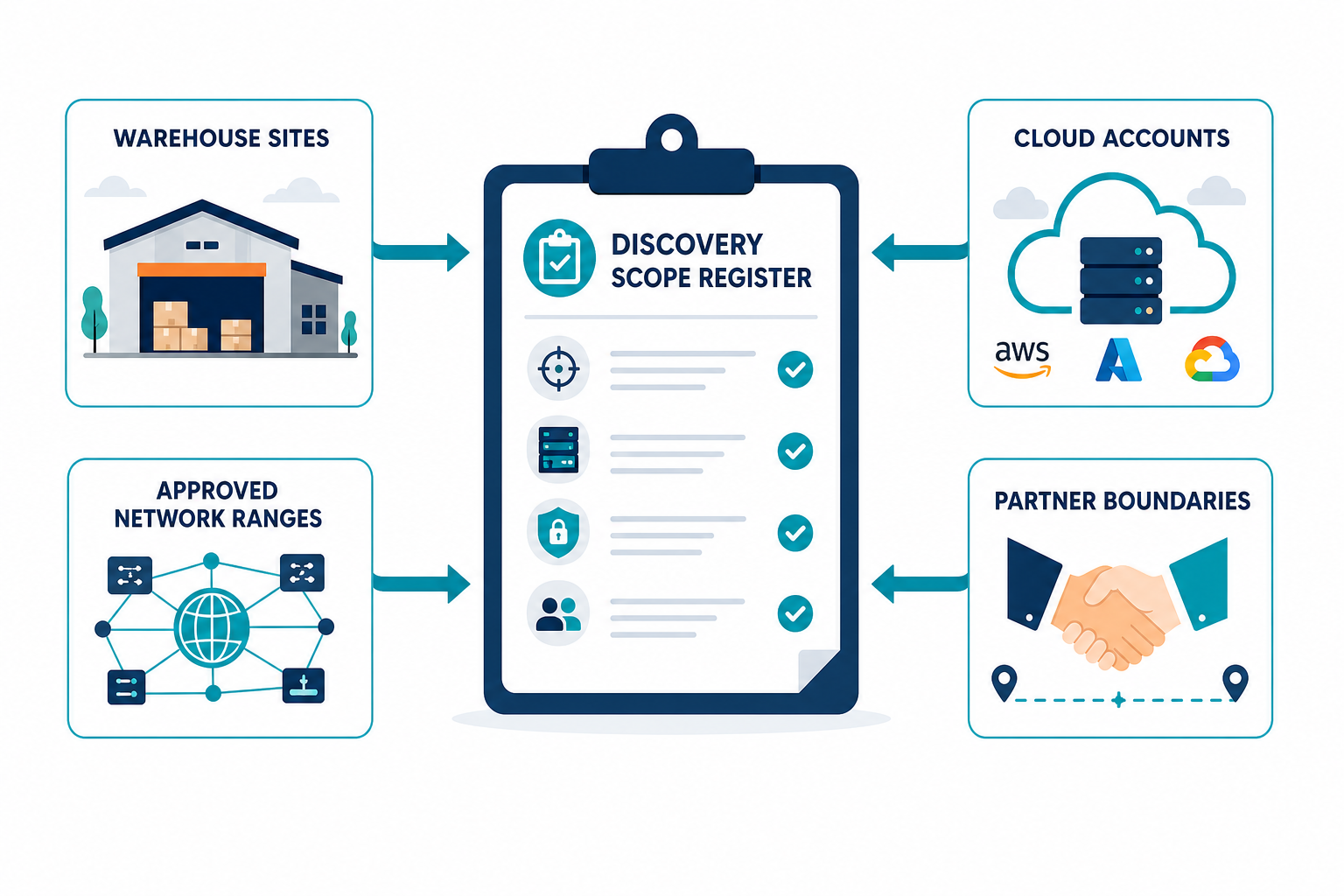
Before selecting a scan range, establish which sites belong in the first discovery cycle. A location list from facilities or operations is a useful starting point, but it needs technical detail before scanning begins.
Create one row for each hub, depot, cross-dock, or distribution center. Give each location a consistent site identifier and name a person who can validate its information.
For each site, record:
- Business function: What work happens there, and which operating hours matter?
- Network scope: Which approved subnets, address ranges, and connected environments belong to the site?
- System owners: Who manages the network, servers, warehouse applications, and local equipment?
- Third-party boundaries: Which systems or network segments are operated by landlords, carriers, or logistics partners?
- Known exclusions: Which networks or devices require separate review before discovery?
- Validation sources: Which network diagrams, site inventories, cloud records, or contracts can the team compare against results?
A site identifier helps distinguish similarly named facilities and acquired locations. It also gives reviewers a consistent way to group findings when addresses or hostnames change.
Start with a site where local IT, operations, and partner contacts can participate. A pilot produces a repeatable checklist before the team expands across the network.
Identify the Services the Site Relies On
The site register should name the services that matter during an interruption. Examples include warehouse order processing, label printing, dispatch, and the network connection to a partner.
Ask the service owner to identify the applications and systems they already know support each service. Mark uncertain relationships for validation rather than treating them as confirmed.
The risk extends beyond equipment inside the warehouse. In its Q2 2026 industrial ransomware analysis, Dragos reported that operational disruption followed encryption or precautionary shutdown of enterprise and virtualization systems supporting industrial operations.
The analysis describes observed industrial incidents broadly. It does not conclude that incomplete asset maps caused those incidents. For logistics teams, it highlights the value of checking dependencies across warehouse, enterprise, and virtualization environments.
Agree on Access Before Running Discovery
An approved range tells the team where it may look. Credentials and network paths determine what it can actually inspect.
For each network segment, identify the team that can authorize access. Confirm the discovery source, routing, firewall rules, authentication method, and approved operating window.
Use the least privilege needed for the agreed inventory. Store credentials through the organization’s approved process and assign responsibility for renewal. A scan that ran successfully last month can lose access when an account expires or a firewall rule changes.
A practical access review should answer:
- Can the discovery source reach the target range? Check routing and approved firewall rules with the network owner.
- Which credentials are required? Confirm the account type and privileges with the system owner.
- What information should the method return? Agree on the attributes needed for the inventory.
- When may discovery run? Avoid periods when the site or equipment owner has restricted network activity.
- Who reviews failures? Assign failed authentication and unreachable ranges to named owners.
Record an access decision even when the answer is no. An excluded network should appear in the scope register with its reason, owner, and next review date.
A blank result alone cannot distinguish an empty network from a blocked route or failed credential. Treat those outcomes separately when reporting coverage.
Check Protocol and Device Limits
Warehouses contain equipment with different operating systems, interfaces, and tolerance for network activity. A discovery method suitable for a server may be unsuitable for a sorter controller or handheld device.
Begin with the device owner’s guidance. For each equipment class, record the approved protocol, authentication requirements, expected attributes, and any scanning restrictions.
| Equipment or system | Planning question | Validation action |
|---|---|---|
| Servers and virtual machines | Can the approved account retrieve the required hardware and software details? | Compare a sample with the server or virtualization inventory. |
| Network devices | Which management interfaces and credentials are approved? | Compare discovered switches and gateways with network diagrams. |
| Handhelds and mobile endpoints | Are they reachable during the scan window, and is an agent appropriate? | Check endpoint-management records and confirm devices missed while offline. |
| Industrial or connected equipment | Does the equipment owner permit the proposed method and protocol? | Agree on a safe method before any network activity. |
| Cloud workloads | Which AWS or Azure accounts and permissions are in scope? | Compare results with the relevant account inventory. |
A device response does not guarantee a complete asset record. Some equipment may expose a network address and manufacturer while withholding a serial number or software version.
For sensitive operational technology, involve the equipment owner and security team before scanning. Where active scanning is unsuitable, assess approved alternative inventory sources or passive methods with the relevant provider.
Keep unsupported or untested device classes visible in the register. They are coverage gaps until an owner validates an appropriate collection method.
Define the Boundary With Each Logistics Partner
A third-party logistics provider may operate an application, a gateway, or an entire network segment at a shared site. Physical proximity does not establish permission to inspect that environment.
Document the boundary with the partner before adding its addresses to a discovery scope. The agreement should identify:
- The systems and network ranges each organization owns or operates.
- Whether either party may scan the other’s assets, and under what conditions.
- Which inventory attributes can be shared and how often they will be refreshed.
- The contact responsible for approving changes and resolving discrepancies.
- The incident contact for a shared service or gateway.
Where direct discovery is unavailable, request an agreed inventory or service-dependency summary from the partner. Record its source and the date received. A partner-supplied record provides useful context, but its contents still depend on the partner’s collection and validation process.
For a shared gateway, document the owner on each side and the service it connects. If the partner cannot disclose systems behind the gateway, mark that dependency as a boundary requiring partner confirmation.
This distinction gives incident responders a usable next step: contact the accountable partner rather than assuming their own scan covered the entire service.
Run a Pilot and Validate the Results
Choose one site and prepare its scope, access, and exclusions before the first discovery cycle. Save the approved baseline so reviewers can distinguish a coverage change from an infrastructure change.
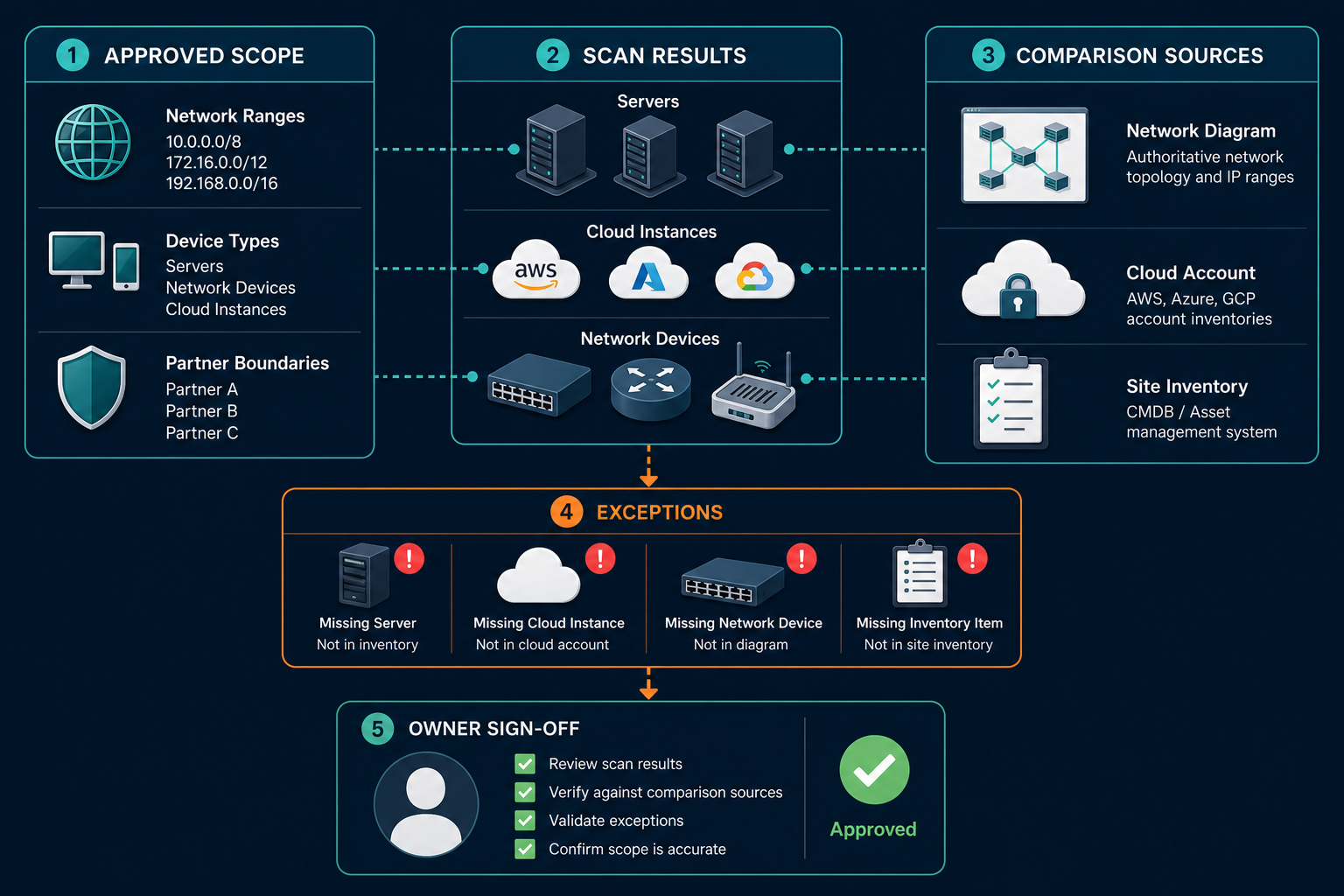
After the cycle, review results with the site owner and network team. Use the following checks to turn scan output into a more dependable inventory.
Compare Expected and Discovered Assets
Start with a sample of known assets from the site inventory, network diagram, or cloud account. Check whether those assets appear in the discovery results.
Investigate missing items by category. An endpoint may have been offline, a subnet may have been omitted, or credentials may have failed. Record the reason and assign the next action.
Also review unexpected findings with a local owner. A discovered device may be legitimate equipment missing from the prior inventory. It may also belong to a partner or fall outside the intended scope.
Check Identity and Ownership
Compare stable identifiers where available, such as serial numbers or cloud instance IDs. Hostnames can change or be reused, so they should not be the sole durable join key.
Ask an accountable person to confirm the owner and site association. Discovery findings can inform that review, while ownership decisions remain with people who manage the systems.
When records conflict, retain enough source information for the responsible team to investigate. For example, a site spreadsheet and a scan may report different names for the same server.
Record Coverage Gaps and Exceptions
Maintain a list of unreachable ranges, failed credentials, excluded equipment, and partner-managed environments. Each entry should include an owner and a review date.
Report these gaps alongside the number of discovered assets. A large inventory can still leave an important warehouse segment outside the approved scope.
Test a Service Dependency
Select one important service, such as warehouse order processing. Ask its owner to identify the application and infrastructure they expect it to use.
Compare those expected relationships with the available discovery and service-map records. Investigate missing or uncertain links with the relevant application, network, or partner owner.
Virima’s service mapping capabilities build dependency maps after customers provide their service definitions. Teams should review those definitions and the resulting relationships with the people responsible for the service.
Set a Discovery and Review Cadence
A first scan establishes a baseline for the approved scope. Site changes, seasonal capacity, and credential changes make regular review necessary.
Agree on a discovery schedule with the site and system owners. Consider operating windows, the rate of infrastructure change, and restrictions on sensitive equipment.
Set separate review dates for items that discovery cannot resolve. Examples include partner-supplied inventories, excluded controllers, and assets awaiting ownership confirmation.
After peak season, compare temporary cloud workloads and site systems against the services they support. Confirm with the owner before decommissioning anything. Record the decision and its reason.
When a new hub opens, or an acquisition closes, add its site information to the register. Review its network boundaries and access before adding it to the scheduled discovery scope.
For teams seeking a shared foundation for these records, explore Trusted Runtime Truth. It brings discovery-sourced information about assets and their relationships into operational decisions.
How Virima Supports a Discovery-First Workflow
Virima can help teams collect and reconcile information across approved environments. Its agent-based and agentless discovery methods support infrastructure inventory, while cloud discovery covers AWS and Azure accounts within the configured scope.
The CMDB can bring information from multiple sources into configuration item records. Site teams still need to confirm ownership, investigate conflicting information, and review gaps that discovery cannot reach.
Once service owners provide the service definitions, ViVID™ can build dependency maps from those inputs. Reviewers can use the maps to investigate relationships before a change or during incident triage.
Virima also connects with service management platforms. The integrations overview lists supported connections, including ServiceNow, Jira Service Management, Ivanti, HaloITSM, Xurrent, Hornbill, and TeamDynamix.
These capabilities complement warehouse management, transportation management, and telematics tools. Those systems continue to handle their operational workflows, while the discovery process focuses on supporting technology.
Start With the Hub You Worry About Most
Choose a hub where the infrastructure owner and operations lead can review the same findings. Build the site scope register, agree on access, and document the partner boundaries before scanning.
Use the first cycle to compare known systems with discovered results. Give every unresolved gap an owner and a review date, then repeat the process at the next site.
Schedule a Virima demo to discuss how your team could discover and validate the infrastructure supporting a hub or depot.
Frequently Asked Questions
What is IT discovery for logistics?
IT discovery identifies technology assets supporting logistics sites and services. Its coverage depends on the approved scope, network access, credentials, and device compatibility. Teams then validate findings against site records and assign ownership.
Can discovery find warehouse equipment on every network?
Coverage depends on whether the network is in scope, the device is reachable, and an approved discovery method is compatible. Sensitive equipment may require an alternative inventory method agreed with its owner.
How should a team inventory a partner-managed system?
Agree on ownership, access, and the information each party may share. If direct discovery is unavailable, request an inventory or dependency summary from the partner and record its source and review date.
How does Virima help validate a logistics site inventory?
Virima discovers assets within configured and accessible environments and reconciles information from multiple sources. Site and system owners should compare the findings with existing records, confirm ownership, and investigate missing or conflicting information.
Does Virima replace warehouse management or fleet tracking tools?
Virima complements those tools by helping teams inventory supporting IT infrastructure. Warehouse management and fleet tracking systems continue to manage their respective operational records and workflows.