

How to build an AWS configuration management database

Managing configurations in large AWS setups affects every team that uses asset data. You need accurate and up-to-date information to avoid mistakes.
An AWS configuration management database helps you track and control cloud resources at scale. It gives you a clear and structured view of your environment. Over time, the CMDB has moved beyond simple ITSM tools and basic Excel tracking.
Earlier, CMDBs captured a snapshot of configuration items at one point in time. These items included resource details, ownership, and relationships.
However, cloud environments change very fast. AWS resources can launch, scale, or stop at any time. Because of this, old discovery methods cannot keep up. If your CMDB falls behind, even by a few days, it can create serious risks.
So, you must take a clear and practical approach. You need a strategy that keeps your AWS configuration management database accurate. This guide will help you understand what an AWS CMDB is and why it matters. It will also show you how to build one that works well in real use.
What is an AWS configuration management database?
An AWS configuration management database (AWS CMDB) acts as a central place for your cloud data. You use it to store details about your AWS resources, often with the help of tools like Systems Manager. This makes it easier for you to manage and track everything in one place.
It tracks configuration items like services, instances, networks, and storage. It also shows how these resources connect with each other. As a result, you get a clear and complete view of your environment.
However, having a CMDB alone is not enough. In fact, only 25% of organizations get real value from it. So, you must focus on how you build and maintain it.
If you keep it accurate and updated, it becomes very useful. In the end, it helps your team understand what exists and how everything works together.
Key features of an AWS configuration management database
An AWS CMDB built on AWS Config provides several capabilities that make tracking and governance practical:
1. Integration options
Organizations can integrate an AWS configuration management database with both on-premises and cloud resources through event-driven or batch updates.
Three common models exist:
- Existing CMDB integration: your current CMDB stays the authoritative source, with cloud CI updates flowing in through event-driven or batch processes.
- Federated CMDB: you maintain your existing CMDB alongside a cloud-native one, with bi-directional sync between them. Each system stays independent but shares data.
- Cloud service provider CMDB: AWS Config serves as the primary CMDB for both cloud and on-premises CIs, giving a unified view of all resources.
2. Configuration history of resources
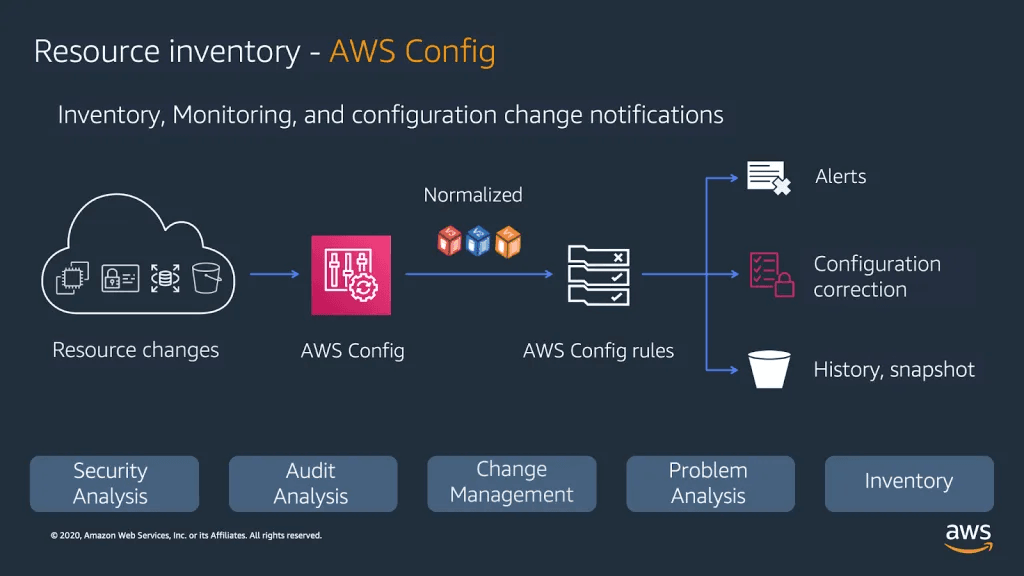
AWS Config monitors and records changes to your AWS resources continuously. You can access detailed configuration history through the AWS Management Console, API, or CLI. It delivers configuration history files to Amazon S3 buckets automatically and supports third-party resources and custom types.
3. Resource relationship tracking
AWS Config automatically identifies and maps relationships between resources. When a new security group links to an EC2 instance, both configurations update to reflect the relationship.
4. Configurable and customizable rules
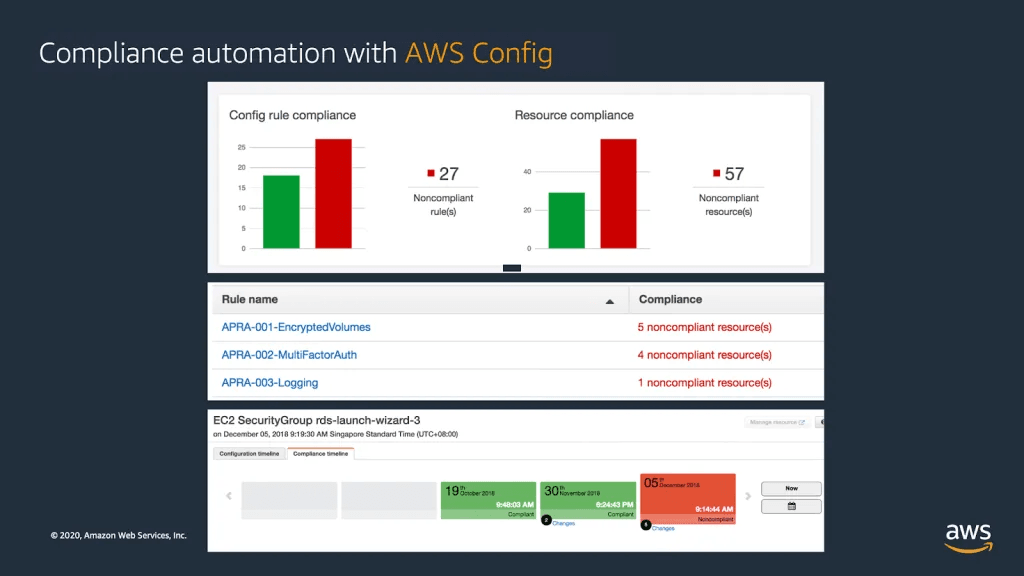
The service includes built-in rules to evaluate resource configurations against compliance baselines. You can also create custom rules using AWS Lambda to meet internal standards.
5. Conformance packs
Conformance packs bundle multiple AWS Config rules into one package. This helps teams maintain consistent configuration policies across multiple accounts without managing rules individually.
6. Multi-account, multi-region data aggregation
AWS Config aggregators centralize audits across accounts and regions, giving your team a single view of resource configurations and compliance status.
These features form the foundation of a strong AWS configuration management database that improves visibility, supports compliance, and keeps your team working from accurate data.
Key benefits of an AWS configuration management database
Here’s what a well-maintained AWS CMDB delivers for teams managing cloud operations:
Centralized information
An AWS CMDB is your single source of truth. All configuration items live in one place, giving IT teams accurate, current information about assets across cloud and on-premises environments. No more cross-referencing spreadsheets or hunting through multiple consoles.
Streamlined incident and change management
Linking incidents and changes to specific CIs makes root cause analysis faster. When your team can trace an outage to a specific configuration change on a specific resource, the mean time to resolution drops.
Change management improves, too. Knowing which CIs a proposed change affects before you make it reduces the risk of unexpected downstream failures.
Improved compliance and risk management
A CMDB keeps detailed records of every configuration and change, which auditors need. It supports tracking compliance against both internal policies and external regulations. When audit season arrives, the data is already organized.
Increased operational efficiency
Automated AWS discovery tools keep a near-real-time inventory of your resources. This cuts manual effort and reduces errors from outdated information. Your team spends less time reconciling data and more time acting on it.
Better cost management
Tracking software licenses and cloud resource usage in one place supports smarter financial planning. You can spot underused instances, flag license overages, and make informed decisions about scaling.
Integration with IT operations tools
An AWS CMDB connects with IT operations management platforms to coordinate incident management, change management, and IT asset management. This eliminates the data silos that slow teams down.
How to build a successful AWS configuration management database
Building an AWS configuration management database requires planning before implementation. Here’s a step-by-step approach:
Step 1: Define your CMDB strategy
Start by clarifying your goals. Determine which CIs to track, how they relate to each other, and which CMDB model fits your environment:
- Existing CMDB integration: Use your current CMDB as the main source. Integrate cloud CI updates through event-driven or batch processes.
- Federated CMDB: keep your existing CMDB and create a cloud version alongside it, with two-way synchronization.
- Cloud service provider CMDB: Use AWS Config as the primary CMDB for both cloud and on-premises resources.
Step 2: Identify configuration items to track
Choose which AWS resources matter for your operations. EC2 instances, Lambda functions, RDS databases, VPCs, and security groups are common starting points.
Track stateful resources that persist and affect service delivery. Skip transient resources like short-lived containers or spot instances and track the Auto Scaling group or ECS cluster instead. If you manage software licensing, use AWS License Manager to keep license data connected to your CMDB.
Step 3: Set up tracking mechanisms
Set up AWS Config to monitor and record resource configurations continuously. This is the core engine of your AWS configuration management database.
Create configuration recorders for the resource types you identified in Step 2. Define compliance baselines using AWS Config rules, which evaluate whether resources match your target configurations. For OS-level and application-level settings, enforce instance configurations with AWS Systems Manager State Manager.
Step 4: Build a notification engine
Use Amazon SNS to send alerts when configuration changes occur or when compliance states shift. Route these notifications to your operations team’s channels so nothing slips through unnoticed.
Step 5: Tag your configuration items
Build a consistent tagging strategy across your AWS environment. Tags should cover cost centers, security classification, environment (prod/staging/dev), workload type, and ownership.
Use preventive controls (IAM policies) to require tagging at resource creation time. Then apply reactive controls (AWS Config rules) to catch resources that slip through without proper tags.
Step 6: Evaluate your design against best practices
Use AWS Well-Architected Framework principles to review your AWS configuration management database design for operational excellence, security, reliability, and cost efficiency.
How do you keep an AWS CMDB accurate over time?
Building the CMDB is the easy part. Keeping it accurate is the ongoing challenge. AWS environments change constantly as developers spin up resources, auto-scaling adjusts capacity, and infrastructure-as-code pipelines deploy changes daily.
Three practices keep your data reliable:
- Automated discovery on a recurring schedule. Don’t rely on one-time imports. Configure discovery to run at intervals that match your change velocity. Daily works for most environments; hourly for high-change workloads.
- Drift detection. Use AWS Config rules to flag resources that deviate from their recorded state. Orphaned resources, untagged instances, and configuration changes made outside your IaC pipeline all create drift.
- Relationship reconciliation. CIs don’t exist in isolation. When a resource changes, its upstream and downstream dependencies may also need updating. Automated relationship mapping catches these cascading changes.
Without these practices, your CMDB degrades within weeks. Stale data undermines every process that depends on it, from incident response to compliance audits to capacity planning.
What happens when your AWS CMDB falls out of date?
An inaccurate CMDB creates problems that compound quickly. The accuracy of most CMDBs hovers around 60%, far from the single source of truth that organizations depend on. Readyworks Change advisory boards approve changes based on dependency maps that don’t reflect reality.
Incident responders waste time tracing connections that no longer exist. Compliance audits fail because the recorded state doesn’t match the actual environment. Incident responders waste time tracing connections that no longer exist. Compliance audits fail because the recorded state doesn’t match the actual environment.
A single change deployed against a stale dependency map can cascade into a service outage. An audit that reveals undocumented resources can trigger regulatory penalties. The CMDB exists to prevent these scenarios, but only when the data is current.
How Virima strengthens your AWS configuration management database
Virima provides IT asset management and configuration management capabilities built specifically for complex hybrid environments. For AWS, Virima automates the parts of CMDB management that are hardest to maintain by hand.
Automated AWS CI updates amid constant change
Virima’s AWS integration provides visibility into your cloud assets by importing AWS objects directly through the Virima UI. No back-end coding or third-party software is required — you enter your AWS credentials, select which objects to import, and Virima keeps those CIs current as your environment changes. Once AWS assets enter Virima, they appear as “Discovered Assets,” giving your team precise control over which items enter the CMDB.
Flexible sorting features let you be as selective and precise as you need when organizing imported assets. Business rules automate the intake process so new assets flow into the CMDB without manual intervention. Virima’s IT discovery then adds deeper detail for each EC2 instance, including OS specifics, installed software, and hardware and software configurations that IP-based network discovery alone wouldn’t capture. Your CMDB entries carry the context your team needs for operational decisions.
Operationalizing your AWS CMDB with ViVID™
Virima Visual Impact Display (ViVID™) overlays live ITSM data, including incidents, changes, event management alerts, and NIST NVD vulnerability data, onto the dependency maps built by Discovery and Service Mapping. Your team sees active incidents and open changes directly on the service map without switching between tools.
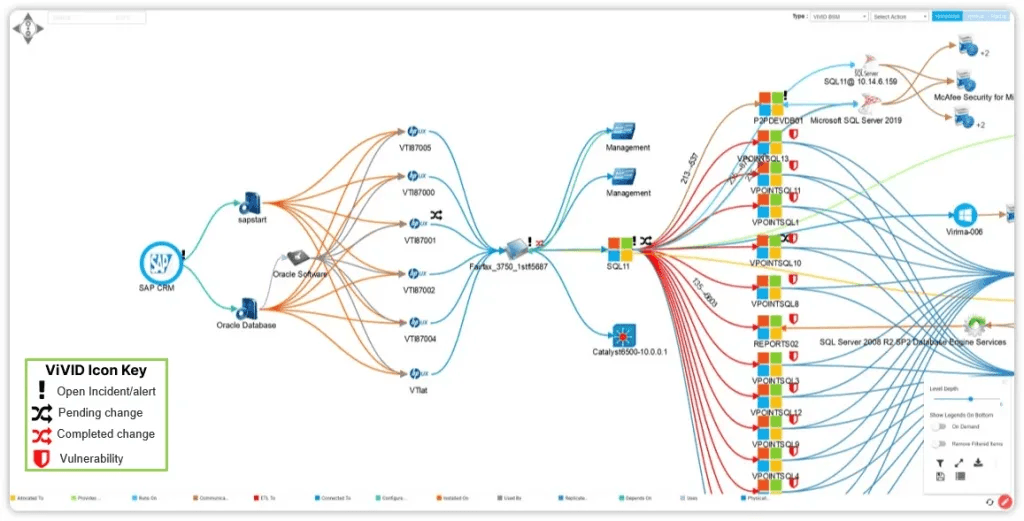
When a change request comes in, you can see which services sit downstream and whether any active incidents already affect those services. That context speeds up change assessment and reduces the risk of overlapping changes.
ITSM integration for synchronized operations
Virima integrates with seven ITSM platforms: ServiceNow, Jira Service Management, Ivanti, HaloITSM, Cherwell, Xurrent, and Hornbill. Bi-directional sync is available with ServiceNow, Jira Service Management, Ivanti, HaloITSM, and Cherwell, keeping CMDB data and ITSM data synchronized so your team works from a single consistent view of assets, incidents, and changes.
Synchronised data eliminates the manual reconciliation that eats up operations time. When Virima discovers a new asset or detects a configuration change, that update flows to your ITSM platform automatically. Incident responders, change managers, and asset managers all see the same data.
Virima’s ITSM is PinkVERIFY™ certified for six ITIL® processes: service asset and configuration management (SACM), change, incident, problem, request, and knowledge management. ViVID™ also integrates NIST National Vulnerability Database (NVD) data, adding vulnerability context directly to your service maps.
Scalability and flexibility
Virima is a cloud-native platform that scales with your environment. As your AWS footprint grows across more accounts, regions, and resource types, Virima’s discovery and mapping capabilities keep pace without requiring infrastructure upgrades.
Virima’s flexible configuration management processes let you tailor how configuration items are tracked and categorized. This makes the CMDB relevant to your specific environment rather than forcing you into a generic schema.
Build an AWS configuration management database that stays accurate at scale
A well-built AWS configuration management database gives your team a clear, current view of every configuration item in your environment. That visibility drives faster incident response, safer change management, and smoother compliance audits.
The real challenge isn’t building the CMDB. It’s keeping it accurate as AWS resources change daily. Virima automates the discovery and CI updates that manual processes can’t sustain. ViVID™ overlays live incident, change, and vulnerability data onto your dependency maps so your team works from a single operational view. And with seven ITSM integrations keeping data synchronized, every team stays aligned. Ready to build an AWS CMDB that stays current? Contact us to see how Virima fits your environment.





