Database asset management: Tracking data stores in your CMDB

Database asset management is the practice of discovering, tracking, and governing database servers, managed cloud databases, and data storage volumes as configuration items in your IT asset inventory. It treats every database as a first-class IT asset: with an owner, a version, service dependencies, and a place in your CMDB.
Most IT teams track their servers and network devices with reasonable discipline. Fewer apply that same rigor to their databases. That gap has a direct operational cost. A database outside your CMDB has no change impact record, no mapped service dependencies, and no ownership trace. When that database is involved in an incident or touched by a change, the missing context becomes a recovery delay.
This article covers what database asset management involves, why databases routinely fall outside standard ITAM programs, what breaks when they do, and the best practices for bringing data stores under full CMDB governance.
What database asset management covers
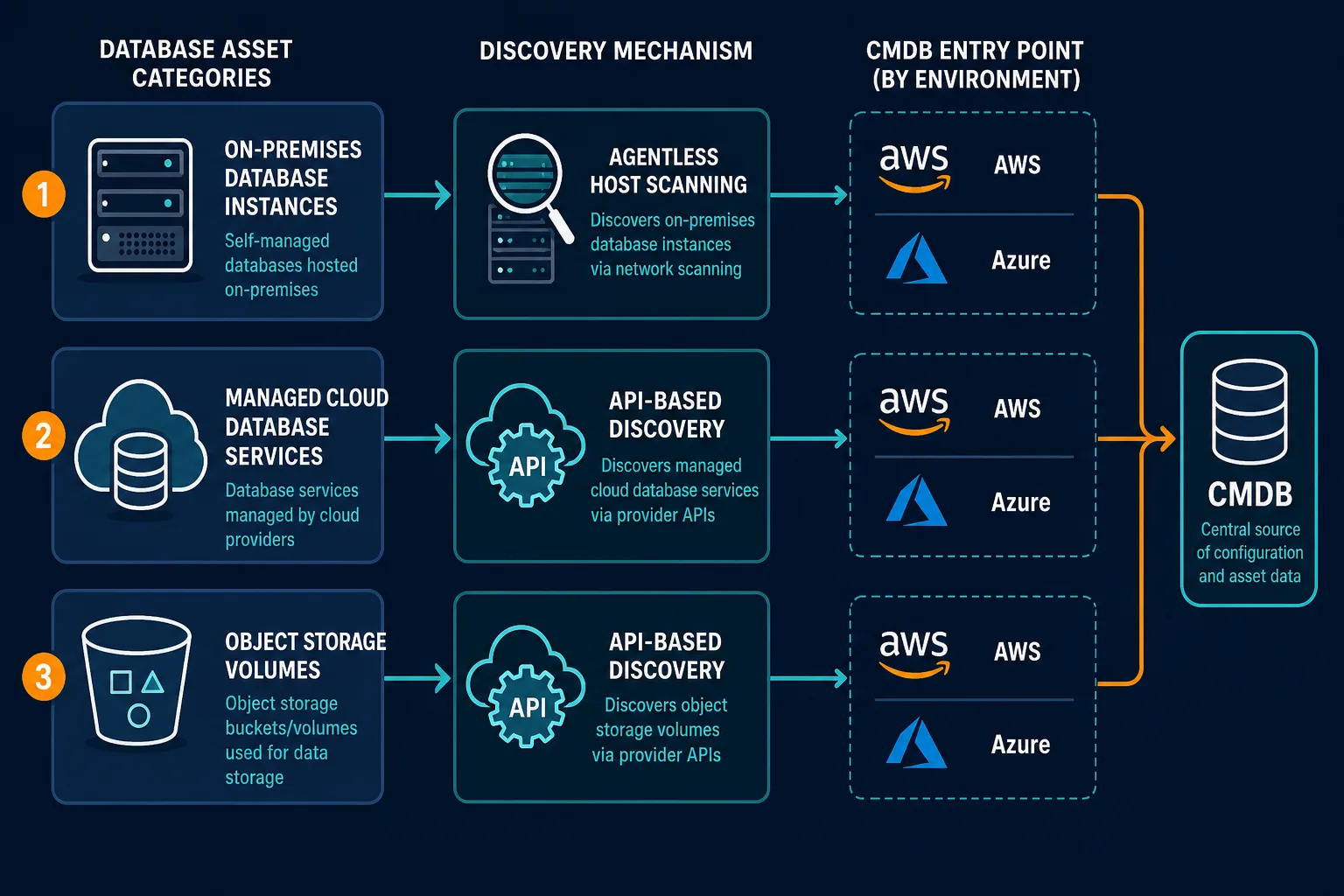
Database asset management applies to three categories of data store resources. Each has different tracking requirements.
Database servers and instances include on-premises installations of SQL Server, Oracle, MySQL, PostgreSQL, and equivalent platforms. Each instance is a discrete IT asset with a software version, a patch level, a host relationship, and one or more applications that depend on it.
Managed cloud database services cover AWS RDS, Aurora, Azure SQL Database, and equivalent platform-as-a-service offerings. These services run without an accessible underlying server. No agent can be installed on them. They are provisioned through cloud consoles or infrastructure-as-code pipelines, often without a change ticket, which is exactly why they go missing from CMDB inventories.
Object storage and data volumes include S3 buckets, Azure Blob containers, and attached storage volumes on cloud instances. These assets are among the most compliance-sensitive in any environment because they frequently store regulated data, yet most ITAM programs treat them as infrastructure afterthoughts.
Why databases fall outside most CMDB programs
The problem is structural, not accidental. Traditional CMDB discovery was built for physical and virtual servers. That model has three specific blind spots for database assets.
Agent-based discovery cannot reach managed cloud databases. There is no accessible infrastructure underneath an AWS RDS instance or an Azure SQL Database. You cannot install an agent on a managed service. So any discovery approach that depends on agent deployment will skip every managed database service in your cloud accounts.
Network scanning misses databases behind application tiers. Many database instances sit behind application servers and are not directly reachable from a discovery scanner without specific routing. A scan that returns web servers and application servers often never reaches the database tier.
Development teams provision databases outside standard intake. A data engineer creates a PostgreSQL instance in Azure to support a pipeline. A development team spins up an RDS instance in a side account. Neither event opens a change ticket, so neither asset reaches the CMDB through any standard process. That gap is exactly where cost and governance problems start: according to Flexera’s 2026 State of the Cloud report, organizations waste approximately 28% of their cloud spend, much of it tied to resources that were never right-sized or decommissioned after the project that created them ended.
The result is a CMDB that is accurate for compute and network, but treats the data tier as invisible. That asymmetry breaks every operational process that touches databases.
What breaks when databases are missing from your CMDB
Missing database assets have specific, traceable consequences across three operational areas.
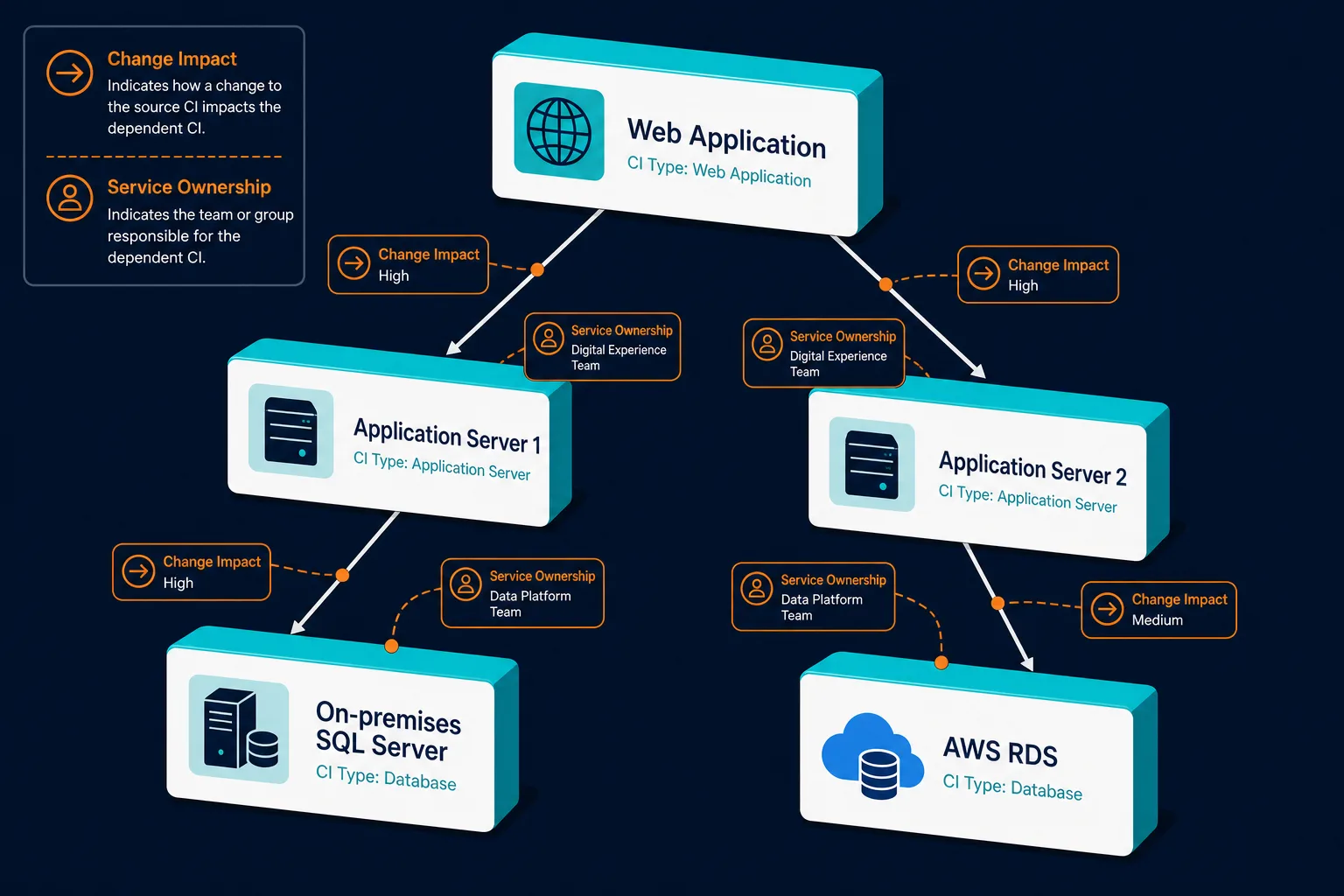
Change management loses blast radius accuracy. Change advisory board reviews depend on knowing what depends on the resource being changed. When a database is not in the CMDB, it cannot appear in impact analysis. A change to an application server that shares a database cluster with other applications shows a contained blast radius on paper. The risk to every other application using that shared database stays invisible.
Incident response loses dependency context. When an application throws errors, the on-call engineer needs to know what the application depends on and what changed recently in that dependency chain. If the database layer is not in the CMDB as a configuration item with mapped relationships, the engineer reconstructs that context during the incident rather than retrieving it. That reconstruction time extends the outage.
Audit and compliance lose a traceable inventory. SOX, PCI DSS, HIPAA, and ISO 27001 all require demonstrated control over assets that store or process regulated data. A database outside the CMDB is a database outside the compliance perimeter, with no access history, no change record, and no ownership trace. Flexera’s 2025 ITAM report found that 45% of organizations spent over $1 million on software audits in the prior three years. Untracked databases contribute to that cost because they cannot be mapped against licensing requirements, data residency policies, or security controls.
Best practices for database asset management
Discover, map, and classify every database
Use API-based discovery for managed cloud databases. Cloud provider APIs return every active database resource in a connected account: type, region, version, storage configuration, and tag data. This is the only reliable method for managed database services, which cannot be reached by agent deployment or network scanning. Virima’s IT discovery capability uses AWS and Azure APIs to surface managed database services into the CMDB without requiring network access to the database tier.
Map each database CI to the applications that depend on it. A database CI without application relationships has limited operational value. When a database enters the CMDB, link it to the application CIs above it and, where applicable, to the data pipelines and integration processes that read from or write to it. Those relationships are what make blast radius analysis and incident triage reliable.
Tag every database with owner, environment, and data classification. Owner determines accountability for patch state and access control. Environment determines the change management scrutiny level. Data classification determines the compliance scope. A database without all three tags cannot be governed, and it looks a lot like the kind of gap Virima’s discovery uncovered in one audit of unowned IT assets, where devices with no assigned owner became the hardest line items to clear at audit time.
Track, reconcile, and integrate ongoing
Track patch state as a CMDB attribute. Database software versions represent a significant and well-documented attack surface. SQL Server, Oracle, MySQL, and PostgreSQL all carry documented CVE histories. Tracking current versions in the CMDB feeds both vulnerability management workflows and compliance reporting.
Reconcile cloud database cost against CMDB records monthly. Cloud database instances that are not in the CMDB are not under governance. Monthly reconciliation between billing data and asset coverage surfaces instances that are incurring cost with no owner, no environment tag, and no decommission plan; the same authoritative-source reconciliation logic that keeps other CI data from drifting also applies here. Left unreconciled, these instances are exactly the kind of spend the Flexera cloud waste figure above describes: resources nobody sized, owned, or shut down once their project ended.
Integrate database CIs with your ITSM platform. Database asset data flowing into ServiceNow, Jira Service Management, Ivanti, HaloITSM, Xurrent, or Hornbill gives your service desk and change teams database context during incidents and reviews, without a separate lookup outside the ITSM tool.
Database asset management checklist:
- Discover managed cloud databases through API-based scanning, not agents
- Discover on-premises database instances through agentless host scanning
- Map every database CI to the applications and pipelines that depend on it
- Tag each database with owner, environment, and data classification
- Track patch state as a CMDB attribute for vulnerability and compliance reporting
- Reconcile cloud database cost against CMDB coverage monthly
- Integrate database CIs into your ITSM platform of record
How discovery brings database assets into your CMDB
The most reliable path from database asset to governed CI runs through agentless, API-based discovery.
For AWS and Azure environments, discovery queries the cloud provider’s database service APIs to return every active managed database resource in a connected account — the specific engines in scope (RDS, Aurora, Azure SQL Database, and comparable managed services) depend on account configuration. Each resource becomes a CI in the CMDB with its configuration attributes, region, account, and tag data.
For on-premises database servers, agentless discovery uses WMI and SSH protocols to identify database software installed on discovered hosts. Each installation becomes a CI linked to its host server CI, capturing instance name, version, and listening port.
Once in the CMDB, database CIs participate in ViVID™ service maps alongside compute and network assets. A service map built from discovery-sourced data reflects the actual data tier. That accuracy is what makes change impact analysis reliable when a proposed change touches a database or a resource that a database depends on.
To see how Virima discovers and governs database assets as part of an actively maintained, relationship-mapped CMDB, explore Virima’s Trusted Runtime Truth approach.