
Home > Learning Center > What is Service Mapping

What Is Service Mapping? A
Complete Guide for IT Teams

TL;DR

Service mapping refers to the function of establishing dependency relationships between infrastructure components and applications within an IT environment. It works by connecting a business service to its granular components, hardware, software, application programming interfaces (APIs), and network infrastructure, showing how all of them combine to deliver that service, regardless of whether the mapping starts from the business service or from the infrastructure itself.

On this page

What Is Service Mapping?

In IT operations, service mapping is the practice of identifying which infrastructure components, applications, and dependencies combine to deliver a specific business service, then visualizing those relationships as a single connected map.

Take a customer support portal as an example. Behind that one reader-facing service sit several configuration items (CIs): an application server running the ticketing software, an authentication service handling logins, a database storing ticket history, and a load balancer routing traffic between them.

Arrow
grouped as
icon

Customer Support Portal

Business service, mapped
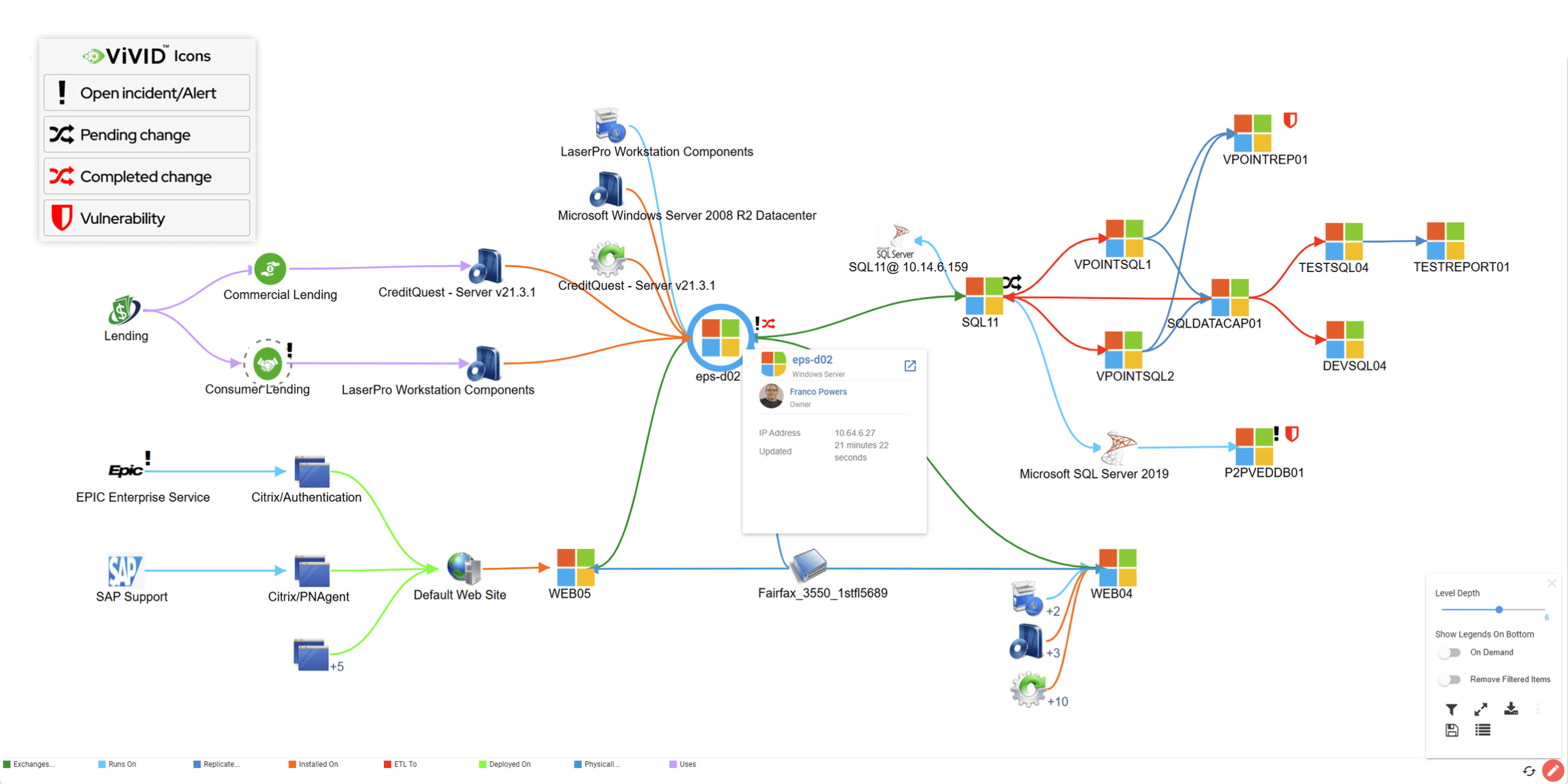
Individually, each of these is just an asset sitting in an inventory. Grouped together under “Customer Support Portal,” they become a business service, and the map shows exactly what depends on what.

That grouping is the core of service mapping. Service mapping organizes infrastructure relationships around a business outcome, so a support team, a finance team, and an engineering team can look at the same map and understand what “Customer Support Portal” depends on to stay online.

The value shows up the moment something breaks. A failed load balancer stops being an isolated infrastructure event and becomes a specific, named business service going down, with a specific team who notices first.

How Service Mapping Works

Service mapping starts with discovery. A discovery layer scans the environment and identifies the individual components, servers, applications, databases, APIs, and network devices that exist across the infrastructure. That discovered data gets stored and structured inside a configuration management database (CMDB), which becomes the system of record for what exists and how those components relate to each other.

Service mapping builds on top of that CMDB data. The next step is defining the business service: naming it, and identifying its starting point, typically the application or endpoint where a user actually interacts with the service. From that starting point, the mapping process traces every CMDB-recorded component the service touches, one connection at a time, until the full chain is accounted for.

Service Mapping in ITIL and ITOM Frameworks

Service mapping sits inside two overlapping frameworks, and each one frames its value differently.
icon

ITIL

Under IT Infrastructure Library (ITIL), service mapping supports Service Configuration Management, the ITIL practice responsible for maintaining accurate information about how services are constructed and what they depend on. ITIL treats the map as documentation the rest of change and incident management relies on.

Graph icon

ITOM

Under IT operations management (ITOM), service mapping plays an operational role. It feeds the event correlation and alerting layer, so when a monitoring tool detects a failure, ITOM tooling traces that failure to the specific business service it affects and prioritizes the response accordingly.

Both frameworks depend on the same underlying map. ITIL treats it as a record to maintain; ITOM treats it as an input a system acts on in real time.

Business Service Mapping vs. Application Dependency Mapping (ADM)

Business service mapping and application dependency mapping cover overlapping ground, and the two terms get used interchangeably more often than they should.

The difference comes down to starting point. Business service mapping starts from the business side: a service catalog entry, a named outcome like payroll processing or order fulfillment, and the stakeholders who own it. Application dependency mapping starts from the technical side: one application’s communication with other applications, traced through network traffic, ahead of any business label being attached.

In practice, application dependency mapping is often the first step toward building a business service map.

Almost every guide on application dependency mapping covers the same technical discovery methods, tag inspection, traffic analysis, and process-level fingerprinting, that feed into the business service layer once the business context gets attached.

a US-based Bank
“Auditors demand clear evidence of data flow and system communications. With ViVID™, we have complete visibility into every connection, helping us strengthen business continuity, prioritize critical services, and deliver the transparency auditors value.”
Robert Hanson

Robert Hanson

IT Manager and Director

Service Mapping vs. CMDB: What's the Difference?

A CMDB stores CIs and the relationships between them. Service mapping takes that same relationship data and organizes it around a specific business service.

A CMDB acts as a central repository that can confirm which application server connects to which database. Service mapping groups that server, that database, and everything else in the chain under a single named service, so the answer to what a service depends on is available as one view instead of a chain of individual lookups.

Most service mapping tools build directly on top of CMDB data rather than replacing it.

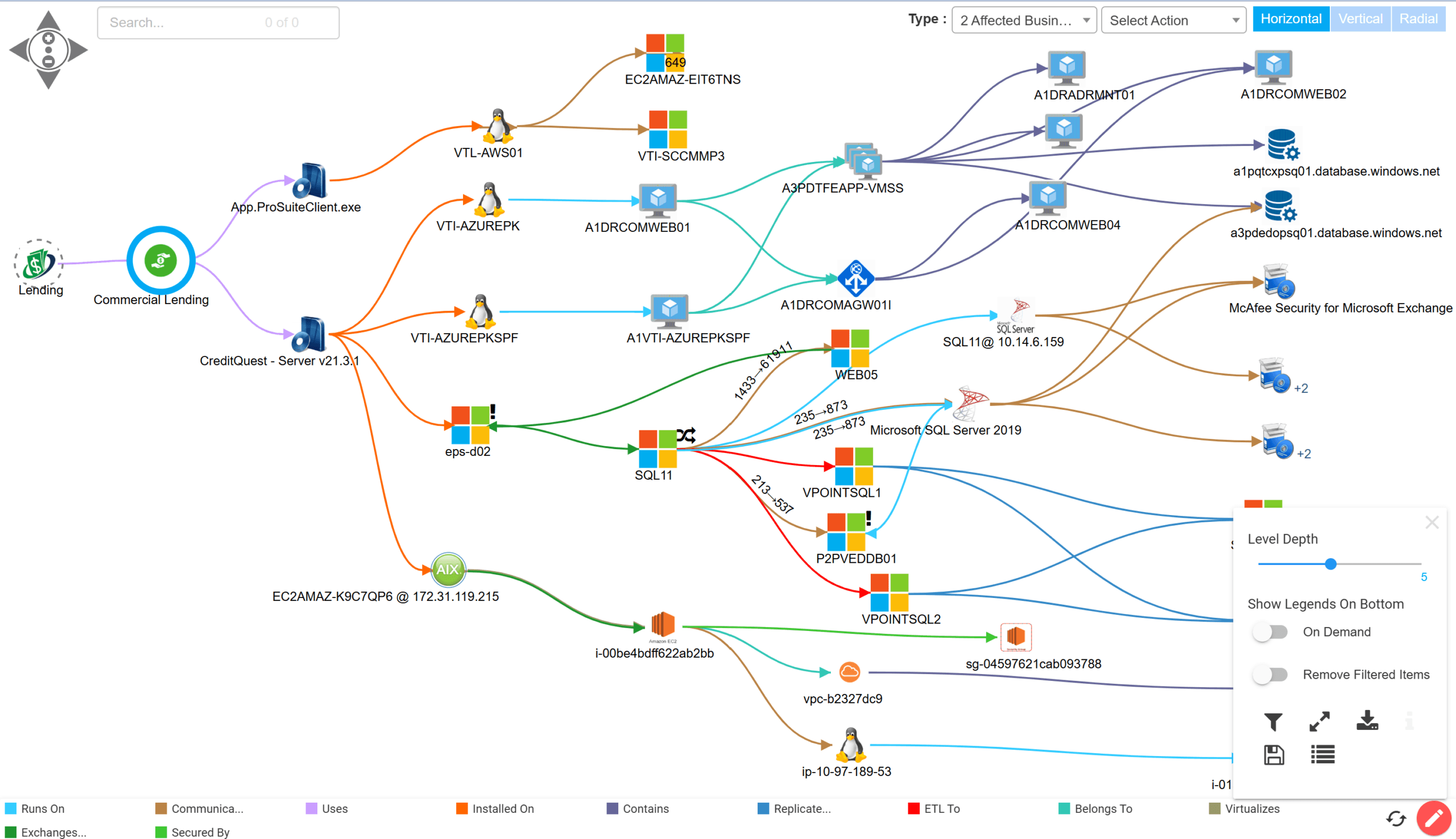
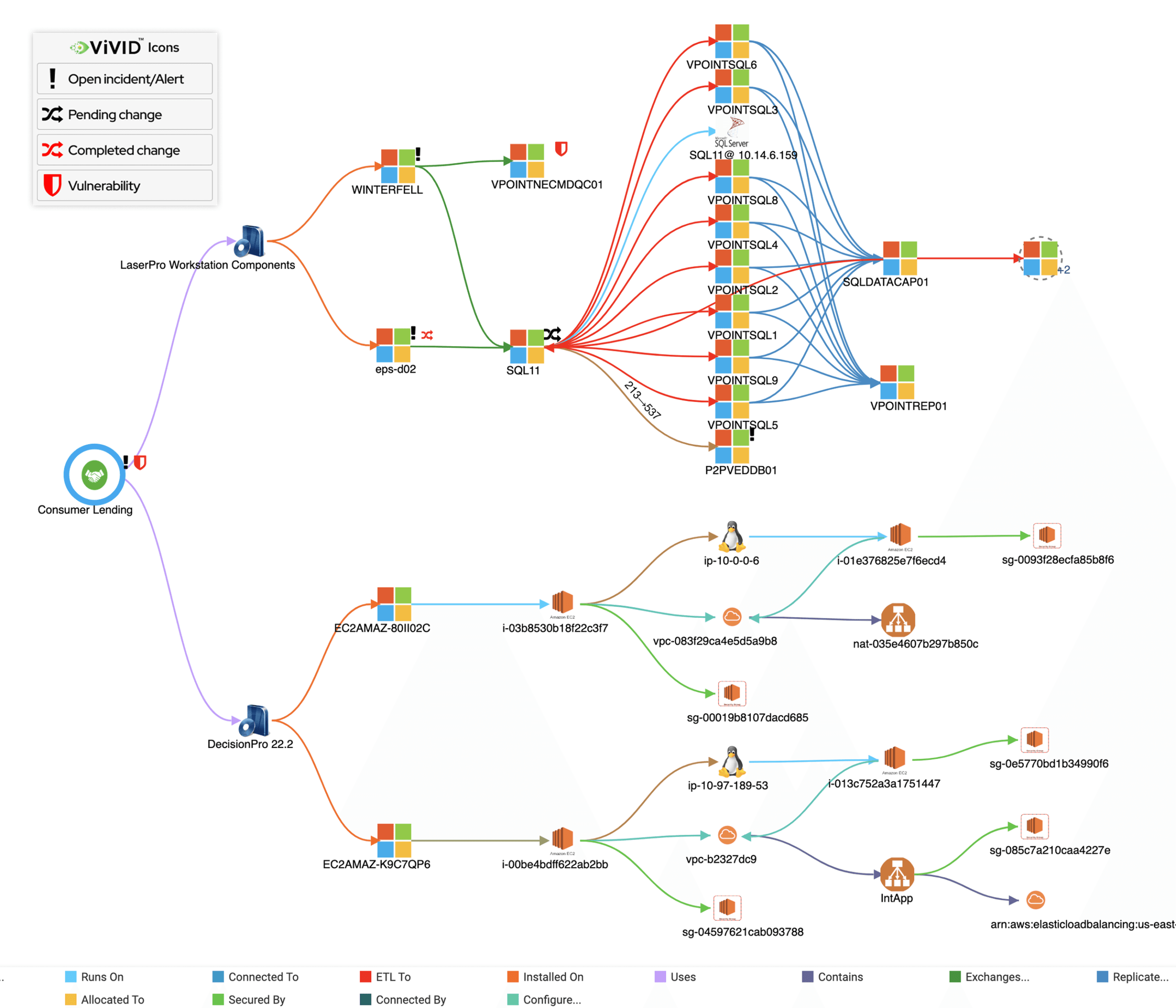
Virima’s ViVID™ Service Mapping builds live dependency maps directly from discovery data, so the map reflects current infrastructure rather than a snapshot from months ago.

Core Benefits of Service Mapping

Service mapping’s value shows up wherever a team needs to know what a failure or a change actually touches, before it happens rather than after.
Icon

Incident response

When a component fails, the map identifies exactly which business service is affected, so response teams prioritize based on business impact instead of guessing which alert matters most.

icon

Change management.

A team reviewing a proposed change can see every service that depends on the component being changed, before approving the change window rather than after something breaks downstream.

icon

Security prioritization.

A vulnerability disclosed for a specific application version becomes a prioritized list of affected business services, giving security teams business context a flat list of vulnerable assets does not carry.

There are many more benefits that service mapping offers from an operational, financial, and compliance perspective that practitioners would benefit from knowing.

Service Mapping Best Practices

Number 1

Start with a small number of critical services.

Mapping every service in the environment at once is slower and more error-prone than proving value on one or two business-critical services first, then expanding.

Number 2

Choose a mapping technique that matches the service.

Top-down mapping suits a well-defined legacy application. Tag-based mapping suits consistently tagged cloud resources. Traffic-based mapping suits services with no existing documentation to start from.

Number 3

Assign ownership for each mapped service.

A map with no owner drifts out of date the same way an unowned CI does. Someone needs to be accountable for confirming the map still reflects reality.

Number 4

Refresh the map on a scheduled cadence.

Scheduled, automated re-scans keep pace with a changing environment far better than manual updates, closing the gap where a map’s accuracy actually erodes.
Common Service Mapping Challenges

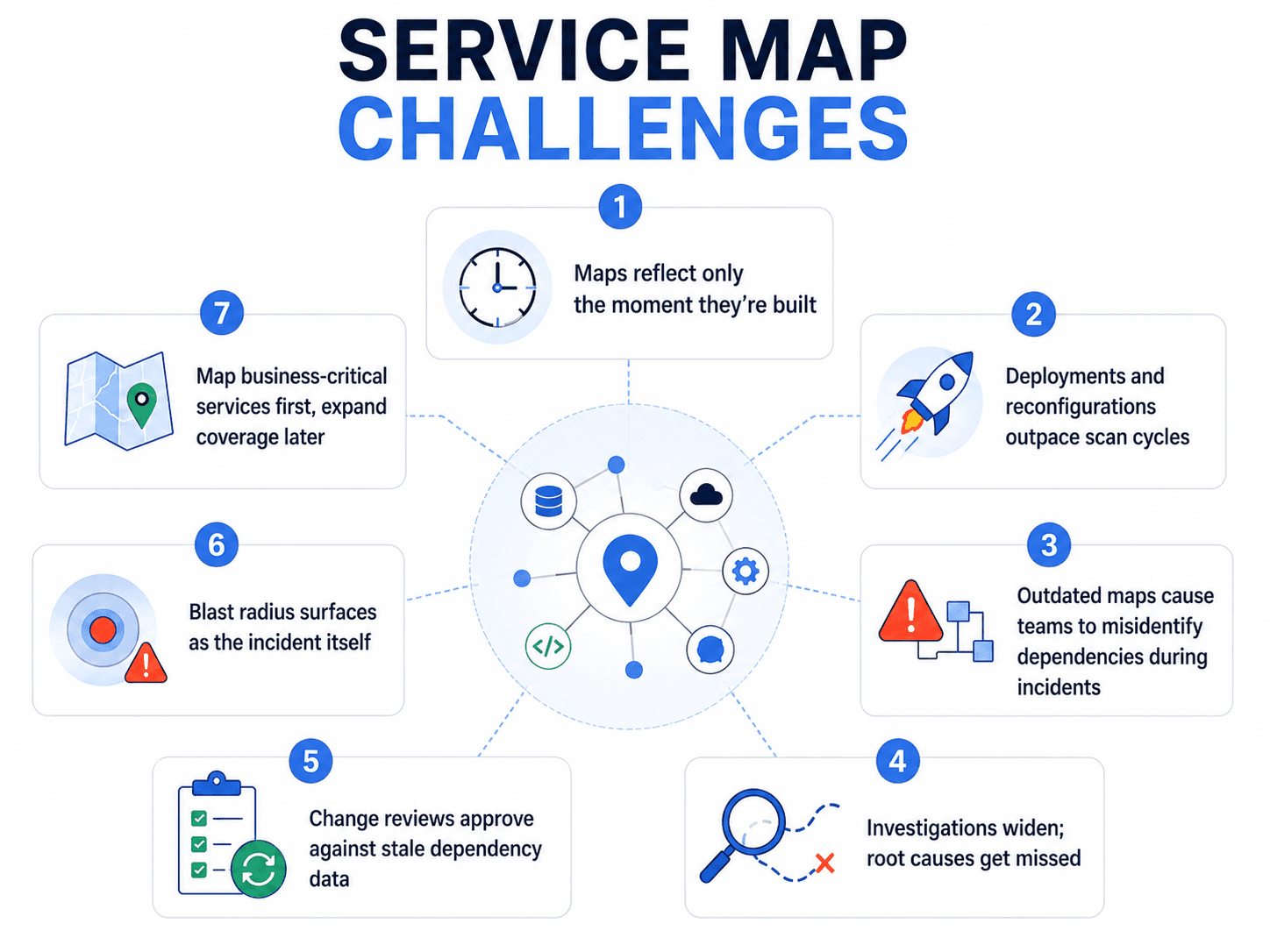
A service map is accurate at the moment it is built. However, the environment keeps changing after that, new deployments, retired components, reconfigured connections, and the map catches up on those changes only at the next scheduled scan.

This creates a specific risk during incident response. A team working from an outdated map can misidentify which components a failing service actually depends on, widening an investigation that should have stayed narrow or overlooking a dependency that should have been obvious.

The same risk applies to change management. A change advisory board approving a change against a stale map is working from a view that predates a dependency added since the last scan. The blast radius of that change then surfaces during the incident it caused, rather than the review meant to catch it.

Scope is a second common challenge. Mapping every component in an environment in equal detail rarely earns back the effort it takes. Most organizations get more value scoping the map to business-critical services first, then expanding coverage as the initial maps prove useful.

Virima’s discovery layer runs on a scheduled, high-frequency cadence, so ViVID™ Service Mapping reflects recent changes rather than a snapshot from the last manual review.

Service Mapping Software and Tools

Service mapping tools generally fall into three categories. Platform-native tools ship as a module inside a broader IT service management (ITSM) platform, sharing that platform’s own data model. Standalone tools focus on discovery breadth and reconciliation, feeding data into whichever ITSM platform an organization already uses. Cloud-native tools focus specifically on tracking cloud resources, which change and scale differently than on-premises infrastructure.

Which category fits depends on what’s already in place. An organization fully standardized on one ITSM platform generally gets more value from that platform’s native mapping module. An organization running a hybrid environment across multiple platforms typically needs a standalone tool that can reconcile data across all of them.

A full comparison of specific tools, including feature breakdowns and buyer considerations, is covered in Virima’s service mapping tools guide.

The Bancorp

“Virima’s integration with ServiceNow has allowed us to
enhance and fully integrate our CMDB into all of our ITIL
processes. The seamless integration gives us the ability to
leverage the best of both Virima and ServiceNow.”

Keith Lee

Keith Lee

VP Disaster Recovery and IT Risk

How Virima Approaches Service Mapping Differently

Most of the challenges above trace back to one thing: how often the map gets refreshed against what’s actually running. Virima’s discovery layer runs on scheduled, high-frequency scan cycles, closing the gap between what the map shows and what the environment actually looks like faster than periodic manual reviews allow.

ViVID™ Service Mapping builds on that same discovery data rather than requiring a separate mapping process. Once a business service is defined, Virima traces its dependencies using the discovery data already collected for the CMDB, keeping the map and the CMDB consistent with each other instead of drifting apart as two separately maintained records.

This same current, relationship-aware data becomes the foundation incident response and change management workflows depend on. A team acting on a recently refreshed map has an accurate picture of what a component’s failure actually touches. A team acting on a stale one is working from an outdated picture instead.

Everything on this page, from discovery to business service grouping to how a map supports incident response and change management, comes together in Virima’s ViVID™ Service Mapping.

— Frequently asked questions

Service Mapping Questions, Answered.

A demo answers the rest in 20 minutes.
Why is service mapping important?
Service mapping turns a list of disconnected assets into a view of what actually supports a business outcome. That distinction matters most during an incident or a change, when knowing which service is affected is more useful than knowing which component failed.

ServiceNow runs service mapping as a module inside its IT Operations Management platform, building maps directly from its own CMDB using discovery agents installed within the environment. A closer look at how it compares to alternative approaches is covered in ServiceNow’s service mapping approach.

A service map is used most often during incident response, change management, and security prioritization, anywhere a team needs to know what a specific component’s failure or modification actually affects before acting on it.

— Get started

Move faster. Act safely.

Get live, explainable runtime truth across your entire estate —
without platform lock-in.