What makes an IT audit successful: Key points to consider

Picture this: It’s 7 p.m. on a Friday. The office is quiet, and you’re staring at yet another checklist. Auditors demand compliance proof, your team is exhausted, and “data classification policy” is beginning to blur on screen.
You sigh and think — there has to be a better way to do it efficiently and effectively.
If that sounds familiar, this guide is for you. You must keep your organization’s technology secure, compliant, and efficient. And if you’ve ever wondered how to make them more than just another box to tick, you’re in the right place.
This isn’t just about surviving audits — it’s about turning audits into a strategic advantage using the right information technology audit tools. Consequently, you’ll learn how to make audits faster, simpler, and truly useful for your business.
In this guide, you’ll find clear answers to big questions like:
- Why are IT audits important?
- What should an IT audit include?
- How can you make the audit process easier and faster?
Yes, IT systems today are complex — a maze of on-premise, cloud, and hybrid environments. But the truth is, a well-run audit doesn’t have to be painful. When done right, it can uncover blind spots, strengthen security, and streamline operations.
By the end, you’ll understand how asset management tools turn compliance into an advantage.
Why IT audits are important (more than just compliance)
| Think of an IT audit as a health check for your technology. It looks at your systems closely to find hidden issues before they become big problems. It also makes sure you follow all rules and stay safe from data breaches — helping your organization ensure compliance across all information technology systems. An IT audit isn’t just about filling out forms or ticking boxes. It’s about keeping your business strong, protecting customer trust, and helping everything run without trouble. |
When done regularly, you gain many benefits — both for security and for smoother daily operations.
- Ensures regulatory compliance: It checks that your IT systems and processes follow all the right rules. This includes industry laws like GDPR or HIPAA, as well as your own company policies. By doing this, you can avoid legal problems, fines, and other risks.
- Identifies risks early: It helps you spot weak points or mistakes in your systems early. This includes security gaps, wrong settings, or possible threats. Finding these issues ahead of time keeps your data safe and prevents future problems.
- Improves security posture: It checks how well your security measures work, like firewalls and access controls. If there are any gaps, the audit points them out. When you fix these issues, your overall cybersecurity becomes much stronger.
- Optimizes IT operations: It finds areas where your IT processes or assets aren’t being used well. Once you know these weak spots, you can make operations smoother and cut down on waste. For example, you might retire old servers or combine unused software licenses to save money and work more efficiently.
- Builds stakeholder trust: It shows customers, partners, and regulators that you manage your IT resources with honesty and care. Regular audits demonstrate that you take security and compliance seriously. As a result, this builds trust and strengthens your organization’s reputation.
- Informs decision-making: It gives leaders clear insights to plan IT investments and strategies wisely. Audit results identify where upgrades, training, or new policies are needed. Consequently, this helps your organization make smarter, data-driven business decisions.
Why this matters
Nearly 48% of organizations found signs of a security breach in 2024. This shows how important it is to find system weaknesses early through audits.
The risks of poor oversight are serious. In 2025, data breaches cost companies an average of $4.44 million. On top of that, regulators can issue huge fines — GDPR penalties can reach up to 4% of yearly revenue.
But the damage isn’t just about money. A weak process can cause system downtime and make customers lose trust.. In short, a strong IT audit doesn’t just meet rules — it protects your business’s reputation and financial health.
Key components of a successful IT audit
A strong IT audit looks at both your technology and how it’s managed. It reviews the systems, policies, and controls that keep everything running safely and smoothly.
This also involves evaluating the management system that governs your IT operations and how effectively your business processes align with compliance and performance goals.
Include the key areas below to ensure you overlook anything important.
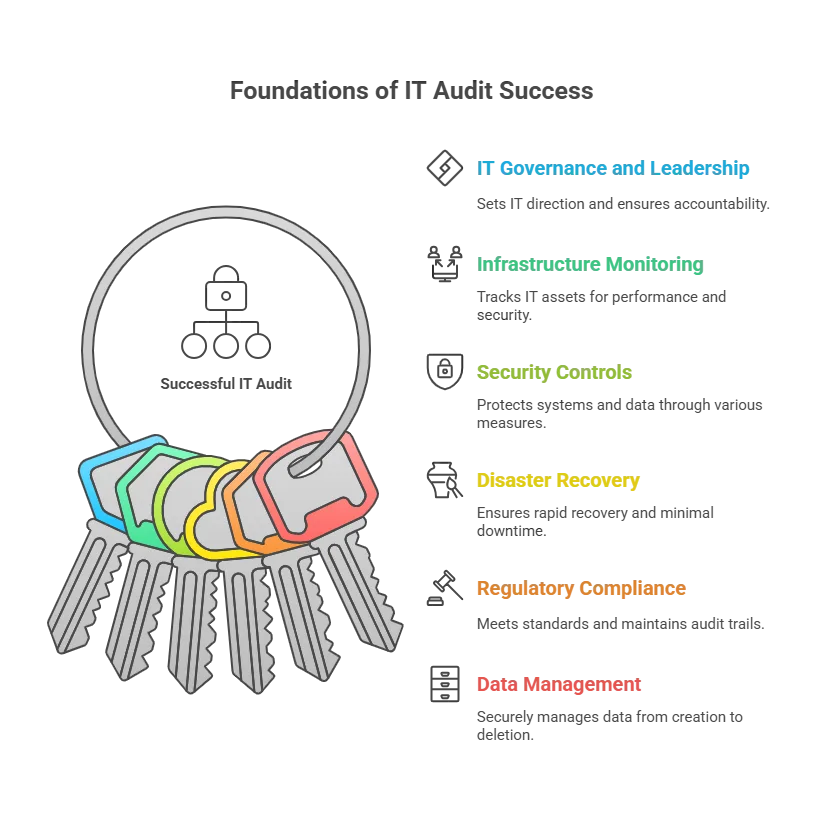
1. IT governance and leadership
What it is
This is the system your organization uses to manage and guide all IT activities. Therefore, it defines the rules for using and protecting IT resources.
Why it matters
Auditors check if your business follows a clear IT governance framework, such as defined policies or standards like COBIT, supported by clear plans that link IT controls with business objectives.
Good governance keeps IT goals aligned with business goals and makes sure someone is responsible for every decision — a key success factor in strong IT frameworks.
A strong audit assesses whether leaders monitor IT performance, manage risks, and take responsibility for policies and compliance.
2. Comprehensive IT infrastructure monitoring
What it is
This is a complete list and review of everything in your IT setup. It includes hardware, software, networks, and cloud services — from servers and laptops to apps, databases, and IoT devices.
Consequently, it gives auditors and teams a clear picture of what exists and how it’s managed. It enables better data analytics and insight-driven decision-making throughout the audit process.
Why it matters
The review checks if these assets are working well, safe, and up to date. It looks for problems like old hardware or unpatched software that could cause security risks or downtime — insights made easier to uncover with information technology audit tools during audit processes.
An essential part of this is managing each asset’s lifecycle to keep equipment and software updated or replaced on time.
For example, if a server runs an outdated system, it will be flagged so you can fix it early. Regular checks like this keep every part of your IT environment secure and reliable.
3. Security controls and access management
What it is
These are the steps you take to protect your systems and data from hackers or unauthorized users. This includes tools like firewalls, antivirus software, and intrusion detection systems. It also covers user access controls such as passwords, two-factor authentication, and physical security measures for IT equipment.
Why it matters
Security is one of the most important parts of any IT audit — it forms the backbone of practices supported by advanced information technology audit tools. Auditors check whether your defenses and policies truly protect sensitive data. They assess user access controls—ensuring proper permissions—and evaluate how swiftly you address security gaps.
Since many cyberattacks involve stolen passwords or data, these checks are vital. An AI-powered monitoring approach can further enhance the accuracy of security control assessments by detecting anomalies faster.
The audit also examines physical security, including server room access and the disposal of old devices. In short, a strong audit confirms your security controls are solid and ready to face modern threats.
4. Disaster recovery and business continuity planning
What it is
This is your organization’s plan for getting IT systems back up after a disaster or major outage. It includes an IT disaster recovery plan (DRP) and business continuity plan (BCP) to maintain critical operations during disruptions.
Why it matters
Losing data or facing long downtime can seriously hurt your business, which is why recovery procedures with information technology audit tools are essential.
That’s why auditors check if you have a tested, up-to-date recovery plan. They look for regular backups, off-site or cloud storage, and clear goals for how quickly systems should recover.
It also confirms that your team practices recovery drills and fixes any weak spots. For example, if a data center fails, you should be able to restore systems from backups quickly.
With strong DR and BCP plans, your business can recover fast and keep serving customers with little interruption — while integrating systems development and recovery procedures within your management system for lasting resilience.
5. Regulatory compliance and audit trail
What it is
This means following all the laws, rules, and standards that apply to your IT systems. Examples include data privacy and security laws like GDPR, HIPAA, ISO 27001, and PCI-DSS. It also covers your own company policies and how well you keep records or system logs to show accountability.
Why it matters
Many IT audits start because of compliance needs, such as annual checks or customer security reviews. Auditors ensure your IT practices meet all the right requirements — from protecting personal data to keeping financial systems secure. If your business fails to follow these rules, it can face major fines and a loss of trust.
A good audit ensures system compliance and verifies clear records of all changes, access, and activities — critical elements supported by reliable information technology audit tools and a proactive risk management mindset.
Consequently, these logs help prove compliance and make it easier to investigate problems if they occur.
6. Data management lifecycle
What it is
This covers how your organization handles data from start to finish. It explains how people create, store, back up, use, and delete data. It also involves how you manage IT assets that hold data, like hard drives and servers.
Why it matters
Data is one of your most valuable assets. A good IT audit checks how safely and responsibly you manage it at every stage.
Auditors assess how teams gather, store, and access data — an integral part of data lifecycle management using information technology audit tools. They verify that someone encrypts, backs up, and securely deletes the data when no longer needed.
Regular backups, strong encryption, and clear retention rules show that you take data protection seriously. Managing data properly helps you stay compliant with privacy laws and reduces the risk of data loss or leaks.
| Pro tip: Covering all these components gives you a complete view of your IT environment. A strong review should show how healthy your systems and policies are — both technically and operationally, integrating business processes with data analytics insights for a clearer compliance picture. Up next, we’ll talk about how to prepare for the audit and present your findings clearly. |
How to create a successful IT audit report (best practices)
Even with thorough analysis, its true value lies in documenting findings and applying improvements. The following best practices will help you prepare a thorough audit report and actionable follow-ups:
Discover and catalog all assets
Beforehand, make sure you know about every device and system in use. Use automated tools or network scans to find all servers, laptops, apps, cloud systems, and databases.
Keeping an updated asset list helps you spot how systems connect and depend on each other, simplifying audit readiness through automated information technology audit tools.
This prevents surprises, like a forgotten server that could cause a security or compliance issue. When you have full visibility of your assets, your report will be more accurate and reliable.
Leverage a detailed CMDB
Keep all your IT asset details in one central place called a Configuration Management Database (CMDB). It stores information about each system, the software it runs, and how everything connects.
A well-updated CMDB (CMDB definition) makes the process much faster since you won’t need to search through old files or scattered spreadsheets — a clear advantage when auditing IT environments with modern information technology audit tools.
It allows you to demonstrate control by clearly presenting auditors with your assets and their management. This builds trust and shows that your IT environment is well organized.
Maintain baseline configurations
Create standard settings and normal performance levels for all your systems. Use management tools to monitor any changes. When you know what “good” looks like, it’s easier to find what’s different or wrong during an audit.
For example, if every company laptop must have disk encryption and antivirus software, make that your baseline. Then, you can quickly flag any laptop that doesn’t meet those rules.
Baselines save time by focusing only on what’s out of place and help you stay compliant all year long.
This level of consistency also strengthens your management system, ensuring IT controls remain aligned with organizational standards and long-term compliance goals.
Customize reports for different stakeholders
Not everyone needs the same level of detail from your IT audit. Leaders and board members may only want a quick summary that shows key risks, compliance status, and main recommendations. Your technical team, on the other hand, will need detailed results — like system logs or scan reports — so they can fix issues.
By customizing reports to each group, you make the results more useful. For example, you might share a one-page dashboard with the CIO and a longer, detailed report with IT operations. Clear, focused reporting turns your audit into an action plan—whether fixing systems, upgrading tools, or refining policies.
Following these best practices helps make your audits smoother and more valuable. Instead of a stressful, once-a-year task, your audits become part of an ongoing improvement process.
To make things even easier, automation and specialized tools can take your IT audit efficiency to the next level. Let’s look at how they can help next.
Streamlining IT audits with an ITAM platform (using Virima as an example)
One of the smartest ways to make your IT audit easier is to use an IT Asset Management (ITAM) platform — especially one that supports AI-powered insights and data analytics to enhance visibility across information technology systems.
This type of tool helps you find, track, and report on all your IT assets in one place.
Virima is a great example of such a platform. The design optimizes IT audits, making them faster, simpler, and more reliable.
By using Virima, you can save time and reduce manual work. It helps you automate many audit tasks, so you can focus on what really matters.
Let’s see how this kind of platform can solve common audit problems.
1. Automated asset discovery
Virima helps you find every device, software, and service in your IT setup, turning auditing IT assets into a seamless process through automated information technology audit tools.
It does this using both agentless and agent-based discovery methods. This means it keeps scanning your systems to make sure your asset list is always current and complete.
You don’t have to spend hours doing manual checks anymore. With Virima, you always have a full view of your IT environment, so you won’t miss any server or app during an audit.
| For example, if a new or unauthorized cloud VM appears, Virima quickly spots it. You can then fix the issue before it becomes a problem in your audit. This smart automation helps you run accurate audits and solve issues fast. |
2. Real-time tracking and alerts
Virima monitors all your IT assets in real time. As a result, you can instantly see which ones follow company rules and which might not. Moreover, its easy-to-read dashboards display everything at a glance.
If something goes wrong—like a license expires or a security patch is missing—Virima alerts you right away. This quick warning helps you fix problems before they turn into audit issues.
You’ll always be ready for audits without the last-minute stress. Plus, Virima helps you use your resources wisely. For example, it can spot hardware or software that’s not being used much, so you can reuse or remove it to save money.
With real-time tracking, you not only stay ready but also make your daily work smoother and more efficient — essential for ongoing auditing IT, and leveraging information technology audit tools.
3. Integrated CMDB and data accuracy
Virima includes a built-in CMDB management that updates itself automatically. It uses smart automation and clear business rules to keep your data accurate and up to date. Consequently, you no longer need to waste time on manual updates.
When audit time comes, you can feel confident that your data is correct because information technology audit tools continuously verify and support auditing IT data accuracy.
All your asset lists, configurations, and user access logs stay organized and up to date. Auditors rely on the information because someone manages it clearly and consistently.
Virima can even create reports straight from the CMDB tools. This saves you a lot of time collecting evidence. It also keeps a real-time record of all your IT assets and their settings — something every auditor appreciates.
4. Compliance mapping and reporting
A smart ITAM tool like Virima helps you stay compliant with rules and standards. It achieves this by linking your IT assets directly to specific compliance requirements — making auditing IT controls easier through integrated information technology audit tools.
For example, you can tag servers that store credit card data and connect them to PCI-DSS controls. Virima then shows which servers meet these rules and which ones need fixing.
It’s easy dashboards display key compliance metrics and KPIs, so you can see your company’s compliance health at a glance. Both IT teams and leaders can quickly understand what’s working and what needs attention.
This clear view helps you make smart choices, like upgrading a high-risk system right away. With Virima, compliance tracking becomes a simple, ongoing process instead of a long, stressful checklist.
5. Agile and cost-effective audit prep
Getting ready for reviews no longer has to be stressful or time-consuming. With Virima’s ITAM platform, most data collection and reporting occur automatically.
You can create up-to-date reports anytime because your inventory and CMDB software are always current. This means your organization stays audit-ready all the time.
If a new rule or requirement appears, Virima lets you adapt fast. You can easily add new compliance checks or data points without redoing your entire process.
As a result, reviews finish faster and take much less manual work. Your audit team saves time, cuts costs, and avoids disruption through smarter risk management, risk assessments, and streamlined business processes that support continuous compliance.
Instead of chasing data, your IT staff can focus on fixing issues and making improvements.
6. Real-world impact
With an ITAM platform like Virima, audits no longer feel like a yearly headache — instead, information technology audit tools make it an ongoing, automated process.
Instead, they become a smooth, ongoing part of your IT management.
You can relax knowing that someone automatically checks your systems and keeps them compliant. When it’s time for an external or internal audit, you’ll already have everything in order.
You can hand over accurate data right away and spend your time discussing improvements—not scrambling for missing details. Consequently, it’s a smarter and calmer way to handle compliance checks.
Achieve IT audit excellence with the right approach
A successful IT audit starts with good preparation. You need to focus on three key areas — governance, technology, and process.
When you cover everything, from strong IT rules and security checks to compliance and data management, you leave no gaps. Every part of your IT setup undergoes a thorough review.
With this approach, audits become more than just inspections. They turn into learning tools that show where to improve and help you make smarter IT decisions for the future. Leverage automation and tools: Modern IT tools like Virima and other information technology audit tools help you make your IT operations audit-proof while simplifying auditing IT.
When asset discovery happens automatically and your CMDB stays up to date, you’re already ahead. Add real-time compliance checks, and audits stop being stressful. Instead of feeling like a test, they become a way to show the great work your team is doing. They also help you identify areas for future improvement.
Remember, an audit isn’t just a one-time task. It’s an ongoing habit that keeps your IT environment organized, secure, and ready for anything. When you use the right tools and follow smart practices, audits don’t have to be a burden. CIOs and IT managers can turn them into smooth, useful processes that add real value.
The rewards are significant — stronger security, better compliance, smoother operations, and more confident decisions. Ultimately, with the right approach, audits become a way to strengthen your entire IT organization.
Next steps
Now it’s time to put these ideas into action. Start using these steps in your organization to get ready for IT audits with confidence.
If you want to make your audit process easier and stronger, explore Virima’s IT asset management software solution. You can request a demo to see how automation and smart IT management make audits simple and stress-free.
Give your team the right tools and knowledge to succeed. With Virima, every audit becomes a chance to shine and turn compliance into a real advantage for your business.