What Is DCIM? Data Center Infrastructure Management

Data Center Infrastructure Management (DCIM) is software that gives IT and facilities teams unified, real-time visibility into a data center’s power, cooling, space, and physical assets. It replaces manual spreadsheets and periodic audits with continuous monitoring. But knowing what sits inside the data center is the easier half of the job — DCIM doesn’t track the services or configurations that depend on that hardware, which is where the real operational risk begins. This guide explains how DCIM works, what it covers, and where the gap opens.
What is DCIM?
Data Center Infrastructure Management (DCIM) is a category of software and methodology that gives IT and facilities teams unified visibility into a data center’s physical infrastructure, covering power, cooling, space, and assets. Instead of tracking rack layouts, power draw, and cooling capacity across spreadsheets and one-off audits, DCIM platforms pull that data into a single system teams can monitor in real time.
At its core, DCIM exists to answer three operational questions: how much power and cooling capacity is left, where physical assets sit and how healthy they are, and how efficiently the facility is running. Teams use DCIM to optimize PUE (Power Usage Effectiveness), plan capacity ahead of hardware refreshes, and avoid the kind of manual audits that go stale within weeks.
DCIM is typically owned by Data Center Ops Managers and Facilities Engineers, but IT Infrastructure Teams and CIOs rely on the same data when they are deciding whether a facility has room for new workloads or where the next migration should land.
DCIM explained in plain terms
Strip away the acronym: DCIM is the system of record for a data center’s physical layer. It answers where equipment sits, how much capacity is left, and how efficiently the facility runs, without a facilities team re-checking spreadsheets or physical walk-throughs to find out.
What is DCIM?
DCIM (Data Center Infrastructure Management) is software that gives IT and facilities teams real-time visibility into data center power, cooling, space, and physical assets. It helps teams optimize energy efficiency, plan capacity, and reduce the risk of unplanned outages caused by resource constraints or configuration errors.
How DCIM works
DCIM platforms are built in layers, and each one feeds the next.
The data collection layer starts at the hardware: sensors, PDUs (power distribution units), CRAC and CRAH units for cooling, and network switches all report status back to the platform continuously. That raw telemetry only becomes useful once it is tied to physical context, which is what the asset management layer does: it maps servers, storage, and network gear to specific rack positions so a power alert or thermal reading points to an exact location, not just a number.
The analytics and reporting layer turns that data into decisions: PUE tracking, capacity trending, thermal mapping, and power chain visualization all sit at this level. Finally, the integration layer pushes DCIM data into ITSM platforms, Building Management Systems (BMS), and Energy Management Systems (EMS) so operations teams are not switching between five different tools to get one answer.
How does DCIM work?
DCIM platforms collect data from physical sensors, PDUs, and cooling units across the data center. That data feeds into a central management layer that tracks asset location, power draw, cooling capacity, and space utilization, giving operations teams a live view of infrastructure health and the headroom available for new workloads.
Key features of DCIM software
Most DCIM platforms are built around the same six capability areas, even if the interface and depth vary by vendor.
Power monitoring and management
DCIM tracks power draw at the PDU, rack, and floor level, so teams can see exactly where capacity is being consumed and how much headroom remains before the next hardware deployment.
Cooling and thermal management
Hot and cold aisle configurations, along with CRAC unit performance, get monitored continuously. That visibility is what keeps thermal incidents from turning into equipment failures.
Space and capacity planning
DCIM tracks rack unit availability, floor space, and weight limits, which is the data teams need before committing to a hardware refresh or a new deployment.
Asset inventory and lifecycle management
Physical servers, storage, and networking gear get tracked from install to decommission, giving teams a lifecycle view instead of a point-in-time snapshot.
Environmental monitoring
Temperature, humidity, and airflow sensors feed continuous readings back to the platform, catching environmental drift before it damages equipment.
Reporting and compliance
PUE benchmarking, energy cost reporting, and regulatory reporting for standards like ENERGY STAR and ISO 50001 all draw from the same underlying data set.
| Feature | What It Tracks |
|---|---|
| Power monitoring | PDU, rack, and floor-level power draw |
| Cooling and thermal management | Hot/cold aisle status, CRAC unit performance |
| Space and capacity planning | Rack availability, floor space, weight limits |
| Asset inventory and lifecycle | Physical servers, storage, and network gear |
| Environmental monitoring | Temperature, humidity, airflow |
| Reporting and compliance | PUE, energy cost, ENERGY STAR/ISO 50001 reporting |
Why DCIM matters: risk, efficiency, and compliance
Data centers account for a meaningful share of global electricity use, which is why PUE optimization is not a side benefit of DCIM, it is one of the main reasons teams adopt it. According to Uptime Institute, data center owners reported an average annual PUE of 1.54 across their largest facilities in 2025 — well above the 1.1 to 1.2 range hyperscale operators hit. That gap shows how much efficiency headroom most enterprise facilities still have.
Unplanned outages are the other side of that risk. Uptime Institute’s 2025 Annual Outage Analysis found that 54% of significant outages cost more than $100,000 in remediation, and 20% top $1 million. Human error plays a large role in that: according to the same Uptime Institute analysis, nearly 40% of organizations reported a major outage caused by human error over the past three years. Of those incidents, 85% traced back to staff not following procedures or to incomplete procedures. That is exactly the kind of risk configuration-aware change management is meant to close.
Regulatory pressure adds a third layer. ENERGY STAR, the EU Energy Efficiency Directive, and ISO 50001 all require auditable, accurate infrastructure data, not estimates. Without that data, teams tend to swing to one extreme or the other: over-provisioning hardware (which raises cost) or under-provisioning (which raises risk).
Why is DCIM important for enterprise IT?
DCIM gives enterprise IT teams the visibility they need to optimize energy costs, prevent unplanned outages, and plan capacity accurately. Without it, data center decisions rely on spreadsheets and manual audits, leading to over-provisioning, thermal incidents, and compliance gaps that auditors can and do flag.
What DCIM doesn’t cover, and where the gap appears
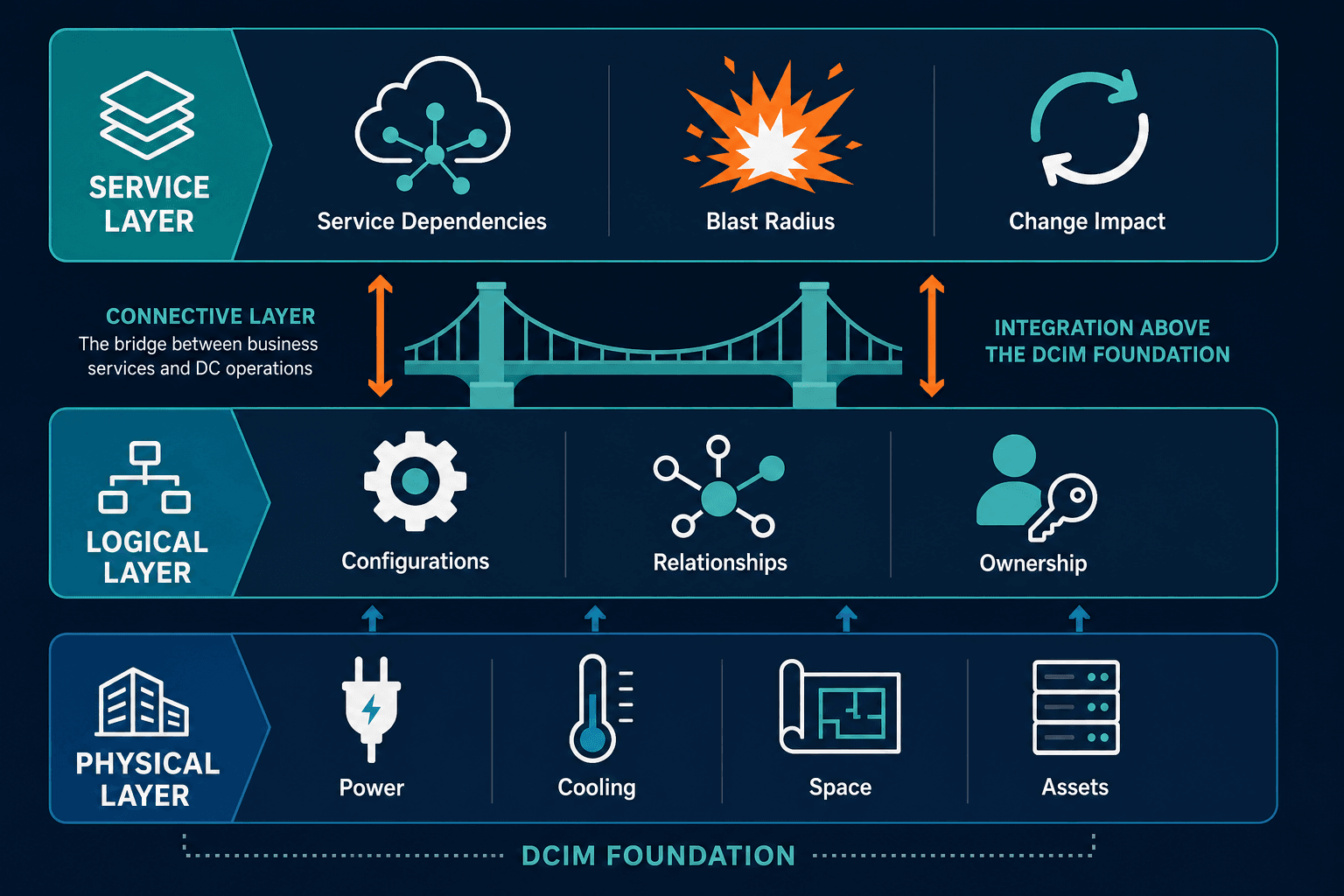
DCIM manages physical infrastructure. It does not track the software, configurations, or services running on top of that infrastructure, and that is where a real gap opens for IT teams.
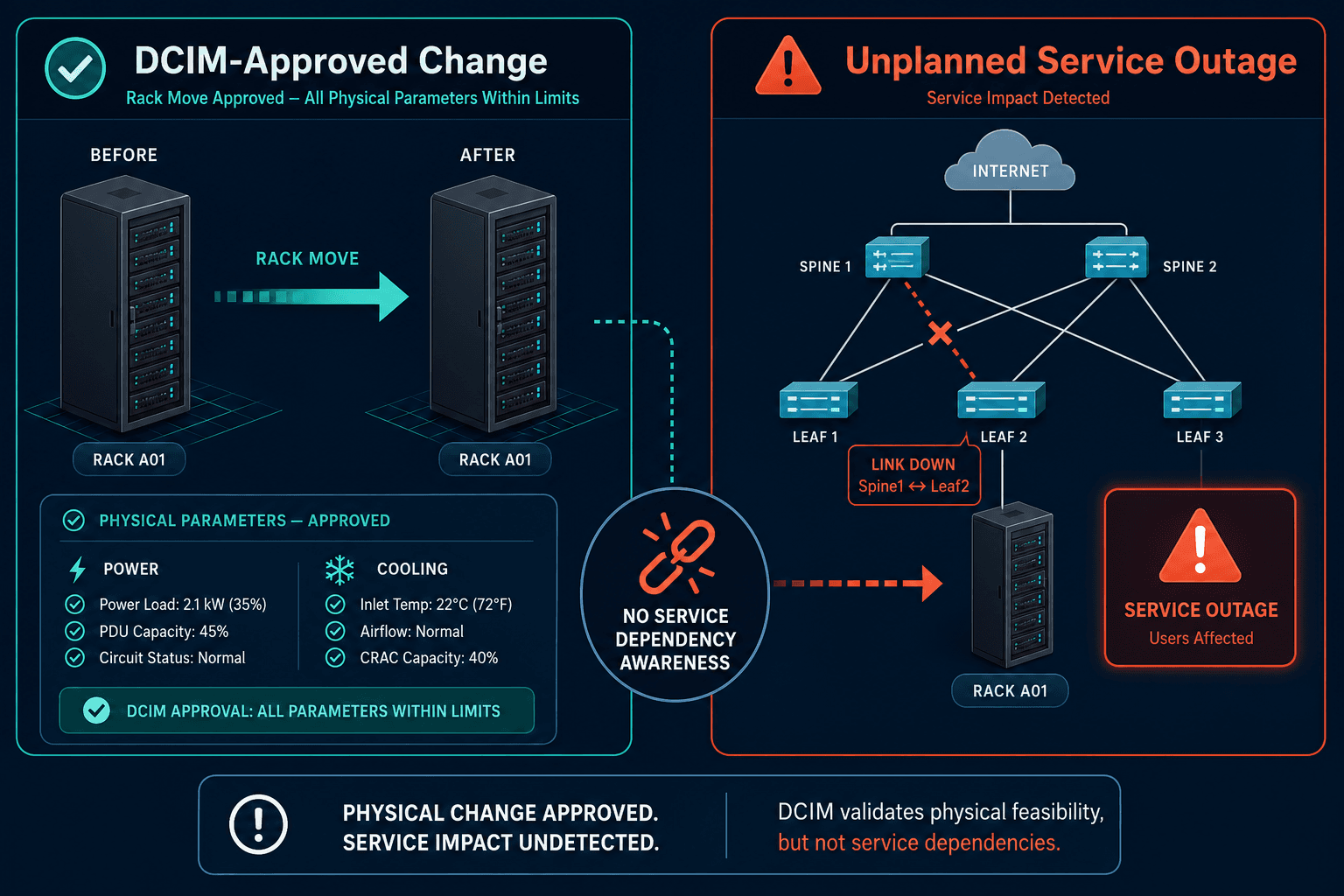
A rack move or power event that DCIM approves as safe can still break a production service if nobody knows which applications depend on the affected hardware. That’s a boundary, not a flaw — DCIM asset inventories are often populated manually or through one-time discovery scans, not continuously verified against what actually exists in the environment.
So the honest read is this: DCIM tells you what the data center contains. It does not tell you what will break if something in it changes. Closing that gap requires a layer that connects physical assets to the services and configurations that depend on them.
What are the limitations of DCIM software?
DCIM tools focus on physical infrastructure: power, cooling, space, and physical assets. They don’t track the software configurations, service dependencies, or CI relationships that determine the business impact of a physical change. Teams that rely on DCIM alone can approve infrastructure changes that break production services because the service context is missing.
DCIM and CMDB: how they work together
DCIM covers the physical layer. A CMDB covers the logical and service layer: configurations, relationships, ownership, and dependencies. Teams that connect DCIM data to a CMDB get the full picture, what exists in the data center, what runs on it, and what breaks if it changes.
This is where Virima’s discovery extends into the data center. Agentless, agent-based, and API-based discovery methods surface physical and virtual assets and map their configurations into a discovery-sourced CMDB. From there, ViVID service maps feature page show which production services depend on which physical assets, so a rack move or power maintenance window does not turn into an unplanned outage.
DCIM use cases
Capacity planning and hardware refresh cycles
Teams use DCIM data to time hardware refreshes against actual rack, power, and cooling headroom instead of guessing from outdated floor plans.
Energy efficiency optimization and PUE reduction
PUE tracking over time shows which facilities or zones are wasting the most power, giving teams a concrete target for cooling or airflow improvements.
Data center migration and consolidation
Before consolidating facilities, teams pull DCIM data to confirm exactly what equipment exists, where it sits, and what power and cooling it needs at the new location.
Compliance reporting
ENERGY STAR, ISO 50001, and EU Energy Efficiency Directive reporting all draw on the same PUE and energy consumption data DCIM already tracks.
What are common DCIM use cases?
Common DCIM use cases include capacity planning for hardware refresh cycles, energy efficiency optimization to lower PUE, data center migration and consolidation, and compliance reporting for standards such as ENERGY STAR and ISO 50001. Each use case depends on accurate, current physical asset data.
DCIM answers the physical question well: what is in the data center, how much capacity is left, and how efficiently it is running. But the riskier question, what breaks when something changes, needs service context DCIM was never built to provide.
So, what is DCIM good for, and where does it stop? It’s the physical-layer system of record — and it stops at the rack door. Business dependency mapping for data center and cloud operations to see the specific CI relationships DCIM alone won’t show you.