Serial Number Conflicts in CMDB: What They Are and How to Resolve Them

TLDR
A serial number conflict in a CMDB occurs when two or more hardware asset records share the same serial number, blocking the auto-linking engine from matching configuration items to their physical hardware counterparts. Conflicts arise from duplicate imports, asset refresh failures, virtual machine serial number inheritance, and blade server environments. They cause CI-to-asset linking failures, audit gaps, and unreliable service impact analysis. Resolution requires a structured review workflow: identify the duplicates, retire or correct the conflicting record, then re-run the linking job. Prevention centers on import-time serial uniqueness validation.
What Is a Serial Number Conflict in a CMDB?
In any CMDB that supports CI-to-hardware-asset linking, the matching process relies on a shared identifier between the CMDB and the ITAM (IT Asset Management) system. The serial number is the most widely used identifier because it is manufacturer-assigned, device-specific, and captured by both discovery tools and procurement processes.
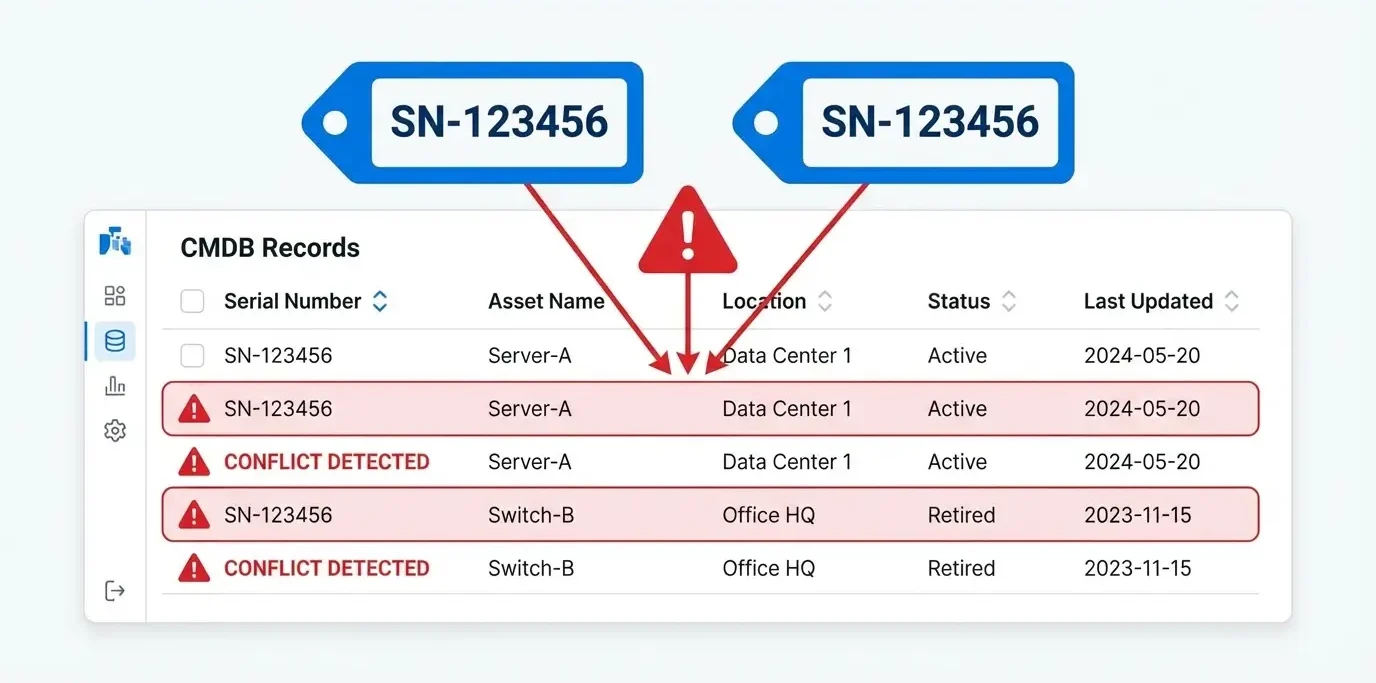
A serial number conflict exists when two or more asset records in the ITAM system carry the same serial number value. From the auto-linking engine’s perspective, this creates an ambiguous state: the system finds a CI with a serial number, SN-ABC123456 searches the ITAM asset table for a match, and finds two records — Asset A and Asset B — both claiming that serial. The engine cannot determine which is the correct record to link without human judgment, so it blocks the link and routes both records to a conflict queue.
Serial number conflicts are distinct from missing serial numbers (where no serial is present on a CI) and from serial mismatches (where the CI and asset record contain different values for the same device). Conflicts specifically involve duplicate values across multiple asset records.
What Causes Serial Number Conflicts?
Understanding the root causes makes conflicts easier to prevent. The most common sources in enterprise ITAM environments are:
Duplicate asset imports. Most ITAM databases are populated from multiple data sources: manual entry, spreadsheet uploads, discovery integrations, and procurement system feeds. When the same physical device arrives through more than one channel without a de-duplication check, two records are created with the same serial number. This is the single largest source of serial conflicts in organizations with immature ITAM processes.
Asset refresh without decommissioning the old record. When a hardware refresh replaces a server or workstation, the process should close the old ITAM record (status: decommissioned) and create a new record for the replacement device. When the decommission step is skipped, both the old and new records remain active in the system. If the replacement device happens to use the same chassis serial (common when only a component is replaced rather than the full unit), both records carry the same value.
Virtual machine serial number inheritance. Hypervisors and virtualization platforms sometimes report the host physical server’s serial number as the serial for virtual machines running on it. A single physical host with serial SN-XYZ789 may generate dozens of VM asset records all bearing SN-XYZ789. The auto-linking engine reads each of these as a separate asset record claiming the same serial, creating a large-scale conflict cluster.
Blade server and chassis environments. In blade chassis deployments, individual blade units may be recorded under the chassis serial number at procurement rather than the blade’s own unique identifier. If the chassis serial is used as the primary key for all blades in that chassis, every blade in the enclosure creates a conflict with every other blade.
Data entry errors during manual registration. A single transposed digit in a serial number entered manually at procurement can cause a false conflict: the correct record carries SN-AB1234, while a mis-entered record carries SN-AB1243 pointing to the same device. When discovery later populates the CI with the correct manufacturer serial, neither asset record matches cleanly — though only one of them is accurate.
How Serial Conflicts Break CI-to-Asset Linking
The practical impact of serial number conflicts is not confined to data quality metrics. Conflicts have direct operational consequences:
CI-to-asset linking fails entirely for affected records. Any CI whose serial number resolves to a conflicted asset pair cannot be auto-linked. The CI sits as an orphan — a configuration item with no connection to its financial, lifecycle, or procurement context. This is not a minor omission: an orphaned CI cannot be properly prioritized for asset refresh, cannot trigger warranty-based SLA escalations, and cannot feed accurate cost-center data to financial reporting.
Audit results become unreliable. Hardware audits require a traceable, one-to-one correspondence between asset records and physical devices. Conflicts mean multiple active records claim the same physical hardware. Auditors see over-counted inventory that does not match physical reality — a finding that triggers additional scrutiny and remediation effort. According to the Flexera 2025 State of ITAM Report, 45% of organizations paid more than $1 million in audit expenses over the last three years — making audit-ready, conflict-free ITAM data a direct financial priority.
Change and incident management lose asset context. When a technician responds to an incident involving a CI with a serial conflict, the CMDB cannot reliably surface the asset’s warranty status, support contract, or assigned owner from ITAM. The technician must manually look up the information across both systems, adding resolution time to every affected ticket.
Service impact analysis is incomplete. Service mapping depends on accurate CI records. A CI with an unresolved serial conflict may be missing location, model, and support tier information that affects how the service map weights the risk of a related change or outage.
How to Detect Serial Number Conflicts
Serial conflicts do not always announce themselves visibly. Active detection requires both automated tooling and periodic reporting:
Conflict queue monitoring. Any CMDB or ITAM platform that runs CI-to-asset auto-linking should maintain a conflict queue — a dedicated view that surfaces all asset records flagged as having duplicate serial values. This queue should be reviewed on a regular schedule (weekly at minimum) rather than treated as an exception report. Queue size growing faster than it is being resolved signals a process breakdown upstream.
Serial uniqueness queries. In environments where the tooling does not provide a native conflict queue, a direct database query on the asset table — grouping by serial number and filtering for groups with a count greater than one — surfaces all duplicate serial values. This query should be part of a regular ITAM data quality audit.
Discovery reconciliation reports. Most discovery tools produce a reconciliation report after each scan cycle that flags CIs where the discovered serial number differs from the serial stored on the existing CI record. Serial changes on existing CIs — even if legitimate (component replacement) — are a leading indicator of incoming conflict risk, because the old serial may still exist on another asset record.
Link coverage gap analysis. A link coverage report that shows CI orphan rate trending upward, without a corresponding increase in new CI discovery, often indicates that conflicts are accumulating faster than they are being resolved. Orphan rate and conflict queue size should be tracked together.
Resolution Strategies
Resolving serial number conflicts requires a consistent workflow applied consistently:
Step 1: Identify the records. Pull both (or all) conflicting asset records into a side-by-side comparison. Review: asset name, model, manufacturer, assigned user, location, status, creation date, source (how was each record created?), and last updated date.
Step 2: Determine which record is canonical. In most cases, one record is a duplicate created by a redundant data import or an entry error. The canonical record is typically the one created first, populated from the authoritative procurement source (purchase order data), and associated with an active assigned user or location.
Step 3: Retire or merge the duplicate. Mark the non-canonical record as retired, merged, or duplicate — depending on what status options your ITAM platform supports. Do not delete the record permanently; retain it for audit purposes with a reference to the canonical record it was merged into.
Step 4: Correct serial number errors if present. If one record contains a data entry error in the serial number field, correct it before retiring, so that the correction is part of the audit trail.
Step 5: Re-run the auto-link job. Once the conflict is resolved and only one active asset record carries the serial number, queue the affected CI for the next auto-link batch. Confirm that the link is created successfully and that the CI no longer appears in the orphan report.
Step 6: Document the root cause. Note what created the conflict in the first place. If the root cause is a systematic process failure (for example, a discovery integration that does not de-duplicate against existing records), address the process — not just the individual conflict.
Prevention: Stopping Conflicts Before They Start
Reactive conflict resolution is necessary, but prevention reduces the volume that needs resolution. The most effective prevention controls are:
Import-time serial uniqueness validation. Before any new asset record is committed to the ITAM database — whether via manual entry, spreadsheet import, or integration feed — the system should check whether an active record with the same serial number already exists. If one does, block the import and route the incoming record to a review queue rather than creating a duplicate. This is a core element of CMDB best practices for data governance.
Standardize serial number capture at procurement. Require that the physical serial number, confirmed from the device chassis label, be recorded as part of the procurement intake process. Do not rely solely on electronically captured serial values from management interfaces, which may differ from the chassis label in certain hardware categories.
Configure VM asset records with host-aware serial identification. In virtualized environments, configure the ITAM system to use a VM-specific identifier (VM UUID, for example) rather than the host physical serial for VM asset records. This prevents the host serial from contaminating the ITAM database with dozens of apparently identical records.
Enforce decommission steps in the asset refresh workflow. Make ITAM record decommission a required step in the hardware refresh process, completed before new asset records for replacement devices are created. A service asset and configuration management framework with checklist-based change workflows is an effective enforcement mechanism.
Conclusion
Serial number conflicts are a preventable but common data quality problem that blocks the automatic CI-to-asset linking that gives CMDB-ITAM integration its operational value. Left unresolved, they orphan configuration items, break audit trails, and deprive incident and change management processes of the hardware context they need.
Virima 6.1.1 introduces serial conflict detection as a native feature of its CMDB-ITAM auto-linking capability, surfacing conflicting records in a dedicated queue with the metadata needed for rapid resolution. Combined with import-time validation and scheduled link coverage reporting, it gives IT operations teams a complete toolkit for maintaining clean, fully linked CMDB and ITAM data at scale.
Want to see serial conflict detection in action? Schedule a demo at virima.com and see how Virima handles CMDB data quality challenges across your full asset lifecycle.