ITOM vs. ITSM: A complete guide to IT operations & service management

ITOM and ITSM are two distinct disciplines, but the line between them is blurring. Both fall under IT management, but historically they’ve operated in separate silos: ITOM focused on infrastructure health and operations, ITSM on service delivery and workflows. The challenge was that ITOM and ITSM teams often worked from different data, different tools, and different priorities.
Today’s leading organizations are closing that gap through ServiceOps: a unified practice where ITOM and ITSM converge into one integrated discipline. Instead of passing data back and forth, operational context flows directly into service workflows.
Understanding how ITOM and ITSM differ, and how they’re converging, helps IT teams make sharper decisions about tooling, processes, and resource allocation. The stakes are high: The average cost of downtime now exceeds $14,000 per minute for midsize businesses and can reach $23,750 per minute for large enterprises.
This guide breaks down the key differences between ITOM and ITSM and explains how they work together.
Understanding ITOM and ITSM
To understand how these frameworks support IT operations, let’s start by defining what ITSM is and why it matters.
What is ITSM?
ITSM (IT service management) focuses on delivering IT services to end users. It covers the processes and practices that keep IT services aligned with business needs. Key ITSM activities include incident management, problem management, change management, and service level management.
Think of ITSM as the front-of-house operation. It answers one question: how do we deliver reliable IT services to the people who need them?
Most teams do not build ITSM from scratch. They lean on established frameworks. ITIL is the most widely adopted set of service management practices and the common starting point. COBIT adds IT governance and control. ISO/IEC 20000 is the international service management standard. MOF (Microsoft Operations Framework) provides guidance for Microsoft-centric environments. ITIL is where most teams begin, but the others layer on governance, certification, and platform-specific direction.
What is ITOM?
ITOM (IT operations management) is the discipline of monitoring, maintaining, and operating infrastructure; discovery, CMDB, event management, and service mapping. It’s traditionally the infra/ops team side of the house. ITOM delivers the operational data and asset visibility that service management depends on.
ITOM is the back-of-house engine room. It answers a different question: how do we keep everything running so those services can actually be delivered?
Key differences between ITOM and ITSM
Both ITOM and ITSM fall under IT management, but they operate on different layers of the stack. Historically, they’ve been separate disciplines. Today, the distinction is evolving. Leading organizations are converging ITOM and ITSM into a unified practice called ServiceOps, where operational data flows directly into service workflows instead of living in isolated silos.
For now, it helps to understand what each manages:
| Feature | ITOM | ITSM | ServiceOps (Converged) |
| Focus | IT infrastructure and operations | IT service delivery and management | Infrastructure + service workflows unified |
| Key activities | Discovery, CMDB, monitoring, service mapping, event management | Managing service requests, incidents, problems, and changes | Operational data flowing directly into service processes |
| Goal | Reliable infrastructure & accurate asset visibility | High-quality IT services to end users | Proactive, data-driven service delivery |
| Relationship | Feeds operational context into service management | Depends on accurate infrastructure data | Integrated operational domains with shared data layer |
| Where the definitions diverge (and how they’re converging). Historically, frameworks approached ITOM and ITSM differently: ITIL’s view: ITOM technically falls within the Service Operation stage, making it part of the broader ITSM framework. Practical view: Most IT teams ran them as separate operational domains; different teams, different tools, shared data layer (CMDB). The risk: Whether you treat ITOM as subordinate or fully separate, you end up with the same problem: workflows in silos. Infrastructure teams focus on system health; service teams focus on ticketing and SLAs. The data flows between them, but the operational decisions don’t. It means incident response is slow, and change management misses dependencies. Today’s best practice is ServiceOps: fully converged ITOM and ITSM into one unified discipline. This means operational data (asset inventory, service maps, dependencies, monitoring) flows directly into service workflows (incident response, change management, problem resolution) instead of sitting in separate systems. Leading analysts and platforms (EMA, ServiceNow, Ivanti, PagerDuty) are pushing this shift because it’s the only way to eliminate the data silos and slow decision-making that plague separate ITOM and ITSM approaches. Virima’s ITIL 4 certification (covering SACM, change, incident, problem, request, and knowledge management) grounds the solution in proven ITIL practices. But Virima goes beyond ITIL’s categorization by integrating ITOM (discovery, CMDB, service mapping) directly into ITSM workflows, enabling organizations to operate as a single ServiceOps discipline rather than two separate ones. |
Is ITOM a subset of ITSM or a separate discipline?
Technically under ITIL: ITOM falls within the Service Operation stage of ITSM.
Practically in modern organizations: ITOM and ITSM are best treated as fully integrated operational disciplines and not separate domains that happen to share a CMDB. This is ServiceOps. Why the difference matters: If you frame ITOM as subordinate to ITSM, you risk underfunding infrastructure visibility. If you frame them as completely separate, you create data silos and slow incident response.
The solution is ServiceOps: operational data (discovery, CMDB, service maps) feeding directly into service workflows (incident management, change management, problem resolution) so the entire IT organization operates with unified visibility and makes faster, better decisions.
What is the difference between ITOM and ITSM? ITOM provides the operational context; ITSM uses that context to drive service workflows. Historically, these were separate domains. Today, the best practice is ServiceOps; converging them so ITOM data flows directly into ITSM workflows instead of sitting in isolated systems. This integration eliminates delays and data silos that plague organizations running ITOM and ITSM as separate disciplines.
How ITOM and ITSM work together
When ITOM and ITSM are integrated (ServiceOps), incident response is much faster:
- ITOM monitoring and alerting: Discovery-sourced monitoring tools provide near-real-time visibility into server performance, alerting IT staff the moment something goes wrong. Choosing the right host monitoring tools is what makes that alerting dependable.
- ITOM root cause analysis: Service maps and CMDB data pinpoint why the server crashed—hardware failure, software issue, or network problem.
- ITOM service mapping: Service maps show which business services depend on that failed server. This lets incident response teams (ITSM) immediately understand the blast radius, prioritize their response, and communicate impact to stakeholders.
Service maps also play a preventive role. If a map shows heavy dependency on a single server, teams can implement redundancy or upgrade hardware before a failure occurs. That proactive approach (driven by ITOM visibility but informed by ITSM business context) reduces incident frequency and supports business continuity.
The discovery-sourced operational context that powers this response is accurate asset inventory, dependency maps, and health data, keeping both ITOM and ITSM working effectively. The same integrated data layer also pays off when coordinating on-site IT work, where field technicians need accurate dependency context before they touch an asset.
What role does a CMDB play in ITOM and ITSM?
A CMDB (Configuration Management Database) acts as the shared data layer that enables ITOM and ITSM to work as an integrated ServiceOps discipline. It stores configuration items (CIs), their attributes, and the relationships between them, creating a single source of truth for infrastructure and service context.
- For ITOM, the CMDB provides an accurate inventory of infrastructure components, their dependencies, and their health status. This is what enables rapid root cause analysis and impact assessment.
- For ITSM, it supplies the operational context needed for incident triage (which services are affected?), change impact analysis (what will this change break?), and problem investigation (what are the dependencies?).
- For ServiceOps (converged ITOM + ITSM), an accurate CMDB means incident response teams have real-time visibility into what’s affected, field teams know what they’ll impact before they touch an asset, and change managers can assess risk accurately. When CMDB data is current, teams move faster and make better decisions.
When a CMDB goes stale or has gaps, both ITOM and ITSM feel the pain immediately. Incident resolution slows down because teams don’t know the true scope of the outage. Changes carry hidden risk because impact analysis is incomplete. Capacity planning turns into guesswork. This is why accuracy matters more than having a CMDB at all; a stale CMDB is worse than none, because teams trust data that’s wrong.
| What role does a CMDB play in ITOM and ITSM? A CMDB is the foundation that enables ITOM and ITSM to operate as integrated ServiceOps. ITOM populates it with infrastructure dependencies; ITSM uses it for incident triage and change impact analysis. When the CMDB goes stale, both suffer: incident resolution slows, changes carry hidden risk, and capacity planning loses accuracy. |
Automated IT discovery is what keeps a CMDB accurate and current. Virima runs recurring scheduled scans using hundreds of extendable probes (agentless) plus optional agents for Windows, macOS, and Linux. Discovered assets and their relationships feed directly into the CMDB continuously, eliminating the manual effort that causes data to decay over time. This automated discovery-to-CMDB pipeline is the foundation that makes ServiceOps possible, because converged ITOM and ITSM workflows depend on operational data that reflects reality in near real-time.
CMDB and ITAM: why they are not the same thing
Teams often ask whether a CMDB can double as an IT asset management system. On the surface, the two look similar, but they answer different questions and work best as separate, connected systems.
A CMDB tracks configuration items (CIs) that support IT services, including hardware, software, people, and documents, along with how those items connect and depend on one another. It is service-centric. IT asset management (ITAM) tracks ownership, cost, contracts, and the full lifecycle of each asset. It is asset-centric.
Why keep them separate? Think of a transit system. Planners track physical assets like buses and stations in one database, including purchase dates, repairs, and depreciation. They manage services, such as routes, schedules, and demand, in another. The systems stay connected, but each serves a different purpose and updates on a different cadence. IT works the same way: hardware assets turn over every few years, while service configurations change far more often as business needs, user issues, and security risks shift.
The practical approach is to run ITAM for inventory, procurement, depreciation, and compliance; run a CMDB for service relationships and change and incident support; then connect the two so the CMDB draws current asset data from the ITAM system. That pairing gives both ITOM and ITSM a complete, accurate picture without forcing one tool to do two jobs. For a closer look at where these two disciplines meet, see ITOM vs ITAM: bridging the gaps.
The rise of AI in ITOM
AI and machine learning are changing how IT teams manage infrastructure. AI-powered tools pull data from monitoring systems, logs, and performance metrics to spot anomalies, predict issues, and suggest fixes before outages hit.
ServiceNow’s AIOps platform is one well-known example. It uses machine learning to analyze data streams, predict issues, and automate routine tasks. AIOps is still maturing as a category, but its potential to cut manual intervention is real.
Here are the AI-driven ITOM capabilities getting the most traction:
- Predictive analytics: Analyzing historical data to anticipate server failures or network bottlenecks before they happen.
- Automated incident response: Detecting incidents, identifying root causes, and triggering pre-defined remediation steps without human intervention.
- Anomaly detection: Flagging deviations from normal patterns in real-time data streams.
- Root cause analysis: Tracing relationships between system components to find the actual source of a problem.
- Capacity planning: Predicting future resource needs based on usage trends to right-size infrastructure.
Benefits of AI in ITOM
- Improved uptime: Proactive issue detection and faster resolution increase system availability.
- Lower costs: Automating routine tasks and optimizing resource use cuts operational spending.
- Better user experience: Faster problem resolution means less disruption for end users.
- Faster decisions: AI-driven insights give IT teams the data they need to act quickly instead of waiting for manual analysis.
How is AI changing IT operations management? AI in ITOM shifts teams from reactive to predictive operations. Machine learning models flag anomalies before outages, automate incident detection and initial response, and project future resource needs from usage trends. The prerequisite is clean, complete infrastructure data; AI models that train on stale CMDB data produce unreliable predictions.
Challenges of AI in ITOM
- Data quality: AI models need clean, complete data. Garbage in, garbage out, and most IT environments have plenty of data hygiene issues to sort out first.
- Implementation complexity: Integrating AI tools with existing infrastructure and workflows takes expertise and deliberate planning.
- Skill gaps: IT teams may need training to use AI tools effectively and know what to do with the outputs.
AI in ITOM is still evolving. But for organizations that get the data foundation right, it opens the door to faster, more proactive operations.
| What are common examples of ITSM tools? ITSM tools manage service delivery workflows like ticketing, incident tracking, and change approvals. Common platforms include ServiceNow, Ivanti Neurons, Jira Service Management, HaloITSM, Cherwell, Xurrent, and Hornbill. These platforms handle the service layer, but most depend on a separate ITOM solution for the infrastructure visibility that powers accurate incident resolution and change impact analysis. Virima integrates with all of them, syncing discovery data and CMDB updates into each platform and extending ViVID™ service map overlays to display ITSM records like open incidents and pending changes alongside infrastructure dependencies. |
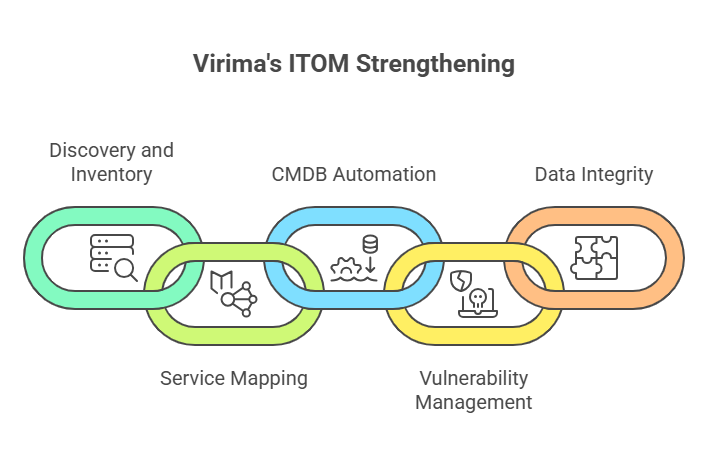
How Virima strengthens ITOM capabilities
Virima bridges ITOM and ITSM into a unified ServiceOps practice. It delivers core ITOM capabilities: discovery, CMDB, service mapping—either as an all-in-one platform or tightly integrated with your existing ITSM tool. Either way, operational data flows directly into service workflows instead of living in separate silos. Its stack combines IT discovery, service mapping, CMDB automation, IT Asset Management, ITSM, and Virima Visual Impact Display (ViVID™), which overlays ITSM records and vulnerability data directly onto service maps.
Discovery and inventory
Virima’s IT discovery runs agentless IP-based scans with hundreds of extendable probes. Optional Discovery Agents cover Windows, macOS, and Linux endpoints for persistent monitoring, even when devices roam off-network. Cloud discovery covers AWS and Azure environments, pulling cloud assets into the same CMDB as on-prem infrastructure.
Discovery scans run on configurable schedules, so the asset inventory stays close to current. Running frequent, time-varied scans casts the widest net across the environment.
Service mapping with ViVID™
ViVID™ (Virima Visual Impact Display) overlays ITSM data, vulnerability information, and other operational data onto service maps. That turns static dependency maps into operational dashboards where teams can see open incidents, pending changes, and known vulnerabilities in the context of the services they affect.
Teams across IT operations, cybersecurity, and DevOps use these maps for change impact analysis, root cause investigation, and stakeholder communication.
CMDB automation and ITSM integration
Virima syncs discovery data and service maps with ITSM platforms through detailed CMDB integration. This helps you improve operations management ITOM by keeping your systems connected and visible. You can choose which discovered assets and updates move to your external CMDB. You can do this manually or use simple automation rules to save time.
Virima syncs discovery data and service maps with your service management ITSM platforms through detailed CMDB integration. This helps you connect business processes, improve service delivery, and support your management system. You can choose which discovered assets and updates move to your external CMDB. You can do this manually or by using simple rules that match your business objectives.
As a result, your CMDB stays current without extra effort. Your service desk and team members always work with accurate data. This improves response time, helps you resolve issues faster, and supports a better customer experience. It also gives you the right performance metrics to inform decisions and maintain the right level of service.
Virima also includes a built-in ITSM solution based on the ITIL framework. You can manage incidents, changes, problems, service requests, configuration, and knowledge in one place. This setup supports strong business operations and improves daily workflows. It also helps you meet your service level agreement (SLA) goals and manage multiple service level agreements (SLAs) with ease.
If you already use another platform, you still have flexibility. Virima supports integration with tools like ServiceNow, Ivanti, Jira Service Management, HaloITSM, Cherwell, Xurrent, and Hornbill. So, you can connect your existing cloud services and improve operations management ITOM without changing your system.
Vulnerability management
Virima integrates with the NIST National Vulnerability Database (NVD) at no extra cost. For Windows Server assets, Virima automatically checks discovered data against known CPEs and CVEs from the NIST NVD. ViVID™ service maps surface those findings in context, weighted by asset criticality and the business services that depend on each server. For full multi-OS vulnerability coverage, Virima pairs with dedicated VM scanners.
How to decide between ITOM and ITSM investments
The short answer: most organizations need both. The real question isn’t whether you need both; it’s whether you’ll run them as separate disciplines or converge them into a unified ServiceOps practice. Separate ITOM and ITSM tools and teams create data silos and slow incident response. A converged ServiceOps approach (ITOM data feeding directly into ITSM workflows) is increasingly the standard, and it’s what leading platforms like Virima support. ITOM and ITSM solve different problems, and investing in one without the other leaves blind spots.
If your team struggles with asset visibility, dependency mapping, or infrastructure monitoring, start with ITOM. If the bigger pain is service delivery, SLA management, or incident workflows, focus on ITSM first.
For most mid-market and enterprise organizations, the practical path is a platform that bridges both. Virima’s integration model lets teams layer ITOM capabilities on top of their existing ITSM platform, whether that’s ServiceNow, Ivanti, Jira Service Management, or others, without a full platform displacement. The same criteria apply across the wider category, so it helps to compare IT management software across ITSM, ITAM, ITOM, and CMDB before you commit to any one tool.
Should I invest in ITOM or ITSM first? Start with ITOM if your team lacks asset visibility, dependency mapping, or infrastructure monitoring. Start with ITSM if the bigger pain is service delivery gaps, SLA failures, or unstructured incident workflows. For mid-market and enterprise environments, most organizations need both, and benefit most from a platform that bridges the two through a shared CMDB.
Here are the factors worth evaluating when comparing ITOM vs ITSM solutions:
- Discovery depth: Does the tool scan your full environment, covering cloud, on-prem, and edge devices?
- CMDB accuracy: Is the CMDB automatically maintained, or does it depend on manual updates that go stale?
- Service mapping: Can you visualize dependencies and overlay operational data like incidents and changes?
- Integration flexibility: Does it work with your current ITSM platform without a rip-and-replace?
- Total cost of ownership: What are the real licensing, deployment, and ongoing maintenance costs?
Virima addresses all five. SOC 2 Type II certification covers security and compliance. PinkVERIFY ITIL 4 covers six core ITSM processes. And its flexible deployment model, either as an all-in-one platform or layered on top of an existing ITSM tool, keeps the total cost of ownership well below enterprise-only alternatives.
See how Virima converges ITOM and ITSM into unified ServiceOps. Watch discovery-driven CMDB automation feed real-time operational data directly into incident response, change management, and service workflows.
Frequently asked questions about ITOM and ITSM
Can I use ITOM without ITSM?
Technically yes, but it is rarely ideal. ITOM on its own keeps infrastructure and system performance under control, but without ITSM you lose the structure that ties IT work to user needs and business goals, along with service-level insight and workflows. ITOM keeps systems running; ITSM makes sure those systems serve the people who rely on them.
How do ITOM and ITSM integrate in practice?
They connect through shared tools and data. An ITOM tool can detect a system issue and trigger an incident in the ITSM platform. During a planned change, ITOM supplies health and dependency data that helps ITSM teams assess risk. A shared CMDB sits underneath both, giving each side a common view of assets and their relationships.
Why is accurate IT discovery critical for ITOM and ITSM?
Discovery keeps your CMDB current. An accurate CMDB is the foundation that lets both ITOM and ITSM work effectively; incident response teams have context, change managers can assess impact, and capacity planning is accurate. Without discovery, your CMDB goes stale, and both domains suffer.
How do we move from separate ITOM and ITSM to ServiceOps?
Connect them through your CMDB: enable automated IT discovery to keep it current, sync CMDB updates to your ITSM platform, and integrate ITOM data (service maps, dependencies, asset health) into service workflows. This bridges the gap. For new implementations, choose platforms designed for ServiceOps from the start.
What happens when ITOM and ITSM data are out of sync?
When the infrastructure picture ITOM holds does not match the service records ITSM relies on, both break down. Incident triage slows because teams are working from different asset states. Change approvals carry hidden risk because impact analysis is based on stale dependency data. A shared CMDB that both domains update from the same discovery source is the most direct fix.