Is ServiceNow CMDB service mapping right for your business?

Incomplete application dependency maps remain a primary trigger for unmapped IT changes and costly service outages. When IT teams lack accurate relationships between infrastructure configuration items and core business applications, change risk management becomes guesswork and incident resolution stalls.
ServiceNow CMDB Service Mapping aims to solve this by constructing dynamic dependency trees inside the ServiceNow data model. However, high ITOM licensing tiers, complex entry-point configurations, and heavy CSDM prerequisites leave many IT organizations evaluating whether to deploy native ServiceNow mapping or augment their ServiceNow ITSM with a faster, external discovery and mapping engine.
Is ServiceNow CMDB service mapping right for your business?
ServiceNow CMDB service mapping fits large enterprises fully committed to the ServiceNow ITOM stack with mature CSDM, clean horizontal discovery, and budget for ongoing entry-point upkeep. Organizations seeking rapid service visibility without high ITOM license costs often augment ServiceNow ITSM by feeding CMDB tables from an external discovery and service mapping engine.
What is ServiceNow CMDB service mapping
ServiceNow CMDB service mapping helps businesses understand how their services and infrastructure are connected. CMDB stores information about IT assets, known as configuration items (CIs), and their relationships. Further, ServiceNow CMDB service mapping builds on this by showing how these CIs work together to deliver services.
CMDB business service mapping provides a visual map of your IT environment. With this map, it helps your team manage incidents, plan changes, etc. It also collects data from different sources, creating a unified view of your IT landscape.
- Find the systems and applications that support key business services.
- See how changes in one area affect other parts of the service.
- Improve ITSM management by having a clear view of your critical services.
- Troubleshoot faster by understanding how each service works.
Key Capabilities and Strengths of ServiceNow Service Mapping
ServiceNow Service Mapping is an enterprise-grade ITOM capability designed to map relationships between IT infrastructure components and high-level business services. When fully implemented, it delivers distinct capabilities:
- Native CSDM Alignment: Maps configuration items (CIs) directly to ServiceNow’s Common Service Data Model (CSDM) framework, ensuring consistency across Incident, Problem, and Change Management.
- Multi-Method Discovery Integration: Combines pattern-based entry-point discovery, tag-based mapping, and traffic-based mapping to construct detailed dependency trees.
- Unified Platform Ecosystem: For organizations already operating exclusively within ServiceNow ITOM, ITAM, and ITSM, native service mapping eliminates the need for third-party data synchronization.
- Automated Health Dashboards: Provides CMDB Health Dashboards to monitor CI correctness, completeness, and compliance across mapped infrastructure.
Where ServiceNow Service Mapping Works Best
ServiceNow Service Mapping is ideal for large enterprise organizations with mature ITIL processes, dedicated ServiceNow administrative teams, substantial ITOM budgets, and fully standardized entry points across all core business applications.
Challenges to consider before choosing ServiceNow CMDB service mapping
Although ServiceNow CMDB service mapping has many benefits, it also comes with some challenges. You should consider these before deciding if it’s the right tool for your business.
Implementation complexity
Deploying ServiceNow Service Mapping requires clean underlying discovery data, precise entry points (such as URLs, IP addresses, and ports), and configured credentials. According to research from the EMA ServiceOps Report, unmapped IT changes and incomplete asset dependencies account for over 60% of major service outages in enterprise environments. When entry points change or custom applications lack standard patterns, maintaining ServiceNow service maps requires ongoing administrative maintenance and costly specialized consulting resources.
Why do ServiceNow service mapping implementations fail?
ServiceNow service mapping projects frequently stall due to incomplete horizontal discovery, missing administrative credentials, unstable entry points, and heavy CSDM prerequisites. When custom applications lack standard patterns or entry points drift after releases, maintaining accurate maps requires continuous administrative effort and costly specialized consulting resources.
High Licensing and Ownership Costs
ServiceNow Service Mapping is typically licensed as part of higher-tier ITOM packages. In addition to per-node or per-CI licensing fees, organizations must account for mandatory implementation partner fees, ongoing admin overhead, and subscription upgrades. For mid-market enterprises or organizations seeking rapid time-to-value, these cumulative costs often exceed the initial software budget.
Scalability issues
Only some businesses need the full suite of features that ServiceNow® offers. If your IT environment is relatively simple, you may not use all the available capabilities. In this situation, you might end up paying for unnecessary features.
Is ServiceNow CMDB service mapping right for your business?
Before you decide, it’s important to consider whether ServiceNow CMDB service mapping fits your business needs. Here are a few factors to keep in mind:
Business size and IT complexity
If your business has a large, complex IT infrastructure, ServiceNow® can help simplify service management. But if you’re a smaller business with less complexity, the features offered might be more than you need. In contrast, a simpler solution could meet your requirements just as well.
Budget considerations
The cost of ServiceNow® is often a major consideration. For businesses with a larger IT budget, the investment can provide good returns. But for smaller organizations, consider more affordable alternatives that still offer the core features of CMDB business service mapping.
Existing tools and integration
Consider the tools you are currently using. If your current tools offer similar features, such as asset discovery and dependency mapping, ServiceNow® might not be necessary. Also, consider how well it integrates with your existing systems. Integration issues can also add complexity and increase the overall cost.
ServiceNow Service Mapping Readiness Scorecard
Before committing to native ServiceNow Service Mapping or choosing an external augmentation path, evaluate your IT environment across ten operational criteria:
| Evaluation Criterion | High Native ITOM Readiness | Augmentation / External Mapping Indicator |
|---|---|---|
| CSDM Maturity | CSDM 4.0 crawl/walk/run fully implemented | CSDM in early stages or inconsistent application mapping |
| Application Entry Points | 90%+ COTS apps with static URLs, ports, and IPs | High proportion of custom, microservice, or legacy entry points |
| Administrative Capacity | Dedicated ServiceNow engineering team for pattern maintenance | Lean ITOM staff managing multiple platform priorities |
| ITOM Budget Band | Enterprise budget supporting per-node suite licensing | Mid-market or cost-sensitive IT budget requiring predictable pricing |
| ITSM Ecosystem | 100% standardized on ServiceNow across all IT workflows | Multi-ITSM environment (e.g., ServiceNow + Jira Service Management) |
| Deployment Timeline | 6-12 month strategic rollout acceptable | Immediate 30-day requirement for change risk visibility |
| Hybrid Cloud Share | Standardized AWS/Azure infrastructure with clear tagging | Complex multi-cloud, on-prem, and containerized hybrid sprawl |
| Credential Management | Centralized CyberArk/Vault with universal server access | Segmented credentials across business units and security zones |
| Change Velocity | Infrequent scheduled releases with static architecture | High-frequency CI/CD deployments causing frequent pattern drift |
| Primary Goal | Single-vendor ITOM consolidation | Rapid blast-radius visibility inside ServiceNow CMDB at lower TCO |
Augmenting ServiceNow with Trusted Runtime Truth
You do not need to replace ServiceNow ITSM to achieve fast, accurate service mapping. Discover how Virima ViVID™ automatically maps application dependencies and feeds authoritative data directly into your ServiceNow CMDB.
Explore Trusted Runtime Truth
Alternatives to ServiceNow CMDB service mapping
ServiceNow® is not the only option available for CMDB business service mapping. Other solutions, like Virima, offer similar features at a lower price point and with more flexibility.
Virima: Fast, Authoritative Service Mapping for Enterprise IT
Virima provides automated IT discovery, CMDB, and service mapping designed for rapid deployment and seamless integration. Rather than forcing organizations into a single proprietary stack, Virima functions either as a complete standalone ITOM/ITAM solution or as a high-value discovery and service mapping engine that feeds directly into ServiceNow.
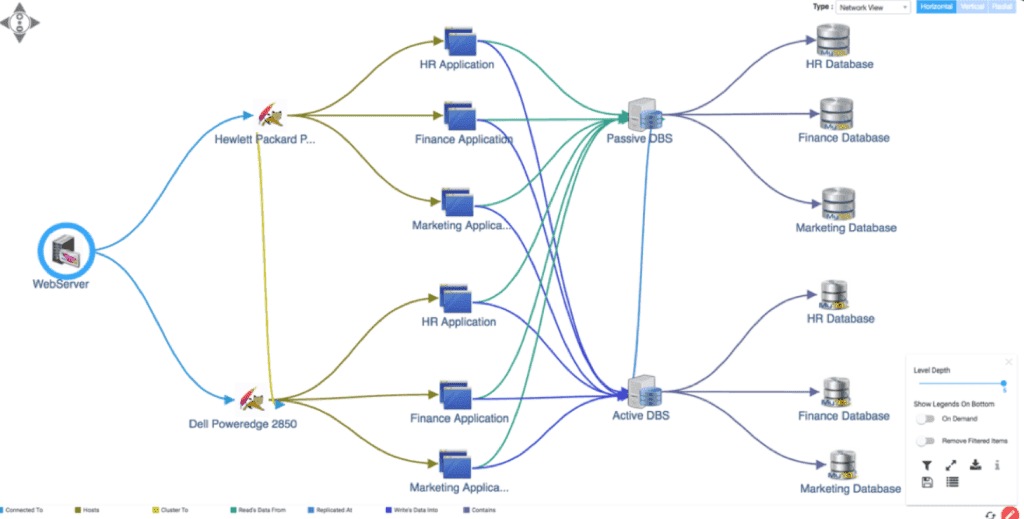
Virima service mapping offers multi-level visualization to clarify the dependencies on each CI in the IT infrastructure.
Key features of Virima
- ViVID™ Virima Visual Impact Display: ViVID™ enhances CMDB service mapping by overlaying active ITSM records (incidents, problems, pending changes, and security vulnerabilities) directly onto dynamic service maps. This provides change managers and incident response teams with immediate blast-radius visualization during change planning and major incident triage.
- High-frequency automated updates: Scheduled discovery capabilities maintain CMDB accuracy through high-frequency discovery cycles, capturing infrastructure updates and application changes with minimal administrative effort.
- Enhanced data accuracy: Virima focuses on maintaining accurate data within the CMDB. This helps organizations reduce MTTR and increase Mean Time Between Failures (MTBF) by providing better visibility into service relationships.
Choosing the best solution for your CMDB business service mapping
| Capability / Feature | ServiceNow Native ITOM Mapping | Virima Service Mapping (Standalone) | Virima + ServiceNow Integration |
|---|---|---|---|
| Primary Deployment Model | Full native ServiceNow ITOM stack | Standalone ITOM, ITAM & CMDB platform | Virima discovery/mapping feeding ServiceNow CMDB |
| Service Map Building | Pattern, entry-point, & tag-based building | Automated map building from defined service boundaries | Virima builds maps and syncs CIs/relationships to ServiceNow |
| Implementation Timeline | 3 to 9+ months (often requires consultants) | 2 to 4 weeks | 2 to 4 weeks |
| ITSM Record Overlay | Native inside ServiceNow ITSM | Native ViVID™ overlay (Incidents, Changes, Risks) | Overlays Virima maps while syncing data to ServiceNow |
| IT Discovery Capabilities | ServiceNow ITOM Discovery (separate license) | Included automated agentless & agent discovery | Virima discovers hybrid IT and populates ServiceNow CIs |
| Service Mapping License Cost | High (ITOM suite per-node/tier pricing) | Predictable, node-based pricing | Significantly lower TCO than full ServiceNow ITOM |
| CSDM Alignment | Native ServiceNow CSDM structure | Aligned with CSDM & ITIL best practices | Populates ServiceNow CSDM tables automatically |
| Maintenance Overhead | High (ongoing pattern tuning & entry point fixes) | Low (automated dependency updates) | Low (Virima handles discovery & mapping maintenance) |
| Best-Fit Organization | Large enterprise fully committed to complete ServiceNow stack | Mid-to-large IT orgs needing rapid ITAM/CMDB/Mapping | Organizations using ServiceNow ITSM wanting faster, lower-cost mapping |
Deciding between ServiceNow Service Mapping and Virima comes down to your budget, timeline, and existing IT stack. If your organization has an unlimited budget, a dedicated ServiceNow engineering team, and a requirement for a single-vendor platform, ServiceNow ITOM Service Mapping is a viable choice.
However, if your team requires rapid time-to-value, transparent node-based pricing, and automated dependency mapping, either as a standalone system or to augment an existing ServiceNow CMDB, Virima provides an authoritative, flexible alternative. Explore how Virima integrates with ServiceNow to deliver complete operational visibility.