How to Monitor IT Assets in Real Time: Task Guide for IT Teams

Monitor IT assets in real time by combining discovery through agent, agentless, and API methods, a last-seen timestamp on every record, and alerts when an asset disappears, changes configuration, or falls out of compliance. Most IT teams cannot watch every endpoint manually, so monitoring depends on scheduled discovery cycles that refresh inventory records, flag differences from the prior cycle, and route those differences to owners for review.
For an ITAM manager facing an audit or a CMDB owner answering for a change incident, the fear is finding a laptop, server, or cloud instance that no one tracked. This guide shows a repeatable workflow that keeps hardware and software inventory current across on-premises, remote, and cloud estates without relying on spreadsheets or quarterly cleanups. You will see which discovery method fits each asset class, which events deserve an immediate alert, how to structure dashboards, and which failure modes break monitoring programs.
Step-by-Step IT Asset Monitoring Process
Start with a clear asset scope before you tune any schedule. List the asset classes that matter for operations and audit defense, including end-user devices, servers, network gear, virtual machines, and cloud instances across AWS and Azure. Assign an owner for each class so every alert has a named reviewer and stale records do not wait in a shared queue.
Build the inventory from discovery output rather than manual entry. Virima IT discovery populates configuration items without manual data entry, maps dependencies between items, and reconciles data from multiple sources into one authoritative record. Run agent-based discovery on managed laptops and servers for deep hardware and software detail, agentless network scans for infrastructure and unmanaged endpoints, and cloud APIs for elastic workloads that appear and disappear between on-site scans.
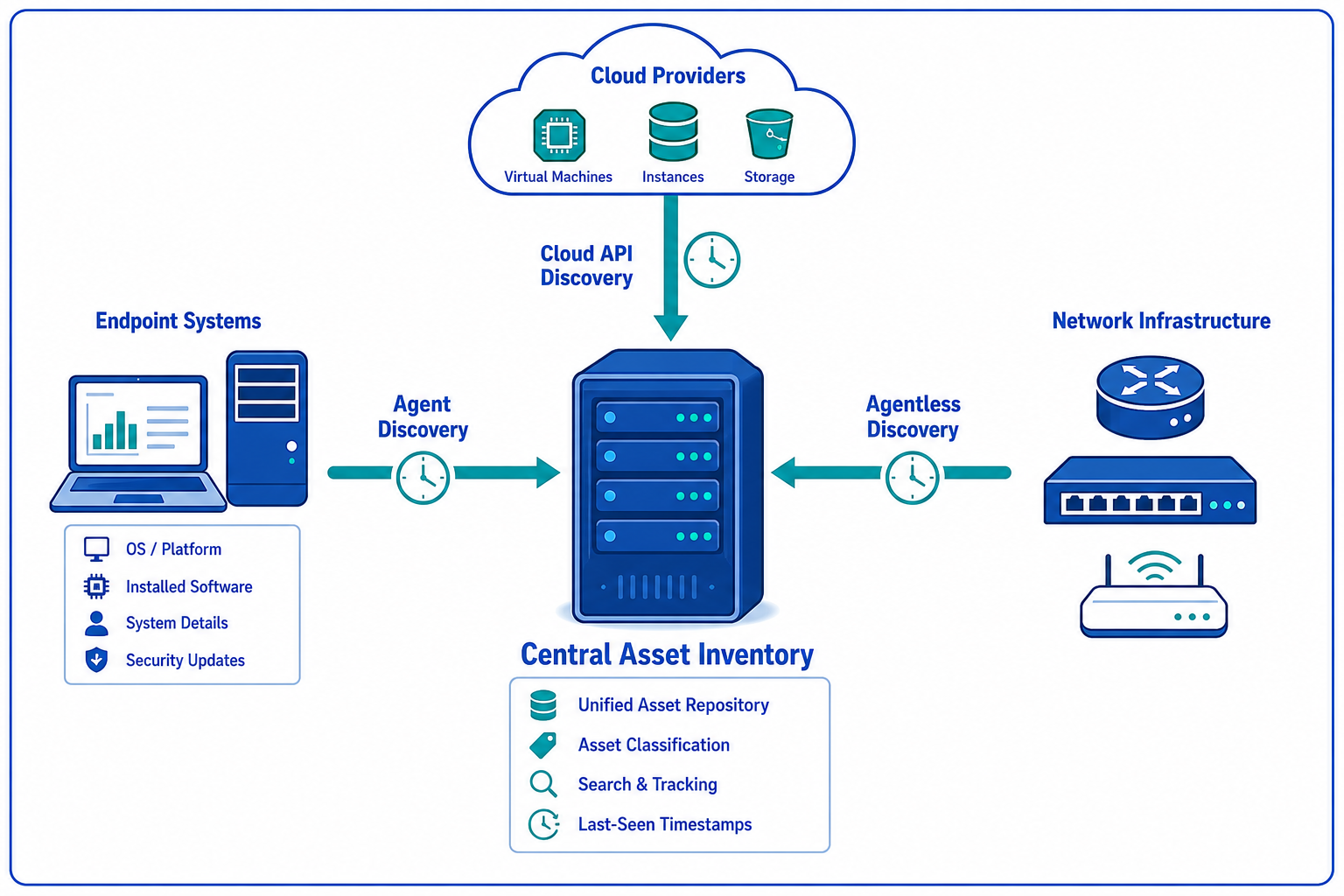
Set a last-seen timestamp as the freshness signal for every record. Each discovery cycle updates the timestamp when an asset responds, which lets reviewers sort inventory by recency and spot records that stopped responding. Track accuracy, completeness, and staleness with CMDB health scoring so leaders see whether coverage is improving or drifting between cycles.
Reconcile differences on every cycle instead of saving them for month-end. Multi-source reconciliation merges serial numbers, hostnames, cloud instance IDs, and installed software into one record, with serial number or cloud instance ID as the durable join key when hostnames change. Route additions, removals, and configuration changes to class owners, then require confirmation before the record is marked reviewed.
Close the loop with lifecycle tracking. Virima tracks configuration items from deployment through decommission, flags hardware and software approaching vendor end of life, and stores contract and warranty dates alongside each asset. Teams that confirm decommissions promptly keep license counts aligned with installed software and reduce audit exposure from retired machines that still appear active.
Discovery Methods Compared: Agent, Agentless, and Cloud API
No single method covers a hybrid estate. Use the table below to match each method to the assets it observes best, then combine methods so gaps in one source are covered by another source on the next cycle.
| Method | Best Coverage | What It Collects | Scheduling Guidance |
|---|---|---|---|
| Agent-based discovery | Managed laptops, remote endpoints, Windows and Linux servers | Hardware specs, serial numbers, OS versions, installed software, patch levels | Daily or more frequently for mobile fleets; lightweight agent reports on check-in |
| Agentless discovery | Network gear, printers, unmanaged endpoints, data center infrastructure | OS fingerprint, open services, network identity, responding IP inventory | Nightly network scans plus targeted sweeps after subnet changes |
| Cloud API discovery | AWS and Azure instances, virtual machines across VMware and Hyper-V | Instance IDs, sizes, tags, ownership metadata, start and stop state | Multiple cycles per day for elastic accounts; hourly where change volume is high |
Agent-based discovery gives the deepest software inventory because the local agent reads installed applications, versions, and license footprint directly from the endpoint. That depth supports software normalization, which standardizes publisher names so Microsoft SQL Server editions do not appear as five separate products. Remote laptops that leave the corporate network still report when they connect, which keeps last-seen timestamps current for a hybrid workplace with broad remote coverage described in securing assets across hybrid workplaces.
Agentless discovery covers assets that cannot take an agent, including routers, switches, firewalls, and shared lab machines. Credential-based scans identify OS versions and hardware fingerprints without endpoint installs, which helps network and security teams confirm that infrastructure devices remain visible between maintenance windows. Schedule these scans outside backup windows to avoid credential lockouts and incomplete responses.
Cloud API discovery handles elasticity that network scans miss. Instances launched for testing on Friday can terminate before Monday, so daily scans alone leave license and security reviewers working from outdated lists. Frequent API polling captures instance IDs, tags, and ownership fields, then reconciliation joins that cloud metadata to CMDB records for cost allocation and incident triage.
Critical Alert Examples That Deserve Immediate Review
Alerts work when they signal asset truth changes that affect risk, cost, or service availability. Limit immediate alerts to events where delayed review creates audit exposure or extends incident triage, and send lower-risk drift to a daily digest for owners.
A disappeared asset alert fires when a previously seen endpoint misses consecutive discovery cycles. The alert should include the last-seen timestamp, assigned user, business service links, and prior software inventory so the owner can distinguish a decommissioned machine from a silent agent or a device that left the network. Require owners to confirm decommission, reimage, or reassignment before the record is archived.
An unapproved software alert fires when discovery detects an installer or version outside the approved catalog. Include publisher, product, version, endpoint, and user so service desk reviewers can approve, remove, or route the request through procurement. The National Institute of Standards and Technology guidance on asset management frames this inventory accuracy as the foundation for protecting systems, which helps justify strict review for administrative tools and remote-access utilities.
A configuration change alert fires when OS version, hardware fingerprint, or security control state differs from the prior authoritative record. Include prior and current values, discovery source, and affected service relationships so change managers can trace impact before approving follow-up work. Virima change impact analysis shows downstream configuration item impact before approval, which shortens review for server changes tied to revenue services.
A compliance drift alert fires when an asset falls out of license, warranty, or support coverage. Flag installations that exceed purchased entitlements, devices approaching end of support, and contracts nearing renewal so finance and ITAM reviewers can true up licenses or schedule replacements. License compliance reporting identifies gaps before vendor audits, which protects teams from unbudgeted true-up charges.
Dashboard Setup and Reporting for Daily Monitoring
Dashboards fail when they show raw counts without ownership or next action. Build role-based views that answer whether coverage is complete, which records need review, and which services carry the most stale data.
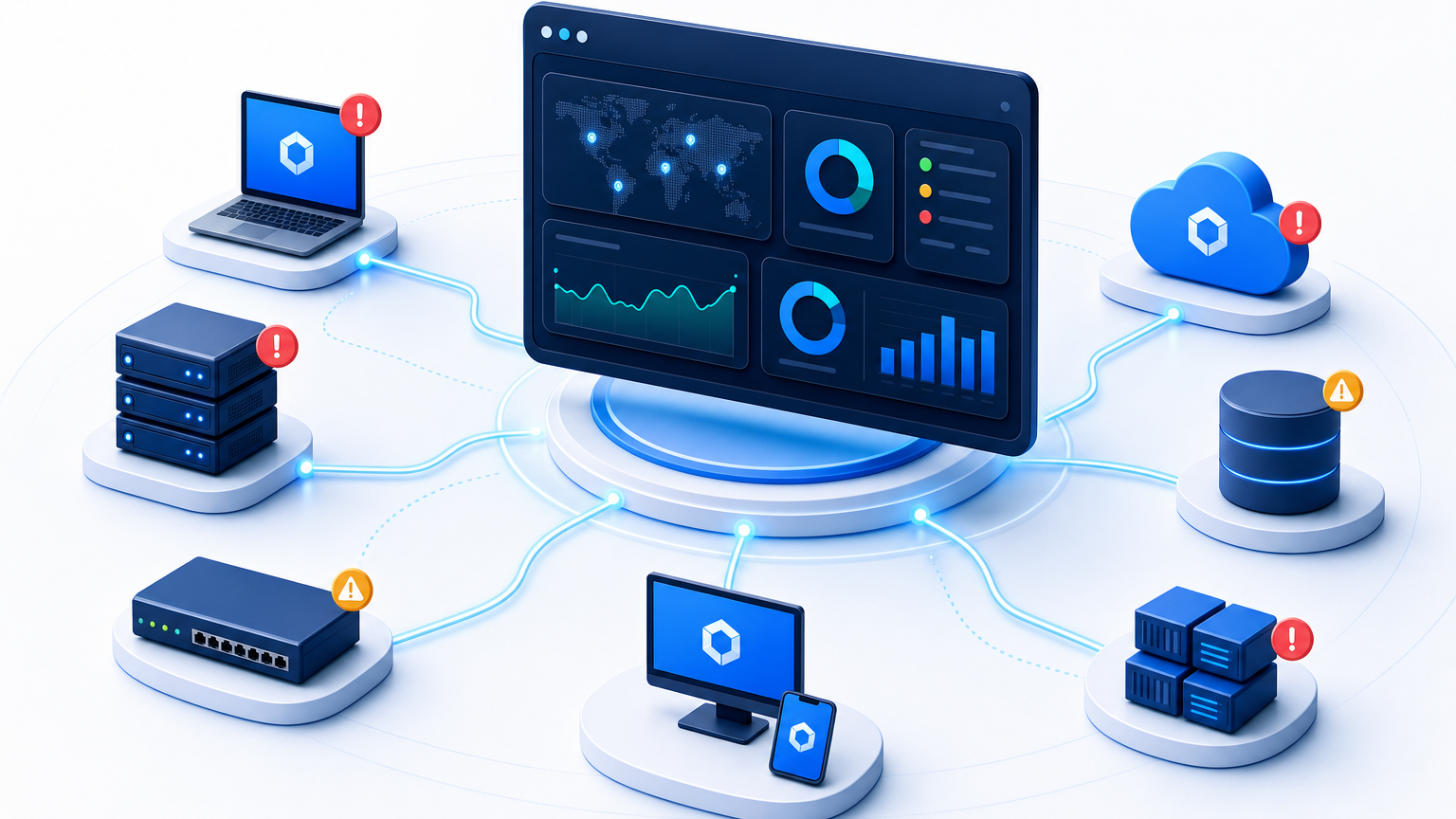
Start with a coverage view by asset class and location. Show discovered assets against expected counts from procurement and HR feeds, last-seen distribution by age band, and unmanaged segments that responded to scans without credentials. This view helps directors spot enrollment gaps after hiring waves or office moves without paging through device lists.
Add an exceptions queue for owners. List disappeared assets, unapproved software, configuration mismatches, and compliance drift with age, owner, and service context in one table. Sort by service criticality rather than alert volume so database servers supporting order processing appear above lab machines with missing agents.
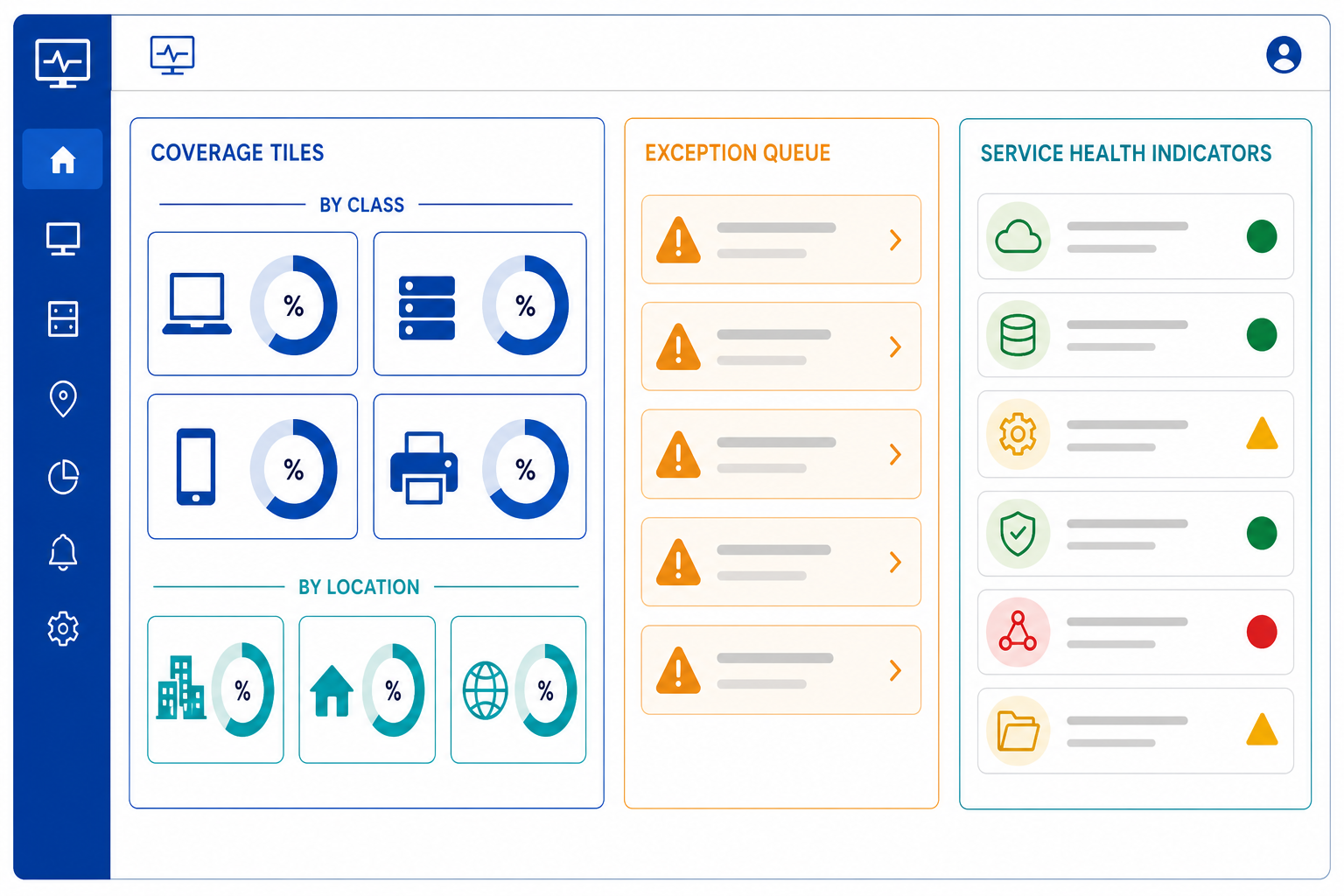
Include a service lens for incident response. Once service definitions are provided manually, through spreadsheet import, or through enterprise architecture inputs, Virima builds application-to-infrastructure dependency maps that stay current as infrastructure changes. Operators can trace from a failing configuration item to the affected business service, which reduces triage time when alerts reference unfamiliar hostnames.
Schedule weekly trend reports alongside daily views. Track discovery coverage delta, mean time to confirm exceptions, license position movement, and audit trail completeness. Virima audit trail logging records changes to configuration item records, which gives auditors a verifiable history of additions, updates, and decommissions. Teams that sustain this rhythm build toward Trusted Runtime Truth across hybrid estates. Export custom reports to CSV for finance reviews and downstream analysis without rebuilding queries each month.
Common Failure Modes in Monitoring Programs
Monitoring breaks most often from process gaps rather than tool limits. Naming these failure modes early helps teams protect schedules, credentials, and ownership before coverage drifts.
Stale credentials stop agentless scans silently. Service account password rotations, expired SSH keys, and changed SNMP strings cause subnets to return fewer responses while dashboards still show prior totals. Rotate discovery credentials through a documented change process and alert when response rates drop by subnet between cycles.
Hostname-only joins create duplicates after reimaging. When teams join records on hostname alone, renamed or reimaged machines generate parallel records that inflate counts and confuse license math. Use serial number for physical assets and cloud instance ID for elastic workloads as durable join keys, and treat hostname as a display attribute that can change.
Decommission delays inflate license exposure. Servers removed from virtualization consoles often remain active in inventory when no one confirms removal, which keeps software installs counted toward effective license position. Require infrastructure owners to confirm decommission in the same cycle the instance stops responding, supported by CI lifecycle tracking from deployment through retirement.
Alert fatigue buries real risk. Programs that page owners for every minor version change train reviewers to ignore the queue, which delays response to disappeared assets and unapproved administrative tools. Keep immediate alerts narrow, move informational drift to digests, and review alert thresholds quarterly against incident and audit findings.
Fragmented ownership leaves exceptions unworked. Shared queues without named owners age quickly during peak project periods. Assign class owners, back them up during leave, and report queue age by owner so leaders can rebalance review load before month-end audits.
Build a Monitoring Cadence Your Team Can Sustain
A sustainable cadence pairs frequent discovery cycles with clear ownership and a narrow alert set. Confirm scope by asset class, combine agent, agentless, and API sources for full coverage, reconcile every cycle on serial number or cloud instance ID, and review exceptions by service impact rather than raw volume. Teams that follow this rhythm enter audits with reconciled inventory, current last-seen evidence, and documented decommissions. Schedule a demo to map a monitoring cadence for your asset classes.
Frequently Asked Questions
How often should automated discovery run?
Run agent check-ins daily for mobile fleets, agentless network scans nightly, and cloud API polling multiple times per day for elastic accounts. Increase frequency after hiring waves, data center moves, or cloud migrations, then confirm that last-seen timestamps and coverage scores improve on the next cycle.
Do remote laptops need a local agent for monitoring?
Remote laptops benefit strongly from the lightweight discovery agent because it reports hardware, software, and patch state whenever the device connects. Agentless scans cannot reliably reach devices outside the corporate network, so teams that rely only on network scans lose visibility when users work from home.
What events should trigger an immediate IT asset alert?
Alert immediately for disappeared assets, unapproved software installs, material configuration changes, and license or warranty drift that affects audit exposure. Send lower-risk drift, such as minor version updates, to a daily digest, so owners stay focused on events that change risk, cost, or service availability.
Is asset monitoring the same as RMM?
Remote monitoring and management focuses on endpoint health, patch deployment, and remote control for managed devices. Asset monitoring maintains authoritative inventory, lifecycle state, license position, and service relationships across all asset classes, which supports audits, change review, and incident triage beyond endpoint remediation.