What fields should an IT asset register include?

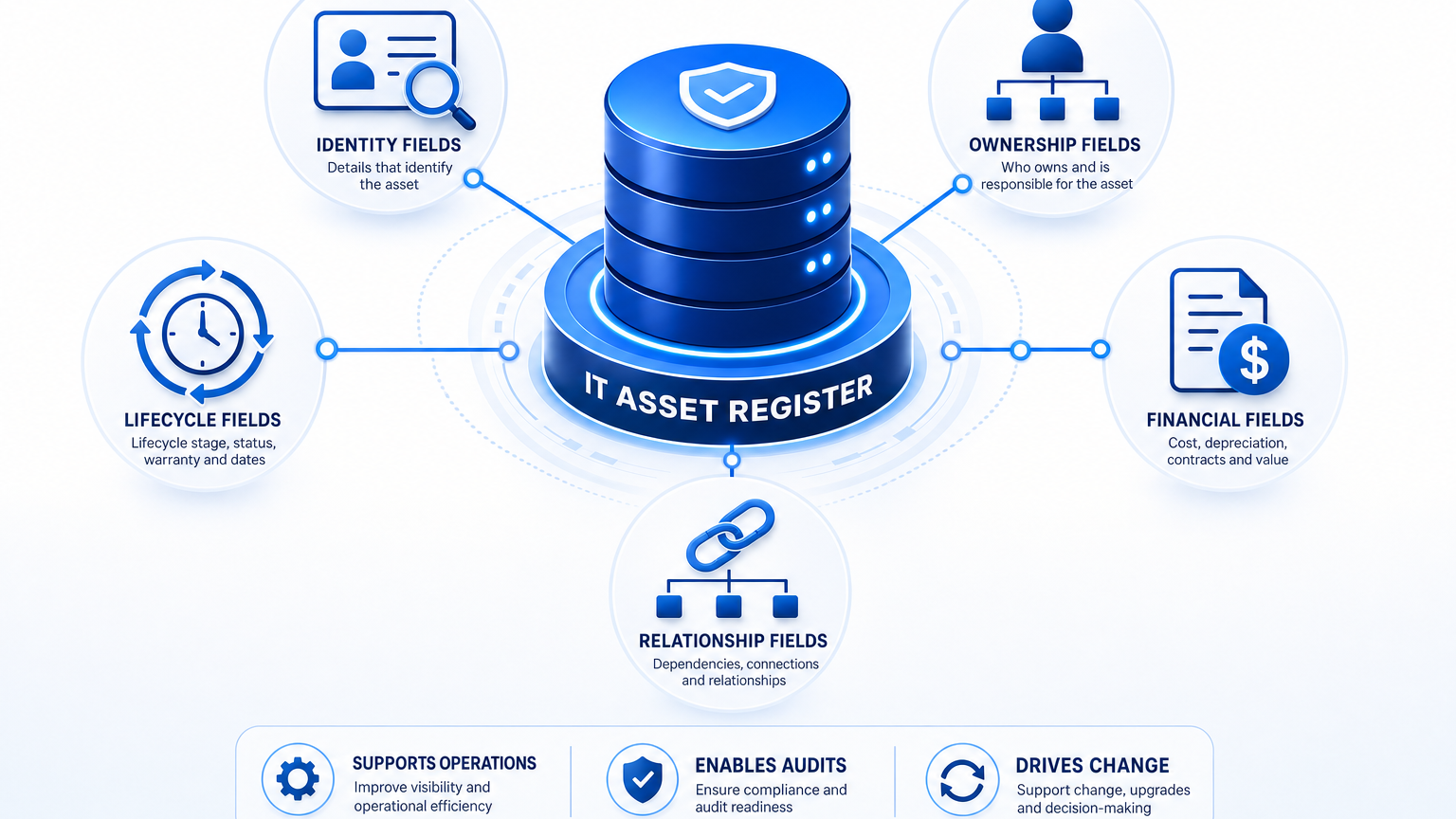
An IT asset register should include identity fields, ownership and location fields, lifecycle and warranty fields, financial and contract fields, and relationship fields that link each asset to services and dependencies. Every record needs a unique asset ID, asset type and category, manufacturer and model, serial number, assigned owner, location, procurement date, warranty status, lifecycle stage, and links to related configuration items and business services. Registers that omit ownership, lifecycle stage, or service relationships fail audits and slow incident triage because teams cannot prove accountability or assess downstream impact with confidence.
Most registers start as inventory lists that track purchases and assignments. That scope covers finance questions but leaves operations exposed during incidents, changes, and audits. A register earns operational value when each record answers five questions without follow-up research: what the asset is, who owns it, where it sits in its lifecycle, what it cost and which contract covers it, and what depends on it. The sections below define each field group, explain why auditors and responders ask for it, and show how discovery-sourced data keeps the record accurate.
Core IT asset register fields that define each asset record
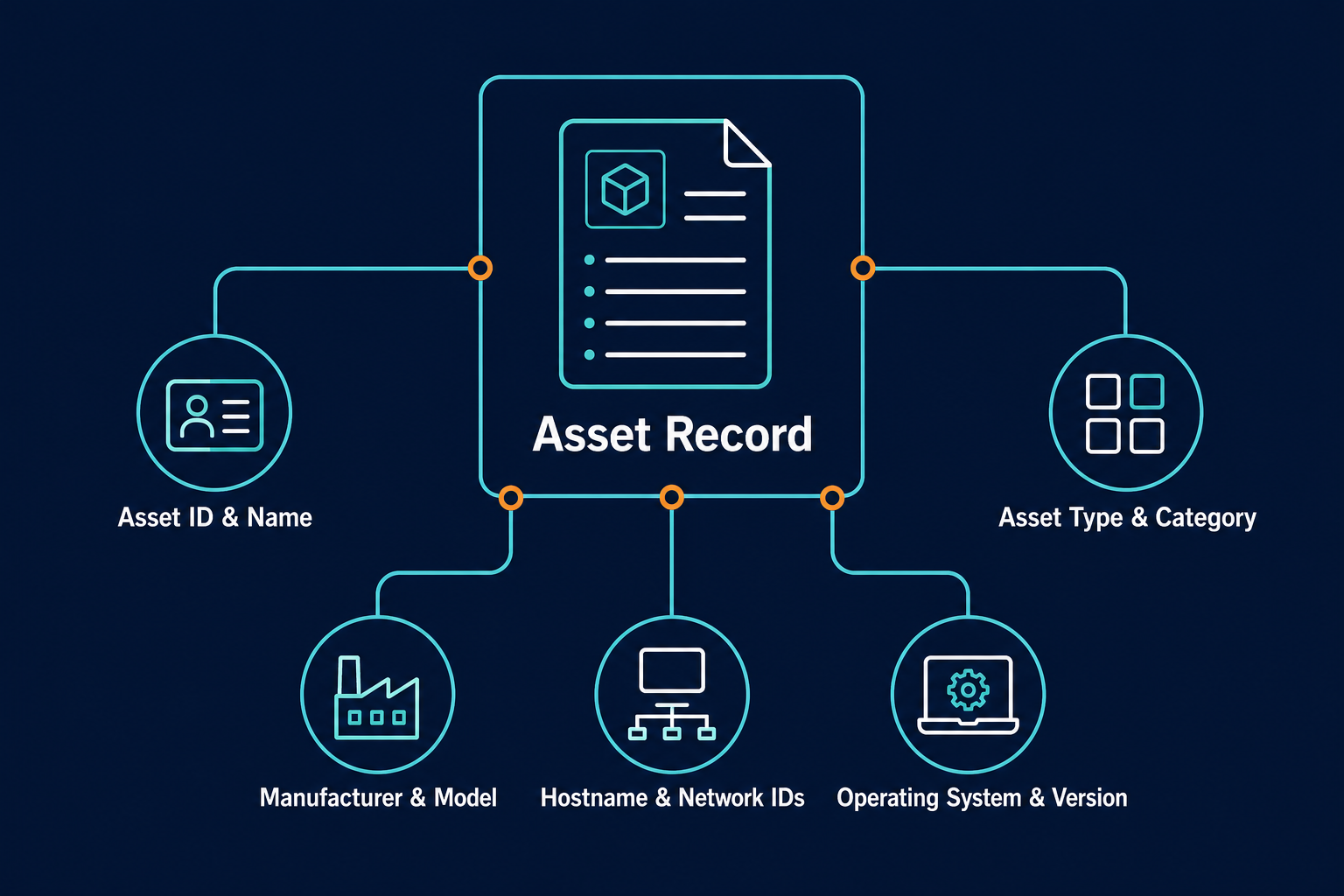
Identity fields distinguish one asset from every other record and support search, reconciliation, and audit evidence. Without stable identity data, duplicate records multiply and reconciliation becomes manual review work. An asset register and a CMDB share this same identity layer — a register uses it to track ownership and lifecycle for inventory control, while a CMDB builds on it with the relationship data that supports incident and change decisions.
That record needs these identity fields:
- Asset ID and asset name
- Asset type, category, and subcategory
- Manufacturer, model, and serial number
- Hostname (where applicable)
- IP and MAC addresses for networked assets
- Operating system and version
- Installed software inventory
Hardware specifications, serial numbers, and installed applications can be populated through scheduled discovery using agentless methods such as WMI, SSH, and SNMP alongside agent-based collection on Windows, macOS, and Linux endpoints.
CISA asset inventory guidance recommends descriptive fields that identify each asset and support security decisions, including device type, network identifiers, and software details. Identity data also provides the join keys used to match procurement records, discovery observations, and service tickets to the same asset. Hostname values change during rebuilds and renames, so durable keys such as serial number or cloud instance ID should anchor reconciliation logic.
What fields should an IT asset register include?
An IT asset register should include identity fields, owner and location, lifecycle and warranty dates, financial and contract data, and service relationships. Each record needs a unique ID, owner, status, and dependency links to support audits, incidents, and changes.
Ownership, location, and assignment fields that establish accountability
Ownership fields answer who is accountable for the asset and where it resides. Auditors request this group first during access reviews, and incident responders rely on it to route triage without delay.
Include these ownership and location fields:
- Assigned user
- Business owner and technical owner
- Department and cost center
- Physical site and floor or rack position
- Cloud account, region, and virtual network for cloud workloads
Records without a named business owner create delays during access reviews and change approvals because accountability remains unclear across shared infrastructure. Gaps like this compound over time rather than staying flat — in a hybrid environment running thousands of CIs across on-prem and cloud, one missing owner field multiplies into dozens of unresolved access reviews by the time of the next audit.
Ownership data should remain current through scheduled discovery cycles and reconciliation with HR, ITSM, and cloud sources. When ownership changes after moves, transfers, or team reorganizations, the register should reflect the update through the next reconciliation cycle instead of depending on manual correction. Multi-source data reconciliation merges observations into a single authoritative record so ticket, procurement, and discovery views stay aligned.
Explore how discovery-sourced records support audit-ready lifecycle evidence.
Lifecycle, warranty, and status fields that drive refresh planning
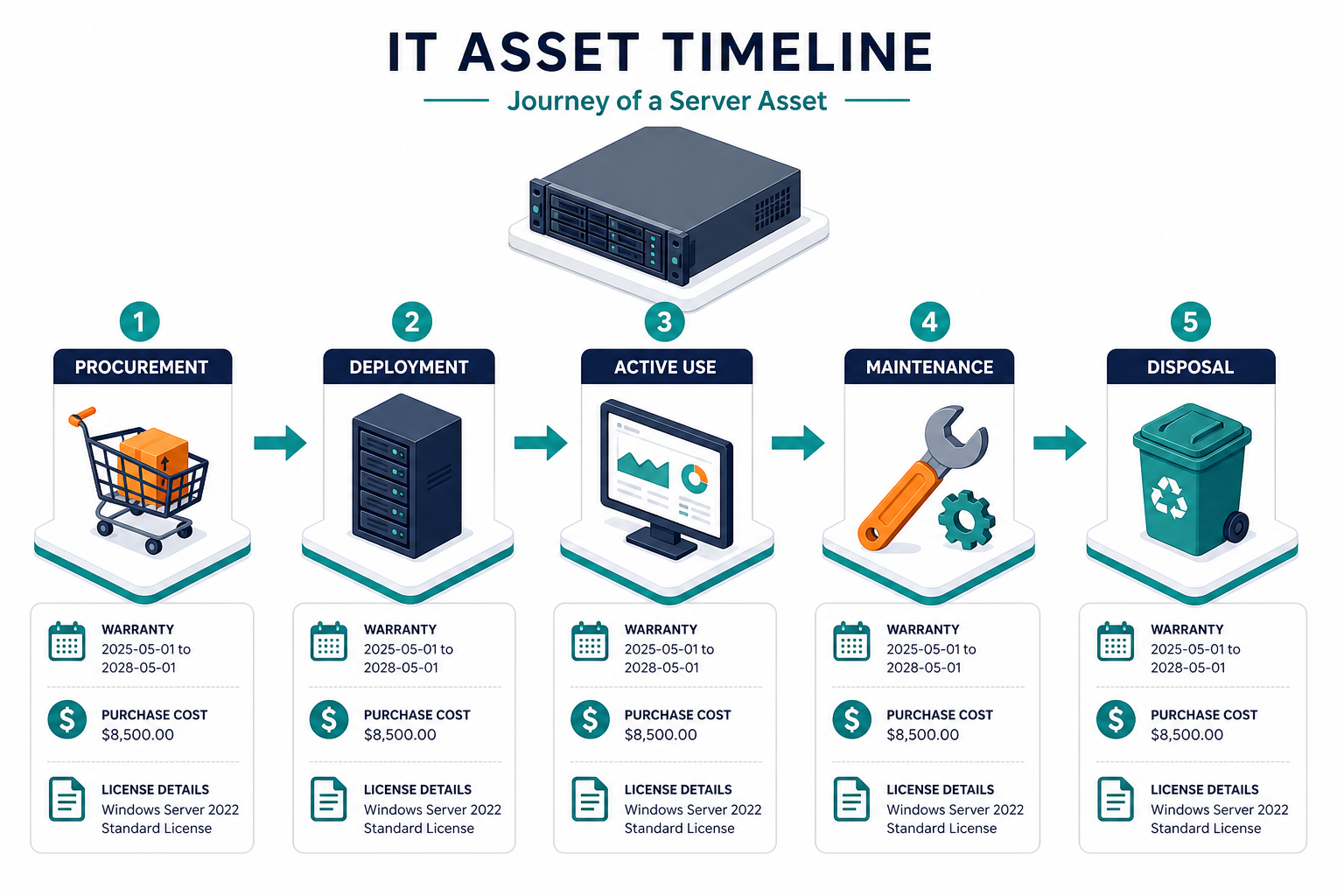
Lifecycle fields show whether the asset is active, aging, or ready for retirement. These fields drive refresh planning, support decisions, and license renewal timing.
Track these lifecycle and warranty fields:
- Procurement date and deployment date
- Asset status
- Lifecycle stage from procurement through disposal
- Warranty start and expiration
- Contract reference
- End of life and end of support dates
ITAM teams use these dates to flag hardware and software approaching vendor end of support and to plan replacements before failure or compliance exposure affects services.
Status values need consistent definitions across teams so reports remain comparable. Define states such as in stock, deployed, in maintenance, retired, and disposed, then map each state to allowed transitions. Virima tracks hardware assets from procurement to disposal and flags approaches to vendor end of life and end of support dates for proactive planning. Audit trails that record changes to configuration item (CI) records provide evidence that status transitions followed an approved path.
Financial and contract fields that connect operations to procurement
Financial fields connect operational records to procurement and finance workflows. They support depreciation tracking, chargeback inputs, vendor management, and renewal planning.
Include these financial and contract fields:
- Purchase cost
- Vendor name
- Contract number
- License entitlement details
- Depreciation schedule
- Renewal dates
License records should compare entitlements against actual installs to identify over-licensing and compliance gaps before a vendor audit. Software vendor audits are becoming both more frequent and more expensive. A 2025 Unisphere Research survey of IT and procurement professionals found 62% of organizations had been audited by a major software vendor in the past year, up from 40% in 2023, and nearly a third incurred financial liabilities exceeding $1 million (DBTA/Unisphere Research, 2025). License entitlement and renewal fields in the register are what let a team answer an audit request with its own data instead of reconstructing it under deadline pressure. Contract and warranty management fields store vendor agreements and expiration dates so renewals receive review time instead of rushed approval.
Rates, journals, and ledger postings belong in finance systems. The register supplies the allocation base that finance uses, including cost objects, durable join keys, owners, and service consumers. Keep allocation logic consistent by tying each asset to a cost center and, where relevant, to the business service that consumes it. Virima’s IT asset management features track purchase cost, contracts, and license entitlements alongside the rest of the lifecycle record, so that allocation base stays reconciled instead of living in a separate spreadsheet.
Relationship and dependency fields that support incidents and changes
Relationship fields turn a flat inventory into operational truth that supports response work. They record what each asset connects to and what breaks when the asset changes.
Include these relationship and dependency fields:
- Parent-child relationships
- Installed-on and runs-on links
- Upstream and downstream dependencies
- Associated business service
- Linked incidents and changes
Accurate relationship data supports change impact analysis by showing downstream effects before approval. Service composition details are provided manually, through spreadsheet import, or through enterprise architecture inputs, and Virima maps the resulting dependencies into a service dependency map, reducing manual map maintenance as the environment changes.
What makes an asset register operational instead of just financial?
An IT asset register becomes operational once it records relationship fields: parent-child links, upstream and downstream dependencies, and the business service each asset supports. Without these fields, incident responders must manually trace what a failing server affects, turning a five-minute lookup into an hour of cross-team calls.
See how Virima’s IT Asset Management features capture and reconcile these fields automatically.
Teams that maintain dependency context resolve incidents faster because responders trace the path from a failing component to the affected service instead of manually checking each candidate system. Infrastructure health views that consolidate status across on-premises and cloud estates depend on the same relationship data. Alert and incident correlation also improves when alerts link to configuration items and affected services instead of arriving as isolated device notifications.
Field quality practices that keep the register audit-ready
Field completeness matters less when values grow stale. Registers stay audit-ready through verification cycles, reconciliation rules, and history logging that prove the data reflects the estate.
Verify high-change fields such as owner, location, and status on a scheduled cycle tied to discovery and reconciliation. Review warranty, contract, and lifecycle dates each month so renewals never arrive as surprises. Track CMDB health through accuracy, completeness, and staleness measures so owners see which field groups need attention. These three measures turn a one-time cleanup into a repeatable process the team can audit. Custom reporting and CSV export support downstream review when auditors request samples or when managers validate prior updates.
For integrations with existing ITSM workflows, Virima shares asset and CI data with platforms including ServiceNow, Jira Service Management, Ivanti, Cherwell, HaloITSM, Xurrent, Hornbill, and TeamDynamix. Learn more about Virima’s integrations.
Closing: what fields an IT asset register should include, in practice
A register that covers identity, ownership, lifecycle, financial, and relationship fields gives each stakeholder what they need from the same record. Finance sees cost and contract coverage. Support sees owner, location, and status. Operations sees dependencies and service impact. Audit sees evidence with history and reconciliation behind it. Start with the minimum field set, enforce ownership and lifecycle discipline, then add relationship context so incidents and changes benefit from the same data that finance already trusts.
Frequently Asked Questions
What is the minimum field set for a small IT team?
Start with asset ID, type, manufacturer and model, serial number, owner, location, status, procurement date, and warranty expiration. That set supports basic tracking, support triage, and refresh planning without heavy administration overhead.
How is an asset register different from a CMDB?
An asset register tracks owned assets across their lifecycle for inventory and financial control. A CMDB tracks configuration items and their relationships to support incidents, changes, and service availability decisions.
How often should register fields be verified?
Verify high-change fields such as owner, location, and status on a scheduled cycle tied to discovery and reconciliation. Review warranty, contract, and lifecycle dates each month so renewals receive timely attention.
How does Virima keep IT asset register fields accurate?
Virima discovers assets across hybrid estates with agentless, agent-based, and API methods, then reconciles multi-source data into authoritative records. Automated population, relationship mapping, and health scoring reduce manual updates while keeping ownership and dependency context current.