CMDB asset management vs ITAM: Key differences explained

CMDB asset management vs ITAM is one of the most common points of confusion in IT operations, because both describe your IT environment yet answer entirely different questions. ITAM tracks what you own, what it costs, and where it sits in its lifecycle, from procurement to retirement. A CMDB tracks how your assets are configured, which services depend on them, and what breaks if they change. The difference between CMDB and ITAM matters because most enterprise IT environments need both, and the trouble starts when teams treat them as competing systems rather than complementary ones. This guide breaks down the CMDB vs ITAM differences, clarifies when to use each, and explains how they work together.
What is ITAM (IT Asset Management)?
The ISO/IEC 19770-1:2017 standard defines IT Asset Management as the set of practices for gaining value from digital items that help an organization acquire, process, store, or share information. Unlike configuration management, ITAM goes beyond tracking items. It brings together procurement, financial management, compliance, and lifecycle planning into a single governance layer.
Per ITIL 4, an asset is any useful component that supports an IT product or service. ITAM covers the planning and management of every stage in that asset’s lifecycle, from procurement to retirement.
Best practices for smarter ITAM:
- Classify assets by type, use, or risk level so every item in your asset register is trackable with less confusion.
- Track physical and virtual asset location to prevent loss or unauthorized use.
- Plan for end-of-life and remove assets that no longer serve a purpose. This reduces security risk and storage overhead.
- Set access controls so only authorized personnel can read or update asset records, reducing the chance of data leaks.
- Use built-in reporting to monitor spending by asset type and identify where costs can be cut.
- Track cloud costs across licenses, storage, and data transfer to stay ahead of budget drift.
Also read: 9 ways to declutter your ITAM tool
What is a CMDB?
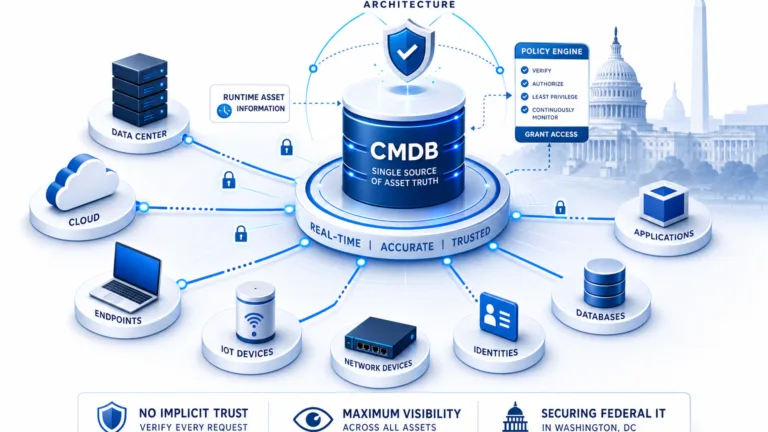
A CMDB (Configuration Management Database) is the operational system of record for your IT environment. Also called Service Asset and Configuration Management (SACM) in ITIL 4, it stores information about every configuration item (CI), including hardware, software, services, and documentation, along with the relationships between them. Many teams organize this data using a standardized framework such as the Common Service Data Model (CSDM), which defines how CIs and services map to one another so the CMDB stays consistent as it grows. For the full CMDB picture, see our complete guide to the CMDB.
How does CMDB work?
Its core value is not simply storing attributes. It maps how components interact: what depends on what, how changes propagate, and what the blast radius of any modification looks like across your services. For a full treatment of how ITIL 4 formalizes CI lifecycle management and CMDB governance, see our guide to service asset and configuration management.
The CMDB’s value shows most clearly during incident response. When a service goes down, teams with an accurate CMDB can trace affected CIs, identify related components, and understand which dependencies are involved in minutes rather than hours. A practical guide on connecting ITSM incident management to CMDB shows how CI relationships and change history accelerate root cause identification in ways that financial ITAM data alone cannot support.
How to keep your CIs current:
- Start by identifying every hardware or software component currently in use. This is your baseline CI inventory.
- Document each CI and add it to your configuration management system with its key attributes.
- When updates occur, revise the existing CI record. Do not create duplicates.
- Remove CIs that are no longer in use to prevent stale data from contaminating your service maps.
- Verify accuracy after every update, particularly for CIs tied to business-critical services.
- Assess the potential impact if a CI fails, and use that risk assessment to prioritize governance effort.
Doing this manually does not scale as your environment grows. Automating CI maintenance with business rules is what keeps day-to-day CMDB management accurate without constant human intervention.
Read more: How to select the best CMDB discovery technique
What is the difference between a configuration item and an IT asset?
A Configuration Item (CI) and an IT asset can refer to the same physical resource but track entirely different data. A virtual machine is an asset in ITAM, with a budget owner, cost center, and depreciation schedule. That same VM is a CI in the CMDB, linked to the payment service, two databases, and a load balancer. Neither system can hold both views without one degrading, so mature teams run them as two connected but separate systems of record. This is the practical core of the difference between CMDB and ITAM.
What is the difference between a configuration item (CI) and an IT asset?
An IT asset is any resource managed for financial, contractual, and lifecycle purposes, including purchase cost, owner, and renewal schedule. A Configuration Item (CI) is any component managed because it impacts IT service delivery, tracked for attributes, relationships, and change history. One resource can exist as both.
The laptop and operating system example makes this concrete. The physical laptop is an IT asset: procured, depreciated, warranty-tracked, and eventually decommissioned. The operating system and applications running on it are configuration items, and they may outlast multiple laptop refresh cycles and tie directly to service delivery.
ITAM tracks the laptop’s financial and lifecycle data. The CMDB tracks the OS and software as CIs that support specific services. A CI representing the email service has its own lifecycle, independent of any single piece of hardware.
This is not about overlap. It is about knowing which tool answers which question in your IT environment.
Same IT resource: Two perspectives
Understanding how the same component appears across both systems prevents schema bloat and clarifies data ownership:
| IT Resource | ITAM View (Financial & Lifecycle) | CMDB View (Operational & Dependency) |
|---|---|---|
| Cloud Virtual Machine | Cost center, budget owner, cloud vendor billing tag, reserved instance commitment. | IP address, OS version, hosted applications, database connections, service dependencies. |
| Enterprise Laptop | Purchase date, warranty expiry, assigned employee, depreciation schedule. | Installed agent software, active OS build, network access policies (if path of service). |
| Database Instance | Software license entitlement, core count licensing cost, renewal date. | Cluster node configuration, active schema links, upstream web services, blast radius. |
When to use ITAM, when to use a CMDB, and when you need both
Use ITAM when your question is about ownership, cost, contracts, or lifecycle: “Who is paying for this?”, “Is this license covered?”, “When does this warranty expire?” Use a CMDB when your question is about configuration, dependencies, or service impact: “What changed on this service last Tuesday?”, “What else breaks if we patch this database tonight?” Use both when your environment spans multiple cloud providers, SaaS tools, and on-premises infrastructure, which describes most enterprise teams today.
Choose ITAM when your most urgent question is:
- “Who owns this asset and which cost center is responsible for it?”
- “Are we audit-ready if a software vendor audits us this quarter?”
- “Which licenses are over-provisioned or approaching expiration?”
- “What is our hardware refresh cycle for this infrastructure tier?”
Choose a CMDB when your most urgent question is:
- “What changed on this service in the last four hours?”
- “If we patch this server tonight, which services are affected?”
- “Which configuration items have dependencies on this database cluster?”
Can a CMDB replace an ITAM system?
No. A CMDB tracks operational configurations and service dependencies, while ITAM manages ownership, cost, contracts, and lifecycle status. Attempting to store all financial and contractual data inside a CMDB bloats the database and complicates maintenance. Best practices connect both systems through shared identifiers.
Use both when you are running cloud across at least two providers, your SaaS footprint is growing faster than your asset register can track, and your SRE team needs a dependency map while your finance team needs a cost center breakdown for the same set of resources. That describes most organizations with more than 200 endpoints and any cloud footprint.
ITAM vs CMDB — quick reference
| ITAM | CMDB | |
|---|---|---|
| Purpose | Financial control, compliance, and lifecycle governance | Operational visibility and service context |
| Answers | Who owns this? What does it cost? When does it expire? | How is this configured? What depends on it? What breaks if it changes? |
| Data tracked | Cost, owner, contract, warranty, lifecycle status, location | Configuration attributes, relationships, change history, service dependencies |
| Primary use | Budgeting, compliance, lifecycle planning, audit readiness | Incident response, change management, service mapping |
| Failure mode | Spend leakage, missed renewals, audit exposure, ungoverned assets | Poor dependency visibility, slower incident resolution, weak change control |
| Owned by | ITAM, finance, procurement, asset governance | IT operations, platform engineering, SRE, ITSM governance |
CMDB asset management vs ITAM: why you need both
ITAM and CMDB work best when they share a stable resource identifier, such as a serial number, cloud resource ID, or asset tag, so each system owns the data it is designed to manage. ITAM owns cost, contract, owner, and lifecycle status. The CMDB owns configuration attributes, relationships, change history, and service dependencies. Synchronizing through an API prevents data drift and ensures the same resource answers both financial and operational questions accurately.
Organizations that try to consolidate both into a single system typically encounter two failure patterns. Without ITAM, infrastructure visible in the CMDB is ungoverned: no one knows who owns it, what it costs, or whether it should stay in service. Without a CMDB, financial records may be accurate but operationally blind: no one can trace which services a change affects or predict the blast radius. For organizations running cloud environments, this disconnect becomes critical when FinOps teams lack the ITAM discovery data needed to reduce ghost assets and align cost ownership with service dependencies.
ITIC’s 2024 research found that for more than 90% of mid-size and large enterprises, one hour of downtime costs more than $300,000. Teams with accurate CMDB data, where CI relationships and change history are current, identify the cause and blast radius of a failure significantly faster than those working from incomplete records.
For a deeper comparison of the tools involved, our breakdown of IT asset management tools vs CMDB covers what each system does and when your environment genuinely needs both.
Working together in practice
To make CMDB asset management genuinely valuable, both systems need to operate together rather than in isolation. ITAM tracks asset lifecycle, cost, and compliance. The CMDB maps how those assets support IT services as configuration items. Syncing inventories through shared identifiers ensures accurate data and prevents duplication.
Syncing asset data
Instead of manually recreating asset records in the CMDB, link existing ITAM assets to the correct CIs. Pull in asset details such as warranty status, ownership, and purchase date when they are needed for operational decisions. This keeps the CMDB focused on configuration and relationships rather than cluttered with financial and contractual data it is not designed to hold. Depreciation is one financial field worth surfacing alongside discovered state; here is how to track IT asset depreciation in your CMDB.
Contracts are a clear example. Storing contract documents and key dates in the CMDB requires heavy customization and serves neither system well. Managing them in an ITAM or contract lifecycle management system, then linking them to related CIs, keeps service context intact without bloating the configuration database.
How do you keep CMDB and ITAM data synchronized?
CMDB and ITAM systems synchronize through automated APIs using a shared resource identifier, such as a serial number, cloud resource ID, or asset tag. ITAM maintains cost, contract, and lifecycle fields, while discovery tools populate configuration attributes and service dependencies into the CMDB automatically.
Strengthening service dependency mapping
Service dependency mapping in the CMDB becomes more useful with ITAM context added. Linking a CI such as a virtual machine to its ITAM record brings in license details, cost information, and ownership data. This business context supports better decisions during change windows and speeds up incident resolution.
Think of it as a transit system. The CMDB tracks routes, schedules, and connections between services. ITAM tracks each vehicle’s history, insurance, and maintenance records. Integrating both means you can assign, monitor, and maintain each component accurately, with each system managing the data it is built for.
Adapting to modern IT environments
Cloud resources change faster than manual tracking can follow. SaaS applications often enter your environment without IT involvement. IoT devices rarely fit standard asset schemas. In each case, the approach is the same: use ITAM to track ownership and cost, and use the CMDB to map how each resource connects to services and what depends on it.
Many teams use IT discovery tools and CMDB discovery automation to keep both systems synchronized. With Virima’s high-frequency discovery cycles, teams gain accurate, current views of assets, service connections, and infrastructure changes across on-premises, cloud, and multi-vendor environments. Our software license tracking guide covers how to keep SaaS entitlements, usage data, and audit readiness aligned.
In one engagement, a multinational client integrated their CMDB with Virima’s ITAM solution so that both systems shared a common identifier and stayed synchronized through high-frequency discovery cycles. With every asset reconciled automatically, the team spent less time preparing for audits and more time acting on accurate data.
→ Download EMA’s 2025 ServiceOps report for the full research on discovery and CMDB maturity →
Understanding SAM, ITAM, and CMDB: four systems compared
When evaluating CMDB vs ITAM, organizations often encounter a broader set of tools: Software Asset Management (SAM), the full ITAM discipline, a CMDB, and a basic asset register. Each serves a distinct purpose, and conflating them leads to gaps in either financial governance or operational visibility.
| Category | SAM | ITAM | CMDB | Asset Register |
|---|---|---|---|---|
| Focus | Software licensing, usage, and compliance | Lifecycle and financial management of all IT assets | Tracking configuration items and their relationships within IT services | A basic record of all physical and digital assets owned |
| Scope | Software only | Hardware and software assets | Hardware, software, services, documentation, and dependencies | Typically physical assets (hardware, equipment) |
| Primary goal | Ensure license compliance and optimize software costs | Track ownership, location, cost, and lifecycle of IT assets | Support change, incident, and problem management through accurate configuration data | Maintain an up-to-date inventory for auditing and operational tracking |
| Data tracked | Installations, license keys, usage metrics, vendor agreements | Purchase date, warranty, location, user, depreciation | Dependencies, relationships, versions, and current configuration state | Serial numbers, purchase date, and location |
| System of record for | Software licenses and compliance | Entire IT asset base | IT service components and their relationships | Physical assets such as laptops, furniture, and IT hardware |
| Typical tools | Flexera, Snow Software, ServiceNow SAM | ServiceNow ITAM, Virima, Lansweeper | ServiceNow CMDB, BMC Atrium, Virima CMDB | Manual registers, Excel sheets, basic inventory tools |
| ITIL relevance | Supports financial and compliance processes | Supports asset and financial management | Core to ITSM (change, incident, problem management) | May support asset management, but typically not comprehensive |
| Interrelationship | Subset of ITAM | Broad management layer that includes SAM | Consumes data from ITAM and SAM to form accurate CI records | Foundational tool that feeds into ITAM and CMDB systems |
What types of assets do CMDB and ITAM manage?
Both ITAM and CMDB cover a wide range of IT components, but with different priorities and data models. Anything that supports IT service delivery falls within scope, though most organizations apply a risk-based approach to determine how deeply to manage each category.
Hardware includes servers, desktop computers, network equipment, and storage devices. These appear as assets in ITAM (cost, lifecycle, warranty data) and as CIs in the CMDB (configuration attributes, service relationships, change history).
Software includes applications, operating systems, and databases. ITAM tracks licensing and compliance. The CMDB tracks which version is deployed, what it connects to, and what changes have been applied.
Portable devices include laptops, smartphones, and tablets. They are tracked in ITAM for financial and lifecycle management, and in the CMDB when they participate in a service dependency chain.
A risk-based approach keeps both systems manageable. Low-value infrastructure such as internal network cables may not warrant full CI modeling in the CMDB. The asset lifecycle management guide covers how to decide what to track and at what depth across your environment.
CMDB, ITAM, and AI agents
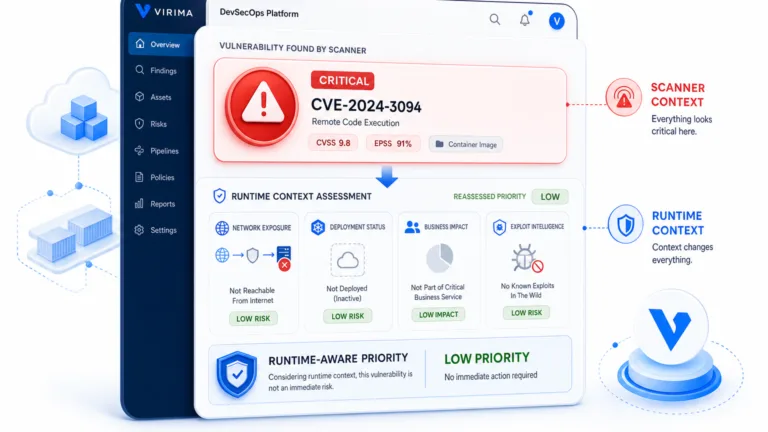
AI agents acting on IT infrastructure need to know what exists, how it is configured, and what will break before they act. That requires ITAM data, to confirm ownership, lifecycle state, and financial context, and CMDB data, to verify dependencies, configuration state, and blast radius. Accurate CMDB and ITAM records together form the trusted runtime truth layer that governs safe agentic operations across hybrid IT environments.
Why do AI agents require both CMDB and ITAM data?
AI agents executing infrastructure changes require ITAM data to verify ownership, lifecycle status, and financial authorization, alongside CMDB data to map service dependencies and blast radius. Operating without both risks unauthorized modifications or unexpected service downtime.
An agent that has financial data but no dependency map may decommission a workload that is still in active service. One with configuration data but no ownership context may trigger a change without knowing who to notify or which budget is affected. Both gaps produce the same outcome: an action that appeared safe based on incomplete data.
For a detailed treatment of what CMDB accuracy requirements look like in an agentic IT context, see our guide on CMDB for AI agents.
Achieving unified ITAM and CMDB visibility
Understanding CMDB asset management vs ITAM is the foundation for scalable IT governance. Rather than forcing one database to perform both roles, enterprise IT teams achieve greater reliability and financial control by integrating dedicated ITAM and CMDB capabilities around automated discovery.
Virima provides the trusted runtime truth layer that keeps ITAM lifecycle records and CMDB configuration items synchronized across hybrid, multi-cloud, and on-premises infrastructure. By combining authoritative multi-source discovery with dynamic ViVID™ service mapping, Virima surfaces complete asset ownership and operational dependencies inside your existing ITSM platforms, including ServiceNow, Ivanti, Jira Service Management, HaloITSM, Xurrent, and Hornbill.
FAQs: Your questions answered
1. What is the main difference between CMDB and ITAM?
The difference between CMDB and ITAM comes down to the question each answers. ITAM tracks ownership, cost, warranty, contracts, and lifecycle status (“what do we own and what does it cost?”). A CMDB tracks configuration state, relationships, change history, and service impact (“how is this configured and what depends on it?”). Most enterprises run both and connect them through a shared identifier.
2. What is a CMDB and how does it support asset management?
A CMDB (Configuration Management Database) is the system of record for CIs and service dependencies. In asset management, it provides the operational context that an asset register lacks, showing how hardware and software components interact to deliver IT services for incident response and change impact analysis.
3. Does a CMDB store financial or cost data?
A CMDB is not designed to be the primary system of record for financial or contractual data. Cost, purchase date, depreciation, and warranty belong in ITAM. The recommended approach is to keep financial fields in ITAM and link them to CIs via APIs when operational workflows require cost context.
4. How do I get started implementing CMDB asset management?
Start by defining business-critical services, automating infrastructure discovery to establish baseline CIs, mapping service dependencies, selecting an integrated discovery tool like Virima, establishing automated discovery schedules, and setting clear governance rules across ITAM and ITSM teams.
5. Can a CMDB replace ITAM?
No. A CMDB tracks configuration state and service relationships, whereas ITAM tracks financial contracts, licensing, and lifecycle status. Attempting to store all lifecycle data inside a CMDB creates database bloat and weakens operational usability. Connect both via shared keys instead.
6. What is the difference between a Configuration Item (CI) and an IT asset?
An IT asset is tracked for financial accountability, cost, and lifecycle status. A Configuration Item (CI) is managed because it actively supports IT service delivery, tracked for attributes, relationships, and change history. The same physical or cloud server often exists as both an asset in ITAM and a CI in the CMDB.
7. How does a CMDB improve asset tracking in enterprise environments?
In enterprise environments, a CMDB supplies real-time operational context. It maps asset relationships and service dependencies across multi-cloud and on-premises infrastructure, enabling accurate change risk assessment, faster incident root-cause analysis, and automated audit reporting.
8. Which ITSM platforms does Virima integrate with for ITAM and CMDB?
Virima integrates natively with ServiceNow, Ivanti, Jira Service Management, HaloITSM, Xurrent, and Hornbill, synchronizing discovered asset data and live service maps directly into native ITSM records without schema duplication.