8 Best Jira Alternatives in 2026 (and What Most Comparisons Miss)

Last updated: August 20, 2026
Why IT Teams Start Looking for Jira Alternatives
- If you are weighing Jira alternatives, you are likely an IT operations or service desk team trying to run ITSM workflows on a tool built for software development. Jira works well for development teams. It handles backlogs, sprints, epics, and bug tracking with depth that few tools match. That same configuration depth creates friction when IT operations teams, service desk managers, and IT directors try to use it for workflows it was not originally built for.
- Three patterns come up consistently. First, Jira’s per-user pricing scales quickly, and enterprise add-ons push total cost of ownership higher as teams grow. Second, teams outside engineering often find the interface harder to adopt than purpose-built ITSM platforms. Third, Jira Service Management extends Jira into ITSM territory, but it still needs external integrations to connect service tickets to accurate, discovery-driven asset data and service dependency maps.
- Those gaps push IT operations teams toward two categories of alternatives: leaner agile tools for teams with simpler project tracking needs, and dedicated ITSM platforms for teams that need genuine incident, change, and asset management without developer-centric overhead. The stakes are not just convenience. According to the IBM Cost of a Data Breach Report 2025, breaches involving data spread across multiple environments cost an average of $5.05 million, the most expensive category in the study. When your service platform runs on asset records that no longer match reality, that hybrid complexity is exactly where risk hides.
What are the best Jira alternatives in 2026?
For engineering speed, teams shortlist Linear, Azure DevOps, and ClickUp. For cross-functional work, Asana and Monday.com are common picks. For IT service management, Xurrent, Ivanti Neurons for ITSM, and Halo cover ITIL workflows with less developer-centric setup than Jira Service Management. CI accuracy still depends on discovery-fed CMDB data behind the ticket, whichever tool you choose.
How We Chose These 8 Jira Alternatives
This list is split on purpose. Five tools compete with Jira Software for agile and project work. Three compete with Jira Service Management for IT service workflows. Mixing those jobs into one ranked “best overall” list hides the real decision most IT buyers face.
We included a tool only when it met all of the following:
- It can replace Jira Software or Jira Service Management for a named job (sprints, portfolio work, or ITIL-style service desk).
- It is a current commercial product with a documented path off Jira (import, partner services, or coexistence).
- It is evaluable on five criteria: ITSM depth, agile depth, path to accurate CI or asset data, TCO predictability as headcount grows, and time-to-value for non-admin users.
We did not score “best overall.” We mapped each tool to the team that benefits most. Pure collab suites and self-hosted trackers that never show up in ITSM shortlists stay out of the main eight, with a short note later so the consensus eng set is not ignored.
Disclosure: Virima partners with Jira Service Management, Xurrent, Ivanti, and Halo for discovery-driven CMDB and service mapping sync. Virima is not a Jira replacement for issue tracking or sprint planning. It sits under the workflow layer so CI records stay current. Where Linear or Azure DevOps win for pure engineering delivery, that is stated in the reviews below.
What to Look for in a Jira Alternative
Before choosing an alternative, define what Jira is specifically not doing for you. That answer narrows your list of Jira alternatives faster than any feature comparison table.
For IT operations and service desk teams, the key criteria are incident and change management depth, SLA tracking, CMDB integration or native asset tracking, and bidirectional sync with discovery tools. For agile development or general project management, priorities shift toward sprint planning, backlog management, timeline views, and collaboration features.
Also factor in migration cost. Switching from Jira means moving ticket history, custom workflows, user configurations, and integration connections. Tools with documented migration paths and dedicated onboarding support reduce that timeline considerably.
The 8 Best Jira Alternatives in 2026
This page is built for IT operations and dual-track teams (eng plus service desk), not for a full project-management bake-off. High-frequency eng picks such as Notion, Trello, GitHub Projects, and Shortcut appear often in software-only roundups. They are strong for docs, Kanban, or repo-native work, and weak as ITSM systems of record, so they are out of the main eight on purpose.
Jira Alternatives at a Glance
Use this table to shortlist by job, then read the matching review. Pricing cells stay high level on purpose. Confirm current list price with each vendor before you model TCO.
| Tool | Primary job | ITSM depth | Agile depth | Free tier | CMDB / assets path | Virima integration | Best team profile |
|---|---|---|---|---|---|---|---|
| Linear | Agile / Dev | None | Strong | Yes (limits apply) | None native | No | Small to mid eng |
| Azure DevOps | DevOps / Dev | Limited | Strong | Limited / plan-based | Limited native | No | Mid to enterprise Microsoft shops |
| ClickUp | Cross-functional PM | Limited | Moderate | Yes | None native | No | Small to mid mixed teams |
| Asana | Team coordination | None | Moderate | Yes (limits apply) | None native | No | Business + light IT projects |
| Monday.com | Visual PM / Ops | Moderate (Monday Service) | Moderate | Yes (limits apply) | Limited | No | Ops teams prioritizing views |
| Xurrent | Enterprise ITSM | Full ITIL | Limited | Eval / paid | ITSM + integration | Yes | Enterprise service orgs |
| Ivanti Neurons for ITSM | ITSM + endpoint | Full ITIL | Limited | Eval / paid | ITSM + asset/endpoint | Yes | Mid to enterprise IT |
| Halo Service Desk | Mid-market ITSM | Full ITIL | Limited | Eval / paid | ITSM + asset | Yes | About 50-500 IT users |
CMDB / assets path and free-tier notes are directional as of August 2026. Re-verify on vendor sites before procurement.
1. Linear
Linear targets product and engineering teams that find Jira too slow and too complex to maintain. Its interface is stripped down by design, with keyboard shortcuts, fast load times, and a clean visual structure built for speed over configuration depth.
Linear handles cycles (sprints), projects, teams, and roadmaps effectively. It is faster to navigate than Jira for day-to-day issue work. It does not offer the ITSM depth that IT operations teams need, including incident classification, change management, SLA tracking, and service request workflows.
Best for: Product and engineering teams seeking a faster, simpler alternative for sprint-based issue tracking.
2. Azure DevOps
Azure DevOps is Microsoft’s platform for the full software delivery lifecycle. It combines boards, repositories, pipelines, test plans, and artifact management under one roof. For teams already running in the Microsoft ecosystem (Azure, Visual Studio, Teams, Power BI), the integration depth is a genuine advantage.
Unlike Jira, Azure DevOps treats code management, CI/CD, and project tracking as first-class capabilities in the same platform. The learning curve is real, but for DevOps-heavy organizations, the consolidation benefit often justifies it. Like Jira, it is not purpose-built for ITSM service desk workflows.
Best for: Dev and DevOps teams already invested in the Microsoft technology stack.
3. ClickUp
ClickUp positions itself as an all-in-one alternative to multiple tools, combining tasks, docs, goals, chat, and reporting in one workspace. It offers more view flexibility than Jira, with Kanban, list, calendar, Gantt, and timeline views all available without add-ons.
For cross-functional teams consolidating project work, ClickUp’s breadth is useful. For IT service management teams that need strict ITSM workflows, the broad feature set can feel like too much to configure for a focused use case.
Best for: Cross-functional teams looking to consolidate project management and light collaboration workflows.
4. Asana
Asana focuses on team coordination and task management with a clean interface that non-technical stakeholders find approachable quickly. Its Rules feature provides basic workflow automation without requiring engineering involvement to configure.
IT teams sometimes use Asana for lower-complexity project tracking and IT request intake. It does not support ITSM workflows like SLA enforcement, incident classification, change advisory board processes, or CI-linked service records natively.
Best for: Business teams and IT project managers handling non-ticket project coordination and stakeholder visibility.
5. Monday.com
Monday.com excels at visual project tracking. Its board, calendar, timeline, and Gantt views suit teams that want flexible status visibility without deep workflow customization. The platform has expanded significantly, adding Monday Dev for engineering teams and Monday Service for service management workflows.
Monday Service is worth evaluating as a simpler alternative to Jira Service Management for teams with moderate ITSM needs. It does not match the depth of purpose-built ITSM platforms on change management, CMDB integration, and service dependency visibility.
Best for: Operations and project teams that prioritize visual reporting and fast onboarding over deep ITSM workflow customization.
6. Xurrent
Xurrent is a purpose-built ITSM platform designed for modern enterprise IT service delivery. It covers the full ITIL process set: incident management, service requests, change management, and problem management, with strong SLA tracking and a role-appropriate interface. For organizations that find Jira Service Management too developer-centric, Xurrent provides deeper ITSM workflow support with less configuration overhead. Xurrent integrates with Virima, connecting your CMDB and discovery-driven asset data to every Xurrent service record. Xurrent integrates with Virima (partner). Discovery-driven CI data and service maps can attach to Xurrent service records so technicians are not working from stale asset fields alone. Virima does not replace Xurrent’s ITSM workflows.
Best for: Enterprise IT teams that need dedicated ITSM depth with strong SLA enforcement and change management support.
7. Ivanti Neurons for ITSM
Ivanti Neurons for ITSM delivers enterprise-grade service management with built-in asset management capabilities. It handles the full ITIL lifecycle and extends into endpoint management and security workflows that most pure ITSM tools treat as separate products. Ivanti integrates with Virima (partner) for discovery-driven IT asset data. Service records can carry current CI attributes, ownership, and change impact context from scheduled discovery cycles. Virima is the data layer under Ivanti, not a second service desk.
Best for: IT organizations that need ITSM, endpoint management, and asset lifecycle tracking in an integrated platform.
8. Halo Service Desk
Halo is a flexible, mid-market ITSM platform covering the full ITIL process set: incident, problem, change, asset, and knowledge management. It offers a balance between configuration depth and deployment speed that many IT teams find practical. Halo integrates with Virima (partner). Service records can pull discovery-driven CMDB data so technicians see current asset detail on the ticket. Halo remains the ITSM system of record for process; Virima feeds CI truth underneath.
Best for: Mid-market IT teams that need full ITIL coverage at a manageable total cost of ownership.
See how discovery-sourced trusted runtime truth sits under your ITSM stack. Start with Trusted Runtime Truth.
Which Jira Alternative Is Best for IT Service Management?
For dedicated IT service management workflows, the strongest Jira alternatives are Xurrent, Ivanti Neurons for ITSM, and Halo. Each provides full ITIL process coverage including incident, change, problem, and asset management, with less developer-centric configuration than Jira Service Management. All three integrate with Virima for discovery-driven CMDB and asset data. The at-a-glance table earlier in this article summarizes where each option fits. For dedicated IT service management, prioritize Xurrent, Ivanti Neurons for ITSM, and Halo, then validate CI accuracy under whichever platform you shortlist.
The Layer Most Jira Alternative Comparisons Skip
Most Jira alternative comparisons focus on features, pricing, and ease of setup. They rarely address the question that decides whether your ITSM platform actually works in production: where does the asset data come from?
Every ITSM platform depends on accurate configuration item (CI) records to link service tickets to the right assets. When a technician opens an incident ticket, the CI attached to it should reflect the current state of that asset: hardware specs, software version, location, owner, and the services it supports. Without that accuracy, technicians make decisions based on records that may be months out of date.
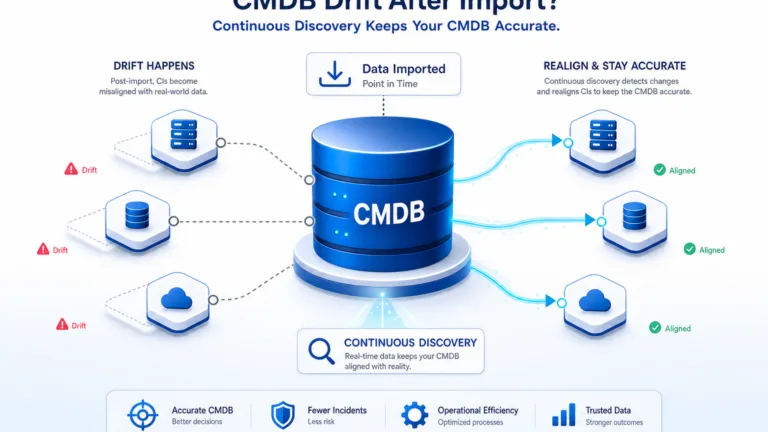
The problem is that CI records degrade. Hardware gets replaced without a CMDB update. Software changes without anyone logging it. Virtual machines spin up and disappear without touching the CI record. Over time, the data your service platform depends on drifts from what actually exists in your environment.
IT discovery closes this gap. High-frequency discovery cycles scan your environment on a recurring schedule and push current asset data into your CMDB, so CI records stay accurate without manual updates after every change. For teams ready to build that foundation, Virima IT Discovery outlines a structured starting point, and EMA’s ServiceOps 2025 research examines how discovery maturity shapes outage risk across IT operations.
What do most Jira alternative comparisons miss?
Most comparisons stop at features, price, and setup speed. They skip where CI and asset data originate. Every ITSM ticket that depends on a stale configuration item forces technicians to work from inventory that no longer matches the estate. Scheduled discovery into the CMDB is what keeps that layer honest.
How Virima Works with Jira and the Top ITSM Alternatives
Virima integrates with Jira Service Management, Xurrent, Ivanti, and Halo to provide discovery-driven asset data behind every service record. Each integration connects Virima’s CMDB to your ITSM workflows so technicians see accurate CI data, service dependencies, and change impact context without leaving the platform they work in every day.
For Jira Service Management specifically, Virima syncs discovery-driven CI records to Jira assets and links them to service requests, incidents, and change records. When a technician opens a ticket tied to a server or network device, the CI record reflects a state confirmed by the latest discovery cycle.
For teams moving from Jira Service Management to Xurrent, Ivanti, or Halo, Virima’s integrations mean your CMDB accuracy carries forward to whichever platform you choose. This is what separates Virima from most Jira alternatives: you do not lose the asset data foundation you built, because Virima sits at the discovery layer beneath all of it. That layer is platform-agnostic by design.
ViVID™ Service Mapping extends this further. Before a technician works on any CI, the service map shows which downstream services and applications depend on that asset. That impact visibility helps reduce change-related incidents across your service platform, regardless of which tool manages the workflow above it. Whichever platform your team selects, the quality of the asset data behind it shapes how well the platform performs in practice. For a deeper look at how the two data layers fit together, see Virima’s guide to CMDB and ITAM.
Does Virima Integrate with Jira Alternatives?
Yes. Virima integrates with Jira Service Management, Xurrent, Ivanti Neurons for ITSM, and Halo. Each integration connects Virima’s discovery-driven CMDB to the ITSM platform, giving technicians accurate CI records, service dependency maps, and change impact context within their service workflows, regardless of which platform they choose to run.
The Tool You Choose Matters. The Asset Data Behind It Matters More.
Picking the right option among Jira alternatives comes down to matching the tool to your actual workflow, your team size, and your ITSM maturity. For agile development teams, Linear, ClickUp, or Azure DevOps often fit better than Jira’s heavier configuration model. For IT operations teams, Xurrent, Ivanti, or Halo provide the ITSM depth that Jira Service Management takes significant setup to match.
The tool you choose handles the workflow layer. It does not solve the data layer beneath it. Whatever ITSM platform you run, your service records depend on accurate CI data from your CMDB. When that data comes from high-frequency discovery cycles rather than manual entry, your technicians arrive at every ticket informed, changes happen within visible risk boundaries, and your CMDB stays current between scans. That is the difference between a platform that looks good in a demo and one your team trusts during an incident. When you want that data layer under Jira Service Management, Xurrent, Ivanti, or Halo, request a Virima demo.
Frequently Asked Questions About Jira Alternatives
What is the best free Jira alternative?
Linear and Asana both offer free tiers that work for small teams with simple tracking needs. Open-source and self-hosted options such as OpenProject appear often when data residency is the driver. Purpose-built ITSM platforms (Xurrent, Ivanti, Halo) are rarely free beyond evaluation. Match free tier limits to headcount before you standardize.
Is Jira Service Management good for IT operations teams?
Jira Service Management covers incident, change, and request workflows with solid depth for many desks. It still needs outside help for discovery-driven asset data and service dependency maps. Teams that need tight CMDB-to-ticket accuracy often add a discovery layer beside JSM rather than forcing manual CI upkeep.
Can engineering keep Jira while IT moves to another ITSM tool?
Yes. Many organizations leave Jira Software with eng and run Xurrent, Ivanti, or Halo for the service desk. The hard part is shared asset truth across both stacks. A platform-agnostic discovery and CMDB layer keeps CI quality from fracturing when tickets span two systems.
How does Linear compare to Jira for software teams?
Linear wins on speed, keyboard workflows, and low admin overhead. Jira wins on configuration depth, enterprise reporting, and marketplace breadth. Linear is a poor substitute when the requirement is ITIL service management. Pick Linear for delivery velocity; pick an ITSM platform when the desk runs incidents and changes against CIs.