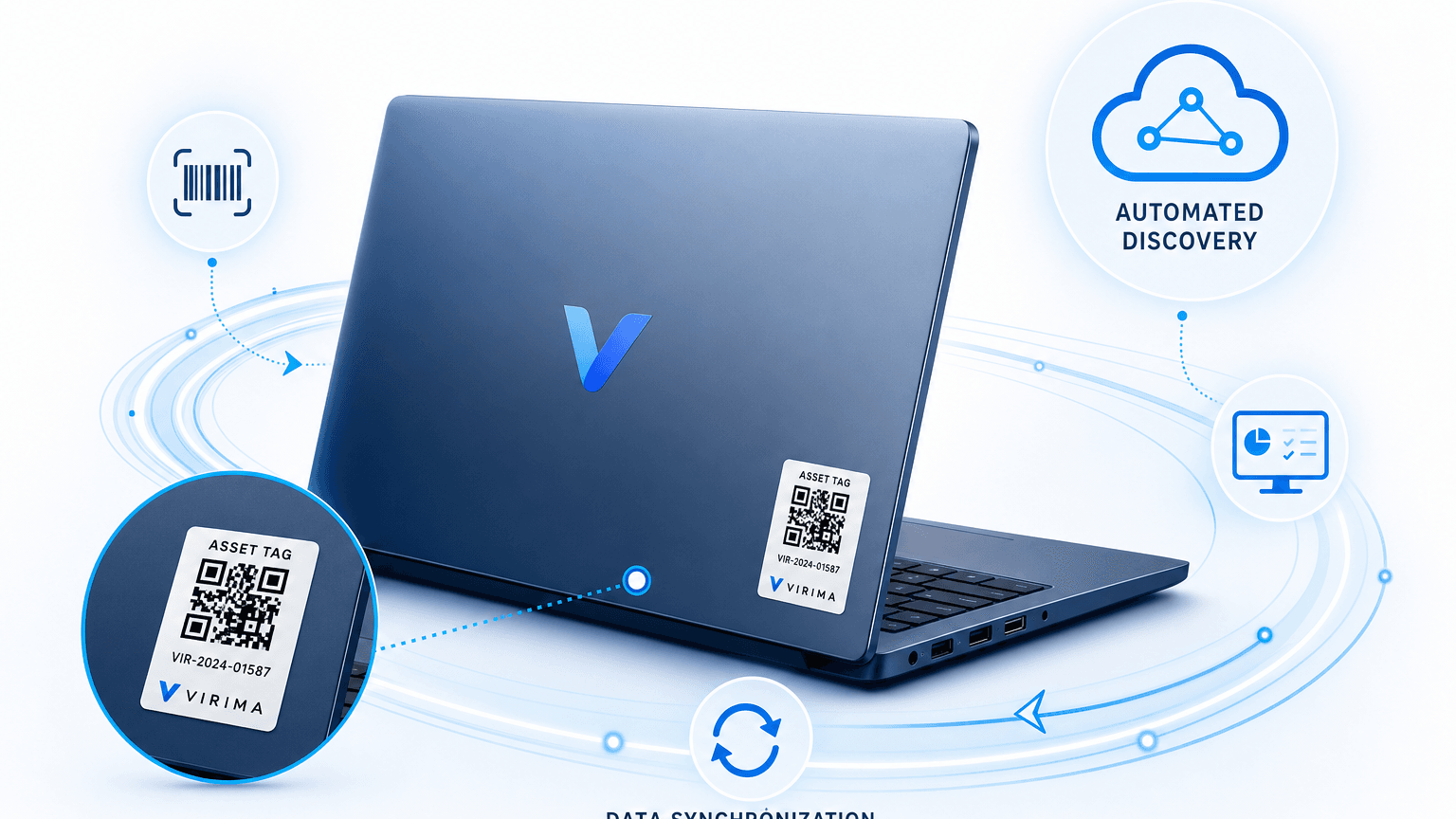
Asset Tags for Laptops: What They Actually Solve

The laptop on the staging desk has a fresh asset tag. The spreadsheet still shows that tag assigned to someone who left eight months ago. Between the intake scan and today, the label and the system of record stopped matching. That gap is where most physical tagging programs fail.
When teams face an audit or an offboarding mess, they often treat asset tags for laptops as the full fix. Print barcodes or QR codes, scan at intake, and call the inventory handled. A physical tag is a static label from one moment in time. It holds a serial and an asset ID. It does not show who has the device now, what is installed, whether it is on the network, or whether help desk reimaged and reassigned it.
Physical tagging and automated discovery solve different jobs. The tag handles offline identification and chain of custody. Discovery keeps configuration and custody data current through high-frequency discovery cycles. Treating either layer as enough on its own is what produces the mismatches practitioners keep filing in forums.
Asset tags for laptops: what they actually solve (and where discovery has to take over)
What do asset tags for laptops actually solve?
Asset tags for laptops provide durable visual identification for intake, physical audits, insurance, and chain of custody when devices are powered off or offline. They do not track software, users, or network state. Pair tags with discovery-sourced CMDB updates so the physical ID and the digital record stay aligned.
What asset tags for laptops actually do (and what they don’t)
IT asset managers need a tight scope for physical tags. Tags are physical anchors, not state monitors.
What physical asset tags solve
- Line-of-sight identification: A technician reads an asset ID without booting the laptop or opening an MDM console.
- Intake speed: Receiving can scan hardware into inventory before imaging or enrollment.
- Offline verification: Stockrooms and powered-down fleets still have a scannable ID.
- Chain of custody: Tags link chassis to purchase orders, warranty, lease, and insurance records.
What physical asset tags cannot solve
- Configuration and software truth: A sticker cannot see unapproved apps, missing agents, or patch debt.
- Movement between scans: Without a checkpoint scan, the tag does not show a move to a home office.
- Record drift after repair or reissue: Tags do not rewrite CMDB fields when an MDM renames a host or a motherboard swap changes the BIOS serial.
Physical tags establish identity in the physical world. They do not keep inventory accurate after the device enters daily use. The gap is not hypothetical: a 2026 Department of Homeland Security Office of Inspector General audit found that one intelligence component could account for only 11 percent of the mobile devices its own asset management system listed as issued to staff. Fedscoop reported the gap in 2026. That is what happens when a labeled inventory record stops getting reconciled against what is actually deployed.
Choosing a tag type for laptops
Match durability, scan method, and unit cost to laptop wear when choosing asset tags for laptops. Paper labels fail under heat, sleeves, and daily handling.
| Tag type | Pros | Cons | Best fit |
|---|---|---|---|
| 1D barcode (Code 128 / Code 39) | Low cost; basic scanners work | Strict line of sight; low data density; larger footprint | Legacy receiving, shipping cartons |
| 2D QR code | High data capacity; phone cameras; compact | Needs line of sight; abrades if unlaminated | Most modern laptop fleets |
| Passive RFID (UHF) | Bulk scans without line of sight | Higher cost; metal chassis needs on-metal tags | Dense depots and warehouse audits |
| NFC / tamper-evident foil | Hard to remove cleanly; close-range tap | Higher cost; short scan distance | High-security or regulated fleets |
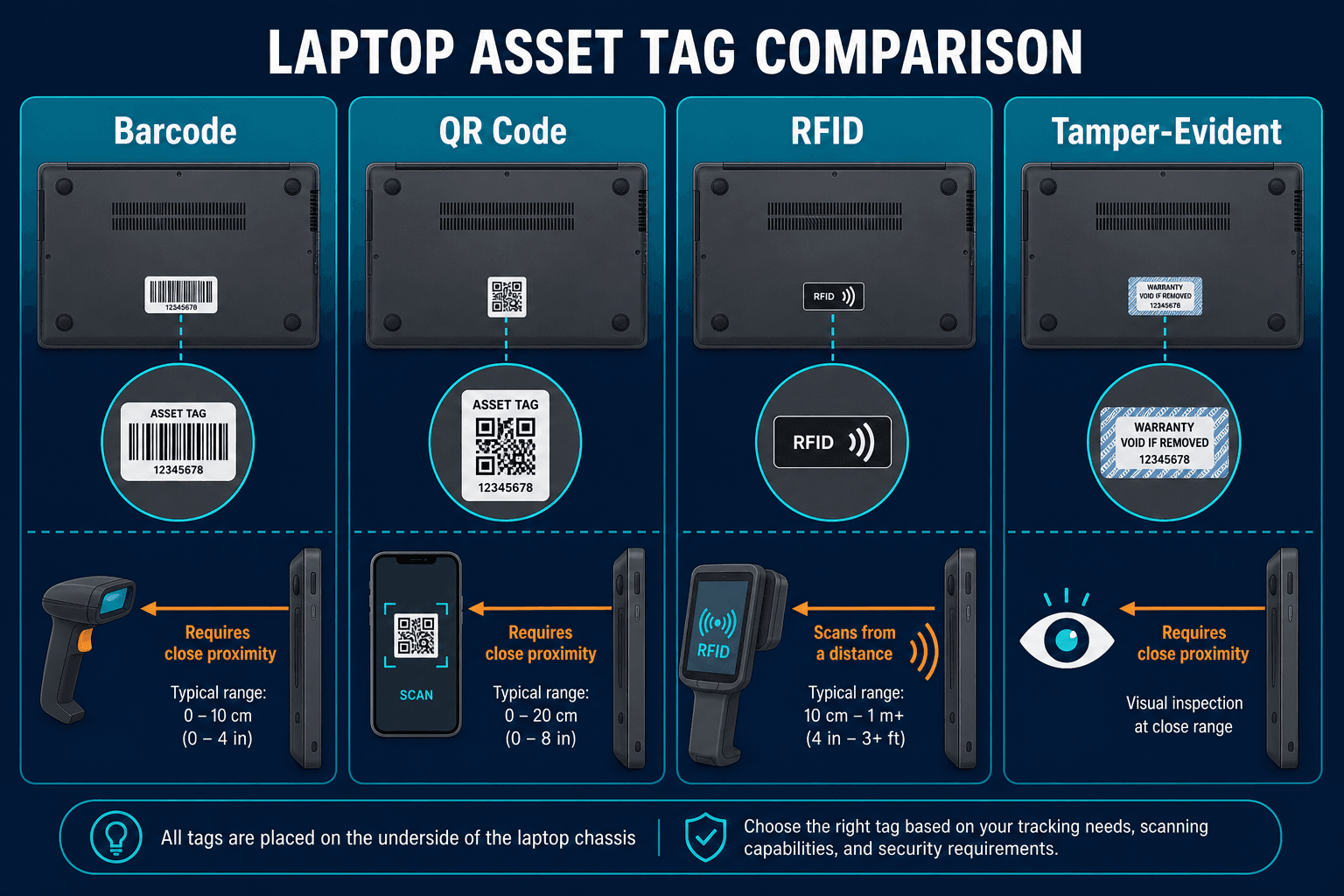
QR codes hold up to 4,296 alphanumeric characters versus roughly 40 for a 1D barcode, so a single scan can carry a full asset-record URL instead of just a lookup number. For laptops, that means a technician’s phone camera resolves the full CI record on the first scan, with no dedicated scanner required.
For most fleets, durable polyester or metallic QR tags balance cost and field usability. Remote staff can scan with a phone. On aluminum or magnesium chassis, use high-tack, tamper-evident metallic stock with anti-metal backing so heat and sleeves do not lift the label.
Tamper-evident, VOID-pattern asset tags are standard for regulated or high-security laptop fleets because a removed tag leaves visible residue. That visibility protects chain of custody when a laptop travels through remote shipping or third-party repair.
What to link the tag to
A scan should open a structured asset or CI record, not a one-off spreadsheet row.
Capture at intake:
- Hardware keys: manufacturer, model, system serial, primary MAC.
- Financial context: PO, vendor, warranty end, lease terms, cost center.
- Asset tag ID: the human- and machine-readable value on the label.
- Custody state: assigned user, status (In Stock, Assigned, In Repair, Pending Disposal), depot or site.
- CI reference: the primary key that joins the physical asset row to the logical configuration item.
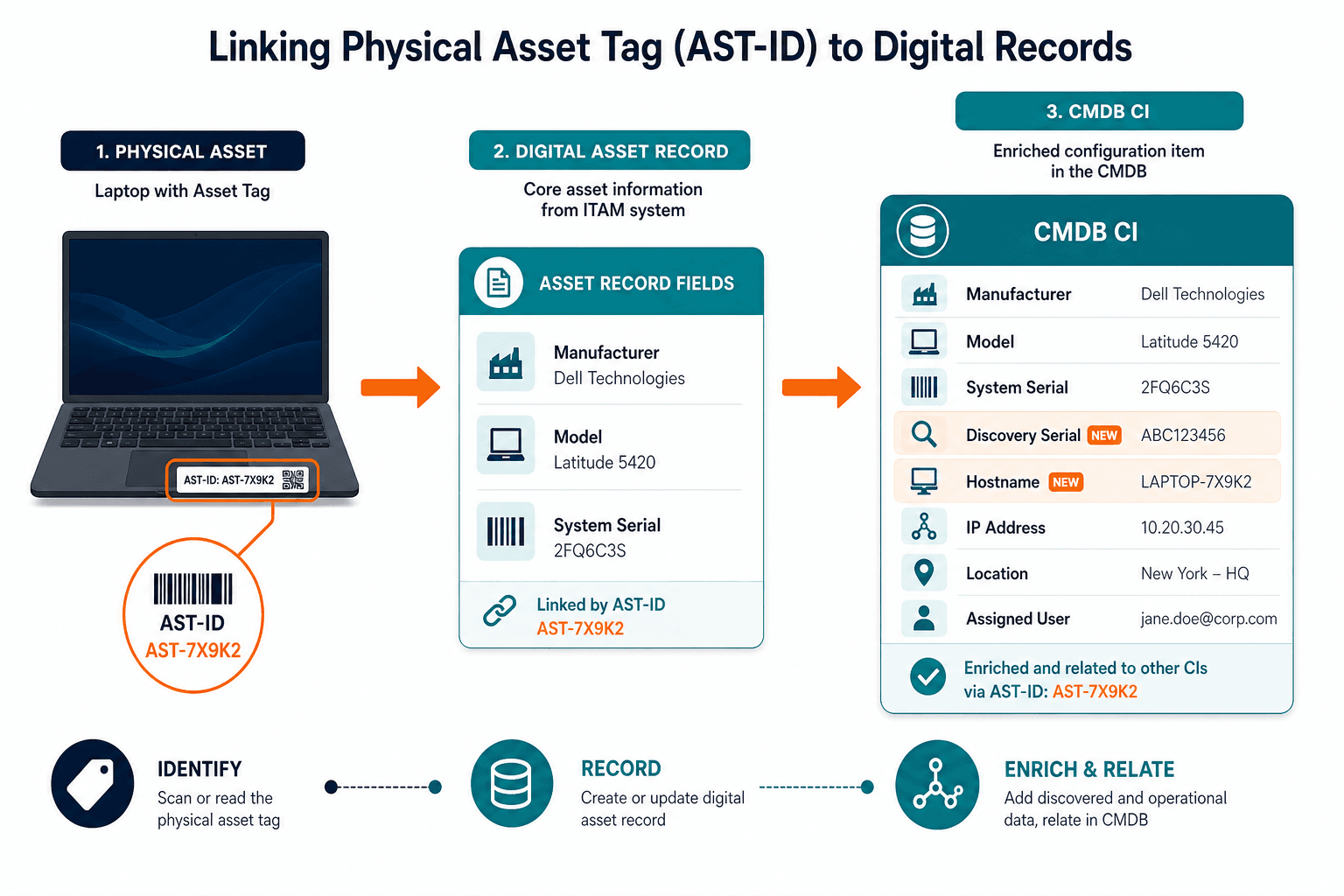
A laptop asset tag should never be the primary key on its own — store the tag ID alongside the manufacturer serial on one CI record, so a motherboard repair that changes the BIOS serial enriches that same record instead of spawning an orphaned duplicate.
Where tagging breaks down: the reconciliation gap
Failure starts after deployment. Digital tools and physical hand-offs diverge unless someone owns the join.
A common practitioner pattern shows up when MDM enrollment and CMDB asset numbers diverge after reimage or reissue. Teams document Intune asset tag values that no longer match the CMDB asset tag field after repairs and user swaps. Public threads on the ServiceNow Community describe exactly that mismatch pattern. Treat those posts as operational evidence of drift, not as a product comparison.
Drift triggers include:
- Help desk swaps: replacement from a closet with ticket notes but delayed inventory update.
- Motherboard repair: BIOS serial changes while the chassis tag stays put.
- Remote offboarding: device ships to a clearinghouse, gets reimaged, and never hits intake scan again.
Agent-based discovery catches the BIOS serial change from a motherboard swap on the next scheduled scan cycle, which is what closes that specific drift trigger before it reaches an audit.
Flexera’s 2024 State of ITAM reporting continues to stress how weak visibility and fragmented processes raise audit and spend risk. Physical labels alone do not close that gap. They mark what was labeled at intake.
How do you reconcile asset tags with a CMDB?
Store the physical tag ID and manufacturer serial on the same CI. Use high-frequency discovery and MDM feeds to re-read serial, hostname, and user. Flag exceptions when discovered identity no longer matches the tagged asset record so ITAM can correct custody before audit week.
Tagging and discovery: division of labor
Physical tags are not obsolete. They are not sufficient as the only tracking method either. That split keeps this piece aligned with broader IT asset tracking methods and gaps. Tag-only programs do not scale as the sole system of record, yet tags still own offline identity.
- Tag as permanent physical anchor for intake, shipping, warranty, insurance, and powered-off audits.
- Discovery as currency engine via scheduled agent, agentless, and API collection against serial, hostname, user, and installed software.
- Reconciliation rules that match discovered serials to tagged CIs and raise exceptions on conflict.
Stockroom and depot laptops should be physically audited on a fixed cadence, typically quarterly. Deployed laptops need a tighter loop: high-frequency discovery and MDM checks catch custody and configuration drift between physical audits, not just once a year.
Virima integrates with ServiceNow, Jira, Ivanti, and many more through a single hub of connectors so asset and CI fields can stay joined without building one-off spreadsheets. See all integrations.
Practical laptop tagging rollout checklist
- Standardize tag stock: metallic or heavy polyester QR, thermal-rated adhesive, tamper-evident where policy requires.
- Define a stable ID scheme: sequential asset IDs or serial-linked IDs; never bake user or department names into the permanent tag value.
- Tag before image and enroll: receiving owns the first scan and field capture.
- Map MDM and discovery serials into the same CI that holds the tag ID.
- Automate exception queues for serial, hostname, or custody conflicts after each discovery cycle.
- Wire offboarding and repair tickets so intake and outbound scans are required fields, not optional comments.
For lifecycle process detail, use the IT asset management checklist. Product capability context sits on Virima ITAM.
Closing the gap between label and truth
Asset tags for laptops solve the offline identification problem. Discovery and CMDB joins solve currency after the device leaves the cage. Programs that treat tagging as a closed loop keep rediscovering the same audit spreadsheet every year. Programs that treat the tag as the durable key and discovery as the refresh path spend less time reconciling ghosts.
Asset tags for laptops solve identity. Closing the reconciliation gap after deployment takes a system that keeps discovering and rejoining the record. See Trusted Runtime Truth for how that join works.
Frequently Asked Questions
What is the best way to tag laptops for asset tracking?
Use durable QR or metallic tamper-evident tags on a consistent chassis location, capture serial and tag ID at intake before imaging, and store both on the same CMDB CI. Add scheduled discovery so custody and configuration stay current after deployment.
QR code vs barcode vs RFID for laptops: which is best?
QR codes fit most fleets because phones can scan them and the footprint is small. Barcodes remain fine for low-cost receiving lines. RFID helps dense depot bulk scans but needs on-metal tags and higher unit cost. Choose based on scan workflow, not vendor marketing alone.
How do you reconcile asset tags with your CMDB or inventory system?
Join physical tag ID to manufacturer serial on one CI. Let discovery and MDM report serial, hostname, and user on a schedule. Queue mismatches for ITAM review instead of waiting for the annual wall-to-wall scan.
Does Virima reconcile laptop asset tags with discovery data automatically?
Virima’s agent-based, agentless, and API discovery methods re-read serial, hostname, and user on a scheduled cycle and match them against the tag ID stored on the CI. When a discovered value no longer matches the tagged record, Virima flags the exception so ITAM can correct custody before audit week instead of during it.
Does Virima work with our existing ITSM tool for asset tag reconciliation?
Yes. Virima integrates with ServiceNow, Jira Service Management, Ivanti, and other major ITSM platforms through a single connector hub, so tagged asset records and discovery data stay joined without replacing the ITSM tool your team already uses.