Asset management software for schools still fails when SIS and procurement never meet

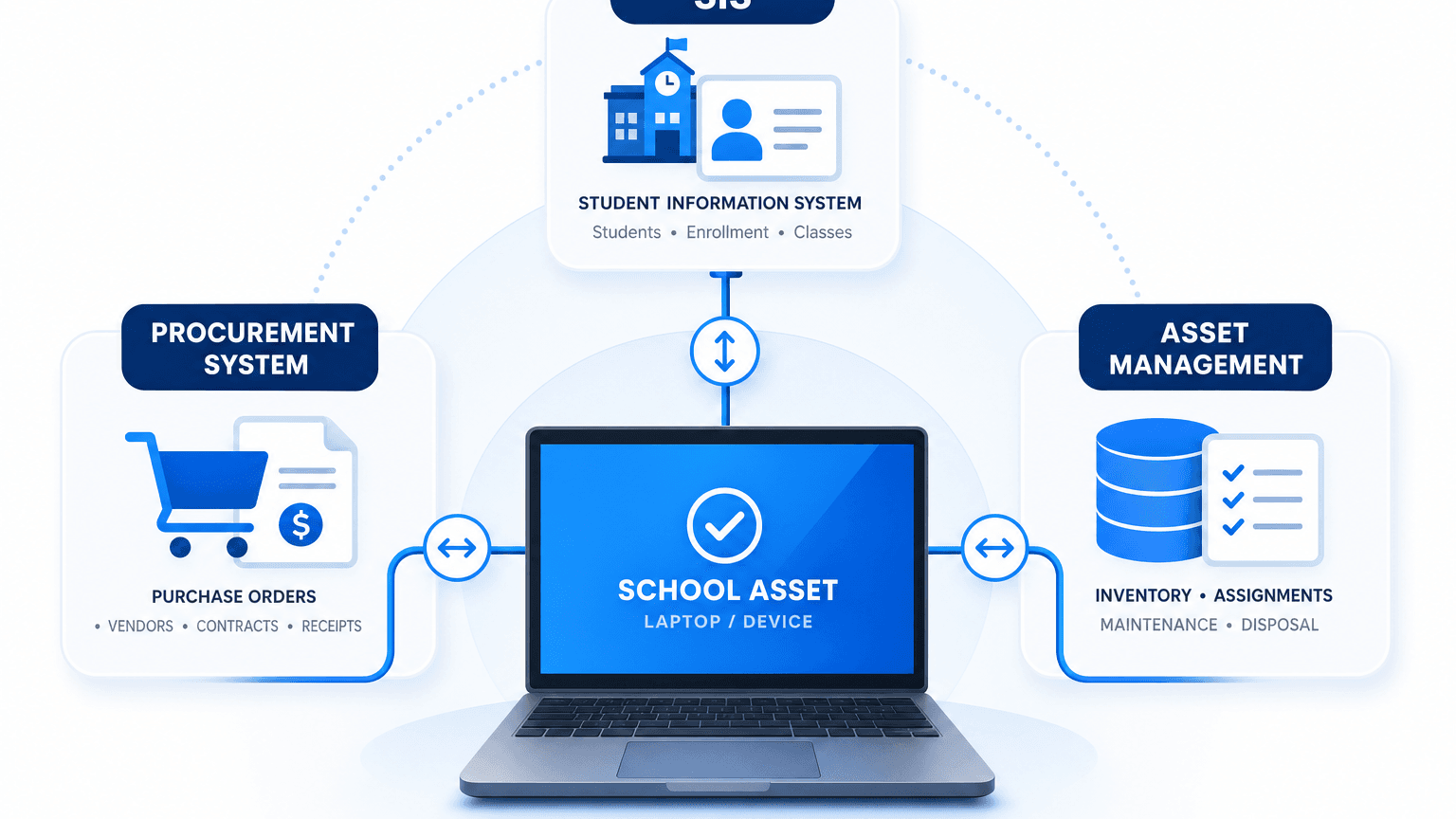
A laptop cart comes back from summer deployment short three units, no return log, no linked purchase order, and no active student ID on the asset row. Multiply that gap across a few hundred devices split between central IT, academic departments, and a checkout app nobody reconciles, and budget close turns into a guessing game. The break is rarely the device. Asset management software for schools holds only when hardware records, enrollment data in the student information system (SIS), and procurement or ERP spend data reconcile against a shared purchase order and existence check — device tracking that only joins the SIS, without that PO link and a way to confirm the device still exists, still drifts. This guide shows why that three-way split fails, what to require before purchase, and how discovery keeps inventory honest after checkout logs stop matching the live estate.
Why siloed school asset trackers create lost devices and budget noise
The scale of the disconnect
CDW’s February 2024 higher education device management overview frames higher education device inventory as mission-critical for students, faculty, and staff. It also calls out decentralized ownership: departments often run their own technology, IT leaders, and policies. The same piece cites EDUCAUSE and Inside Higher Ed survey signals that many campuses still split device management between central IT and local units. It also notes that students still hit device failures and software gaps during term. Those pressures show up in inventory as orphaned records. A laptop sits on a classroom cart with no active SIS enrollment ID, or a purchase order closes in ERP with no matching asset row.
The scale of that gap shows up when districts try to close the books, and it’s a preview of what happens when K-12 IT asset inventory never joins enrollment and purchase records. Chicago Public Schools’ own inspector general found 77,505 devices, about $23 million in laptops, hotspots, and iPads, reported lost or stolen in the 2021-22 school year. Thirty-six schools couldn’t locate a single student device (WBEZ Chicago, January 2024). The district’s own watchdog traced the shortfall to an inventory and recovery process that never reconciled against enrollment or purchase records — the exact join this guide addresses.
Where the three-system join breaks
School inventory tools often start as a checkout spreadsheet, a help desk module, or a barcode tool bought for summer deployment. Procurement keeps purchase orders in the ERP. Academic units keep local lists for labs and carts. Student information systems (SIS) such as PowerSchool, Infinite Campus, and Skyward hold enrollment, location, and status. None of those systems is wrong in isolation. The failure is the missing join key between device identity, active user or location, and verified spend.
When device records live apart from enrollment and financial procurement data, schools lose the ability to match equipment to active users or verified purchase orders. Lost devices show up as mystery serials at year-end. Budget lines show devices paid for that never entered inventory, or inventory lines with no PO trail. Duplicate purchasing follows when a department cannot see what central IT already holds.
IT asset tracking only closes that gap when publisher, serial, owner, and last-seen facts stay current enough to support real SIS asset management integration and reconcile against procurement IDs on a fixed cadence.
Why do school asset trackers lose devices and skew budgets?
They lose accuracy when device records stay separate from SIS enrollment and procurement purchase orders. Without a shared join key, inventory cannot prove who holds a device or which PO funded it, so missing gear and mismatched spend show up at audit or refresh time.
What IT and procurement must require before buying asset management software for schools
IT and procurement should select platforms with documented APIs or native connectors to the campus SIS and procurement or ERP stack before purchase, not after deployment. Evaluate join fields explicitly:
- Student or staff ID
- Building or room codes your SIS already uses
- PO number
- Cost center
- Serial or asset tag
Ask vendors to show a live sample of enrollment-driven assignment and PO-driven intake, not only a barcode scan demo.
Run a data audit that maps every asset record to a corresponding SIS enrollment or staff ID and purchase order number. Flag orphaned records on both sides: assets without IDs, and POs or roster lines without assets. That audit is the baseline for any new tool. It also reveals whether your current school inventory stack is a custody layer or a second spreadsheet with a nicer UI.
A working school device procurement inventory needs a rule that new device purchases auto-populate the asset system at order or receipt, rather than relying on manual entry weeks later. That intake rule is one stage of the broader IT asset lifecycle schools already own, from purchase through retirement, not a standalone rule for laptops alone. IT should name a single owner who reconciles discrepancies across SIS, ERP, and inventory on a fixed schedule, such as monthly, instead of only during annual audits.
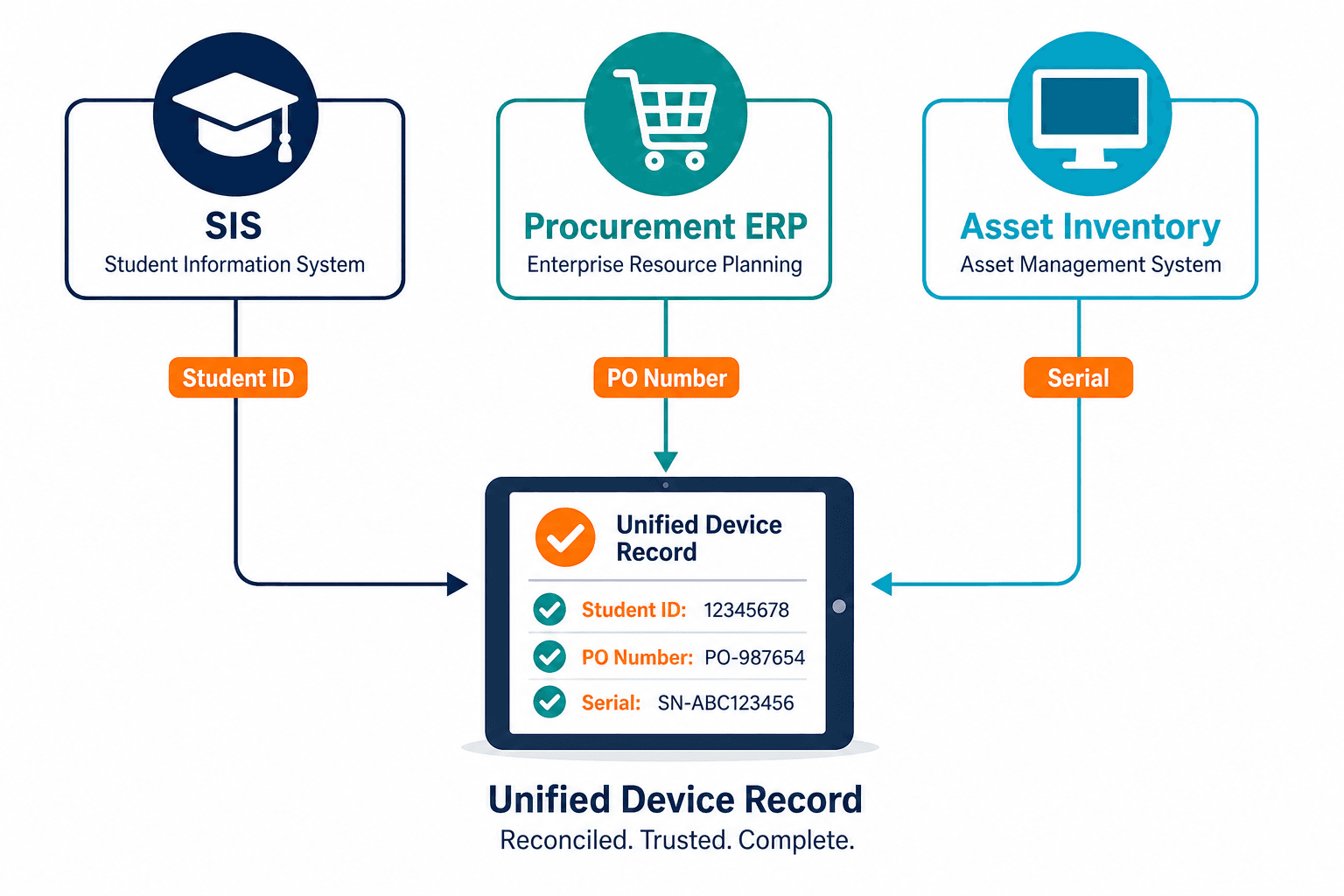
Operational checklist: keep the three-system join alive
The platform earns its keep after go-live, not at kickoff. Use this operating loop.
Intake
Require PO number and receiving location on every new device row. Block “unknown” serials from closing the ticket.
Assignment
Sync assignment to active SIS or HR status. When enrollment or employment ends, trigger return workflows before the next term starts.
Discovery refresh
Discovery-sourced inventory confirms what still answers on the network between checkout events (see “Where tags and checkout apps stop,” below). High-frequency scheduled discovery cycles catch devices that never returned, clones of gold images, and lab gear that moved without a ticket.
Reconciliation ownership
One named owner runs a monthly exception list: assets without SIS or staff ID, POs without assets, and discovery hits without asset rows. Escalate repeats to the department that owns the gap. ViVID service maps show which downstream services and incidents trace back to a missing or misassigned device, so the reconciliation owner can prioritize the exceptions that carry real operational risk.
When partial inventories still drive student device programs, start with Trusted Runtime Truth. Pressure-test whether serial, owner, and last-seen facts still come from discovery after the last summer deployment ends.
Capability table: what schools should demand from asset management software
| Capability | What good looks like | What fails in practice |
|---|---|---|
| SIS join | Device rows carry active enrollment or staff IDs and location codes from the SIS of record | Free-text student names with no ID match after transfers |
| Procurement join | PO number, cost center, and receive date on every capitalized device | Bulk uploads without PO after the fiscal year closes |
| Custody workflow | Checkout, return, and damage states tied to the same serial as inventory | Separate cart lists that never update central inventory |
| Discovery truth | Scheduled discovery confirms what still exists beyond the last scan event | Annual physical counts as the only existence check |
| Security and compliance context | Asset populations usable for patch and control sampling | Inventory that cannot support security population questions |
CISA Binding Operational Directive 23-01 pushes federal civilian agencies toward timely asset visibility for known exploited vulnerabilities. K-12 and higher ed are not the directive’s audience, yet the same physics apply: you cannot prioritize devices you cannot locate. NIST SP 800-53 control families around inventory and configuration management, published in SP 800-53 Revision 5, likewise treat complete, current asset inventories as a control input, not optional bookkeeping. The same inventory discipline underpins cybersecurity asset management on campus networks.
What should schools require before buying asset management software?
Require documented joins to the campus SIS and procurement or ERP systems, including student or staff ID, location codes, and purchase order fields, proven in a sample before contract. Add a named owner and monthly reconciliation so orphaned device, roster, and PO records do not wait for the annual audit.
Where tags and checkout apps stop and discovery must continue
Physical tags and student checkout apps solve custody at the desk. They do not prove a device still exists on the network after it leaves the cage, nor do they reconcile shadow purchases that never hit central IT. Treat tags as labels for offline custody and discovery as existence proof after the device leaves the cage.
Tools that only store the last checkout event will drift as carts move, images refresh, and departments buy outside the standard SKU. High-frequency discovery cycles feed the same serial and hostname the SIS and PO rows already reference.
See how discovery-sourced inventory keeps school device serials, owners, and last-seen facts current enough to reconcile against SIS and purchase order records between term audits.
How to run the SIS-PO-inventory data audit
Export three files: active SIS or HR assignments with IDs, open and closed POs for devices in the last two fiscal years, and the full asset export with serials. Match on ID and PO first, serial second. Produce three exception lists: assets without ID, POs without assets, discovery or network unknowns without assets. Assign each exception an owner and a due date. Repeat monthly until exception volume stabilizes, then keep the cadence.
This audit is the operational meaning of the thesis. Integration without a reconciliation owner still fails. A reconciliation owner without join fields still fails.
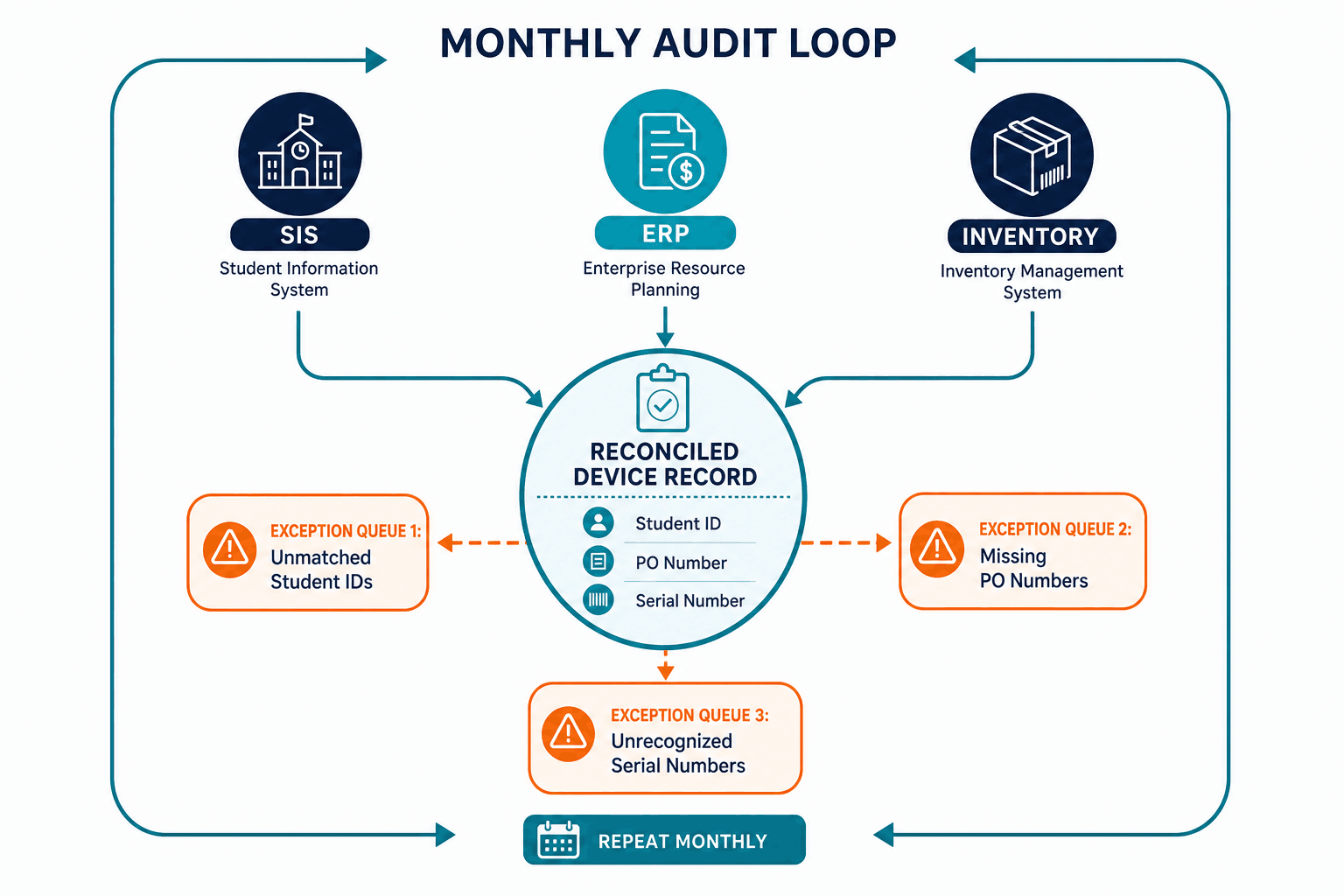
Where discovery-sourced inventory closes the school estate loop
Asset management software for schools still needs custody workflows, help desk tickets, and procurement process. Those systems need an existence layer underneath: what still runs, who owns it, and whether the serial matches the PO and roster join. A discovery-sourced configuration management database (CMDB) supplies that layer for hybrid campuses mixing on-prem labs, 1:1 laptops, and cloud workloads on AWS and Azure. High-frequency scheduled discovery cycles keep the join current between term starts. Virima provides that CMDB and discovery layer and feeds ITSM platforms schools already run, including ServiceNow, Jira, Ivanti, and many more through one hub at all integrations. It does not replace the SIS, ERP, or student checkout product. It keeps the estate truth those tools must trust.
How does discovery support asset management software for schools?
Discovery confirms which devices still exist beyond the last checkout or barcode event and keeps serial, hostname, and last-seen fields current for SIS and procurement joins. That existence layer turns monthly reconciliation into a short exception list instead of a full physical recount.
Make the join the selection criterion
Keep the thesis as the filter on every RFP and renewal. School inventory software must join SIS and procurement data, or the tool will recreate the spreadsheet problem under a new brand. Run the three-system audit before you buy. Name the reconciliation owner before go-live. Refresh existence with discovery on a fixed schedule so lost devices and budget mismatches surface as exceptions, not as May surprises. That’s the test every asset management software for schools purchase should pass before signature. Request a demo to see how publisher, serial, and CI truth stay current enough for the first query after a term starts.
Frequently Asked Questions
What is the most important integration for school asset tools?
Joins to the SIS for active user and location identity, and to procurement or ERP for purchase order and cost center. Custody apps without those joins still produce orphaned inventory. This is the baseline capability any school asset management software purchase should prove before contract.
How often should schools reconcile SIS, PO, and inventory?
Monthly exception reviews work better than annual only audits. Term start and end need extra passes for mass assignment and return waves.
Do barcode tags replace school inventory platforms?
Tags label devices for offline custody. They do not prove network presence, shadow purchases, or PO match. Pair tags with inventory joins and discovery refresh.
Can central IT own all campus devices?
Many campuses still split management across departments. Central standards can still require shared join fields and a single reconciliation owner even when local units buy or support devices.
How does Virima’s CMDB support asset management software for schools?
A discovery-sourced CMDB keeps serials, owners, and last-seen facts current for SIS and procurement joins. It feeds ITSM tools and does not replace SIS, ERP, or checkout products.
Does Virima integrate with the ITSM platforms schools already use?
Yes — Virima’s discovery-sourced CMDB feeds ITSM platforms schools already run, including ServiceNow, Jira, and Ivanti, without replacing them.