Asset Management Platform Features: The 8 to Test Before You Sign

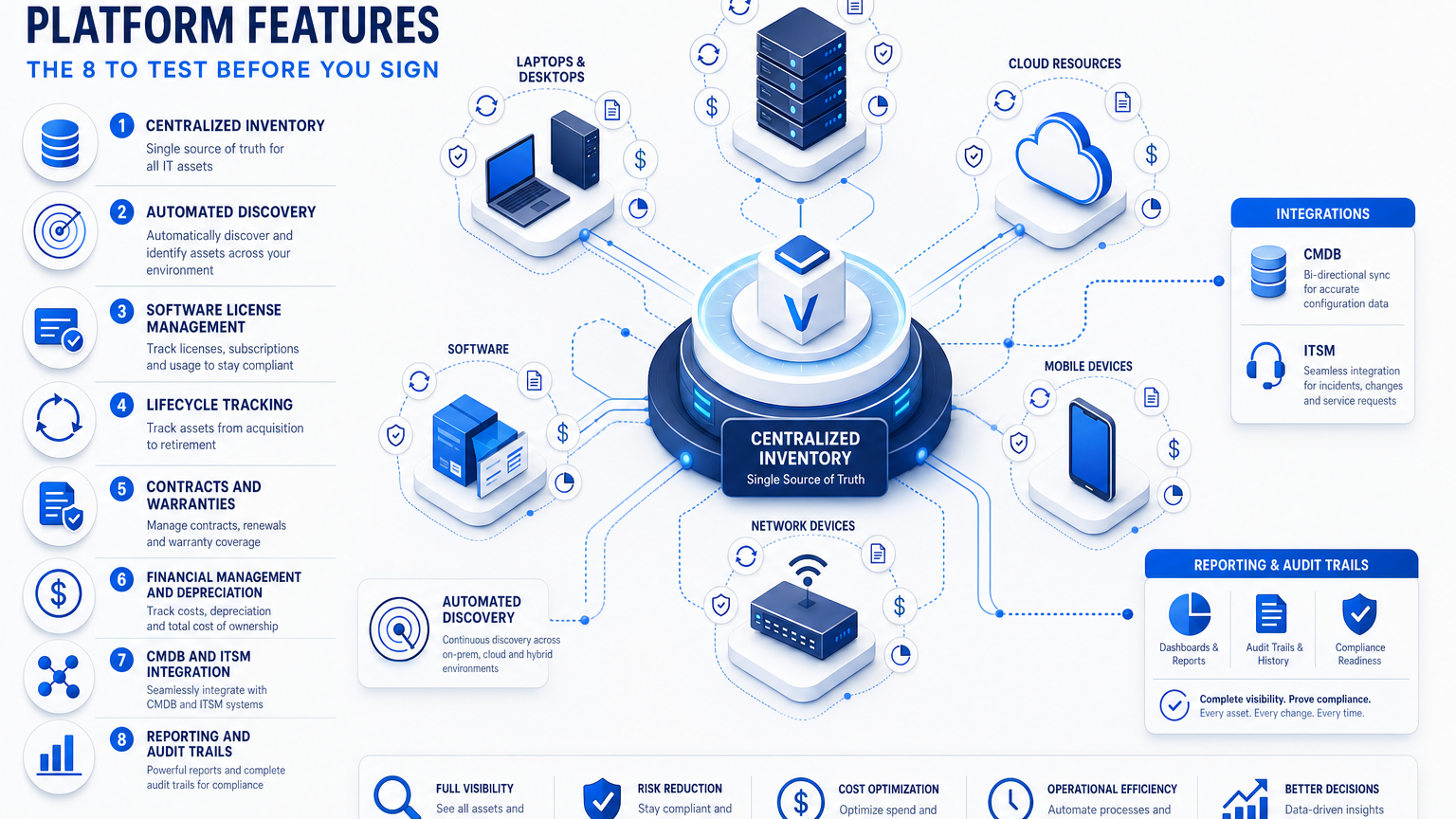
A good asset management platform has eight core features. They are a centralized inventory, automated discovery, software license management, lifecycle tracking, contracts and warranties, financial management and depreciation, CMDB and ITSM integration, and reporting with audit trails.
This guide covers IT assets: hardware, software, and cloud. It lists the eight features, a checklist table, questions to ask in demos, and claims to check before you sign.
Visibility is the common gap: in Flexera’s 2026 State of ITAM survey, 36% of professionals reported complete IT visibility, down from 43%.
The 8 Core Asset Management Platform Features
Each feature below has a definition and the checks you can run before buying.
- Centralized inventory: one record per asset holds its owner, status, cost, and history. Check that hardware, software, and cloud assets share one record structure, and that each asset has a named owner from the day it is registered. Virima’s IT asset management features describe this as a single record of what you own, who is using it, and what it costs.
- Automated discovery: discovery finds hardware, software, and cloud resources on a schedule and writes them to the inventory. Check which methods the platform offers, such as agentless and agent-based discovery, cloud connectors for AWS and Azure, and a scan schedule you can configure. Registration still needs a validation step, so stale or duplicate entries meet a rule or a human review.
- Software license management: license management compares entitlements with installs, by device and owner. Check how entitlements are imported, whether usage data is collected for metering, and whether an auditor can read the export. In Flexera’s 2026 survey, 48% of organizations were audited in the past year.
- Lifecycle tracking: lifecycle tracking records each asset’s stage from request to retirement, with an owner and a dated history of every change. Check that statuses are configurable and that a named owner confirms each retirement. Virima’s ITAM guide says warranty status, patch level, and upcoming end of life should be flagged in advance.
- Contracts and warranties: the platform should link contract terms and warranty status to each asset. Check warranty lookup coverage by manufacturer, whether support and warranty documents attach to individual assets and bulk purchases, and how renewals are surfaced.
- Financial management and depreciation: cost and purchase date should sit in the same record as configuration and ownership, so finance can plan budgets and calculate depreciation. Check which cost fields exist and how they export to your finance system. Depreciation itself is usually calculated in the finance system.
- CMDB and ITSM integration: the CMDB records what exists and how it connects, while ITAM tracks ownership, cost, and lifecycle stage for the same assets. Check the sync direction, which data moves, and how conflicts are resolved. Linking asset records to the service desk gives technicians context during incidents.
- Reporting and audit trails: reporting should cover inventory, licensing, patch, security, and financial data on a schedule, with a record of who changed what and when. Check history retention, export formats, and whether each report states the date its data was collected.
What features should an asset management platform have?
An asset management platform should have eight features: centralized inventory, automated discovery, software license management, lifecycle tracking, contracts and warranties, financial management and depreciation, CMDB and ITSM integration, and reporting with audit trails. Test each one on your own assets during a demo before you sign.
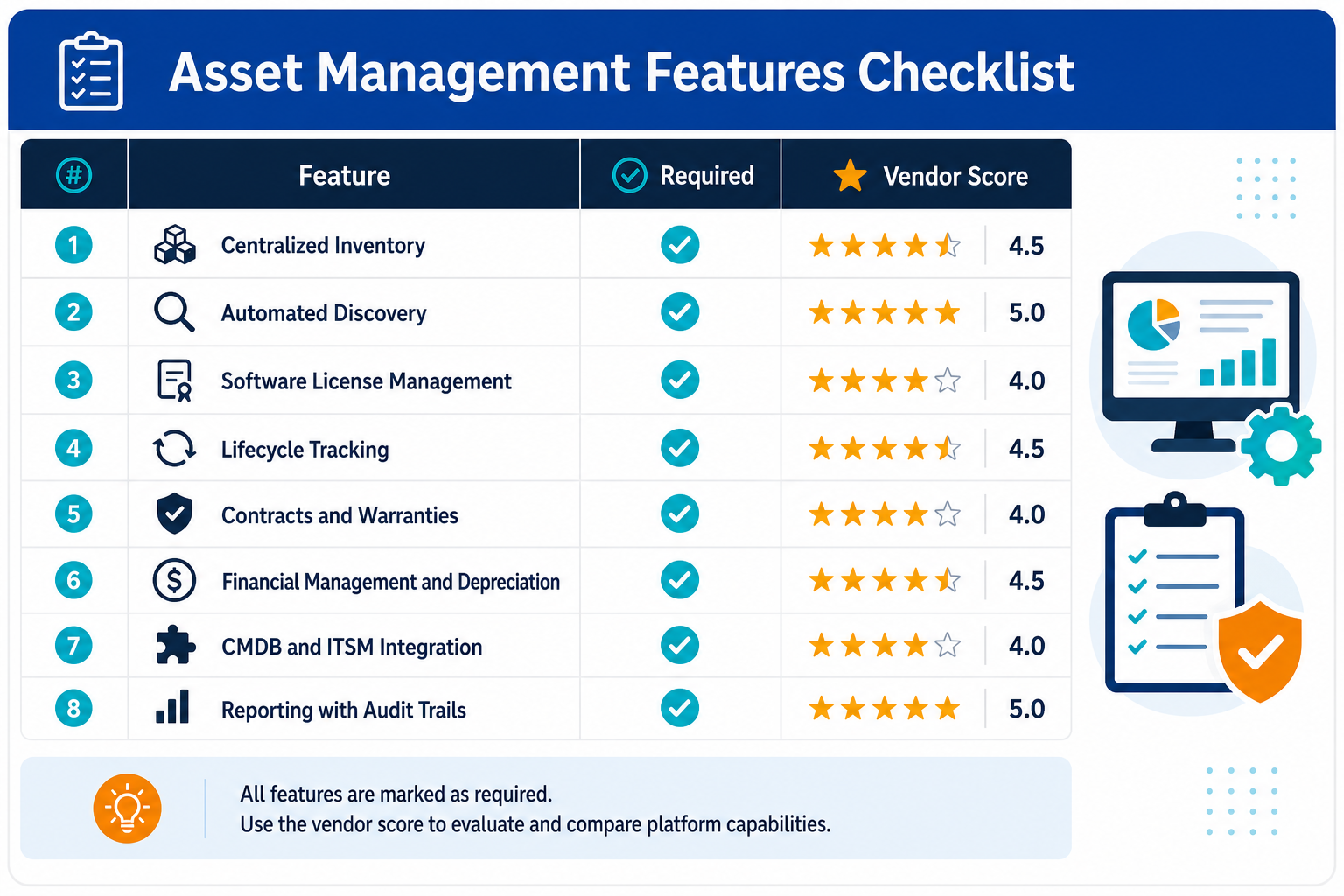
Asset Management Platform Features Checklist
Use this table as a scoring sheet during vendor evaluations. The last column shows how Virima handles each feature.
| Feature | Why it matters | How Virima handles it |
|---|---|---|
| Centralized inventory | Gives every team one record of what exists. | ITAM keeps a single record of what you own, who is using it, and what it costs. |
| Automated discovery | The inventory reflects what is on the network and in cloud accounts. | More than 140 extendable agentless probes, a Windows, macOS, and Linux agent, AWS and Azure connectors, and recurring scans on a cadence you configure. |
| Software license management | Shows license position against what is deployed. | License entitlements are tracked against actual installs, down to the device and its owner, and software metering helps reclaim underused licenses. |
| Lifecycle tracking | Shows each asset’s stage and owner. | Configurable statuses such as requested, ordered, development, production, and decommissioned. |
| Contracts and warranties | Keeps coverage and renewals visible. | Automatic warranty lookup by serial number for HP, Dell, and Lenovo, plus vendor service level agreement and contract management. |
| Financial management and depreciation | Supplies cost data to finance and budgeting. | ITAM reporting covers financial governance, usage metrics, and spend support for software audits. |
| CMDB and ITSM integration | Keeps asset and service records aligned. | Integrations with ServiceNow, Jira Service Management, Ivanti/Cherwell, and Halo, including bi-directional sync with ServiceNow. |
| Reporting and audit trails | Gives owners and auditors the data and its history. | A reporting engine with KPI dashboards, plus a CMDB that retains reconciliation history for audit and a timestamped change log for each configuration item. |
What Discovery Should Capture
Discovery depth decides how useful the inventory is. A platform should record more than a device name.
Virima IT Discovery captures these categories:
- Hardware attributes: OS version, patch level, CPU, RAM, and disk configuration for each device.
- Software footprint: installed versions, usage data, and license counts.
- Applications and databases: installed software, running services, and open ports.
- Cloud resources: AWS and Azure instances, virtual machines, networks, and gateways, pulled through API connectors.
Agent-based discovery adds configuration state and software usage for devices that leave the network. Discovery credentials are encrypted on the on-premises Discovery App server. Ask each vendor for the equivalent list and compare it with your own asset classes.
Discovery only helps when the records it writes can be trusted at the moment someone acts on them. See how Trusted Runtime Truth keeps asset records accurate and explainable.
What a Good ITSM Integration Looks Like
Four checks show how deep an integration goes. Virima’s ServiceNow and other ITSM integrations answer each one.
- Matching: does the platform match each CI against existing service desk records before syncing? Virima does, and asset-specific correlators prevent duplication.
- Direction: does data flow both ways? Virima pulls ownership changes, approvals, and enrichment notes from ServiceNow back into the CMDB.
- Mapping: can you choose which discovery properties sync and which tables they map to? Virima maps any blueprint to ServiceNow tables, including custom objects.
- Coexistence: does the platform run beside the service desk’s own discovery? Virima runs alongside ServiceNow Discovery, which lets both tools operate in the same environment.
Virima also lists integrations with Jira Service Management, Ivanti/Cherwell, and Halo. Ask for the same four answers about every ITSM tool on your shortlist.
What Audit History Should Include
Virima’s CMDB page states that regulators and auditors expect a clear record of what changed, when, and why. Four features support that record in Virima’s CMDB:
- Change log: each configuration item carries a timestamped change log that remains available after decommissioning.
- Decommissioned assets: records stay in the system with a flag and remain available for audit.
- Reconciliation history: the full history of how conflicts between sources were resolved is retained.
- Authority rules: configured attribute-level authority rules decide which source wins for each attribute.
Ask each vendor how long history is retained and in what format it exports.
What Drives Platform Cost
Vendors charge by different units, so the same estate can price very differently across platforms. Ask for the unit and the count before you compare quotes.
- Pricing unit: ask whether price depends on asset count, device count, or another unit.
- Virima example: Business Pro pricing depends on the number of assets in the Virima CMDB, where an asset is one standalone configuration item. The plan includes 2,000 assets and can expand to 6,000.
- Enterprise: pricing is based on server operating systems and physical devices, and it is quoted to your scope.
- Billing: both Virima plans are billed annually in advance.
- Add-ons: ask what onboarding and add-ons cost. Virima quotes enterprise onboarding separately and offers onboarding packs with Business Pro.
Who Uses Each Feature
The ITAM guide assigns responsibilities across five roles, and each role leans on different features.
- IT asset manager: owns the record day to day and relies on discovery, lifecycle tracking, and license reconciliation.
- Procurement: controls what enters the record, so contracts and warranties matter most.
- Finance: uses the record for budget planning and depreciation.
- IT operations and service desk: consume asset data during incidents, which makes CMDB and ITSM integration central.
- Security: scopes vulnerability exposure and prioritizes patching by asset criticality, using discovery and reporting.
Small IT teams often combine these duties in one generalist role, while enterprises usually spread them across dedicated staff. Involve each role in the demo so every feature gets tested by the person who will use it.
A useful exercise is to give each role one scenario to run during the trial. Procurement can attach a contract and warranty to a new device record. Finance can pull a cost report for one department. Security can list every device missing a recent patch. The service desk can open an incident and view the affected asset’s owner and history. Each scenario takes minutes and shows whether the feature works for the person who depends on it.
Gaps a Platform Should Close
Virima’s ITAM guide and hardware asset management guide describe five common gaps. Match each one to a feature on your checklist, and ask the vendor to demonstrate that feature on your own data. A gap that stays open after the demo will stay open after the contract is signed.
- Shadow IT: unsanctioned software, personal devices, and unauthorized cloud subscriptions accumulate where procurement-based tracking has gaps. Discovery of what is actually running addresses those gaps.
- Infrastructure sprawl: on-premises, cloud, and SaaS environments produce data in different formats and on different schedules, so the data has to be combined before anyone sees one picture.
- License rules: licensing models differ, since some are based on users, others on cores or subscriptions. Poor tracking can lead to buying too many or too few licenses, which adds cost or triggers audit fines.
- Data staleness: records drift from reality over time unless they are refreshed against current discovery.
- Disposal: a documented retirement process lets the team verify data destruction and record each asset’s final status.
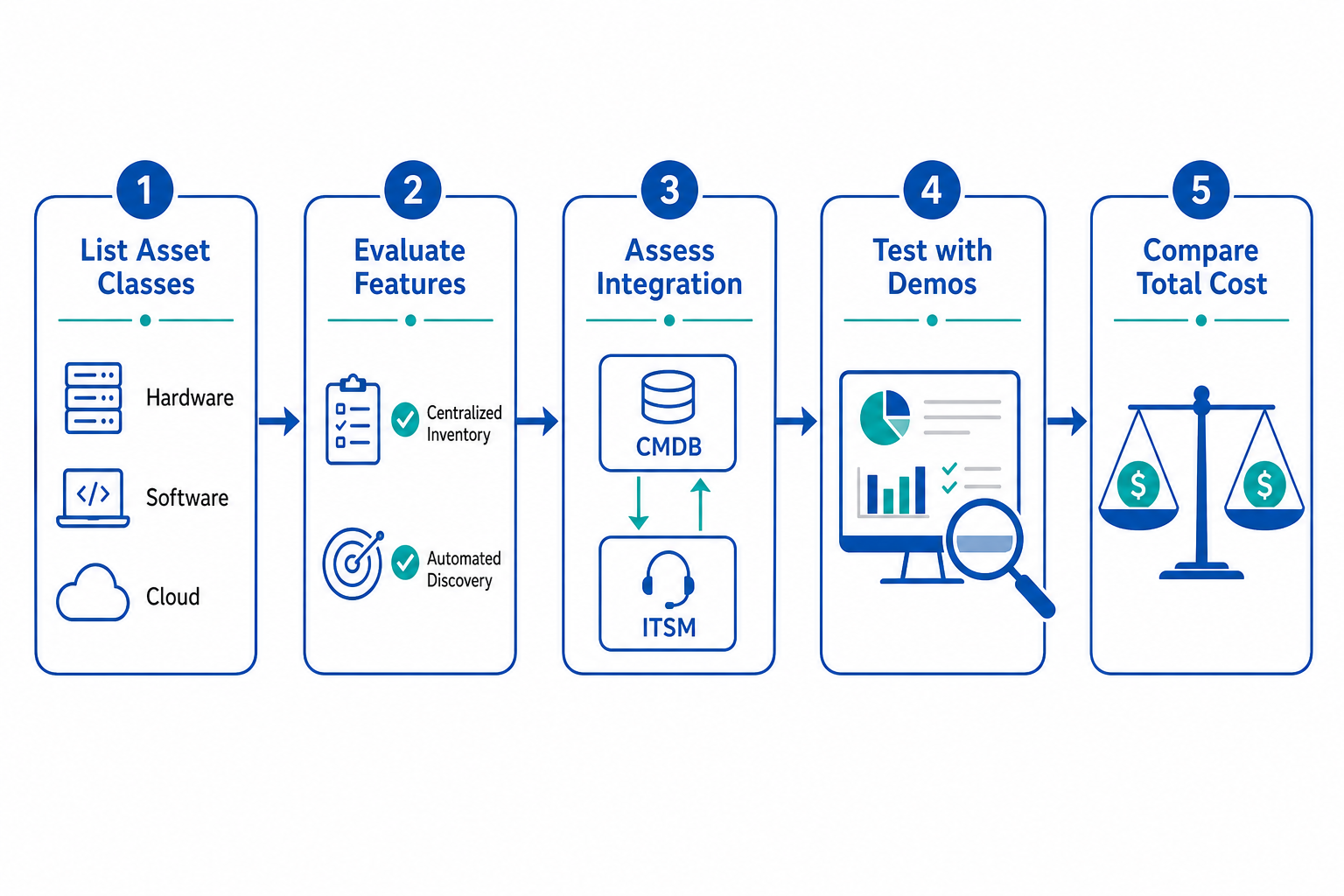
How to Score a Platform Shortlist
A scorecard keeps the evaluation consistent across vendors. Start with the eight core features and add the checks from this guide.
- List your asset classes: laptops, servers, network devices, cloud instances, and software titles.
- Weight each feature by how much your team relies on it. A regulated team may weight audit history higher, while a distributed workforce may weight agent-based discovery higher.
- Run the same trial scenarios on every platform, using a sample of your real assets.
- Score each feature on what you saw in the demo, and record the evidence next to each score.
- Compare total cost for the same asset count, including onboarding and add-ons.
Keep the scorecard with the final decision. It gives the team a record of why a platform was chosen and a baseline for the first renewal review.
Questions to Ask Vendors During Demos
Ask each vendor to run the demo on your own data. Group the questions by feature so each answer can be scored.
- Inventory: Can you show one asset record with its owner, status, cost, and change history?
- Discovery: How often do scans run, and who can change the schedule? Which asset classes fall outside discovery?
- Licenses: can you load one publisher’s entitlements and export installs against entitlements?
- Lifecycle: can you move one asset through every status and show the change log?
- Contracts and warranties: which manufacturers does warranty lookup cover, and how are renewals surfaced?
- Financial: which cost and purchase fields exist, and how do they export to our finance system?
- Integration: which data moves to our service desk, in which direction, and which side wins a conflict?
- Reporting: can you schedule one report, name its recipient, and show its export formats?
- Cost: which unit drives the price, and what do onboarding and add-ons include?
Score each answer on whether it produced a count, a timestamp, or an export file during the demo.
Red Flags in Vendor Feature Claims
Each flag pairs a claim with the check that tests it.
- Real-time discovery claims: ask for the scan schedule in writing and a timestamp on each record.
- Complete or full coverage: ask which asset classes sit outside it. In Flexera’s 2026 survey, visibility of cloud licenses and BYOL was 43%, and complete IT visibility was 36%.
- Integrates with a named tool: ask which data moves, in which direction, and how conflicts are resolved.
- Audit-ready reports: ask for the export format and the change history behind each figure.
- Unlabeled or promotional pricing: ask for the unit that drives cost and what onboarding adds.
- A demo on sample data: ask to see the same steps on your own assets.
A platform that answers each check with a count, a timestamp, or an export file has earned its row on your checklist.
How do you test asset management platform features before buying?
Run the same trial scenarios on every shortlisted platform using a sample of your real assets. Score each feature on what the demo produced, such as a count, a timestamp, or an export file, and record that evidence next to the score. Compare total cost for the same asset count.
Run these demo questions on your own assets before you shortlist a platform. Schedule a Virima demo to see discovery, lifecycle statuses, and license tracking against your own estate.
Frequently Asked Questions
What is the most important feature of an asset management platform?
A centralized inventory fed by automated discovery matters most, because every other feature reads from it. In Flexera’s 2026 survey, 36% of professionals reported complete IT visibility, so inventory accuracy is the common gap.
Do I need barcode scanning in an asset management platform?
Barcode scanning helps with physical counts and device handoffs, because a scan opens the record at once. Cloud and virtual assets have nothing to tag, so discovery records them through API connectors. Ask each vendor whether tags and scans are included.
How does the platform integrate with ServiceNow?
Virima’s ServiceNow integration pushes discovery data into ServiceNow and matches each CI against existing records before syncing. Ownership changes, approvals, and enrichment notes made in ServiceNow sync back into Virima.
What does an asset management platform cost?
Ask each vendor which unit drives the price, such as asset count. Virima prices Business Pro by assets in its CMDB, with 2,000 included, and quotes Enterprise by server operating systems and physical devices.
Does it track SaaS alongside hardware?
According to Flexera, SaaS is discovered through single sign-on platforms, API connectors, financial records, cloud access security brokers, and browser extensions. Ask each vendor which methods it supports and whether SaaS records sit beside hardware records.