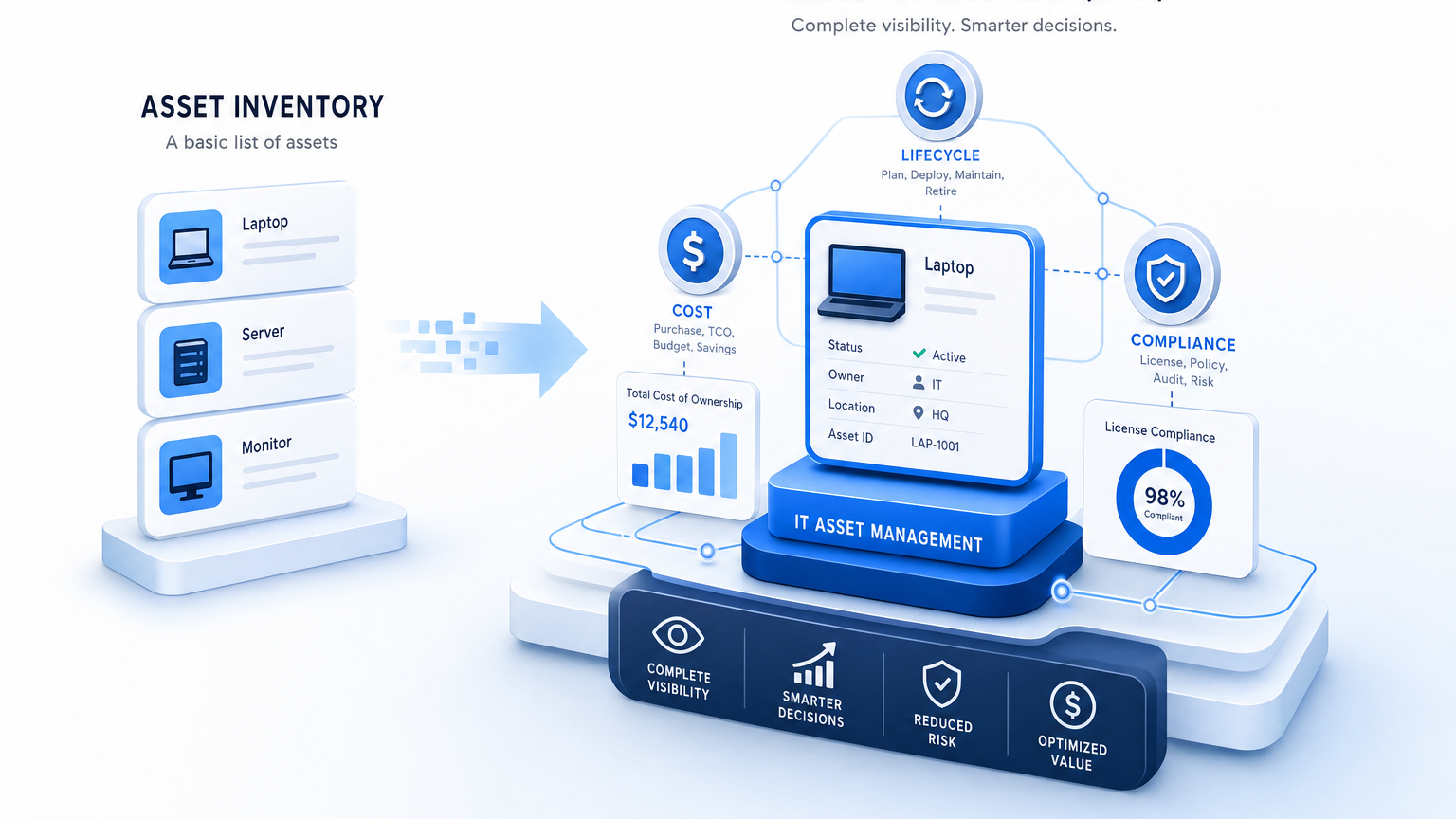
What Is the Difference Between Asset Inventory and IT Asset Management?

An asset inventory is a list of what exists: devices, software, and licenses, with owner and location. IT asset management adds the lifecycle, cost, contract, and compliance data around that list, from procurement to retirement. Inventory answers ‘what do we have’; ITAM answers ‘what does it cost, who uses it, and when does it expire’.
Most teams start with a spreadsheet of laptops and servers. That list helps for a week, then hires, refreshes, and cloud workloads make it stale. The audit request arrives, the renewal auto-renews, or an incident hits an unknown dependency. That gap between a static list and a managed lifecycle is where IT asset management earns its keep.
Asset inventory: the verified list of what exists
An asset inventory records each discoverable asset with identity, owner, and location. Typical fields include hostname, serial number, operating system, installed software, assigned user, department, and site. A strong inventory also captures cloud instances with instance ID, region, and tags.
The quality test is verification. A manually typed list drifts within weeks because assets change faster than people update rows. A discovery-sourced inventory stays trustworthy because scheduled scans refresh hardware, software, and ownership fields from the environment itself.
For IT Asset Managers, inventory is the evidence base. Auditors ask for proof of installed software against purchased entitlements. Security teams ask for every in-scope Windows Server for patching. Finance asks for headcount of active endpoints before a refresh. Each answer starts from the same verified list.
What is an IT asset inventory?
An IT asset inventory is a verified list of hardware, software, and cloud resources with owner and location details. It records identity fields such as serial number and instance ID plus assignment data. Discovery-sourced updates keep the list accurate between audits and refresh cycles.
IT asset management: the lifecycle, cost, and compliance layer
IT asset management uses the inventory as a starting point and manages each asset from procurement through retirement. It adds purchase date, cost center, depreciation, warranty, contract terms, license entitlements, renewal dates, and disposal records.
That lifecycle view changes decisions. Procurement sees underused licenses before buying more seats. ITAM sees warranties expiring before a failure forces an emergency purchase. Compliance sees effective license position against actual installs before a vendor audit letter arrives.
The National Institute of Standards and Technology frames asset inventories as the foundation for security and lifecycle controls in its cybersecurity guidance. Inventory supplies visibility, while management processes apply governance, ownership, and review around that visibility.
See how enterprise teams establish trusted runtime truth to keep inventory and lifecycle data aligned under operations.
Side by side: inventory versus ITAM
Use this table when stakeholders confuse the two terms in planning meetings.
| Dimension | Asset Inventory | IT Asset Management |
|---|---|---|
| Core question | What do we have and where is it | What does it cost, who uses it, and what happens next |
| Data captured | Identity, configuration, owner, location | Cost, contracts, entitlements, lifecycle state, disposal |
| Time horizon | Point in time snapshot | Full lifecycle from procurement to retirement |
| Owner | IT operations or discovery admin | ITAM manager with finance and procurement input |
| Refresh method | Scheduled discovery scans and imports | Workflow updates plus discovery reconciliation |
| Audit role | Evidence of installed base | Entitlement reconciliation and compliance reporting |
| Outcome | Accurate visibility | Controlled spend, lower audit risk, planned refreshes |
The practical takeaway is sequence. Inventory without ITAM leaves cost and risk unmanaged. ITAM without verified inventory builds reports on stale inputs. Mature teams connect both so the register and the financial record reconcile.
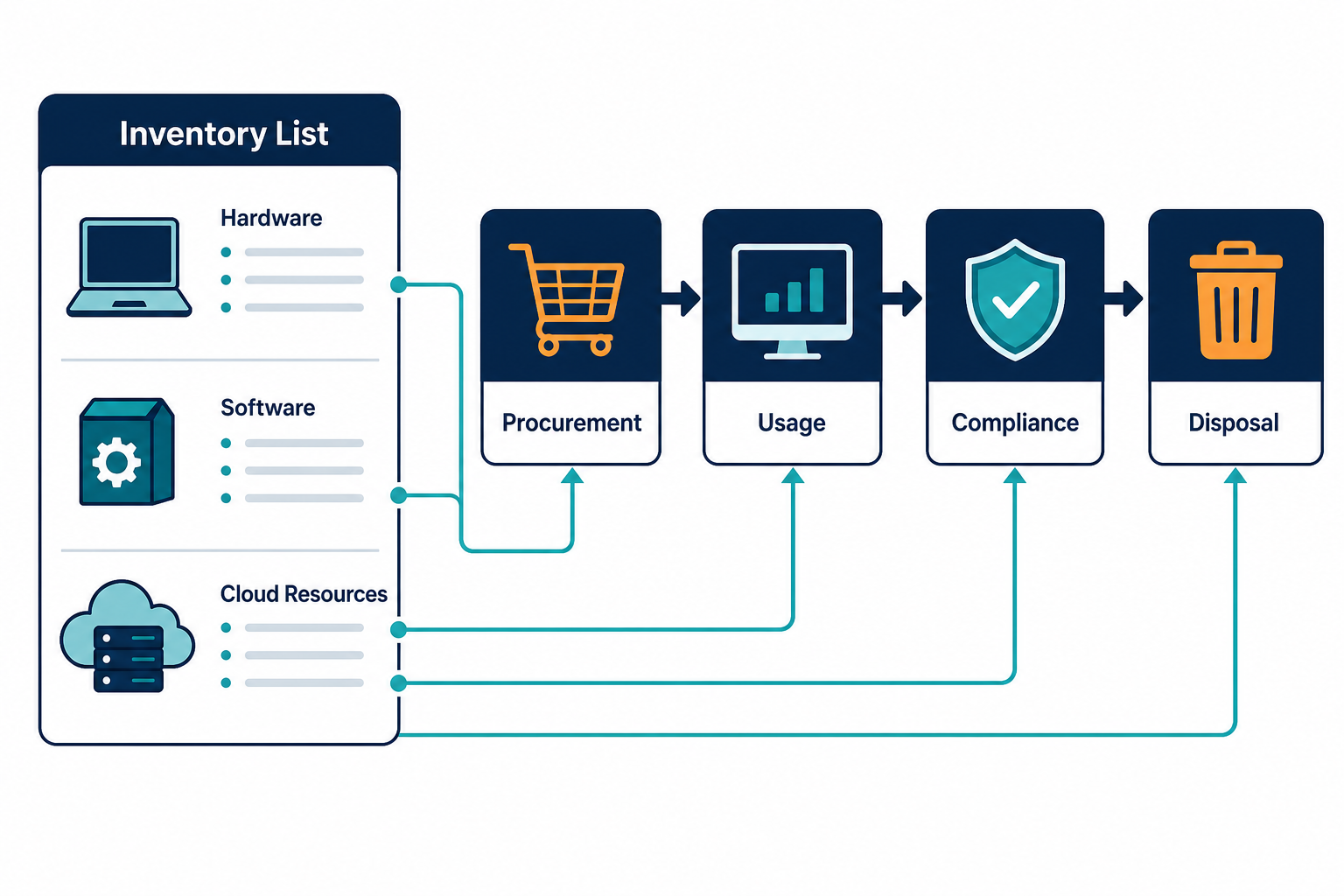
Where automatic discovery fits
Discovery keeps the inventory honest between human updates. Agentless scans cover networked systems over WMI, SSH, and SNMP. Agents cover roaming laptops and remote endpoints. API based discovery covers AWS and Azure workloads that never appear on the corporate network.
Virima discovery normalizes serial numbers, software titles, and cloud identifiers into one record per asset. That reconciliation removes duplicates from reimaged machines, renamed hosts, and short-lived cloud instances. The result is a register the ITAM process can trust for entitlement joins and refresh planning.
Teams that still depend on manual inventory methods feel the difference during onboarding surges and cloud scale-outs. Discovery catches assets that tickets and sheets miss.
Where a CMDB fits
If inventory answers what exists and ITAM answers what it costs, the CMDB answers how it connects and what will break. The CMDB stores configuration items plus relationships such as runs on, depends on, and supports for a business service.
That distinction matters for change and incident work. ITAM knows a server warranty expires in March. The CMDB knows payroll processing depends on that server through two middleware layers. One view plans spend, the other view plans risk.
Many buyers compare ITAM tools against CMDB platforms as if they compete. They complement each other when discovery feeds both from the same sources. Keep inventory, ITAM, and CMDB on shared identifiers such as serial number or cloud instance ID.
Do I need a CMDB if I already track IT assets?
You need a CMDB when incidents and changes require dependency context beyond ownership and cost. ITAM tracks lifecycle and entitlements per asset. A CMDB maps how assets support business services and what fails downstream. Teams running critical services benefit from operating both.
When a spreadsheet is enough, and when it fails
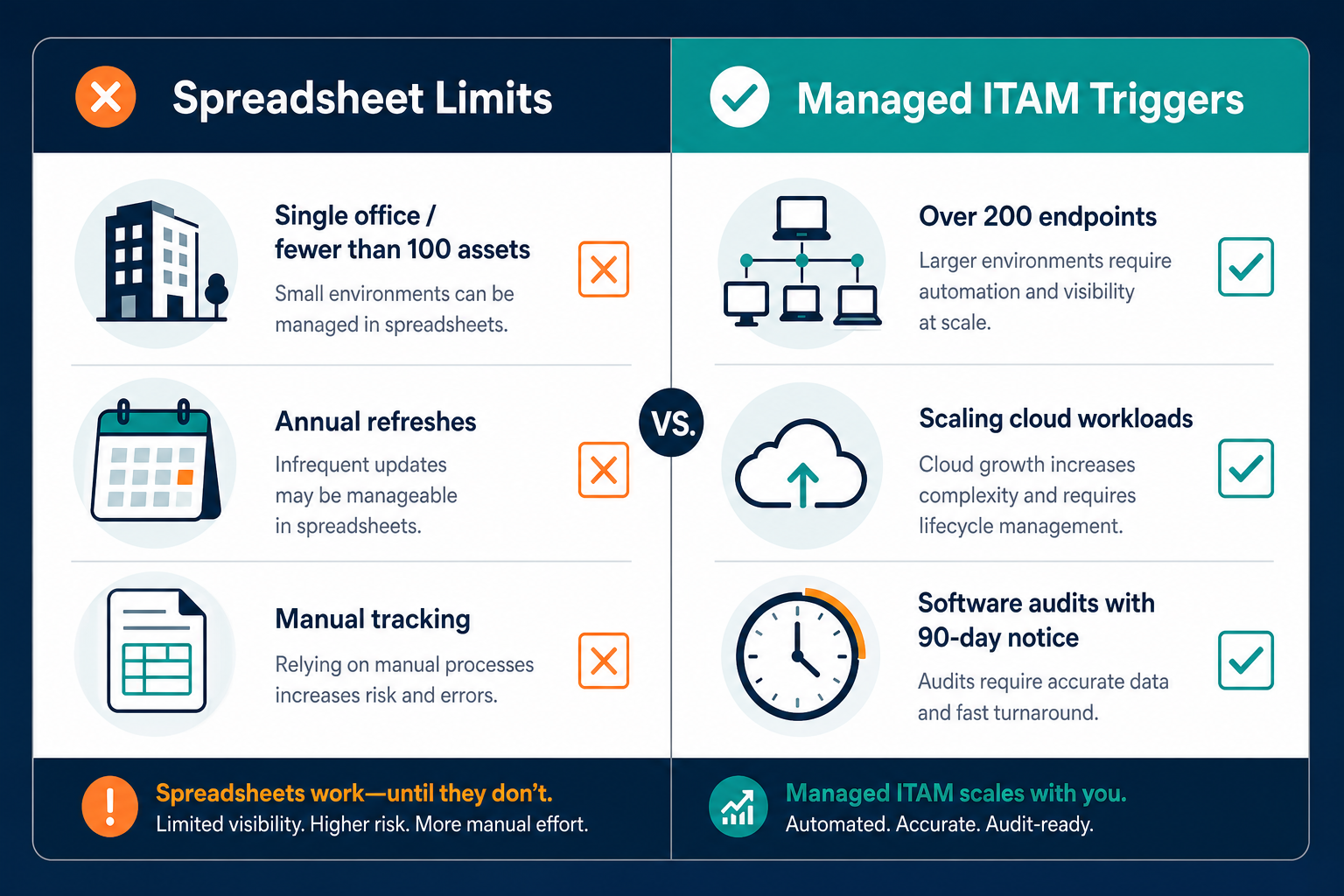
A spreadsheet works for fewer than one hundred assets with slow change and one owner. A single office, annual refreshes, and volume licensing with headroom can survive manual tracking.
Spreadsheets fail when any of these conditions appear. Endpoint counts pass two hundred, cloud workloads scale weekly, software audits arrive with ninety-day notice, or multiple owners edit copies of the same file. Renewals auto-renew because no owner sees the date. Disposed drives leave without disposal evidence.
The upgrade signal is reconciliation time. When your team spends more hours chasing owners and merging sheets than reviewing renewals and risks, the list has outgrown its format.
What breaks when inventory and ITAM stay disconnected
Disconnected data creates three familiar failures. First, license true-ups surprise finance because installs grew while entitlements stayed flat. Second, refresh budgets miss because age and warranty data live in procurement inboxes. Third, audit prep consumes weeks because analysts rebuild install versus entitlement joins under deadline.
Each failure shares a root cause. The inventory snapshot and the contract record were maintained in separate systems with no shared key. Joining them late costs more than keeping them aligned from the start.
How Virima connects discovery to the register
Virima discovers hybrid estate data with agentless, agent-based, and API methods, then maintains the CMDB and ITAM views from those sources. Hardware lifecycle tracking, software license tracking against installs, contract and warranty dates, and end-of-life flags sit on verified discovery rather than manual entry.
ViVID service maps then layer business service context on that foundation once service definitions are provided. Incident triage sees affected services, change review sees downstream impact, and audit prep pulls install evidence with ownership.
If renewals and audits still depend on stale sheets, see your estate as Virima sees it with discovery-sourced detail.
Which one do you need first
Start with verified inventory if you lack confidence in counts, owners, or cloud scope. Add ITAM workflows once the list holds for ninety days without manual cleanup. Add CMDB relationships once incidents or changes need blast radius context.
For lean teams, that phased path avoids buying process before data. For larger estates under audit pressure, run inventory verification and entitlement reconciliation in parallel. Either way, keep one authoritative source for identity so every view agrees.
Is an asset register the same as an inventory?
An asset register is the formal record version of an inventory, often with financial fields for accounting. An inventory emphasizes operational detail such as configuration and assignment. Many ITAM programs treat the register as the governed inventory plus procurement and disposal history.
Closing: build the list once, manage it for years
Inventory gives you ground truth. ITAM turns that truth into controlled spend and audit readiness. Discovery keeps both current without manual chasing.
If your team still reconciles sheets before every renewal, start by verifying the list, then attach lifecycle ownership. Schedule a demo to see discovery-sourced inventory feeding ITAM and CMDB views together.
Frequently Asked Questions
Is an asset register the same as an inventory?
A register is the governed, often financial record of assets, while inventory emphasizes operational detail. Most teams merge them by adding cost and disposal history to the verified list.
Can discovery replace manual inventory?
Discovery replaces manual data collection for networked, agent-covered, and API visible assets. Teams still confirm ownership, cost center, and disposal details through workflow.
Do I need a CMDB too?
You need a CMDB when services depend on connected infrastructure and change risk matters. ITAM manages lifecycle per asset, while the CMDB maps service dependencies and impact paths.
Is ITAM only for enterprise teams?
Small teams benefit once endpoints pass roughly two hundred or audits and renewals create risk. Start with verified inventory, then add lifecycle tracking as spend grows.