What Features Should Asset Inventory Management Software Have?

An auditor asks for a current hardware list, and the spreadsheet still shows three laptops that left the building eight months ago. A renewal notice arrives for a publisher nobody remembers buying extra seats for, and no one is sure which devices still run that software. A new VP wants a one-page view of every asset across two cloud accounts and one data center, and getting that answer takes four days by hand. Each of those moments traces to the same gap: the inventory on paper and what IT runs are two different records.
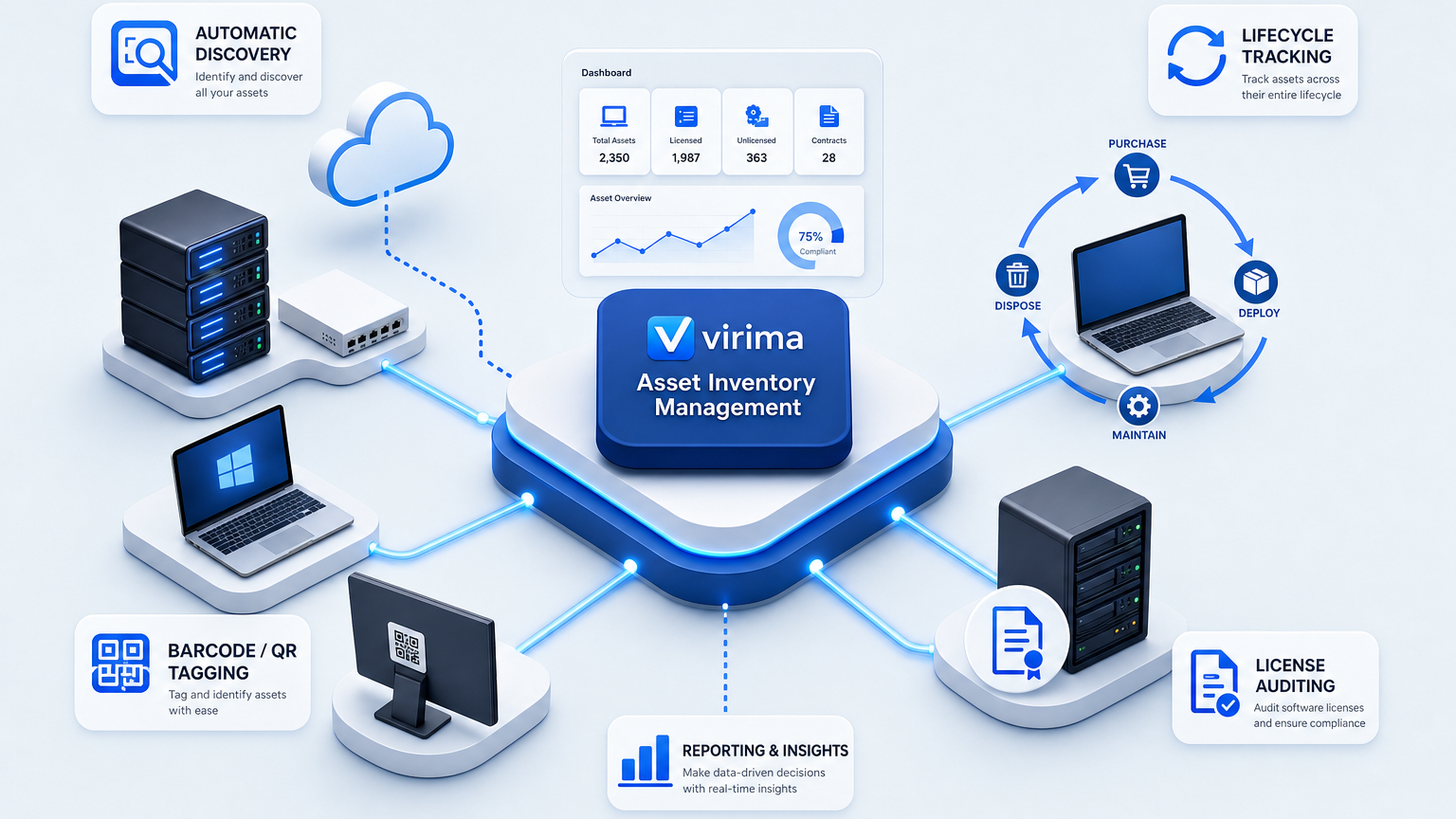
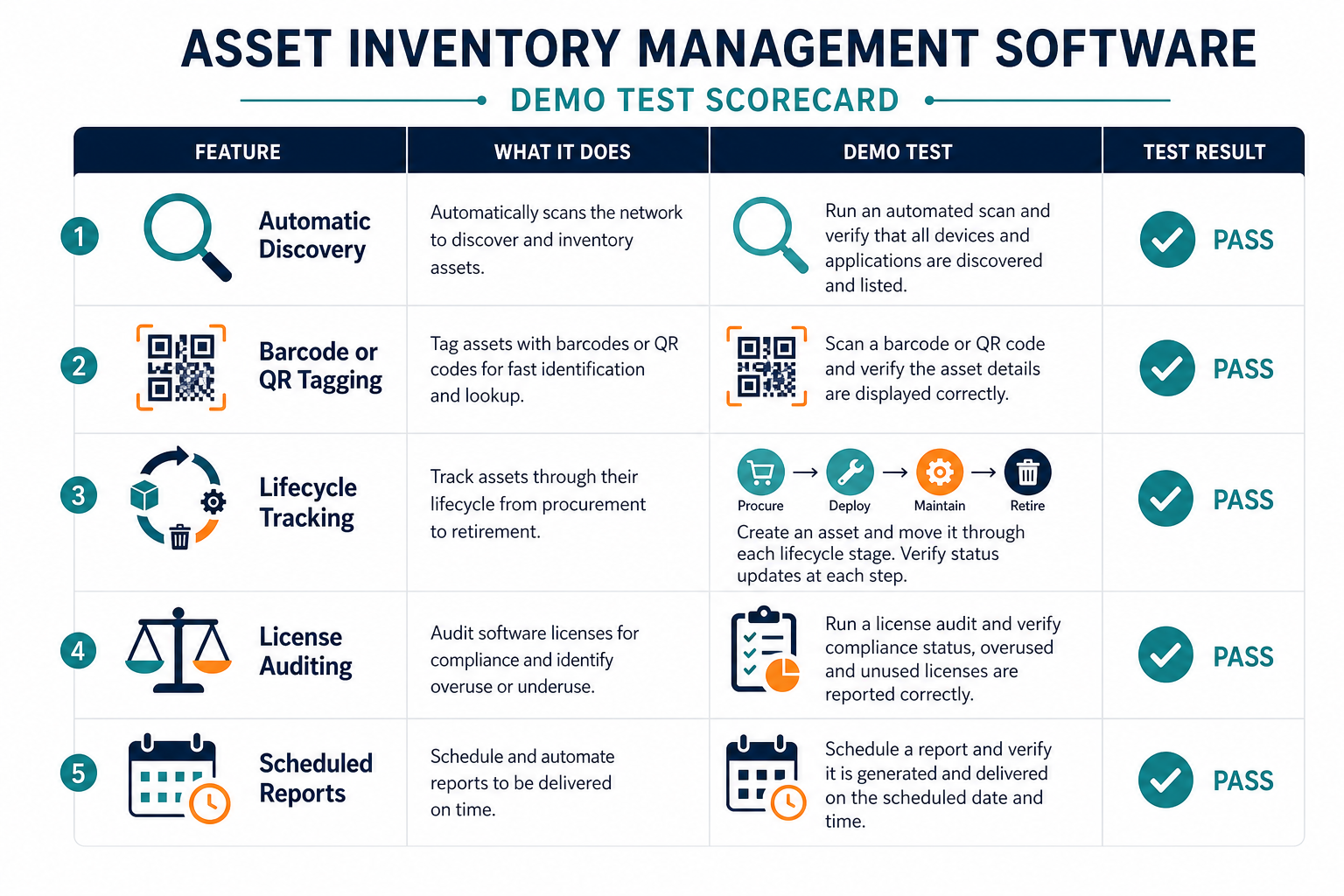
The asset inventory management software features that close that gap are automatic discovery, barcode or QR tagging, lifecycle tracking from purchase to disposal, software license auditing, and scheduled reports for depreciation and audits. The checklist below follows the order most evaluations take: a scoring table first, then one section per feature group, with a test you can run in a vendor demo for each.
Inventory accuracy is the hard part to buy. Across industries, Flexera’s 2026 State of ITAM report finds that 36% of IT professionals report complete visibility of their IT estate, down from 43%. The global survey covered 512 respondents.
Asset Inventory Management Software Features Checklist
Use this table as a scoring sheet during vendor evaluations. Each row pairs a feature with a test that produces a count, a timestamp, or an export file.
| Feature | Why It Matters | How to Test in Demo |
|---|---|---|
| Automatic discovery | The inventory starts from observed assets on the network and in cloud accounts. | Scan one subnet and one cloud account, then count the assets your current list lacks. |
| Barcode or QR tagging | A tag links each physical device to its record for counts and handoffs. | Request a tag for one item, scan it, and confirm it opens the right record. |
| Lifecycle tracking | Each asset shows its stage and owner from purchase to disposal. | Move one asset through every status and check the change log for who and when. |
| License auditing | Licenses owned are compared with software installed, by device and owner. | Load one publisher’s entitlements and export installs against entitlements. |
| Scheduled reports | Audit and depreciation inputs reach owners on a set calendar. | Schedule one report and confirm the recipient, the date, and the export format. |
The inventory also serves as a security baseline. CIS Critical Security Control 1, titled Inventory and Control of Enterprise Assets, asks organizations to actively manage (inventory, track, and correct) all enterprise assets.
Integrations and role-based access also affect the decision. The post on must-have IT inventory software features covers both in more detail.
Automatic Discovery
Automatic discovery finds hardware, software, and cloud resources on a schedule and writes them to the inventory. Each asset carries a first-seen date and a last-seen date, so the record shows when the asset was last observed.
The NIST National Cybersecurity Center of Excellence describes IT asset management as foundational to an effective cybersecurity strategy. Its scope covers computers, mobile devices, operating systems, applications, data, and network resources. That breadth is why discovery has to reach beyond a single device type.
What to Ask Vendors About Discovery
Ask each vendor about these points:
- Discovery methods: Agentless scanning reaches network devices and servers, while an installed agent reaches laptops that leave the network. Ask whether the tool offers agentless and agent-based discovery and how the two feed one record.
- Cloud connectors: Ask whether AWS and Azure accounts are read through their APIs, and whether those records merge with network records for the same asset.
- Scan schedule: Ask how often scans run, who can change the schedule, and whether scan windows can differ by network segment.
- Credential storage: Discovery needs credentials to read devices. Ask where they are stored and how they are encrypted.
- Conflicting sources: Two tools often report different values for the same asset. Ask whether the tool applies attribute-level authority rules and whether conflicts go to a review queue.
Testing Discovery in a Demo
The demo test is a count. Scan one subnet and one cloud account, then list the assets found that your current inventory lacks. That list is your starting gap.
Ask for the scan frequency in writing, because the schedule sets how old a record can get. Virima’s CMDB health score method measures record freshness against 30, 60, and 90-day windows.
Expect the tool to disagree with a second source sometimes. A common conflict is a device location, such as rack 12 in one source and rack 18 in another. The tool should show both values, apply its authority rule, and keep a history of the decision.
What should automatic discovery cover in asset inventory software?
Automatic discovery should find hardware, software, and cloud resources on a schedule, write first-seen and last-seen dates, support agentless and agent methods, and merge AWS and Azure API records with network scans into one asset record.
Barcode / QR Tagging
A barcode or QR tag ties a physical device to its record, so a physical count can be checked against the system. Tags matter most for laptops, monitors, network gear, and other items that move between rooms, racks, and people.
Tagging is one step in how asset inventory software works, alongside asset entry, data capture, and reporting.
Ask each vendor about these points:
- Tag generation: Ask whether the tool generates tag IDs and prints labels in formats your label printer supports.
- Scanning: Ask whether staff can scan with a phone or a handheld and see the full record at once.
- Unknown tags: Ask what happens when a scanned tag has no record, and whether the tool creates one or flags it for review.
- Count sessions: Ask whether a scanning session can be saved as a count and compared with the inventory.
Cloud and virtual assets have no physical surface to tag, so discovery carries that coverage. Physical assets that discovery cannot reach, such as monitors and spare equipment, rely on tags and counts.
The demo test takes a few minutes. Request a tag for one item, scan it, and confirm it opens the correct record with its owner and status.
Lifecycle Tracking
Lifecycle tracking records each asset’s stage from purchase to disposal, with a named owner and a dated history of every change. The stages usually run from requested and ordered, through production, to decommissioned.
The asset lifecycle management guide walks through the same stages, from buying and setup to end-of-life and disposal.
Ask each vendor about these points:
- Statuses: Ask whether the statuses can be renamed to match your process, and whether each change records who made it and when.
- Ownership: Every asset should carry a named owner, because the owner decides who confirms a change or a retirement.
- Disposal: Ask whether the disposal step records a date and a method, such as data wiping or recycling.
- Retirement: A named owner should confirm each retirement before the record closes.
- History: Decommissioned assets should remain in the record with a timestamp, so audits can trace them.
- Change link: Ask whether an asset’s status updates when a related change request closes, so the record follows the work.
The demo test is a walk-through. Move one asset through every status, then open its change log and check that each step shows who made the change and when.
Virima’s IT asset management features include configurable status designations, for example, requested, ordered, development, production, and decommissioned.
See how discovery-sourced inventory feeds lifecycle status, owners, and audit-ready change history in one record.
License Auditing & Depreciation Reports
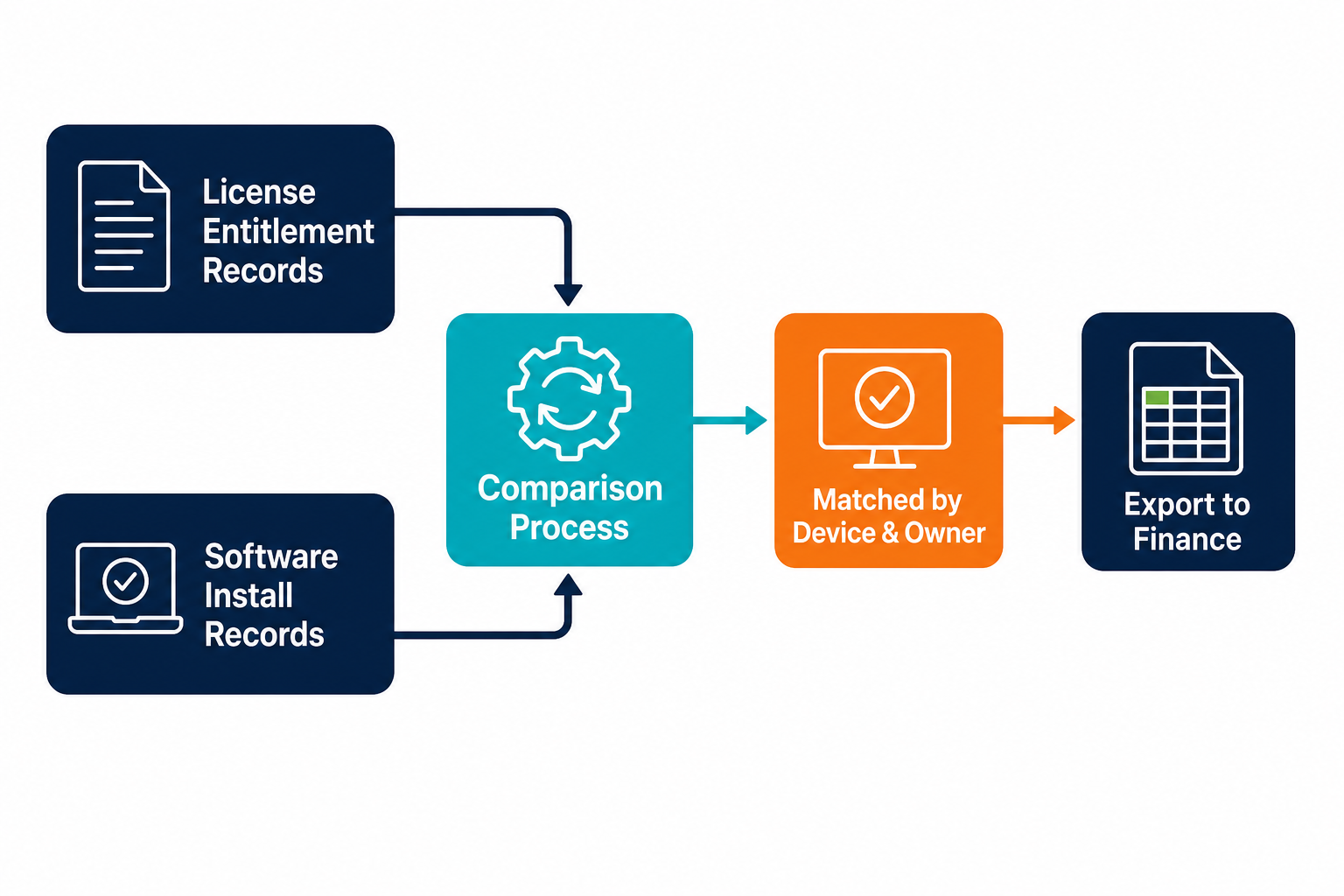
License auditing compares the licenses you own with the software installed. The comparison needs two inputs: entitlement records from purchasing and install records from discovery, matched by device and owner.
Ask each vendor about these points:
- Entitlements: Ask how entitlements are imported and whether the tool covers the publishers behind most of your spend.
- Installs: Ask whether installs come from discovery or from manual entry, and when each was last collected.
- Usage: Software metering shows which installed licenses are used, so unused ones can be reclaimed.
- Export: An auditor should be able to read the export without help from your team.
Virima ITAM tracks license entitlements against installs, down to the device and its owner.
The demo test uses one publisher. Load that publisher’s entitlements, run the comparison, and export installs against entitlements for the auditor’s view.
Depreciation reports are mostly a finance function: the inventory supplies purchase date, purchase cost, and asset status, while the finance system calculates depreciation itself.
For that reason, ask whether the inventory stores cost and purchase date for every asset and whether those fields export to a spreadsheet or to your finance system. Confirm which depreciation method your finance team applies, because the inventory only needs to carry the fields that method requires.
Scheduled reports put these inputs in front of owners on a calendar. Useful ones include assets by status and owner, assets with no owner, license entitlements against installs, and decommissioned assets with dates. Schedule one report in the demo, then confirm the recipient, the date, and the export format.
What to Check After the First Five Features
Three further checks apply to every tool on your shortlist.
- Integrations: Ask whether inventory records sync to your service desk and what the sync carries. Partner platforms such as ServiceNow can receive reconciled CI data and dependency maps when inventory feeds the integrations hub.
- Role-based access: Ask whether roles limit who can edit, retire, or export records, since the inventory holds owner names and license data.
- Audit trail: Ask whether every edit to a record is logged with a user and a timestamp.
Software metering belongs on the same list. Ask whether usage data sits beside entitlement data, because reclaiming a license needs both.
How Virima Covers the Checklist
Virima covers the discovery, lifecycle, license, and reporting rows of this checklist through IT Discovery, ITAM, and the CMDB.
- Discovery: Virima IT Discovery uses more than 140 extendable agentless probes, plus a lightweight agent for Windows, macOS, and Linux that works regardless of connectivity. AWS and Azure API connectors feed the same CI record, and recurring scans run with varied scan windows.
- Credentials: Discovery credentials are encrypted on the on-premises Discovery App server.
- Lifecycle: ITAM supports configurable lifecycle statuses from requested to decommissioned.
- Licenses: ITAM tracks license entitlements against installs and applies software metering to reclaim underused licenses.
- Reporting: The reporting engine generates KPI dashboards and metrics.
In the Virima CMDB, each configuration item carries a source, a freshness timestamp, and an owner. Decommissioned assets stay in the record, flagged, with a timestamped change log.
Does asset inventory software replace a CMDB?
Asset inventory software lists assets with owners and status. A CMDB adds relationships between assets and services, plus each record’s source and freshness timestamp. Choose a CMDB when you need to see which services depend on which assets.
Running the Checklist in a Demo
Run these five steps with each vendor on your own data, so the results are comparable across tools.
- Export your current asset list from the system or spreadsheet you use today.
- Run discovery on one subnet and one cloud account, and ask how often that scan can repeat.
- Compare the two lists, and record each difference with an owner and a decision.
- Walk one asset from purchase to disposal, and tag it if the vendor supports tags.
- Load one publisher’s entitlements, schedule one report, and export installs against entitlements.
Running these steps on your own assets shows how far your current list agrees with what discovery finds. Schedule a Virima demo to walk through the same comparison on one of your own subnets, with each asset’s owner and status attached.
Where to Start With Your Feature Shortlist
Start with one subnet and one cloud account, and compare the discovery results with your current asset list. Book a demo to see discovery, lifecycle statuses, and license tracking run against your own assets, then score each vendor with the five-row checklist above.
Frequently Asked Questions
What is asset inventory management software?
Asset inventory management software records each IT asset with its owner, status, and history. Discovery populates the records, lifecycle statuses track each stage, and reports give auditors the data. A CMDB adds the relationships between assets and services.
Do I need barcode scanning in asset inventory software?
Barcode scanning helps when you run physical counts or hand out devices, because a scan opens the record at once. Cloud and virtual assets have no physical tag, so discovery covers those assets.
What reports should IT inventory produce?
An IT inventory should produce an asset list by status and owner, license entitlements against installs, assets with no owner, and decommissioned assets with dates. Schedule each one so owners review it before an audit.
How is depreciation tracked in an asset inventory?
The finance system usually calculates depreciation. The inventory supplies purchase date, purchase cost, and asset status for each asset, so confirm those fields exist and export before you buy the software.
Does asset inventory software replace a CMDB?
Asset inventory software lists assets with owners and status. A CMDB adds the relationships between assets and services, along with each record’s source and freshness timestamp. Choose a CMDB when you need to see which services depend on which assets.