Application Change Management: Reduce Failed Changes

Picture this: the IT team of a 500-bed hospital is working late to deploy an EHR upgrade. The goal is to meet HIPAA requirements and keep clinicians connected to patient records.
Midway through, an AI-driven application dependency mapping simulation flags a risky API misconfiguration. Left alone, it would break lab system integration and cause hours of unplanned downtime. The change manager halts the rollout, pulls together an ECAB, and resolves the issue using eBPF-based dependency insights. By morning, the upgrade is live, and patient care continues without a gap.
That’s application change management doing what it should: catching problems before they reach production. It’s the process of planning, testing, approving, and deploying changes to applications with enough rigor that disruptions stay rare and recovery stays fast.
This blog covers the strategies that make application change management work in practice. You’ll find the process steps, KPIs worth tracking, collaboration tactics, and how the right tooling closes the gap between planning and execution.
What is application change management?
Application change management is the process of planning, assessing, approving, implementing, and reviewing modifications to software, infrastructure, and IT services. It follows a structured workflow — RFC submission, CAB or ECAB approval, staged deployment, and post-implementation review — to minimize disruptions and keep production environments stable.
What are the risks of poor change control?
Poor change control costs more than just downtime. Based on ITIL 4 guidelines and common CMDB failure patterns, here are the risks that every change management team needs to address:
- Increased incidents: Without proper impact analysis through tools like application dependency mapping, a single change can trigger cascade failures across connected systems. An API update that breaks a dependent microservice is a textbook case. These incidents spike MTTR, burn out IT staff, and erode the trust end users have in your release process.
- Frequent rollbacks: When CMDB data is stale, teams lack reliable dependency maps to predict impact. Changes fail, rollbacks stack up, and planned improvements sit in a queue. Each rollback delays feature rollouts, adds labor costs, and throws release schedules off track.
- Costly downtime: Unplanned downtime from botched changes averages $843,360 per incident. Beyond the direct hit, it shrinks profit margins, degrades customer service, and puts you at risk of non-compliance with standards like NIST SP 800-34.
What is a clear and consistent application change management process?
Successful application change management starts with a documented process that every team follows the same way. Every change should move through a clear path: proposal, review, approval, implementation, and monitoring.
When the process is well-defined, it also builds team buy-in. People who understand what’s expected of them at each stage take more ownership of outcomes and raise concerns earlier.
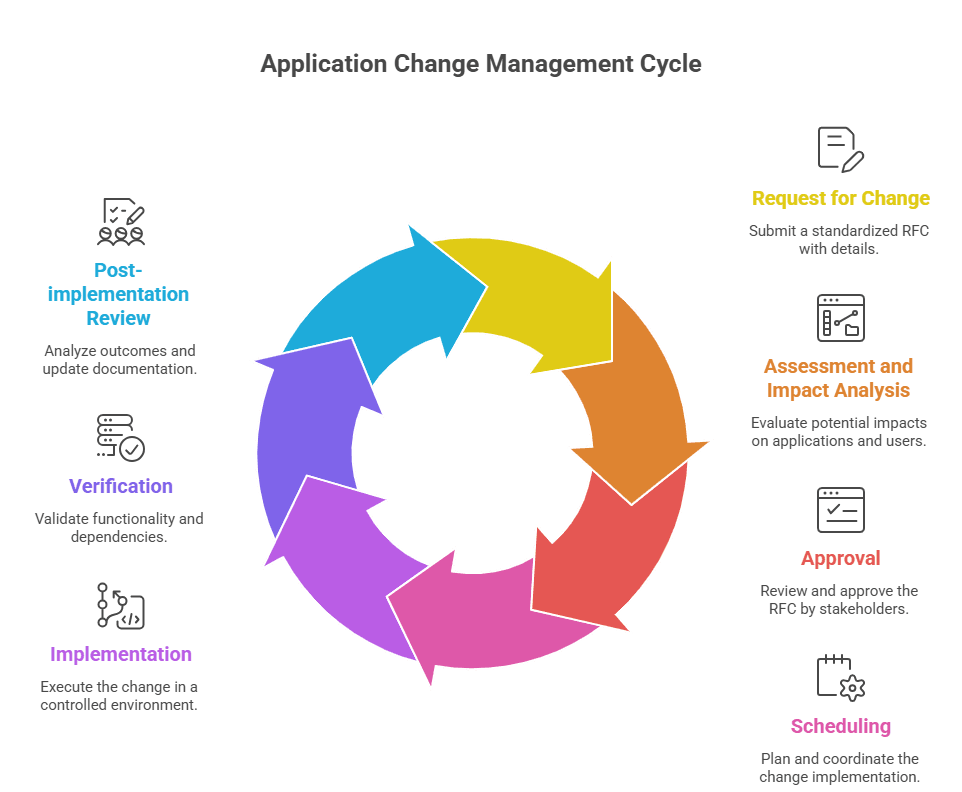
Step 1: Request for Change (RFC) submission
Every change starts with a standardized RFC. Use an ITSM tool template that captures the application name, change type, business justification, priority, proposed timeline, and rollback plan. Assign a unique ID and notify the App Owner and Service Owner through automated alerts.
Step 2: Assessment and impact analysis
Map the change’s potential impact on applications, dependencies, and end users. Use application dependency mapping tools with eBPF or AI inference to trace APIs and SaaS integrations. Run simulations in a sandbox to predict outcomes. The goal here is to surface risks like downtime, data corruption, and regulatory violations before the change moves to approval.
Step 3: Approval (CAB/ECAB)
For normal changes, convene a Change Advisory Board with stakeholders to review the RFC and impact analysis. For emergency changes, use an ECAB for rapid approval. ADM visualizations help make dependencies and risks concrete during the review, which is where most bad changes should get caught.
Step 4: Scheduling
Pick a low-impact window, like off-peak hours. Coordinate with stakeholders to avoid conflicts with other changes or critical operations. Integrate with release calendars in your ITSM tool for visibility. Communicate the schedule proactively via email, Slack, or ITSM dashboards so nobody is surprised.
Step 5: Implementation
Test in a staging environment first to validate functionality (EHR API connectivity, for example). Use version control to track changes and enable rollbacks. Automate standard change deployments through CI/CD pipelines and follow a detailed runbook. Keep stakeholders informed with live updates or dashboard access.
Step 6: Verification
Validate functionality through post-deployment tests. Use ADM to confirm dependencies remain intact, and check eBPF or service mesh data for accuracy. Monitor performance metrics like latency and error rates to catch anomalies early. Collect end-user feedback and update the CMDB with verified configuration items.
Step 7: Post-implementation review (PIR)
Compare outcomes against RFC objectives. Look at any incidents, rollbacks, or delays that came up during implementation. Collect stakeholder feedback on user impact and satisfaction. Update process documentation with what you learned, track KPIs via ITSM dashboards, and feed insights into predictive analytics so the next change cycle benefits from this one.
How does application change management differ from organizational change management?
Application change management focuses on controlled modifications to software, infrastructure, and IT services. It follows ITIL change management processes: RFC submission, CAB approval, testing, deployment, and post-implementation review.
Organizational change management deals with the people side: restructuring, new workflows, culture shifts, or role changes. It uses frameworks like Prosci ADKAR or Kotter’s model and focuses on adoption, training, and resistance management.
The two collide when a technology change also requires user training, process redesign, and stakeholder buy-in. A technically flawless EHR deployment still fails if clinicians weren’t trained on the new interface. Effective IT teams run both tracks in parallel so the technology and the people are ready at the same time.
What KPIs should you track for application change management?
Tracking the right KPIs tells you whether your change process is delivering value or quietly building risk. Here are the metrics that operational teams should watch.
- Change success rate: Target 90-95%. High success rates reflect solid impact analysis and accurate dependency mapping. Anything below 85% points to gaps in testing, stale CMDB data, or both.
- Mean Time to Resolve (MTTR) after change: Target under 1 hour for critical systems. Industry averages land between 30 minutes and 4 hours. Elevated MTTR after changes usually means your dependency maps have gaps or your CMDB is out of date.
- Emergency change rate: Target below 15%. A high rate means your team is reacting to problems instead of preventing them. It typically traces back to poor planning or risks that weren’t caught during normal change cycles.
- CAB lead time: Aim for 1-3 days for normal changes. Too long and you delay critical updates. Too short and you risk rubber-stamping changes that need a closer look.
What is the role of a CMDB in application change management?
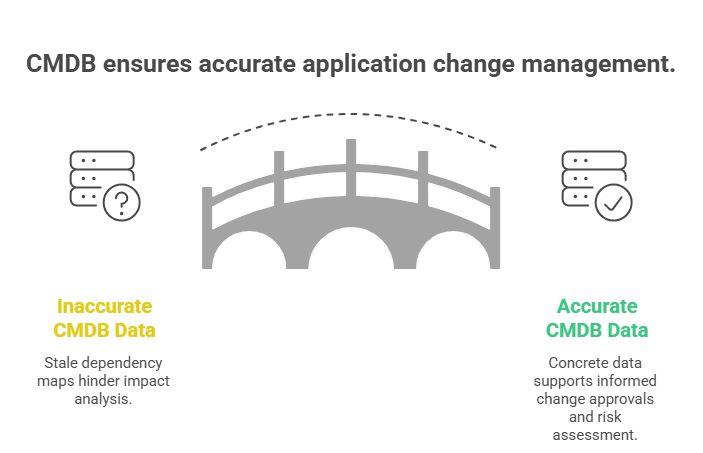
The CMDB is the single source of truth for every configuration item a change could affect. Without accurate CMDB data, your CAB reviews dependency maps that are weeks or months old, and your impact analysis is built on assumptions instead of facts.
In practice, the CMDB feeds three critical steps. During impact analysis, it shows which CIs, services, and business processes a change will touch. During approval, it gives the CAB concrete data to assess risk instead of relying on whoever in the room happens to remember the last deployment. After implementation, it records what actually changed so the next cycle starts from accurate data.
The hard part is keeping CMDB data current. Virima’s IT discovery runs recurring scheduled scans using agentless and agent-based methods to catch configuration drift between scan cycles. With scans scheduled at the right frequency, your CMDB stays current enough that the next change request is assessed against accurate dependency data, not a stale snapshot.
How to build collaboration and communication into your application change management process
Collaboration makes the difference between a change process that works on paper and one that works in production. Here’s what that looks like in practice:
- Involve stakeholders early: Bring developers, testers, operations teams, and business users into the process from the RFC stage. Early input catches risks that siloed planning misses. A developer who knows the API quirks will spot a dependency the dependency map doesn’t show.
- Keep communication open: Encourage feedback at every step. Address concerns quickly and explain decisions clearly. When people understand why a change was approved or rejected, they participate more actively in the next cycle.
- Use the right tools: Collaboration platforms and ticketing systems keep everyone aligned. Integrate your ITSM tool with Slack or Teams so updates flow without anyone having to ask for them.
How to get more from application change management software
Change management software automates the repetitive work and gives you visibility into the process. Here’s what good tooling delivers in practice.
Change management software does its best work when it removes the manual overhead that slows decisions down and surfaces the dependency data that human reviewers miss. The four capabilities below define what good tooling actually delivers in practice.
- First, you need an effective change management strategy backed by a clear communication plan. You should keep every team member and key stakeholder informed at each stage. This builds trust and avoids confusion during critical updates. In addition, clear communication helps you catch problems early.
- Next, you should follow a data-driven approach to guide your decisions. You can track key performance indicators (KPIs) to measure success and spot risks. Because of this, you make informed decisions instead of guessing. Over time, this improves your approval process and reduces delays.
- You also need a strong management solution to connect your teams. It should bring together inputs from human resources and technical teams in one place. This improves coordination and keeps everyone aligned. More importantly, it helps you minimize disruption to daily operations.
- Finally, you should focus on continuous improvement after every change. You can review what worked and what did not. Then, you can apply those lessons to future updates. Step by step, you enable your organization to handle changes faster and with fewer failures.
Automated workflows
Automating RFC submission, approvals, notifications, and task assignments cuts the manual overhead that slows change cycles down. Teams that automate these steps consistently see change success rates climb toward the 90-95% range because the process runs the same way every time.
Improved visibility and tracking
Dashboards that surface RFC status, dependency impacts, and KPIs in near-real-time keep teams informed without requiring manual status checks. Syncing those dashboards with your CMDB eliminates the visibility gaps that lead to decisions based on stale data.
Collaboration is built into the workflow
When App Owners and Ops teams can collaborate on an EHR upgrade RFC and review ADM visuals in the same platform, you remove the friction of switching between tools. Centralized document sharing and threaded discussions tied to specific change requests keep context from getting lost.
Risk management through dependency analysis
AI and ADM tools with eBPF-based analysis simulate proposed changes and flag potential failures before they reach production. Pre-change risk assessment built into the workflow catches the dependency conflicts that manual reviews miss.
Compliance management
Pre-defined templates and approval workflows aligned with HIPAA, SOX, or PCI-DSS help meet regulatory requirements without adding manual steps. Automated audit trails document every approval, rejection, and modification so you’re not scrambling to reconstruct evidence during an audit.
| How does application change management support compliance?Every regulated industry needs an auditable record of what changed, when, who approved it, and what was affected. Application change management provides that trail when it’s built into the process rather than bolted on after the fact.HIPAA, SOX, and PCI-DSS all require documented change control processes. Routing every change through an RFC, CAB approval, and PIR builds the evidence auditors need. Pairing this process with accurate CMDB data and dependency maps means you can show exactly which systems were in scope for each change and prove that the right people reviewed the risk.Virima strengthens this by keeping the CMDB audit-ready through recurring scheduled discovery. When an auditor asks which CIs were affected by a specific change, the answer is already documented with timestamps and dependency context. |
RACI matrix for application change management
The RACI matrix below lays out who does what across the application change management process. Clear role assignment keeps changes from stalling because nobody knew the next step was theirs.
| Activity | Service Owner | Change Manager | Release Manager | App Owner | Security Team | Ops Team |
| Submit RFC | R | A | C | C | I | I |
| Impact analysis (ADM) | C | A | C | R | C | C |
| CAB/ECAB approval | C | A | C | C | R | I |
| Schedule change | C | A | R | C | I | C |
| Implement change | I | A | R | C | C | C |
| Verify change | C | A | R | R | C | C |
| Post-implementation review | R | A | C | C | C | C |
R = Responsible (performs the task) | A = Accountable (ultimately answerable) | C = Consulted (provides input) | I = Informed (kept updated)
How Virima strengthens your application change management
Integrating change management tooling with your existing ITSM platform is where most organizations hit friction. Virima is built to close that gap. Here’s how it fits into the workflow.
Automated discovery and service mapping
Manual service mapping is slow, and the output goes stale almost immediately. Virima replaces that with automated IT discovery that scans your infrastructure using agentless and agent-based methods to find servers, applications, databases, and network devices.
From there, Virima’s service mapping traces dependencies between components and builds a visual map of how applications interact with each other and the underlying infrastructure. These maps update on recurring scheduled scans, so you’re always working with current data.
For change management, this translates to:
- Faster impact assessments: Dependency maps are ready when you need them. No waiting on someone to manually trace connections before you can assess a change.
- Fewer blind spots: Automated discovery catches assets and relationships that manual processes miss, including the shadow IT that nobody documented.
- Better CAB decisions: When the board reviews a change request, the dependency data backing the impact analysis reflects what’s actually in the environment today.
Virima Visual Impact Display (ViVID)
Virima Visual Impact Display (ViVID™) goes beyond standard service maps. ViVID overlays ITSM incidents and changes, monitoring alerts from platforms like SolarWinds, Nagios, and Logic Monitor, and NIST NVD vulnerability data onto the service maps built by Discovery and Service Mapping.
For application change management teams, ViVID delivers:
- Visual impact analysis: See the potential blast radius of a proposed change on applications, infrastructure, and business services before you approve it.
- Faster risk identification: ViVID surfaces ripple effects and dependencies that text-based impact assessments miss. Open incidents and known vulnerabilities on affected CIs are visible at a glance.
- Clearer stakeholder communication: Dependency chains that take paragraphs to explain in text become intuitive in a visual map. Technical and non-technical stakeholders can review the same view and align faster.
- Proactive risk mitigation: When you can see that a proposed change touches a CI with an open P1 incident, you reschedule instead of discovering the conflict mid-deployment.
Enhanced change request management
Virima integrates with leading ITSM platforms, including ServiceNow, Jira Service Management, Ivanti, HaloITSM, Cherwell, Xurrent, and Hornbill. This integration tightens change request management in ways that matter day-to-day:
- Automated dependency population: Change requests get enriched with dependency data from Virima’s service maps automatically. No copy-pasting from a separate tool.
- Informed approvals: Stakeholders see dependency visualizations directly within change requests, giving them concrete data instead of a text summary.
- Reduced risk: With complete dependency information available upfront, teams catch potential conflicts before implementation rather than during it.
Build an application change management process that scales with your infrastructure
Application change management is how you keep applications stable while everything around them changes. A documented process, clear roles, the right KPIs, and tooling that actually integrates with your ITSM platform are what separate teams that ship confidently from teams that ship and hope.
Virima brings IT discovery, service mapping, CMDB accuracy, and ViVID™ visualization together to give your application change management process the data and visibility it needs. Integrated with your ITSM platform, it closes the gap between what your team thinks is affected by a change and what actually is.
Ready to see the difference? Explore Virima today and see change risk mapped by dependency.
FAQs
What are the types of application changes?
ITIL 4 Change Enablement defines three types. Standard changes are low-risk and pre-approved with minimal impact. Normal changes carry moderate to high risk and require formal CAB assessment. Emergency changes address critical issues and go through an expedited ECAB process.
Do we need a Change Advisory Board (CAB) for every app change?
No. Per ITIL 4 guidelines, standard changes skip the CAB because they’re pre-approved. Normal and emergency changes require CAB or ECAB review, respectively.
What’s the role of automation in application change management?
Automation handles RFC processing, impact analysis, testing and deployment, and post-change monitoring. It reduces human error and speeds delivery. Given that CMDB inaccuracy contributes to up to 80% of change-related failures, automated discovery and data sync are what keep the whole process from running on bad data.
What are the top causes of application change failures?
The most common causes are poor planning and impact analysis, incomplete dependency visibility, resistance to process adoption, and inadequate testing. Each one traces back to either stale data or inconsistent process execution.
How often should we review the application change management process?
ITIL 4 recommends quarterly reviews for incremental improvement, an immediate review after any major incident or failed change, and a full annual overhaul to align with evolving business needs.
Glossary
- CAB – Change Advisory Board: group that reviews and approves normal changes
- ECAB – Emergency Change Advisory Board: small team for rapid approval of urgent changes
- RFC – Request for Change: formal proposal for application changes, logged in ITSM tools
- PIR – Post-implementation review: post-change review to evaluate success and capture lessons learned
- Change freeze – period halting non-emergency changes to ensure stability
- Standard change – low-risk, pre-approved, often automated change